[简体中文](README.md) | **English**
# superpowers-preset-dsh
The complete [obra/superpowers](https://github.com/obra/superpowers) development
methodology, packaged as a **DeepSeek Harness (DSH) agent preset**.
Chosen per task, scoped per task: the workflow rules go into the system prompt,
and the skill catalog is visible only in this mode.
[](LICENSE)
[](#compatibility)
[](https://github.com/obra/superpowers)
[](package.json)
---
## The problem it solves
Install Superpowers as a **plugin** and its skills register into the host layer,
so *every* session in the profile — including ones with nothing to do with
coding, and ones following a different workflow — carries that skill catalog in
its system prompt. That is both a token cost and a potential workflow conflict.
This project takes the other road: Superpowers as an **agent preset** — a
selectable *mode*.
| | Plugin | This preset |
| --- | --- | --- |
| Who sees the skills | Every session in the profile | Only tasks started in this mode |
| Catalog tokens when unused | Paid in every session | Zero |
| How the rules reach the model | Depends on the plugin (session-start context, or the catalog description alone) | This mode's system prompt, re-sent on every request |
| After context compaction | Text injected at session start can be trimmed | Unaffected: the system prompt is not conversation history |
| Turning it off | Disable/remove the plugin and restart | Pick another mode for the next task |
They answer different questions and neither is better in the abstract; the
tradeoffs are laid out in [Compared with the plugin approach](docs/plugin-vs-preset.md).
## Install
> **One word of clarification first.** `dsh plugin add` is DSH's **installation
> channel**, and what it installs is a **bundle** — an ordinary npm package that
> declares a `dsh.bundle.patch`. What that bundle becomes at runtime is entirely
> up to what its patch contains.
>
> This package inserts **one agent-preset declaration** into the profile's
> composition and mounts nothing at the host layer. So the accurate description
> is "**a preset installed through the plugin channel**", not "a plugin". The only
> code it ships is `lib/skills.js`, mounted as a **child row of the preset**, which
> is why it registers into the preset's own skill layer. The reasoning is in
> [How it works](#how-it-works).
### Option 1 — let DSH install it
Start a conversation in DSH and send:
```
Install this plugin for me: https://github.com/EdouardRichard/superpowers-preset-dsh
```
It will run `dsh plugin ... add` and verify the composition. **It cannot restart
the profile for you** — that would kill the session it is running in. Restart the
profile yourself and refresh the browser.
> Prerequisite: the agent needs a usable `dsh`. If yours is not on `PATH`, paste
> it the full command from Option 2 instead.
### Option 2 — the command line
```sh
dsh plugin --profile web add github:EdouardRichard/superpowers-preset-dsh
```
Without a global `dsh`, run the same CLI through `npx`:
```sh
npx --yes @deepseek-ai/dsh plugin --profile web add github:EdouardRichard/superpowers-preset-dsh
```
> ⚠️ `npx` resolves npm's `latest` tag, which can **lag behind** the harness you
> are running (npm currently has `latest = 0.2.0-rc.2` while this was verified on
> `0.2.1-alpha.1`). Pin the version when they differ:
> `npx --yes @deepseek-ai/dsh@0.2.1-alpha.1 plugin ...`.
> With pnpm, `pnpm dlx @deepseek-ai/dsh@ plugin ...` is equivalent.
Replace `--profile` with the profile you actually run (`web`, `headless`, or your
own). A profile that does not exist yet is initialized automatically.
### Option 3 — from a local checkout
```sh
git clone https://github.com/EdouardRichard/superpowers-preset-dsh
dsh plugin --profile web add ./superpowers-preset-dsh
```
A relative path resolves against the directory you run the command from, and is
recorded as an absolute link to that directory. A local directory installs as a
**link**, not a copy, so your edits take effect on the next profile restart —
convenient while customising.
### A restart is required
Bundle layers mount at profile start, so **restart the profile** (stop it and run
`dsh web` again), then refresh the browser.
### Confirm it installed
```sh
dsh --profile web --dump-config | grep superpowers-preset-dsh
```
You should see the `- id: preset-superpowers` block, including the line
`name: superpowers-preset-dsh/skills`.
### Uninstall
```sh
dsh plugin --profile web remove superpowers-preset-dsh
```
A restart is required here too.
## Use
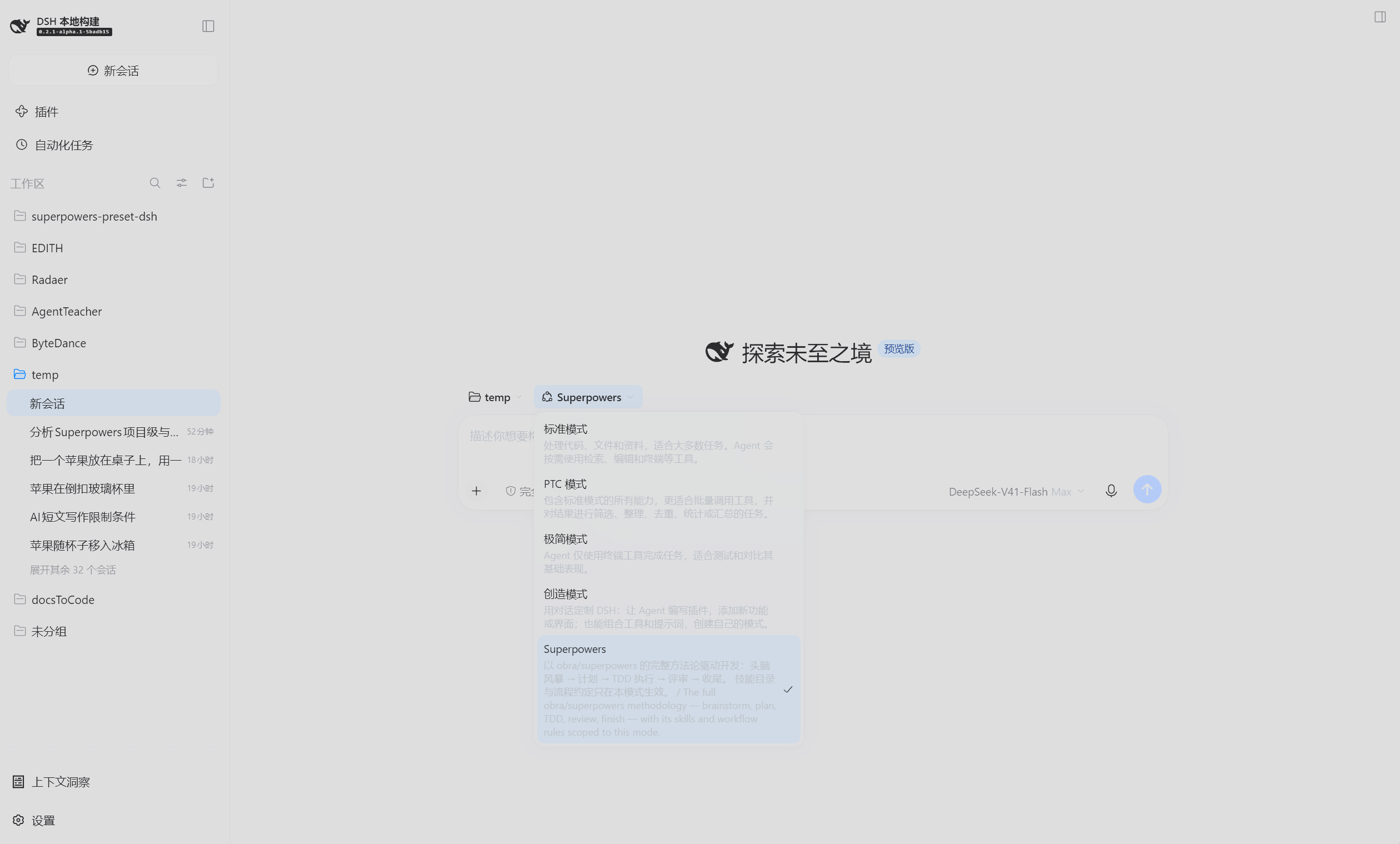
Start a new task, switch the mode selector above the composer to
**Superpowers**, and describe the work normally.
- **You do not need to remember skill names.** The agent loads them by rule: if a
skill clearly applies, it loads it with the `skill` tool before acting.
- **You can name one.** Type a slash command such as `/brainstorming`,
`/writing-plans`, or `/test-driven-development`, or just ask for it.
- **Switching back is free.** The mode affects the current task only; pick
Standard for the next one.
## Mode details / How to use
The four built-in DSH presets (Standard, PTC, Minimal, Creator) show **Mode
details** and **How to use** buttons on their cards. **A third-party preset
cannot get those buttons** — that is how DSH is currently implemented, not a
configuration mistake: the help lookup is open only to built-in presets with
`trust === 'system'`, and only four hardcoded ids ever match (see
[the evidence](docs/guide.en.md#why-the-card-has-no-such-buttons)).
So that content ships as documentation instead:
- **[Mode details and how to use (English)](docs/guide.en.md)**
- **[模式说明与如何使用(中文)](docs/guide.zh.md)**
A condensed version follows.
### Mode details (condensed)
**How it works.** The 15 Superpowers skills are registered into this preset's own
skill layer, and the body of `using-superpowers` enters the system prompt as this
mode's persona. Plan mode, subagents, workflows, goals, context compaction, a
terminal, and file read/write/search are all mounted, so the mode can carry a
task from idea to commit on its own.
**Five stages.** Think it through (`brainstorming`) → plan it (`writing-plans`) →
execute it (`subagent-driven-development` / `executing-plans`) → debug it
(`systematic-debugging` / `test-driven-development`) → finish it
(`verification-before-completion` / `requesting-code-review` /
`finishing-a-development-branch`).
**Choose it when** you are shipping code — features, bug fixes, refactors — or
you want the agent to settle requirements and design before writing, or the task
is long enough to need a plan and a ledger.
**Choose something else when** the task is not about code (Standard mode saves
the tokens), you want a one-line change without a process, or you need a
comparison baseline (Minimal mode).
### How to use (condensed)
Pick the mode and describe the task:
> I want to add an "export to CSV" feature to this CLI, but I have not settled the
> argument design. Talk the requirements and boundaries through with me first,
> give me two or three options to compare, and only write code after I confirm.
> Occasionally an order gets charged twice after submit. Find the root cause
> first — do not patch yet. Once you have it, write a failing test that
> reproduces it, then fix it, run the relevant tests, and explain the cause.
> Review the changes on this branch. Focus on potential bugs and test gaps, and
> cite file paths and line numbers. Do not modify files yet.
Each example states its expected output; all six are in
[How to use](docs/guide.en.md#2-how-to-use-it).
## Skills
Skill content is synced from upstream **obra/superpowers v6.4.2**, with the
instructions that name tools, paths, subagents, or scripts rewritten for DSH.
| Skill | Purpose |
| --- | --- |
| `using-superpowers` | Entry point: how to find skills and when you must load one |
| `brainstorming` | Turn an idea into a design you approved, through dialogue |
| `writing-plans` | Break a spec into small independently verifiable tasks |
| `executing-plans` | Drive a plan from a ledger in the current context, one review at the end |
| `subagent-driven-development` | A fresh implementer and an independent reviewer per task |
| `dispatching-parallel-agents` | Fan independent work out concurrently |
| `systematic-debugging` | Four-phase root-cause-before-fix discipline |
| `test-driven-development` | The RED-GREEN-REFACTOR implementation loop |
| `verification-before-completion` | Evidence before any success claim |
| `requesting-code-review` | Get a strict review before merging |
| `receiving-code-review` | Verify feedback instead of performing agreement |
| `finishing-a-development-branch` | Integrate finished work safely |
| `using-git-worktrees` | An isolated workspace for feature work |
| `writing-skills` | Author and validate new skills TDD-style |
| `diagnosing-superpowers` | Read the on-disk transcript and report with `file:line` evidence |
## How it works
In one sentence: `cordis.patch.yml` inserts **one** agent-preset declaration into
the profile's composition, and the skill provider mounted inside it is
`superpowers-preset-dsh/skills`, so it registers into **that preset's own scope**
rather than the host's global layer.
```
cordis.patch.yml
└── preset-superpowers (@deepseek-ai/dsh-agent-preset)
├── persona ← using-superpowers body into the system prompt
├── superpowers-preset-dsh/skills ← 15 skills, registered into this preset's layer only
├── skill-filesystem ← local skills: project / user / bundled
├── tool-skill ← the catalog and the skill loader
└── everything else copied from the shipped Standard preset
```
### It is Standard plus Superpowers — and that is enforced
DSH disables several working rows at the host layer and lets each agent preset
mount its own copy. The one that bites is `skill-filesystem`: the shipped patch
says plainly that "presets own local discovery"
(`packages/bundle/web-app/cordis.patch.yml:493-503`). A preset that forgets to
mount it has **no local skill discovery at all** — `.dsh/skills`,
`.agents/skills`, and `$DSH_HOME/skills` all disappear from the catalog, with no
error to tell you why.
So this preset guards that class of loss three ways:
1. **The list is mirrored, not hand-written.**
`npm run sync:preset -- ` rebuilds the plugin list straight from
the shipped `standard` preset, keeping only this package's own two rows (the
persona and the Superpowers provider) and copying the rest byte for byte.
2. **A committed snapshot gates the build.** `preset/standard-parity.json`
records every row Standard carries plus a sha256 per top-level row block, and
`npm run verify` fails if a row goes missing *or* if any mirrored row's
config, `isolate` map, `disabled` expression, or nested rows were edited.
3. **The persona identity is asserted too**: if DSH rewords the identity line or
the working-directory suffix, `sync:preset` fails rather than quietly shipping
an older identity.
After a DSH upgrade, run `npm run sync:preset -- --check` (reports drift,
changes nothing), then `npm run verify`.
### Three inherent differences from Standard
These follow from the fact that DSH did not ship this preset; no bundle can
change them:
| Aspect | Standard | This mode |
| --- | --- | --- |
| Roster group | Built-in | Custom (`isBuiltInPreset` accepts only a row that publishes no `name` and whose id is one of the shipped four) |
| Name / description | localized from DSH's dictionaries | literal strings; they do not follow the UI language |
| New-task default | yes | no — pick it per task, or press "Set as new task default" in Settings |
Two more, in behaviour rather than composition:
- **A local skill with the same name wins.** This package and `skill-filesystem`
register into the same layer, and duplicate names resolve by rank inside a
layer (local roots 100–500, this package 550, the bundled root 600; lower
wins). A skill you write with the same name shadows the packaged one, and DSH
logs a warning.
- **The prompt is bigger, in this mode only.** Measured during development:
system prompt 6130 → 9878 chars, skill catalog 2559 → 8356 chars.
The full explanation — why the bootstrap is a persona rather than a session-start
injection, and why the provider is a subpath export rather than the package root —
is in [docs/architecture.md](docs/architecture.md).
## Customising
Every row of the preset can be overridden from your own profile patch: rename the
mode, move it up the roster, or drop tools you do not want.
```yaml
# Append to $DSH_HOME/profiles//cordis.patch.yml
- id: preset-superpowers
name: '@deepseek-ai/dsh-agent-preset'
config:
id: superpowers
name: Superpowers (mine)
description: My own description.
order: 2
plugins:
# `config` is replaced wholesale, never deep-merged: copy the plugin list
# from cordis.patch.yml above, then add or remove rows.
- id: persona
name: '@deepseek-ai/dsh-persona'
config:
prefix: |-
...keep it as-is, or write your own...
suffix: Your working directory is {{cwd}}.
# ...
```
A copy-pasteable skeleton is in
[examples/profile-override.patch.yml](examples/profile-override.patch.yml).
## Upstream sync
`skills/` is a **generated** tree. Do not hand-edit it. The sync logic lives in
scripts, and every rewrite is asserted:
```sh
# 1. fetch the pinned upstream checkout
mkdir -p .upstream && curl -L \
https://codeload.github.com/obra/superpowers/tar.gz/refs/tags/v6.4.2 \
| tar -xz -C .upstream --strip-components=1
# 2. replay the port (also re-renders the persona text in cordis.patch.yml)
npm run sync -- .upstream
# 3. gate it
npm run verify
```
If upstream changes text an adaptation depends on, `npm run sync` **fails and
leaves `skills/` untouched** instead of silently dropping a DSH adaptation. The
adaptation list is in [NOTICE.md](NOTICE.md).
## Compatibility
| | Status |
| --- | --- |
| DSH versions verified | `0.2.1-alpha.1` (installed) and source checkout `5badb15` |
| DSH interfaces used | `ctx.skills.registerProvider`, `dsh.bundle.patch`, the `@deepseek-ai/dsh-agent-preset` declaration format, `@deepseek-ai/dsh-persona` |
| Runtime dependencies | **None.** Node built-ins only |
| peerDependencies | **None declared.** DSH's plugin compatibility gate only inspects the peer dependencies a plugin declares, so it will not block this bundle — at the cost of DSH not validating it for you. Re-run `npm run verify` after a DSH upgrade |
| Node.js | >= 20 (verified on 24.x) |
| Platforms | Windows, macOS, Linux. On Windows `tool-pwsh` is mounted; on POSIX, `tool-bash` |
### Known limitations
- **No Mode details / How to use buttons on the card** — see above; the
equivalent content is in [docs/guide.en.md](docs/guide.en.md).
- **Subagents cannot pin a model.** DSH's `subagent` tool accepts only
`description`, `prompt`, and `run_in_background`. Where
`subagent-driven-development` says "always specify the model explicitly", the
DSH translation is to state it in the prompt; when per-unit model control
matters, use `workflow`, whose `agent()` accepts `provider` and `model`.
- **No named agents.** Upstream's `Task(superpowers:code-reviewer)` has no DSH
equivalent; dispatch the skill's own prompt template (`code-reviewer.md`, …)
through `subagent` instead.
- **bash helper scripts.** Seven `.sh` scripts need Git Bash. On Windows, `bash`
on `PATH` is often `WindowsApps\bash.exe` — a 0-byte WSL stub, not Git Bash.
Run `Get-Command bash -All` before relying on it. The Node helpers are
unaffected.
- **`writing-skills/render-graphs.js` needs graphviz `dot`.** Skip the render if
it is not installed.
## Verification
The static gate, which needs no installation (this is what CI runs):
```sh
npm run verify
```
It checks that the bundle manifest resolves, the preset declaration is
well-formed, the provider is mounted inside the preset rather than at the host
layer, every row the shipped Standard preset carries is still mounted here, the
persona text matches the skill file byte for byte, all 15 skills list and load
through the real provider, and no relative link dangles.
End-to-end, in a throwaway profile:
```sh
# Use a disposable profile; do not touch your own
dsh --profile sptest --from-default-profile web --dump-config > /dev/null
dsh plugin --profile sptest add ./superpowers-preset-dsh
dsh --profile sptest --port 3099 --no-open
```
Then start one task in **Superpowers** and one in **Standard**, and compare the
transcripts:
- the Superpowers task's system prompt contains the `using-superpowers` body, and
its skill catalog lists all 15 skills;
- the Standard task's system prompt does not, and its catalog does not.
## License and credits
MIT. The skill content is adapted from
[obra/superpowers](https://github.com/obra/superpowers) (MIT, © 2025 Jesse
Vincent); the full third-party notice, the upstream licence text, and the
adaptation list are in [NOTICE.md](NOTICE.md).
The upstream project, DSH, and
[superpowers-dsh](https://github.com/LayneChai/superpowers-dsh) — the first port
of Superpowers to DSH — are all worth your time. This project is not affiliated
with any of them.