Whispering

Epicenter Whispering

Press shortcut → speak → get text. Free and open source ❤️
AGPLv3 License Discord macOS Windows Linux Svelte 5 Tauri TypeScript Rust

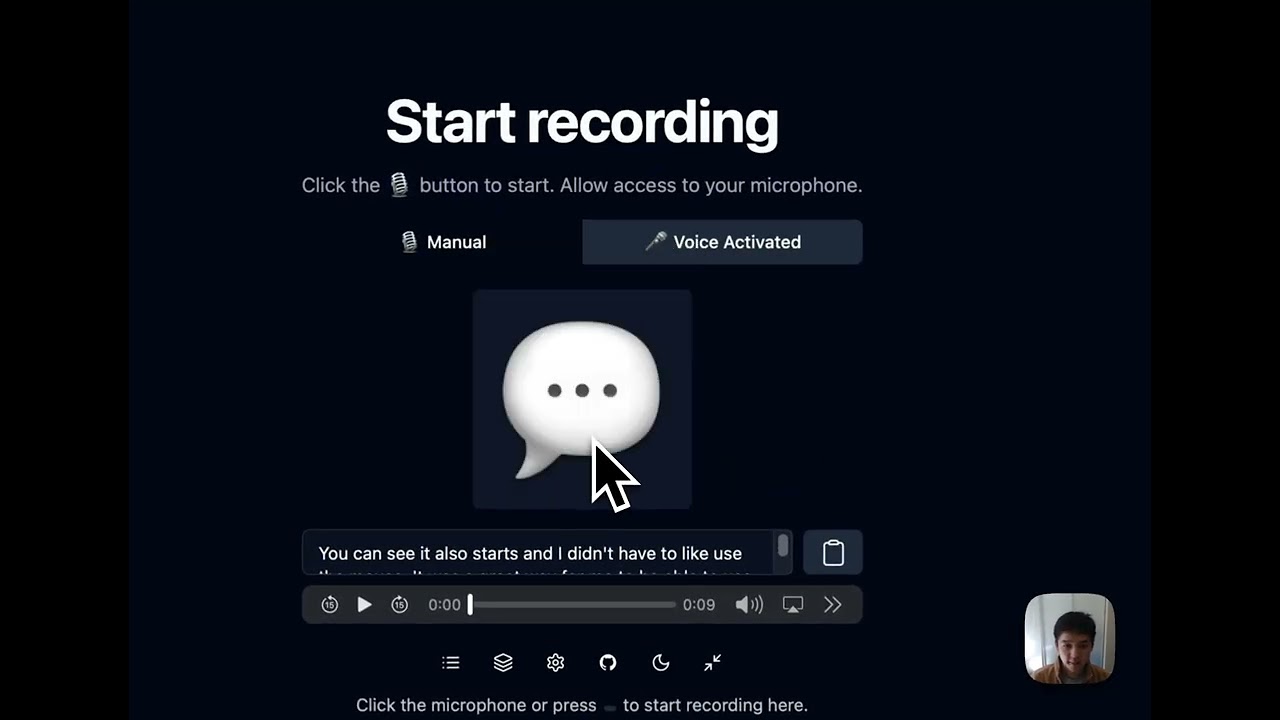
Whispering is an open-source speech-to-text application. Press a keyboard shortcut, speak, and your words will transcribe, transform, then copy and paste at the cursor. I really like hands-free voice dictation. For years, I relied on transcription tools that were _almost_ good, but they were all closed-source. Even those claiming to be "local" or "on-device" were still black boxes that left me wondering where my audio really went. So I built Whispering. It's open-source, local-first, and most importantly, transparent with your data. ​​Your data is stored locally on your device, and your audio goes directly from your machine to a local provider (Whisper C++, Speaches, etc.) or your chosen cloud provider (Groq, OpenAI, ElevenLabs, etc.) without any middleman or vendor lock-in. For me, the features were good enough that I left my paid tools behind (I used Superwhisper and Wispr Flow before). Productivity apps should be open-source and transparent with your data, but they also need to match the UX of paid, closed-software alternatives. I hope Whispering is near that point. I use it for several hours a day, from coding to thinking out loud while carrying pizza boxes back from the office. > [!TIP] > Whispering is designed for quick transcriptions, not long recordings. For extended recording sessions, use a dedicated recording app. > [!NOTE] > The terms **Epicenter Whispering** and **Whispering** are interchangeable and refer to the same app. > > - _Epicenter Whispering_ emphasizes the app's place in the larger ecosystem. > - _Whispering_ may be used for brevity and/or to focus on the standalone app. Here's an overview:
Whispering Complete Setup Guide

Click to watch: Complete setup and usage guide (5 min)

Note: We recently added support for Whisper C++, which isn't included in the video. For setup, see the docs below.

and [here's how I personally am using it with Claude Code these days](https://www.youtube.com/watch?v=tpix588SeiQ). There are plenty of transcription apps out there, each with their own strengths. Whispering has a few tricks up its sleeve, like a voice-activated mode for truly hands-free operation (no button holding), and customizable AI transformations with any prompt/model. The space is full of great ideas, but I just wanted to add some extra competition from the OSS ecosystem. Built with Svelte 5 and Tauri, so it's tiny (~22MB) and starts instantly. The codebase is well-documented and designed to be understood and audited. That way, you know where your audio goes, how it's processed, and what data is stored. And finally, the cost savings. When you cut out the middleman, you pay providers directly: | Service | Cost per Hour | Light Use (20 min/day) | Moderate Use (1 hr/day) | Heavy Use (3 hr/day) | Traditional Tools | | --------------------------------- | ------------- | ---------------------- | ----------------------- | -------------------- | ----------------- | | `whisper-large-v3-turbo` (Groq) | $0.04 | $0.40/month | $1.20/month | $3.60/month | $15-30/month | | `whisper-large-v3` (Groq) | $0.111 | $1.11/month | $3.33/month | $9.99/month | $15-30/month | | `gpt-4o-mini-transcribe` (OpenAI) | $0.18 | $1.80/month | $5.40/month | $16.20/month | $15-30/month | | Local | $0.00 | $0.00/month | $0.00/month | $0.00/month | $15-30/month | We're hoping that together in the open-source, local-first community, we can build something better than any closed-source alternative. The code is open-source because I believe that fundamental tools shouldn't require trusting a black box. Companies pivot, get acquired, or shut down. But open source is forever. ❤️ ## Install Whispering Set up Whispering and be ready to transcribe in about two minutes. ### 1️⃣ Download Whispering

🍎 macOS #### Option 1: Install via Homebrew (Recommended) The fastest way to install Whispering on macOS: ```bash brew install --cask whispering ``` This automatically handles installation and updates. #### Option 2: Direct Download | Architecture | Download | Requirements | | ----------------- | ----------------------------------------------------------------------------------------------------------------------------------------------- | ---------------- | | **Apple Silicon** | [Whispering_7.10.0_aarch64_darwin.dmg](https://github.com/EpicenterHQ/epicenter/releases/download/v7.10.0/Whispering_7.10.0_aarch64_darwin.dmg) | M1/M2/M3/M4 Macs | | **Intel** | [Whispering_7.10.0_x64_darwin.dmg](https://github.com/EpicenterHQ/epicenter/releases/download/v7.10.0/Whispering_7.10.0_x64_darwin.dmg) | Intel-based Macs | > **💡 Tip:** Not sure which Mac you have? Click the Apple menu → About This Mac. Look for "Chip" or "Processor": > > - Apple M1/M2/M3/M4 → Use Apple Silicon version > - Intel Core → Use Intel version **Installation steps:** 1. Download the `.dmg` file for your architecture 2. Open the downloaded file 3. Drag Whispering to your Applications folder 4. Open Whispering from Applications #### Troubleshooting: - **"Unverified developer" warning:** Right-click the app → Open → Open - **"App is damaged" error (Apple Silicon):** Run `xattr -cr /Applications/Whispering.app` in Terminal
🪟 Windows #### Download Options | Installer Type | Download | Description | | ----------------- | ----------------------------------------------------------------------------------------------------------------------------------------------- | -------------------------------------- | | **MSI Installer** | [Whispering_7.10.0_x64_en-US_windows.msi](https://github.com/EpicenterHQ/epicenter/releases/download/v7.10.0/Whispering_7.10.0_x64_en-US_windows.msi) | Recommended Standard Windows installer | | **EXE Installer** | [Whispering_7.10.0_x64-setup_windows.exe](https://github.com/EpicenterHQ/epicenter/releases/download/v7.10.0/Whispering_7.10.0_x64-setup_windows.exe) | Alternative installer option | #### Installation 1. Download the `.msi` installer (recommended) 2. Double-click to run the installer 3. If Windows Defender appears: Click "More Info" → "Run Anyway" 4. Follow the installation wizard Whispering will appear in your Start Menu when complete.
🐧 Linux #### Download Options | Package Format | Download | Compatible With | | --------------- | --------------------------------------------------------------------------------------------------------------------------------------------- | ------------------------ | | **AppImage** | [Whispering_7.10.0_amd64_linux.AppImage](https://github.com/EpicenterHQ/epicenter/releases/download/v7.10.0/Whispering_7.10.0_amd64_linux.AppImage) | All Linux distributions | | **DEB Package** | [Whispering_7.10.0_amd64_linux.deb](https://github.com/EpicenterHQ/epicenter/releases/download/v7.10.0/Whispering_7.10.0_amd64_linux.deb) | Debian, Ubuntu, Pop!\_OS | | **RPM Package** | [Whispering-7.10.0-1.x86_64_linux.rpm](https://github.com/EpicenterHQ/epicenter/releases/download/v7.10.0/Whispering-7.10.0-1.x86_64_linux.rpm) | Fedora, RHEL, openSUSE | #### Quick Install Commands **AppImage (Universal)** ```bash wget https://github.com/EpicenterHQ/epicenter/releases/download/v7.10.0/Whispering_7.10.0_amd64_linux.AppImage chmod +x Whispering_7.10.0_amd64_linux.AppImage ./Whispering_7.10.0_amd64_linux.AppImage ``` **Debian/Ubuntu** ```bash wget https://github.com/EpicenterHQ/epicenter/releases/download/v7.10.0/Whispering_7.10.0_amd64_linux.deb sudo dpkg -i Whispering_7.10.0_amd64_linux.deb ``` **Fedora/RHEL** ```bash wget https://github.com/EpicenterHQ/epicenter/releases/download/v7.10.0/Whispering-7.10.0-1.x86_64_linux.rpm sudo rpm -i Whispering-7.10.0-1.x86_64_linux.rpm ```
> [!TIP] > **Links not working?** Find all downloads at [GitHub Releases](https://github.com/EpicenterHQ/epicenter/releases/latest)
Try in Browser (No Download)
**[🚀 Open Whispering Web App →](https://whispering.epicenterhq.com)** No installation needed! Works in any modern browser. > **📝 Note:** The web version doesn't have global keyboard shortcuts, but otherwise works great for trying out Whispering before installing.
### 2️⃣ Choose Your Transcription Method Whispering offers two approaches to transcription. Pick the one that fits your needs:
🏠 Option A: Local Transcription (Whisper C++) **Best for:** Complete privacy, offline use, no ongoing costs Your audio never leaves your device. Works without internet. Free forever. #### Setup Steps **First, download a model (required):** 1. Open Whispering 2. Click **Settings** (⚙️) → **Transcription** 3. Select **Whisper C++** from the dropdown 4. Choose a model (start with `Small` for good balance of speed and accuracy) 5. Click **Download** button next to the model 6. Wait for download to complete (may take a few minutes) 7. Verify the model shows as **activated** > **⚠️ Important:** You must download a model before you can transcribe. #### Test Your Setup 1. Click the record button or use your keyboard shortcut 2. Say "Testing local transcription" 3. Press the stop record button and wait for processing to complete **🎉 Success!** Your words are now in your clipboard. Paste anywhere! > **📝 Note:** Local transcription is slower than cloud options but provides complete privacy. Processing speed depends on your hardware and the model size you chose.
☁️ Option B: Cloud Transcription (Groq) **Best for:** Fast setup, near-instant results, high accuracy I personally use Groq for most of my transcriptions because it's incredibly fast and accurate. > **💡 Tip:** Why Groq? Fastest transcription models, super accurate, generous free tier, and unbeatable pricing (as cheap as $0.04/hour using `whisper-large-v3-turbo`) #### Get Your Free API Key 1. Visit [console.groq.com/keys](https://console.groq.com/keys) 2. Sign up (free, no credit card required) → Create API key → Copy it #### Setup Steps 1. Open Whispering 2. Click **Settings** (⚙️) → **Transcription** 3. Select **Groq** from the dropdown 4. Paste your API key in the API key field 5. Choose a model (`whisper-large-v3-turbo` is fastest and cheapest) #### Test Your Setup 1. Click the record button or use your keyboard shortcut 2. Say "Testing cloud transcription" 3. Results appear almost instantly **🎉 Success!** Your words are now in your clipboard. Paste anywhere! > **📝 Note:** Cloud transcription requires an internet connection and sends your audio to Groq's servers. Your API key ensures the data goes directly from you to Groq with no middleman.
Having trouble? Common issues & fixes ### Quick Fixes - **No transcription?** → Double-check API key in Settings - **Shortcut not working?** → Bring Whispering to foreground (see macOS section below) - **Wrong provider selected?** → Check Settings → Transcription ### Platform-Specific Issues
macOS: Global shortcut stops working? This happens due to macOS App Nap, which suspends background apps to save battery. **Quick fixes:** 1. Use Voice Activated mode for hands-free operation (recommended) 2. Bring Whispering to the foreground briefly to restore shortcuts 3. Keep the app window in the foreground (even as a smaller window) **Best practice:** Keep Whispering in the foreground in front of other apps. You can resize it to a smaller window or use Voice Activated mode for minimal disruption.
Accidentally rejected microphone permissions? If you accidentally clicked "Don't Allow" when Whispering asked for microphone access, here's how to fix it: #### 🍎 macOS 1. Open **System Settings** → **Privacy & Security** → **Privacy** → **Microphone** 2. Find **Whispering** in the list 3. Toggle the switch to enable microphone access 4. If Whispering isn't in the list, reinstall the app to trigger the permission prompt again #### 🪟 Windows If you accidentally blocked microphone permissions, use the Registry solution: **Registry Cleanup (Recommended)** 1. Close Whispering 2. Open Registry Editor (Win+R, type `regedit`) 3. Use Find (Ctrl+F) to search for "Whispering" 4. Delete all registry folders containing "Whispering" 5. Press F3 to find next, repeat until all instances are removed 6. Uninstall and reinstall Whispering 7. Accept permissions when prompted
Alternative solutions **Delete App Data:** Navigate to `%APPDATA%\..\Local\com.bradenwong.whispering` and delete this folder, then reinstall. **Windows Settings:** Settings → Privacy & security → Microphone → Enable "Let desktop apps access your microphone"
See [Issue #526](https://github.com/EpicenterHQ/epicenter/issues/526) for more details.
### 3️⃣ Next Steps: Power User Features Take your transcription experience to the next level with these advanced features:
🎯 Custom Transcription Services Choose from multiple transcription providers based on your needs for speed, accuracy, and privacy: #### 🚀 Groq (Recommended) - **API Key:** [console.groq.com/keys](https://console.groq.com/keys) - **Models:** `whisper-large-v3-turbo` ($0.04/hr), `whisper-large-v3` ($0.111/hr) - **Why:** Fastest, cheapest, generous free tier #### 🎯 OpenAI - **API Key:** [platform.openai.com/api-keys](https://platform.openai.com/api-keys) ([Enable billing](https://platform.openai.com/settings/organization/billing/overview)) - **Models:** `whisper-1` ($0.36/hr), `gpt-4o-transcribe` ($0.36/hr), `gpt-4o-mini-transcribe` ($0.18/hr) - **Why:** Industry standard #### 🎙️ ElevenLabs - **API Key:** [elevenlabs.io/app/settings/api-keys](https://elevenlabs.io/app/settings/api-keys) - **Models:** `scribe_v1`, `scribe_v1_experimental` - **Why:** High-quality voice AI #### 🏠 Speaches (Local) - **API Key:** None needed! - **Why:** Complete privacy, offline use, free forever
🤖 AI-Powered Transformations Transform your transcriptions automatically with custom AI workflows: **Quick Example: Format Text** 1. Go to **Transformations** (📚) in the top bar 2. Click "Create Transformation" → Name it "Format Text" 3. Add a **Prompt Transform** step: - Model: `Claude Sonnet 3.5` (or your preferred AI) - System prompt: `You are an intelligent text formatter specializing in cleaning up transcribed speech. Your task is to transform raw transcribed text into well-formatted, readable content while maintaining the speaker's original intent and voice. Core Principles: 1. Preserve authenticity: Keep the original wording and phrasing as much as possible 2. Add clarity: Make intelligent corrections only where needed for comprehension 3. Enhance readability: Apply proper formatting, punctuation, and structure Formatting Guidelines: Punctuation & Grammar: - Add appropriate punctuation (periods, commas, question marks) - Correct obvious transcription errors while preserving speaking style - Fix run-on sentences by adding natural breaks - Maintain conversational tone and personal speaking patterns Structure & Organization: - Create paragraph breaks at natural topic transitions - Use bullet points or numbered lists when the speaker is listing items - Add headings if the content has clear sections - Preserve emphasis through italics or bold when the speaker stresses words Intelligent Corrections: - Fix homophones (e.g., "there/their/they're") - Complete interrupted thoughts when the intention is clear - Remove excessive filler words (um, uh) unless they add meaning - Correct obvious misspeaks while noting significant ones in [brackets] Special Handling: - Technical terms: Research and correct spelling if unclear - Names/places: Make best guess and mark uncertain ones with [?] - Numbers: Convert spoken numbers to digits when appropriate - Time references: Standardize format (e.g., "3 PM" not "three in the afternoon") Preserve Original Intent: - Keep colloquialisms and regional expressions - Maintain the speaker's level of formality - Don't "upgrade" simple language to sound more sophisticated - Preserve humor, sarcasm, and emotional tone Output Format: Return the formatted text with: - Clear paragraph breaks - Proper punctuation and capitalization - Any structural elements (lists, headings) that improve clarity - [Bracketed notes] for unclear sections or editorial decisions - Original meaning and voice intact Remember: You're a translator from spoken to written form, not an editor trying to improve the content. Make it readable while keeping it real.` - User prompt: `Here is the text to format: {{input}}` 4. Save and select it in your recording settings **What can transformations do?** - Fix grammar and punctuation automatically - Translate to other languages - Convert casual speech to professional writing - Create summaries or bullet points - Remove filler words ("um", "uh") - Chain multiple steps together **Example workflow:** Speech → Transcribe → Fix Grammar → Translate to Spanish → Copy to clipboard
Setting up AI providers for transformations You'll need additional API keys for AI transformations. Choose from these providers based on your needs: #### 🧠 OpenAI - **API Key:** [platform.openai.com/api-keys](https://platform.openai.com/api-keys) - **Models:** `gpt-4o`, `gpt-4o-mini`, `o3-mini` and more - **Why:** Most capable, best for complex text transformations #### 🤖 Anthropic - **API Key:** [console.anthropic.com/settings/keys](https://console.anthropic.com/settings/keys) - **Models:** `claude-opus-4-0`, `claude-sonnet-4-0`, `claude-3-7-sonnet-latest` - **Why:** Excellent writing quality, nuanced understanding #### ✨ Google Gemini - **API Key:** [aistudio.google.com/app/apikey](https://aistudio.google.com/app/apikey) - **Models:** `gemini-2.5-pro`, `gemini-2.5-flash`, `gemini-2.5-flash-lite` - **Why:** Free tier available, fast response times #### ⚡ Groq - **API Key:** [console.groq.com/keys](https://console.groq.com/keys) - **Models:** `llama-3.3-70b-versatile`, `llama-3.1-8b-instant`, `gemma2-9b-it`, and more - **Why:** Lightning fast inference, great for real-time transformations #### 🧩 Custom (OpenAI-Compatible) - **API Key:** From your provider's settings, if applicable - **Base URL:** Any OpenAI-compatible `/v1` endpoint (Ollama, LM Studio, vLLM, etc.) - **Models:** Whatever your endpoint exposes - **Why:** Point Whispering at any self-hosted or private LLMs you want
🎙️ Voice Activity Detection (VAD) Hands-free recording that starts when you speak and stops when you're done. **Two ways to enable VAD:** **Option 1: Quick toggle on homepage** - On the homepage, click the **Voice Activated** tab (next to Manual) **Option 2: Through settings** 1. Go to **Settings** → **Recording** 2. Find the **Recording Mode** dropdown 3. Select **Voice Activated** instead of Manual **How it works:** - Press shortcut once → VAD starts listening - Speak → Recording begins automatically - Stop speaking → Recording stops after a brief pause - Your transcription appears instantly Perfect for dictation without holding keys!
⌨️ Custom Shortcuts Change the recording shortcut to whatever feels natural: 1. Go to **Settings** → **Recording** 2. Click on the shortcut field 3. Press your desired key combination 4. Popular choices: `F1`, `Cmd+Space+R`, `Ctrl+Shift+V`
## How is my data stored? Whispering stores as much data as possible locally on your device, including recordings and text transcriptions. This approach ensures maximum privacy and data security. Here's an overview of how data is handled: 1. **Local Storage**: Voice recordings and transcriptions are stored in IndexedDB, which is used as blob storage and a place to store all of your data like text and transcriptions. 2. **Transcription Service**: The only data sent elsewhere is your recording to an external transcription service—if you choose one. You have the following options: - External services like OpenAI, Groq, or ElevenLabs (with your own API keys) - A local transcription service such as Speaches, which keeps everything on-device 3. **Transformation Service (Optional)**: Whispering includes configurable transformation settings that allow you to pipe transcription output into custom transformation flows. These flows can leverage: - External Large Language Models (LLMs) like OpenAI's GPT-4, Anthropic's Claude, Google's Gemini, or Groq's Llama models - Hosted LLMs within your custom workflows for advanced text processing - Simple find-and-replace operations for basic text modifications When using AI-powered transformations, your transcribed text is sent to your chosen LLM provider using your own API key. All transformation configurations, including prompts and step sequences, are stored locally in your settings. You can change both the transcription and transformation services in the settings to ensure maximum local functionality and privacy. ## Frequently Asked Questions ### How is this different from other transcription apps? Most apps are middlemen charging $30/month for API calls that cost pennies. With Whispering, you bring your own API key and pay providers directly. Your audio goes straight from your device to the API. No servers in between, no data collection, no subscriptions. I built this for myself and use it every day. The code is open source so you can verify exactly what it does. ### What's it built with? Svelte 5 + Tauri. The app is tiny (~22MB), starts instantly, and uses minimal resources. The codebase is clean and well-documented if you want to learn or contribute. ### Can I use it offline? Yes, use the Speaches provider for local transcription. No internet, no API keys, completely private. ### How much does it actually cost? With Groq (my favorite): $0.02-$0.06/hour. With OpenAI: $0.18-$0.36/hour. Local transcription: free forever. I use it several hours daily and pay about $3/month total. ### Is it really private? Your recordings stay on your device in IndexedDB. When you transcribe, audio goes directly to your chosen provider using your API key. No middleman servers. For maximum privacy, use local transcription. Note: we use anonymized event logging with [Aptabase](https://github.com/aptabase), an open-source, privacy-first analytics service. No personal data is attached to any of these events. You can see exactly what events we log [in `analytics.ts`](https://github.com/EpicenterHQ/epicenter/tree/main/apps/whispering/src/lib/services/analytics.ts) and where they are logged [by searching for `rpc.analytics.logEvent` in our codebase](https://github.com/search?q=repo%3AEpicenterHQ%2Fepicenter+rpc.analytics.logEvent&type=code). You can turn this off in settings at any time. ### Can I format the output automatically? Yes - set up AI transformations to fix grammar, translate languages, or reformat text. Works with any LLM provider. ### What platforms work? Desktop: Mac (Intel & Apple Silicon), Windows, Linux. Web: Any modern browser at [whispering.epicenterhq.com](https://whispering.epicenterhq.com). ### Found a bug? Open an issue on [GitHub](https://github.com/EpicenterHQ/epicenter/issues). I actively maintain this and respond quickly. ## Development ### Built With Modern Web Technologies Whispering showcases the power of modern web development as a comprehensive example application: #### Web and Desktop - [Svelte 5](https://svelte.dev): The UI reactivity library of choice with cutting-edge runes system - [SvelteKit](https://kit.svelte.dev): For routing and static site generation - [Tauri](https://tauri.app): The desktop app framework for native performance - [WellCrafted](https://github.com/wellcrafted-dev/wellcrafted): Lightweight type-safe error handling - [Svelte Sonner](https://svelte-sonner.vercel.app): Toast notifications for errors - [TanStack Query](https://tanstack.com/query): Powerful data synchronization - [TanStack Table](https://tanstack.com/table): Comprehensive data tables - [IndexedDB](https://developer.mozilla.org/en-US/docs/Web/API/IndexedDB_API) & [Dexie.js](https://dexie.org): Local data storage - [shadcn-svelte](https://www.shadcn-svelte.com): Beautiful, accessible components - [TailwindCSS](https://tailwindcss.com): Utility-first CSS framework - [Turborepo](https://turborepo.org): Monorepo management - [Rust](https://www.rust-lang.org): Native desktop features - [Vercel](https://vercel.com): Hosting platform - [Zapsplat.com](https://www.zapsplat.com): Royalty-free sound effects #### Browser Extension - [React](https://reactjs.org): UI library - [shadcn/ui](https://ui.shadcn.com): Component library - [Chrome API](https://developer.chrome.com/docs/extensions/reference): Extension APIs **Note:** The browser extension is temporarily disabled while we stabilize the desktop app. ### Architecture Overview Whispering uses a clean three-layer architecture with 97% code sharing between desktop and web versions: - **Service Layer**: Platform-agnostic business logic with Result types - **Query Layer**: Reactive data management with caching - **UI Layer**: Clean Svelte 5 components with minimal logic The architecture achieves extensive code reuse through build-time platform detection, allowing the same codebase to run natively on desktop (via Tauri) and in the browser. **→ For developers:** See the detailed [Architecture Deep Dive](./ARCHITECTURE.md) to understand how everything fits together. ### Run Whispering in Local Development Mode 1. Clone the repository: `git clone https://github.com/EpicenterHQ/epicenter.git` 2. Change into the project directory: `cd epicenter` 3. Install the necessary dependencies: `bun i` To run the desktop app and website: ```bash cd apps/whispering bun tauri dev ``` ### Build The Executable Yourself If you have concerns about the installers or want more control, you can build the executable yourself. This requires more setup, but it ensures that you are running the code you expect. Such is the beauty of open-source software! #### Desktop ```bash cd apps/whispering bun i bun tauri build ``` Find the executable in `apps/whispering/target/release` ### Contributing We welcome contributions! Whispering is built with care and attention to clean, maintainable code. #### Code Style Guidelines - Follow existing TypeScript and Svelte patterns throughout - Use Result types from the [WellCrafted library](https://github.com/wellcrafted-dev/wellcrafted) for all error handling - Follow WellCrafted best practices: explicit errors with `Result`, structured `TaggedError` objects, and comprehensive error context - Study the existing patterns in these key directories: - **[Services Architecture](./src/lib/services/README.md)** - Platform-agnostic business logic - **[Query Layer Patterns](./src/lib/query/README.md)** - RPC pattern and reactive state - **[Constants Organization](./src/lib/constants/README.md)** - Type-safe configuration **→ New to the codebase?** Start with the [Architecture Deep Dive](./ARCHITECTURE.md) to understand how everything fits together. #### Contributing New Adapters We'd love to expand Whispering's capabilities with more transcription and AI service adapters! Here's how to add a new adapter: **Overview of the adapter system:** 1. **Transcription services** (`services/transcription/`): Convert audio to text 2. **Completion services** (`services/completion/`): Power AI transformations in the transformation pipeline 3. **Query layer** (`query/`): Provides reactive state management and runtime dependency injection 4. **Settings layer**: Stores API keys and user preferences ##### Adding a Transcription Service Adapter Adding a new transcription service involves four main steps: 1. **Create the service implementation** in the appropriate transcription subdirectory: - **Cloud services**: `src/lib/services/transcription/cloud/` (OpenAI, Groq, Deepgram, ElevenLabs) - **Local services**: `src/lib/services/transcription/local/` (WhisperCpp, Parakeet) - **Self-hosted services**: `src/lib/services/transcription/self-hosted/` (Speaches) ```typescript // Example: src/lib/services/transcription/cloud/your-service.ts import { WhisperingErr, type WhisperingError } from '$lib/result'; import type { Settings } from '$lib/settings'; import { Err, Ok, tryAsync, type Result } from 'wellcrafted/result'; // Define your models directly in the service file export const YOUR_SERVICE_MODELS = [ { name: 'model-v1', description: 'Description of what makes this model special', cost: '$0.XX/hour', }, { name: 'model-v2', description: 'A faster variant with different trade-offs', cost: '$0.YY/hour', }, ] as const; export type YourServiceModel = (typeof YOUR_SERVICE_MODELS)[number]; export function createYourServiceTranscriptionService() { return { async transcribe( audioBlob: Blob, options: { prompt: string; temperature: string; outputLanguage: Settings['transcription.outputLanguage']; apiKey: string; modelName: (string & {}) | YourServiceModel['name']; // Add any service-specific options }, ): Promise> { // Validate API key if (!options.apiKey) { return WhisperingErr({ title: '🔑 API Key Required', description: 'Please enter your YourService API key in settings.', action: { type: 'link', label: 'Add API key', href: '/settings/transcription', }, }); } // Make the API call const { data, error } = await tryAsync({ try: () => yourServiceClient.transcribe(audioBlob, options), catch: (error) => WhisperingErr({ title: '❌ Transcription Failed', description: error.message, action: { type: 'more-details', error }, }), }); if (error) return Err(error); return Ok(data.text.trim()); }, }; } export const YourServiceTranscriptionServiceLive = createYourServiceTranscriptionService(); ``` Don't forget to export your service in `src/lib/services/transcription/index.ts`: ```typescript import { YourServiceTranscriptionServiceLive } from './cloud/your-service'; export { // ... existing exports YourServiceTranscriptionServiceLive as yourservice, }; ``` And add the API key field to the settings schema in `src/lib/settings/settings.ts`: ```typescript 'apiKeys.yourservice': z.string().default(''), ``` 2. **Update the service registry** in `src/lib/services/transcription/registry.ts`: ```typescript // Add import for your service icon (as SVG) import yourServiceIcon from '$lib/constants/icons/your-service.svg?raw'; // Add import for your models import { YOUR_SERVICE_MODELS, type YourServiceModel, } from './cloud/your-service'; // Add to the TranscriptionModel union type type TranscriptionModel = | OpenAIModel | GroqModel | ElevenLabsModel | DeepgramModel | YourServiceModel; // Add to TRANSCRIPTION_SERVICE_IDS array export const TRANSCRIPTION_SERVICE_IDS = [ 'whispercpp', 'parakeet', 'Groq', 'OpenAI', 'ElevenLabs', 'Deepgram', 'speaches', 'YourService', // Add your service here ] as const; // Add to TRANSCRIPTION_SERVICES array (in the appropriate section) export const TRANSCRIPTION_SERVICES = [ // ... existing services // Add in the cloud services section: { id: 'YourService', name: 'Your Service Name', icon: yourServiceIcon, invertInDarkMode: true, // or false, depending on your icon description: 'Description of what makes your service special', models: YOUR_SERVICE_MODELS, defaultModel: YOUR_SERVICE_MODELS[0], modelSettingKey: 'transcription.yourservice.model', apiKeyField: 'apiKeys.yourservice', location: 'cloud', // or 'local' or 'self-hosted' }, // ... rest of services ] as const satisfies SatisfiedTranscriptionService[]; ``` 3. **Wire up the query layer** in `src/lib/query/transcription.ts`: ```typescript // Add to the switch statement in transcribeBlob function case 'YourService': return services.transcriptions.yourservice.transcribe(blob, { outputLanguage: settings.value['transcription.outputLanguage'], prompt: settings.value['transcription.prompt'], temperature: settings.value['transcription.temperature'], apiKey: settings.value['apiKeys.yourservice'], modelName: settings.value['transcription.yourservice.model'], }); ``` 4. **Update the settings UI** in `src/routes/(config)/settings/transcription/+page.svelte`: ```svelte {:else if settings.value['transcription.selectedTranscriptionService'] === 'YourService'} ({ value: model.name, label: model.name, ...model, }))} bind:selected={ () => settings.value['transcription.yourservice.model'], (selected) => settings.updateKey('transcription.yourservice.model', selected) } renderOption={renderModelOption} /> {/if} ``` Create the API key input component in `src/lib/components/settings/api-key-inputs/YourServiceApiKeyInput.svelte`: ```svelte { settings.updateKey('apiKeys.yourservice', value); }} > {#snippet description()}

You can find your YourService API key in your YourService dashboard .

{/snippet}
``` And export it from `src/lib/components/settings/index.ts`: ```typescript export { default as YourServiceApiKeyInput } from './api-key-inputs/YourServiceApiKeyInput.svelte'; ``` ##### Adding an AI Transformation Adapter AI transformations in Whispering use completion services that can be integrated into transformation workflows. Here's how to add a new AI provider: 1. **Create the completion service** in `src/lib/services/completion/`: ```typescript // src/lib/services/completion/your-provider.ts import { WhisperingErr, type WhisperingError } from '$lib/result'; import { Err, Ok, tryAsync, type Result } from 'wellcrafted/result'; export function createYourProviderCompletionService() { return { async complete(options: { apiKey: string; model: string; systemPrompt: string; userPrompt: string; temperature?: number; }): Promise> { // Validate API key if (!options.apiKey) { return WhisperingErr({ title: '🔑 API Key Required', description: 'Please add your YourProvider API key.', }); } // Make the completion request const { data, error } = await tryAsync({ try: () => yourProviderClient.complete(options), catch: (error) => WhisperingErr({ title: '❌ Completion Failed', description: error.message, action: { type: 'more-details', error }, }), }); if (error) return Err(error); return Ok(data.text); }, }; } export const YourProviderCompletionServiceLive = createYourProviderCompletionService(); ``` 2. **Register the service** in `src/lib/services/completion/index.ts`: ```typescript import { YourProviderCompletionServiceLive } from './your-provider'; export { // ... existing exports YourProviderCompletionServiceLive as yourprovider, }; ``` 3. **Wire up the transformation handler** in `src/lib/query/transformer.ts`: ```typescript // Add a new case in the handleStep function's prompt_transform switch statement case 'YourProvider': { const { data: completionResponse, error: completionError } = await services.completions.yourprovider.complete({ apiKey: settings.value['apiKeys.yourprovider'], model: step['prompt_transform.inference.provider.YourProvider.model'], systemPrompt, userPrompt, }); if (completionError) { return Err(completionError.message); } return Ok(completionResponse); } ``` 4. **Add API key to settings** in `src/lib/settings/settings.ts`: ```typescript 'apiKeys.yourprovider': z.string().default(''), ``` 5. **Update transformation types** to include your provider models and configuration ##### Error Handling Best Practices Always use the `WhisperingErr` helper for user-facing errors: ```typescript // Good: User-friendly error with action return WhisperingErr({ title: '⏱️ Rate Limit Reached', description: 'Too many requests. Please try again in a few minutes.', action: { type: 'link', label: 'View rate limits', href: 'https://yourservice.com/rate-limits', }, }); // Handle different error types if (error.status === 401) { return WhisperingErr({ title: '🔑 Invalid API Key', description: 'Your API key appears to be invalid or expired.', action: { type: 'link', label: 'Update API key', href: '/settings/transcription', }, }); } // Use with tryAsync for automatic error mapping const { data, error } = await tryAsync({ try: () => apiClient.makeRequest(), catch: (error) => WhisperingErr({ title: '❌ Request Failed', description: error.message, action: { type: 'more-details', error }, }), }); ``` ##### Testing Your Adapter Create a test file alongside your service: ```typescript // Example: src/lib/services/transcription/cloud/your-service.test.ts import { describe, it, expect } from 'vitest'; import { createYourServiceTranscriptionService } from './your-service'; describe('YourService Transcription', () => { it('should handle missing API key', async () => { const service = createYourServiceTranscriptionService(); const result = await service.transcribe(new Blob(), { apiKey: '', // other options }); expect(result.error).toBeDefined(); expect(result.error?.title).toContain('API Key Required'); }); // Add more tests }); ``` ##### Example PR Structure When submitting a PR for a new adapter, include: - The service implementation with comprehensive error handling - All type definitions and constants - Query layer integration - Settings UI components - Tests covering success and error cases - Documentation of any special requirements or limitations - Example `.env` entries if needed We're excited to see what services you'll integrate! Feel free to open an issue first to discuss your adapter idea. #### Contributing Process 1. Fork the repository 2. Create a feature branch: `git checkout -b feature/your-feature-name` 3. Make your changes and commit them 4. Push to your fork: `git push origin your-branch-name` 5. Create a pull request #### Version Bumping When preparing a new release, use our version bumping script to update all necessary files: ```bash # Update version across all project files bun run bump-version # Example: bun run bump-version 7.0.1 ``` This script automatically updates: - Root `package.json` - App `package.json` - Tauri configuration (`tauri.conf.json`) - Cargo manifest (`Cargo.toml`) After running the script, follow the displayed instructions to commit, tag, and push the changes. #### Good First Issues - UI/UX improvements and accessibility enhancements - Performance optimizations - New transcription or transformation service integrations Feel free to suggest and implement any features that improve usability—I'll do my best to integrate contributions that make Whispering better for everyone. ## Acknowledgments ### Local Transcription Whispering's local transcription capabilities are powered by amazing open-source projects: - **[transcribe-rs](https://github.com/cjpais/transcribe-rs)** by [CJ Pais](https://github.com/cjpais) - A unified Rust library providing abstraction over multiple speech-to-text engines (Whisper and Parakeet). This library enables Whispering to seamlessly support different transcription engines with a consistent API. - **[Handy](https://github.com/cjpais/handy)** by [CJ Pais](https://github.com/cjpais) - The original project that birthed `transcribe-rs`. Handy is a an awesome cross-platform desktop speech-to-text application, and I personally use it especially when developing Whispering locally. - **[whisper.cpp](https://github.com/ggerganov/whisper.cpp)** by Georgi Gerganov - High-performance C/C++ port of OpenAI's Whisper model that makes local transcription fast and efficient. Special thanks to [CJ Pais](https://github.com/cjpais) for creating and maintaining essential libraries that make local, privacy-preserving transcription possible in Whispering. ## Support and Community ### License Whispering is released under the [AGPLv3 License](../../LICENSE). Fork it, modify it, build on top of it, make it yours. ### Support and Feedback We're built in public, shaped by user feedback. If you encounter any issues or have suggestions for improvements, please open an issue on the [GitHub issues tab](https://github.com/EpicenterHQ/epicenter/issues). I really appreciate it! - Community Discord: [Discord](https://go.epicenterhq.com/discord) - Feature Requests, Issues, and Bug Reports: [GitHub Issues](https://github.com/EpicenterHQ/epicenter/issues) ### Sponsors This project is supported by amazing people and organizations: User avatar: User avatar: User avatar: User avatar: User avatar: Olivier HUser avatar: JL BauerUser avatar: Jade Laurence EmpleoUser avatar: Chris Tabone --- Transcription should be free, open, and accessible to everyone. Join us in making it so.
