Fast, flexible LLM inference.
| Documentation | Rust SDK | Python SDK | Discord |

## Why mistral.rs?
- **Any HuggingFace model, zero config**: Just `mistralrs run -m user/model`. Auto-detects architecture, quantization, chat template.
- **True multimodality**: Vision, audio, speech generation, image generation, embeddings.
- **Not another model registry**: Use HuggingFace models directly. No converting, no uploading to a separate service.
- **Full quantization control**: Choose the precise quantization you want to use, or make your own UQFF with `mistralrs quantize`.
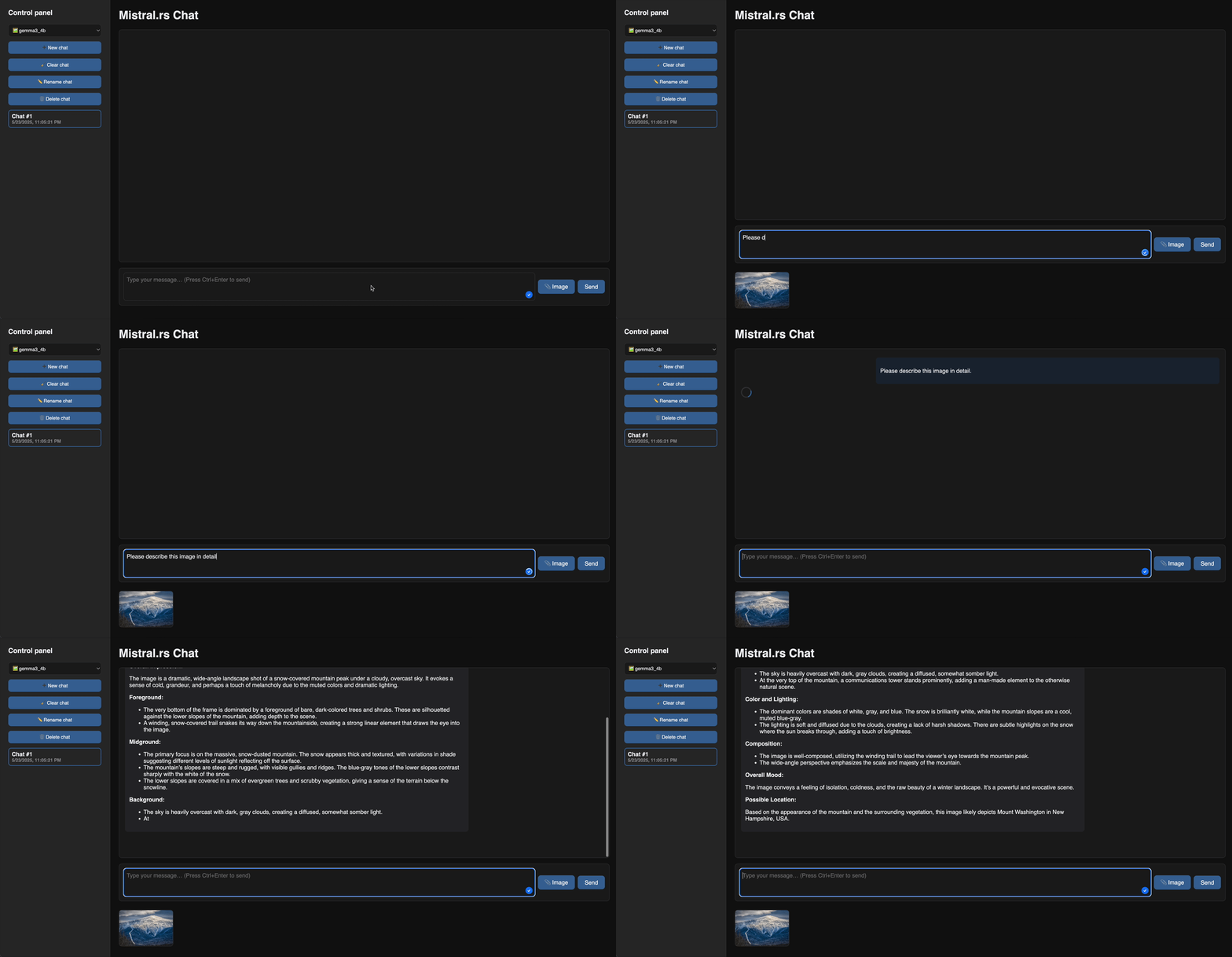
- **Built-in web UI**: `mistralrs serve --ui` gives you a web interface instantly.
- **Hardware-aware**: `mistralrs tune` benchmarks your system and picks optimal quantization + device mapping.
- **Flexible SDKs**: Python package and Rust crate to build your projects.
## Quick Start
### Install
**Linux/macOS:**
```bash
curl --proto '=https' --tlsv1.2 -sSf https://raw.githubusercontent.com/EricLBuehler/mistral.rs/master/install.sh | sh
```
**Windows (PowerShell):**
```powershell
irm https://raw.githubusercontent.com/EricLBuehler/mistral.rs/master/install.ps1 | iex
```
[Manual installation & other platforms](docs/INSTALLATION.md)
### Run Your First Model
```bash
# Interactive chat
mistralrs run -m Qwen/Qwen3-4B
# Or start a server with web UI
mistralrs serve --ui -m google/gemma-3-4b-it
```
Then visit `http://localhost:1234/ui` for the web chat interface.
### The `mistralrs` CLI
The CLI is designed to be **zero-config**: just point it at a model and go.
- **Auto-detection**: Automatically detects model architecture, quantization format, and chat template
- **All-in-one**: Single binary for chat, server, benchmarks, and web UI (`run`, `serve`, `bench`)
- **Hardware tuning**: Run `mistralrs tune` to automatically benchmark and configure optimal settings for your hardware
- **Format-agnostic**: Works with Hugging Face models, GGUF files, and [UQFF quantizations](docs/UQFF.md) seamlessly
```bash
# Auto-tune for your hardware and emit a config file
mistralrs tune -m Qwen/Qwen3-4B --emit-config config.toml
# Run using the generated config
mistralrs from-config -f config.toml
# Diagnose system issues (CUDA, Metal, HuggingFace connectivity)
mistralrs doctor
```
[Full CLI documentation](docs/CLI.md)
Web Chat Demo
## What Makes It Fast
**Performance**
- Continuous batching support by default on all devices.
- CUDA with [FlashAttention](docs/FLASH_ATTENTION.md) V2/V3, Metal, [multi-GPU tensor parallelism](docs/DISTRIBUTED/DISTRIBUTED.md)
- [PagedAttention](docs/PAGED_ATTENTION.md) for high throughput continuous batching on CUDA or Apple Silicon, prefix caching (including multimodal)
**Quantization** ([full docs](docs/QUANTS.md))
- [In-situ quantization (ISQ)](docs/ISQ.md) of any Hugging Face model
- GGUF (2-8 bit), GPTQ, AWQ, HQQ, FP8, BNB support
- ⭐ [Per-layer topology](docs/TOPOLOGY.md): Fine-tune quantization per layer for optimal quality/speed
- ⭐ Auto-select fastest quant method for your hardware
**Flexibility**
- [LoRA & X-LoRA](docs/ADAPTER_MODELS.md) with weight merging
- [AnyMoE](docs/ANYMOE.md): Create mixture-of-experts on any base model
- [Multiple models](docs/multi_model/README.md): Load/unload at runtime
**Agentic Features**
- Integrated [tool calling](docs/TOOL_CALLING.md) with Python/Rust callbacks
- ⭐ [Web search integration](docs/WEB_SEARCH.md)
- ⭐ [MCP client](docs/MCP/README.md): Connect to external tools automatically
[Full feature documentation](docs/README.md)
## Supported Models
Text Models
- Granite 4.0
- SmolLM 3
- DeepSeek V3
- GPT-OSS
- DeepSeek V2
- Qwen 3 MoE
- Phi 3.5 MoE
- Qwen 3
- GLM 4
- GLM-4.7-Flash
- GLM-4.7 (MoE)
- Gemma 2
- Qwen 2
- Starcoder 2
- Phi 3
- Mixtral
- Phi 2
- Gemma
- Llama
- Mistral
Vision Models
- Qwen 3-VL
- Gemma 3n
- Llama 4
- Gemma 3
- Mistral 3
- Phi 4 multimodal
- Qwen 2.5-VL
- MiniCPM-O
- Llama 3.2 Vision
- Qwen 2-VL
- Idefics 3
- Idefics 2
- LLaVA Next
- LLaVA
- Phi 3V
Speech Models
- Dia
Image Generation Models
- FLUX
Embedding Models
- Embedding Gemma
- Qwen 3 Embedding
[Request a new model](https://github.com/EricLBuehler/mistral.rs/issues/156) | [Full compatibility tables](docs/SUPPORTED_MODELS.md)
## Python SDK
```bash
pip install mistralrs # or mistralrs-cuda, mistralrs-metal, mistralrs-mkl, mistralrs-accelerate
```
```python
from mistralrs import Runner, Which, ChatCompletionRequest
runner = Runner(
which=Which.Plain(model_id="Qwen/Qwen3-4B"),
in_situ_quant="4",
)
res = runner.send_chat_completion_request(
ChatCompletionRequest(
model="default",
messages=[{"role": "user", "content": "Hello!"}],
max_tokens=256,
)
)
print(res.choices[0].message.content)
```
[Python SDK](https://ericlbuehler.github.io/mistral.rs/PYTHON_SDK.html) | [Installation](https://ericlbuehler.github.io/mistral.rs/PYTHON_INSTALLATION.html) | [Examples](examples/python) | [Cookbook](examples/python/cookbook.ipynb)
## Rust SDK
```bash
cargo add mistralrs
```
```rust
use anyhow::Result;
use mistralrs::{IsqType, TextMessageRole, TextMessages, VisionModelBuilder};
#[tokio::main]
async fn main() -> Result<()> {
let model = VisionModelBuilder::new("google/gemma-3-4b-it")
.with_isq(IsqType::Q4K)
.with_logging()
.build()
.await?;
let messages = TextMessages::new().add_message(
TextMessageRole::User,
"Hello!",
);
let response = model.send_chat_request(messages).await?;
println!("{:?}", response.choices[0].message.content);
Ok(())
}
```
[Rust SDK](https://crates.io/crates/mistralrs) | [Examples](mistralrs/examples)
## Docker
For quick containerized deployment:
```bash
docker pull ghcr.io/ericlbuehler/mistral.rs:latest
docker run --gpus all -p 1234:1234 ghcr.io/ericlbuehler/mistral.rs:latest \
serve -m Qwen/Qwen3-4B
```
[Docker images](https://github.com/EricLBuehler/mistral.rs/pkgs/container/mistral.rs)
> For production use, we recommend installing the CLI directly for maximum flexibility.
## Documentation
For complete documentation, see the **[Documentation](https://ericlbuehler.github.io/mistral.rs/)**.
**Quick Links:**
- [CLI Reference](docs/CLI.md) - All commands and options
- [HTTP API](docs/HTTP.md) - OpenAI-compatible endpoints
- [Quantization](docs/QUANTS.md) - ISQ, GGUF, GPTQ, and more
- [Device Mapping](docs/DEVICE_MAPPING.md) - Multi-GPU and CPU offloading
- [MCP Integration](docs/MCP/README.md) - MCP integration documentation
- [Troubleshooting](docs/TROUBLESHOOTING.md) - Common issues and solutions
- [Configuration](docs/CONFIGURATION.md) - Environment variables for configuration
## Contributing
Contributions welcome! Please [open an issue](https://github.com/EricLBuehler/mistral.rs/issues) to discuss new features or report bugs. If you want to add a new model, please contact us via an issue and we can coordinate.
## Credits
This project would not be possible without the excellent work at [Candle](https://github.com/huggingface/candle). Thank you to all [contributors](https://github.com/EricLBuehler/mistral.rs/graphs/contributors)!
mistral.rs is not affiliated with Mistral AI.
Back to Top