# Godot MCP Runtime





A lightweight [MCP](https://modelcontextprotocol.io/) server that pairs comprehensive headless editing with full runtime control over a [Godot](https://godotengine.org/) 4.x project. Scene, node, autoload, and validation ops cover everything short of the most niche corners of the engine; the runtime bridge adds screenshots, input simulation, UI discovery, and live GDScript against the running scene tree.
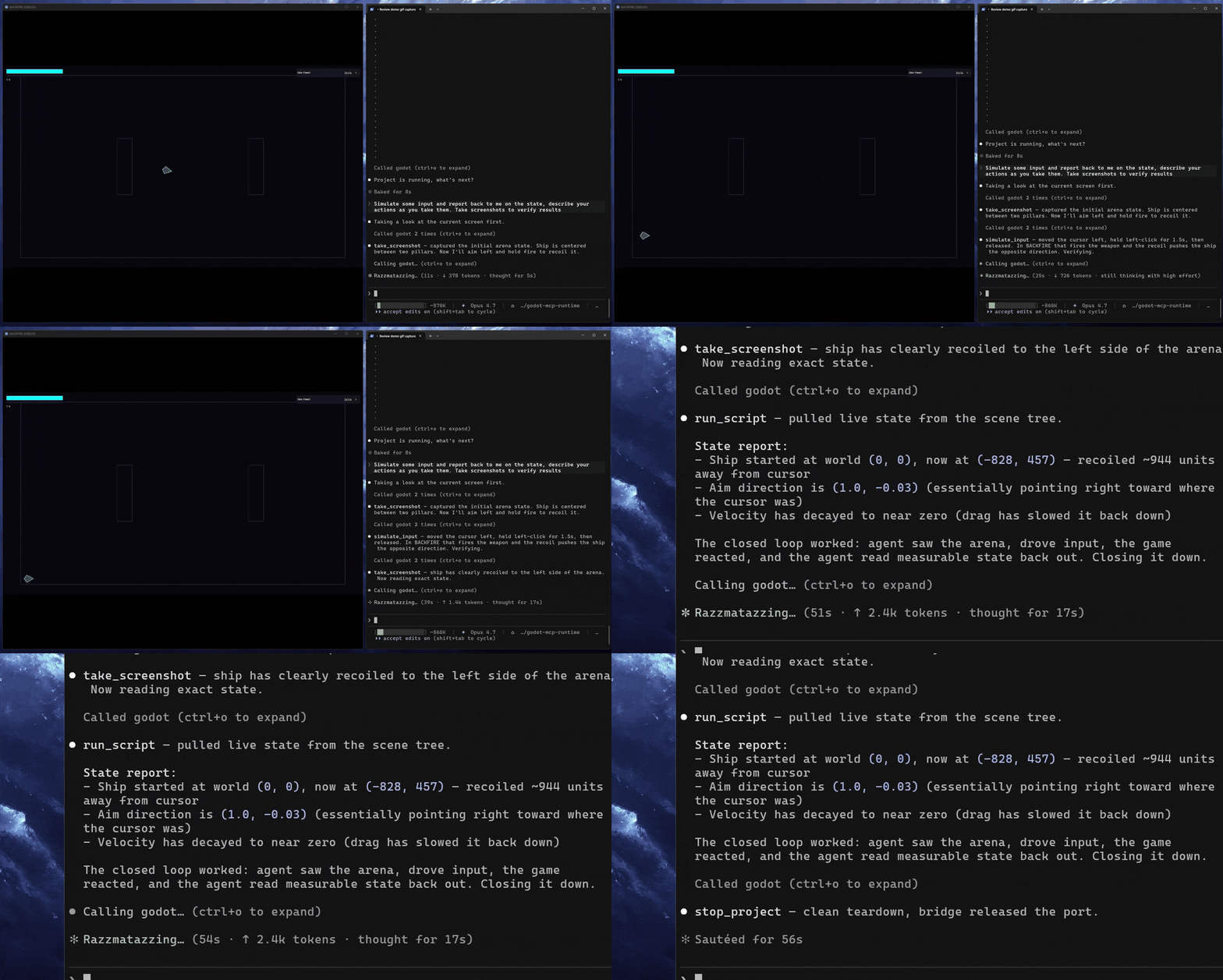
The AI doesn't just write your game, it can check its work.
- **Headless editing** — scenes, nodes, scripts, signals, validation, no editor window
- **Runtime control** — screenshots, input simulation, UI discovery, and live GDScript against the running game
- **Zero footprint** — no Godot addon, no project commits, auto-cleanup on shutdown
**No addon required.** Most Godot MCP servers that offer runtime support ship as a Godot addon, something you install into your project, commit to version control, and manage as a dependency. Use npx and there's no install or setup needed.
Think of it as [Playwright MCP](https://github.com/microsoft/playwright-mcp), but for Godot. This does the same thing for games: run the project, take a screenshot, simulate input, read what's on screen, execute a script against the live scene tree. The agent closes the loop on its own changes rather than handing off to you to verify.
> [!NOTE]
> This is not a playtesting replacement. It doesn't catch the subtle feel issues that only a human notices, and it won't tell you if your game is fun. What it does is let an agent confirm that a scene loads, a button responds, a value updated, a script ran without errors. The ability to check work is crucial for AI driven workflows.
## Contents
- [What It Does](#what-it-does)
- [How It Compares](#how-it-compares)
- [Quick Start](#quick-start)
- [Docs](#docs)
- [Acknowledgments](#acknowledgments)
- [License](#license)
## What It Does
**Built for agents.** Every tool is purpose-built and self-documenting. When something fails, the response tells the agent how to fix it; when something succeeds, it points toward the next step. The result is an AI that stays unstuck and self-corrects without needing you to nudge it along.
**Headless editing.** Create scenes, add nodes, set properties, attach scripts, connect signals, validate GDScript. All the standard operations, no editor window required.
**Runtime bridge.** When `run_project` or `attach_project` is called, the server injects `McpBridge` as an autoload. This opens a localhost-only TCP listener (both auto-select a free port when `bridgePort` is omitted; pass `bridgePort` to pin a specific port) and enables:
- **Screenshots:** Capture the viewport — by default returns a 960x540 preview inline plus the full PNG on disk; use `responseMode: 'full'` for pixel-perfect or `'path_only'` to skip the inline image
- **Input simulation:** Batched sequences of key presses, mouse clicks, mouse motion, UI element clicks by name or path, Godot action events, and timed waits
- **UI discovery:** Walk the live scene tree and collect every visible Control node with its position, type, text content, and disabled state
- **Live script execution:** Compile and run arbitrary GDScript with full SceneTree access while the game is running
**Background mode.** Pass `background: true` to `run_project` and the Godot window moves off-screen (positioned at `(-9999, -9999)`) with physical input blocked: borderless, unfocusable, mouse-passthrough. Programmatic input, screenshots, and all runtime tools work exactly the same. Useful for automated agent-driven testing where the window shouldn't be visible or interactive.
**Manual attach mode.** When something other than MCP launches the game (a CI pipeline, an external debugger, your own shell), call `attach_project` first. It injects the bridge and marks the project active without spawning Godot, so when you launch the game manually, runtime tools work against it. Use `detach_project` when done.
> [!IMPORTANT]
> `get_debug_output` is unavailable in attached mode. stdout and stderr only flow through processes MCP started itself, so when Godot is launched externally there's no captured output to return. Use `run_project` if you need the debug stream.
The bridge cleans itself up automatically when `stop_project` or `detach_project` is called. No leftover autoloads, no modified project files.
## How It Compares
The Godot MCP space splits on two axes: whether a server can drive a _running_ game (runtime) or only edit files, and what it costs your project to do so. Most servers that offer real runtime control ship as a Godot addon you install and commit to version control, or as a custom engine you download. This one injects a bridge transiently and removes it on shutdown, so you get full live-game control against stock Godot with nothing left in your repo.
| Server | Live-game runtime | Footprint | License | Price |
| ------------------------- | ---------------------------------------------------------- | ------------------------------------ | ------------------------------ | --------------------- |
| **Godot MCP Runtime** | **Full**: screenshots, input, live scene tree, script exec | **Zero** (`npx`, no committed addon) | MIT | Free |
| Summer Engine | Full | Custom engine download + sign-in | MIT layer / proprietary engine | Free core, paid cloud |
| tugcantopaloglu/godot-mcp | Full | Committed autoload addon | MIT | Free |
| Godot MCP Pro | Full | Committed editor addon | Proprietary | $15 |
| GDAI MCP | Editor-mediated | Committed editor addon | Proprietary | $19 |
| Coding-Solo/godot-mcp | No (launch + debug output) | Zero (`npx`) | MIT | Free |
Among servers with full live-game control, Godot MCP Runtime pairs a zero-footprint install (no addon committed to version control, no custom engine, no account) with a single `npx` command, and it has shipped this transient-autoload runtime bridge since February 2026. One other project, [Vollkorn-Games/godot-mcp](https://github.com/Vollkorn-Games/godot-mcp), independently arrived at the same design at the same time and is the only other server in this niche; it's earlier-stage and installs from source rather than npm. For the full field of ~20 servers with a source for every claim, see [docs/comparison.md](docs/comparison.md).
## Quick Start
### Prerequisites
- [Node.js](https://nodejs.org/) v20+
- [Godot 4.x](https://godotengine.org/)
That's it. No Godot addon, no project modifications.
### Configure Your MCP Client
Add the following to your MCP client config. Works with Claude Code, Claude Desktop, Cursor, or any MCP-compatible client.
**Zero-install via npx (recommended):**
```json
{
"mcpServers": {
"godot": {
"command": "npx",
"args": ["-y", "godot-mcp-runtime"],
"env": {
"GODOT_PATH": ""
}
}
}
}
```
**Or install globally:**
```bash
npm install -g godot-mcp-runtime
```
```json
{
"mcpServers": {
"godot": {
"command": "godot-mcp-runtime",
"env": {
"GODOT_PATH": ""
}
}
}
}
```
**Or clone from source:**
```bash
git clone https://github.com/Erodenn/godot-mcp-runtime.git
cd godot-mcp-runtime
npm install
npm run build
```
```json
{
"mcpServers": {
"godot": {
"command": "node",
"args": ["/godot-mcp-runtime/dist/index.js"],
"env": {
"GODOT_PATH": ""
}
}
}
}
```
> [!TIP]
> **Prefer pnpm?** All three install paths work with pnpm. Substitute `pnpm dlx godot-mcp-runtime` for `npx -y godot-mcp-runtime`, `pnpm add -g godot-mcp-runtime` for the global install, or `pnpm install && pnpm run build` for the source build. pnpm ships stronger defaults against npm supply-chain attacks; see [pnpm's supply chain security guide](https://pnpm.io/supply-chain-security).
If Godot is on your `PATH`, you can omit `GODOT_PATH` entirely. The server will auto-detect it.
#### Optional environment variables
All are set in the same `env` block as `GODOT_PATH`:
| Variable | Effect |
| ------------------------------- | --------------------------------------------------------------------------------------------------------------------------------------------------------------------------------------------------------------------------------------------------------------------------------- |
| `DEBUG` | `"true"` enables verbose `[DEBUG]` logging. |
| `GODOT_MCP_DISABLE_ELICITATION` | `"true"` disables the confirmation prompts for `run_project` and `run_script`. Use this if your client cannot display elicitation prompts (e.g. Claude Desktop, which auto-cancels them). Fail-open: the action proceeds with a warning. Tier 1 security hard-blocks still apply. |
| `GODOT_MCP_STRICT` | `"true"` hard-rejects anything that would otherwise prompt, for unattended operation. Takes precedence over `GODOT_MCP_DISABLE_ELICITATION` when both are set. |
```json
{
"mcpServers": {
"godot": {
"command": "npx",
"args": ["-y", "godot-mcp-runtime"],
"env": {
"GODOT_PATH": "",
"GODOT_MCP_DISABLE_ELICITATION": "true"
}
}
}
}
```
> [!IMPORTANT]
> **Windows path gotchas.** `GODOT_PATH` must point at the Godot executable itself, not its install folder. Backslashes in JSON must be escaped or replaced with forward slashes:
>
> ```json
> "GODOT_PATH": "D:\\Godot\\Godot_v4.4-stable_win64.exe"
> // or equivalently
> "GODOT_PATH": "D:/Godot/Godot_v4.4-stable_win64.exe"
> ```
>
> Setting the variable from a wrapper `.bat` does not propagate to the MCP server — the path must live in the client's `env` block above.
### Verify
Ask your AI assistant to call `get_project_info`. If it returns a Godot version string (e.g., `4.4.stable`), you're connected and working.
## Security model
`run_script` and `run_project` execute arbitrary GDScript inside the live Godot process, which runs with full user privileges. The server defends against this with a three-tier static-analysis gate that inspects GDScript before forwarding it to the bridge:
- **Tier 1 (hard block)** — direct exec (`OS.execute`/`shell_open`/…), reflection bypasses (`ClassDB.instantiate`, `Object.set_script`), dynamic code (`Expression`, `str_to_var`), and non-literal `load`/`preload`/`call` are rejected server-side.
- **Tier 2 (elicit)** — filesystem writes (`FileAccess.open`, `DirAccess.remove`) and network primitives (`HTTPRequest`, `TCPServer`, …) trigger a user-confirmation prompt via MCP elicitation.
- **Tier 3 (warn)** — literal `load("res://…")` and similar common idioms execute, but findings surface in the response `warnings` array.
`run_project` runs the same scan over `[autoload]` scripts and scripts attached to the launched scene before spawning Godot.
Set `GODOT_MCP_STRICT=true` to promote every Tier 2 finding to a hard block — needed for unattended operation where MCP client bypass-permissions modes auto-accept elicitation. Off by default.
Set `GODOT_MCP_DISABLE_ELICITATION=true` for clients that cannot display elicitation prompts (e.g. Claude Desktop, which auto-cancels them). It skips the confirmation prompts and proceeds (fail-open): `run_project` launches and Tier 2 `run_script` findings run with a warning. Tier 1 hard blocks are unaffected. Strict mode takes precedence when both are set. Off by default.
Every `run_script` call writes a `.policy.json` sidecar next to the audit-trail `.gd` file in `.mcp/scripts/`. See [`docs/security.md`](docs/security.md) for the full rule catalogue.
## Docs
- [`docs/tools.md`](docs/tools.md) — full tool reference, grouped by category
- [`docs/tool-authoring.md`](docs/tool-authoring.md) — standards for adding or modifying tools
- [`docs/architecture.md`](docs/architecture.md) — source layout, bridge sequence diagram, lifecycle steps, runtime artifact behavior
- [`docs/security.md`](docs/security.md) — `run_script` / `run_project` security model, full rule catalogue, strict-mode behavior
## Acknowledgments
Built on the foundation laid by [Coding-Solo/godot-mcp](https://github.com/Coding-Solo/godot-mcp) for headless Godot operations.
Developed with [Claude Code](https://claude.ai/code).
## License
[MIT](LICENSE)