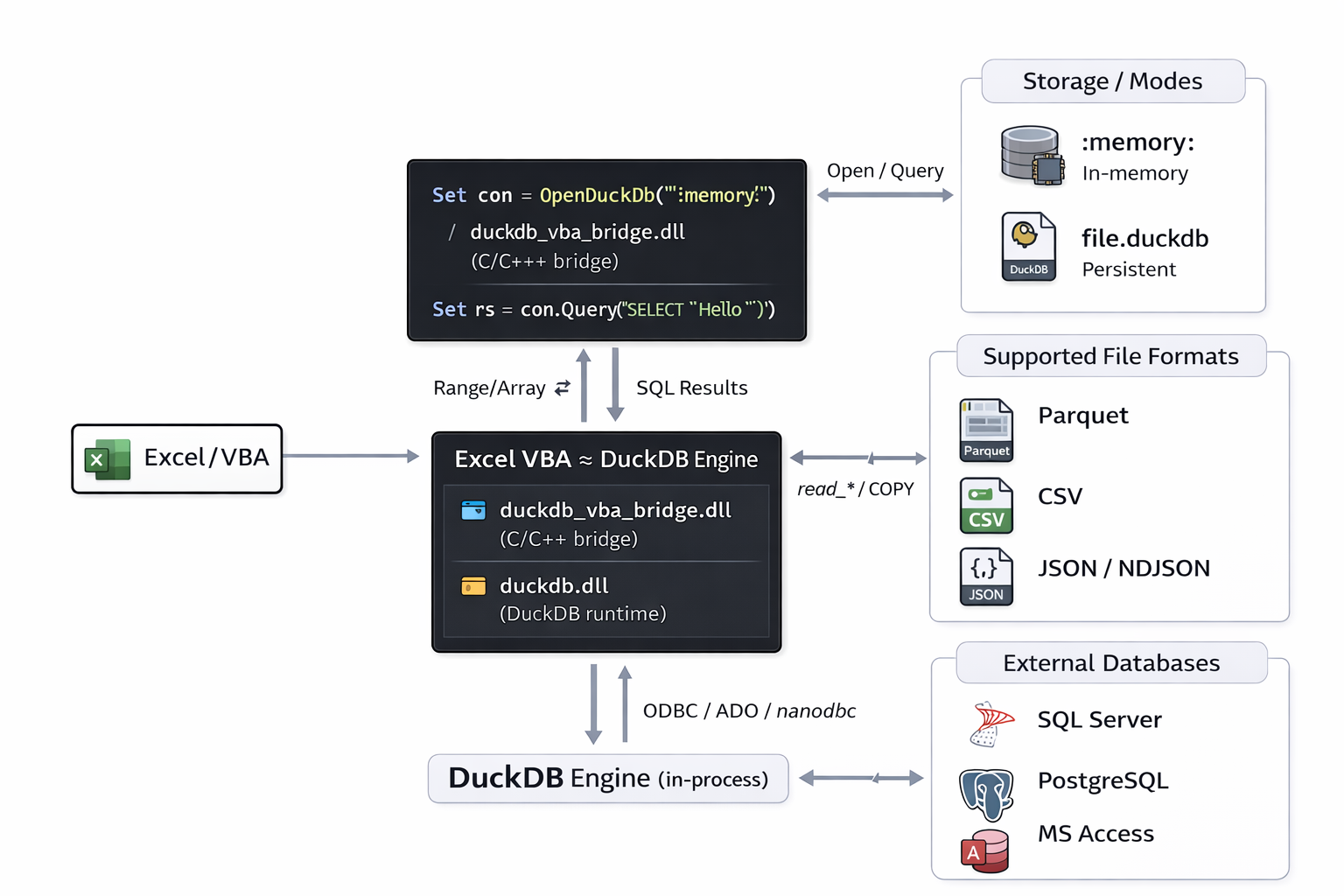
> **Boost Excel/VBA with an embedded DuckDB OLAP engine, powered by the native DuckDB C API through a lightweight DLL bridge.**
No ODBC setup. No external server. No complex deployment.
Just DuckDB running directly inside Excel/VBA, turning your workbook into a fast local analytics front-end.
Compared with traditional VBA loops or ADO/ODBC-style workflows, the native bridge can deliver **up to 5× faster performance** for typical Range/Array ⇄ DuckDB ingestion and query pipelines.
- ✅ **No ODBC installation required** — direct native DuckDB C API integration
- ✅ **Pandas-like analytics in VBA**: run fast SQL on an in-memory DuckDB (`:memory:`)
- ✅ Work with **Parquet / CSV / JSON** from VBA at high speed (read, transform, export)
- ✅ Ultra-fast **Range/Array ⇄ DuckDB** ingestion + upserts + dictionary lookups
- ✅ Easier integration with external databases (**SQL Server / PostgreSQL/SQLite**)
- ✅ Replace slow VBA loops / ADO bottlenecks
- ✅ Use DuckDB as a modern **MS Access alternative** (single portable `.duckdb` file)
- ✅ **Access → DuckDB migration** helpers (e.g. `AppendAdoRecordsetFast`) for quick conversion of legacy .mdb/.accdb data
---
- 📖 **Documentation (PDF)**: [DuckVBA_documentation_EN.pdf](DuckVBA_documentation_EN.pdf?raw=1)
- 🧪 **Excel/VBA tutorial workbook (XLSM)**: [DuckDB_VBA_Tutorial_fr.xlsm](https://github.com/EtienneLenoir/DuckDB-VBA-DLL/raw/main/tutorial/DuckDB_VBA_Tutorial_fr.xlsm)
- ➡️ **Download**: see [**Releases**](../../releases) for a ready-to-run ZIP (DLLs + VBA modules + demo XLSM).
- 👉 Next: [**Quick install (VBA)**](#quick-install-vba)
Table of contents
- [Why this project?](#why-this-project)
- [Highlights](#highlights)
- [Requirements](#requirements)
- [Quick install (VBA)](#quick-install-vba)
- [Connections: file, memory, read-only](#connections-file-memory-read-only)
- [In-memory DB (ultra fast)](#in-memory-db-ultra-fast)
- [File DB (persistent)](#file-db-persistent)
- [Read-only (safe reporting / audit)](#read-only-safe-reporting--audit)
- [VBA API (toolbox level)](#vba-api-toolbox-level)
- [Import / Export (CSV, JSON, Parquet)](#import--export-csv-json-parquet)
- [CSV](#csv)
- [JSON](#json)
- [Parquet](#parquet)
- [Extensions (examples)](#extensions-examples)
- [miniplot (HTML charts)](#miniplot-html-charts)
- [rapidfuzz (fuzzy search)](#rapidfuzz-fuzzy-search)
- [nanodbc (Access via ODBC, from DuckDB)](#nanodbc-access-via-odbc-from-duckdb)
- [ui (DuckDB UI)](#ui-duckdb-ui)
- [Repository layout (typical in this project)](#repository-layout-typical-in-this-project)
- [Build / packaging (DLL)](#build--packaging-dll)
- [License](#license)
- [Disclaimer](#disclaimer)
- [Support / contributions](#support--contributions)
Architecture overview (DuckDB VBA)
## Why this project?
Excel/VBA is still unbeatable for the “last mile” (UI, validation, reporting), but it becomes slow and brittle as soon as you hit serious data workloads:
- costly VBA loops,
- ADO/ODBC friction at larger volumes,
- MS Access is convenient but quickly caps out for modern data workflows.
**DUCK VBA DLL** brings a modern OLAP engine (DuckDB) to VBA: JOIN/GROUP BY/CTE/WINDOW, columnar scans, vectorized execution, multi-threading, Parquet/JSON/CSV read & write… while keeping Excel as the front-end.
## Highlights
- **Zero server**: DuckDB embedded in-process, local, no instance to maintain.
- **Simple deployment**: one bridge DLL + `duckdb.dll` (next to the `.xlsm`).
- **Two database modes**:
- `:memory:` for ultra-fast **RAM pipelines**,
- `.duckdb` file for persistence and portability.
- **Fast ingestion from Excel** (no intermediate CSV): `Range.Value2` → `AppendArray` / `FrameFromValue` (native appender).
- **Efficient exports**:
- `SELECT` → `Variant(2D)` (paste directly to worksheet),
- `SELECT` → `Dictionary` (ultra-fast in-memory lookups in VBA),
- `COPY TO` Parquet/JSON/CSV.
- **Access → DuckDB made easy**: import tables fast with `AppendAdoRecordsetFast` (quick migration from legacy `.mdb/.accdb`)
- **Build your own “pandas-like” toolkit**: `FrameFromValue` turns any `Variant(2D)` into an in-memory table you can slice/filter/join/aggregate in SQL
- **Toolkit-ready features**:
- upsert (sync Excel → DuckDB),
- temp lists (replace huge `WHERE IN (...)`),
- scalar helpers,
- Access import (ADO/DLL) + optional nanoODBC route,
- DuckDB extensions (miniplot, rapidfuzz, ui…).
## Requirements
- Windows
- **Excel 64-bit** (VBA7)
- `duckdb.dll` (DuckDB runtime)
- `duckdb_vba_bridge.dll` (bridge DLL)
- **Microsoft Visual C++ Redistributable 2015–2022 (x64)**
(often already installed with common apps like Office/Teams/Visual Studio.
If Excel can’t load the DLLs or you see missing `vcruntime140*.dll` / `msvcp140.dll`, install it:
https://aka.ms/vc14/vc_redist.x64.exe)
> ⚠️ After downloading/copying: right-click `duckdb.dll` and `duckdb_vba_bridge.dll` → **Properties** → **Unblock** (otherwise Excel may refuse to load them).
## Quick install (VBA)
1) Put `duckdb.dll` + `duckdb_vba_bridge.dll` in your workbook folder (or a subfolder).
2) Import into your VBA project at minimum:
- `mDuckNative.bas`
- `cDuck.cls`
3) Minimal example:
```vb
Sub Quickstart_DuckVba()
Dim db As New cDuck,v As Variant
'1) Init (DLL location)
db.Init ThisWorkbook.Path
db.ErrorMode = 2 '2=LogOnly (debug via duckdb_errors.log), 1=MsgBox, 0=Raise
'2) Choose your mode:
db.OpenDuckDb ":memory:" '100% RAM, no disk I/O, ideal for ETL & analytics
'db.OpenDuckDb ThisWorkbook.Path & "\cache.duckdb" 'persistent file (read/write, Access-like)
'db.OpenReadOnly ThisWorkbook.Path & "\cache.duckdb" 'read-only file (safe reporting / audit)
'3) SQL analytics (DDL/DML)
db.Exec "CREATE TABLE t(id INT, name TEXT);"
db.Exec "INSERT INTO t VALUES (1,'Duck'),(2,'VBA');"
'4) SELECT -> Variant(2D) (ligne 1 = headers)
v = db.QueryFast("SELECT * FROM t ORDER BY id;")
'5) Display
If Not IsEmpty(v) Then
ActiveSheet.Range("A1").Resize(UBound(v, 1), UBound(v, 2)).Value2 = v
End If
CleanExit:
On Error Resume Next
db.CloseDuckDb
End Sub
```
## Connections: file, memory, read-only
### In-memory DB (ultra fast)
```vb
db.OpenDuckDb ":memory:"
```
- no disk I/O
- perfect for throwaway ETL, staging, intermediate computations
### File DB (persistent)
```vb
db.OpenDuckDb ThisWorkbook.Path & "\cache.duckdb"
```
- single portable file
- great for a local “mini data warehouse” (Access-like, but OLAP)
### Read-only (safe reporting / audit)
```vb
db.OpenReadOnly ThisWorkbook.Path & "\cache.duckdb"
```
- no writes allowed
- useful for predictable “read/report” use-cases
## VBA API (toolbox level)
In `cDuck` (high-level wrapper):
### SQL execution
- `db.Exec sql` : DDL/DML/COPY/transactions
- `db.QueryFast(selectSql) As Variant` : `SELECT` → `Variant(2D)` (row 1 = headers)
- `db.Scalar(selectSql) As Variant` : `SELECT` 1x1 → value
### Ingest from Excel
- `db.FrameFromValue frameName, v2d, hasHeader, makeTemp`
- `db.AppendArray tableName, v2d, hasHeader`
### Synchronization (upsert)
- `db.UpsertFromArray tableName, v2d, headerRow, keyColsCsv`
### “Temp list” (bulk keys)
- `db.CreateTempList tabName, keys, sqlType`
then `... WHERE x IN (SELECT v FROM tabName)` or `JOIN tabName ...`
### Dictionaries (in-memory lookups)
- `db.SelectToDictFlat(...)` : `key → value`
- `db.SelectToDictRow1D(...)` : `key → Variant(1D)` (values only, very fast)
- `db.SelectToDictRow2D(...)` : `key → Variant(2D)` (labels + values, more self-describing)
### DuckDB extensions
- `db.LoadExt "parquet"` / `"json"` / `"rapidfuzz"` / `"miniplot"` / `"nanodbc"` / `"ui"` …
## Import / Export (CSV, JSON, Parquet)
### CSV
**Import** (auto-detect into a table):
```sql
CREATE OR REPLACE TABLE data AS
SELECT * FROM read_csv_auto('path/to/file.csv', HEADER=true);
```
**Append** (COPY):
```sql
COPY data FROM 'path/to/file.csv' (AUTO_DETECT true, HEADER true);
```
**Export**:
```sql
COPY (SELECT * FROM data) TO 'out.csv' (HEADER true);
```
### JSON
**Auto import (JSON / NDJSON)**:
```sql
CREATE OR REPLACE TABLE j AS
SELECT * FROM read_json_auto('path/to/file.json');
```
**Export**:
```sql
COPY (SELECT * FROM j) TO 'out.json' (FORMAT JSON);
```
### Parquet
**Direct read**:
```sql
SELECT * FROM read_parquet('path/to/file.parquet');
```
**Materialize into a table**:
```sql
CREATE OR REPLACE TABLE p AS
SELECT * FROM read_parquet('path/to/file.parquet');
```
**Export Parquet**:
```sql
COPY (SELECT * FROM p) TO 'out.parquet' (FORMAT PARQUET);
```
> The toolkit also provides helper shortcuts for common copy/select-to-parquet flows.
## Extensions (examples)
### miniplot (HTML charts)
- `LOAD miniplot;`
- typical functions: `bar_chart`, `line_chart`, `scatter_chart`, `area_chart`, `scatter_3d_chart`
The module demonstrates a robust pattern:
- try “direct file generation” first
- fallback to “HTML returned as text” → write file in VBA → open in browser
### rapidfuzz (fuzzy search)
- `LOAD rapidfuzz;`
- functions: `rapidfuzz_ratio`, `rapidfuzz_jaro_winkler_*`, `rapidfuzz_prefix_*`, `rapidfuzz_postfix_*`, `rapidfuzz_osa_*`, `rapidfuzz_partial_ratio`
Typical use: typo-tolerant search (names, tickers, venues…).
### nanodbc (Access via ODBC, from DuckDB)
- `LOAD nanodbc;`
- `odbc_query` (Access/ACE SQL executed by the driver) or `odbc_scan` (raw table copy)
> Alternative path: Access ingestion via ADO + `AppendAdoRecordset` (often very fast and with fewer extension deployment dependencies).
### ui (DuckDB UI)
- `LOAD ui;`
- `CALL start_ui();` then open local UI (runs a local UI server)
- keep a VBA connection alive to keep the UI server running
## Repository layout (typical in this project)
### C / bridge DLL
- `duckdb_vba_bridge.c` : native bridge (Unicode, SAFEARRAY/VARIANT, appender, error buffer…)
### Core VBA
- `mDuckNative.bas` : `Declare PtrSafe` prototypes + native helpers
- `cDuck.cls` : high-level wrapper (clean API for VBA)
- `cHiPerfTimer.cls` : high-resolution timing (benchmarks)
### Feature modules & demos
- `Mod1DuckDb_Begin.bas` : getting started / first demos
- `Mod2DuckDb_Info.bas` : catalog introspection (tables/columns, exists, rename…)
- `Mod2DuckDb_Scalar.bas` : scalar helpers
- `Mod1DuckDb_Csv.bas`, `Mod1DuckDb_Json.bas`, `Mod1DuckDb_Parquet.bas` : import/export
- `Mod2DuckDb_DictFlat.bas`, `Mod2DuckDb_DictRow1D.bas`, `Mod2DuckDb_DictRow2D.bas` : dictionaries
- `Mod2DuckDb_ExcelUpdate.bas` : Excel ⇄ DuckDB sync via upsert
- `Mod2DuckDb_WhereInSimple.bas`, `Mod2DuckDb_WhereInFct.bas` : temp lists / WHERE IN patterns
- `Mod2DuckDb_Extension.bas`, `Mod2DuckDb_Miniplot_Ext.bas`, `Mod2DuckDb_RapidFuzz_Ext.bas`, `Mod2DuckDb_CI_Ext.bas` : extensions
- `Mod3DuckDb_1AccessToDuck_main.bas`, `Mod3DuckDb_2AccessToDuck_dll.bas`, `Mod3DuckDb_3Nanodbc_Ext.bas` : Access → DuckDB (multiple routes)
- `Mod3DuckDb_RowStream.bas` : “row streaming” patterns
## Build / packaging (DLL)
- The bridge DLL is written in C/C++ and built with MSVC (x64).
- It links against DuckDB (runtime `duckdb.dll` + import lib depending on your build) and `oleaut32` (SAFEARRAY/VARIANT/BSTR).
- Goal: export `__stdcall` functions that are VBA-friendly, handle Unicode conversions properly, and reliably free COM/DuckDB resources.
> If you publish on GitHub, consider a clean structure: `/src` (C), `/vba` (modules), `/bin` (DLL binaries), `/docs`.
## License
- This project is licensed under the **GNU General Public License v3.0**.
Put the full `LICENSE` text at the repository root (recommended), and keep your license section in the docs in sync.
- The names/logos (“DUCK VBA DLL”, etc.) remain **trademarks**: see `Trademark_Policy_GPLv3.md`.
## Disclaimer
Independent project: not affiliated with DuckDB or Microsoft. “Microsoft”, “Excel”, and “VBA” are trademarks of Microsoft Corporation.
## Support / contributions
- Issues / discussions: GitHub
- Pull requests: welcome (if you accept external contributions, consider documenting the process and whether you require a CLA).