





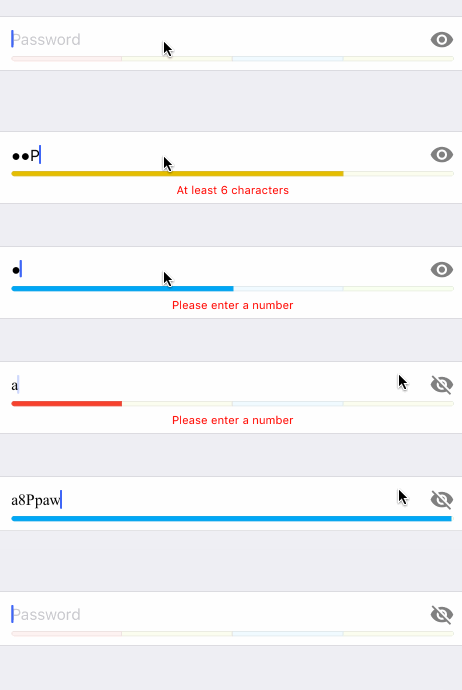
 ## Usage
```swift
import Eureka
import GenericPasswordRow
class ViewController: FormViewController {
override func viewDidLoad() {
super.viewDidLoad()
form +++ Section()
<<< GenericPasswordRow()
}
}
```
## Requirements
* iOS 9.0+
* Xcode 11.5+
* Eureka ~> 5.2.1
## Getting involved
* If you **want to contribute** please feel free to **submit pull requests**.
* If you **have a feature request** please **open an issue**.
* If you **found a bug** or **need help** please **check older issues, [FAQ](#faq) and threads on [StackOverflow](http://stackoverflow.com/questions/tagged/GenericPasswordRow) (Tag 'GenericPasswordRow') before submitting an issue.**.
Before contribute check the [CONTRIBUTING](CONTRIBUTING.md) file for more info.
If you use **GenericPasswordRow** in your app we would love to hear about it! Drop us a line on [twitter](https://twitter.com/xmartlabs).
## Examples
Follow these steps to run Example project:
* Clone GenericPasswordRow repository
* Open terminal in the downloaded folder and run bin/setup script
* Open GenericPasswordRow workspace
* Run the *Example* project.
## Installation
#### CocoaPods
[CocoaPods](https://cocoapods.org/) is a dependency manager for Cocoa projects.
To install GenericPasswordRow, simply add the following line to your Podfile:
```ruby
pod 'GenericPasswordRow', '~> 3.1'
```
#### Carthage
[Carthage](https://github.com/Carthage/Carthage) is a simple, decentralized dependency manager for Cocoa.
To install GenericPasswordRow, simply add the following line to your Cartfile:
```ogdl
github "EurekaCommunity/GenericPasswordRow" ~> 3.1
```
## Customization
For basic styling like fonts, colors, margins, separators you should use `cellSetup` and `cellUpdate`. Otherwise, you should be able to provide a completely different design (different nib file) and reuse the already implemented logic.
### GenericPasswordRow parameters
* `var passwordValidator: PasswordValidator = DefaultPasswordValidator()`:
a PasswordValidator intended to define the rules to be satisfied by the password. See [Implement custom validation](#custom-password-validation)
* `var placeholder: String? = "Password"`: placeholder of password textfield.
For example you can do this:
```swift
<<< GenericPasswordRow() {
$0.passwordValidator = // instantiate your custom validator
$0.placeholder = "Create a password"
}
```
### GenericPasswordCell parameters:
* `@IBOutlet weak var textField: UITextField!`:
Password textfield.
* `@IBOutlet weak var visibilityButton: UIButton?`:
Visibility button intended to toggle the `secureTextEntry` property of `textField`.
* `@IBOutlet weak var passwordStrengthView: PasswordStrengthView?`:
A subclass of `PasswordStrengthView` with the custom design of the strength indicator. See [PasswordStrengthView](#custom-strength-view)
* `@IBOutlet weak var hintLabel: UILabel?`:
Label used to show hints to the user while typing his password.
* `var visibilityImage: (on: UIImage?, off: UIImage?)`:
Images to be set to the visibilityButton depending on the textField's `secureTextEntry` state.
* `var dynamicHeight = (collapsed: UITableViewAutomaticDimension, expanded: UITableViewAutomaticDimension)`:
Heights of the cell when collapsed (with hintLabel hidden) and expanded (hintLabel not hidden). This property is nib-specific.
### Creating custom nib file
You might want to follow your own design. To accomplish this you should follow these steps:
* Create a user interface xib file and edit it with Xcode's Interface Builder. You should add a simple `UITableViewCell` and say that its class is a `GenericPasswordCell`.
* Add an UITextField for the password entry and connect it to the `textField` outlet.
* [optional] Add an UIButton and connect it to the `visibilityButton`.
* [optional] Add a [PasswordStrengthView](#custom-strength-view) subclass and connect it to the `passwordStrengthView` outlet.
* [optional] Add an UILabel and connect it to the `hintLabel` outlet.
* Specify that you want to use the newly created nib file. You can do this in two ways:
* Using RowDefaults: use this if you want to use only this custom GenericPasswordRow in your app.
```swift
GenericPasswordRow.defaultRowInitializer = {
$0.cellProvider = CellProvider
## Usage
```swift
import Eureka
import GenericPasswordRow
class ViewController: FormViewController {
override func viewDidLoad() {
super.viewDidLoad()
form +++ Section()
<<< GenericPasswordRow()
}
}
```
## Requirements
* iOS 9.0+
* Xcode 11.5+
* Eureka ~> 5.2.1
## Getting involved
* If you **want to contribute** please feel free to **submit pull requests**.
* If you **have a feature request** please **open an issue**.
* If you **found a bug** or **need help** please **check older issues, [FAQ](#faq) and threads on [StackOverflow](http://stackoverflow.com/questions/tagged/GenericPasswordRow) (Tag 'GenericPasswordRow') before submitting an issue.**.
Before contribute check the [CONTRIBUTING](CONTRIBUTING.md) file for more info.
If you use **GenericPasswordRow** in your app we would love to hear about it! Drop us a line on [twitter](https://twitter.com/xmartlabs).
## Examples
Follow these steps to run Example project:
* Clone GenericPasswordRow repository
* Open terminal in the downloaded folder and run bin/setup script
* Open GenericPasswordRow workspace
* Run the *Example* project.
## Installation
#### CocoaPods
[CocoaPods](https://cocoapods.org/) is a dependency manager for Cocoa projects.
To install GenericPasswordRow, simply add the following line to your Podfile:
```ruby
pod 'GenericPasswordRow', '~> 3.1'
```
#### Carthage
[Carthage](https://github.com/Carthage/Carthage) is a simple, decentralized dependency manager for Cocoa.
To install GenericPasswordRow, simply add the following line to your Cartfile:
```ogdl
github "EurekaCommunity/GenericPasswordRow" ~> 3.1
```
## Customization
For basic styling like fonts, colors, margins, separators you should use `cellSetup` and `cellUpdate`. Otherwise, you should be able to provide a completely different design (different nib file) and reuse the already implemented logic.
### GenericPasswordRow parameters
* `var passwordValidator: PasswordValidator = DefaultPasswordValidator()`:
a PasswordValidator intended to define the rules to be satisfied by the password. See [Implement custom validation](#custom-password-validation)
* `var placeholder: String? = "Password"`: placeholder of password textfield.
For example you can do this:
```swift
<<< GenericPasswordRow() {
$0.passwordValidator = // instantiate your custom validator
$0.placeholder = "Create a password"
}
```
### GenericPasswordCell parameters:
* `@IBOutlet weak var textField: UITextField!`:
Password textfield.
* `@IBOutlet weak var visibilityButton: UIButton?`:
Visibility button intended to toggle the `secureTextEntry` property of `textField`.
* `@IBOutlet weak var passwordStrengthView: PasswordStrengthView?`:
A subclass of `PasswordStrengthView` with the custom design of the strength indicator. See [PasswordStrengthView](#custom-strength-view)
* `@IBOutlet weak var hintLabel: UILabel?`:
Label used to show hints to the user while typing his password.
* `var visibilityImage: (on: UIImage?, off: UIImage?)`:
Images to be set to the visibilityButton depending on the textField's `secureTextEntry` state.
* `var dynamicHeight = (collapsed: UITableViewAutomaticDimension, expanded: UITableViewAutomaticDimension)`:
Heights of the cell when collapsed (with hintLabel hidden) and expanded (hintLabel not hidden). This property is nib-specific.
### Creating custom nib file
You might want to follow your own design. To accomplish this you should follow these steps:
* Create a user interface xib file and edit it with Xcode's Interface Builder. You should add a simple `UITableViewCell` and say that its class is a `GenericPasswordCell`.
* Add an UITextField for the password entry and connect it to the `textField` outlet.
* [optional] Add an UIButton and connect it to the `visibilityButton`.
* [optional] Add a [PasswordStrengthView](#custom-strength-view) subclass and connect it to the `passwordStrengthView` outlet.
* [optional] Add an UILabel and connect it to the `hintLabel` outlet.
* Specify that you want to use the newly created nib file. You can do this in two ways:
* Using RowDefaults: use this if you want to use only this custom GenericPasswordRow in your app.
```swift
GenericPasswordRow.defaultRowInitializer = {
$0.cellProvider = CellProvider