

Your Ultimate Social Media Data & API Marketplace
Professional data solutions for Douyin, Xiaohongshu, TikTok, Instagram, YouTube,
Twitter, and more.
Real-time Data | Flexible APIs | Seamless Integration | Competitive Pricing with Discounts
Buy and sell custom APIs, services, and social media solutions on the
TikHub.io Marketplace, alongside developers, businesses and content creators.
Trusted by leading global influencer marketing and social media intelligence platforms

https://space.bilibili.com/2
```
Short links are followed and a link buried in a caption is extracted. A post id is also
checked against the platform's own encoding first, so an id that cannot exist is refused
here rather than costing an upstream request. A Bilibili av number is turned into the
bvid it stands for, so either spelling reaches the same post.
## ⚗️ Built with
| | |
|---|---|
| Service | Python 3.12 · FastAPI · SQLAlchemy 2.0 (async) · Alembic · Typer · structlog |
| Transport | wreq (browser TLS fingerprint emulation) · httpx |
| Data | PostgreSQL + TimescaleDB · Redis |
| Console | React 19 · TypeScript · Vite · TanStack Query · wouter · i18next |
| Signing | a_bogus, X-Bogus, X-Gnarly, X-Dynosaur and Bilibili's WBI in pure Python |
| Identity minting | CloakBrowser, headless, in a container of its own, called over HTTP; Bilibili guests over plain HTTP, no browser |
| Downloader | Go 1.23, standard library only, statically linked into a scratch image |
| Transcription | FunASR ONNX (Paraformer, FSMN-VAD, CT-Transformer), offline, in a container with no network route |
| Auth | argon2id password hashing · API keys with scopes |
| Protocols | REST (OpenAPI) · MCP (streamable-http) · CLI |
| Tooling | uv · ruff · mypy · pytest · Docker Compose |
Nothing beyond Postgres and Redis is required. No Kafka, no Elasticsearch, no object
store, no Kubernetes.
CloakBrowser is pinned to a specific commit. That pin is a security control — see
[docker/Dockerfile.browser](./docker/Dockerfile.browser).
## 🗂 Project layout
**First, what `dtk` is.** `Douyin_TikTok_Download_API` is a mouthful, so the code
says **DTK** instead: **D**ouyin + **T**i**K**Tok. The two platforms, and not the
download or API halves of the name.
It is the Python package (`src/dtk/`), the command (`dtk --help`), the prefix on
every environment variable (`DTK_SECRET_KEY` and friends), the Compose project
name (`-p dtk`), and the three letters in the console's title bar. Where you see
`dtk`, it means `Douyin_TikTok_Download_API`.
```
Douyin_TikTok_Download_API/
├── src/dtk/ the service; all of it lives here
│ ├── api/ FastAPI routes, auth, OpenAPI localisation
│ ├── platforms/ Douyin, TikTok and Bilibili adapters: endpoints, params, parsers
│ ├── signing/ a_bogus / X-Bogus / X-Gnarly / X-Dynosaur / WBI
│ ├── transport/ outbound requests, response classification
│ ├── identity/ identity minting and health
│ ├── scheduler/ identity selection, token buckets, circuit breakers
│ ├── services/ the business layer, shared by REST, MCP and the CLI
│ ├── worker/ async tasks, callbacks, scheduled collection
│ ├── db/ SQLAlchemy models and Alembic migrations
│ ├── ops/ diagnostics, backups, health checks, alerting
│ ├── media/ downloader client
│ ├── models/ one content model across every platform
│ ├── urls/ link recognition, short-link expansion, id validation
│ ├── mcp/ MCP server
│ ├── cli/ the dtk command line
│ ├── i18n/ server-side English and Chinese strings
│ └── core/ settings, logging, error types
├── web/ the React console, built into the app image
│ └── src/
│ ├── pages/ one file per console page
│ ├── components/ design system and shared components
│ └── locales/ console English and Chinese strings
├── docker/ four Dockerfiles, compose, and three sidecars
│ ├── browser_rpc/ Python, wrapping CloakBrowser
│ ├── downloader/ Go, the media download sidecar
│ ├── transcriber/ Python, offline FunASR transcription
│ └── compose.yml
├── documents/ user documentation, 18 pages in each language
├── tests/ unit / integration / contract / replay
├── scripts/ smoke.sh
├── .github/workflows/ CI and Docker image publishing
├── alembic.ini
├── pyproject.toml
└── Makefile
```
## ⚡️ Quick start: self-host it with Docker
If you would rather not think about it, the guided script asks a few questions and
brings the stack up — it works out your distribution, checks for Docker, and
scales the resource limits to the machine:
```bash
curl -fsSL https://raw.githubusercontent.com/Evil0ctal/Douyin_TikTok_Download_API/main/install/install.sh -o install.sh
less install.sh # reading it first is a good habit
bash install.sh
```
**Afterwards the same script is the operations tool.** Run it again and it finds the install and opens a menu: status, upgrade (compared against the latest GitHub release), passwords, an extra administrator, backup and restore, runtime settings, disk cleanup, stop or uninstall. `--manage` goes straight there.
Details in [install/README.md](./install/README.md). The manual route follows.
There are two ways to install this; below is the recommended one. For the by-hand route, see
[Without Docker](#without-docker).
| How | Who for | Full steps |
|---|---|---|
| **Docker Compose** (recommended) | Almost everyone, production included | [Installation · First install](./documents/en/02-installation.md#first-install) |
| By hand | Docker is not an option, or you are changing the code | [For development](./documents/en/02-installation.md#running-without-docker) · [On bare metal](./documents/en/02-installation.md#a-production-install-without-docker) |
> **Installing from mainland China?** Switch your mirrors before you start, or the pull will
> most likely time out:
> [Network preparation in mainland China](./documents/en/02-installation.md#network-preparation-in-mainland-china).
You need Docker and Docker Compose. Start by cloning the repository — the compose file,
the Dockerfiles and the migrations all live in it, and the default branch is v5:
```bash
git clone https://github.com/Evil0ctal/Douyin_TikTok_Download_API.git
cd Douyin_TikTok_Download_API
```
Nothing in the repository ships a default password or key, so write `.env` next:
```bash
POSTGRES_PASSWORD=$(openssl rand -hex 24)
REDIS_PASSWORD=$(openssl rand -hex 24)
cat > .env < and use the token from the log to create the first
administrator.
That starts no browser container, and without it (`--profile browser`, see
[the optional profiles](./documents/en/02-installation.md#the-optional-profiles)) Douyin and
TikTok identities can only be imported, not minted: both hand a visitor its cookies from inside
their page scripts. Bilibili guests are minted over plain HTTP either way.
### Where the image comes from
By default it is built locally: the first `up` compiles the application image from the
Dockerfile in this repository, which takes a few minutes. To skip that, point compose at
the published image instead, in the same `.env`:
```bash
cat >> .env <<'EOF'
DTK_IMAGE=evil0ctal/douyin_tiktok_download_api
DTK_IMAGE_TAG=latest
EOF
export COMPOSE_ENV_FILES=.env
docker compose -p dtk -f docker/compose.yml pull
docker compose -p dtk -f docker/compose.yml up -d
```
These two are read by compose itself rather than by the containers, and compose looks for
them in `docker/.env` unless `COMPOSE_ENV_FILES` says otherwise. Without the export it
finds nothing, falls back to the local names and quietly builds from source again, so it
belongs in every shell you run compose from. The script's `dtkctl` carries it for you.
`latest` is the newest release and moves only when one is cut, so updating later needs
nothing edited here. The `pull` is not optional: these services declare both `image` and
`build`, so compose builds from the local Dockerfile whenever the image is not already on
the machine rather than reaching for a registry.
Images are published for `linux/amd64` and `linux/arm64`, so Apple Silicon and a
Raspberry Pi both run natively. The browser container is not published: it installs
CloakBrowser from a pinned commit, and that pin is a security control that should be
yours to choose, so it stays a local build.
### Without Docker
Supported, and it is how the project itself is developed. You provide PostgreSQL 17 (**with the
TimescaleDB extension** — a plain `postgres:17` will not do), Redis 8, Python 3.12 and uv, plus
Node 22 if you build the console. Two sets of steps:
- [Running without Docker](./documents/en/02-installation.md#running-without-docker) — for
development; Postgres and Redis still come from containers
- [A production install without Docker](./documents/en/02-installation.md#a-production-install-without-docker)
— all of it by hand, systemd units included, verified on a clean Ubuntu 24.04
What the containers were doing for you — a non-root user, memory and CPU ceilings, a read-only root
filesystem, process supervision — you put back yourself. That section lists them one by one.
### Where to look next
| What you want to do | Where |
|---|---|
| Size a machine, change the container limits | [Three sizes](./documents/en/02-installation.md#three-sizes) · [Changing the limits](./documents/en/02-installation.md#changing-the-limits) |
| Turn on the browser container, the downloader or the transcriber sidecar | [The optional profiles](./documents/en/02-installation.md#the-optional-profiles) |
| Put TLS and a reverse proxy in front | [Behind a reverse proxy](./documents/en/02-installation.md#behind-a-reverse-proxy) |
| Understand how the environment is actually read | [Environment variables](./documents/en/02-installation.md#environment-variables) |
| Confirm an install is genuinely healthy | [Verifying an install](./documents/en/02-installation.md#verifying-an-install) |
| Read the compose file line by line | [docker/README.md](./docker/README.md) |
## 🖥 What you get: console, REST API, MCP and CLI
| Entry point | Where | What it is |
|---|---|---|
| Web console | `/` | Identity pool, scheduler, library, downloads, transcriptions, logs, diagnostics |
| API reference | `/docs` | Swagger UI inside the console, English and Chinese |
| Bare reference | `/swagger`, `/redoc` | No login required |
| REST API | `/api/v1/...` | 128 operations |
| MCP | `/mcp` | Shares the service layer with REST; client setup at `/mcp-guide` in the console |
| CLI | `dtk --help` | Same |
The main capabilities:
- **Parse** a link, share text, short link, or a bare post id
- **Archive** everything parsed, so a post deleted upstream is still here
- **Download** media to your own disk, in bulk by author, skipping what you have,
with duplicate cleanup
- **Transcribe** a stored video to text, offline
- **Watch** an author or a post and re-collect it on a timer
- **iOS Shortcut** support at `/api/v1/ios/shortcut`
## 🔄 Updating to a new release
The console keeps an eye out for you: `system.check_updates` is on by default,
and if a newer release exists you get one notice after signing in, at most once
a day. That request goes from **your browser** to GitHub — the server never
sends anything outward, so it does not tell anyone this instance exists. Turn it
off in Settings if you would rather it did not.
If you installed with the script, it is one command in the install directory:
```bash
cd /opt/dtk # or ~/dtk - wherever you installed it
./dtkctl upgrade # the latest release; ./dtkctl upgrade 5.1.6 for a given one
```
It moves the checkout to the release's tag, pulls the new images (or rebuilds them, on an
install built from source), rebuilds the browser image, takes a backup, migrates, and only
then writes the version it moved to into `.env` and restarts. Anything that fails before the
restart puts the checkout and `.env` back, and the old version keeps running. There is
nothing to edit by hand. An install from before
5.1.6 does not have `upgrade` yet; there, once, run `git pull && bash install/install.sh
--upgrade` in the same directory, and from then on it is `./dtkctl upgrade`. Running
`bash install.sh --manage` and picking 2 does the same from the menu.
By hand it is:
```bash
cd /opt/dtk && git pull
export COMPOSE_ENV_FILES=.env
# Running the published images (recommended). Name the services you run:
# add downloader and transcriber if you enabled them, with the same --profile flags.
docker compose -p dtk -f docker/compose.yml pull api worker
docker compose -p dtk -f docker/compose.yml build browser-rpc # only with --profile browser
docker compose -p dtk -f docker/compose.yml run --rm migrate
docker compose -p dtk -f docker/compose.yml up -d
```
With `DTK_IMAGE_TAG=latest` there is nothing to change first. A pinned version or
`sha-` build is the one thing a pin costs: move it in `.env` before you pull, which is
the step the script does for you. A checkout the script made sits on a release tag, where
`git pull` has no branch to pull: there, use
`git fetch origin tag v5.1.7 && git checkout --detach v5.1.7`.
Building locally instead? Swap `pull` for `build`.
`migrate` runs on every start and Alembic is idempotent, so running it separately is
only about getting the schema up before the containers switch over.
**Your data stays put.** The named volumes (`postgres-data`, `redis-data`,
`media-data`) survive a rebuild, so the identity pool, the archive, the settings
and the API keys are all where you left them.
The browser image is built from this checkout, never pulled, so rebuild it on every
update: under a tag that stays the same - `latest`, or a local build's `dev` - the old
one keeps running the old code. Cached layers keep it short.
To go back, `./dtkctl upgrade 5.1.5` with the script, or set `DTK_IMAGE_TAG` to the
previous version or `sha-` by hand and `up -d` again. Migrations have no automatic
downgrade, so the script refuses, before pulling anything, a release that lacks the
database's latest migration; past one, the way back is a new install of the old version
with a backup taken on it restored. Back the database up before upgrading — the script
does — which is the only rollback that always works.
## 📖 Documentation
**Read it online at [douyin.wtf](https://douyin.wtf)** — the same 18 pages, rendered,
searchable and in both languages. The markdown source is in
[`documents/`](./documents/README.md) and is what the site is built from, so the two
never disagree.
**New here:**
[Quick start](./documents/en/01-quickstart.md) ·
[Concepts](./documents/en/04-concepts.md) ·
[Console overview](./documents/en/05-console-overview.md)
**Running it:**
[Installation and deployment](./documents/en/02-installation.md) ·
[Configuration reference](./documents/en/03-configuration.md) ·
[Operations](./documents/en/10-operations.md) ·
[Troubleshooting](./documents/en/14-troubleshooting.md) ·
[Security](./documents/en/15-security.md)
**Building against it:**
[REST API guide](./documents/en/11-api.md) ·
[MCP and AI agents](./documents/en/12-mcp.md) ·
[CLI reference](./documents/en/13-cli.md) ·
[Contributing](./documents/en/16-contributing.md)
The endpoint reference is not in there: it is generated from the code that serves the
requests, so your own instance is the copy that is never out of date. Find it at `/docs`
inside the console, or at `/swagger`, `/redoc` and `/openapi.json` without a login. Both
languages.
中文文档:[`documents/README.zh-CN.md`](./documents/README.zh-CN.md)
**Reading this with an LLM?** [`llms.txt`](./llms.txt) is the whole documentation set
as one annotated index, in the [llmstxt.org](https://llmstxt.org) format.
## 📮 Contact
| | |
|---|---|
| Issues | [GitHub Issues](https://github.com/Evil0ctal/Douyin_TikTok_Download_API/issues) — public, keeps its history, and anyone who has hit the same thing can answer |
| Email | `Evil0ctal1985@gmail.com` — reaches one person; best for anything that does not belong in public |
| Author | [@Evil0ctal](https://github.com/Evil0ctal) |
Before asking, read [Troubleshooting](./documents/en/14-troubleshooting.md) and include
the output of the Diagnose page or `dtk diagnose`. It answers most of what a maintainer
would otherwise have to ask you.
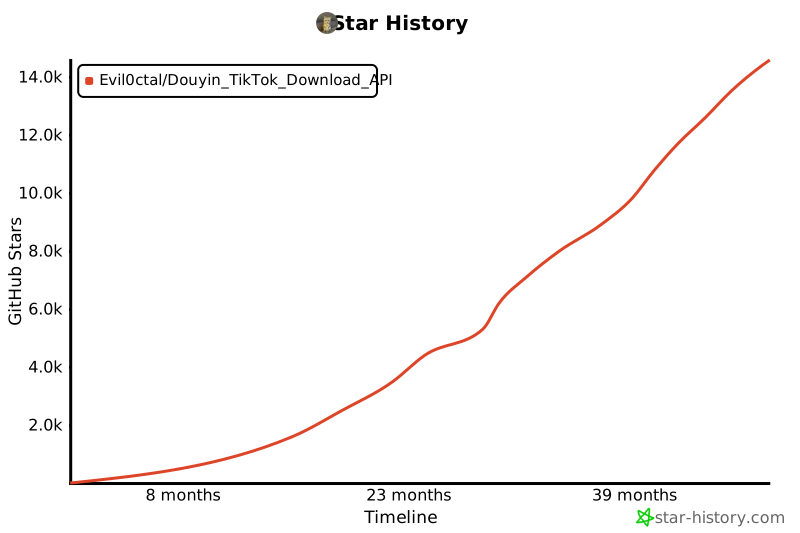
## ⭐️ Star history
[](https://star-history.com/#Evil0ctal/Douyin_TikTok_Download_API&Timeline)
> Started 2021/11/06 · GitHub [@Evil0ctal](https://github.com/Evil0ctal)
## 📄 Licence
[Apache License 2.0](./LICENSE).
You may use, modify and distribute this project, **including commercially and inside
closed-source products**. The grant is irrevocable. In return the licence asks you to:
- Keep the licence text and the [NOTICE](./NOTICE) file, which carries the copyright
notice, with any copy you distribute
- State what you changed, in files you modified
- Accept that it comes with no warranty
### A request from the author
This project is given away, and it stays free because sponsors pay for it rather than
users. **If you are making money from it, please consider sponsoring instead of only
taking.**
This is a request, not a licence condition — Apache 2.0 permits commercial use, and
nothing above takes that back.
## ☕️ Support the author
The sponsors above pay for the **project**. This section is for the **person who
maintains it**, and is entirely optional.
| Network | Address |
|---|---|
| Solana | `HvtkxmDERbNXfCoojpdFAYN5mSWowjpXgedsG9eF7y9z` |
| Tron (TRC20) | `TQwSM2vjcnrdRU7gY7KNp2tCgMnK33azkT` |
| Ethereum (ERC20) | `0x2f210FdfD981B59eC130370E5b1Aa8A6a06fb5Ad` |
| BNB Smart Chain (BEP20) | `0x2f210FdfD981B59eC130370E5b1Aa8A6a06fb5Ad` |
| Bitcoin | `bc1q785j55cxlnjqe8lkwy8cq57t8t9vn3ak9tlsfy` |
These networks carry the usual major tokens. **USDT on Tron (TRC20) or Solana** is the
easiest to receive, and the cheapest to send.
> **Send only on the network an address is listed under.** A transfer on the wrong chain
> cannot be recovered by anybody.
> Ethereum and BNB Smart Chain share one address on purpose: both are EVM chains, and
> the same key controls it.
[GitHub Sponsors](https://github.com/sponsors/evil0ctal) works too.
### What you are responsible for
This fetches data from platforms that have their own terms, and it runs on your machine
under your control. Respect those terms and applicable law, respect the people whose
content you collect, do not use it to harass anyone, and do not redistribute work that
is not yours. Nobody else can enforce any of that for you.
