Fully Open Framework for Democratized Multimodal Training
> [!IMPORTANT]
> 🌟 **The core work on this project is led by [Glint Lab](https://www.glint-mvt.com).**
> For an interactive online experience, visit **[ve2s.ai](https://ve2s.ai/)**.
---
## NEWS
- 2026-04-30: Released LLaVA-OneVision-2 — next-generation multimodal model, with new [LLaVA-OneVision-2-VideoCaption](#datasets) and [LLaVA-OneVision-2-Spatial](#datasets) datasets.
- 2026-02-10: Released [OneVision-Encoder](https://huggingface.co/collections/lmms-lab-encoder/onevision-encoder-6978aeb2bbe1aa13fad12d4c) — codec-aligned vision encoders, with [Technical Report](https://arxiv.org/abs/2602.08683).
- 2025-12-11: Released RL recipe for LLaVA-OneVision-1.5, with [Project](https://mvp-ai-lab.github.io/LLaVA-OneVision-1.5-RL/), [Code](https://github.com/EvolvingLMMs-Lab/LLaVA-OneVision-1.5-RL), [Data](https://huggingface.co/datasets/mvp-lab/LLaVA-OneVision-1.5-RL-Data), and [Model](https://huggingface.co/mvp-lab/LLaVA-OneVision-1.5-8B-RL).
- 2025-09-30: Released the LLaVA-OneVision-1.5 [Technical Report](https://arxiv.org/abs/2509.23661).
## Contents
- [Introduction](#introduction)
- [Results](#evaluation-results)
- [Evaluation Reproduction](#evaluation-reproduction)
- [Method](#method)
- [Models](#models)
- [Datasets](#datasets)
- [Quick Start (4B, single node)](#quick-start-4b-single-node)
- [Citation](#citation)
- [Acknowledgement](#acknowledgement)
- [LLaVA-OneVision-1.5](https://github.com/EvolvingLMMs-Lab/LLaVA-OneVision-1.5/tree/1.5)
## Introduction
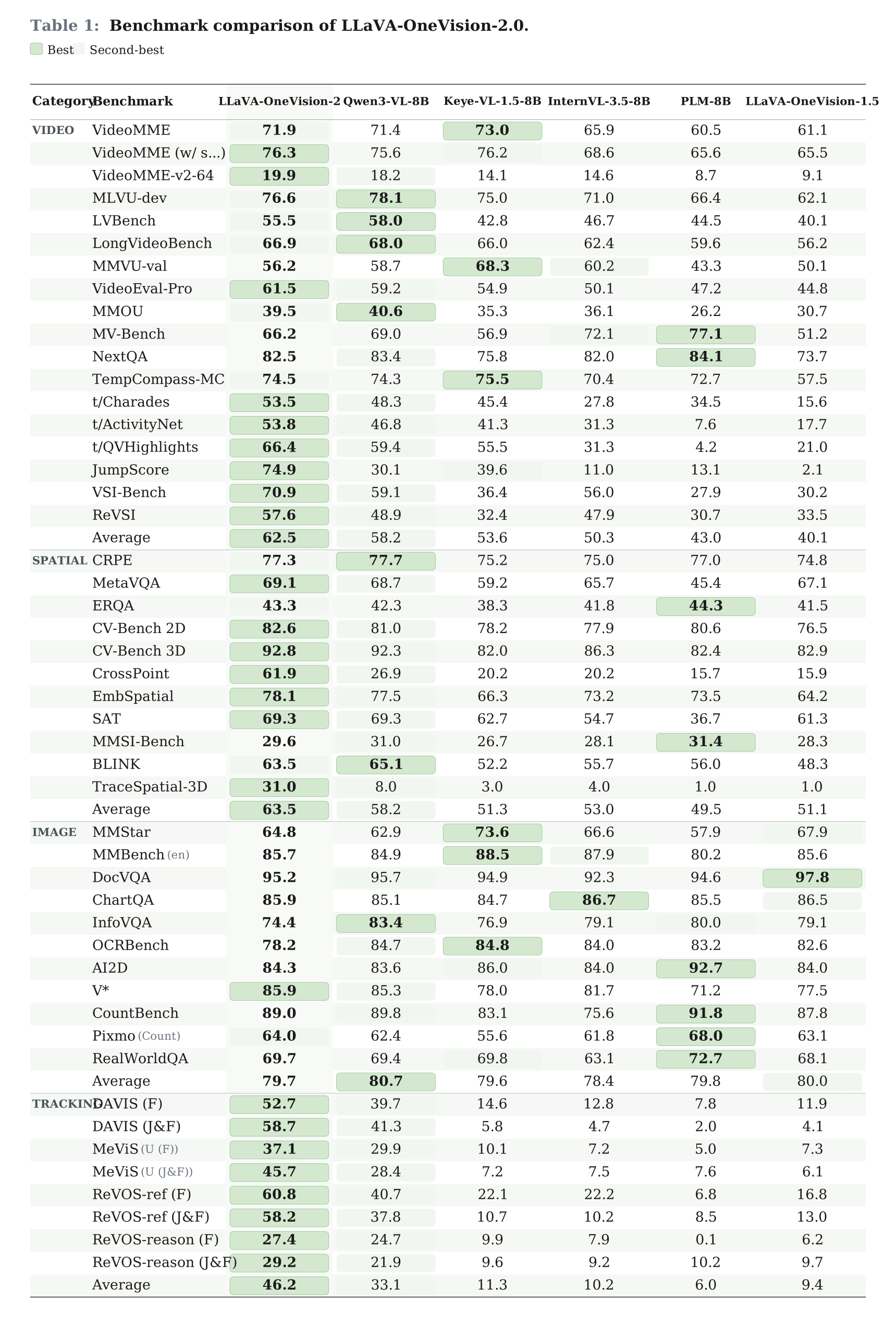
**LLaVA-OneVision-2** is the next-generation release of the LLaVA-OneVision family — a fully open 8B multimodal model that unifies image, long-form video, and spatial understanding under a single architecture, with the entire pipeline (data, encoders, training, checkpoints, logs) released end-to-end.
### 🎬 Codec-Aligned Vision Encoders
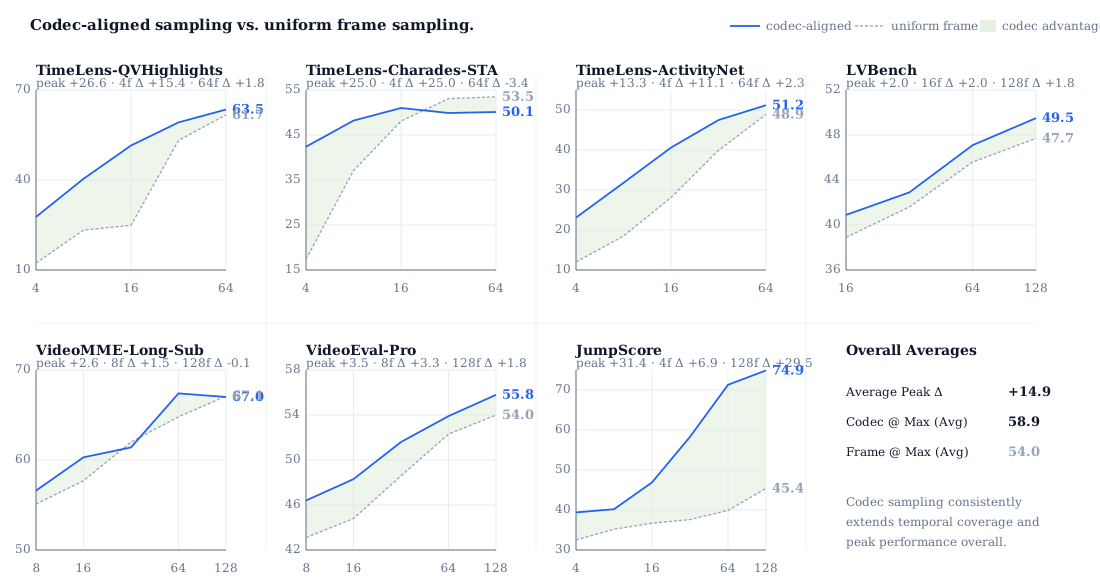
Beyond uniform patchification. **OneVision-Encoder** and **OneVision-Encoder-Lang** are HEVC-style vision transformers that add a codec-stream input mode alongside image and uniform-frame video — selecting only motion- and residual-rich patches and sampling dense frames sparsely instead of sparse frames densely. The result is dramatically longer temporal coverage under the same token budget, where prior ViT backbones simply run out of context.
### 🧊 One Model, Every Modality
Most open multimodal models still live in a 2D, single-image world. **LLaVA-OneVision-2-8B-Instruct** breaks out of it — one model, native resolution, no task-specific adapters, no hidden tricks.
- **Long video** — multi-frame reasoning with efficient codec-aligned inference
- **3D-aware spatial reasoning** — depth, layout, object relations
- **Documents, OCR, charts** — structured visual inputs at native resolution
New open-source SOTA across a broad suite of multimodal benchmarks.
### 🚀 Fully Open, Reproducible from Day One
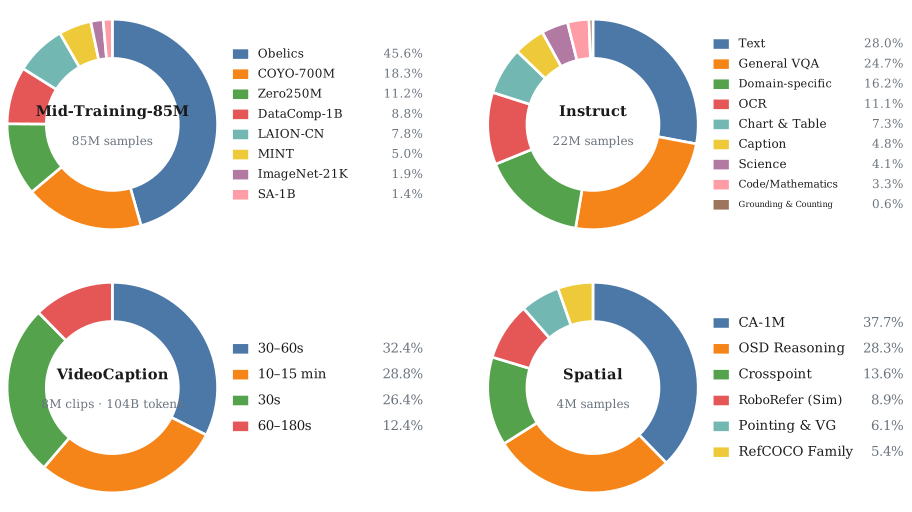
Four datasets ship with the LLaVA-OneVision family — two new for 2, two carried forward from 1.5:
- **LLaVA-OneVision-2-VideoCaption** — extremely dense video captions
- **LLaVA-OneVision-2-Spatial** — 3D-aware spatial reasoning
- **LLaVA-OneVision-1.5-Mid-Training-85M** — 85M concept-balanced mid-training corpus
- **LLaVA-OneVision-1.5-Instruct** — full instruction-tuning mixture
And unlike most "open" releases, *everything* ships alongside them: encoder weights, training code, configs, and full training logs. Reproducible end to end.
## Evaluation Results
## Evaluation Reproduction
The evaluation settings behind the reported LLaVA-OneVision-2 results are
published in the `llava-onevision2` branch of `lmms-eval`:
- Branch: https://github.com/EvolvingLMMs-Lab/lmms-eval/tree/llava-onevision2
- Reproduction guide: https://github.com/EvolvingLMMs-Lab/lmms-eval/blob/llava-onevision2/README.md
That branch includes the exact evaluation model wrapper, benchmark/task
configs, Docker environment, and thin launcher scripts used to reproduce the
reported numbers for both the frames backend and the codec backend.
## Method
### Codec-Style Patch Selection
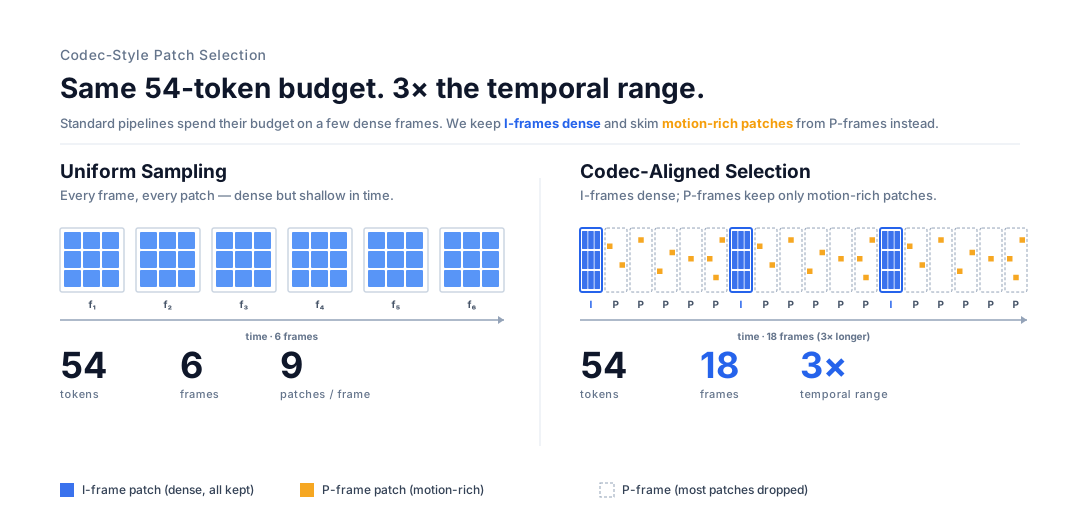
Standard video pipelines uniformly sample a handful of frames and process **every** patch — most of it static background. We borrow from HEVC: keep **I-frames** dense, keep only **motion- and residual-rich patches** from **P-frames**. Same 54-token budget, **18 frames** instead of 6 — 3× the temporal range, no extra LLM context, no input-type adapters.
### One Encoder, Every Modality
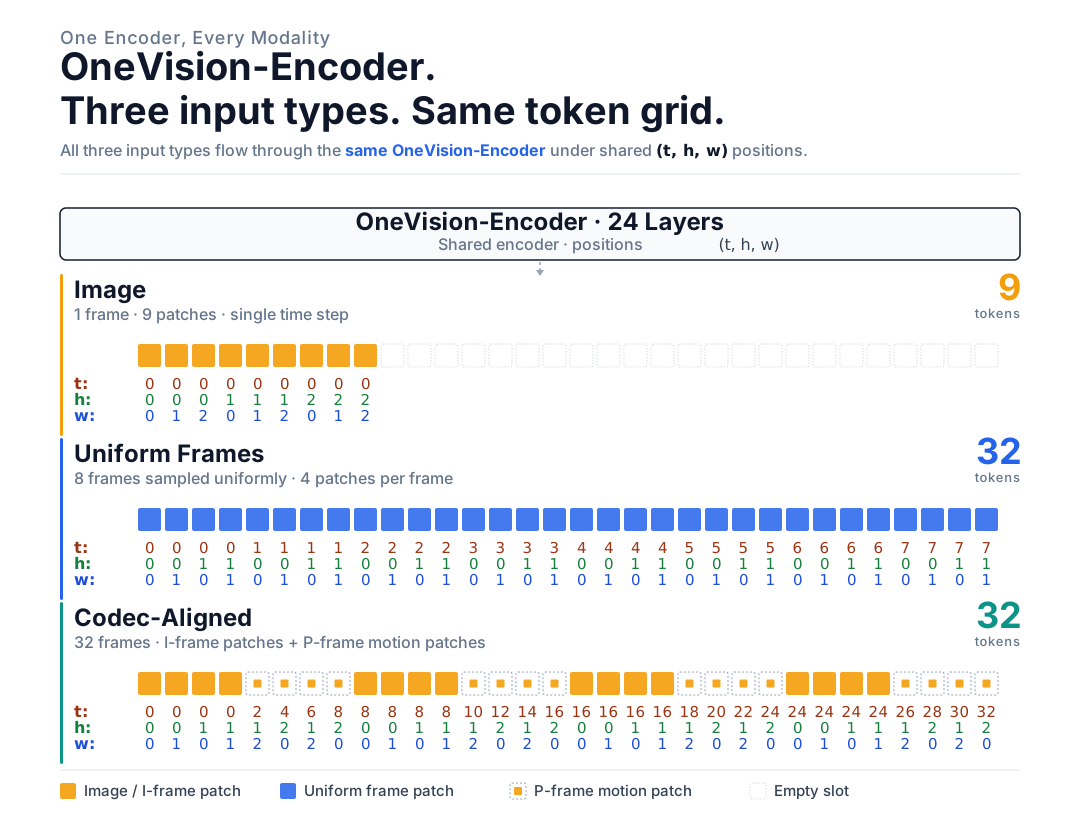
Most multimodal stacks ship a different tokenizer per input type — one path for images, another for video, a third for multi-image. We don't. **Image, uniform frames, and codec-aligned tokens** all flow into the **same OneVision-Encoder** under a shared `(t, h, w)` position scheme. No task-specific tokenizers, no per-modality routing.
### Four-Stage Training Curriculum
We train LLaVA-OneVision-2 in four compact stages:
1. **Bootstrap video ability** from LLaVA-OneVision-1.5 with short 30s video captions.
2. **Instruction tune** with large multimodal instruction data and 30–180s video captions.
3. **Extend to long videos** with 10–15 min captions and public video instruction data.
4. **Refine codec, spatial, and tracking skills** with denser long-video sampling, point tracking, and 4M spatial samples.
The curriculum mixes LLaVA-OneVision-1.5 data, FineVision, and new in-house video caption/spatial datasets; we do not synthesize any video instruction data.
## Models
| Model | HF Link | Training Log |
| ------------------------------- | ------------------------------------------------------------------------------------------------------------------------------------------------------------------------------------------------------------------------------------------------------------- | ----------------------------------------------------------------------------------------------------------------------------------------------------------------------------------------------------------------------------------------------------------------------------------------- |
| LLaVA-OneVision-2-8B-Instruct | [](https://huggingface.co/lmms-lab-encoder/LLaVA-OneVision-2-8B-Instruct) |  |
| LLaVA-OneVision-2-4B-Instruct |  |  |
| LLaVA-OneVision-1.5-4B-Instruct | [](https://huggingface.co/lmms-lab/LLaVA-OneVision-1.5-4B-Instruct) | [](https://huggingface.co/lmms-lab/LLaVA-OneVision-1.5-4B-Instruct/tensorboard) |
| LLaVA-OneVision-1.5-8B-Instruct | [](https://huggingface.co/lmms-lab/LLaVA-OneVision-1.5-8B-Instruct) | [](https://huggingface.co/lmms-lab/LLaVA-OneVision-1.5-8B-Instruct/tensorboard) |
| OneVision-Encoder | [](https://huggingface.co/lmms-lab-encoder/onevision-encoder-large) |  |
| OneVision-Encoder-Lang | [](https://huggingface.co/lmms-lab-encoder/onevision-encoder-large-lang) |  |
## Datasets
| Description | Link | Status |
| ------------------------------------ | ------------------------------------------------------------------------------------------------------------------------------------------------------------------------------------------------------------------------------------------------------------------------------- | --------------------------------------------------------------------------------------------------------------- |
| LLaVA-OneVision-2-VideoCaption | [](https://huggingface.co/datasets/mvp-lab/LLaVA-OneVision-2-Data/tree/main/mid_training_video) |  |
| LLaVA-OneVision-2-Spatial | [](https://huggingface.co/datasets/mvp-lab/LLaVA-OneVision-2-Data/tree/main/spatial) |  |
| LLaVA-OneVision-1.5-Mid-Training-85M | [](https://huggingface.co/datasets/mvp-lab/LLaVA-OneVision-1.5-Mid-Training-85M) |  |
| LLaVA-OneVision-1.5-Instruct | [](https://huggingface.co/datasets/mvp-lab/LLaVA-OneVision-1.5-Instruct-Data) |  |
## Quick Start (4B, single node)
> **🚨 Strongly recommended: don't read the rest of this section.** Just hand the prompt below to any code agent (Claude Code, opencode, Cursor, Codex, etc.) from a working directory on your 8×GPU node, and it will reproduce the full SFT run end-to-end — clone, download the 340 GB bundle, load the docker image, and launch detached training — without you reading a single step.
```text
Follow these instructions to start training: https://github.com/EvolvingLMMs-Lab/LLaVA-OneVision-2#quick-start-4b-single-node
```
> Prefer to do it by hand? Keep reading.
> **Audience:** code agent or human reproducing LLaVA-OneVision-2-4B SFT on a **single 8×GPU node**.
> **Target script:** [`examples/llava_onevision2/quick_start_4b/quick_start.sh`](examples/llava_onevision2/quick_start_4b/quick_start.sh)
> **Bundle:** [`lmms-lab-encoder/ov2_quickstart`](https://huggingface.co/datasets/lmms-lab-encoder/ov2_quickstart) on Hugging Face — contains the prebuilt docker image, the Megatron `tp1pp1` checkpoint, the HF tokenizer/config, and the packed Energon dataset (~340 GB total, mostly the packed dataset).
>
>
>
🤖 Agent fast path — one block, idempotent (click to expand)
> **For code agents (Claude Code / opencode / etc.):** copy-paste this entire block from any working directory and run it. It self-bootstraps — clones the repo if missing, downloads the 340 GB bundle if missing, loads the docker image if missing, then launches training. Every step is guarded by an existence check, so re-runs are safe. Human readers should follow the numbered sections (§0–§5) below instead.
```bash
# Run from any working directory. Requires: 8 GPUs, Docker + NVIDIA Container Toolkit,
# git, huggingface-cli (only used if the bundle is missing).
set -euo pipefail
REPO_URL="https://github.com/EvolvingLMMs-Lab/LLaVA-OneVision-2.git"
REPO_DIR="LLaVA-OneVision-2"
BUNDLE_DIR="./ov2_quickstart"
IMAGE="llava_megatron:26.05"
CONTAINER_NAME="ov2_quickstart_4b"
# 0) Repo — clone if the target script isn't reachable from $(pwd).
# If you're already inside the repo, this is a no-op and we stay put.
if [ -f "./examples/llava_onevision2/quick_start_4b/quick_start.sh" ]; then
echo "[skip] already inside repo root at $(pwd)"
elif [ -f "./${REPO_DIR}/examples/llava_onevision2/quick_start_4b/quick_start.sh" ]; then
echo "[skip] repo already cloned at ./${REPO_DIR}"
cd "${REPO_DIR}"
else
git clone --depth 1 "${REPO_URL}" "${REPO_DIR}"
cd "${REPO_DIR}"
fi
OUTPUT_DIR="$(pwd)/output/quick_start_4b"
# 1) Bundle (~340 GB) — skip if the three required subdirs already exist.
if [ -d "${BUNDLE_DIR}/packed_mixed_sft_cap_v30s/node_a/webdataset" ] \
&& [ -d "${BUNDLE_DIR}/ov_encoder_p14m22_qwen3_mcore_tp1pp1/release/mp_rank_00" ] \
&& [ -d "${BUNDLE_DIR}/ov_encoder_p14m22_qwen3_hf" ]; then
echo "[skip] bundle already present at ${BUNDLE_DIR}"
else
huggingface-cli download --repo-type dataset --resume-download \
--local-dir "${BUNDLE_DIR}" \
lmms-lab-encoder/ov2_quickstart
fi
# 2) Docker image — skip if already loaded.
if [ -n "$(docker images -q "${IMAGE}" 2>/dev/null)" ]; then
echo "[skip] docker image ${IMAGE} already loaded"
elif [ -f "${BUNDLE_DIR}/llava_megatron.26.05.tar" ]; then
docker load -i "${BUNDLE_DIR}/llava_megatron.26.05.tar"
else
echo "ERROR: ${IMAGE} not loaded and tarball missing at ${BUNDLE_DIR}/llava_megatron.26.05.tar" >&2
exit 1
fi
# 3) Clean up any prior container with the same name, then launch detached.
docker rm -f "${CONTAINER_NAME}" 2>/dev/null || true
mkdir -p "${OUTPUT_DIR}"
docker run -d \
--gpus all \
--ipc host --net host --privileged --cap-add IPC_LOCK \
--ulimit memlock=-1 --ulimit stack=67108864 \
-v "$(pwd)":/workspace/LLaVA-OneVision-2 \
-e OUTPUT_DIR=/workspace/LLaVA-OneVision-2/output/quick_start_4b \
-w /workspace/LLaVA-OneVision-2 \
--name "${CONTAINER_NAME}" \
"${IMAGE}" \
bash -lc "bash examples/llava_onevision2/quick_start_4b/quick_start.sh"
echo "Training launched. Follow with: docker logs -f ${CONTAINER_NAME}"
```
After this block returns, training is running detached. Tail progress with `docker logs -f ov2_quickstart_4b`. Checkpoints + tensorboard land under `./output/quick_start_4b/quick_start/`.
The numbered sections below (§0 Prerequisites through §5 Run the quickstart training) are the human walkthrough — same steps, broken out with explanations and alternatives (Option B paths, interactive launch, hyperparameter overrides).
### 0. Prerequisites
8 × A800 (or equivalent), Docker with NVIDIA Container Toolkit.
### 1. Layout
Repo is mounted at `/workspace/LLaVA-OneVision-2` inside the container. The HF bundle goes into `/ov2_quickstart/`. **Launch all commands from the repo root** — the training script uses relative paths.
Full directory tree
```
/
├── examples/llava_onevision2/quick_start_4b/quick_start.sh # entry point
├── run_docker_local.sh # docker wrapper
└── ov2_quickstart/ # ← from HF
├── llava_megatron.26.05.tar # 24 GB prebuilt image
├── ov_encoder_p14m22_qwen3_hf/ # HF tokenizer + config (--hf-tokenizer-path)
├── ov_encoder_p14m22_qwen3_mcore_tp1pp1/ # Megatron mcore checkpoint (--load)
│ ├── latest_checkpointed_iteration.txt
│ └── release/mp_rank_00/
└── packed_mixed_sft_cap_v30s/ # Energon packed dataset (~308 GB)
├── dataset.yaml # references node_{a..d}/webdataset
└── node_{a,b,c,d}/webdataset/
```
### 2. Get the dataset + checkpoint
The dataset (`packed_mixed_sft_cap_v30s/`, ~308 GB) **must** come from the HF bundle — it's pre-packed Energon shards specific to this recipe. The **checkpoint** has two paths: download the ready-to-train Megatron `tp1pp1` (recommended) or build it yourself from the standalone ViT + LLM.
#### Option A — Download the full bundle (recommended)
```bash
cd
huggingface-cli download --repo-type dataset --resume-download \
--local-dir ./ov2_quickstart \
lmms-lab-encoder/ov2_quickstart
```
~340 GB. Resumable.
#### Option B — Merge the checkpoint yourself
Use when you want to swap the ViT or LLM, or reproduce the encoder pipeline from scratch. Still requires Option A for the dataset.
You'll need the standalone components from HF:
- ViT: [`lmms-lab-encoder/onevision-encoder-large-lang-tf57`](https://huggingface.co/lmms-lab-encoder/onevision-encoder-large-lang-tf57) (the `p14m2` variant used here)
- LLM: [`Qwen/Qwen3-4B-Instruct-2507`](https://huggingface.co/Qwen/Qwen3-4B-Instruct-2507)
- Processor: [`lmms-lab-encoder/LLaVA-OneVision-2-8B-Instruct`](https://huggingface.co/lmms-lab-encoder/LLaVA-OneVision-2-8B-Instruct) (tokenizer + processor configs)
Inside the container (set up in step 3), run **HF merge → Megatron conversion** in two stages:
```bash
# Stage 1: merge ViT + LLM + processor → unified HF checkpoint
PYTHONPATH=transformers_impl:. python -m merge_ov2 merge \
--variant dense \
--vit lmms-lab-encoder/onevision-encoder-large-lang-tf57 \
--llm Qwen/Qwen3-4B-Instruct-2507 \
--processor lmms-lab-encoder/LLaVA-OneVision-2-8B-Instruct \
--out ./ov2_quickstart/ov_encoder_p14m22_qwen3_hf \
--target-dtype bf16 \
--vit-validator-strategy layerwise
# Stage 2: HF → Megatron-Core (TP=1, PP=1)
bash examples/llava_onevision2/convert/convert_4b_p14m2_hf_to_mcore.sh \
./ov2_quickstart/ov_encoder_p14m22_qwen3_hf \
./ov2_quickstart/ov_encoder_p14m22_qwen3_mcore_tp1pp1 \
1 1
```
After Stage 2 succeeds, `./ov2_quickstart/ov_encoder_p14m22_qwen3_mcore_tp1pp1/` will match the layout that Option A would have downloaded (a `release/mp_rank_00/` directory plus `latest_checkpointed_iteration.txt`).
> Full merge reference: `.opencode/skills/merge-ov2/SKILL.md` (variant matrix, validators, common failure modes). For other TP/PP layouts (e.g. PP=4 with the ViT on stage 0), pass `2 4 0,12,12,12` to the conversion script.
You **still need to download the dataset** from Option A:
```bash
huggingface-cli download --repo-type dataset --resume-download \
--local-dir ./ov2_quickstart --local-dir-use-symlinks False \
--include 'packed_mixed_sft_cap_v30s/*' \
lmms-lab-encoder/ov2_quickstart
```
### 3. Get the docker image
#### Option A — Load the prebuilt image (recommended)
```bash
docker load -i ov2_quickstart/llava_megatron.26.05.tar
docker images | grep llava_megatron
# llava_megatron 26.05 ... ~30GB
```
~1 minute. Skips the long base-image pull + dependency install.
#### Option B — Build from source
Use when the prebuilt tar is unavailable, or you've modified Dockerfile / requirements.txt.
```bash
cd
docker build -t llava_megatron:26.05 .
```
~30 min on a warm pip cache. Base image is `nvcr.io/nvidia/pytorch:25.04-py3`; Python deps come from `requirements.txt`.
### 4. Launch the container
Use the repo's wrapper. It mounts the host repo at `/workspace/LLaVA-OneVision-2`, opens all GPUs, sets NCCL env vars for IB, and drops you into a bash shell.
```bash
cd
bash run_docker_local.sh
```
You should now be inside the container at:
```
root@:/workspace/LLaVA-OneVision-2#
```
Agent-mode: detached launch (no interactive shell, runs training directly)
When you don't want an interactive shell — e.g. a code agent kicking off training and walking away — run the container detached and pass the training script as the entrypoint. Minimal, portable form (no site-specific NCCL tuning, no extra bind-mounts):
```bash
cd
mkdir -p ./output/quick_start_4b
docker run -d \
--gpus all \
--ipc host --net host --privileged --cap-add IPC_LOCK \
--ulimit memlock=-1 --ulimit stack=67108864 \
-v "$(pwd)":/workspace/LLaVA-OneVision-2 \
-e OUTPUT_DIR=/workspace/LLaVA-OneVision-2/output/quick_start_4b \
-w /workspace/LLaVA-OneVision-2 \
--name ov2_quickstart_4b \
llava_megatron:26.05 \
bash -lc "bash examples/llava_onevision2/quick_start_4b/quick_start.sh"
# Follow progress:
docker logs -f ov2_quickstart_4b
```
Notes:
- `--rm` is intentionally omitted so the container survives a crash for postmortem (`docker logs ov2_quickstart_4b`).
- The bundle lives under `/ov2_quickstart/`, which is already inside the mounted repo — no extra `-v` needed.
- If your cluster needs IB / NCCL tuning, append `-e NCCL_*=...` flags; the defaults in `run_docker_local.sh` are site-specific and not required here.
### 5. Run the quickstart training
Inside the container, from `/workspace/LLaVA-OneVision-2`:
```bash
# Optional: pick an output dir on a disk with ≥ 100 GB free for checkpoints + tensorboard.
export OUTPUT_DIR=/workspace/LLaVA-OneVision-2/output/quick_start_4b
bash examples/llava_onevision2/quick_start_4b/quick_start.sh
```
That's it. Defaults: 8 GPUs, TP=1, PP=1, SEQ_LEN=10192, MBS=1, GBS=16, 1 epoch over 219,907 packed bins. Logs + checkpoints land under `${OUTPUT_DIR}/quick_start/`.
What the script does, hyperparameter overrides, and env knobs
The script will:
1. Set the two mandatory packing gates (`OFFLINE_PACKING_BMR=1`, `OFFLINE_PACKED_DATA=1`) — see `.opencode/skills/offline-packing-env-vars/SKILL.md` for why both are required.
2. Compute `NSTEP = ceil(219907 × EPOCHS / GBS)` from the verified bin count of the four shards (54480 + 54854 + 54785 + 54788 = 219907).
3. `torchrun --nproc_per_node=8 --nnodes=1` against `aiak_training_llm/train.py` with the `llava-onevision2-4b-p14m2` model.
4. Stream stdout/stderr to `${OUTPUT_DIR}/quick_start/run__tp1_pp1_seqlen10192_mbs1_gbs16_steps.log` (and to your terminal via `tee`).
5. Save checkpoints to `${OUTPUT_DIR}/quick_start/` every 2000 iters; tensorboard events to `${OUTPUT_DIR}/quick_start/tensorboard/`.
**Positional args:**
| Arg | Position | Default | Override example |
| --- | --- | --- | --- |
| `TP` | `$1` | `1` | `bash quick_start.sh 2` |
| `PP` | `$2` | `1` | `bash quick_start.sh 1 2` |
| `SEQ_LEN` | `$3` | `10192` | `bash quick_start.sh 1 1 8192` |
| `MBS` | `$4` | `1` | **must stay `1`** (packing gate requires it) |
| `GBS` | `$5` | `16` | `bash quick_start.sh 1 1 10192 1 32` |
| `EPOCHS` | `$6` | `1` | `bash quick_start.sh 1 1 10192 1 16 2` |
**Env knobs:**
Paths (point at the bundle):
- `DATA_PATH` — `./ov2_quickstart/packed_mixed_sft_cap_v30s/dataset.yaml` (Energon Metadataset)
- `TOKENIZER_PATH` — `./ov2_quickstart/ov_encoder_p14m22_qwen3_hf` (HF tokenizer + config)
- `CHECKPOINT_PATH` — `./ov2_quickstart/ov_encoder_p14m22_qwen3_mcore_tp1pp1` (Megatron `tp1pp1` start)
- `OUTPUT_DIR` — `./output/quick_start_4b` (checkpoints + tensorboard + dataloader state)
Distributed (single-node defaults are fine):
- `GPUS_PER_NODE=8` — must equal visible GPUs
- `MASTER_ADDR=127.0.0.1`, `MASTER_PORT=26000`
Optional logging:
- `WANDB_API_KEY` — if set, also logs to W&B (`WANDB_PROJECT` / `WANDB_NAME` honored)
## Contributors
Thanks so much to all of our amazing contributors!
## Citation
If you find LLaVA-OneVision-2 useful in your research, please cite the following paper:
```bibtex
@misc{an2026llavaonevision2nextgenerationperceptualintelligence,
title = {LLaVA-OneVision-2: Towards Next-Generation Perceptual Intelligence},
author = {Xiang An and Yin Xie and Feilong Tang and Yunyao Yan and Huajie Tan and Didi Zhu and Changrui Chen and Xiuwei Zhao and Bin Qin and Kaicheng Yang and Yifei Shen and Yuanhan Zhang and Kaichen Zhang and Wenkang Zhang and Zheng Cheng and Nansen Zhang and Chunsheng Wu and Chunjiang Ge and Zimin Ran and Dehua Song and Chunyuan Li and Shikun Feng and Ming Hu and Zhangquan Chen and Junbo Niu and Bo Li and Ziyong Feng and Ziwei Liu and Zongyuan Ge and Jiankang Deng},
year = {2026},
eprint = {2605.25979},
archivePrefix = {arXiv},
primaryClass = {cs.CV},
url = {https://arxiv.org/abs/2605.25979}
}
@misc{an2025llavaonevision15fullyopenframework,
title = {LLaVA-OneVision-1.5: Fully Open Framework for Democratized Multimodal Training},
author = {Xiang An and Yin Xie and Kaicheng Yang and Wenkang Zhang and Xiuwei Zhao and Zheng Cheng and Yirui Wang and Songcen Xu and Changrui Chen and Didi Zhu and Chunsheng Wu and Huajie Tan and Chunyuan Li and Jing Yang and Jie Yu and Xiyao Wang and Bin Qin and Yumeng Wang and Zizhen Yan and Ziyong Feng and Ziwei Liu and Bo Li and Jiankang Deng},
year = {2025},
eprint = {2509.23661},
archivePrefix = {arXiv},
primaryClass = {cs.CV},
url = {https://arxiv.org/abs/2509.23661}
}
@misc{tang2026onevisionencodercodecalignedsparsityfoundational,
title = {OneVision-Encoder: Codec-Aligned Sparsity as a Foundational Principle for Multimodal Intelligence},
author = {Feilong Tang and Xiang An and Yunyao Yan and Yin Xie and Bin Qin and Kaicheng Yang and Yifei Shen and Yuanhan Zhang and Chunyuan Li and Shikun Feng and Changrui Chen and Huajie Tan and Ming Hu and Manyuan Zhang and Bo Li and Ziyong Feng and Ziwei Liu and Zongyuan Ge and Jiankang Deng},
year = {2026},
eprint = {2602.08683},
archivePrefix = {arXiv},
primaryClass = {cs.CV},
url = {https://arxiv.org/abs/2602.08683}
}
@article{li2025llavaonevisioneasyvisualtasktransfer,
title = {LLaVA-OneVision: Easy Visual Task Transfer},
author = {Bo Li and Yuanhan Zhang and Dong Guo and Renrui Zhang and Feng Li and Hao Zhang and Kaichen Zhang and Peiyuan Zhang and Yanwei Li and Ziwei Liu and Chunyuan Li},
journal = {Transactions on Machine Learning Research},
year = {2025},
url = {https://openreview.net/forum?id=zKv8qULV6n}
}
```
## Acknowledgement
We extend our sincere gratitude to the [**LoongForge**](https://github.com/baidu-baige/LoongForge) team from Baidu AI Cloud for providing the exceptional AIAK-based training framework. The outstanding capabilities of AIAK-Training-LLM and AIAK-Megatron have significantly accelerated our training process with remarkable efficiency. We are especially grateful for their citation of LLaVA-OneVision-2 and deeply appreciate their recognition and support.
We acknowledge the support of [Synvo AI](https://synvo.ai/) for contributing to the partial data annotation in this work, and also thank the maintainers and contributors of the following open-source projects, whose work greatly inspired and supported our research:
- LLaVA: Large Language-and-Vision Assistant — [LLaVA](https://github.com/haotian-liu/LLaVA)
- LLaVA-NeXT: Next-generation multi-modal assistant — [LLaVA-NeXT](https://github.com/LLaVA-VL/LLaVA-NeXT)
- lmms-eval: A standardized evaluation framework for Large Multimodal Models — [lmms-eval](https://github.com/EvolvingLMMs-Lab/lmms-eval)
- Megatron-LM: Efficient, scalable training for large language models — [Megatron-LM](https://github.com/NVIDIA/Megatron-LM)
- Qwen2.5-VL: Strong vision-language foundation model — [Qwen2.5-VL](https://github.com/QwenLM/Qwen2.5-VL)
- InternVL: Open-source large-scale vision-language foundation model — [InternVL](https://github.com/OpenGVLab/InternVL)
- Qwen3: Next-generation Qwen LLM — [Qwen](https://github.com/QwenLM/Qwen)
- MetaCLIP: Scalable contrastive pretraining — [MetaCLIP](https://github.com/facebookresearch/MetaCLIP)
- FineVision: Open Data Is All You Need — [FineVision](https://huggingface.co/spaces/HuggingFaceM4/FineVision)