简体中文 | English
# dsh-plugin-restart-desktop
**A minimal DSH Desktop plugin that does exactly one thing: adds a "Restart Desktop" button at the bottom-left of the sidebar, and restarts DSH Desktop in an orderly way when clicked.**
Nothing more. Tiny codebase, single behavior — great for:
- **Verifying your plugin install pipeline**: profile registration → `pnpm install` → restart, and the button appears immediately;
- **A minimal example for your own plugins**: the five-file package layout, the `insert` patch in `cordis.patch.yml`, host/client halves and the Typert Remote pattern.
## Screenshot
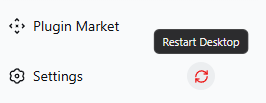
> Above: the button in the English UI (in the sidebar settings row, right of the gear; hover shows the "Restart Desktop" tooltip).
> The Chinese-UI screenshot lives in the [Chinese README](README.md).
## Features
- The button is injected into the sidebar's bottom **settings row** (right of the gear) — always inside the visible area, never clipped by the footer action stack;
- Click opens a **double-confirmation dialog**; on confirm the desktop main process's `desktopActions.requestRestart()` (Electron relaunch) is called and a "restarting…" wait overlay is shown;
- Texts are bound to the DSH **language system** (Settings → General → Language): Chinese / English switch automatically and **take effect immediately**;
- Effective only in the **desktop** profile; on a headless `web` profile the host answers `{ ok: false }` and a friendly error dialog is shown.
## Install (desktop profile)
Desktop-only; register it into the desktop profile:
1. Add this directory to the desktop profile's `dependencies` and `dsh.profile.bundles`:
```jsonc
// ~/.dsh/profiles/desktop/package.json
"dependencies": { "dsh-plugin-restart-desktop": "file:F:/path/to/dsh-plugin-restart-desktop" },
"dsh": { "profile": { "bundles": [ "@deepseek-ai/dsh-base", "@deepseek-ai/dsh-web-app", "dsh-plugin-restart-desktop" ] } }
```
2. Run `pnpm install` in the profile directory;
3. Restart DSH Desktop — the "Restart Desktop" button appears in the bottom-left settings row.
## License
MIT. See [LICENSE](LICENSE). Chinese docs: [README.md](README.md).