Eyevinn Channel Engine
[](https://www.npmjs.com/package/eyevinn-channel-engine)
[](https://github.com/Eyevinn/channel-engine/releases)
[](LICENSE)
[](https://github.com/eyevinn/channel-engine/issues?q=is%3Aissue+is%3Aopen+label%3A%22help+wanted%22)
[](https://github.com/eyevinn)
[](http://slack.streamingtech.se)
[](https://app.osaas.io/browse/channel-engine?utm_source=github&utm_medium=readme&utm_campaign=fast-channel)
Eyevinn Channel Engine is a core component library for creating FAST channels based on VOD2Live technology. Combine this vod2live technology component with your business and scheduling logic to build your very own and unique FAST channel engine.
Please see the [Documentation](https://vod2live.docs.eyevinn.technology) for introductory tutorials and how to get started building your own FAST channel engine.
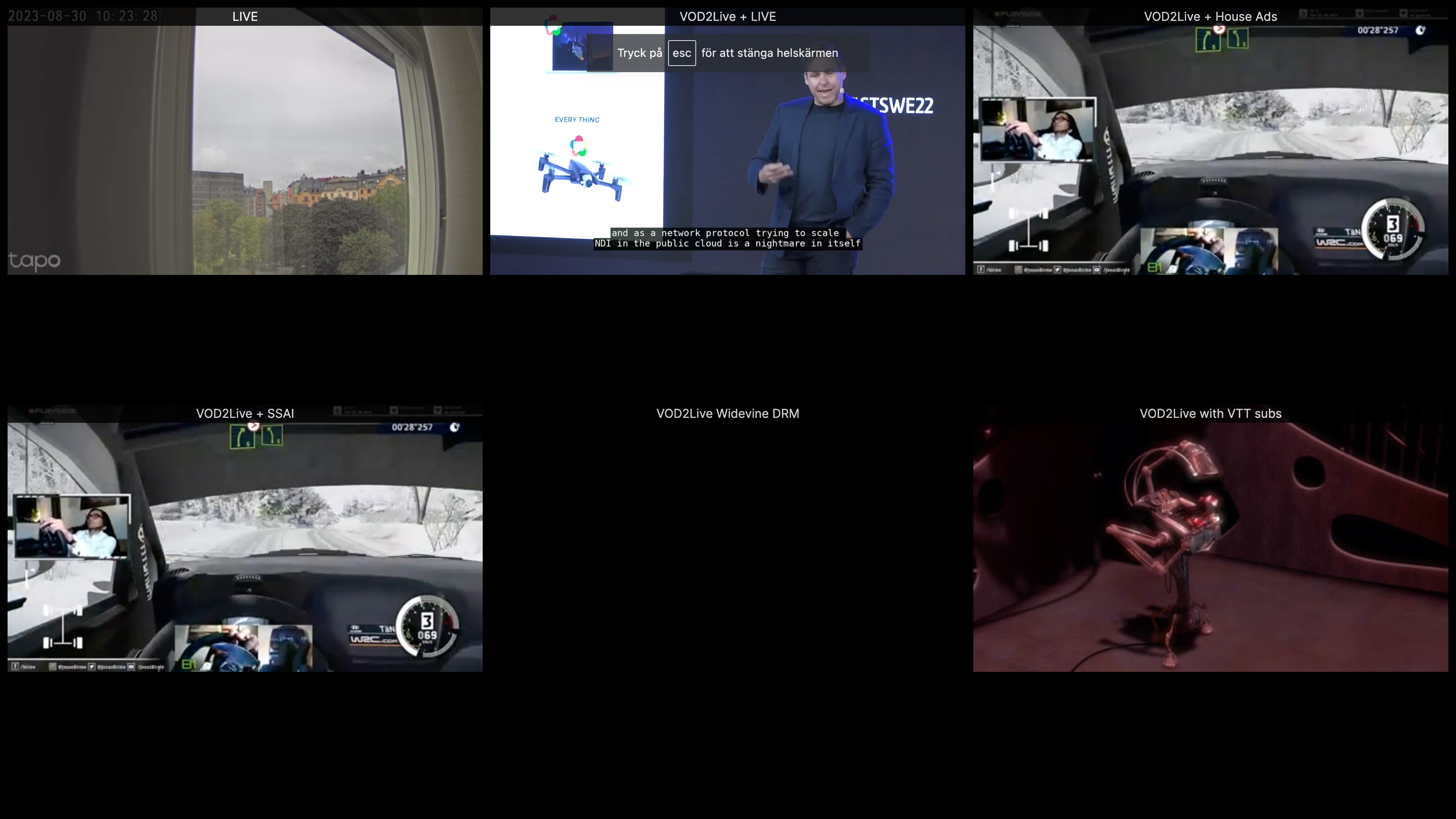
## Features
- Produce 24/7 HLS live channels based on already transcoded HLS VODs
- Produce a personalized 24/7 HLS live channel unique for each viewer
- Mix VOD2Live channel with a "real" live HLS stream
- Develop adapters to plugin with custom scheduling endpoints
- High Availability with Redis Cache or Valkey as shared state store
- Support for WebVTT subtitles
- Support for DRM encrypted HLS VODs (in beta)
- Improved performance with Redis connection pooling and pipelining
- Enhanced stability in High Availability mode
- Support for livemix with demuxed content (TS and CMAF)
- And much more!
## System Requirements
Supported Node.js Versions
| Version | Supported |
| ------- | --------- |
| 14.x | Yes |
| 16.x | Yes |
| 18.x | Yes |
## Supported Source Formats
| HLS Format | Muxed | Demuxed | Mix w. Live | Subtitles | Mix w. Live & Subtitles | DRM |
| ---------- | ----- | ------- | ----------- | --------- | ----------------------- | --- |
| HLS + TS | Yes | Yes | Yes | Yes | No | No |
| HLS + CMAF | Yes | Yes | Yes | Yes | No | No |
NOTE: The engine does not support subtitles in the live-mix + demux setting. Furthermore, then using the live-mix + demux setting, it is most optimal to use HLS content which has the same segment durations on all variants.
Using a mix of different segment durations may result in occasional playback/audio sync issues, but not always. Further development will be needed to resolve this and improve the robustness of the live-mix + demux experience.
## High Availability Support
[High availability support](https://vod2live.docs.eyevinn.technology/usage-guide.html#high-availability) is available in the Channel Engine and it uses Redis or Valkey as the shared storage. This allows you to run a replicaset behind a round-robin load balancer.
Supported Redis/Valkey Engine versions:
| Version | Supported |
| ------- | --------- |
| 5.x | Yes |
| 6.x | Yes |
| 7.x | No |
### Redis/Valkey Configuration
You can adjust Redis/Valkey connection pool size using the environment variable:
```
REDIS_POOL_SIZE=15 # Default is 15
```
## Usage (Docker)
Follow [this tutorial](https://vod2live.docs.eyevinn.technology/getting-started.html) to get started building your own FAST channel engine.
You can also use prebuilt [Eyevinn FAST Engine Docker Container](https://github.com/Eyevinn/docker-fast) based on this library. To try it out you can start an instance with 50 demo channels by running this command:
```
docker run -d -p 8000:8000 -p 8001:8001 \
-e DEMO_NUM_CHANNELS=50 \
eyevinntechnology/fast-engine
```
Open the URL http://localhost:8001/ in your browser for a multiview of all 50 channels, and to playback one of the 50 channels point your HLS video player to the URL: http://localhost:8000/channels//master.m3u8 where is a number between 1 and 50.
## Usage (Eyevinn Open Source Cloud)
Available as an open web service in [Eyevinn Open Source Cloud (OSC)](https://www.osaas.io).
1. Sign up for an [OSC account](https://www.osaas.io)
2. Get the personal access token in the web console (Settings/API)
3. Store it in the environment variable `OSC_ACCESS_TOKEN` in your shell
```bash
% export OSC_ACCESS_TOKEN=
```
4. Launch a channel called `guide` using the OSC command line tool.
```bash
% npx -y @osaas/cli create channel-engine guide \
-o type=Loop \
-o url=https://lab.cdn.eyevinn.technology/osc/osc-reel/a4e1156e-f872-455f-9f1f-be73b5effba8/index.m3u8
Instance created:
{
id: 'eyevinnlab-guide',
name: 'guide',
type: 'Loop',
url: 'https://lab.cdn.eyevinn.technology/osc/osc-reel/a4e1156e-f872-455f-9f1f-be73b5effba8/index.m3u8',
playback: 'https://eyevinnlab.ce.prod.osaas.io/channels/guide/master.m3u8'
}
```
This will create a linear channel by looping the Open Source Cloud demo reel video. Channel is available for playback on URL https://eyevinnlab.ce.prod.osaas.io/channels/guide/master.m3u8 in this case.
## Migration
### Upgrading from 4.x to >= 5.0.0
Version 5.0.0 introduces several significant improvements:
- **Web Framework Change**: Replaced Restify with Fastify for improved performance
- **Redis Improvements**: Added connection pooling and pipelining for better performance
- **Livemix Enhancements**: Support for demuxed content in both TS and CMAF formats
- **Stability Improvements**: Better handling of alignment in High Availability mode
- **Manifest Format Options**: Added option to disable legacy master manifest format
To migrate:
1. If you've extended the server functionality, you'll need to update your code to use Fastify instead of Restify
2. Review the new Redis pooling configuration options
3. Test your application thoroughly, especially if using High Availability mode
### Upgrading from 3.4.x to >= 4.0.0
Support for HLS-CMAF and handling audio and video segments of different durations was added to v4
and this means that it is not possible to mix muxed TS with demuxed CMAF.
### Upgrading from 3.3.x to >= 3.4.x
A breaking change was introduced in v3.4.0 when Typescript types were introduced. The library no longer exports a default. This means that you need to change `const ChannelEngine = require('eyevinn-channel-engine')` to `const { ChannelEngine } = require('eyevinn-channel-engine')`;
## Contributing
Read [CONTRIBUTING](CONTRIBUTING.md) first and then follow the instructions below to get started with the devolpment environment.
### Development
Install the dependencies:
```
npm install
```
Build the app:
```
npm run build
```
To start the reference implementation in `examples/default.ts` run:
```
npm start
```
For full debug mode you set the environment variable `DEBUG`.
```
DEBUG=* npm start
```
or if you want be more specific for example:
```
DEBUG=engine-* npm start
```
In addition there other reference implemetations that can be used:
- `examples/demux.ts` : example with demuxed audio
- `examples/livemix.ts` : example with live mixing
- `examples/multicodec.ts` : example with multicodec
- `examples/drm.ts` : example with DRM
- `examples/autocreate.ts` : example to auto create channel on demand
- `examples/truncate.ts` : example when trimming start and end of a VOD
### Source linking hls-vodtolive library
It is not uncommon that you need to test an local branch of the hls-vodtolive library and in order to do that you can use `npm link`.
1. Go to the directory where you have the source code for the hls-vodtolive library and run `npm link`
2. Then go to the channel engine source code directory and run `npm link @eyevinn/hls-vodtolive`
To restore and use the npm published version run the following in the channel engine source code directory:
```
npm uninstall --no-save @eyevinn/hls-vodtolive
npm install
```
## Support
Join our [community on Slack](http://slack.streamingtech.se) where you can post any questions regarding any of our open source projects. Eyevinn's consulting business can also offer you:
- Further development of this component
- Customization and integration of this component into your platform
- Support and maintenance agreement
## About Eyevinn Technology
[Eyevinn Technology](https://www.eyevinntechnology.se) is an independent consultant firm specialized in video and streaming. Independent in a way that we are not commercially tied to any platform or technology vendor. As our way to innovate and push the industry forward we develop proof-of-concepts and tools. The things we learn and the code we write we share with the industry in [blogs](https://dev.to/video) and by open sourcing the code we have written.
Want to know more about Eyevinn and how it is to work here. Contact us at work@eyevinn.se!