## Process Compose
[](https://go.dev/) [](https://GitHub.com/F1bonacc1/process-compose/graphs/commit-activity) [](http://makeapullrequest.com)  []() 
Process Compose is a simple and flexible scheduler and orchestrator to manage non-containerized applications.
 **Why?** Because sometimes you just don't want to deal with docker files, volume definitions, networks and docker registries.
Since it's written in Go, Process Compose is a single binary file and has no other dependencies.
Once [installed](https://f1bonacc1.github.io/process-compose/installation/), you just need to describe your workflow using a simple [YAML](http://yaml.org/) schema in a file called `process-compose.yaml`:
```yaml
version: "0.5"
processes:
hello:
command: echo 'Hello World'
pc:
command: echo 'From Process Compose'
depends_on:
hello:
condition: process_completed
```
And start it by running `process-compose` from your terminal.
Check the [Documentation](https://f1bonacc1.github.io/process-compose/launcher/) for more advanced use cases.
#### Features
- Processes execution (in parallel or/and serially)
- Processes dependencies and startup order
- Process recovery policies
- Manual process [re]start
- Processes arguments `bash` or `zsh` style (or define your own shell)
- Per process and global environment variables using [envsubst](https://github.com/drone/envsubst)
- Per process or global (single file) logs
- Health checks (liveness and readiness)
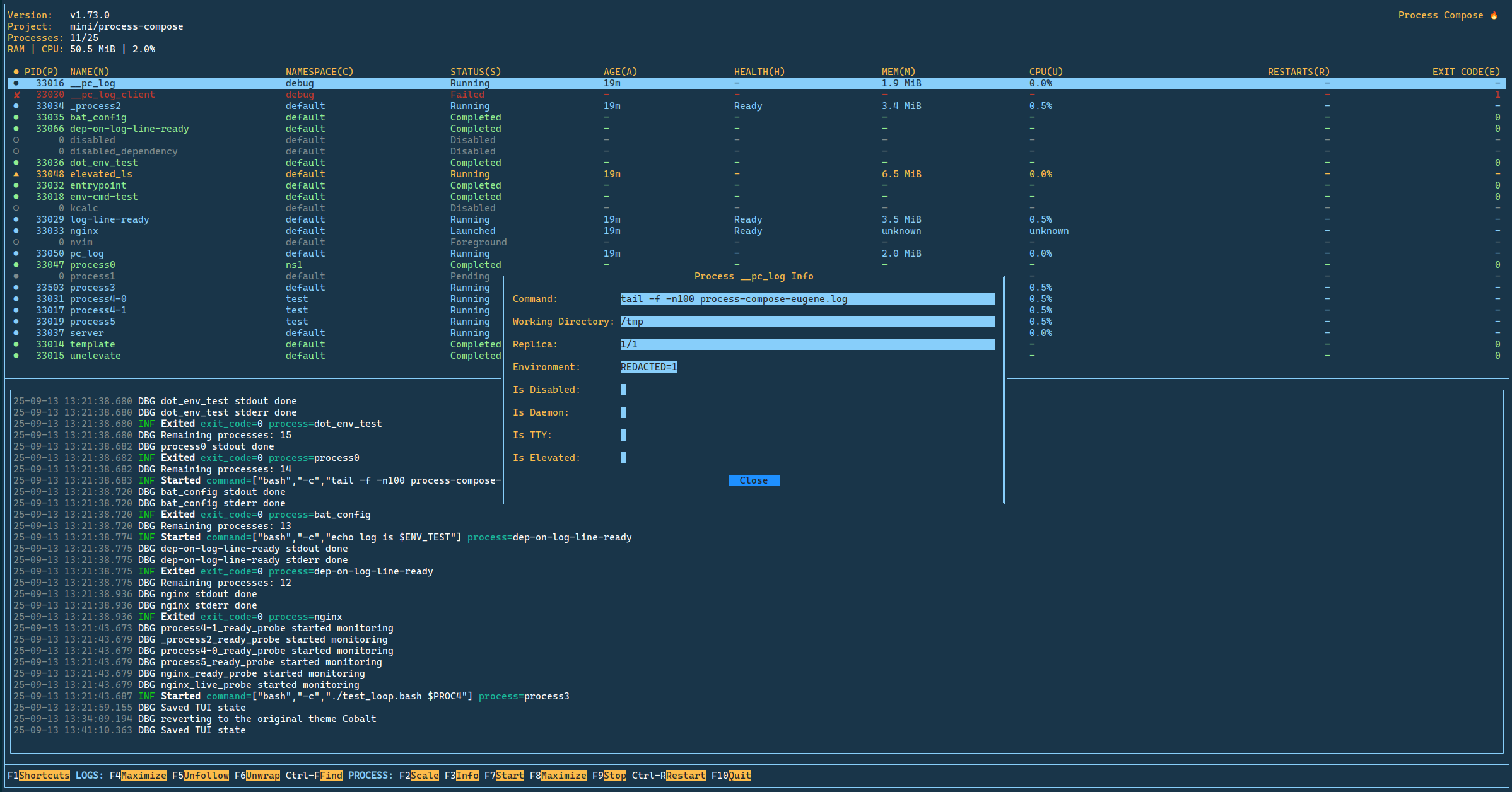
- Terminal User Interface (TUI) or CLI modes
- Forking (services or daemons) processes
- REST API (OpenAPI a.k.a Swagger) with optional token authentication `PC_API_TOKEN`
- Logs caching
- Functions as both server and client
- Configurable shortcuts
- Merge Configuration Files
- Namespaces
- Namespace Operations (Start, Stop, Restart via CLI and TUI)
- Run Multiple Replicas of a Process
- Run a Foreground Process
- Interactive Process
- Themes Support
- On the fly Process configuration edit
- On the fly Project update
- [Recipes](https://github.com/F1bonacc1/process-compose-recipes) Management
- Scheduled Processes (cron and interval-based)
- Dependency Graph visualization (CLI, TUI, and API)
- [MCP Server](https://f1bonacc1.github.io/process-compose/mcp-server/) integration for AI assistants — expose processes as tools/resources and (optionally) the project's own control plane (start/stop/scale/list/logs)
- Process Monitor (Push Notifications)
**Why?** Because sometimes you just don't want to deal with docker files, volume definitions, networks and docker registries.
Since it's written in Go, Process Compose is a single binary file and has no other dependencies.
Once [installed](https://f1bonacc1.github.io/process-compose/installation/), you just need to describe your workflow using a simple [YAML](http://yaml.org/) schema in a file called `process-compose.yaml`:
```yaml
version: "0.5"
processes:
hello:
command: echo 'Hello World'
pc:
command: echo 'From Process Compose'
depends_on:
hello:
condition: process_completed
```
And start it by running `process-compose` from your terminal.
Check the [Documentation](https://f1bonacc1.github.io/process-compose/launcher/) for more advanced use cases.
#### Features
- Processes execution (in parallel or/and serially)
- Processes dependencies and startup order
- Process recovery policies
- Manual process [re]start
- Processes arguments `bash` or `zsh` style (or define your own shell)
- Per process and global environment variables using [envsubst](https://github.com/drone/envsubst)
- Per process or global (single file) logs
- Health checks (liveness and readiness)
- Terminal User Interface (TUI) or CLI modes
- Forking (services or daemons) processes
- REST API (OpenAPI a.k.a Swagger) with optional token authentication `PC_API_TOKEN`
- Logs caching
- Functions as both server and client
- Configurable shortcuts
- Merge Configuration Files
- Namespaces
- Namespace Operations (Start, Stop, Restart via CLI and TUI)
- Run Multiple Replicas of a Process
- Run a Foreground Process
- Interactive Process
- Themes Support
- On the fly Process configuration edit
- On the fly Project update
- [Recipes](https://github.com/F1bonacc1/process-compose-recipes) Management
- Scheduled Processes (cron and interval-based)
- Dependency Graph visualization (CLI, TUI, and API)
- [MCP Server](https://f1bonacc1.github.io/process-compose/mcp-server/) integration for AI assistants — expose processes as tools/resources and (optionally) the project's own control plane (start/stop/scale/list/logs)
- Process Monitor (Push Notifications)
 ## Get Process Compose
[Installation Instructions](https://f1bonacc1.github.io/process-compose/installation/)
## Documentation
[Quick Start](https://f1bonacc1.github.io/process-compose/intro/)
[Documentation](https://f1bonacc1.github.io/process-compose/launcher/)
## How to Contribute
1. Fork it
2. Create your feature branch (git checkout -b my-new-feature)
3. Commit your changes (git commit -am 'Add some feature')
4. Push to the branch (git push origin my-new-feature)
5. Create new Pull Request
See the [Contributing](https://f1bonacc1.github.io/process-compose/contributing/) page for more details.
English is not my native language, so PRs correcting grammar or spelling are welcome and appreciated.
### Consider supporting the project ❤️
##### Github (preferred)
Huge thanks to my **amazing** GitHub sponsors:

##### Bitcoin
## Get Process Compose
[Installation Instructions](https://f1bonacc1.github.io/process-compose/installation/)
## Documentation
[Quick Start](https://f1bonacc1.github.io/process-compose/intro/)
[Documentation](https://f1bonacc1.github.io/process-compose/launcher/)
## How to Contribute
1. Fork it
2. Create your feature branch (git checkout -b my-new-feature)
3. Commit your changes (git commit -am 'Add some feature')
4. Push to the branch (git push origin my-new-feature)
5. Create new Pull Request
See the [Contributing](https://f1bonacc1.github.io/process-compose/contributing/) page for more details.
English is not my native language, so PRs correcting grammar or spelling are welcome and appreciated.
### Consider supporting the project ❤️
##### Github (preferred)
Huge thanks to my **amazing** GitHub sponsors:

##### Bitcoin
 3QjRfBzwQASQfypATTwa6gxwUB65CX1jfX
Thank **You**!
3QjRfBzwQASQfypATTwa6gxwUB65CX1jfX
Thank **You**!