# 🤖 GPT-Telegramus v5
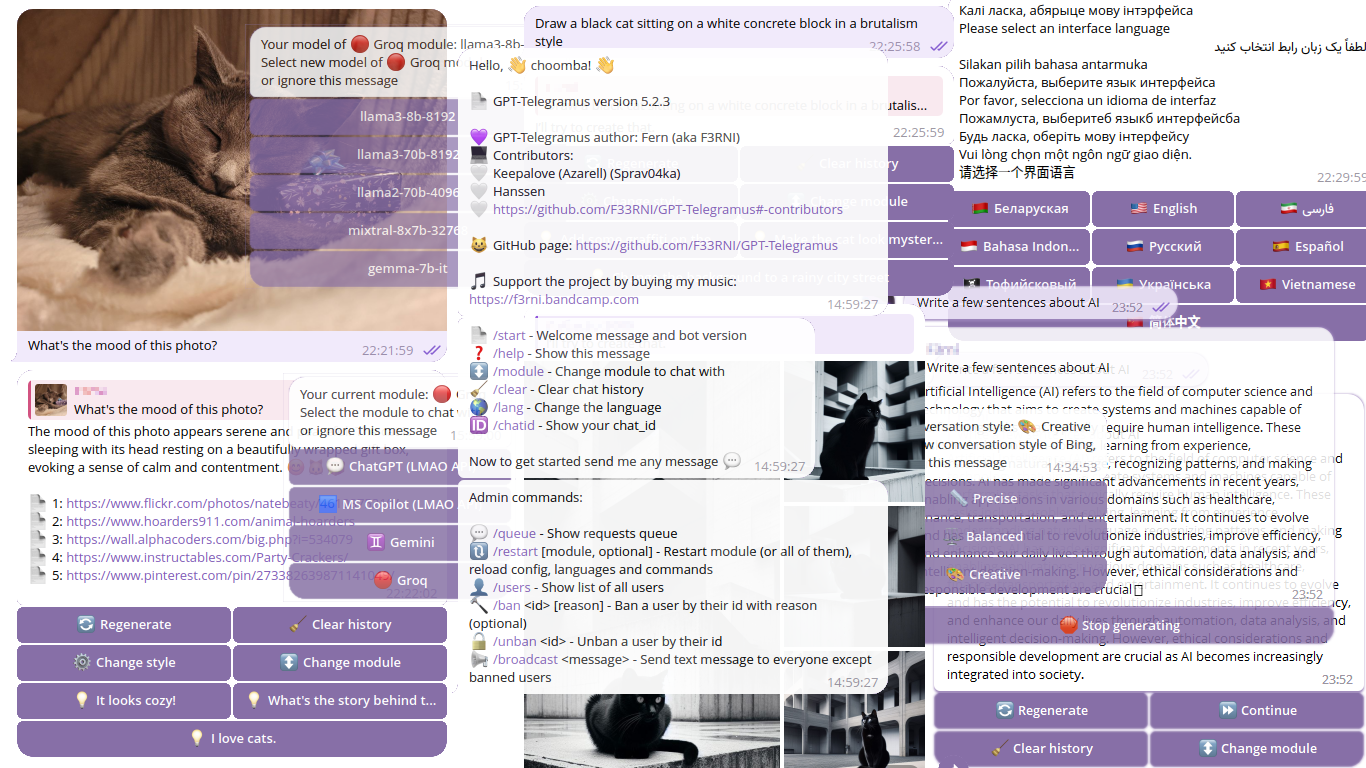
|  | The best free Telegram bot for ChatGPT, Microsoft Copilot (aka Bing AI / Sidney / EdgeGPT), Microsoft Copilot Designer (aka BingImageCreator), Gemini and Groq with stream writing, requests with images, multiple languages, admin control, data logging and more!
|
| -------------------------------- | :--------------------------------------------------------------------------------------------------------------------------------------------------------------------------------------------------------------------------------------------------------------------------: |





----------
## 🚧 GPT-Telegramus is under development
> 😔 Currently, GPT-Telegramus doesn't have paid ChatGPT and DALL-E support
>
> 📈 GPT-Telegramus v5 is an updated and highly refactored version of the old GPT-Telegramus
>
> 📄 Documentation is also under development! Consider reading docstring for now
>
> 🐛 If you find a **bug** in GPT-Telegramus, please create an Issue
>
> p.s. Due to my studies, I don't have much time to work on the project 😔
----------
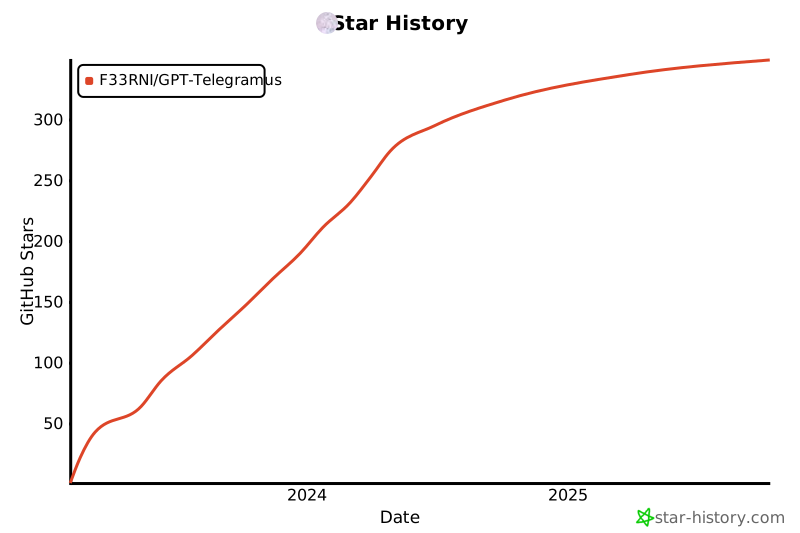
## 😋 Support project
> 💜 Please support the project so that I can continue to develop it
- BTC: `bc1qd2j53p9nplxcx4uyrv322t3mg0t93pz6m5lnft`
- ETH: `0x284E6121362ea1C69528eDEdc309fC8b90fA5578`
- ZEC: `t1Jb5tH61zcSTy2QyfsxftUEWHikdSYpPoz`
- Or by my music on [🟦 bandcamp](https://f3rni.bandcamp.com/)
- Or message me if you would like to donate in other way 💰
[](https://star-history.com/#F33RNI/GPT-Telegramus&Date)
----------
## 🤗 Contributors
- 💜 [Sprav04ka](https://github.com/Sprav04ka) - *Tofii'skovyi' language, Testing, Super beautiful poster, Project Logo, Motivation*
- 💜 [Hanssen](https://github.com/Hanssen0) - *Markdown parsing, bard images, /chat command, caption fix, loading emoji, dynamic splitting, code block splitting, Gemini module, Docker fix, GitHub actions fix* **and much much more**
- 💜 [Sergey Krashevich](https://github.com/skrashevich) - *Docker, GitHub Actions*
- 💜 [Wahit Fitriyanto](https://github.com/wahitftry) - *Indonesian language*
- 💜 [Alexander Fadeyev](https://github.com/alfsoft) - *EdgeGPT Fix*
- 💜 AnthroAsja - *Belarusian language*
- 💜 Anonymous Samurai - *Ukrainian language*
- 💜 Dunya Jafari - *Persian language*
- 💜 [Dedy Rudney](https://github.com/rudney5000) - *French language*
----------
## 📨 Project channel and demo
- You can join official project's Telegram channel
- Also you can test GPT-Telegramus using official bot
⚠️ Please do not overload the bot and use it only as a demo version
----------
## 🏗️ Requirements
- Python **3.10** / **3.11** *(not tested on other versions)*
- Unblocked access to the telegram bot official API
- Other requirements specified in the `requirements.txt` file
----------
## 📙 Project based on
- **F33RNI/LMAO API** (Unofficial open APIs):
- **Groq API** (Official Python API):
- **acheong08/EdgeGPT** (API):
- **jacobgelling/EdgeGPT** (API):
- **acheong08/BingImageCreator** (API):
- **google/generative-ai-python** (API):
- **python-telegram-bot** (Telegram bot API):
----------
## ❓ Get started
See **🐧 Running as service on linux**, **🍓 Running on Raspberry Pi (ARM)**, **🐋 Running in Docker** sections for more info
1. Install Python **3.10** / **3.11** *(not tested on other versions)*, `venv` and `pip`
2. Download source code (clone repo)
3. Create venv `python -m venv venv` / `python3 -m venv venv` / `python3.10 -m venv venv` / `python3.11 -m venv venv`
4. Activate venv `source venv/bin/activate` / `venv\Scripts\activate.bat`
5. Check python version using `python --version` command
6. Install requirements `pip install -r requirements.txt --upgrade`
7. Carefully change all the settings in `config.json` file and in each `*.json` file inside `module_configs` directory. If you have questions regarding any setting, open an issue, I'll try to add a more detailed description
8. Run main script `python main.py`
- 💬 **ChatGPT**
- Free browser-like Chat-GPT. Currently, without extensions and image requests (text only) (because I don't have a paid account to test it)
- Stream response support
- Chat history support
- See for more info
- 🟦 **Microsoft Copilot (aka EdgeGPT aka Bing AI aka Sydney)**
- Supports conversation style `/style`
- Stream response support
- Chat history support
- Web-browsing (probably) and sources (attributions) support
- Accepts image requests (for **lmao_ms_copilot** only)
- Send generated images (for **lmao_ms_copilot** only)
- Suggestions (for **lmao_ms_copilot** only)
- See for more info
- **NOTE:** Non-LMAO API (the old one `ms_copilot`) is deprecated! Please use `lmao_ms_copilot` instead
- 🎨 *Microsoft Copilot Designer* (**DEPRECATED**)
- Bing Image Generator. Used as a separate module due to issues with the EdgeGPT module
- Free and unlimited
- ♊ **Gemini**
- Google's AI using the Gemini Pro model
- Chat history support
- Requests with images (you can send an image with text to it)
- Requests with images will not be recorded in the chat history since Google hasn't support this
- 🔴 **Groq**
- Official Python API
- Chat history support
- **Very fast** response
- Multiple models (*see `/model` command*)
----------
## 🐧 Running as service on linux
1. Install Python **3.10** / **3.11** *(not tested on other versions)*, `venv` and `pip`
2. Clone repo
1. `git clone https://github.com/F33RNI/GPT-Telegramus.git`
2. `cd GPT-Telegramus`
3. Create venv `python -m venv venv` / `python3 -m venv venv` / `python3.10 -m venv venv` / `python3.11 -m venv venv`
4. Carefully change all the settings in `config.json` file and in each `*.json` file inside `module_configs` directory
5. Install systemd
1. `sudo apt-get install -y systemd`
6. Create new service file
1. `sudo nano /etc/systemd/system/gpt-telegramus.service`
```ini
[Unit]
Description=GPT-Telegramus service
After=multi-user.target
[Service]
Type=simple
Restart=on-failure
RestartSec=5
WorkingDirectory=YOUR DIRECTORY HERE/GPT-Telegramus
ExecStart=YOUR DIRECTORY HERE/GPT-Telegramus/run.sh
[Install]
WantedBy=multi-user.target
```
7. Reload systemctl daemon
1. `sudo systemctl daemon-reload`
8. Enable and start service
1. `sudo systemctl enable gpt-telegramus`
2. `sudo systemctl start gpt-telegramus`
9. Note: Please use `sudo systemctl kill gpt-telegramus` and then `sudo systemctl stop gpt-telegramus` if only `sudo systemctl stop gpt-telegramus` not working
----------
## 🍓 Running on Raspberry Pi (ARM)
1. Install Python 3.11 or later *(not tested)* if not installed
1. ```shell
sudo apt-get update
sudo apt-get install -y build-essential tk-dev libncurses5-dev libncursesw5-dev libreadline6-dev libdb5.3-dev libgdbm-dev libsqlite3-dev libssl-dev libbz2-dev libexpat1-dev liblzma-dev zlib1g-dev libffi-dev
wget https://www.python.org/ftp/python/3.11.8/Python-3.11.8.tgz
sudo tar zxf Python-3.11.8.tgz
cd Python-3.11.8
sudo ./configure --enable-optimizations
sudo make -j 4
sudo make altinstall
```
2. Check version by typing `python3.11 -V`. After this, you should use `python3.11` command instead of `python` or you can add it to the `bashrc` by typing `echo "alias python=/usr/local/bin/python3.11" >> ~/.bashrc`
2. Follow the `🐧 Running as service on linux` guide
----------
## 🐋 Running in Docker
### From GitHub Package
1. Clone repo or download [`config.json`](./config.json) and [`module_configs`](./module_configs) and [`langs`](./langs)
2. Edit the `config.json`, set options in the `files` section to the path in the container (`/app/config/`)
3. Run the container
```shell
docker run -d -e TELEGRAMUS_CONFIG_FILE="/app/config/config.json" -v :/app/config --name gpt-telegramus --restart on-failure ghcr.io/f33rni/gpt-telegramus:latest
```
If you want to try the preview version
```shell
docker run -d -e TELEGRAMUS_CONFIG_FILE="/app/config/config.json" -v :/app/config --name gpt-telegramus --restart on-failure ghcr.io/f33rni/gpt-telegramus:edge
```
### Build Manually
1. Install Docker
2. Clone repo
3. Build container
```shell
docker buildx build -t telegramus --load -f Dockerfile .
```
4. Run the container
```shell
docker run -d --name gpt-telegramus --restart on-failure telegramus
```
or if you want to use a custom config
```shell
docker run -d -e TELEGRAMUS_CONFIG_FILE="/app/config/config.json" -v :/app/config --name gpt-telegramus --restart on-failure telegramus
```
----------
## 🌐 Bot messages
### Currently available languages
- 🇺🇸 English
- 🇷🇺 Русский
- ☠️ Тофийсковый
- 🇮🇩 Bahasa Indonesia
- 🇨🇳 简体中文
- 🇧🇾 Беларуская
- 🇺🇦 Українська
- فارسی 🇮🇷
- 🇪🇸 Español
- 🇻🇳 Vietnamese
- 🇫🇷 Français
You can add **a new language**. For that:
1. Copy any existing language file (inside `langs` directory)
2. Rename it according to `Set2/T` (3-letters code) **ISO 639**
3. Translate each entry
4. Create a pull request 💜
> You can add new lines by adding `\n`
>
> ⚠️ Please make sure you haven't messed up the string formatting structure `{this_type}`
----------
## 🤖 Telegram bot commands
- 📄 `/start` - Welcome message and bot version
- ❓ `/help` - Show help message
- ↕️ `/module` - Change module to chat with
- 🧹 `/clear` - Clear chat history
- 🌎 `/lang` - Change the language
- 🆔 `/chatid` - Show your chat_id
- ⚙️ `/model` - Change model of module (Currently for 🔴 Groq module only)
- `/style` - Bing AI conversation style
- `/chat` - Send request in group chat
- Other direct module commands (please check automatically-generated list of commands inside bot)
### Admin commands
- 💬 `/queue` - Show requests queue
- 🔃 `/restart [module name, optional]` - Restart specific module (**and it's config**) or every module and all configs, languages and bot commands
- Please see `bot_command_restart` function in `bot_handler.py` file for more info
- 👤 `/users` - Show list of all users
- 🔨 `/ban [reason]` - Ban a user by their id with reason (optional)
- 🔓 `/unban ` - Unban a user by their id
- 📢 `/broadcast ` - Send text message to everyone except banned users
----------
## 📜 Data collecting
GPT-Telegramus has a built-in data collecting function (saves requests and responses in a files)
- **For text requests / responses** will be saved as plain text
- **For image requests / responses** will be saved as Base64-encoded image (in the same text file)
You can enable and configure data collection in `config.json` in `data_collecting` section
> ⚠️ Please make sure you notify your bot users that you're collecting data
----------
## 📝 TODO
- Paid version of ChatGPT
- DALL-E (from OpenAI)
- Some other LLMs (and maybe some free GPT-4 model)
----------
## ✨ Contribution
- Anyone can contribute! Just create a **pull request**


