# Week Planner Card




[](https://www.buymeacoffee.com/rudygnodde)
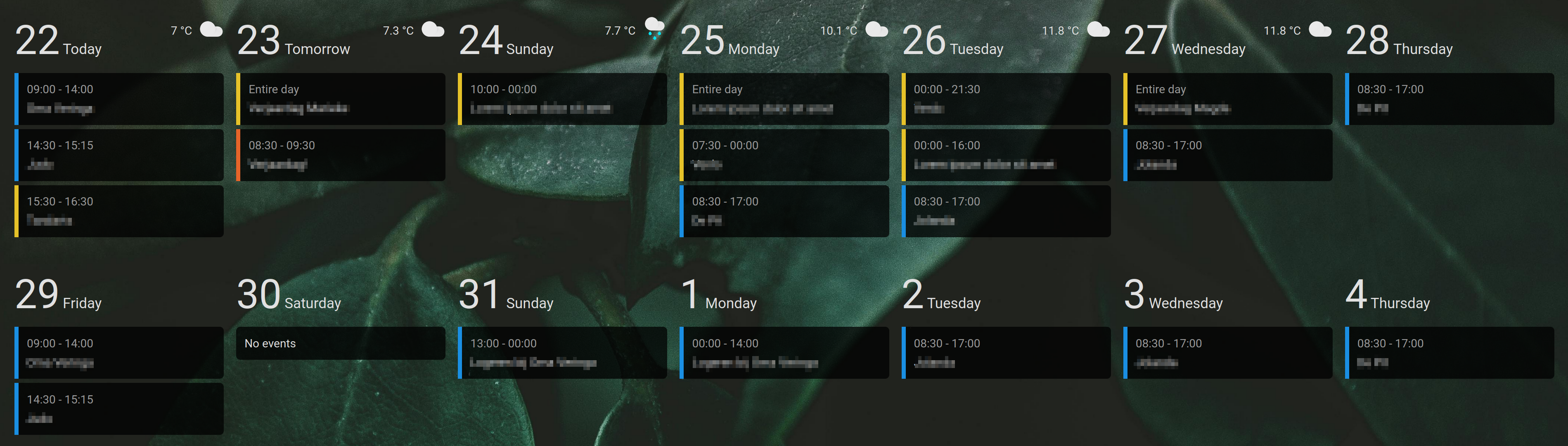
Custom Home Assistant card displaying a responsive overview of multiple days with events from one or multiple calendars
## Table of Content
- [Installation](#installation)
- [HACS (Recommended)](#hacs-recommended)
- [Manual](#manual)
- [Configuration](#configuration)
- [Main options](#main-options)
- [Calendars](#calendars)
- [Texts](#texts)
- [Weather](#weather)
- [Custom styling using cardmod](#custom-styling-using-cardmod)
- [Examples](#examples)
## Installation
### HACS (Recommended)
1. Make sure [HACS](https://hacs.xyz) is installed and working.
2. Search for `week-planner-card`.
3. Download and install using HACS.
### Manual
1. Download and copy `week-planner-card.js` from the [latest release](https://github.com/FamousWolf/week-planner-card/releases/latest) into your `config/www` directory.
2. Add the resource reference to Home Assistant configuration using one of these methods:
- **Edit your configuration.yaml**
Add:
```yaml
resources:
- url: /local/week-planner-card.js?version=1.14.1
type: module
```
- **Using the graphical editor**
1. Make sure advanced mode is enabled in your user profile
2. Navigate to "Settings" -> "Dashboards".
3. Click on the 3 vertical dots in the top right corner and select "Resources".
4. Click on the "Add resource" button in the bottom right corner.
5. Enter URL `/local/week-planner-card.js` and select type "JavaScript Module".
6. Restart Home Assistant.
## Configuration
### Main Options
| Name | Type | Default | Supported options | Description | Version |
|--------------------------|------------------|----------------------------------------------------|---------------------------------------------------------------------------------------------------------------------------------------------|----------------------------------------------------------------------------------------|---------|
| `type` | string | **Required** | `custom:week-planner-card` | Type of the card | 1.0.0 |
| `title` | string | optional | Any string | Card title | 1.6.0 |
| `days` | number \| string | 7 | Any positive integer number \| `month` | The number of days to show | 1.0.0 |
| `maxEvents` | number | 0 | Any positive integer number | The maximum number of events to show (0 is no maximum) | 1.11.0 |
| `maxDayEvents` | number | 0 | Any positive integer number | The maximum number of events to show per day (0 is no maximum) | 1.11.0 |
| `startingDay` | string | `today` | `today` \| `tomorrow` \| `yesterday` \| `sunday` \| `monday` \| `tuesday` \| `wednesday` \| `thursday` \| `friday` \| `saturday` \| `month` | Day to start with | 1.2.0 |
| `startingDayOffset` | number | 0 | Any integer number | Add or subtract days from starting day | 1.7.0 |
| `hideWeekend` | boolean | false | `false` \| `true` | Do not show Saturday and Sunday | 1.2.0 |
| `noCardBackground` | boolean | false | `false` \| `true` | Do not show default card background and border | 1.0.0 |
| `eventBackground` | string | `var(--card-background-color, inherit)` | Any CSS color | Background color of the events | 1.0.0 |
| `compact` | boolean | false | `false` \| `true` | Use compact mode, decreasing several spacings and font sizes | 1.2.0 |
| `updateInterval` | number | 60 | Any positive integer number | Seconds between checks for new events | 1.0.0 |
| `calendars` | object list | **Required** | See [Calendars](#calendars) | Calendars shown in this card | 1.0.0 |
| `texts` | object list | {} | See [Texts](#texts) | Texts used in the card | 1.0.0 |
| `actions` | object list | {} | See [Actions](#actions) | Actions for the card | 1.8.0 |
| `weather` | object | optional | See [Weather](#weather) | Configuration for optional weather forecast | 1.1.0 |
| `dayFormat` | string | optional | See [Luxon format](https://moment.github.io/luxon/#/formatting?id=table-of-tokens) | Format of the date at the top of the day. This is not escaped, so HTML is allowed here | 1.6.0 |
| `dateFormat` | string | `cccc d LLLL yyyy` | See [Luxon format](https://moment.github.io/luxon/#/formatting?id=table-of-tokens) | Format of the date in event details | 1.0.0 |
| `timeFormat` | string | `HH:mm` | See [Luxon format](https://moment.github.io/luxon/#/formatting?id=table-of-tokens) | Format of the time | 1.0.0 |
| `multiDayTimeFormat` | string | `d LL HH:mm` | See [Luxon format](https://moment.github.io/luxon/#/formatting?id=table-of-tokens) | Format of the time for multi day events | 1.14.0 |
| `locale` | string | `en` | Any locale string supported by Luxon | Locale used for day and month texts | 1.1.0 |
| `multiDayMode` | string | `default` | See [Multi day mode](#multiDayMode) | How to show multi day events | 1.14.0 |
| `locationLink` | string | `https://www.google.com/maps/search/?api=1&query=` | Any URL | Link used for event location in the detail popup | 1.1.0 |
| `showTitle` | boolean | true | `false` \| `true` | Show event title in overview | 1.11.0 |
| `showDescription` | boolean | false | `false` \| `true` | Show event description in overview | 1.11.0 |
| `showLocation` | boolean | false | `false` \| `true` | Show event location in overview | 1.3.0 |
| `hidePastEvents` | boolean | false | `false` \| `true` | Do not show past events | 1.3.0 |
| `hideAllDayEvents` | boolean | false | `false` \| `true` | Do not show all day events (this includes "middle" days for multi day events) | 1.14.0 |
| `hideDaysWithoutEvents` | boolean | false | `false` \| `true` | Do not show days without events, except for today | 1.4.0 |
| `hideTodayWithoutEvents` | boolean | false | `false` \| `true` | Also do not show today without events if `hideDaysWithoutEvents` is set | 1.8.0 |
| `filter` | string | optional | Any regular expression | Remove events that match the regular expression | 1.7.0 |
| `filterText` | string | optional | Any regular expression | Remove text from events | 1.10.0 |
| `replaceTitleText` | object | optional | See [Replace title text](#replace-title-text) | Replace title text | 1.12.0 |
| `combineSimilarEvents` | boolean | false | `false` \| `true` | Combine events with the same start date/time, end date/time and title | 1.9.0 |
| `showLegend` | boolean | false | `false` \| `true` | Show calendar legend | 1.7.0 |
| `legendToggle` | boolean | false | `false` \| `true` | Toggle calendars by clicking on the legend | 1.11.0 |
| `columns` | object | optional | See [Columns](#columns) | Configuration to override the number of columns | 1.11.0 |
| `showNavigation` | boolean | false | `false` \| `true` | Show navigational arrows to traverse additional dates on calendar. | 1.12.0 |
| `showWeekDayText` | boolean | false | `false` \| `true` | Display the weekday in a header instead of individual days when days >=7 | 1.13.0 |
**Note regarding Month View:**
When `days` is set to `month` and `startingDay` is configured as a specific weekday (e.g., `monday` to `sunday`), the calendar will align the display with the specified starting day of the week. In this mode, days falling outside the current month will be excluded from the view.
### Calendars
| Name | Type | Default | Supported options | Description | Version |
|--------------------|---------|--------------|-----------------------------------------------|--------------------------------------------------------|---------|
| `entity` | string | **Required** | `calendar.my_calendar` | Entity ID | 1.0.0 |
| `name` | string | optional | Any text | Name of the calendar | 1.7.0 |
| `color` | string | optional | Any CSS color | Color used for events from the calendar | 1.0.0 |
| `icon` | string | optional | Any icon | Icon used for events from the calendar | 1.10.0 |
| `eventTitleField` | string | optional | Any text | Name of the title field for events (usually `summary`) | 1.11.0 |
| `filter` | string | optional | Any regular expression | Remove events that match the regular expression | 1.8.0 |
| `filterText` | string | optional | Any regular expression | Remove text from events | 1.10.0 |
| `replaceTitleText` | object | optional | See [Replace title text](#replace-title-text) | Replace title text | 1.12.0 |
| `hideInLegend` | boolean | false | `false` \| `true` | Do not show the calendar in the legend | 1.8.0 |
| `initiallyHidden` | boolean | false | `false` \| `true` | Initially hide the calendar | 1.13.0 |
### Texts
| Name | Type | Default | Supported options | Description | Version |
|--------------|--------|-----------------------------------|-------------------|---------------------------------------------------------------------------------|---------|
| `fullDay` | string | `Entire day` | Any text | Text shown for full day events instead of time | 1.0.0 |
| `noEvents` | string | `No events` | Any text | Text shown when there are no events for a day | 1.0.0 |
| `moreEvents` | string | `More events` | Any text | Text shown when there are more events for a day | 1.11.0 |
| `today` | string | `Today` | Any text | Text shown for today instead of the week day. Set to empty to show week day | 1.0.0 |
| `tomorrow` | string | `Tomorrow` | Any text | Text shown for tomorrow instead of the week day. Set to empty to show week day | 1.0.0 |
| `yesterday` | string | `Yesterday` | Any text | Text shown for yesterday instead of the week day. Set to empty to show week day | 1.2.0 |
| `sunday` | string | Name of Sunday based on locale | Any text | Text used to override Sundays | 1.1.0 |
| `monday` | string | Name of Monday based on locale | Any text | Text used to override Mondays | 1.1.0 |
| `tuesday` | string | Name of Tuesday based on locale | Any text | Text used to override Tuesdays | 1.1.0 |
| `wednesday` | string | Name of Wednesday based on locale | Any text | Text used to override Wednesdays | 1.1.0 |
| `thursday` | string | Name of Thursday based on locale | Any text | Text used to override Thursdays | 1.1.0 |
| `friday` | string | Name of Friday based on locale | Any text | Text used to override Fridays | 1.1.0 |
| `saturday` | string | Name of Saturday based on locale | Any text | Text used to override Saturdays | 1.1.0 |
### Actions
See [Actions documentation](https://www.home-assistant.io/dashboards/actions/). Currently only the tap action is supported.
### Weather
| Name | Type | Default | Supported options | Description | Version |
|----------------------|---------|--------------|------------------------------|--------------------------------------------------------------------------------|---------|
| `entity` | string | **Required** | `weather.my_weather_service` | Entity ID | 1.1.0 |
| `useTwiceDaily` | boolean | false | `false` \| `true` | Use twice daily forecast if your weather entity doesn't support daily forecast | 1.9.0 |
| `showCondition` | boolean | true | `false` \| `true` | Show condition icon | 1.1.0 |
| `showTemperature` | boolean | false | `false` \| `true` | Show temperature | 1.1.0 |
| `showLowTemperature` | boolean | false | `false` \| `true` | Show low temperature | 1.1.0 |
### Columns
By default, the columns are based on the width of the card. You can use these settings to override the default number of columns.
| Name | Type | Default | Supported options | Description | Version |
|--------------|---------|----------|---------------------|---------------------------------------------------------|---------|
| `extraLarge` | number | optional | Any positive number | Number of columns when the card width is >= 1920 pixels | 1.11.0 |
| `large` | number | optional | Any positive number | Number of columns when the card width is >= 1280 pixels | 1.11.0 |
| `medium` | number | optional | Any positive number | Number of columns when the card width is >= 1024 pixels | 1.11.0 |
| `small` | number | optional | Any positive number | Number of columns when the card width is >= 640 pixels | 1.11.0 |
| `extraSmall` | number | optional | Any positive number | Number of columns when the card width is < 640 pixels | 1.11.0 |
### Multi day mode
Multi day mode determines how multi day events are displayed. The following options are available:
- **default**
On the first day, the start time is the start time of the event. On the last day, the end time is the end time of the event. Any middle days will be shown as full day events.
- **single**
The event is only shown on the first (available) day. `multiDayTimeFormat` is used for formatting of the time.
- **multiple**
The event is shown on all (available) days. `multiDayTimeFormat` is used for formatting of the time.
### Replace title text
You can replace text in the title. For example:
```yaml
replaceTitleText:
"Search text": "Replace text"
"Foo": "Bar"
```
This will replace the text "Search text" with "Replace text" and "Foo" with "Bar". This option is not available in the visual editor.
## Custom styling using cardmod
Like with most cards, you can add custom styling to this card using [card_mod](https://github.com/thomasloven/lovelace-card-mod). To make it easier to add custom styles to days and/or events, there are several classes that days and events can have. Additionally, there are data attributes you can use in CSS selectors.
### Day classes
| Class | Description | Version |
|-------------|--------------------|---------|
| `today` | The current day | 1.5.0 |
| `tomorrow` | The next day | 1.5.0 |
| `yesterday` | The previous day | 1.5.0 |
| `future` | Day in the future | 1.5.0 |
| `past` | Day in the past | 1.5.0 |
| `sunday` | Day is a sunday | 1.6.0 |
| `monday` | Day is a monday | 1.6.0 |
| `tuesday` | Day is a tuesday | 1.6.0 |
| `wednesday` | Day is a wednesday | 1.6.0 |
| `thursday` | Day is a thursday | 1.6.0 |
| `friday` | Day is a friday | 1.6.0 |
| `saturday` | Day is a saturday | 1.6.0 |
### Day data attributes
| Data attribute | Description | Version |
|----------------|--------------------|---------|
| `data-date` | The day number | 1.7.0 |
| `data-weekday` | The weekday number | 1.7.0 |
| `data-month` | The month number | 1.7.0 |
| `data-year` | The year | 1.7.0 |
| `data-week` | The week number | 1.7.0 |
### Event classes
| Class | Description | Version |
|------------|----------------------------|---------|
| `fullday` | Event lasts the full day | 1.5.0 |
| `multiDay` | Event covers multiple days | 1.14.0 |
| `ongoing` | Currently ongoing | 1.5.0 |
| `future` | Event in the future | 1.5.0 |
| `past` | Event in the past | 1.5.0 |
### Event data attributes
| Data attribute | Description | Version |
|----------------------------|-----------------------------------------------------------------|---------|
| `data-entity` | The calendar entity | 1.6.0 |
| `data-additional-entities` | Comma-separated list of additional entities for combined events | 1.9.0 |
| `data-summary` | The event title | 1.9.0 |
| `data-location` | The event location | 1.9.0 |
| `data-start-hour` | The event start hour | 1.9.0 |
| `data-start-minute` | The event start minute | 1.9.0 |
| `data-end-hour` | The event end hour | 1.9.0 |
| `data-end-minute` | The event end minute | 1.9.0 |
## Examples
### Minimal
```yaml
type: custom:week-planner-card
calendars:
- entity: calendar.my_calendar_1
```
### Extended
```yaml
type: custom:week-planner-card
calendars:
- entity: calendar.my_calendar_1
color: '#e6c229'
- entity: calendar.my_calendar_2
color: '#1a8fe3'
weather:
entity: weather.my_weather_service
showTemperature: true
showLowTemperature: true
days: 14
noCardBackground: true
eventBackground: rgba(0, 0, 0, .75)
locationLink: https://www.openstreetmap.org/search?query=
locale: nl
texts:
noEvents: Geen activiteiten
fullDay: Hele dag
today: Vandaag
tomorrow: Morgen
```
### Starting on Sunday
```yaml
type: custom:week-planner-card
calendars:
- entity: calendar.my_calendar_1
color: '#e6c229'
- entity: calendar.my_calendar_2
color: '#1a8fe3'
startingDay: sunday
texts:
today: ''
tomorrow: ''
yesterday: ''
```
### Past events transparent with card_mod
```yaml
type: custom:week-planner-card
calendars:
- entity: calendar.my_calendar_1
color: '#e6c229'
- entity: calendar.my_calendar_2
color: '#1a8fe3'
card_mod:
style: |
.event.past {
opacity: .3;
}
```
### Highlight Today with card_mod
```yaml
type: custom:week-planner-card
calendars:
- entity: calendar.my_calendar_1
color: '#e6c229'
- entity: calendar.my_calendar_2
color: '#1a8fe3'
card_mod:
style: |
.day.today {
box-sizing: border-box;
border: 2px solid #00ffff;
border-radius: 6px;
box-shadow: inset 0 0 5px #00ffff;
margin: 2px;
}
```
### Custom event style based on title text with card_mod
This will style events with `Word1` as part of the title or `Word2` as the exact title with a red background.
```yaml
type: custom:week-planner-card
calendars:
- entity: calendar.my_calendar_1
- color: #e6c229
card_mod:
style: |
.event[data-summary~="Word1"],
.event[data-summary="Word2"] {
background-color: #ff0000 !important;
}
```
### Show entire current month
```yaml
type: custom:week-planner-card
calendars:
- entity: calendar.my_calendar_1
days: month
startingDay: month
```
### Show month with each day
```yaml
type: custom:week-planner-card
calendars:
- calendar.my_calendar_1
dayFormat: '''''d'' ''MMMM'''''
```
### Show day names instead of "Today", "Yesterday" and "Tomorrow"
This can not be done through the GUI editor, but has to be done in the YAML configuration.
```yaml
type: custom:week-planner-card
calendars:
- entity: calendar.my_calendar_1
texts:
yesterday:
today:
tomorrow:
```