[](https://badge.fury.io/py/miniwob)
[](https://pre-commit.com/)
[](https://github.com/psf/black)
> [!IMPORTANT]
> **Maintenance status:** MiniWoB++ is in maintenance mode and is unlikely to
> receive new features or substantial updates. Responses to issues and pull
> requests may be delayed.
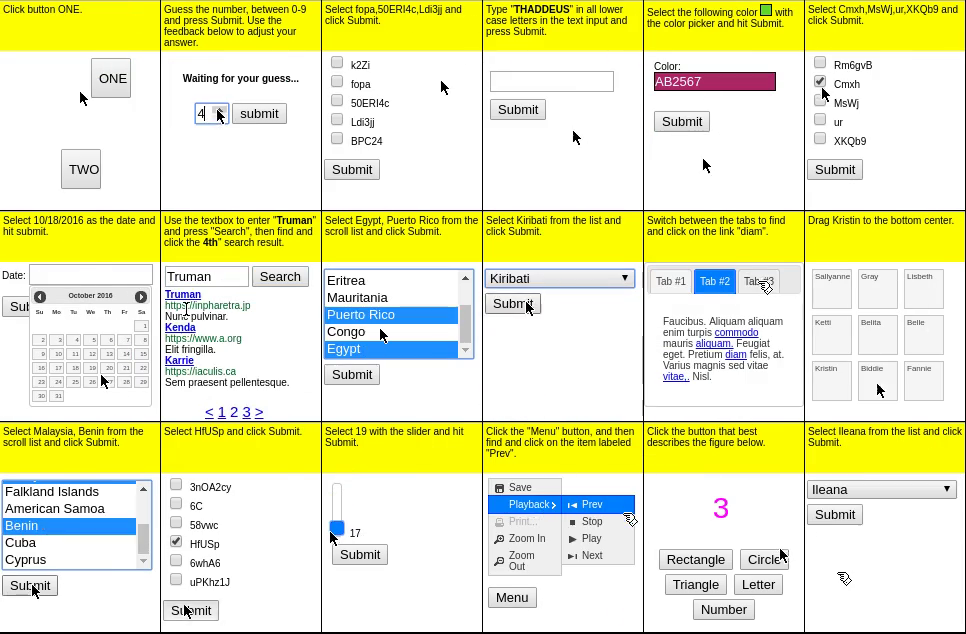
The MiniWoB++ (Mini World of Bits++) library contains a collection of over 100 **web interaction environments**,
along with JavaScript and Python interfaces for programmatically interacting with them.
The Python interface follows the [Gymnasium](https://gymnasium.farama.org/) API
and uses [Selenium WebDriver](https://www.selenium.dev/documentation/webdriver/)
to perform actions on the web browser.
MiniWoB++ is an extension of the
[OpenAI MiniWoB benchmark](http://proceedings.mlr.press/v70/shi17a/shi17a.pdf),
and was introduced in the paper
[Reinforcement Learning on Web Interfaces using Workflow-Guided
Exploration](https://arxiv.org/abs/1802.08802).
The documentation website is at [miniwob.farama.org](https://miniwob.farama.org/).
Development on MiniWoB++ is currently ongoing to bring it up to [Farama Standards](https://farama.org/project_standards.html) for mature projects, and will be maintained long term after this point. See the [Project Roadmap](https://github.com/Farama-Foundation/miniwob-plusplus/issues/58) for more details. If you'd like to help out, you can join our discord server here: .
# Installation
MiniWoB++ supports Python 3.10+ on Linux and macOS.
## Installing the MiniWoB++ Library
To install the MiniWoB++ library, use `pip install miniwob`.
## Installing Chrome/Chromium and ChromeDriver
We strongly recommend using Chrome or Chromium as the web browser,
as other browsers may render the environments differently.
The MiniWoB++ Python interface uses [Selenium](https://www.selenium.dev/documentation/webdriver/),
which interacts with the browser via the [WebDriver API](https://w3c.github.io/webdriver/).
Follow one of the
[instruction methods](https://www.selenium.dev/documentation/webdriver/getting_started/install_drivers/)
to install ChromeDriver. The simplest method is to
[download](https://chromedriver.chromium.org/downloads) ChromeDriver with the matching version,
unzip it, and then add the directory containing the `chromedriver` executable to the `PATH` environment variable:
```sh
export PATH=$PATH:/path/to/chromedriver
```
For Chromium, the driver may also be available in a software package; for example, in Debian/Ubuntu:
```sh
sudo apt install chromium-driver
```
The browser and ChromeDriver versions must match. If more than one Chrome or
ChromeDriver installation is available, set `MINIWOB_CHROME_BINARY` and
`MINIWOB_CHROMEDRIVER` together to the matching executables before starting
MiniWoB++:
```sh
export MINIWOB_CHROME_BINARY=/path/to/chrome
export MINIWOB_CHROMEDRIVER=/path/to/chromedriver
```
Both variables must be set together. If neither variable is set, Selenium uses
its normal browser and driver discovery behavior.
# Example Usage
The following code performs a deterministic action on the
[`click-test-2`](http://miniwob.farama.org/environments/click-test-2/) environment.
```python
import time
import gymnasium
import miniwob
from miniwob.action import ActionTypes
gymnasium.register_envs(miniwob)
env = gymnasium.make('miniwob/click-test-2-v1', render_mode='human')
# Wrap the code in try-finally to ensure proper cleanup.
try:
# Start a new episode.
obs, info = env.reset()
assert obs["utterance"] == "Click button ONE."
assert obs["fields"] == (("target", "ONE"),)
time.sleep(2) # Only here to let you look at the environment.
# Find the HTML element with text "ONE".
for element in obs["dom_elements"]:
if element["text"] == "ONE":
break
# Click on the element.
action = env.unwrapped.create_action(ActionTypes.CLICK_ELEMENT, ref=element["ref"])
obs, reward, terminated, truncated, info = env.step(action)
# Check if the action was correct.
print(reward) # Should be around 0.8 since 2 seconds has passed.
assert terminated is True
time.sleep(2)
finally:
env.close()
```
See [the documentation](http://miniwob.farama.org/content/basic_usage/) for more information.
# Environments
The list of the environments that were included in the MiniWoB++ library can be found in the
[documentation](http://miniwob.farama.org/environments/list/).
All environments share the same [observation space](http://miniwob.farama.org/content/observation_space/),
while the [action space](http://miniwob.farama.org/content/action_space/) can be configured during environment construction.
# Citation
To cite this project please use:
```bibtex
@inproceedings{liu2018reinforcement,
author = {Evan Zheran Liu and Kelvin Guu and Panupong Pasupat and Tianlin Shi and Percy Liang},
title = {Reinforcement Learning on Web Interfaces using Workflow-Guided Exploration},
booktitle = {International Conference on Learning Representations ({ICLR})},
url = {https://arxiv.org/abs/1802.08802},
year = {2018},
}
```