
# DataSources
💾 🔜📱 Type-safe data-driven List-UI Framework. (We can also use ASCollectionNode)
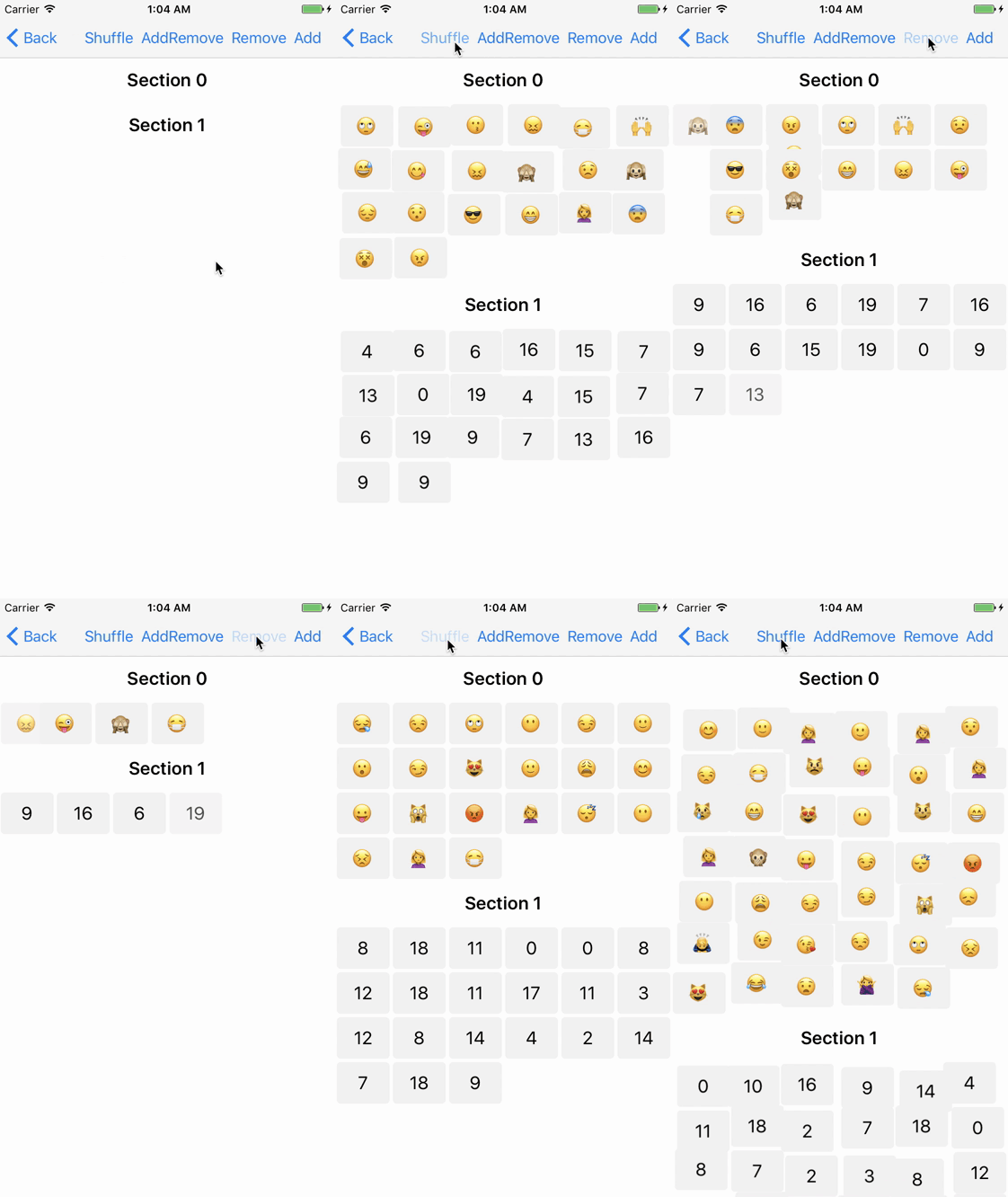
Partial updates(insert, delete, move) of UICollectionView/UITableView is important things for fancy UI.
But, It's hard that synchronous of data and UI.
**DataSources** will solve this problem.

[](https://travis-ci.org/muukii/DataSources)
[](http://cocoapods.org/pods/DataSources)
[](http://cocoapods.org/pods/DataSources)
[](http://cocoapods.org/pods/DataSources)
[](https://github.com/Carthage/Carthage)
[](https://app.fossa.io/projects/git%2Bgithub.com%2Fmuukii%2FDataSources?ref=badge_shield)
## Thanks
**Diff-algorithm**
- Inspired by IGListKit/IGListDiff.
- https://github.com/Instagram/IGListKit
- https://github.com/lxcid/ListDiff
## Features
- Data driven update
- Data did change, then will display.
- Partial updates, no more calling `reloadData`
- Smooth and Faster.
- if the count of changes larger than 300, update with non-animation.
- Simplified usage
- We can use different type each section.
- Type-safe
- We can take clearly typed object by IndexPath.
- Using Adapter-pattern for List-UI
- For example, We can also use this for ASCollectionNode of Texture. (Demo app includes it)
- Reorder by UI operation
- This library is not supported moving between section.
## Requirements
- Swift 4
- iOS 9+
## Usage (Example)
### Conform protocol `Diffable`
```swift
public protocol Diffable {
associatedtype Identifier : Hashable
var diffIdentifier: Identifier { get }
}
```
```swift
struct Model : Diffable {
var diffIdentifier: String {
return id
}
let id: String
}
```
### 🤠 Most Simplified Usage
1. Define `SectionDataController` in ViewController
```swift
let collectionView: UICollectionView
let sectionDataController = SectionDataController(
adapter: CollectionViewAdapter(collectionView: self.collectionView),
isEqual: { $0.id == $1.id } // If Model has Equatable, you can omit this closure.
)
var models: [Model] = [] {
didSet {
sectionDataController.update(items: items, updateMode: .partial(animated: true), completion: {
// Completed update
})
}
}
let dataSource = CollectionViewDataSource(sectionDataController: sectionDataController)
dataSource.cellFactory = { _, collectionView, indexPath, model in
let cell = collectionView.dequeueReusableCell(withReuseIdentifier: "Cell", for: indexPath) as! Cell
cell.label.text = model.title
return cell
}
collectionView.dataSource = dataSource
```
### 😎 Semi Manual
#### Single-Section (UICollectionView)
1. Define `SectionDataController` in ViewController
```swift
let collectionView: UICollectionView
var models: [Model]
let sectionDataController = SectionDataController(
adapter: CollectionViewAdapter(collectionView: self.collectionView),
isEqual: { $0.id == $1.id } // If Model has Equatable, you can omit this closure.
)
```
2. Bind Models to `SectionDataController` in ViewController
```swift
var models: [Model] = […] {
didSet {
sectionDataController.update(items: items, updateMode: .partial(animated: true), completion: {
// Completed update
})
}
}
```
3. Implement UICollectionViewDataSource in ViewController
```swift
func numberOfSections(in collectionView: UICollectionView) -> Int {
return 1
}
func collectionView(_ collectionView: UICollectionView, numberOfItemsInSection section: Int) -> Int {
return sectionDataController.numberOfItems()
}
func collectionView(_ collectionView: UICollectionView, cellForItemAt indexPath: IndexPath) -> UICollectionViewCell {
let cell = collectionView.dequeueReusableCell(withReuseIdentifier: "Cell", for: indexPath) as! Cell
let m = sectionDataController.item(for: indexPath)
cell.label.text = m.title
return cell
}
```
#### Multiple-Section (UICollectionView)
1. Define `DataController` in ViewController
```swift
let collectionView: UICollectionView
var models: [Model]
let dataController = DataController(adapter: CollectionViewAdapter(collectionView: self.collectionView))
```
2. Define `Section` in ViewController
```swift
let section0 = Section(ModelA.self, isEqual: { $0.id == $1.id })
let section1 = Section(ModelB.self, isEqual: { $0.id == $1.id })
```
3. Add `Section` to `DataController`
Order of Section will be decided in the order of addition.
```swift
dataController.add(section: section0) // will be 0 of section
dataController.add(section: section1) // will be 1 of section
```
4. Bind Models to DataController
```swift
var section0Models: [ModelA] = […] {
didSet {
dataController.update(
in: section0,
items: section0Models,
updateMode: .partial(animated: true),
completion: {
})
}
}
var section1Models: [ModelA] = […] {
didSet {
dataController.update(
in: section1,
items: section1Models,
updateMode: .partial(animated: true),
completion: {
})
}
}
```
5. Implement UICollectionViewDataSource
```swift
func numberOfSections(in collectionView: UICollectionView) -> Int {
return dataController.numberOfSections()
}
func collectionView(_ collectionView: UICollectionView, numberOfItemsInSection section: Int) -> Int {
return dataController.numberOfItems(in: section)
}
func collectionView(_ collectionView: UICollectionView, cellForItemAt indexPath: IndexPath) -> UICollectionViewCell {
return dataController.item(
at: indexPath,
handlers: [
.init(section: section0) { (m: ModelA) in
let cell = collectionView.dequeueReusableCell(withReuseIdentifier: "Cell", for: indexPath) as! Cell
cell.label.text = m.title
return cell
},
.init(section: section1) { (m: ModelB) in
let cell = collectionView.dequeueReusableCell(withReuseIdentifier: "Cell", for: indexPath) as! Cell
cell.label.text = m.title
return cell
},
])
/* Other way
switch indexPath.section {
case section0:
let cell = collectionView.dequeueReusableCell(withReuseIdentifier: "Cell", for: indexPath) as! Cell
let m = _dataController.item(at: indexPath, in: section0)
cell.label.text = m.title
return cell
case section1:
let cell = collectionView.dequeueReusableCell(withReuseIdentifier: "Cell", for: indexPath) as! Cell
let m = _dataController.item(at: indexPath, in: section1)
cell.label.text = m.title
return cell
default:
fatalError()
}
*/
}
```
## Reorder by UI operation
`SectionDataController` has a snapshot for `List-UI`.
It helps that perform batch update List-UI in safety.
But, the snapshots include side-effects.
For example, if we did reorder items of `List-UI` by UI operation.
In this time, Items of List-UI is caused differences to the snapshot.
It will be caused unnecessary diff.
Therefore when we reorder items, we should operation followings.
0. Reorder items of UI
1. Call `SectionDataController.reserveMoved(...`
2. Reorder items of Array
3. Call `SectionDataController.update(items: [T]..`
# Demo Application
This repository include Demo-Application.
You can touch DataSources.
1. Clone repository.
```
$ git clone https://github.com/muukii/DataSources.git
$ cd DataSources
$ pod install
```
2. Open xcworkspace
3. Run `DataSourcesDemo` on iPhone Simulator.
# Author
muukii, m@muukii.me, https://muukii.me/
# License
**DataSources** is available under the MIT license. See the LICENSE file for more info.
[](https://app.fossa.io/projects/git%2Bgithub.com%2Fmuukii%2FDataSources?ref=badge_large)