 > 🤵🏻♂️💭
> We guess we still don't cover the all of use-cases.
> Please feel free to ask what you've faced case in Issues!
> 🤵🏻♂️💭
> We guess we still don't cover the all of use-cases.
> Please feel free to ask what you've faced case in Issues!
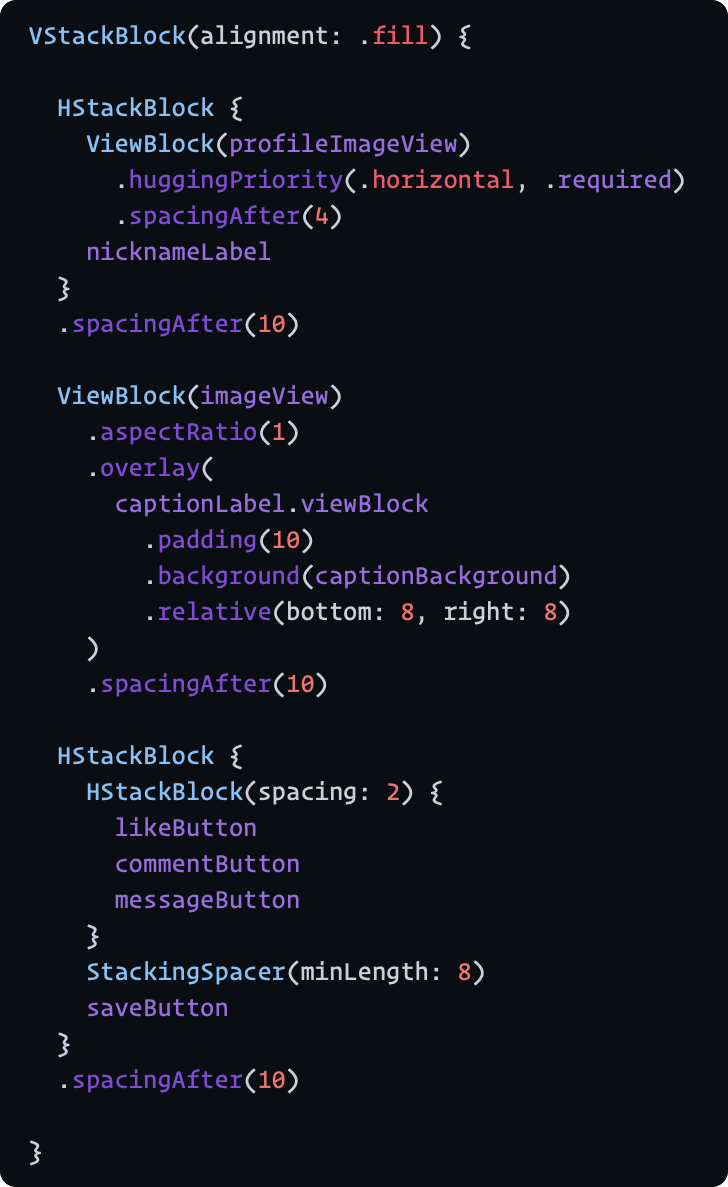
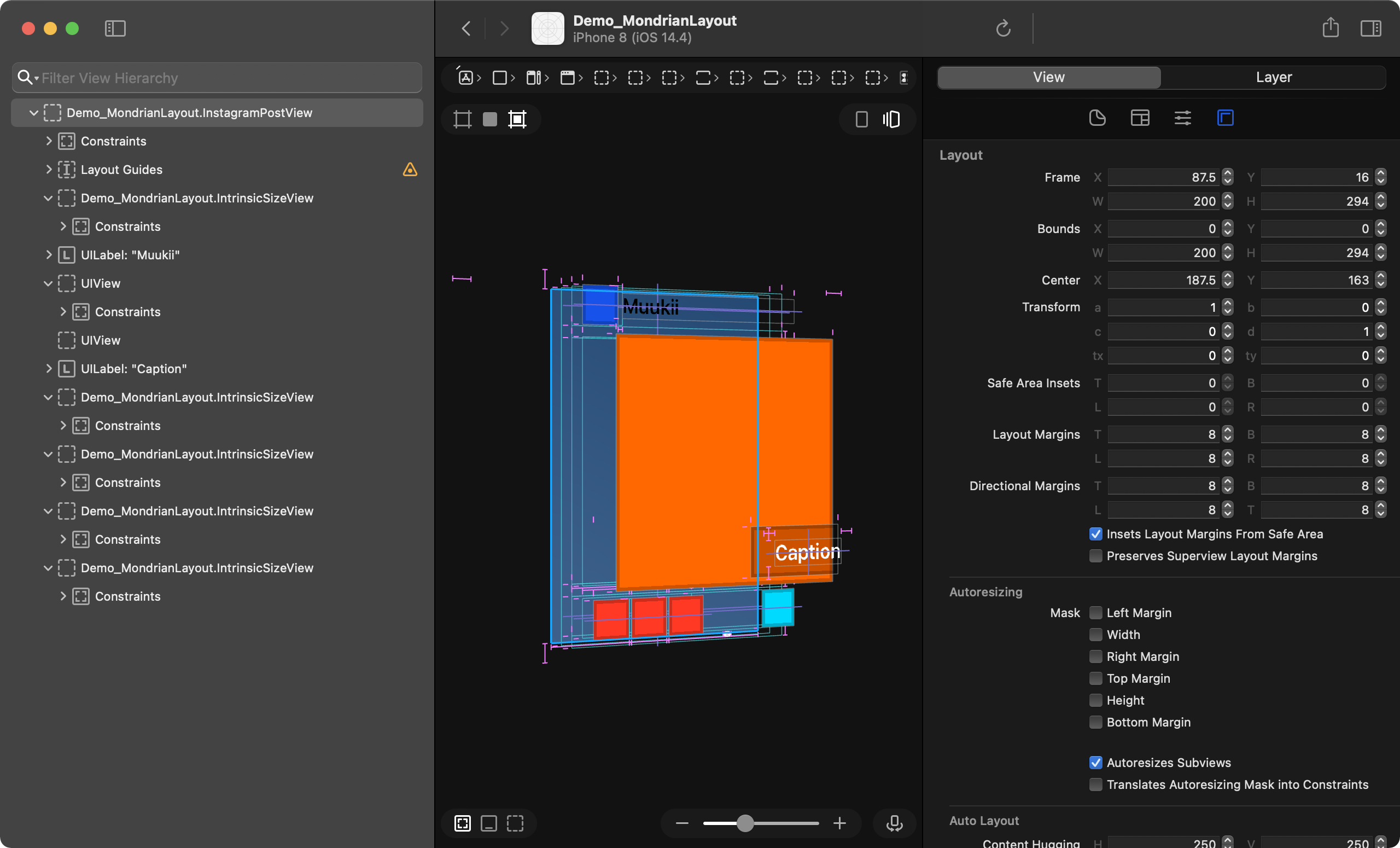
 This image laid out by MondrianLayout
```swift HStackBlock(spacing: 2, alignment: .fill) { VStackBlock(spacing: 2, alignment: .fill) { UIView.mock( backgroundColor: .mondrianRed, preferredSize: .init(width: 28, height: 28) ) UIView.mock( backgroundColor: .layeringColor, preferredSize: .init(width: 28, height: 50) ) UIView.mock( backgroundColor: .mondrianYellow, preferredSize: .init(width: 28, height: 28) ) UIView.mock( backgroundColor: .layeringColor, preferredSize: .init(width: 28, height: 28) ) HStackBlock(alignment: .fill) { UIView.mock( backgroundColor: .layeringColor, preferredSize: .init(width: 28, height: 28) ) UIView.mock( backgroundColor: .layeringColor, preferredSize: .init(width: 28, height: 28) ) } } VStackBlock(spacing: 2, alignment: .fill) { HStackBlock(spacing: 2, alignment: .fill) { UIView.mock( backgroundColor: .layeringColor, preferredSize: .init(width: 28, height: 28) ) VStackBlock(spacing: 2, alignment: .fill) { HStackBlock(spacing: 2, alignment: .fill) { UIView.mock( backgroundColor: .mondrianYellow, preferredSize: .init(width: 28, height: 28) ) UIView.mock( backgroundColor: .layeringColor, preferredSize: .init(width: 28, height: 28) ) } UIView.mock( backgroundColor: .layeringColor, preferredSize: .init(width: 28, height: 28) ) } } HStackBlock(spacing: 2, alignment: .fill) { VStackBlock(spacing: 2, alignment: .fill) { UIView.mock( backgroundColor: .layeringColor, preferredSize: .init(width: 28, height: 28) ) UIView.mock( backgroundColor: .mondrianBlue, preferredSize: .init(width: 28, height: 28) ) } UIView.mock( backgroundColor: .layeringColor, preferredSize: .init(width: 28, height: 28) ) VStackBlock(spacing: 2, alignment: .fill) { UIView.mock( backgroundColor: .layeringColor, preferredSize: .init(width: 28, height: 28) ) UIView.mock( backgroundColor: .layeringColor, preferredSize: .init(width: 28, height: 28) ) } } HStackBlock(spacing: 2, alignment: .fill) { UIView.mock( backgroundColor: .mondrianRed, preferredSize: .init(width: 28, height: 28) ) VStackBlock(spacing: 2, alignment: .fill) { UIView.mock( backgroundColor: .layeringColor, preferredSize: .init(width: 28, height: 28) ) UIView.mock( backgroundColor: .layeringColor, preferredSize: .init(width: 28, height: 28) ) } } } } .overlay( UILabel.mockMultiline(text: "Mondrian Layout", textColor: .white) .viewBlock .padding(4) .background( UIView.mock( backgroundColor: .layeringColor ) .viewBlock ) .relative(bottom: 8, right: 8) ) ```
 |
| |
|
 ### Unstructured layout API (classic style)
 ## Future direction
- Optimize the code - still verbose implementation because we're not sure if the API can be stable.
- Brushing up the DSL - to be stable in describing.
- Adding more modifiers for fine tuning in layout.
- Tuning up the stack block's behavior.
- Adding a way to setting constraints independently besides DSL
- AutoLayout is definitely powerful to describe the layout. We might need to set the constraints additionally since DSL can't describe every pattern of the layout.
## Demo app
You can see many layout examples from the demo application.
https://user-images.githubusercontent.com/1888355/122651186-142e7d00-d172-11eb-8bde-f4432d0a0ac9.mp4
## Overview
MondrianLayout enables us to describe layouts of subviews by DSL (powered by `resultBuilders`)
It's like describing in SwiftUI, but this behavior differs a bit since laying out by AutoLayout system.
To describe layout, use `buildSubviews` as entrypoint.
This method creates a set of NSLayoutConstraint, UILayoutGuide, and modifiers of UIView.
Finally, those apply. You don't need to call `addSubview`. that goes automatically according to hierarchy from layout descriptions.
```swift
class MyView: UIView {
let nameLabel: UILabel
let detailLabel: UILabel
init() {
super.init(frame: .zero)
// Seting up constraints constraints, layoutGuides and adding subviews
Mondrian.buildSubviews(on: self) {
VStackBlock {
nameLabel
detailLabel
}
}
// Seting up constraints for the view itself.
Mondrian.layout {
self.mondrian.layout.width(200) // can be method cain.
}
}
}
```
### Examples
Sample code assumes run in `UIView`. (self is `UIView`)
You can replace it with `UIViewController.view`.
#### Layout subviews inside safe-area
Attaching to top and bottom safe-area.
```swift
Mondrian.buildSubviews(on: self) {
LayoutContainer(attachedSafeAreaEdges: .vertical) {
VStackBlock {
...
}
}
}
```
or
```swift
Mondrian.buildSubviews(on: self) {
VStackBlock {
...
}
.container(respectingSafeAreaEdges: .vertical)
}
```
#### Put a view snapping to edge
```swift
Mondrian.buildSubviews(on: self) {
ZStackBlock {
backgroundView.viewBlock.relative(0)
}
}
```
synonyms:
```swift
ZStackBlock(alignment: .attach(.all)) {
backgroundView
}
```
```swift
ZStackBlock {
backgroundView.viewBlock.alignSelf(.attach(.all))
}
```
#### Add constraints to view itself - using classic layout
```swift
Mondrian.layout {
self.mondrian.layout.width(...).height(...)
}
```
or
```swift
self.mondrian.layout.width(...).height(...).activate()
```
#### Stacking views on Z axis
`relative(0)` fills to the edges of `ZStackBlock`.
```swift
Mondrian.buildSubviews(on: self) {
ZStackBlock {
profileImageView.viewBlock.relative(0)
textOverlayView.viewBlock.relative(0)
}
}
```
#### Centering a label with minimum padding
```swift
ZStackBlock {
myLabel
.relative(.all, .min(20))
}
```
```swift
ZStackBlock {
ZStackBlock {
myLabel
}
.padding(20) /// a minimum padding for the label in the container
}
```
## Detail
### Vertically and Horizontally Stack layout
#### VStackBlock
Alignment
| center(default) | leading | trailing | fill |
|---|---|---|---|
|
## Future direction
- Optimize the code - still verbose implementation because we're not sure if the API can be stable.
- Brushing up the DSL - to be stable in describing.
- Adding more modifiers for fine tuning in layout.
- Tuning up the stack block's behavior.
- Adding a way to setting constraints independently besides DSL
- AutoLayout is definitely powerful to describe the layout. We might need to set the constraints additionally since DSL can't describe every pattern of the layout.
## Demo app
You can see many layout examples from the demo application.
https://user-images.githubusercontent.com/1888355/122651186-142e7d00-d172-11eb-8bde-f4432d0a0ac9.mp4
## Overview
MondrianLayout enables us to describe layouts of subviews by DSL (powered by `resultBuilders`)
It's like describing in SwiftUI, but this behavior differs a bit since laying out by AutoLayout system.
To describe layout, use `buildSubviews` as entrypoint.
This method creates a set of NSLayoutConstraint, UILayoutGuide, and modifiers of UIView.
Finally, those apply. You don't need to call `addSubview`. that goes automatically according to hierarchy from layout descriptions.
```swift
class MyView: UIView {
let nameLabel: UILabel
let detailLabel: UILabel
init() {
super.init(frame: .zero)
// Seting up constraints constraints, layoutGuides and adding subviews
Mondrian.buildSubviews(on: self) {
VStackBlock {
nameLabel
detailLabel
}
}
// Seting up constraints for the view itself.
Mondrian.layout {
self.mondrian.layout.width(200) // can be method cain.
}
}
}
```
### Examples
Sample code assumes run in `UIView`. (self is `UIView`)
You can replace it with `UIViewController.view`.
#### Layout subviews inside safe-area
Attaching to top and bottom safe-area.
```swift
Mondrian.buildSubviews(on: self) {
LayoutContainer(attachedSafeAreaEdges: .vertical) {
VStackBlock {
...
}
}
}
```
or
```swift
Mondrian.buildSubviews(on: self) {
VStackBlock {
...
}
.container(respectingSafeAreaEdges: .vertical)
}
```
#### Put a view snapping to edge
```swift
Mondrian.buildSubviews(on: self) {
ZStackBlock {
backgroundView.viewBlock.relative(0)
}
}
```
synonyms:
```swift
ZStackBlock(alignment: .attach(.all)) {
backgroundView
}
```
```swift
ZStackBlock {
backgroundView.viewBlock.alignSelf(.attach(.all))
}
```
#### Add constraints to view itself - using classic layout
```swift
Mondrian.layout {
self.mondrian.layout.width(...).height(...)
}
```
or
```swift
self.mondrian.layout.width(...).height(...).activate()
```
#### Stacking views on Z axis
`relative(0)` fills to the edges of `ZStackBlock`.
```swift
Mondrian.buildSubviews(on: self) {
ZStackBlock {
profileImageView.viewBlock.relative(0)
textOverlayView.viewBlock.relative(0)
}
}
```
#### Centering a label with minimum padding
```swift
ZStackBlock {
myLabel
.relative(.all, .min(20))
}
```
```swift
ZStackBlock {
ZStackBlock {
myLabel
}
.padding(20) /// a minimum padding for the label in the container
}
```
## Detail
### Vertically and Horizontally Stack layout
#### VStackBlock
Alignment
| center(default) | leading | trailing | fill |
|---|---|---|---|
| |
| |
| |
| |
#### HStackBlock
| center(default) | top | bottom | fill |
|---|---|---|---|
|
|
#### HStackBlock
| center(default) | top | bottom | fill |
|---|---|---|---|
| |
| |
| |
| |
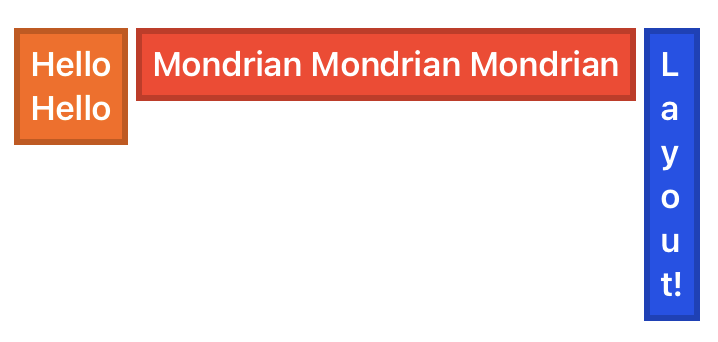
```swift
Mondrian.buildSubviews(on: self) {
VStackBlock(spacing: 4, alignment: alignment) {
UILabel.mockMultiline(text: "Hello", textColor: .white)
.viewBlock
.padding(8)
.background(UIView.mock(backgroundColor: .mondrianYellow))
UILabel.mockMultiline(text: "Mondrian", textColor: .white)
.viewBlock
.padding(8)
.background(UIView.mock(backgroundColor: .mondrianRed))
UILabel.mockMultiline(text: "Layout!", textColor: .white)
.viewBlock
.padding(8)
.background(UIView.mock(backgroundColor: .mondrianBlue))
}
}
```
#### StackingSpacer
Adds a space in stacking layout block.
#### Background modifier
```swift
label
.viewBlock // To enable view describes layout
.padding(8)
.background(backgroundView)
```
|
```swift
Mondrian.buildSubviews(on: self) {
VStackBlock(spacing: 4, alignment: alignment) {
UILabel.mockMultiline(text: "Hello", textColor: .white)
.viewBlock
.padding(8)
.background(UIView.mock(backgroundColor: .mondrianYellow))
UILabel.mockMultiline(text: "Mondrian", textColor: .white)
.viewBlock
.padding(8)
.background(UIView.mock(backgroundColor: .mondrianRed))
UILabel.mockMultiline(text: "Layout!", textColor: .white)
.viewBlock
.padding(8)
.background(UIView.mock(backgroundColor: .mondrianBlue))
}
}
```
#### StackingSpacer
Adds a space in stacking layout block.
#### Background modifier
```swift
label
.viewBlock // To enable view describes layout
.padding(8)
.background(backgroundView)
```
 #### Overlay modifier
```swift
label
.viewBlock // To enable view describes layout
.padding(8)
.overlay(overlayView)
```
#### Relative modifier
`.relative` modifier describes that the content attaches to specified edges with padding.
Not specified edges do not have constraints to the edge. so the sizing depends on intrinsic content size.
You might use this modifier to pin to edge as an overlay content.
```swift
ZStackBlock {
VStackBlock {
...
}
.relative(bottom: 8, right: 8)
}
```
#### Padding modifier
`.padding` modifier is similar with `.relative` but something different.
Different with that, Not specified edges pin to edge with 0 padding.
```swift
ZStackBlock {
VStackBlock {
...
}
.padding(.horizontal, 10) // other edges work with 0 padding.
}
```
#### ZStackBlock
| | |
|---|---|
|
#### Overlay modifier
```swift
label
.viewBlock // To enable view describes layout
.padding(8)
.overlay(overlayView)
```
#### Relative modifier
`.relative` modifier describes that the content attaches to specified edges with padding.
Not specified edges do not have constraints to the edge. so the sizing depends on intrinsic content size.
You might use this modifier to pin to edge as an overlay content.
```swift
ZStackBlock {
VStackBlock {
...
}
.relative(bottom: 8, right: 8)
}
```
#### Padding modifier
`.padding` modifier is similar with `.relative` but something different.
Different with that, Not specified edges pin to edge with 0 padding.
```swift
ZStackBlock {
VStackBlock {
...
}
.padding(.horizontal, 10) // other edges work with 0 padding.
}
```
#### ZStackBlock
| | |
|---|---|
| |
| |
Stacking views in Z axis (aligns in center)
```swift
ZStackBlock {
view1
view2
view3
}
```
Expands to specified edges each view
```swift
ZStackBlock(alignment: .attach(.all)) {
view1
view2
view3
}
```
Specifying alignment each view
```swift
ZStackBlock {
view1.viewBlock.alignSelf(.attach(.all))
view2.viewBlock.alignSelf(.attach([.top, .bottom]))
view3.viewBlock.alignSelf(.attach(.top))
}
```
## Updating layout dynamically
`LayoutManager` does support it.
If we need to change the layout each some conditions such as depending traits, this object helps that.
## Animations
// TODO:
https://github.com/muukii/MondrianLayout/issues/19
## Classic Layout API
Structured layout API(DSL) does not cover the all of use-cases.
Sometimes we still need a way to describe constraints for a complicated layout.
MondrianLayout provides it as well other AutoLayout libraries.
**Activate constraints independently**
```swift
view.mondrian.layout
.width(10)
.top(.toSuperview)
.right(.toSuperview)
.leading(.toSuperview)
.activate() // activate constraints and returns `ConstraintGroup`
```
Batch layout**
```swift
// returns `ConstraintGroup`
Mondrian.layout {
box1.mondrian.layout
.top(.toSuperview)
.left(.toSuperview)
.right(.to(box2).left)
.bottom(.toSuperview)
box2.mondrian.layout
.top(.toSuperview.top, .exact(10))
.right(.toSuperview)
.bottom(.toSuperview)
}
```
### Examples
#### Attach in horizontally
```swift
view.layout.horizontal(.toSuperview, .exact(10))
```
#### Attach in vertically
```swift
view.layout.vertical(.toSuperview, .exact(10))
```
#### Edge attaches to other edge
```swift
view.layout.edge(.toSuperview)
```
```swift
view.layout.edge(.to(myLayoutGuide))
```
## Installation
**CocoaPods**
```ruby
pod "MondrianLayout"
```
**SwiftPM**
```swift
dependencies: [
.package(url: "https://github.com/muukii/MondrianLayout.git", exact: "
|
Stacking views in Z axis (aligns in center)
```swift
ZStackBlock {
view1
view2
view3
}
```
Expands to specified edges each view
```swift
ZStackBlock(alignment: .attach(.all)) {
view1
view2
view3
}
```
Specifying alignment each view
```swift
ZStackBlock {
view1.viewBlock.alignSelf(.attach(.all))
view2.viewBlock.alignSelf(.attach([.top, .bottom]))
view3.viewBlock.alignSelf(.attach(.top))
}
```
## Updating layout dynamically
`LayoutManager` does support it.
If we need to change the layout each some conditions such as depending traits, this object helps that.
## Animations
// TODO:
https://github.com/muukii/MondrianLayout/issues/19
## Classic Layout API
Structured layout API(DSL) does not cover the all of use-cases.
Sometimes we still need a way to describe constraints for a complicated layout.
MondrianLayout provides it as well other AutoLayout libraries.
**Activate constraints independently**
```swift
view.mondrian.layout
.width(10)
.top(.toSuperview)
.right(.toSuperview)
.leading(.toSuperview)
.activate() // activate constraints and returns `ConstraintGroup`
```
Batch layout**
```swift
// returns `ConstraintGroup`
Mondrian.layout {
box1.mondrian.layout
.top(.toSuperview)
.left(.toSuperview)
.right(.to(box2).left)
.bottom(.toSuperview)
box2.mondrian.layout
.top(.toSuperview.top, .exact(10))
.right(.toSuperview)
.bottom(.toSuperview)
}
```
### Examples
#### Attach in horizontally
```swift
view.layout.horizontal(.toSuperview, .exact(10))
```
#### Attach in vertically
```swift
view.layout.vertical(.toSuperview, .exact(10))
```
#### Edge attaches to other edge
```swift
view.layout.edge(.toSuperview)
```
```swift
view.layout.edge(.to(myLayoutGuide))
```
## Installation
**CocoaPods**
```ruby
pod "MondrianLayout"
```
**SwiftPM**
```swift
dependencies: [
.package(url: "https://github.com/muukii/MondrianLayout.git", exact: "