# Flr Plugin
 [ ](https://plugins.jetbrains.com/plugin/13789-flr)
Flr (Flutter-R) Plugin: A Flutter Resource Manager Android Studio Plugin, which can help flutter developer to auto specify assets in `pubspec.yaml` and generate `r.g.dart` file after he changes the flutter project assets. With `r.g.dart`, flutter developer can apply the asset in code by referencing it's asset ID function.
📖 *Read this in other languages: [English](README.md), [简体中文](README.zh-cn.md)*
## Feature
- Support auto service that automatically specify assets in `pubspec.yaml` and generate `r.g.dart` file, which can be triggered manually or by monitoring asset changes
- Support `R.x` (such as `R.image.test()`, `R.svg.test(width: 100, height: 100)`, `R.txt.test_json()`) code struct
- Support for processing image assets ( `.png`, `.jpg`, `.jpeg`, `.gif`, `.webp`, `.icon`, `.bmp`, `.wbmp`, `.svg` )
- Support for processing text assets ( `.txt`, `.json`, `.yaml`, `.xml` )
- Support for processing font assets ( `.ttf`, `.otf`, `.ttc`)
- Support for processing [image asset variants](https://flutter.dev/docs/development/ui/assets-and-images#asset-variants)
- Support for processing asset which’s filename is bad:
- filename has illegal character (such as `blank`, `~`, `@`, `#` ) which is outside the range of valid characters (`0-9`, `A-Z`, `a-z`, `_`, `+`, `-`, `.`, `·`, `!`, `@`, `&`, `$`, `¥`)
- filename begins with a number or character `_` or character`$`
- Support for processing assets with the same filename but different path
## Install Flr plugin
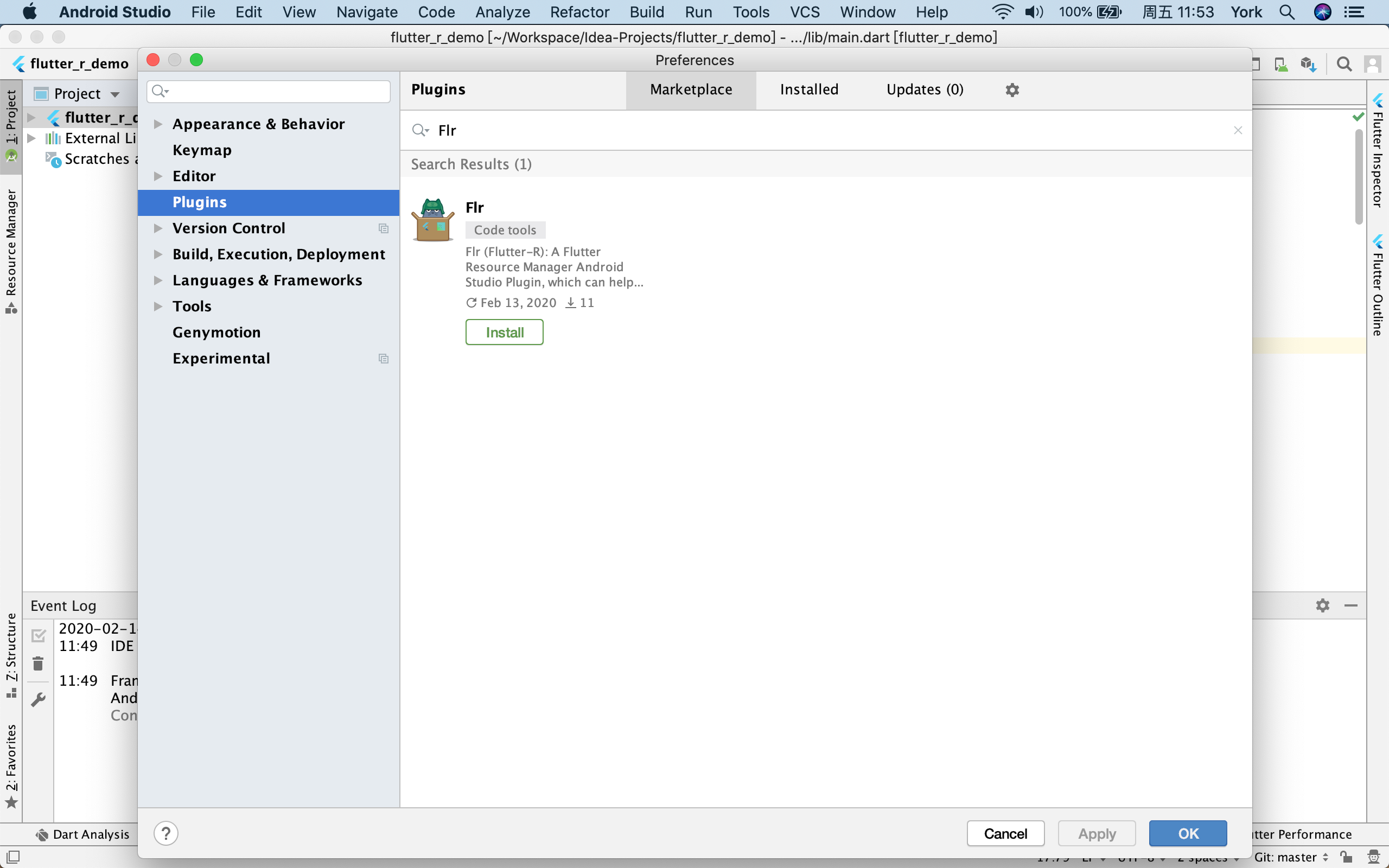
Use the IDE's plugin manager to install the latest version of the plugin:
Preferences > Plugins > Marketplace > Search for "Flr" > Install Plugin
## Usage
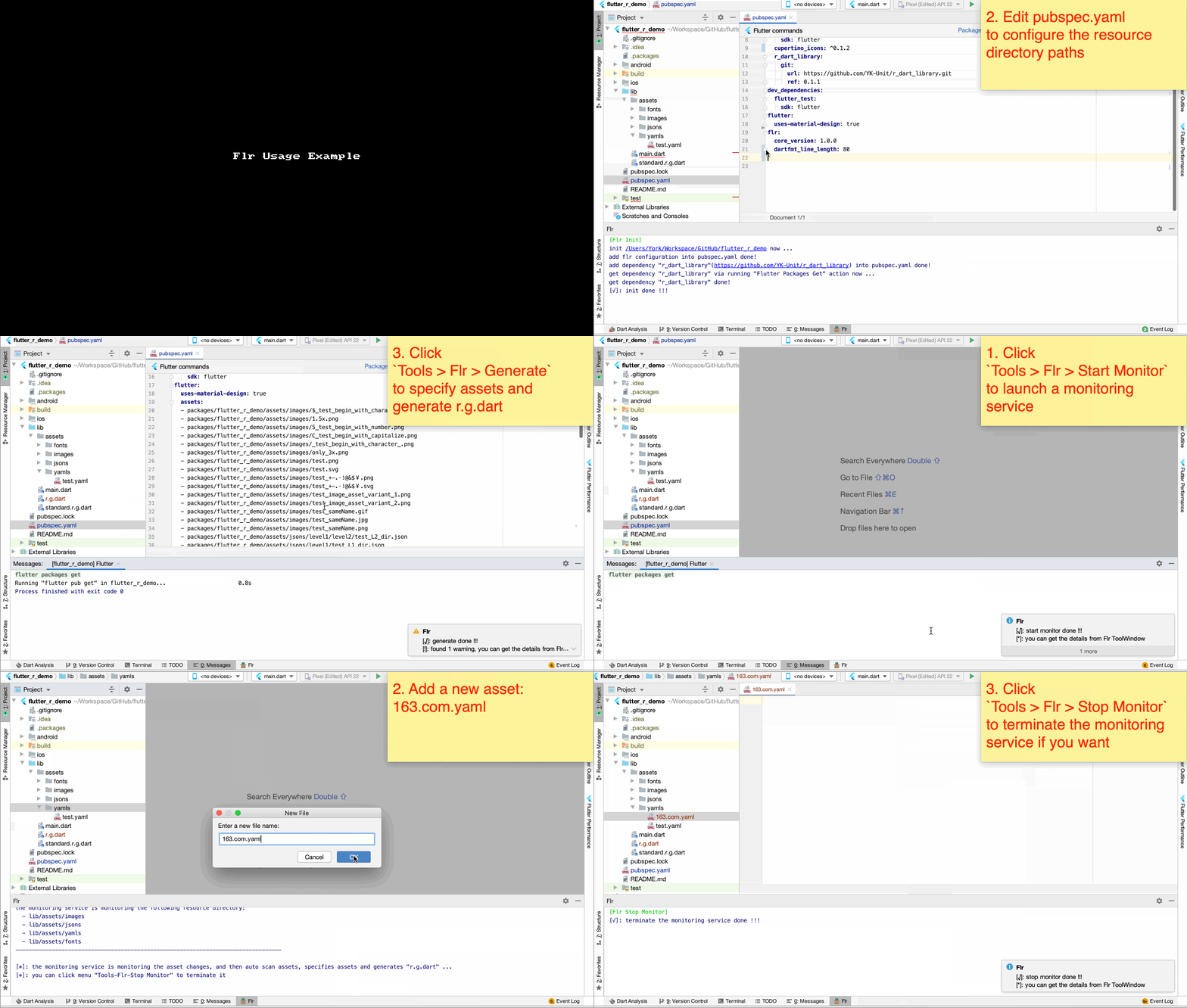
1. Init your flutter project: Click Tools > Flr > Init
> The `Flr Init` action will check to see if the current project is a legal flutter project, add flr configuration and dependency [r_dart_library](https://github.com/YK-Unit/r_dart_library) into `pubspec.yaml`.
>
> **Attention:**
>
> The Flutter SDK is currently in an unstable state, so if you get a build error of `r_dart_library` , you can fix it by modify the dependent version of `r_dart_library`.
>
> You can select the correct version of `r_dart_library` based on this [dependency relationship table](https://github.com/YK-Unit/r_dart_library#dependency-relationship-table).
2. Open `pubspec.yaml` file, find the configuration item for `Flr`, and then configure the resource directory that needs to be scanned by `Flr`, such as:
```yaml
flr:
core_version: 1.0.0
# just use for flr-cli and flr-vscode-extension
dartfmt_line_length: 80
# config the image and text resource directories that need to be scanned
assets:
- lib/assets/images
- lib/assets/texts
# config the font resource directories that need to be scanned
fonts:
- lib/assets/fonts
```
3. Scan assets, specify assets, and generate `r.g.dart`: Click Tools > Flr > Generate
> After invoke `Flr Generate` action, `Flr` will scan the resource directories configured in `pubspec.yaml`, then specify scanned assets in `pubspec.yaml`, and generate `r.g.dart` file.
>
> **If you want `Flr` to do the above operations automatically every time a asset changes, you can invoke `Flr Start Monitor` action.** (Click Tools > Flr > Start Monitor )
> Then `Flr` will launche a monitoring service that continuously monitors resource directories configured in `pubspec.yaml`. If the service detects any asset changes, `Flr` will automatically scan the asset directories, then specify scanned assets in pubspec.yaml, and generate "r.g.dart" file.
>
> **You can terminate this monitoring service by invoke `Flr Stop Monitor` action.** (Click Tools > Flr > Stop Monitor )
## Recommended Flutter Resource Structure
`Flr` the following flutter resource structure schemes:
- scheme 1:
```
flutter_project_root_dir
├── build
│ ├── ..
├── lib
│ ├── assets
│ │ ├── images // image resource directory of all modules
│ │ │ ├── #{module} // image resource directory of a module
│ │ │ │ ├── #{main_image_asset}
│ │ │ │ ├── #{variant-dir} // image resource directory of a variant
│ │ │ │ │ ├── #{image_asset_variant}
│ │ │ │
│ │ │ ├── home // image resource directory of home module
│ │ │ │ ├── home_badge.svg
│ │ │ │ ├── home_icon.png
│ │ │ │ ├── 3.0x // image resource directory of a 3.0x-ratio-variant
│ │ │ │ │ ├── home_icon.png
│ │ │ │
│ │ ├── texts // text resource directory
│ │ │ │ // (you can also break it down further by module)
│ │ │ └── test.json
│ │ │ └── test.yaml
│ │ │ │
│ │ ├── fonts // font resource directory of all font-families
│ │ │ ├── #{font-family} // font resource directory of a font-family
│ │ │ │ ├── #{font-family}-#{font_weight_or_style}.ttf
│ │ │ │
│ │ │ ├── Amiri // font resource directory of Amiri font-family
│ │ │ │ ├── Amiri-Regular.ttf
│ │ │ │ ├── Amiri-Bold.ttf
│ │ │ │ ├── Amiri-Italic.ttf
│ │ │ │ ├── Amiri-BoldItalic.ttf
│ ├── ..
```
- scheme 2:
```
flutter_project_root_dir
├── build
│ ├── ..
├── lib
│ ├── ..
├── assets
│ ├── images // image resource directory of all modules
│ │ ├── #{module} // image resource directory of a module
│ │ │ ├── #{main_image_asset}
│ │ │ ├── #{variant-dir} // image resource directory of a variant
│ │ │ │ ├── #{image_asset_variant}
│ │ │
│ │ ├── home // image resource directory of home module
│ │ │ ├── home_badge.svg
│ │ │ ├── home_icon.png
│ │ │ ├── 3.0x // image resource directory of a 3.0x-ratio-variant
│ │ │ │ ├── home_icon.png
│ │ │
│ ├── texts // text resource directory
│ │ │ // (you can also break it down further by module)
│ │ └── test.json
│ │ └── test.yaml
│ │ │
│ ├── fonts // font resource directory of all font-families
│ │ ├── #{font-family} // font resource directory of a font-family
│ │ │ ├── #{font-family}-#{font_weight_or_style}.ttf
│ │ │
│ │ ├── Amiri // font resource directory of Amiri font-family
│ │ │ ├── Amiri-Regular.ttf
│ │ │ ├── Amiri-Bold.ttf
│ │ │ ├── Amiri-Italic.ttf
│ │ │ ├── Amiri-BoldItalic.ttf
│ ├── ..
```
**Big Attention, the resource structure in the root directory of the font resource MUST follow the structure described above:** name the subdirectory with a font family name, and place the font resources of the font family in the subdirectory. Otherwise, `Flr` may not scan the font resource correctly.
## r.g.dart
After you invoke `Flr Generate` action or `Flr Start Monitor` action, Flr will scan the asset directories configured in `pubspec.yaml`, then specify scanned assets in `pubspec.yaml`, and generate `r.g.dart` file.
`r.g.dart` defines a asset access interface class: `R`, which allows flutter developer to apply the asset in code by referencing it's asset ID function, such as:
```dart
import 'package:flutter_r_demo/r.g.dart';
// test_sameName.png
var normalImageWidget = Image(
width: 200,
height: 120,
image: R.image.test_sameName(),
);
// test_sameName.gif
var gifImageWidget = Image(
image: R.mage.test_sameName_gif(),
);
// test.svg
var svgImageWidget = Image(
width: 100,
height: 100,
image: R.svg.test(width: 100, height: 100),
);
// test.json
var jsonString = await R.text.test_json();
// test.yaml
var yamlString = await R.text.test_yaml();
// Amiri Font Style
var amiriTextStyle = TextStyle(fontFamily: R.fontFamily.amiri);
```
### `_R_X` class
`r.g.dart` defines several private `_R_X` asset management classes: `_R_Image`, `_R_Svg`, `_R_Text`, `_R_FontFamily`. These private asset management classes are used to manage the asset IDs of the respective asset types:
- `_R_Image`: manage the asset IDs of non-svg type image assets ( `.png`, `.jpg`, `.jpeg`, `.gif`, `.webp`, `.icon`, `.bmp`, `.wbmp` )
- `_R_Svg`: manage the asset IDs of svg type image assets
- `_R_Text`: manage the asset IDs of text assets ( `.txt`, `.json`, `.yaml`, `.xml` )
- `_R_FontFamily`: manage the asset IDs of font assets ( `.ttf`, `.otf`, `.ttc`)
### `R` class and `R.x` struct
`r.g.dart` defines a asset access interface class: `R`, which is used to manage common information, aggregate the `_R_X` asset management classes, and implement `R.x` code struct:
```dart
/// This `R` class is generated and contains references to static asset resources.
class R {
/// package name: flutter_r_demo
static const package = "flutter_r_demo";
/// This `R.image` struct is generated, and contains static references to static non-svg type image asset resources.
static const image = _R_Image();
/// This `R.svg` struct is generated, and contains static references to static svg type image asset resources.
static const svg = _R_Svg();
/// This `R.text` struct is generated, and contains static references to static text asset resources.
static const text = _R_Text();
}
/// This `R.fontFamily` struct is generated, and contains static references to static font resources.
static const fontFamily = _R_FontFamily();
}
```
## Example
Here are some example demos to show how to use Flr tool in flutter project and show how to use `R` class in your code:
- [Flutter-R Demo](https://github.com/Fly-Mix/flutter_r_demo)
- [flutter_hello_app](https://github.com/Fly-Mix/flutter_hello_app)
- [flutter_hello_module](https://github.com/Fly-Mix/flutter_hello_module)
- [flutter_hello_package](https://github.com/Fly-Mix/flutter_hello_package)
- [flutter_hello_plugin](https://github.com/Fly-Mix/flutter_hello_plugin)
## License
The plugin is available as open source under the terms of the [MIT License](https://opensource.org/licenses/MIT).