English | [简体中文](./CONTRIBUTING.zh-CN.md)
# Guide for Contributing
We sincerely invite you to click on the ⭐ star in the upper right corner of this page to follow this project, which will allow you to get the latest information and better participate in the co-build. Thank you for your support!
If you have any comment or advice, please report your [issue](https://github.com/antvis/AVA/issues),
or make any change as you wish and submit an [PR](https://github.com/antvis/AVA/pulls).
## For Non-Developers
Whether you are a designer, a product manager or a regular user, you can contribute to the Chart Knowledge Base. **We value your participation and look forward to working with you to build it together**.
If you don't already have a GitHub account, we recommend that you [get yourself a GitHub Account](https://github.com/join) first. This step is well worth it.
After that, you can help us by creating an [issue](https://github.com/antvis/AVA/issues) or a [pull request](https://github.com/antvis/AVA/pulls).
### Create an Discussion
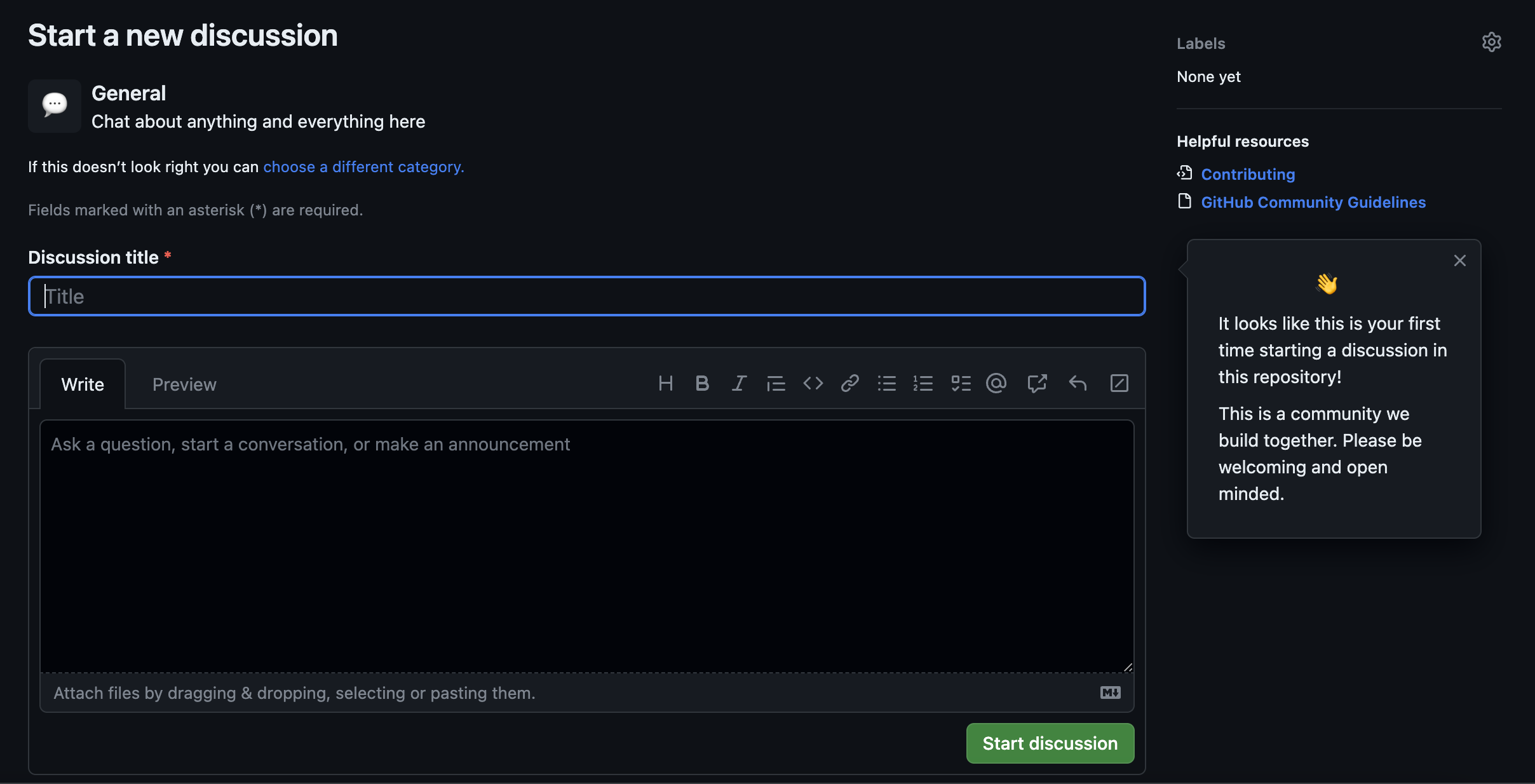
GitHub Discussions is like a message board where you can share ideas, ask questions, answer queries, exchange experiences, and more. Here are the basic steps for submitting discussions:
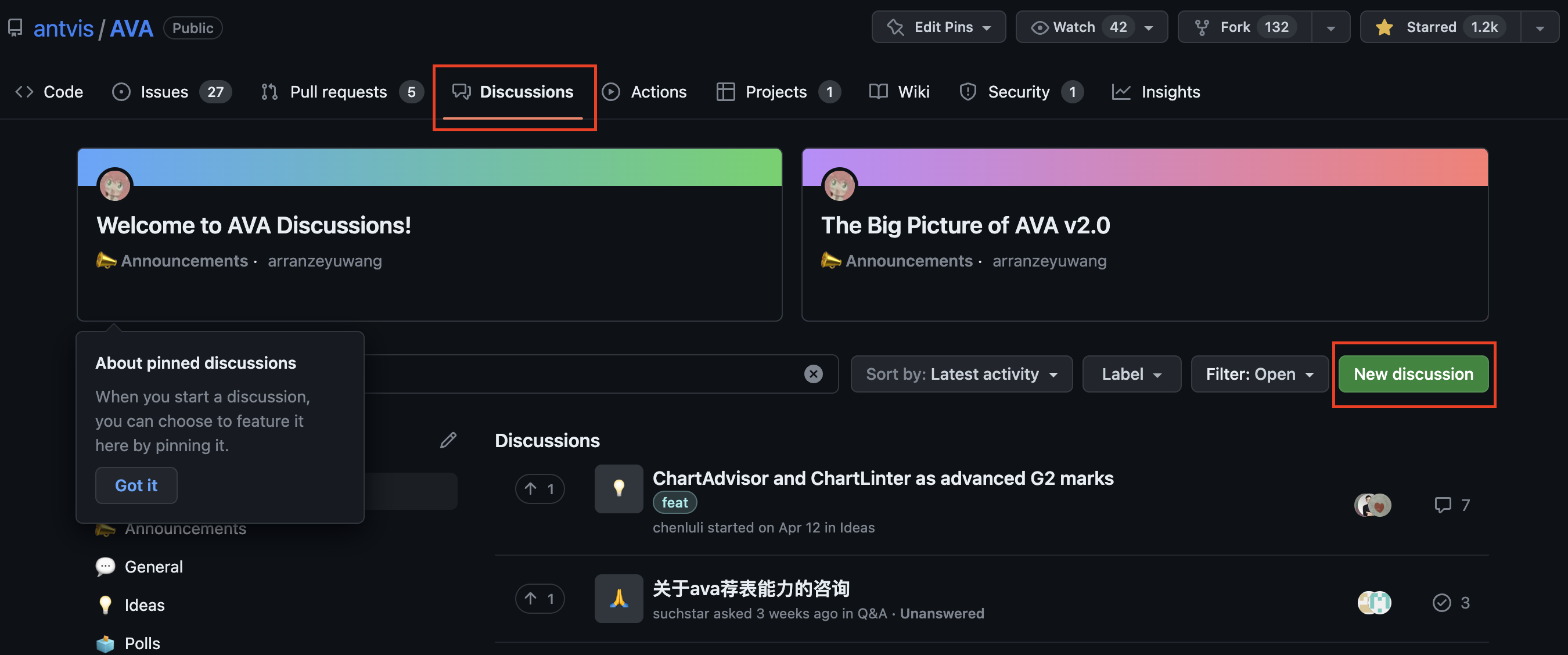
1. New discussion: Switch to the [Discussions tab](https://github.com/antvis/AVA/discussions) and click the **New discussion** button on the right to create a new discussion.
2. Submit discussion: Select an appropriate [Discussion category](https://github.com/antvis/AVA/discussions/new/choose) and click **Get Start** to go to the discussion fill page. The description here should include the topic you want to discuss, your question or idea. Once completed, click **Start discussion** to submit your discussion.
### Submit a Pull Request
If you have the ability to write code, or don't feel resistant to learning some code, and want to put your suggestions into clear code form (or if you want to help us save time), that's great! **Please try submitting a pull request**, it will help us to process your suggestions faster and implement them into the project quickly.
If you don't know what a pull request is, please refer to: [Learn more about pull request](https://help.github.com/en/github/collaborating-with-issues-and-pull-requests/about-pull-requests).
## For Developers
### Language
* All code and comments must be written in English.
* The description language in all issues and Pull Requests is recommended to be English, and in some cases Chinese can also be selected for description accuracy.
We give priority to English to serve a wider range of developers, to deepen international cooperation and co-construction, and to avoid duplicate submissions between different languages.
### Reporting New Issues
* Please specify what kind of issue it is.
* Before you report an issue, please search for related issues. Make sure you are not going to open a duplicate issue.
* Explain your purpose clearly in **tags**(see **Useful Tags**), **title**, or **content**.
AntV group members will confirm the purpose of the issue, replace more accurate tags for it, identify related milestone, and assign developers working on it.
### Submitting Code
#### Pull Request Guide
If you are developer of AntV repo and you are willing to contribute, feel free to create a new branch, finish your modification and submit a PR. AntV group will review your work and merge it to master branch.
Start-up project
```bash
# Create a new branch for development. The name of branch should be semantic, avoiding words like 'update' or 'tmp'. We suggest to use feature/xxx, if the modification is about to implement a new feature.
$ git checkout -b branch-name
# Initialization of the project and installation of dependencies.
$ npm run one-stop-setup
# Launching the official website in development mode.
$ npm run start:site
# Launch playground in development mode.
$ npm run star开发模式下启动playgroundt:playground
```
Test and Submit
```bash
# Run the test after you finish your modification. Add new test cases or change old ones if you feel necessary
$ npm test
# If your modification pass the tests, congradulations it's time to push your work back to us. Notice that the commit message should be wirtten in the following format.
$ git add . # git add -u to delete files
$ git commit -m "fix(role): role.use must xxx"
$ git push origin branch-name
```
Then you can create a Pull Request at [AVA](https://github.com/antvis/AVA/pulls).
No one can guarantee how much will be remembered about certain PR after some time. To make sure we can easily recap what happened previously, please provide the following information in your PR.
1. Need: What function you want to achieve (Generally, please point out which issue is related).
2. Updating Reason: Different with issue. Briefly describe your reason and logic about why you need to make such modification.
3. Related Testing: Briefly describe what part of testing is relevant to your modification.
4. User Tips: Notice for g2 users. You can skip this part, if the PR is not about update in API or potential compatibility problem.
#### Style Guide
Eslint can help to identify styling issues that may exist in your code. Your code is required to pass the test from eslint. Run the test locally by `$ npm run lint`.
#### Commit Message Format
You are encouraged to use [angular commit-message-format](https://github.com/angular/angular.js/blob/master/CONTRIBUTING.md#commit-message-format) to write commit message. In this way, we could have a more trackable history and an automatically generated changelog.
```xml
():
 English | [简体中文](./CONTRIBUTING.zh-CN.md)
# Guide for Contributing
We sincerely invite you to click on the ⭐ star in the upper right corner of this page to follow this project, which will allow you to get the latest information and better participate in the co-build. Thank you for your support!
If you have any comment or advice, please report your [issue](https://github.com/antvis/AVA/issues),
or make any change as you wish and submit an [PR](https://github.com/antvis/AVA/pulls).
## For Non-Developers
Whether you are a designer, a product manager or a regular user, you can contribute to the Chart Knowledge Base. **We value your participation and look forward to working with you to build it together**.
If you don't already have a GitHub account, we recommend that you [get yourself a GitHub Account](https://github.com/join) first. This step is well worth it.
After that, you can help us by creating an [issue](https://github.com/antvis/AVA/issues) or a [pull request](https://github.com/antvis/AVA/pulls).
### Create an Discussion
GitHub Discussions is like a message board where you can share ideas, ask questions, answer queries, exchange experiences, and more. Here are the basic steps for submitting discussions:
1. New discussion: Switch to the [Discussions tab](https://github.com/antvis/AVA/discussions) and click the **New discussion** button on the right to create a new discussion.
English | [简体中文](./CONTRIBUTING.zh-CN.md)
# Guide for Contributing
We sincerely invite you to click on the ⭐ star in the upper right corner of this page to follow this project, which will allow you to get the latest information and better participate in the co-build. Thank you for your support!
If you have any comment or advice, please report your [issue](https://github.com/antvis/AVA/issues),
or make any change as you wish and submit an [PR](https://github.com/antvis/AVA/pulls).
## For Non-Developers
Whether you are a designer, a product manager or a regular user, you can contribute to the Chart Knowledge Base. **We value your participation and look forward to working with you to build it together**.
If you don't already have a GitHub account, we recommend that you [get yourself a GitHub Account](https://github.com/join) first. This step is well worth it.
After that, you can help us by creating an [issue](https://github.com/antvis/AVA/issues) or a [pull request](https://github.com/antvis/AVA/pulls).
### Create an Discussion
GitHub Discussions is like a message board where you can share ideas, ask questions, answer queries, exchange experiences, and more. Here are the basic steps for submitting discussions:
1. New discussion: Switch to the [Discussions tab](https://github.com/antvis/AVA/discussions) and click the **New discussion** button on the right to create a new discussion.