vllmops

A tiny control plane for bare-metal vLLM servers.

CI PyPI Python License Ruff mypy

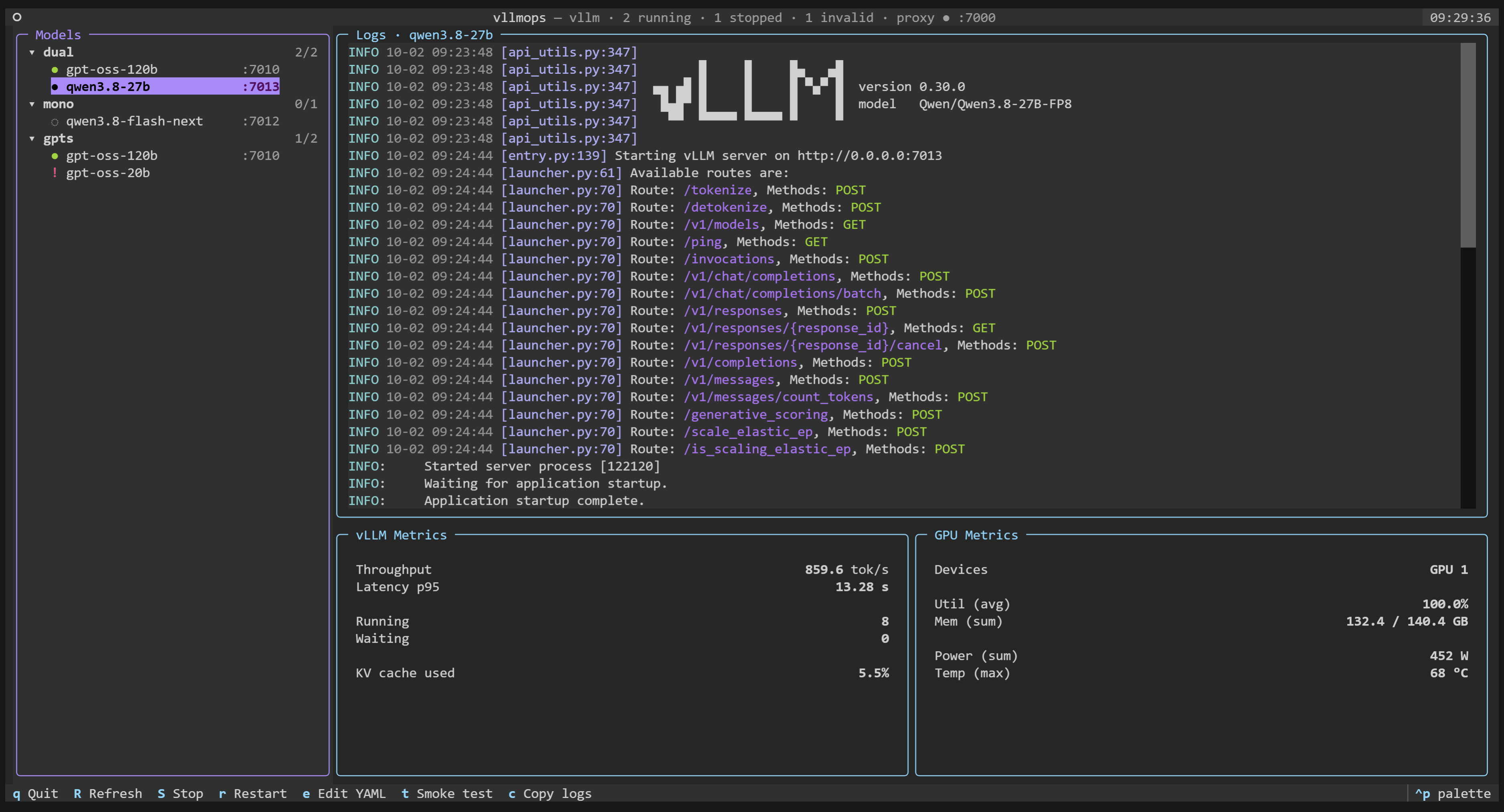
vllmops TUI with two models running behind the LiteLLM gateway, live vLLM and GPU metrics, and the selected model's log
Live metrics and logs per model, one gateway, a broken YAML that blocks nothing.

--- ## Overview Self-hosted vLLM made simple. Declare each model in its own YAML file, group models into profiles in your project config, then drive their full lifecycle from either the CLI or a live TUI. - **Git-friendly YAML.** One file per model, profiles in `.vllmops/config.yaml`. Reviewed in pull requests, reproducible on a fresh machine. - **Full lifecycle.** `start`, `stop`, `restart`, `status`, `health`, `logs`. Single model or whole profile, in parallel. - **CLI and TUI, same actions.** Run from the terminal in scripts, or open the TUI for a live view. - **One gateway.** `vllmops proxy start` generates a LiteLLM config from your catalog: every model behind a single OpenAI-compatible URL, kept in sync as you start and stop models. - **Live metrics, no stack.** Direct `/metrics` scrape, in-memory ring buffer. No Docker, no Prometheus, no Grafana. - **Per-project venv.** Each workspace pins its own vLLM via `uv`. No global install required. - **POSIX, type-checked, tested.** Linux/macOS, mypy strict, 380+ tests. ## Contents - [Install](#install) - [Quickstart](#quickstart) - [Model YAML](#model-yaml) - [Profiles](#profiles) - [LiteLLM proxy](#litellm-proxy) - [Commands](#commands) - [Shell completion](#shell-completion) - [Contributing](#contributing) - [License](#license) ## Install Requires Python 3.10+ on Linux or macOS. ```bash pipx install vllmops ``` Or with `uv`: ```bash uv tool install vllmops ``` ### Nightly builds A [nightly release](https://github.com/Freim32/vllmops/releases/tag/nightly) is built from `main` on demand and carries a dev version like `0.5.0.dev202609091420`. It is meant for trying unreleased changes on a real machine, not for anything you depend on. One command, because it reads the wheel URL off the release page: ```bash uv tool install --force "$(curl -sL \ https://api.github.com/repos/Freim32/vllmops/releases/tags/nightly \ | grep -o 'https://[^"]*\.whl')" vllmops --version ``` Going back to the last release is `uv tool install --force vllmops`. ## Quickstart ```bash mkdir my-llms && cd my-llms vllmops init uv sync # creates .venv with vLLM installed vllmops create-model # interactive: name, HF model, GPUs, port vllmops start qwen3 # blocks on /health by default vllmops tui # live metrics ``` Layout after `init`: ``` my-llms/ ├── .vllmops/config.yaml # project config ├── configs/models/*.yaml # one file per model ├── runtime/logs/ # rotated per spawn (.log + .log.prev) ├── runtime/pids/ ├── pyproject.toml # vLLM as a dep, installed via uv sync └── .env.example ``` ## Model YAML `vllmops create-model --name qwen3 --model Qwen/Qwen3-8B --gpus 0 --port 8001` writes: ```yaml name: qwen3 env: CUDA_VISIBLE_DEVICES: '0' HF_HOME: data/huggingface VLLM_LOGGING_LEVEL: INFO vllm: executable: vllm subcommand: serve model: Qwen/Qwen3-8B args: --host: 0.0.0.0 --port: 8001 --tensor-parallel-size: 1 --dtype: auto --served-model-name: qwen3 --disable-access-log-for-endpoints: /health,/metrics,/ping flags: [] extra_args: [] metrics: path: /metrics ``` `env` supports `${VAR}` interpolation from the shell, `.env`, and the project config (shell wins). Add `HF_TOKEN: ${HF_TOKEN}` for gated models. ## Profiles Group models for bulk lifecycle. Declare in `.vllmops/config.yaml`: ```yaml profiles: dev: [qwen3, llama-small] prod: [qwen3-prod] ``` Then run lifecycle commands on the whole group. Each member is processed in parallel; already-running members are skipped (idempotent), broken YAMLs don't block the rest, failures are reported per-model: ```bash vllmops start --profile dev # parallel spawn + parallel /health wait vllmops stop --profile dev vllmops restart --profile dev vllmops profile list # all profiles with running/total counts vllmops profile show dev # members and their state ``` Models not declared in any profile fall into the synthetic `general` group. The TUI sidebar renders the same grouping; selecting a profile node makes `s`/`S`/`r` operate on every member. ## LiteLLM proxy Every model is its own server on its own port. `vllmops proxy` puts one [LiteLLM](https://github.com/BerriAI/litellm) gateway in front of all of them, so clients keep a single base URL and pick the model by name: ```bash uv tool install 'litellm[proxy]' # once per machine, outside the project vllmops proxy start # writes runtime/litellm.yaml, then serves it vllmops proxy status ``` Install litellm as its own tool, not into the project: `litellm[proxy]` pins its own versions of `openai`, `rich` and other packages, and sharing a venv with vLLM can downgrade vLLM's. ```bash curl http://127.0.0.1:4000/v1/chat/completions \ -H 'Content-Type: application/json' \ -d '{"model": "qwen3", "messages": [{"role": "user", "content": "ciao"}]}' ``` The config is generated from the catalog: every running model becomes one entry, keyed by its vllmops name and routed to its own `--served-model-name` upstream. ```yaml model_list: - model_name: qwen3 litellm_params: model: hosted_vllm/qwen3 api_base: http://127.0.0.1:8001/v1 ``` `vllmops proxy config` prints that YAML so you can review it before starting the gateway. The gateway is a singleton per project, and its whole shape lives in `.vllmops/config.yaml`: ```yaml proxy: host: 127.0.0.1 # gateway bind address port: 4000 upstream_host: 127.0.0.1 # host used in each api_base executable: litellm profile: null # null routes the whole catalog expose: running # running | all (all also routes stopped models) num_workers: 1 detailed_debug: false ``` Edit a value there and run `vllmops proxy restart` to apply it. That file is the single source of the gateway's shape, so a gateway that regenerates itself always comes back exactly as you started it. The new config is checked before the running gateway is stopped: a restart that cannot start, say an empty profile or a port taken by a model, fails and leaves the running gateway in place. ### Following the models While the gateway is up it follows the catalog. Every `start`, `stop` and `restart`, single or by profile, from the CLI or the TUI, regenerates the config and respawns the gateway when the result differs from what is on disk. A file-based LiteLLM config is read at startup, so this is a respawn: requests in flight during the swap are dropped, and the gateway is down for a second or two. The command reports `proxy refreshed` only once the new gateway answers, or says in yellow that it did not. You own the gateway's lifetime: `vllmops proxy start` brings it up and `vllmops proxy stop` takes it down. A model that dies on its own keeps its entry in `model_list`, so calling it returns an error. `vllmops proxy status` and the TUI header report the config as out of date, and `vllmops proxy restart` brings it back in line. When the last model stops, the gateway stays up on the config it already has and prints a yellow line saying so, so the endpoint keeps answering while you start the next model. The TUI header shows the gateway state: `proxy ● :4000` up, `proxy ▴ :4000` up with a config out of date, `proxy ◌` down. `vllmops proxy logs` reads one log across respawns: each start is marked by a `=== vllmops: process started