UniMate
One Unified Model to Animate Diverse Skeletons





Linzhan Mou ·
Jiahui Lei ·
Zhiyang Dou ·
Chenyue Cai ·
Chaoyue Song ·
Adam Finkelstein ·
Szymon Rusinkiewicz
Princeton · UC Berkeley · MIT · NTU
---
## 🔥 News
- **[2026-10-05]** **Bring your own rig**: [`rig_preprocess`](data_process/rig_preprocess/) turns any rigged GLB / glTF / FBX, animated or not, into an asset UniMate can animate, with a review step for its joint labels and facing; the sampler takes dataset skeletons and your own assets by reference. [UniML3D](https://huggingface.co/datasets/Linzhan/UniML3D) adds training-ready features, canonical rest-pose meshes and generic / detailed captions. 🛠️
- **[2026-09-27]** Preview checkpoints are released at [HuggingFace](https://huggingface.co/Linzhan/UniMate); new checkpoints will be synced there. 📦
- **[2026-09-06]** The **training and inference code** is released. 🚀
- **[2026-08-30]** The [UniML3D dataset](https://huggingface.co/collections/Linzhan/unimate) and its [data-processing pipeline](data_process/) are released. 🚀
- **[2026-08-01]** Our [Interactive Demo](https://linzhanmou.com/unimate/interactive.html) is live — browse our animation results in 3D. 🎮
- **[2026-07-18]** UniMate is accepted to SIGGRAPH Asia 2026! 🎉
## 🛠️ Environment Setup
All components share a single conda environment, specified in [`requirements.txt`](requirements.txt):
```bash
conda create -n unimate python=3.10 -y
conda activate unimate
pip install "setuptools<81"
pip install -r requirements.txt --no-build-isolation
```
## 📊 Dataset & Data Processing
We introduce **UniML3D**, a large-scale dataset of 13,769 text-paired motion clips on 7,430 skeletons covering diverse skeletal topologies — bipedal, quadrupedal, avian, marine, insectoid, serpentine, and articulated rigid objects — all brought into a unified canonicalization.
The raw source assets are available on the Hugging Face Hub (collected under [UniMate](https://huggingface.co/collections/Linzhan/unimate)): [Mixamo-Animations-Characters](https://huggingface.co/datasets/Linzhan/Mixamo-Animations-Characters), [Objaverse-XL-Rigged-Animated](https://huggingface.co/datasets/Linzhan/Objaverse-XL-Rigged-Animated) and [Truebones-ZOO-Annotations](https://huggingface.co/datasets/Linzhan/Truebones-ZOO-Annotations) (prompts, metadata and renders only). The Truebones ZOO animal motions themselves are a commercial asset pack whose license does not permit redistribution — please purchase the pack directly from [Truebones](https://truebones.com) and rebuild the per-clip layout with the build scripts in Truebones-ZOO-Annotations.
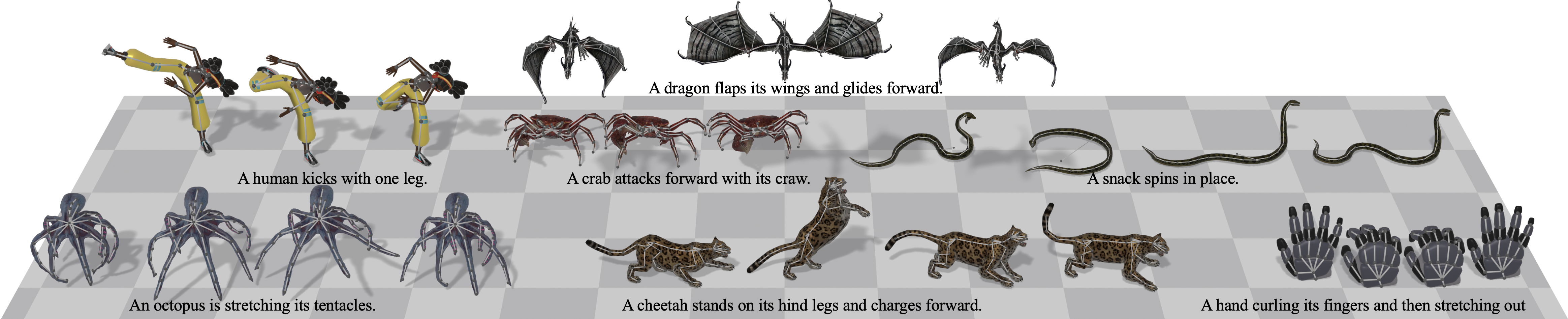
The processed dataset is on the Hub as [UniML3D](https://huggingface.co/datasets/Linzhan/UniML3D): the exported clips with all captions and annotations, the training-ready features, and canonical rest-pose meshes (everything except the Truebones motions and meshes). See [`data_process/README.md`](data_process/README.md) for the full data processing pipeline that turns the raw assets into UniML3D (download → export → rendering → captioning → joint annotation → feature extraction → animation).
## 🏋️ Training
Training reads the canonicalized clips under `dataset/features//`. Download them, or build them with stage 4 of the [data-processing pipeline](data_process/README.md#stage-4-extract) (the Truebones clips must be built from the purchased pack):
```bash
hf download Linzhan/UniML3D --repo-type dataset --local-dir dataset \
--include "features/*" --exclude "features/*/videos/*" --exclude "features/*/tpose/*"
```
Runs are configured by the JSON files in [`configs/`](configs/).
Config naming — {dataset}_{frames}frames_{attention}_{text_cond}.json
8 configs: 4 data combinations x 2 model variants, all at 60 frames.
| Prefix | Training data |
|--------|---------------|
| `uniml3d_*` | Full UniML3D dataset (Truebones + Mixamo + Objaverse) |
| `truebones_*` / `mixamo_*` / `objaverse_*` | A single source |
| Length | `dataset.max_motion_length` |
|--------|-----------------------------|
| `60frames` | 60 frames per clip |
| Suffix | `model.attention` x `model.text_cond` |
|--------|---------------------------------------|
| `_graph_adaln` | `graph` x `adaln` — attention factored into spatial (per frame) and temporal (per joint) passes with graph-distance, edge-type and depth biases; the caption is folded into the adaLN modulation |
| `_full_cross_attn` | `full` x `cross_attn` — one attention over the flattened joint x time tokens; the caption enters every block as cross-attention keys/values |
The two axes are independent and all four combinations are implemented, so `full` x `adaln` and `graph` x `cross_attn` also run if you set them in a config; the two shipped pairings are the ones the paper compares.
Tuned per data combination: `training.batch_size` (16 / 32 / 24 / 16 for Truebones / Mixamo / Objaverse / UniML3D), `training.num_steps` (80k / 120k / 100k / 120k), `model.num_layers` (6 / 6 / 8 / 10) and `dataset.max_joints` (100 / 100 / 60 / 70; `dataset.min_joints` is `5` everywhere). The joint range bounds the skeleton sizes a run admits (object types outside it are dropped) and, through what survives, the joint-axis padding width. Mixamo is a single skeleton, so its configs also turn off the object-type balancing (a no-op with one type) and, by choice, the topology augmentations.
The `uniml3d_*` configs train the recommended model's recipe (at 120k steps; the released `unimate_uniml3d_f60_v3` trained 150k): fixed per-dataset sampling weights (`dataset.sampler_dataset_weights`), one normalization pool across datasets (`dataset.use_dataset_stats: false`), the generic and detailed captions drawn with probability 0.35 and 0.25 besides the normal one, and logit-normal flow time (`training.t_sampling`). The single-source configs keep per-dataset statistics, the normal caption and uniform flow time.
Launch with [🤗 Accelerate](https://github.com/huggingface/accelerate). Single GPU:
```bash
accelerate launch -m unimate.training.train --config configs/uniml3d_60frames_graph_adaln.json
```
Multi-GPU on one node (e.g. 8 GPUs):
```bash
accelerate launch --num_processes 8 -m unimate.training.train --config configs/uniml3d_60frames_graph_adaln.json
```
Options and run outputs
`scripts/run_train.sh [-- extra args]` wraps the single-GPU command with the conda environment activated, the GPU with the most free memory selected, and anything after `--` forwarded to the training module.
`--output_dir`, `--batch_size`, `--num_workers`, `--resume ` and `--stats_path ` override the config from the command line. Resuming restores model, EMA, optimizer, LR-scheduler and step counter, and reuses the run's `dataset_stats.npy`, so a run continues exactly where it stopped. `--stats_path` loads normalization statistics from a file instead of computing them, e.g. to fine-tune a model on new data in the normalization it was trained with.
Each run writes to `outputs//`:
| Path | Content |
|------|---------|
| `config.json` | Resolved config, including the auto-computed `max_joints` / `max_depth`; inference reads it back to rebuild the model |
| `dataset_stats.npy` | Normalization statistics, reused at inference |
| `checkpoints/checkpoint_step_*.pt` | Model, EMA, optimizer and LR-scheduler state, every `training.save_interval` steps |
| `debug/` | Sample visualizations, rendered once before training and at every checkpoint (EMA weights, `sampling.cfg_scale`) |
| `logs/` | TensorBoard scalars (`tensorboard --logdir outputs//logs`) |
What a training step does
Clips are drawn by a power-law-balanced sampler when `training.balanced` is set — a type with `n` clips is sampled in proportion to `n^(1-sampler_alpha)`, so at the default `sampler_alpha = 0.5` a species with 100 clips is seen ten times as often as one with a single clip rather than a hundred times; with `dataset.sampler_dataset_weights` each dataset first gets its fixed share — then augmented on the fly — joint addition, leaf removal, chain pooling and per-bone length perturbation (`dataset.use_*_aug`) — so the model sees more topologies than the data literally contains. Every clip is padded to `max_joints` on the joint axis and `max_motion_length` on the time axis, with masks carried alongside; nothing padded ever contributes to attention or to the loss.
Training is **flow matching** (`training.diff_model = "flow"`): the network predicts the velocity of a linear interpolant between noise and data, under a masked L2 loss plus two auxiliary terms computed on the reconstructed clean motion — a geodesic rotation loss (`training.lambda_geo`) and a velocity-smoothness loss (`training.lambda_smooth`). Conditioning is dropped with probability `model.cond_mask_prob` so the same weights serve the conditional and unconditional branches that classifier-free guidance interpolates at sampling time. AdamW with a cosine schedule and warmup, gradient clipping at `training.max_grad_norm`, and an EMA copy of the weights (`training.use_ema`) — the copy inference loads by default.
Pre-computing text embeddings
The text encoder (`google/flan-t5-base` by default) is fetched from the Hugging Face Hub on first use. Every run loads it once to embed all captions and joint names; pre-computing those embeddings beside the features keeps it out of the run entirely:
```bash
python -m unimate.tools.precompute_text_emb --config configs/uniml3d_60frames_graph_adaln.json
```
This writes `caption_emb_cache.npz` (and `caption_generic_emb_cache.npz` / `caption_detail_emb_cache.npz` for the other two captions) and `joint_emb_cache.npz` into each `dataset/features//` the config uses. Captions are cached per token (the sequence `cross_attn` attends; `adaln` mean-pools it), joint names as one pooled vector each, keyed by the **cleaned** joint vocabulary that stage 3 produces — the shared naming is what lets the same anatomical joint embed identically across rigs. Re-run it after regenerating captions or joint names: anything the cache misses is still encoded at load time, so a stale cache costs speed rather than correctness.
Troubleshooting — unstable training on Objaverse
A non-trivial share of the Objaverse-XL rigs and clips are defective: rest poses that lie flat, are rotated or are inverted, and clips that stitch several unrelated actions together. Training on them can destabilize or collapse a run, and isolated spikes in the training loss are usually a symptom of bad data rather than of optimization.
To localize the problem, first train on Mixamo and Truebones alone — set `dataset.dataset_list` to `["truebones", "mixamo"]` in a copy of a config. If that run is healthy, the fault is on the Objaverse side. From there, inspect the skeleton preview videos of the suspect object types under `dataset/features/objaverse/videos/`, by eye or with an automated pass, and add the offending rigs and clips to the stage-4 skip lists that [`tools/patch_annotations.py`](data_process/README.md#stage-3-joint-annotation) maintains.
## 📌 Note
The processed **UniML3D** dataset is [released](https://huggingface.co/datasets/Linzhan/UniML3D). Its captions were **re-processed** for this release, so they do not necessarily match the prompts shown on the project page or in the paper. See the released caption style in [Truebones](https://huggingface.co/datasets/Linzhan/UniML3D/blob/main/export/truebones/motion_captions.json) · [Mixamo](https://huggingface.co/datasets/Linzhan/UniML3D/blob/main/export/mixamo/motion_captions.json) · [Objaverse](https://huggingface.co/datasets/Linzhan/UniML3D/blob/main/export/objaverse/motion_captions.json). New prompts start with "An object" to generalize across objects.
UniMate is an **early step** toward text-to-animation for any skeleton, and many motions and skeletons **still fail**. We believe that scaling up training data — **distilled from agents or generated from videos** — is a promising direction to close this gap. If you run into failure cases, please open an issue or contact us; they help us improve.
## 🎬 Inference
Given a rigged 3D asset and a text prompt, UniMate generates articulated motion for arbitrary skeletons in real time — with no per-skeleton retraining and no test-time optimization.
**1. Get a model.** Download a [released checkpoint](https://huggingface.co/Linzhan/UniMate) (configuration, normalization statistics, latest checkpoint), or use the output directory of your own training run:
```bash
hf download Linzhan/UniMate --repo-type model --local-dir outputs \
--include "unimate_uniml3d_f60_v3/*.json" --include "unimate_uniml3d_f60_v3/*.npy" \
--include "unimate_uniml3d_f60_v3/checkpoints/checkpoint_step_150000.pt"
```
**2a. Animate a dataset skeleton.** Download [UniML3D](https://huggingface.co/datasets/Linzhan/UniML3D) into `dataset/` (≈ 88 GB; its [dataset card](https://huggingface.co/datasets/Linzhan/UniML3D#download) shows smaller partial downloads):
```bash
hf download Linzhan/UniML3D --repo-type dataset --local-dir dataset
```
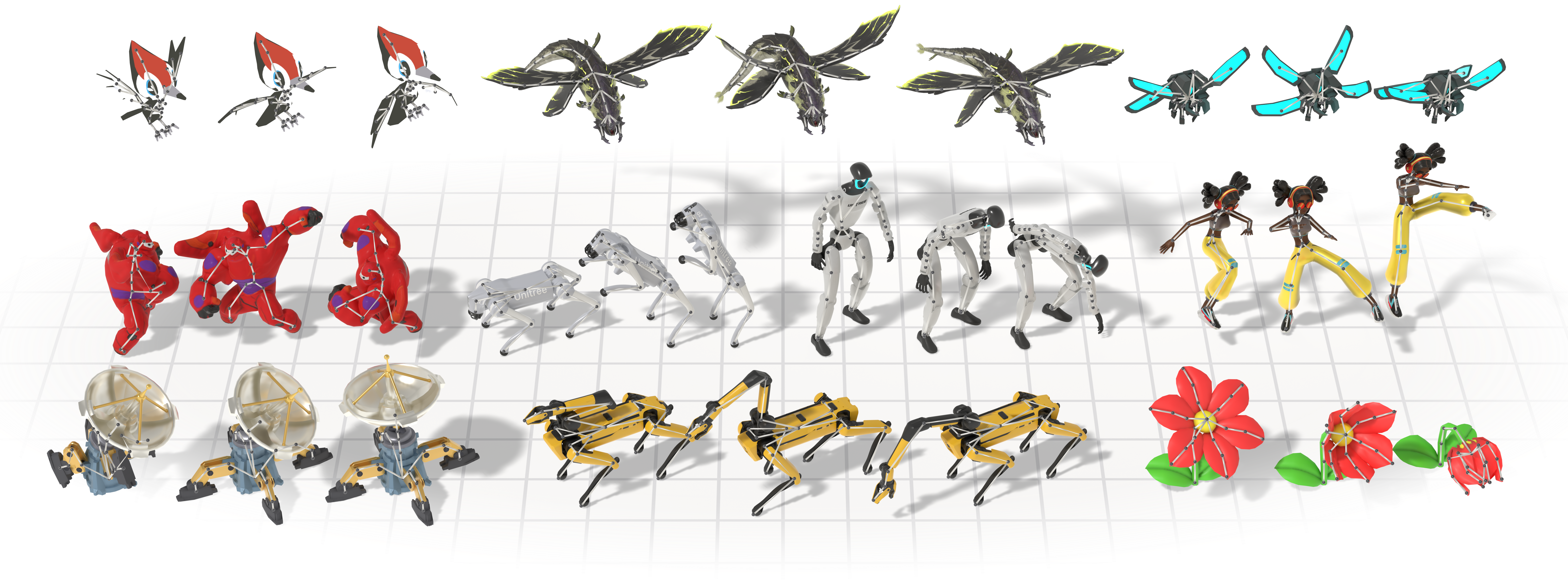
Then name skeletons as `:` (`truebones:Horse`, `mixamo`, `objaverse:`). For example, Garfield, a Gundam, Baymax and a flower from Objaverse-XL, the Mixamo humanoid and a Truebones reindeer ([`assets/examples/examples.json`](assets/examples/examples.json)):
assets/examples/examples.json
```json
[{"asset": "objaverse:01fcb4e4c36548ca86624b63dfc6b255", "id": "garfield-dance", "prompt": "An object dances in place."},
{"asset": "objaverse:01fcb4e4c36548ca86624b63dfc6b255", "id": "garfield-fall", "prompt": "An object falls forward."},
{"asset": "objaverse:42eb6e70ce024c4c9b6ab24118c737b3", "id": "gundam-kick", "prompt": "An object kicks with the right leg."},
{"asset": "objaverse:42eb6e70ce024c4c9b6ab24118c737b3", "id": "gundam-jump", "prompt": "An object jumps in place."},
{"asset": "objaverse:e87c7d42f0b3475c9a698da8295244d1", "id": "baymax-walk", "prompt": "An object walks forward."},
{"asset": "objaverse:e87c7d42f0b3475c9a698da8295244d1", "id": "baymax-punch", "prompt": "An object punches forward with its right arm."},
{"asset": "objaverse:669a74dd57bbceb71e6e8b1d_fbx", "id": "flower-close", "prompt": "An object closes its petals and bends its stem."},
{"asset": "mixamo", "id": "mixamo-run", "prompt": "An object runs forward."},
{"asset": "mixamo", "id": "mixamo-cheer", "prompt": "An object cheers with its arms raised."},
{"asset": "truebones:Raindeer", "id": "raindeer-walk", "prompt": "An object walks in place."},
{"asset": "truebones:Raindeer", "id": "raindeer-attack", "prompt": "An object attacks forward."}]
```
```bash
python -m unimate.inference.sample --exp_dir outputs/unimate_uniml3d_f60_v3 \
--test_cases_json assets/examples/examples.json --num_repetitions 3 --output_dir outputs/samples/examples
# drive each skeleton's canonical mesh: one animated GLB + FBX per motion
# (Truebones meshes are not distributed; SKIP_INVALID=1 skips motions without a mesh)
SKIP_INVALID=1 bash scripts/run_animate_motion.sh outputs/samples/examples
```
`--asset --prompt ` samples every prompt on every asset without a file. Motions are written to `--output_dir` (default `/samples`); runs into the same directory add to it, and `run_animate_motion.sh ` drives them all. Training captions, good prompts to start from, are in `dataset/features//captions*.json`. Mesh driving checks first that motion, conditioning and mesh share one joint order.
**2b. Animate your own rigged asset.** [`rig_preprocess`](data_process/rig_preprocess/README.md) turns a rigged GLB / glTF / FBX, animated or not, into an asset directory that `--asset` takes. It labels the joints with an LLM and stops so you can review the labels and the facing pair before building, since the model is conditioned on both; its [guide](data_process/rig_preprocess/README.md) walks through the review and every option. Three assets processed this way are in [`assets/examples`](assets/examples): a Unitree Go2 quadruped, an eagle and a shark:
```bash
python -m unimate.inference.sample --exp_dir outputs/unimate_uniml3d_f60_v3 --asset assets/examples/unitree_go2 \
--prompt "An object trots forward." "An object rears up on its hind legs." --output_dir outputs/samples/custom
python -m unimate.inference.sample --exp_dir outputs/unimate_uniml3d_f60_v3 --asset assets/examples/eagle \
--prompt "An object flaps its wings." "An object strikes forward." --output_dir outputs/samples/custom
python -m unimate.inference.sample --exp_dir outputs/unimate_uniml3d_f60_v3 --asset assets/examples/shark \
--prompt "An object swims and turns around." "An object bites forward." --output_dir outputs/samples/custom
bash scripts/run_animate_motion.sh outputs/samples/custom # each asset's mesh, animated
```
Prompting
Prompts matter. Write short captions in the style of the training captions (`dataset/features//captions*.json`): start with "An object" and describe one motion, not the character ("An object flaps its wings.", not "A blue parrot flaps its wings in the sky."). The closer a prompt is to that style, the better it is followed. Samples vary, so generate several (`--num_repetitions`) and try a few phrasings. `--cfg_scale` (default 3) sets how strongly the prompt is followed: raise it (5 to 7) when a prompt is ignored, lower it for smoother, calmer motion.
## 🎨 Applications
The same trained model does three more tasks with no extra training. Each is replacement-style sampling: part of the motion is pinned to a known signal and the flow ODE denoises only the rest at every step, so the constraint holds exactly rather than being encouraged by a loss.
### Motion in-betweening
Hold chosen keyframes at their ground truth and generate the transitions between them.
How to run it
`--keep_frames` takes signed indices (negatives count back from the generation window), so `"0,-1"` fills in everything between a clip's first and last pose.
```json
{ "mixamo-Air_Squat-000": "An object squats and then stands up." }
```
```bash
KEEP_FRAMES="0,-1" bash scripts/run_sample_motion_inbetween.sh \
outputs/unimate_uniml3d_f60_v3 cases.json
```
### Text-guided motion editing
Hold chosen joints at their ground-truth motion for every frame and regenerate the rest under a new prompt — keep what should stay, re-animate the rest.
How to run it
`--keep_joints` matches case-insensitively against either the rig's own bone names or the cleaned vocabulary.
```json
{ "mixamo-Cocky_Head_Turn-000": "An object walks forward." }
```
```bash
KEEP_JOINTS="Neck,Head" bash scripts/run_sample_motion_edit.sh \
outputs/unimate_uniml3d_f60_v3 cases.json
```
### Motion expansion
Chain several prompts into one long motion. The first segment is generated freely; every later one pins its first few frames to the previous segment's tail, and the segments are stitched at the seam.
How to run it
Test-case values become *lists* of prompts, one per segment; `--expand_overlap` sets how many frames consecutive segments share.
```json
{ "mixamo-sequence": ["An object stands up.", "An object walks forward.", "An object turns around in place."] }
```
```bash
EXPAND_OVERLAP=10 bash scripts/run_sample_motion_expand.sh \
outputs/unimate_uniml3d_f60_v3 cases.json
```
Shared behaviour
Each mode writes into its own subdirectory of `--output_dir` (`inbetween/`, `motion_edit/`, `motion_expand/`) alongside a small JSON recording the constraint that produced it, and each has a wrapper in `scripts/` — run any of them with `-h` for the full option list.
In-betweening and editing clamp against a real clip, so their test-case keys must be `-` naming a clip on disk: a dataset clip under `dataset/features//motions/`, or one of a `rig_preprocess` asset saved with `--save_clips`; that clip's motion is saved beside the result as `-gt_rep_-.npy` for side-by-side comparison. `--gt_start_frame` pins which window of the clip is used instead of a random one. Editing trims both the sample and the GT to the clip's true length, while in-betweening generates the full window and trims only the GT — so align the two on frame 0 rather than assuming equal lengths. All three modes need `--cfg_scale > 1.0` and are mutually exclusive with each other.
## 📝 Citation
If you find UniMate useful in your research, please consider citing our work:
```bibtex
@article{mou2026unimate,
title = {UniMate: One Unified Model to Animate Diverse Skeletons},
author = {Mou, Linzhan and Lei, Jiahui and Dou, Zhiyang and Cai, Chenyue and Song, Chaoyue and Finkelstein, Adam and Rusinkiewicz, Szymon},
journal = {arXiv preprint arXiv:2609.05415},
year = {2026}
}
```
## ⚖️ License
The code in this repository is released under the [MIT License](LICENSE). The released checkpoints are under [CC BY-NC 4.0](https://huggingface.co/Linzhan/UniMate/blob/main/LICENSE); see the [model card](https://huggingface.co/Linzhan/UniMate) for details.
The datasets remain governed by the licenses of their original sources: the [Mixamo](https://www.mixamo.com/) assets by Adobe's Mixamo terms of use, the [Objaverse-XL](https://objaverse.allenai.org/) assets by the license attached to each original object, and the Truebones ZOO motions by [Truebones](https://truebones.com)' commercial license. Please review and comply with the respective source licenses before using the data.
## 🤝 Acknowledgement
We thank the authors of [AnyTop](https://github.com/Anytop2025/Anytop) for open-sourcing their codebase, on which parts of this repository build. We thank [@chutch1122](https://github.com/chutch1122) for suggesting several captions per clip, which led to the normal, generic and detailed captions of UniML3D.


