
Trae2api-dsh
Use your TRAE account's model quota directly in DeepSeek Harness.
[](https://github.com/FuSheng-cs/Trae2api-dsh/releases/latest)
[](https://github.com/FuSheng-cs/Trae2api-dsh/actions/workflows/ci.yml)
[](LICENSE)
[中文](README.md) · [Download](https://github.com/FuSheng-cs/Trae2api-dsh/releases/latest) · [User guide](docs/usage.en.md) · [Report an issue](https://github.com/FuSheng-cs/Trae2api-dsh/issues)
**Trae2api-dsh** lets dsh use the model quota in your TRAE CN / TRAE SOLO CN accounts. Import an account, select its models and reasoning strengths in the native dsh composer, and run conversations using that account's quota. The embedded console provides account management, daily check-in, rotation, usage statistics and model visibility controls.
[Features](#features) · [Preview](#preview) · [Quick start](#quick-start) · [Everyday use](#everyday-use) · [FAQ](#faq) · [Documentation](#documentation)
## Features
| Feature | Description |
| --- | --- |
| **TRAE quota integration** | Import a TRAE account and use its models and model quota from dsh. |
| **Automatic check-in** | Run daily on a Beijing-time schedule, skip accounts already checked in, run immediately and inspect previous/next runs and results. |
| **Multiple accounts** | Import a logged-in desktop account or authorize through the web, switch the active account and enable or disable requests per account. |
| **Account rotation** | Rotate among valid enabled accounts, in round-robin order or an order based on cached remaining credits. |
| **Models and reasoning** | Include a DeepSeek V4.1 Flash preset and discover Remote / SOLO models with their supported Low / High / Xhigh strengths. |
| **Model visibility** | Search, show or hide models individually or in bulk; retain preferences and synchronize the native picker across refreshes and restarts. |
| **Credits and usage** | Inspect account credits, tokens, cache, requests, consumption records and daily totals. |
| **Full embedded console** | Keep overview, accounts/check-in, usage, rotation/settings and model tests, with a separate-browser-window option. |
| **Managed service lifecycle** | After initial preparation, start the relay with dsh and stop its whole process tree on full exit, Host termination or plugin disable. |
Check-in and rotation are disabled by default. Enable them in the console when needed. Closing Desktop to its tray keeps the service running.
## Preview
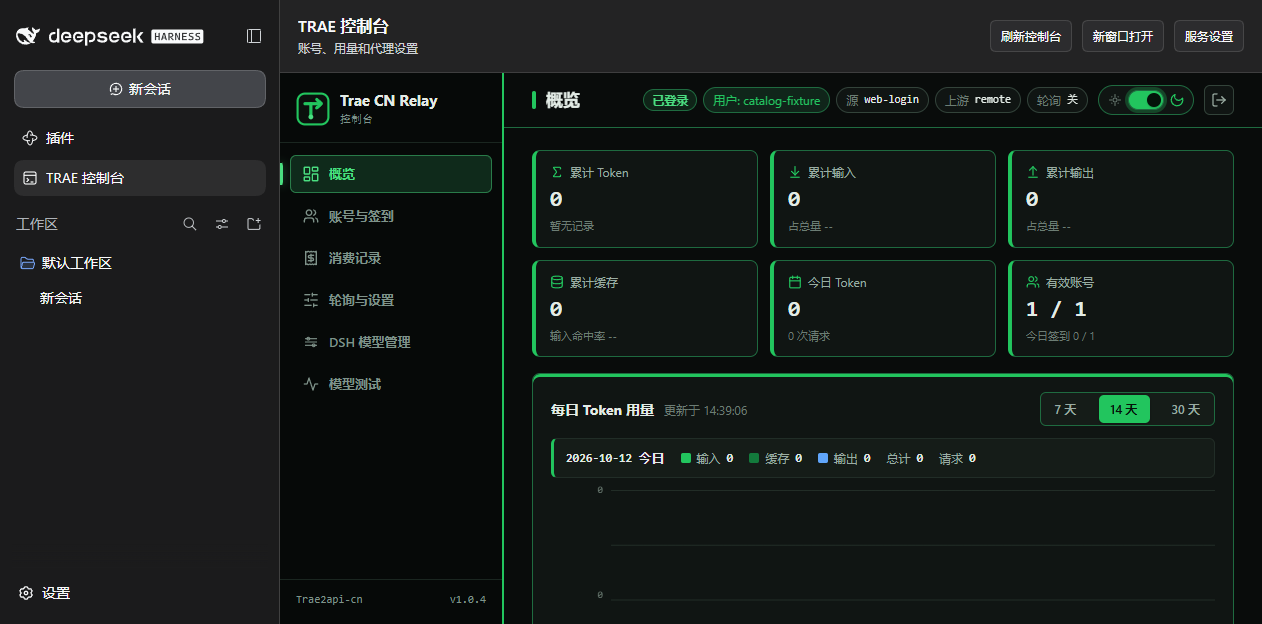
View model management and reasoning selection
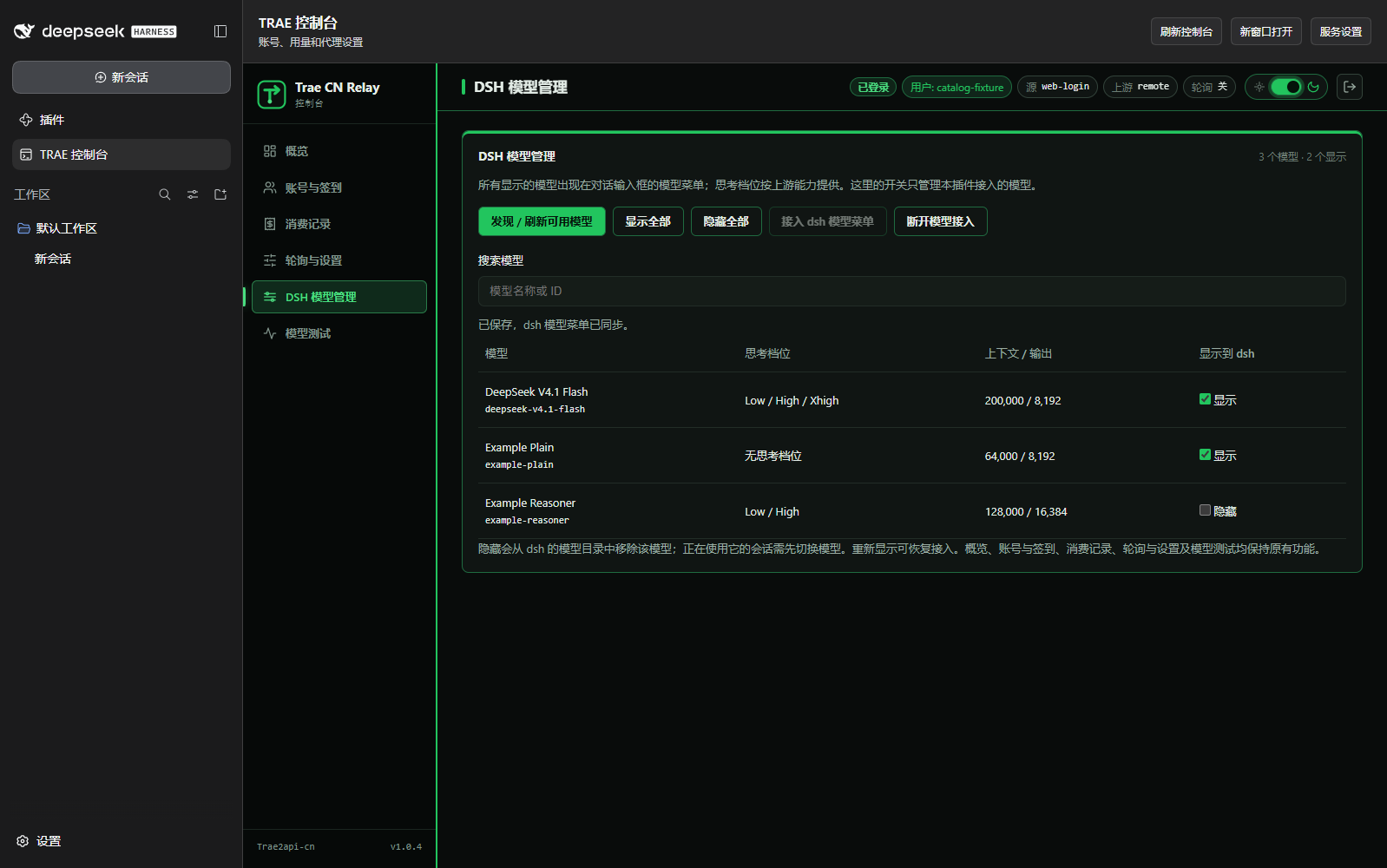
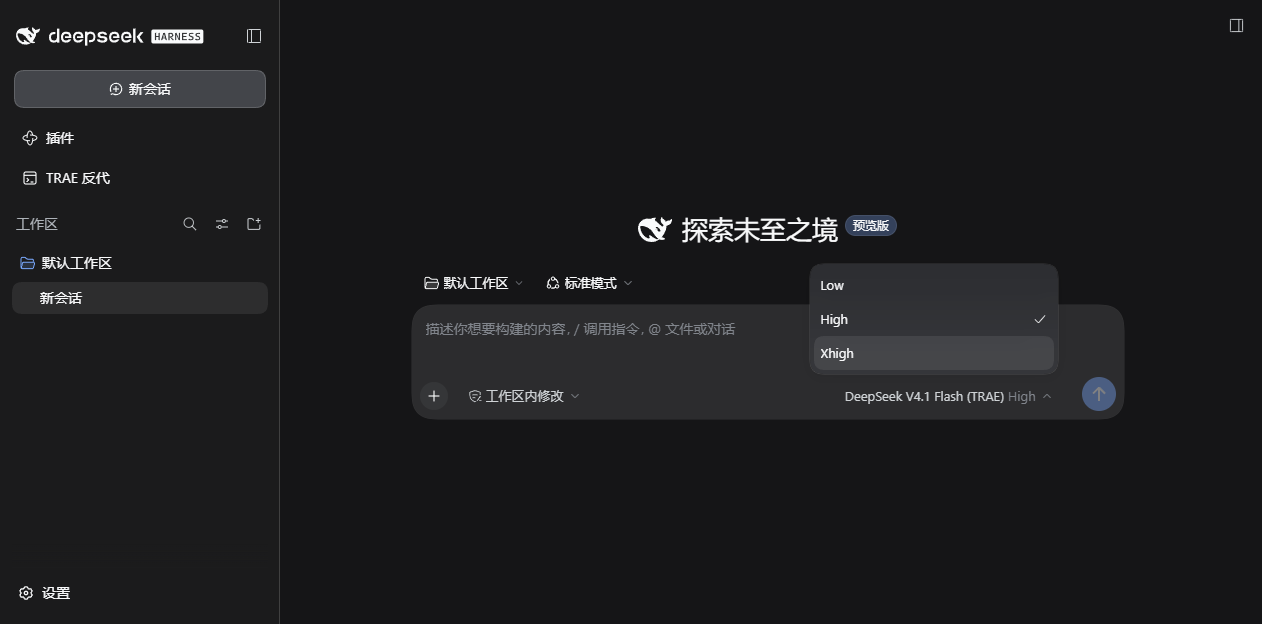
Screenshots use isolated test data. Your account supplies the actual model catalog.
## Quick start
### Requirements
| Environment | Requirement |
| --- | --- |
| dsh | Tested **0.2.0-rc.2**, local Desktop / Web |
| Node.js | **22+** |
| Python | **3.10+**, with `venv` and `pip` |
| Account | TRAE CN / TRAE SOLO CN, with access to the selected model |
| Operating system | Windows 10/11; Linux and macOS covered by CI |
Local Web / CLI installation requires `pnpm` 10+. Desktop uses its bundled plugin manager. Initial setup downloads Python dependencies; Docker is not required.
### Install
**Desktop**: add the following prebuilt archive in the dsh plugin manager, enable the plugin and open **TRAE 控制台** in the sidebar.
```text
https://github.com/FuSheng-cs/Trae2api-dsh/releases/latest/download/trae2api-dsh.tgz
```
**Local Web / CLI**:
```sh
dsh plugin --profile web add https://github.com/FuSheng-cs/Trae2api-dsh/releases/latest/download/trae2api-dsh.tgz
dsh web
```
[Releases](https://github.com/FuSheng-cs/Trae2api-dsh/releases/latest) include versioned downloads and `SHA256SUMS.txt`. See [marketplace status](MARKETPLACES.md) for listing progress; some markets restrict unlisted sources.
### First-time setup
1. Open **TRAE 控制台 → 服务设置**, prepare the environment, then start the service.
2. Select **TRAE SOLO CN** or **Trae CN** and import your logged-in desktop account, or return to the console for web authorization.
3. In **DSH 模型管理**, connect the models to dsh's picker.
4. Select a model and reasoning strength in the composer. Manage visibility in the console.
First startup does not import accounts. You explicitly initiate desktop import, which leaves TRAE client login files unchanged. Your account determines model names, advertised strengths and quotas.
## Everyday use
| Task | Console location |
| --- | --- |
| Add or switch accounts, set request permissions | **账号与签到** |
| Schedule daily check-in or run it immediately | **账号与签到 → 自动签到** |
| Enable round-robin or credit-priority rotation | **轮询与设置 → 多账号轮询** |
| Refresh, search, show or hide models individually or in bulk | **DSH 模型管理** |
| Inspect credits, tokens and consumption | **概览 / 消费记录** |
| Prepare, start or stop the relay | **服务设置** in the header |
Credit-priority mode orders accounts using cached balances; refresh account credits first when needed. Hiding removes a model from dsh's configured catalog, so switch sessions still using it first. If all models are hidden, showing any model restores the provider.
## Operation and updates
The plugin uses a private Python environment and a loopback listener. After preparation it manages the relay lifecycle and preserves other providers and global model defaults. Account copies, settings and visibility preferences live in the plugin's data directory; updates refresh runner files while retaining that state.
The project was previously named `dsh-trae-relay`. To upgrade, disconnect models, stop and remove the old plugin, then add the new package. Existing data paths and credential identifiers remain compatible. See [upgrading from the previous package](docs/usage.en.md#upgrading-from-the-previous-package) for details.
## FAQ
**Does closing dsh stop the relay?** Closing Desktop to its tray keeps it running. Full exit, Host termination or plugin disable stops the relay and check-in scheduler.
**Why do models and reasoning options differ?** The active account supplies the catalog. Unadvertised strengths are omitted; models without advertised controls use the upstream default. Refresh after switching accounts.
**What if the port is occupied or Python cannot be found?** Supply a working Python executable in service settings, or stop the service and prepare it on an unused port. See the [user guide](docs/usage.en.md) for environment and network troubleshooting.
**Are international accounts or remote browsers supported?** This release targets China-edition accounts and local Desktop / Web. The full console uses the Host's loopback address; remote-browser access is not supported.
**Does uninstalling delete accounts?** Uninstall retains plugin state. Disconnect models and stop the relay first; remove data and the credential reference manually only if you want a complete cleanup.
## Documentation
| Document | Content |
| --- | --- |
| [User guide](docs/usage.en.md) | Detailed setup, check-in, rotation, models, storage, upgrades and uninstalling |
| [Contribution guide](CONTRIBUTING.md) | Project layout, development, isolated tests and releases |
| [Changelog](CHANGELOG.md) | Version history |
| [Marketplace record](MARKETPLACES.md) | Listed channels and pending submissions |
CI covers Windows, Ubuntu and macOS with plugin tests, real dsh installation, model synchronization and shutdown checks. Tests use synthetic accounts without personal credentials or paid inference. Report problems through [Issues](https://github.com/FuSheng-cs/Trae2api-dsh/issues).
---
The relay engine and original console come from [autumnsentiment/Trae2api-cn](https://github.com/autumnsentiment/Trae2api-cn) v1.0.4, with its copyright and license retained. Related information: [MIT license](LICENSE) · [Third-party notices](THIRD_PARTY_NOTICES.md) · [Usage boundaries and disclaimer](DISCLAIMER.en.md).