OpenProgram

OpenProgram: Self-Programming AI Agent Framework
Agents create and refine their own workflows · Any LLM · Any platform

arXiv Release License Python Platforms Build status OSWorld GitHub stars

Getting Started · Self-Programming Agents · Framework Comparison · API Reference · Philosophy · 中文

--- > *"The more constraints one imposes, the more one frees oneself."* > — **Igor Stravinsky**, *Poetics of Music* **We propose _Agentic Programming_.** An LLM is flexible; code is deterministic. Let the model run everything and you get chaos — unpredictable execution, context explosion, no output guarantees; hard-code everything and you lose the intelligence. A **harness** balances the two, interleaved moment to moment — **Python for the flow you want fixed, the LLM for the judgement you can't script.** ([the full rationale →](capabilities/agentic-programming/philosophy.md)) > 🎉 **Paper:** [_LLM-as-Code: Agentic Programming for Agent Harness_](https://arxiv.org/abs/2606.15874) — accepted at the **KDD 2026 Workshop on Agentic Software Engineering (AgenticSE)**. ## What makes it different Multi-platform, multi-provider, multi-channel — table stakes; OpenProgram has them (macOS / Linux / Windows, any LLM, terminal / browser / chat). What sets it apart are **three mechanisms in the harness itself — each one the foundation for a class of agent you can build on top.** ### ① DAG Context — for native multi-agent systems

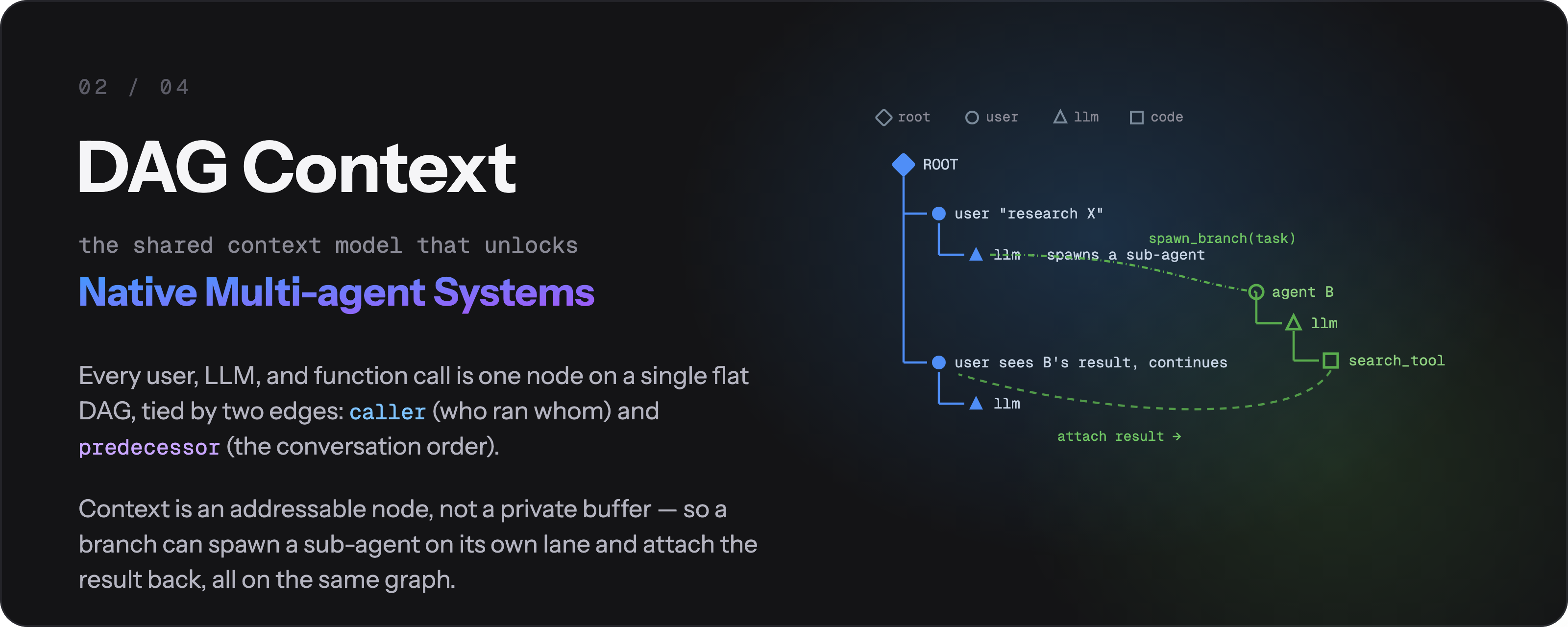
DAG Context — every user, LLM, and function call is one node on a single flat DAG; each @agentic_function declares in one line what context it reads and exposes, so fork, spawn, cross-session messaging, and worktree isolation all follow

Every user turn, LLM call, and function call is **one node on a single flat DAG**. Two edges give it meaning: `caller` (who invoked whom) and `reads` (whose output fed this prompt) — so context is assembled from the graph, not hand-stitched. Each `@agentic_function` is **programmable context in one line**: `expose` controls what a call reveals to its parent, and `render_range` controls how much history a call pulls in (`{"callers": 0}` gives a throwaway, self-isolated scratch context that's reclaimed when it returns — no unbounded prompt growth). Because context is an **addressable node rather than a per-agent buffer**, multi-agent stops being a bolt-on: fork a branch, `spawn` a clean sub-agent, `send_message` across sessions, or run a file-touching branch in an isolated `git worktree` — each is just "select a different node set as context" on the same DAG. ### ② Agentic Workflow — for trustworthy & self-evolving agents

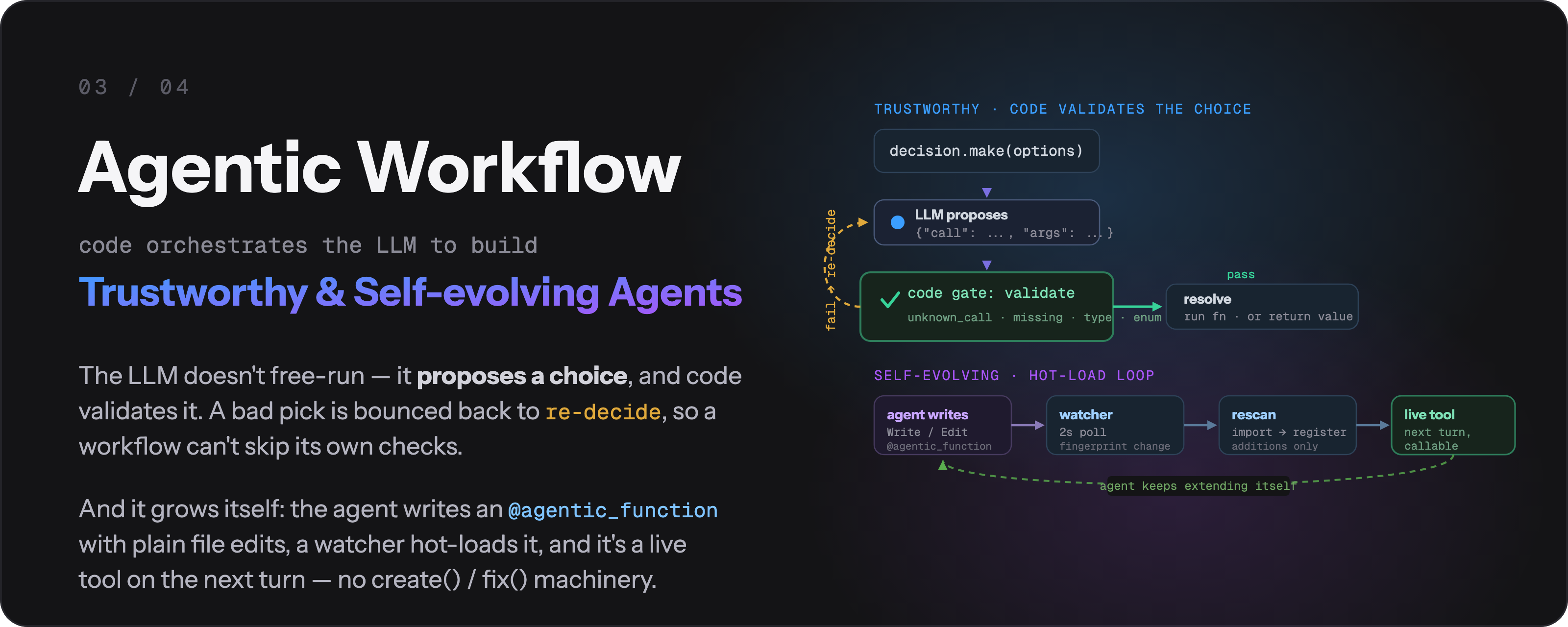
Agentic Workflow — Python drives the flow and code gates enforce the critical steps; a failed validation makes the model re-decide so it cannot skip checks; the agent writes and hot-loads its own @agentic_functions

**Python drives the flow; the LLM reasons only when asked.** Critical steps become **code gates** — the model's choice is parsed and validated by code, and a failed check makes it *re-decide* instead of quietly moving on, so validation can't be skipped. Every call is a retryable, observable DAG node. That's what makes execution *trustworthy*: the guarantees live in code, not in the model's goodwill. *Self-evolving* is a mechanism, not a black box: the agent writes and fixes its own `@agentic_function`s with **ordinary file-edit tools**, a file watcher hot-loads them, and the new tool is live on the next turn — no dedicated `create()` / `fix()` machinery. ### ③ Event Infrastructure — for proactive agents

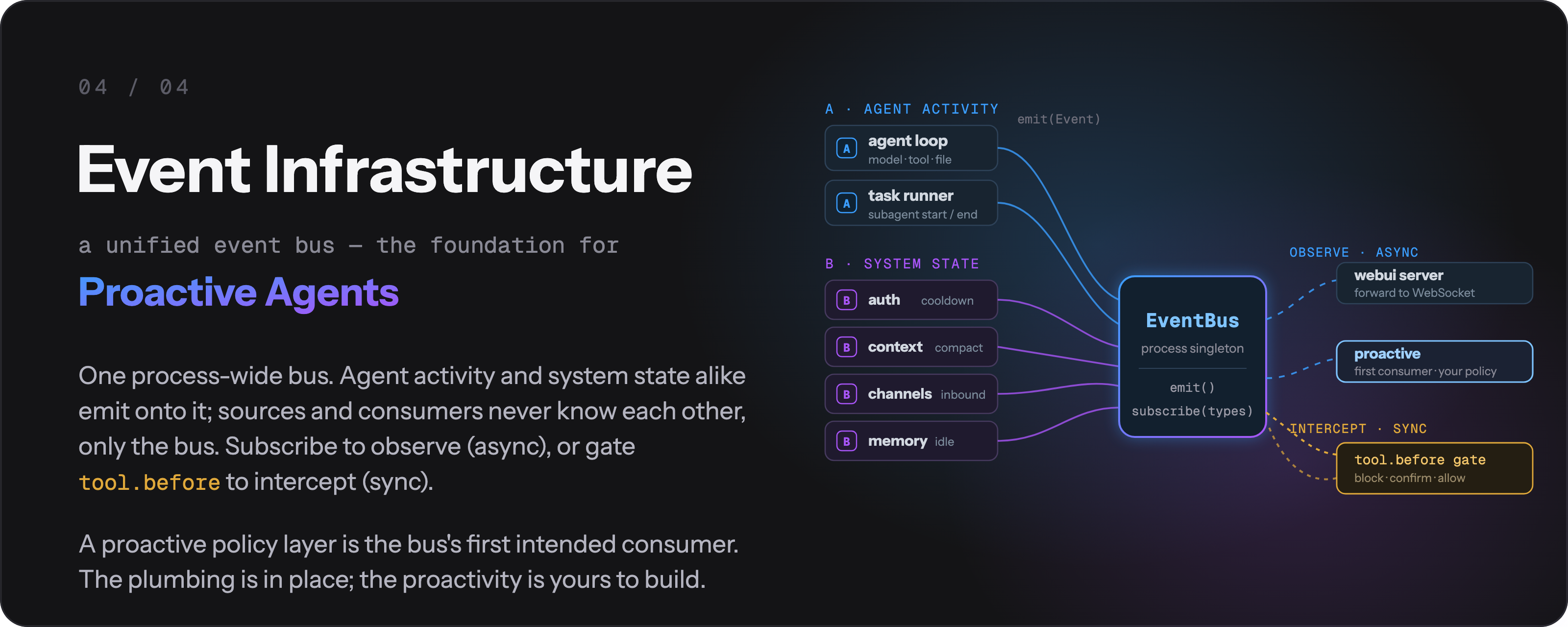
Event Infrastructure — a unified process-wide event bus that the agent loop, auth, context, channels, and memory all emit onto; anything can subscribe by event type, and a proactive policy layer builds on top

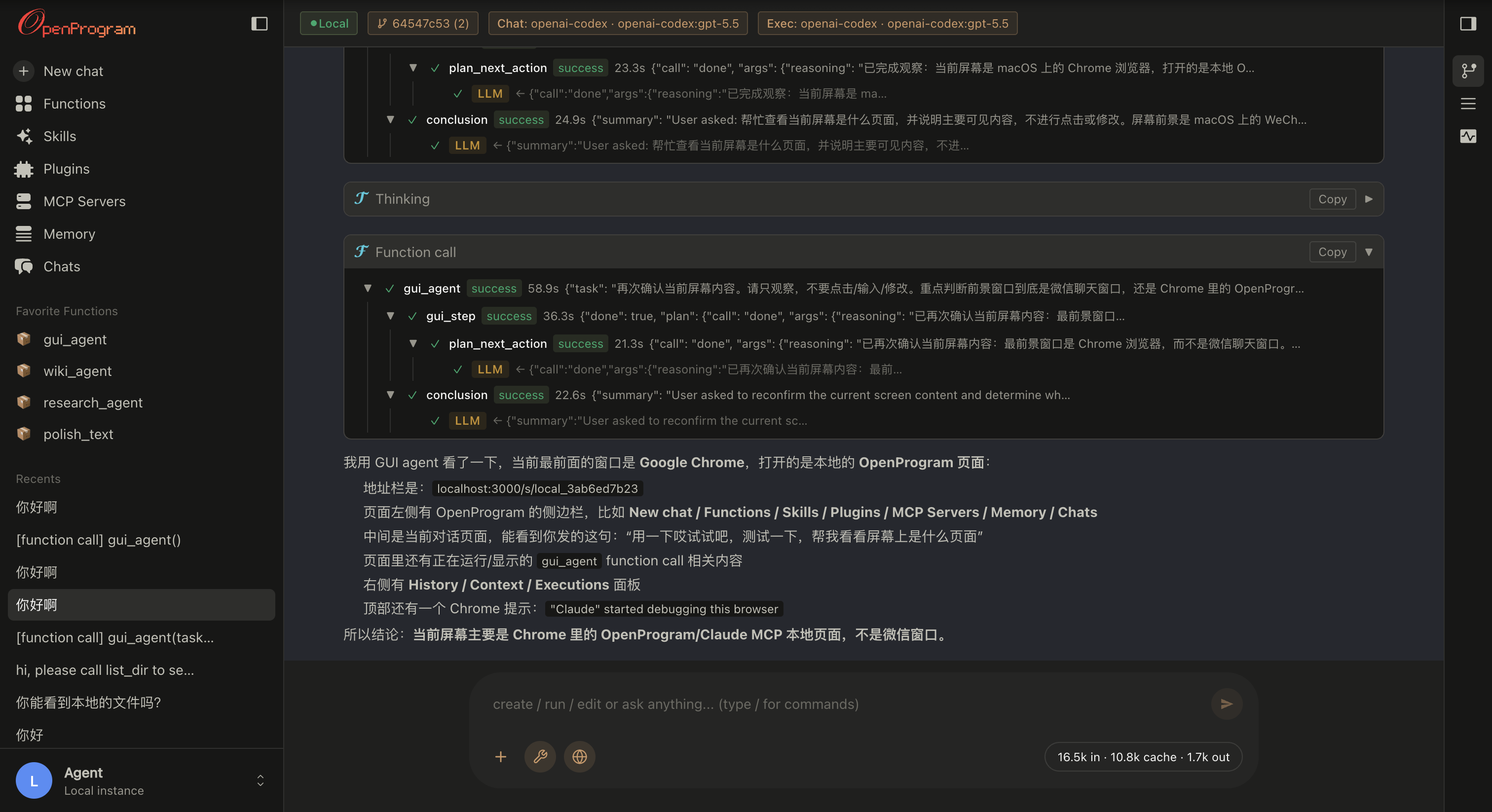
One **process-wide event bus** is the substrate under everything: the agent loop, auth, context, channels, and memory all emit onto it, and any component can subscribe by event type (every event is a uniform `Event(type, payload, ts)` envelope with `id` / `origin` / `metadata`). This is deliberately a **foundation** — a proactive policy layer that watches the stream and acts is the bus's first intended consumer. The plumbing is in place; the proactivity is yours to build on it. ## Quick Start ### 1. Install **macOS / Linux:** ```bash curl -fsSL https://raw.githubusercontent.com/Fzkuji/OpenProgram/main/scripts/install.sh | bash ``` **Windows (PowerShell):** ```powershell iwr -useb https://raw.githubusercontent.com/Fzkuji/OpenProgram/main/scripts/install.ps1 | iex ``` More options — flags, unattended / AI-agent install, installing from a checkout: **[install.md](install/install.md)**. ### 2. Run ```bash openprogram ``` First run sets up your provider, then asks which surface to open. Skip the prompt with `openprogram tui` (terminal) or `openprogram web` (browser → http://localhost:18100). ### 3. Add a harness Harnesses are programs under `openprogram/programs/agentic_functions/`. Install them with `openprogram programs install `: the command clones or verifies the repository, records its owner-approved source, and makes it available after the next worker restart. A directory copied there without this install step is not imported. | Harness | Install | What it does | |---|---|---| | [GUI Agent](https://github.com/Fzkuji/GUI-Agent-Harness) | `openprogram programs install gui` (pulls PyTorch), then its installer for the detector/OCR assets — **[guide](https://github.com/Fzkuji/GUI-Agent-Harness#1-install)** | Drives desktop apps & OSWorld VMs by vision. | | [Research Agent](https://github.com/Fzkuji/Research-Agent-Harness) | `openprogram programs install research` | Literature survey → experiments → paper draft. | | [Wiki Agent](https://github.com/Fzkuji/Wiki-Agent-Harness) | `openprogram programs install wiki` | Turns notes / docs / chats into an Obsidian vault with `[[wikilinks]]`. | | **Any third-party harness** | `openprogram programs install /` (or a full git URL) | Same flow — clone, deps, contract check, and owner source registration. | Writing your own installable harness is one layout contract away — the full guide (install, manage, author, test, publish) is **[installing-harnesses.md](capabilities/installing-harnesses.md)**. > Need a workflow of your own? Just ask the agent in chat — the bundled [`agentic-programming` skill](https://github.com/Fzkuji/OpenProgram/blob/main/skills/agentic-programming/SKILL.md) handles the rest. ## Troubleshooting Two diagnostic commands cover most "it broke and I don't know why" situations: ```bash openprogram rescue # 12 platform-agnostic probes, each with a fix command openprogram doctor # quick "is the install healthy?" check openprogram logs tail # follow the worker log live openprogram providers doctor # OAuth tokens — expiring? refresh wired? ``` `rescue` is the one to reach for first when something doesn't work — it doesn't depend on an LLM being reachable, walks through provider config, ports, dependencies, build artefacts, and prints the exact command to fix each finding. Case-by-case docs live in [troubleshooting.md](server/troubleshooting.md). For platform-builder topics (`Runtime` retry semantics, the full `@agentic_function` decorator API, the flat-DAG context model) see [API.md](reference/API.md) and the per-topic notes under [reference/api/](reference/README.md). ### Power-user commands ```bash openprogram logs list # all log files with size + age openprogram logs tail worker -f # follow worker.log openprogram completion bash # autocomplete: bash | zsh | powershell openprogram secrets list # same as `providers list` (openclaw-style alias) openprogram providers use [profile] # pick which account a provider runs on openprogram providers login --account work # add a second account openprogram worker status # is the backend up? on what port? openprogram --print --resume # continue a previous chat headlessly ``` **Providers & models** live in **Settings → Providers** (web UI). Each provider takes multiple accounts and multiple API keys under one credential pool — keys auto-rotate, cooling off a rate-limited one. Need a provider that isn't in the built-in list? **Add custom provider** takes just a **Name** and **Base URL** (id auto-generated) for any OpenAI-compatible endpoint; browse its models from the provider's `/models` endpoint or add a model by id, same multi-key management as the rest. --- ## How to use Two ways to interact day-to-day — same backend, same sessions, switch freely. ### Web UI — `openprogram web` Opens at `http://localhost:18100`. The full surface: a live **mini-DAG** of the session on the right rail, **branch / merge / attach** on any node, **multi-agent** rows tagged by producer, and drag-and-drop **file attachments**. Best when you want to *see and steer* the execution tree, or for longer, branching work.

OpenProgram web UI — agentic function call tree, streamed thinking, and the conversation DAG on the right rail

### Terminal UI — `openprogram` The same backend without the browser — same commands, same chat history. Picks the native renderer per OS: **Ink** on macOS / Linux, **Rich** on Windows. Best for staying in the terminal or over SSH. One-shot, no UI: `openprogram --print "…"`.
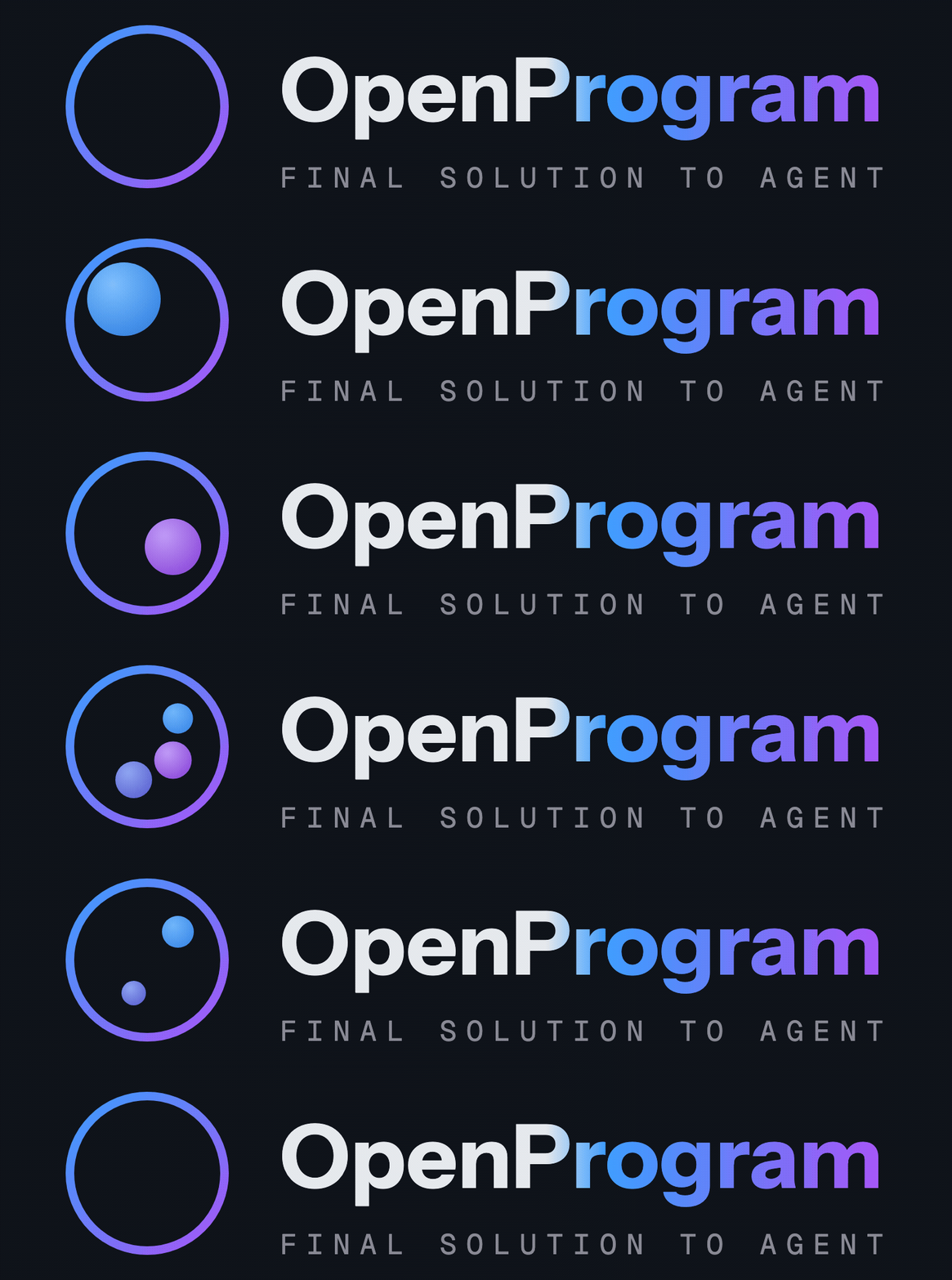

OpenProgram terminal UI — welcome screen listing the model, agents, sessions, and the registered skills / providers / tools / applications

> Sessions live in `~/.openprogram/` and are shared by both — start in the terminal, pick it up in the browser tab, and vice versa. --- ## CLI use Beyond the chat UIs, the `openprogram` command runs headless — script it, pipe it, automate it. ```bash # One-shot: send a prompt, print the answer, exit (redirect or pipe it) openprogram --print "summarise CHANGELOG.md" > summary.md # Run a specific agentic function with key=value args openprogram programs run research --arg topic="state-space models" # Continue an earlier session by id (headless; combine with --print) openprogram --print --resume local_d9a16a6b06 "and now?" ``` Same backend and sessions as the UIs (`~/.openprogram/`) — a `--print` run or a resumed session shows up in the web / terminal UI too. ## Detailed features | Feature | One-line summary | |---|---| | **Automatic context** | Every `@agentic_function` call is a tree node; the runtime threads it through nested LLM calls — no manual prompt assembly. | | **Deep work** | `deep_work(task, level)` runs an autonomous plan → execute → evaluate → revise loop until the output meets the chosen quality bar. State persists to disk. | | **Functions that author functions** | New / fixed `@agentic_function`s are written by the agent itself via ordinary file-editing tools, guided by the `agentic-programming` skill. No dedicated `create()` / `fix()` calls. | | **Conversation as a git DAG** | Sessions are commits + branches + merges, with the right sidebar exposing the operations. File-touching branches run in isolated git worktrees. | | **Memory that writes itself** | Markdown under `~/.openprogram/memory/`: `core.md` (always loaded), `topics/` (one file per subject, every paragraph citing its source), `sources/` (the conversations those citations point at). Conversations are folded into topics in the background, and every write lands whole or not at all. | | **Mini-DAG execution view** | The right rail draws every node + edge of the active session and scrolls with the chat. | | **Multi-agent + multi-channel** | Every row tagged with its producer agent; channel layer wires external transports (Telegram, Discord, Slack, WeChat). | The detailed tour of each one — code samples, design rationale, where to look in the codebase — lives in [**features.md**](start/features.md). ## Integration | Guide | Description | |-------|-------------| | [Getting Started](start/GETTING_STARTED.md) | 3-minute setup and runnable examples | | [Claude Code](integrations/claude-code.md) | Use without API key via Claude Code CLI | | [OpenClaw](integrations/openclaw.md) | Use as OpenClaw skill | | [API Reference](reference/API.md) | Full API documentation |
Project Structure ``` openprogram/ ├── __init__.py # agentic_function re-export ├── cli.py # `openprogram` command entry point ├── agentic_programming/ # engine — paradigm-essential primitives │ ├── function.py # @agentic_function decorator │ ├── runtime.py # Runtime (exec + retry + DAG context) │ ├── session.py # session lifecycle │ └── skills.py # SKILL.md discovery ├── context/ # flat-DAG context model — nodes, storage, render, compute_reads ├── providers/ # Anthropic, OpenAI, Gemini, Claude Code, Codex, Gemini CLI ├── functions/ │ ├── _registry.py # unified registry for tools + agentic functions │ ├── tools/ # @function leaves — bash, read, edit, grep, semble_search, web_search, … │ └── agentics/ # @agentic_function modules (each its own dir, code in __init__.py) │ ├── ask_user/ # ask the user a clarifying question │ ├── deep_work/ # autonomous plan-execute-evaluate loop │ ├── extract_pdf_figures/ # PDF figure extraction │ ├── … # other agentics … │ ├── GUI-Agent-Harness/ # GUI agent (separate repo, cloned in) │ ├── Research-Agent-Harness/ # Research agent (separate repo, cloned in) │ └── Wiki-Agent-Harness/ # Wiki agent (separate repo, cloned in) └── webui/ # `openprogram web` — browser UI skills/ # SKILL.md files for agent integration examples/ # runnable demos tests/ # pytest suite ```
## Contributing This is a **paradigm proposal** with a reference implementation. We welcome discussions, alternative implementations in other languages, use cases that validate or challenge the approach, and bug reports. See [CONTRIBUTING.md](https://github.com/Fzkuji/OpenProgram/blob/main/CONTRIBUTING.md) for details. ## Acknowledgements OpenProgram stands on shoulders. The tool framework, provider abstraction, and several tool implementations were ported or adapted from the projects below — each under its own license. Enormous thanks to their authors. - [**OpenClaw**](https://github.com/openclaw/openclaw) (MIT) — layout of the tool registry (`name / description / parameters / execute`), provider abstraction with `check_fn` + `requires_env` gating, `TOOLSETS` presets, skill loading via SKILL.md frontmatter + late-bound `read`. Our full clone lives under `references/openclaw/` (gitignored) for browsing. - [**hermes-agent**](https://github.com/himanshuishere/hermes-agent) (MIT) — starting point for `execute_code` (we trimmed the Docker / Modal layers), `mixture_of_agents`, and the general shape of the multi-provider `web_search` / `image_generate` / `image_analyze` tools. - [**pi-coding-agent**](https://github.com/mariozechner/pi-coding-agent) (MIT) — via OpenClaw's import, the canonical AgentSkill shape (`` XML formatter, name / description / location). - [**Claude Code**](https://www.anthropic.com/claude-code) — overall ergonomics of the `DEFAULT_TOOLS` set (bash + read / write / edit + glob / grep / list + apply_patch + the todo planning board) and the todo tools' JSON schema. - **Anthropic / OpenAI / Google SDKs** — provider HTTP contracts; our providers call the raw HTTP APIs to keep SDK dependencies optional. Individual tool files call out their direct inspirations in file-level docstrings where the lineage is more specific. These MIT-licensed components keep their original MIT terms; the combined work is distributed under AGPL-3.0. ## Citation Using OpenProgram in your work, or building on the code? Please cite our paper — and under the AGPL, any derivative you **distribute or run as a network service** must itself be open-sourced under the AGPL, with attribution preserved (see [License](#license)). > _LLM-as-Code: Agentic Programming for Agent Harness_ — accepted at the **KDD 2026 Workshop on Agentic Software Engineering (AgenticSE)**. [arXiv:2606.15874](https://arxiv.org/abs/2606.15874) ```bibtex @inproceedings{qi2026llmascode, title = {LLM-as-Code: Agentic Programming for Agent Harness}, author = {Qi, Junjia and Fu, Zichuan and Gao, Jingtong and Zhang, Wenlin and Yan, Hanyu and Wu, Xian and Zhao, Xiangyu}, booktitle = {KDD 2026 Workshop on Agentic Software Engineering (AgenticSE)}, year = {2026}, eprint = {2606.15874}, archivePrefix = {arXiv}, url = {https://arxiv.org/abs/2606.15874}, } ``` ## License [AGPL-3.0](https://github.com/Fzkuji/OpenProgram/blob/main/LICENSE) © 2026 Fzkuji. Free to use, study, modify, and share — but any derivative you distribute **or run as a network service** must also be released under the AGPL, with attribution preserved.