# 🚀 Getting started
> Go from install to your first safe deploy against a live Snowflake account in about 15 minutes.
**On this page:** [Install](#install) · [Connect](#connect) · [Create or extract a project](#create-or-extract-a-project) · [First compare](#first-compare) · [First deploy](#first-deploy) · [Where to go next](#where-to-go-next)
---
## Install
Snowflake Data Tools (SDT) ships as a VS Code extension and a command-line tool. Install whichever fits your workflow — or both. They run the same engine.
### VS Code extension
1. **Open the Extensions view** — press Ctrl+Shift+X.
2. **Search for `sdt-ddt-tools.sdt-vscode`** — or install directly from the [Marketplace listing](https://marketplace.visualstudio.com/items?itemName=sdt-ddt-tools.sdt-vscode).
3. **Reload VS Code** when prompted.
The Free features (extract, project authoring, syntax) work out of the box. Pro features (property compare, script preview) light up when you sign in.
### CLI
Install the `sdt` command globally from [npm](https://www.npmjs.com/package/@sdt-tools/cli):
```sh
npm install -g @sdt-tools/cli # requires Node.js 20 or newer
```
Smoke-test it:
```sh
sdt --version
```
---
## Connect
A connection profile carries your account locator, auth method, and default role / warehouse / database. Profiles live at `~/.sdt/profiles.json` and never store raw secrets.
The fastest start is key-pair auth (recommended for any production use):
```sh
sdt connection add \
--name prod \
--account orgname-acctname \
--user ETL_SVC \
--auth KEY_PAIR \
--key ~/.sdt/sdt_key.p8 \
--role TRANSFORM \
--warehouse COMPUTE_WH \
--database SAMPLE_ANALYTICS
sdt connection test prod # confirms account, role, warehouse, database
```
> [!TIP]
> See [Connecting to Snowflake](connections.md) for every auth method (key-pair, external browser/SSO, password, MFA, OAuth), how to generate an RSA key, and how to add and test connections from VS Code.
---
## Create or extract a project
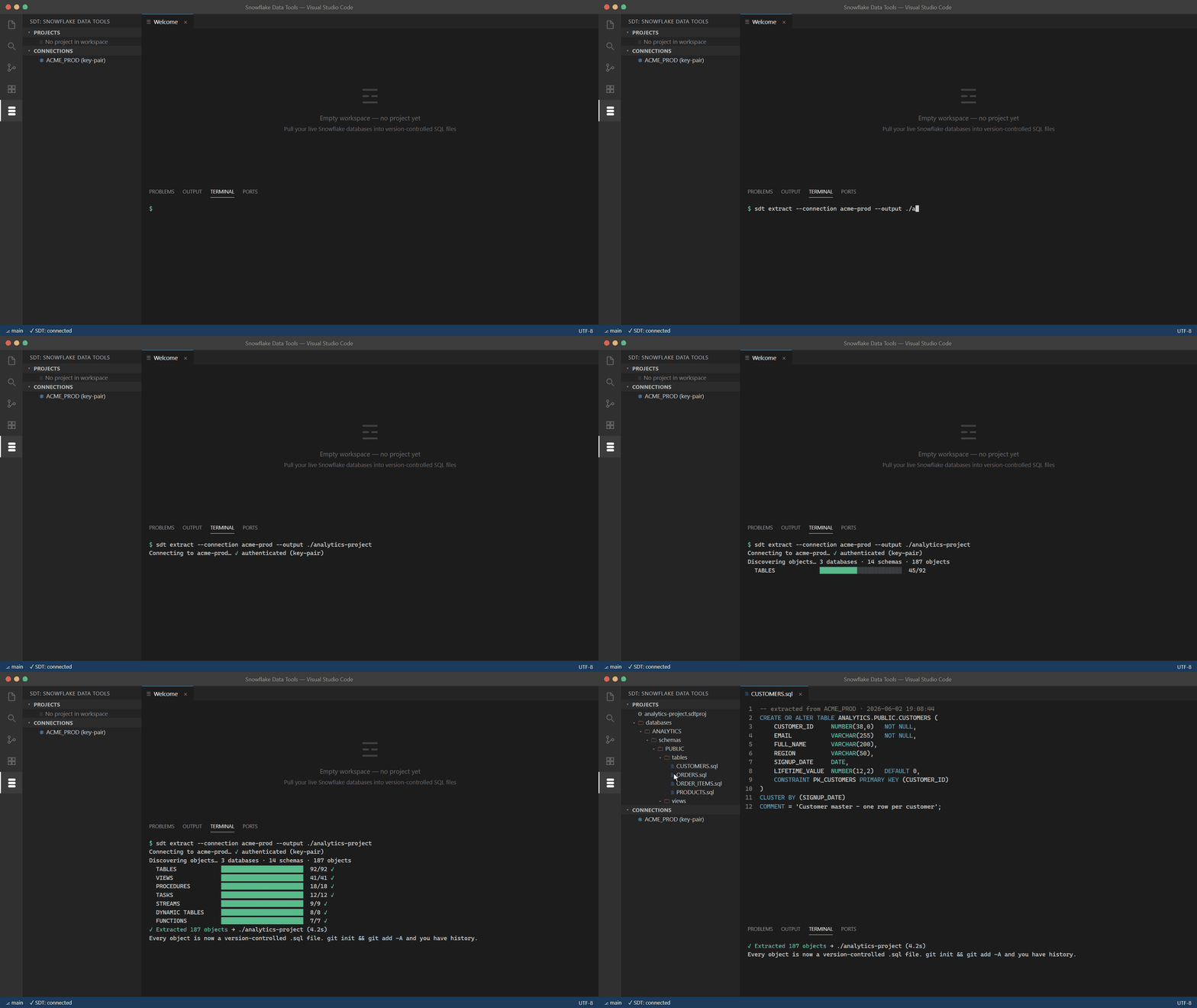
An SDT project is a folder of `.sql` files — one per object — described by a `.sdtproj` manifest. You can scaffold an empty project or extract one from a live account.
### Extract an existing account
`sdt extract` walks every database, schema, and object in the connection and writes one `.sql` file per object at its canonical path. This is the usual first step.
```sh
mkdir my-warehouse-project && cd my-warehouse-project
sdt init --name SampleAnalytics --scope database --db SAMPLE_ANALYTICS
sdt extract --connection prod --output .
```
What you get:
```
.
├── SampleAnalytics.sdtproj # project manifest
└── databases/
└── SAMPLE_ANALYTICS/
└── schemas/
└── PUBLIC/
├── tables/
│ ├── fact_sales.sql # one file per table
│ └── dim_customer.sql
├── views/
├── procedures/
└── functions/
```
Extract covers the full SDT object model — tables, views, materialized views, dynamic tables, streams, tasks, pipes, procedures, functions, file formats, stages, sequences, masking / row-access / aggregation / projection policies, tags, integrations, network policies, and warehouses.
> [!TIP]
> Re-running `sdt extract` against an existing project preserves your manual edits where the DDL hasn't changed.
### Or scaffold a new project
`sdt init` (or the **New Project** command in VS Code) creates the canonical layout with empty type folders, ready for you to author objects by hand.
You author each object as a `.sql` file named for its fully-qualified name, using `CREATE OR ALTER` for every type that supports it.
---
## First compare
Compare diffs two sources — a project, a built `.sdtpac` artifact, or a live account — in any direction and reports exactly what changed.
Make a change first. Edit a table file in the project — say, add a column to `fact_sales.sql`. Then build a pac and compare it to the live account:
```sh
sdt build -p ./SampleAnalytics.sdtproj
# Built ./bin/SampleAnalytics.sdtpac
sdt compare ./SampleAnalytics.sdtproj snowflake://prod/SAMPLE_ANALYTICS
```
In VS Code, run **SDT: Schema Compare** from the Command Palette (Ctrl+Shift+P) to open the compare webview. It shows:
- A tree of every object grouped by type, badged added / removed / modified / unchanged.
- Per-object, field-level drill-down for modified rows.
- Safety findings — every diff classified UNRECOVERABLE / DESTRUCTIVE / EXPENSIVE / WARNING.
- Include/exclude checkboxes per row to narrow the generated script.
- A **Generate Script** action that emits the migration SQL into an editor.
---
## First deploy
A deploy generates a migration script from the diff and — when you opt in — executes it.
Always start with a dry run. It prints the full plan and safety assessment without running any SQL:
```sh
sdt publish --pac ./bin/SampleAnalytics.sdtpac --connection prod --out ./deploy.sql
```
Open `deploy.sql`. Every non-SAFE operation is wrapped in `-- WARNING:` comments. Read the safety report before going further.
When the plan looks right, apply it:
```sh
sdt publish --pac ./bin/SampleAnalytics.sdtpac --connection prod --apply --yes
```
> [!WARNING]
> `--apply` executes DDL against the live account. Destructive operations stay blocked until you explicitly opt in with the matching gate — `allowDropTable`, `allowDropColumn`, `allowNarrowingTypes`, `allowTableRebuild`, or `allowUnrecoverableDrop`. See [Safe deploy](safe-deploy.md) and the [Safety classifier](safety-classifier.md).
On partial failure, the deploy walks completed steps in reverse and rolls back, leaving you at your starting state where every step was reversible.
---
## Where to go next
| Page | What it covers |
|---|---|
| [Connecting to Snowflake](connections.md) | Every auth method, the profiles file, troubleshooting |
| [Projects & suites](projects.md) | Project layout, the `.sdtproj` manifest, multi-project suites |
| [Extract](extract.md) | Extracting a live account into a project in depth |
| [Schema compare](schema-compare.md) | Compare modes and the compare view |
| [Safe deploy](safe-deploy.md) | Dry-run, apply, rollback, deployment profiles |
| [Safety classifier](safety-classifier.md) | What UNRECOVERABLE / DESTRUCTIVE / EXPENSIVE / WARNING mean |
| [CLI reference](cli-reference.md) | Every command and flag |
| [VS Code extension reference](vscode-extension.md) | Commands, views, and panels |
| [CI/CD](ci-cd.md) | Wiring SDT into your pipeline |
---
**Next:** [Connecting to Snowflake](connections.md) · **Up:** [Documentation home](README.md)