```markdown
Visual Agent Orchestration Platform
A visual Agent orchestration platform built on DeepSeek Harness
Supports fixed Workflows, visual flow design, and Agent autonomous meta-orchestration, with real-time intervention during runtime and continuous evolution through feedback-driven experience accumulation
English · 简体中文


---
## What This Project Is
This is an Agent orchestration platform that "gets smarter the more you use it" — no longer just a plain workflow.
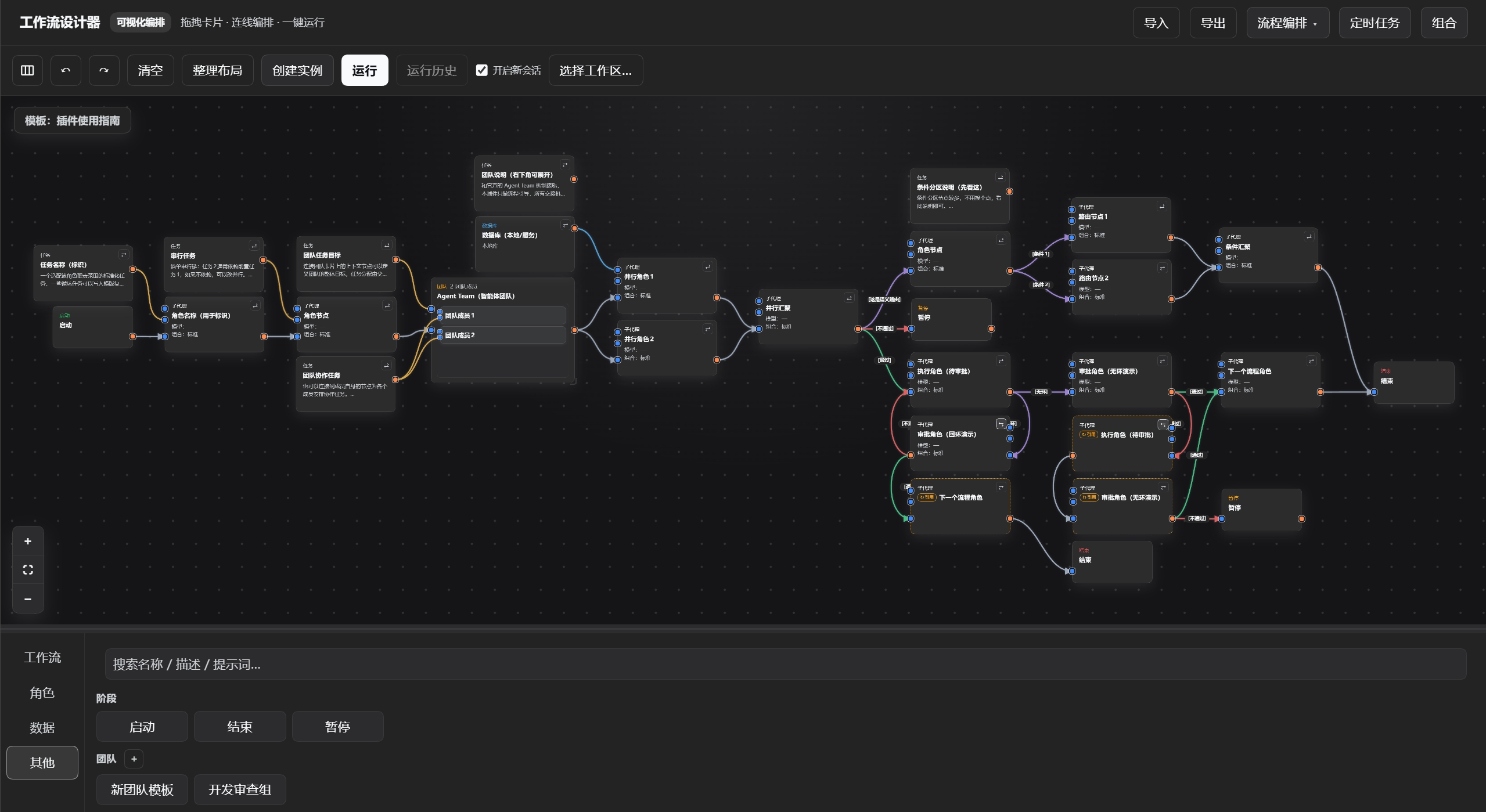
The project combines **Workflow, Agent Team, Meta-Orchestration, Human-in-the-loop, and Organizational Memory** into a single visual workbench:
```text
┌───────────────────────┐
│ Human Design │
│ Fixed Workflow │
└───────────┬───────────┘
│
▼
┌─────────────────────┐ ┌─────────────────┐ ┌──────────────────────┐
│ Agent Autonomous │──►│ Org Generation │◄──│ Live Human │
│ Planning │ │ / Execution │ │ Intervention │
│ Meta-Orchestration │ └────────┬────────┘ └──────────────────────┘
└─────────────────────┘ │
▼
┌────────────────────┐
│ Autonomous │
│ Experience Learning│
└─────────┬──────────┘
│
▼
┌────────────────────┐
│ Organizational │
│ Memory │
│ Assets + Experience│
└─────────┬──────────┘
│
└──────► Next organization generation
```
> Therefore, the project is now officially renamed from the former *dsh Visual Workflow* to: **Visual Agent Orchestration Platform**.
---
## Core Highlights
✦ **Agent Meta-Orchestration**
- Agents are no longer limited to executing a fixed DAG drawn in advance by humans. During orchestration they can **retrieve organizational assets and experience, generate and adjust the organizational structure based on the current task, and keep improving through feedback-driven reinforcement learning**
✦ **Real-time human-in-the-loop adjustment**
- After a human modifies the flow, the orchestrator perceives the latest topology in real time and dynamically adjusts subsequent orchestration; after an Agent modifies the graph, the canvas reflects the changes in real time. Orchestration and canvas always stay in sync, so runs are **observable and correctable**.
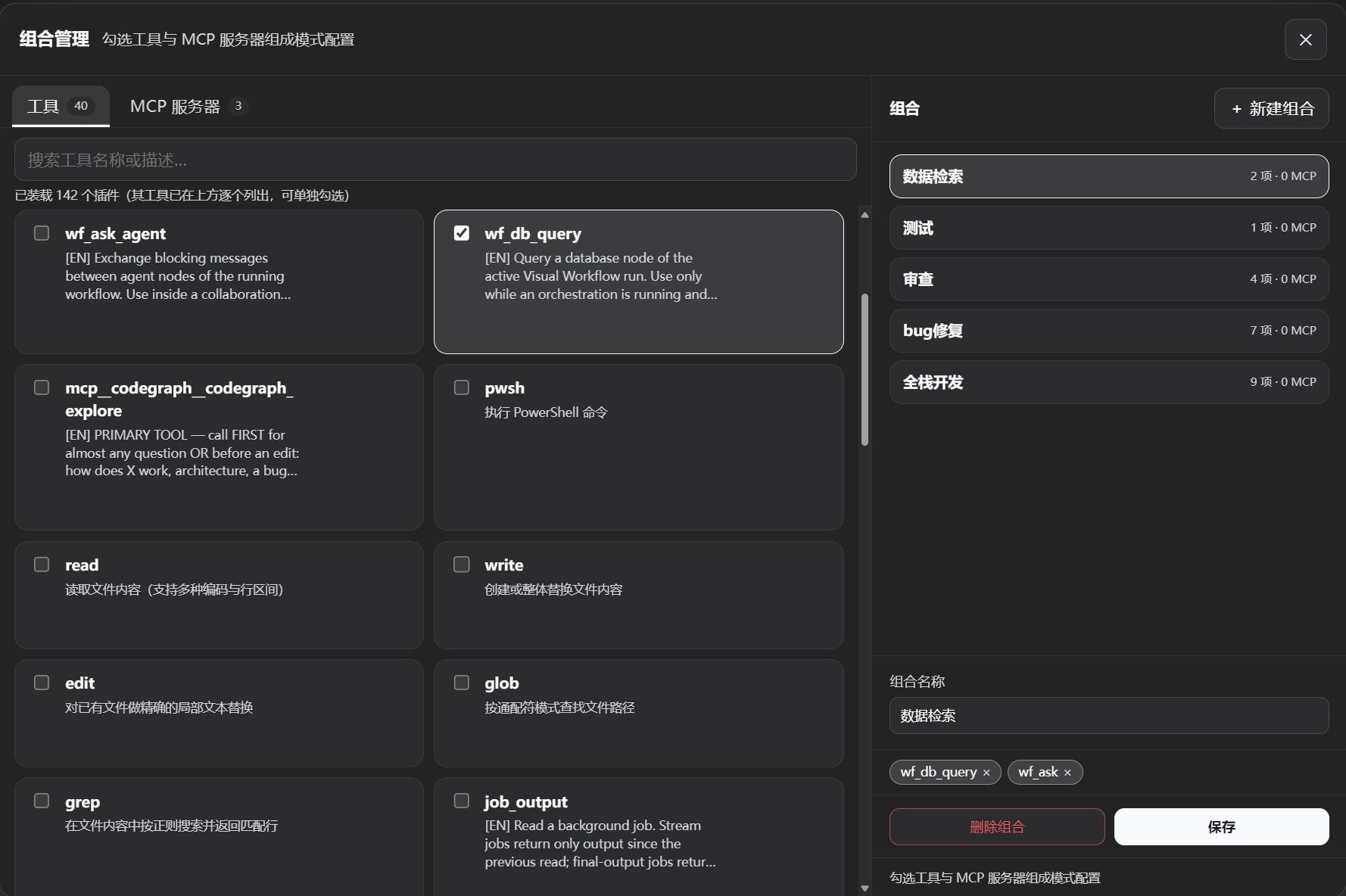
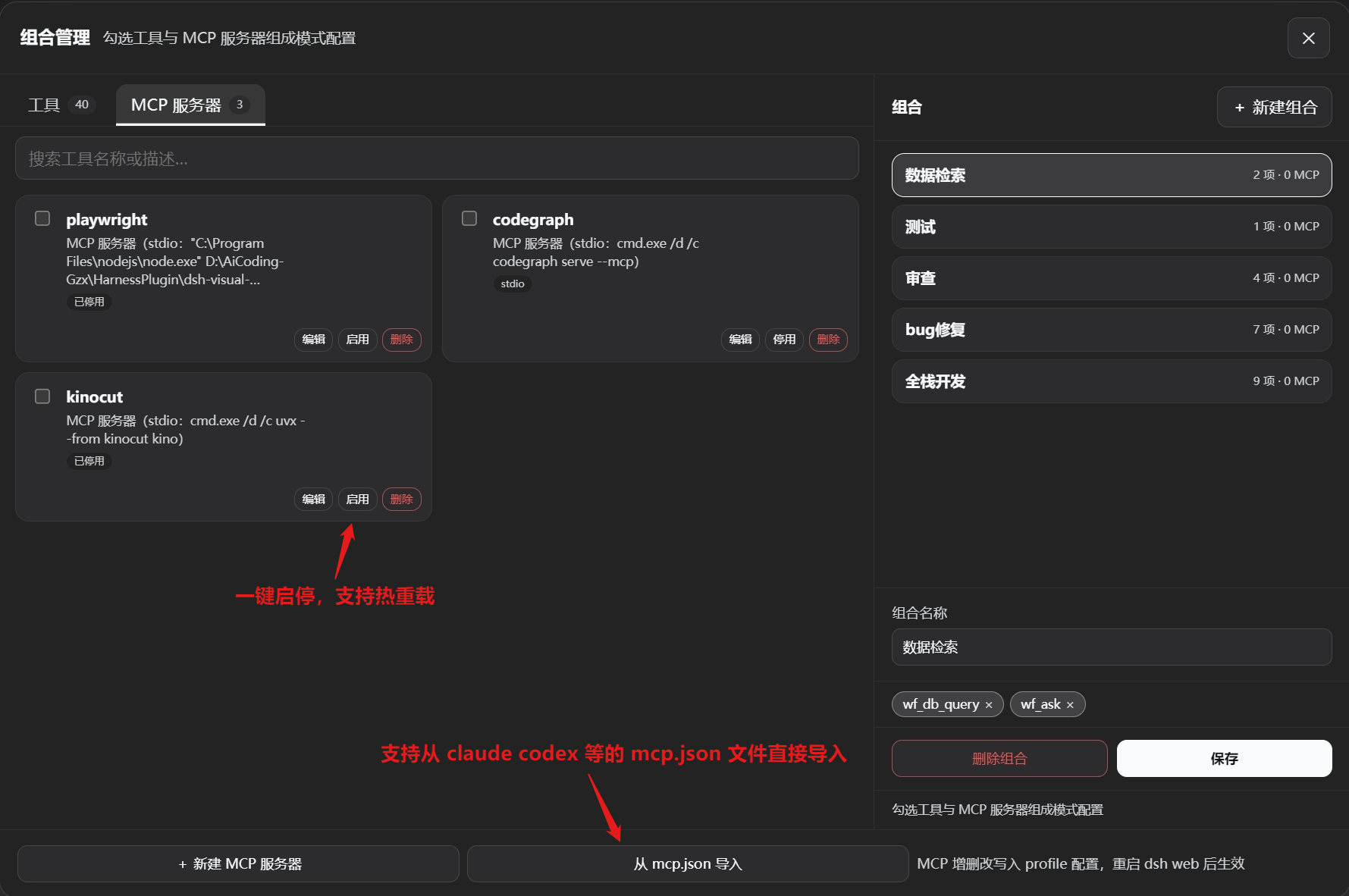
> Tools can be freely combined and assigned to each agent, preventing useless tools from occupying context; an MCP server only needs one line of configuration to be registered automatically, with hot reload taking effect immediately.
✦ **Deep customization**
- Each sub-agent node independently configures its system prompt, LLM model, thinking intensity, tool combo, ReAct iteration cap, and retry-on-reflow cap; the parent agent can also freely choose its model and scheduling template to meet fine-grained orchestration needs.
✦ **Scheduled triggers**
- The workbench has built-in scheduled tasks: pick a workflow template, configure the execution window and trigger strategy, and instances are created and run automatically. Missed windows are automatically suspended/resumed, and off-peak API calls are supported. A task can also mount a condition script that runs at each trigger point; the instance is created only if the script's last output line is `true`.
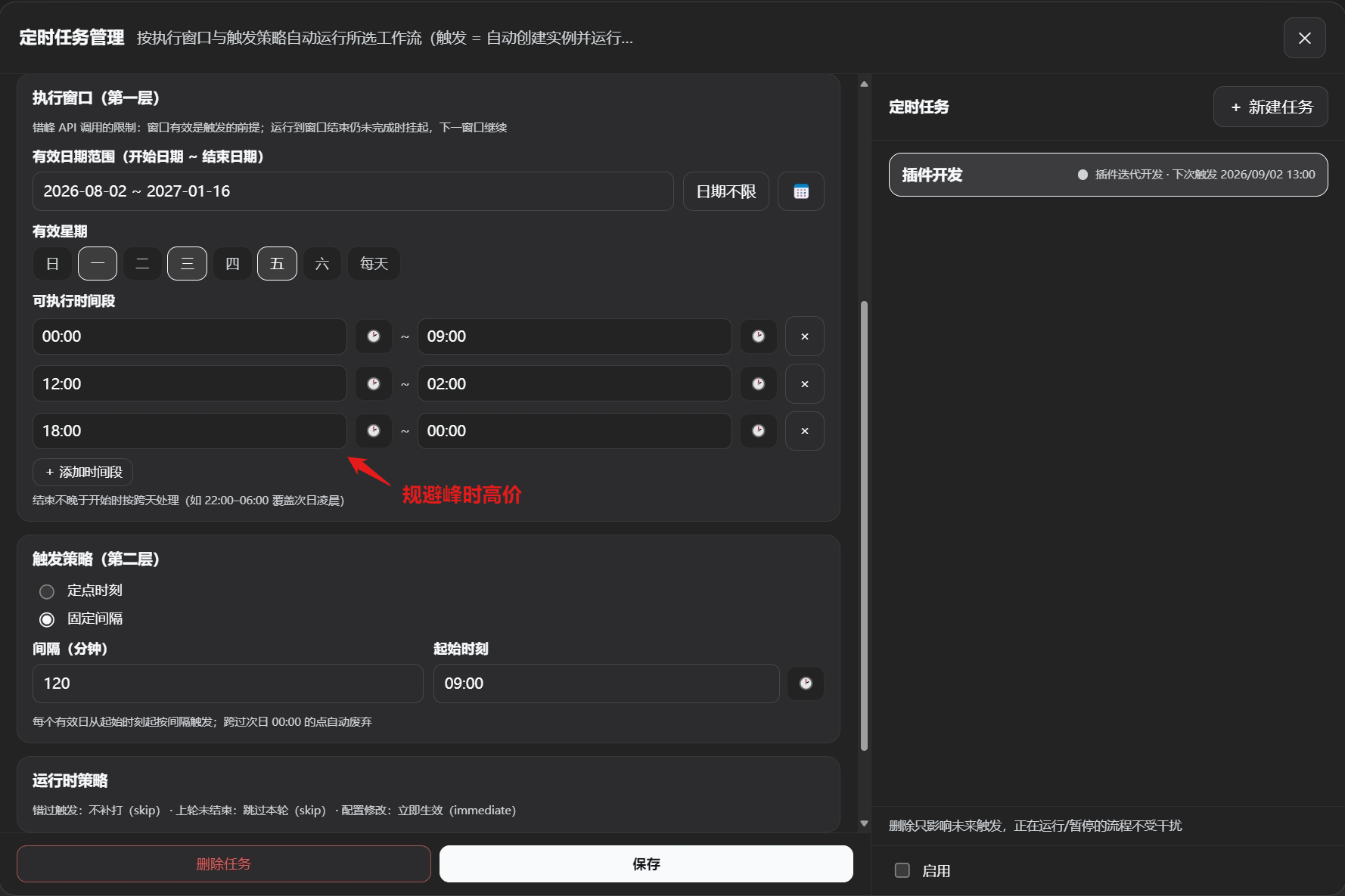
> Fully automated operations: workflows run automatically on schedule, support off-peak staggered API calls, auto-pause, save flow data, and auto-run during off-peak hours.
✦ **Dual-mode architecture**
- **Workflow Orchestration Mode**: intelligent scheduling of long-running multi-Agent flows; the parent agent advances autonomously, with pause-anytime checkpoint resume and real-time status feedback.
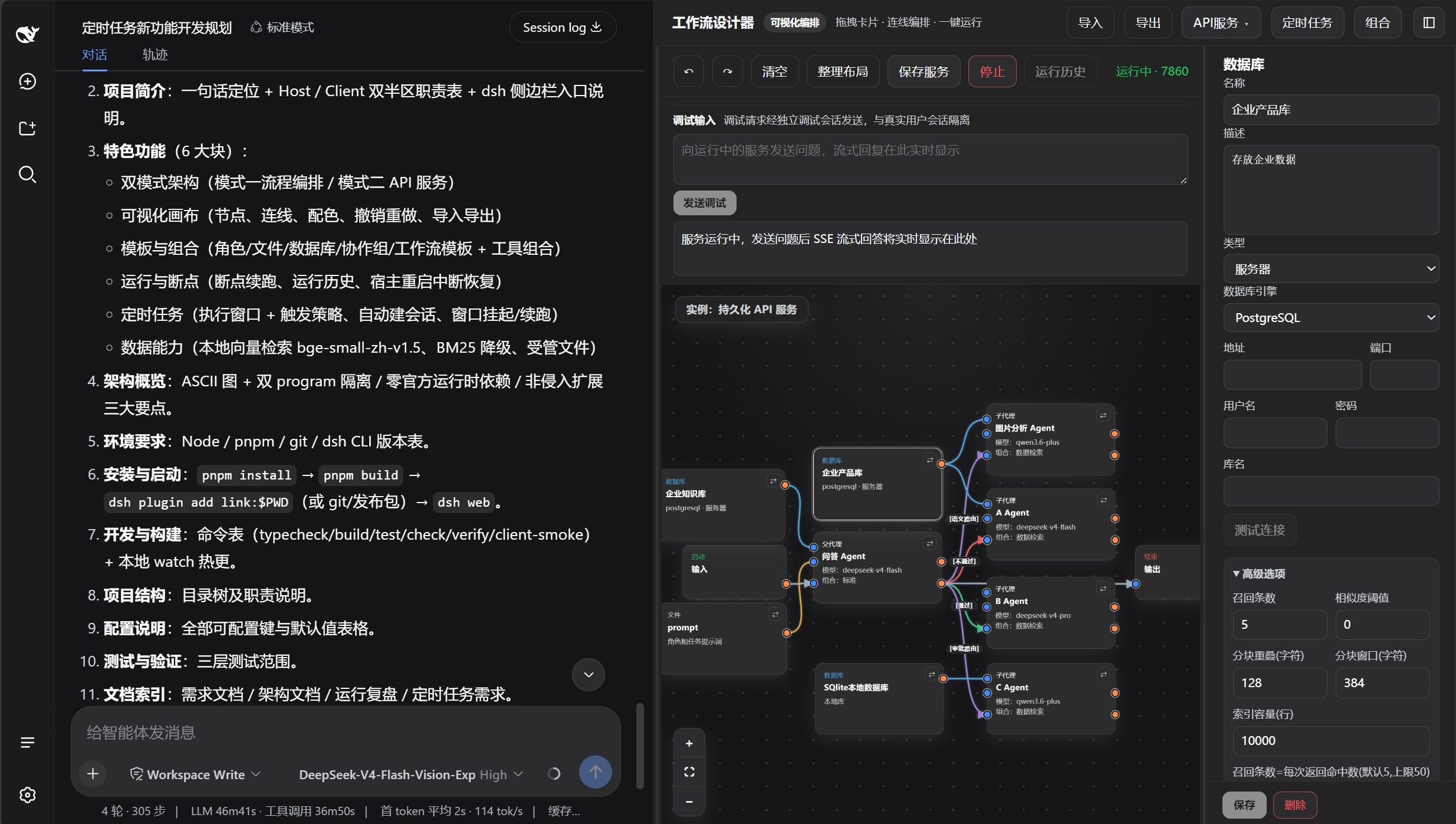
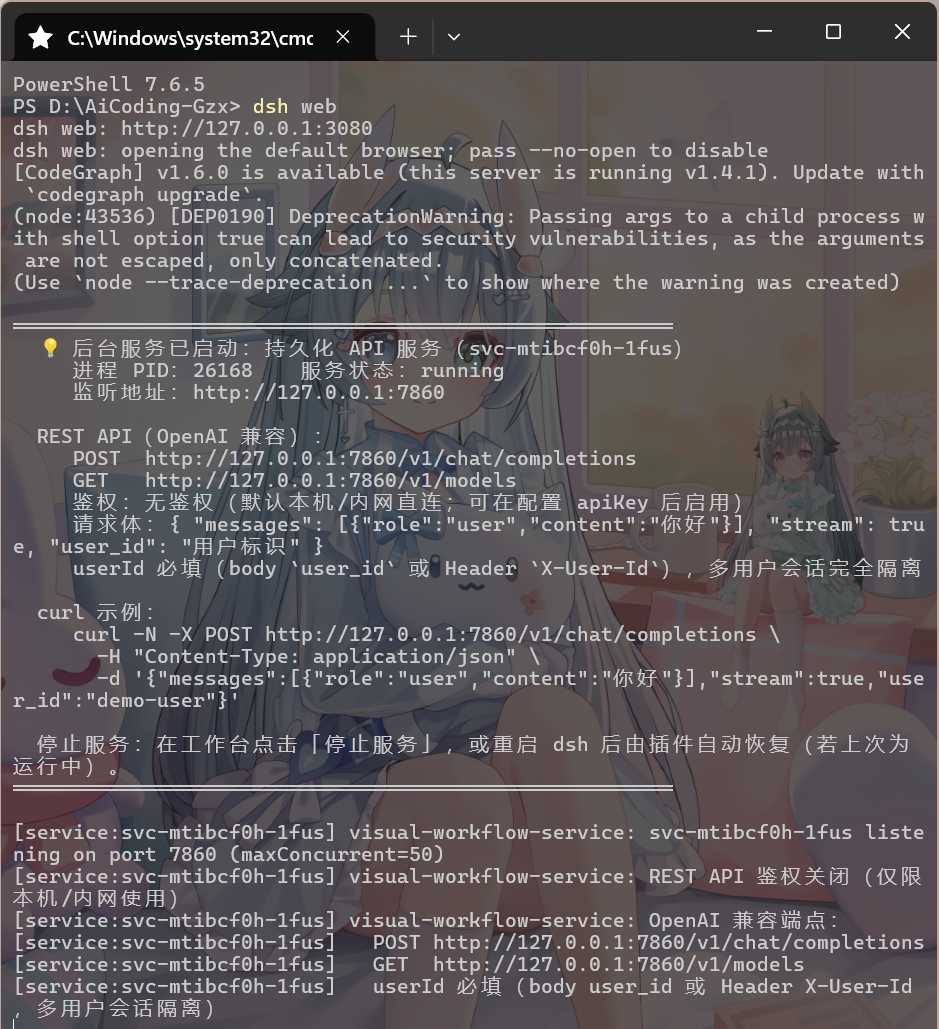
- **API Service Mode**: one-click publish as a standalone REST API service (OpenAI-compatible protocol), multi-tenant session isolation, automatic port allocation.
✦ **Agent Team**
- Drag multiple role nodes into a team card to connect to the official Agent Team mechanism. Custom configurations are wired to teammates, allowing precise control over their collaboration behavior, models used, tool groups, etc. Runtime and coordination tools are handled by the official mechanism.
- When the Agent Team feature is disabled, it degrades to in-group collaboration via the plugin's own communication mechanism (no task board), using the `wf_send_message` tool for in-group messaging.
> Deploy DSH as a standalone backend service with persistent headless Agents running in the background, connectable to external apps (e.g., QQ bots, Feishu/Lark) or a custom frontend.
✦ **Zero official package dependencies**
- All DSH ecosystem services (LLM, sub-agents, tools, user questions, etc.) are resolved at runtime via `ctx.get()`; Host tools are registered as plain object definitions. The plugin itself has no compile-time dependency on any official package, giving stronger upgrade compatibility.
---
## Core Concepts
| Concept | Description |
|------|------|
| **Meta-Orchestration** | An orchestration architecture that, during orchestration, **retrieves organizational assets and experience, generates and adjusts the organizational structure based on the current task, and keeps improving through feedback-driven reinforcement learning** |
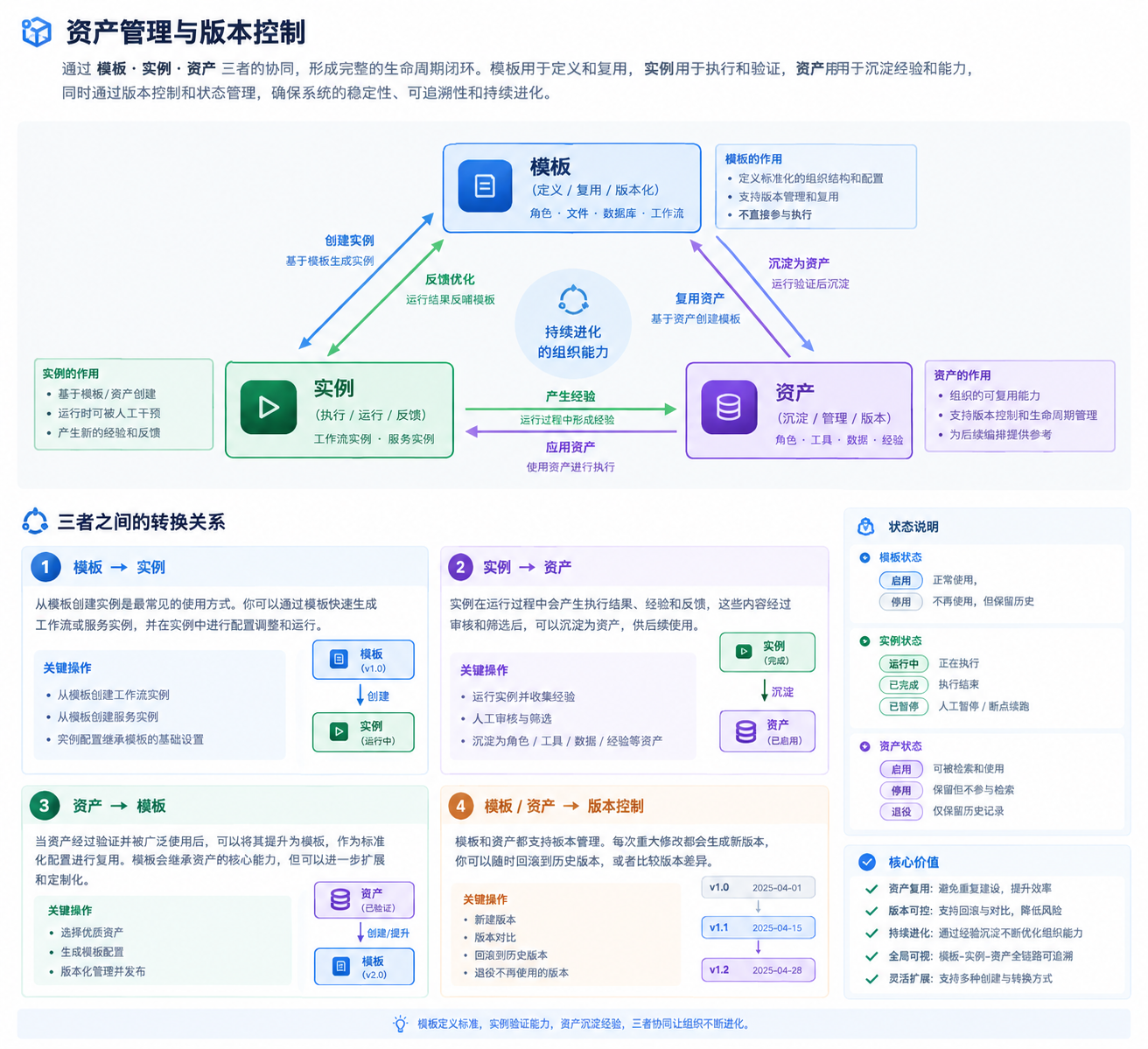
| **Asset** | Roles, workflow configurations, rules, etc. that have been formally promoted and can be recalled by future orchestrations; stored separately from templates and version-controlled |
| **Template** | The "blueprint" of roles/files/databases/workflows, stored in `~/.dsh/visual-workflow/`; templates and instances are decoupled by deep copy, so editing a template does not affect already-generated nodes |
| **Instance** | A concrete running instance of a workflow or service (`workflows/` and `services/`); can only be created from a workflow template, and can be edited and saved on the canvas |
| **Node** | A card on the canvas, categorized as parent agent, sub-agent, file, database, stage (start/end/pause), team, and virtual node |
| **Edge** | Carries flow direction (flow edge), context content (context edge), or database identity (database edge); flow edges can carry condition labels judged semantically by the parent agent |
| **Parent Agent** | The core scheduler of orchestration: supervises and schedules in Mode 1, and is the final responder in Mode 2; the user can instruct it to adjust the orchestration flow |
| **Sub-agent** | The task executor, with independently configured role prompt, model, tools, etc., created and scheduled on demand by the parent agent |
| **Orchestration** | The main Agent autonomously advances the flow using tools such as `wf_run_node` / `wf_finish`, and controls node states |
| **Mode** | The plugin provides two run modes: Workflow Orchestration Mode (Mode 1) and API Service Mode (Mode 2), switchable from the top bar |
| **Checkpoint resume** | After a flow pauses or the host is unexpectedly interrupted, the states of executed nodes are persisted; on resume they are not re-run, and the flow continues from the checkpoint |
| **Team** | Combines multiple role nodes into an Agent Team, within which members can freely communicate and collaborate |
| **Virtual node** | An alias reference to a main node; stores no independent configuration and shares the main node's execution instance, used for topology reuse |
---
## Node Cards
### 1. Role Node (task execution unit)
Card layout (**3 inputs on the left, 1 output on the right**):
```
┌─────────────────────────┐
L1 ● │ [Role Card] Title │
(DB) │ Type badge / Model / │
L2 ● │ Tool combo badge │● R1
(Ctx) │ │ (Flow out)
L3 ● │ │
(Flow in)│ │
└─────────────────────────┘
```
| Port | Name | Semantics |
|---|---|---|
| L1 | Database input | Connects to a database node and injects retrieval/query tools |
| L2 | Context input | Receives upstream context (not inherited if unconnected) |
| L3 | Flow input | Controls execution order |
| R1 | Flow output | Sequential execution / conditional branching (pass/fail/content) |
Note: the right-side `ctx-out` context output port has been retired.
**Property configuration**:
| Setting | Description |
|---|---|
| **Name** | Node name |
| **system prompt** | Text input or reference to a `.md` file, defining the role's system prompt |
| **System prompt toggle** | Controls injection of the official system prompt (enabled by default); turning off the tool prose section does not affect tool-calling capability |
| **LLM model** | Independently select provider + model |
| **Thinking intensity** | Consistent with the official dropdown |
| **Tool combo** | Built-in presets (Standard / Minimal / PTC / Creative) + custom combos (created in Combo Management) |
| **ReAct iteration cap** | Upper limit on tool calls; soft stop, unlimited by default |
| **Retry-on-reflow cap** | Node-level attempt counter guard, default 3 |
| **Input contract** | What this node should receive; used for pre-task self-check |
| **Output contract** | What this node should hand off downstream; controls the output structure of the final reply |
**Virtual node**: Click "Copy" to generate a virtual node that shares configuration and context with the main node; deleting the main node cascades the removal.
### 2. Task Node
- Tasks are described in text (the content is stored directly in the template/node and serves as agent context at runtime)
- The right-side property panel lets you edit the task name and description; the "Select file" button below the text box appends the selected file path to the description
- Purpose: inject task instructions, requirements, acceptance criteria, and other context into role nodes
### 3. Database Node
- Local type: supports SQLite files with built-in vector retrieval (`bge-small-zh-v1.5`; automatically falls back to BM25 on failure)
- Server type: supports MySQL / PostgreSQL, providing structured read-only queries and vector retrieval (index built locally)
- The right-side panel lets you configure connection info, test the connection, and tune advanced retrieval options (recall count, chunk window, similarity threshold, etc.)
- Purpose: connect to enterprise/personal knowledge bases or memory stores to fetch relevant information and run queries
### 4. Stage Node
- Start (Mode 1) / Input (Mode 2): flow entry; in Mode 2 it automatically receives the external user question as the initial context
- End (Mode 1) / Output (Mode 2): flow terminus; in Mode 2 it aggregates the parent agent's final output and returns it as a stream
- Pause (Mode 1): a flow gate that pauses execution here and saves a checkpoint (human review point); the next run continues from the right output
### 5. Team Node (Agent Team)
- Drag multiple role nodes into a team card; in-group roles are registered as Teammates, started on demand, and participate in collaboration
- The collaboration prompt is appended to the end of each member's first user message (optional)
- Team members communicate asynchronously via `wf_send_message` and ask the user questions via `wf_ask_user`
- The card can be resized/extended, and the internal member list is scrollable
---
## Edges
**Edge types and colors**:
| Edge type | Semantics | Color |
|----------|----------|------|
| Flow edge | Controls execution order | ⚪ Cool gray / silver white |
| Context edge | Carries text content such as task descriptions | 🟡 Amber gold |
| Database edge | Carries the database service identity | 🔵 Sky blue |
| Condition: Pass | Condition is true; execute this branch | 🟢 Emerald green |
| Condition: Fail | Condition is false; execute this branch or reflow | 🔴 Coral red |
| Condition: Content | Custom semantic judgment (routing label) | 🟣 Violet |
> After a condition is edited, the condition color overrides the initial color; condition evaluation is performed semantically by the parent agent.
---
## Plugin Tools
| Tool | Purpose |
|---|---|
| **`wf_run_node`** | Mode 1: asynchronously start an Agent node; returns immediately without blocking; parent-agent only |
| **`wf_run_node_wait`** | Mode 2: start an Agent node and block until it finishes; parent-agent only |
| **`wf_finish`** | Mark this orchestration as succeeded/failed, persist the run record, and release the run lock; parent-agent only |
| **`wf_ask_user`** | Raise an official question card to the user and block until answered; multiple questions can be batched |
| **`wf_send_message`** | Send a message to another agent; returns immediately after delivery without waiting for a reply. `target` is `parent` or the node ID of a reachable member |
| **`wf_db_query`** | Read-only database access in three modes: `search` / `query` / `schema` |
| **`wf_org_catalog`** | Tiered recall of organizational assets, tool combos, presets, models, and orchestration rules; parent-agent only |
| **`wf_graph_patch`** | Controlled graph modification of a workflow template or running instance; supports create, update, delete, edge adjustment, etc.; parent-agent only |
| **`wf_experience_learn`** | Store experience: call with an empty array to get the experience-generation prompt, or pass candidates to validate and store them |
| **`wf_experience_recall`** | Tiered recall of existing experience: fetch candidate summaries first, then full content by id |
| **`wf_experience_feedback`** | Rate the experience actually used in this task; fetch the scoring rubric first, then submit the rating |
> Difference: unlike official Teammate scheduling, which can only pass on the parent's tools and model, agent nodes created by `wf_run_node` can freely combine any tools and set a different model and system prompt.
---
## Installation (Windows)
> **Version compatibility**: This plugin targets **DeepSeek Harness `0.2.1-rc.2`**. Install or upgrade the host first (fully stop the dsh process in an external terminal before upgrading):
>
> ```bash
> npm install -g @deepseek-ai/dsh@0.2.1-rc.2
> ```
> Tip: you can copy the following section to an AI assistant such as Claude Codex to install the plugin.
1. **Locate the file**: `%USERPROFILE%\.dsh\profiles\web\pnpm-workspace.yaml` and add the following to it:
```yaml
allowBuilds:
onnxruntime-node: true
protobufjs: true
sharp: true
```
2. **Run the plugin install command**:
```bash
dsh plugin --profile web add "github:GZX2211/dsh-Visual-Workflow#main"
```
3. **On desktop, you can also add and install it directly from the plugin page in the top-left corner**:
```
github:GZX2211/dsh-Visual-Workflow#main
```
4. **Verify mounting** (optional):
```bash
dsh --profile web --dump-config | findstr "visual-workflow"
```
5. **Restart** `dsh web`. Open the workbench: click the official **"Workflow" entry at the bottom of the left sidebar** (next to the official "Settings") → open the "Workflow" tab in the official **right sidebar** to get the full workbench.
### Installation Troubleshooting
**Getting a `Host key verification failed` error**
Run the following in **PowerShell** or **CMD**:
```bash
git config --global url."https://github.com/".insteadOf "git@github.com:"
```
**pnpm blocking with "declares `prepare`, needs `allowBuilds`" (common)**
Locate `%USERPROFILE%\.dsh\profiles\web\pnpm-workspace.yaml` in your file manager, add the package names from the error message to the `allowBuilds` list, save, and reinstall.
### Uninstall
```bash
dsh plugin --profile web remove dsh-visual-workflow
```
> If you no longer use it, you can also clean up the `~/.dsh/visual-workflow/` folder.
## Quick Start
- Want to learn about the project architecture? See [Architecture](docs/architecture.en.md).
- Want to contribute? See [Contributing](docs/CONTRIBUTING.en.md).
- Want to know how to use the plugin? See the [User Guide](docs/USER_GUIDE.en.md).
- Doing secondary development? See [Project Development Guidelines](AGENTS.en.md).
- How to install and an overview of the project? This file: [README.en.md](README.en.md)
---
## Data Storage
All files live under `~/.dsh/visual-workflow/` as human-readable JSON:
```
workflows/ # Mode 1 workflow instances
services/ # Mode 2 service instances
flow-templates/ # editable workflow templates
roles/ # editable role templates
files/ # file templates
databases/ # database templates
combos.json # custom tool combos
builtin-seeds.json # built-in preset template seed marker
runs/ # run snapshots and history
orchestrations/ # source of truth for orchestration during a run
assets.db # formal role/workflow assets + Experience
data/files/ # managed non-text files
data/vector/ # database vector index
scheduler/ # scheduled task definitions and trigger records
```
> Preset templates are seeded only once on first startup (in the UI language active at that time). If you accidentally delete them and need to restore, delete the entire `builtin-seeds.json` file and restart the plugin to regenerate them in the current UI language.
---
## Local Development
```bash
git clone https://github.com/GZX2211/dsh-Visual-Workflow.git
cd dsh-visual-workflow
pnpm install
dsh plugin --profile web add "link:$PWD"
```
Common commands:
```bash
pnpm build # Build Host + Client
pnpm test # Unit tests
pnpm gates # Contract / gate tests
pnpm client-smoke # Client smoke test
pnpm check # Type check + tests + build + smoke
```
> Client changes require a rebuild and a hard browser refresh; Host changes require restarting `dsh web` or the desktop app.
---
## Core Research Direction (Roadmap)
The project's research direction has moved beyond "how to design a better Workflow" toward:
**how to let Agents continuously accumulate effective resources across runs and use them to accomplish task goals more efficiently in the future**
> The long-term goal is to explore the ultimate implementation and boundaries of the meta-orchestration architecture, and to build an AI system that can continuously evolve. Building on a mature Harness plugin framework is an excellent starting point; we hope to keep improving and to contribute a high-quality "plugin" to the dsh ecosystem.
---
## License
[MIT](LICENSE) © GZX2211. Issues / PRs are welcome. This is a community project; the UI form is inspired by [dsh-deepseek-flow](https://github.com/kanghelyu/dsh-deepseek-flow).
```