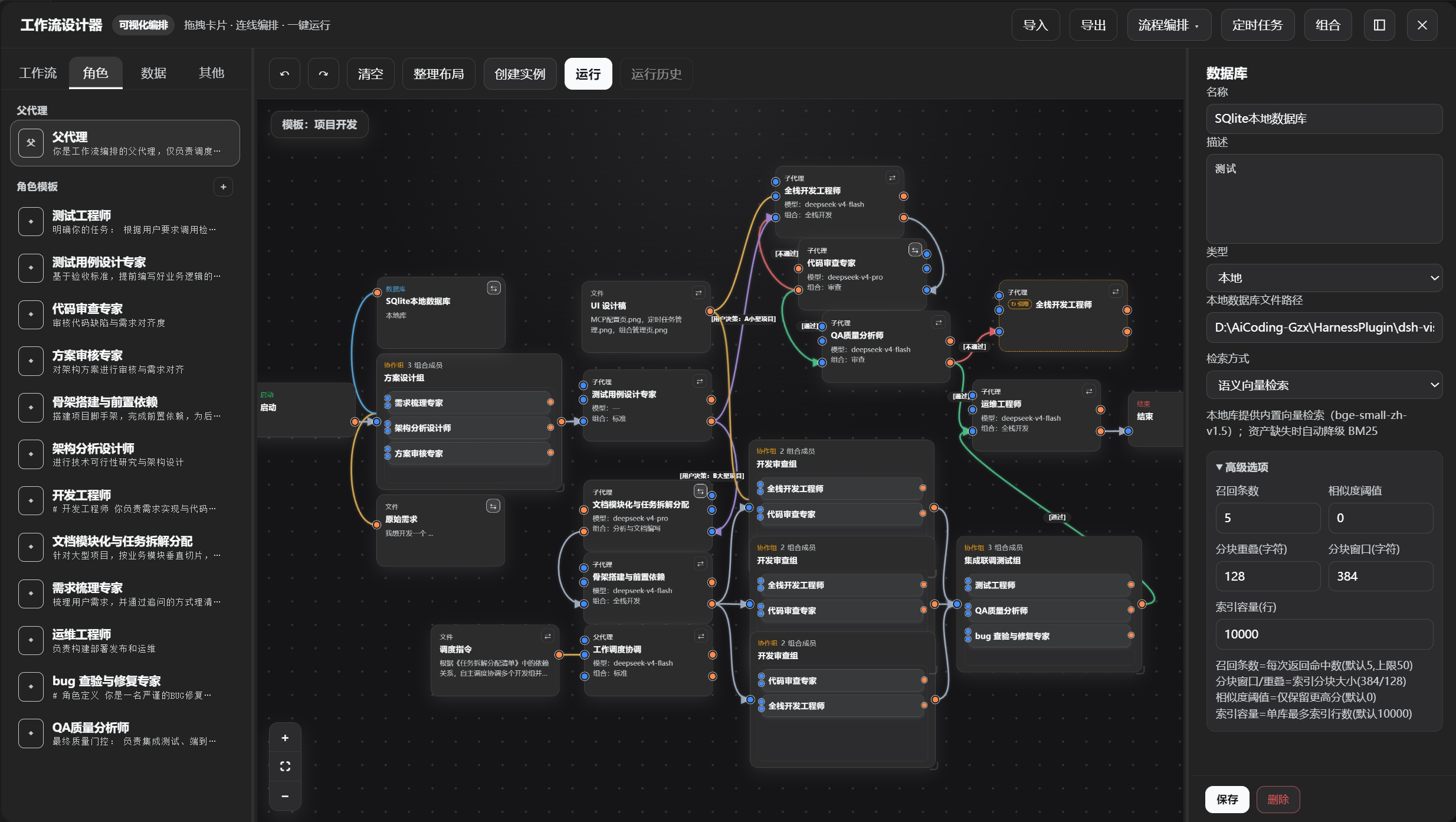
Visual Workflow
A visual multi-agent workflow designer tailored for DeepSeek Harness
English · 简体中文


---
## Key Highlights
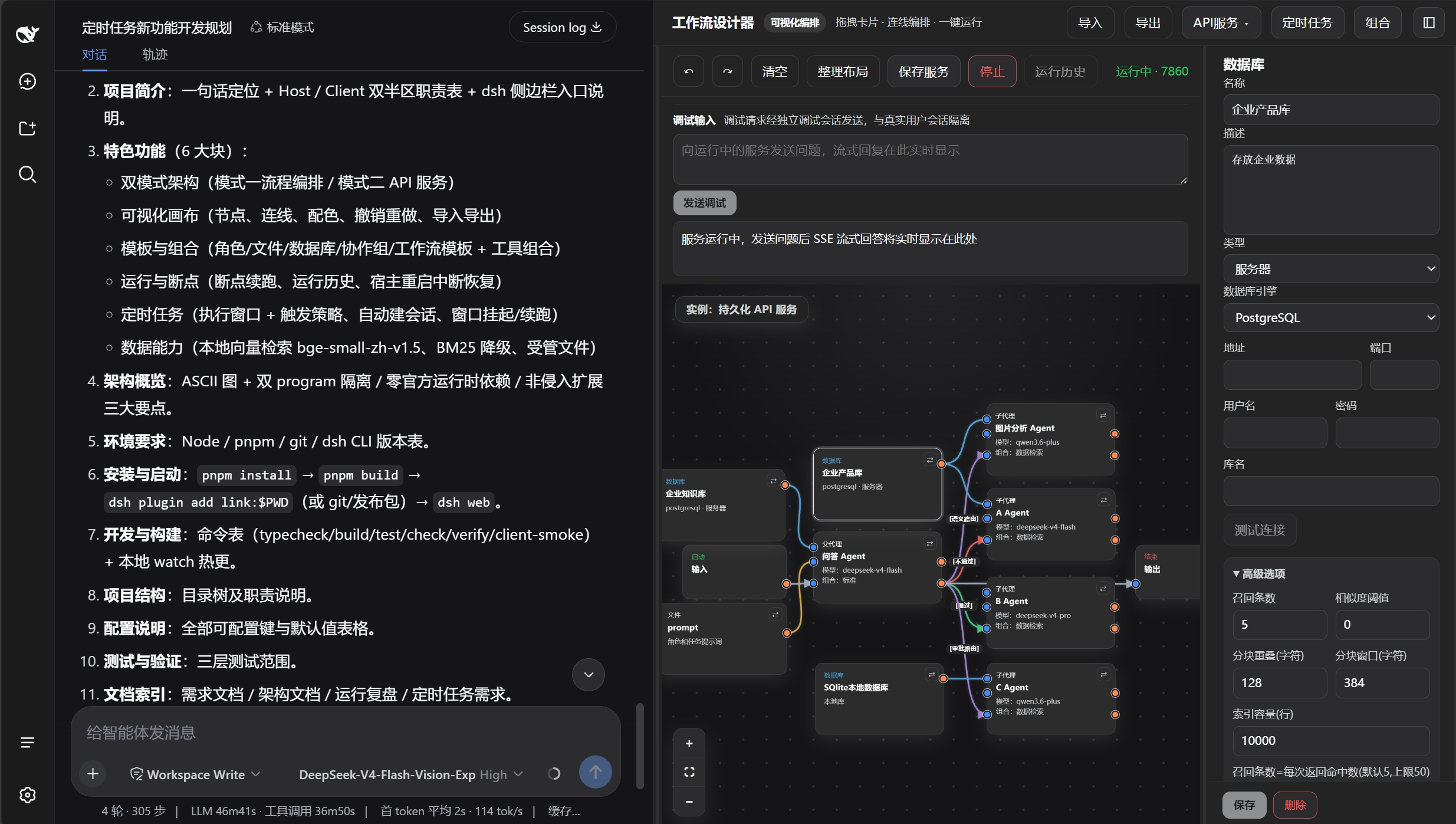
✦ **Drag-and-Drop Orchestration**
- Zero-code drag-and-drop with SVG canvas smooth interaction, full undo/redo support; infinite canvas, one-click auto-layout, making complex workflows easily accessible.
✦ **Dual-Mode Architecture**
- **Flow Orchestration Mode**: Long-process, multi-agent intelligent scheduling with parent-agent autonomous progression, supporting checkpoint resume and real-time editing during execution;
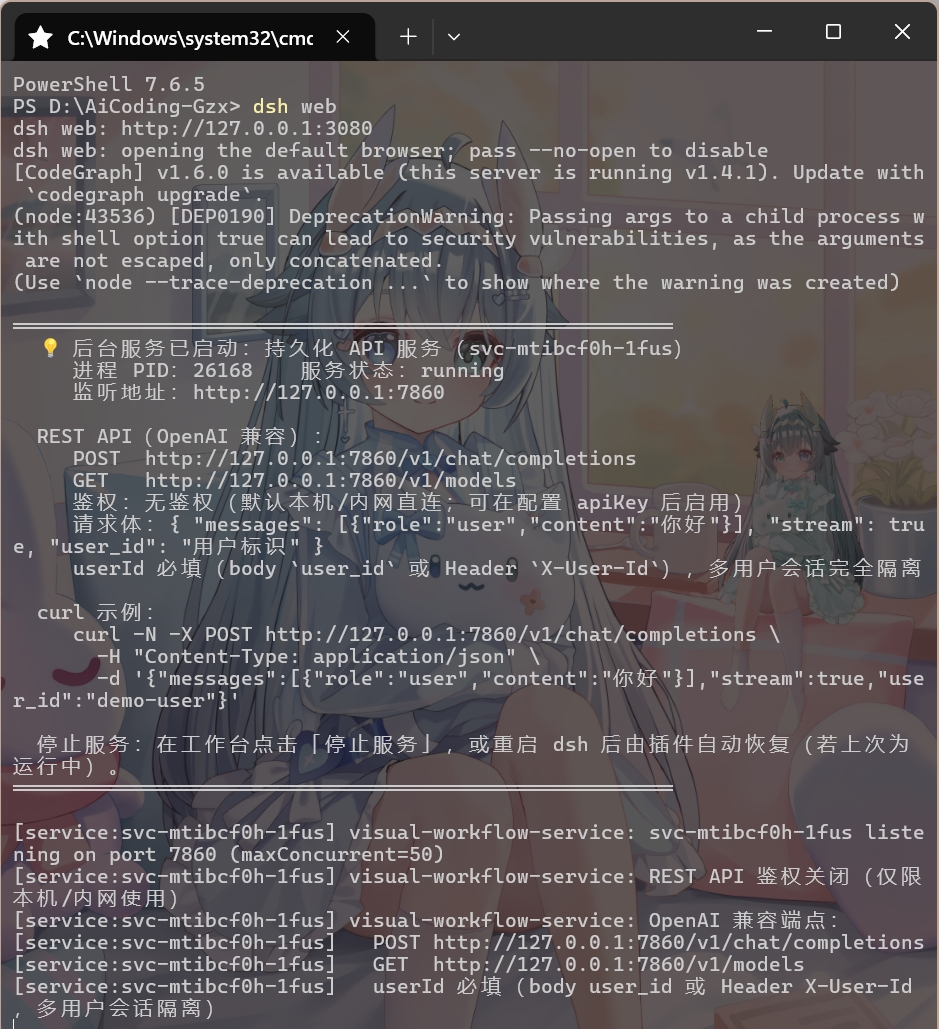
- **API Service Mode**: One-click publication as standalone REST API service (OpenAI-compatible protocol), multi-tenant session isolation, automatic port allocation.
> Deploy DSH as an independent backend service, with persistent headless agents running in the background, connectable to external applications (e.g., QQ bots, Feishu) or custom frontends.
✦ **Bidirectional Canvas Synchronization**
- After saving canvas modifications, the orchestrator instantly reflects the latest topology (new nodes/connections take effect immediately); runtime status (node highlighting, status badges) is displayed back on the canvas in real time; bidirectional change anti-loop protection, run-lock guards against cross-session conflicts, ensuring orchestration and canvas remain consistent.
✦ **Deep Customization**
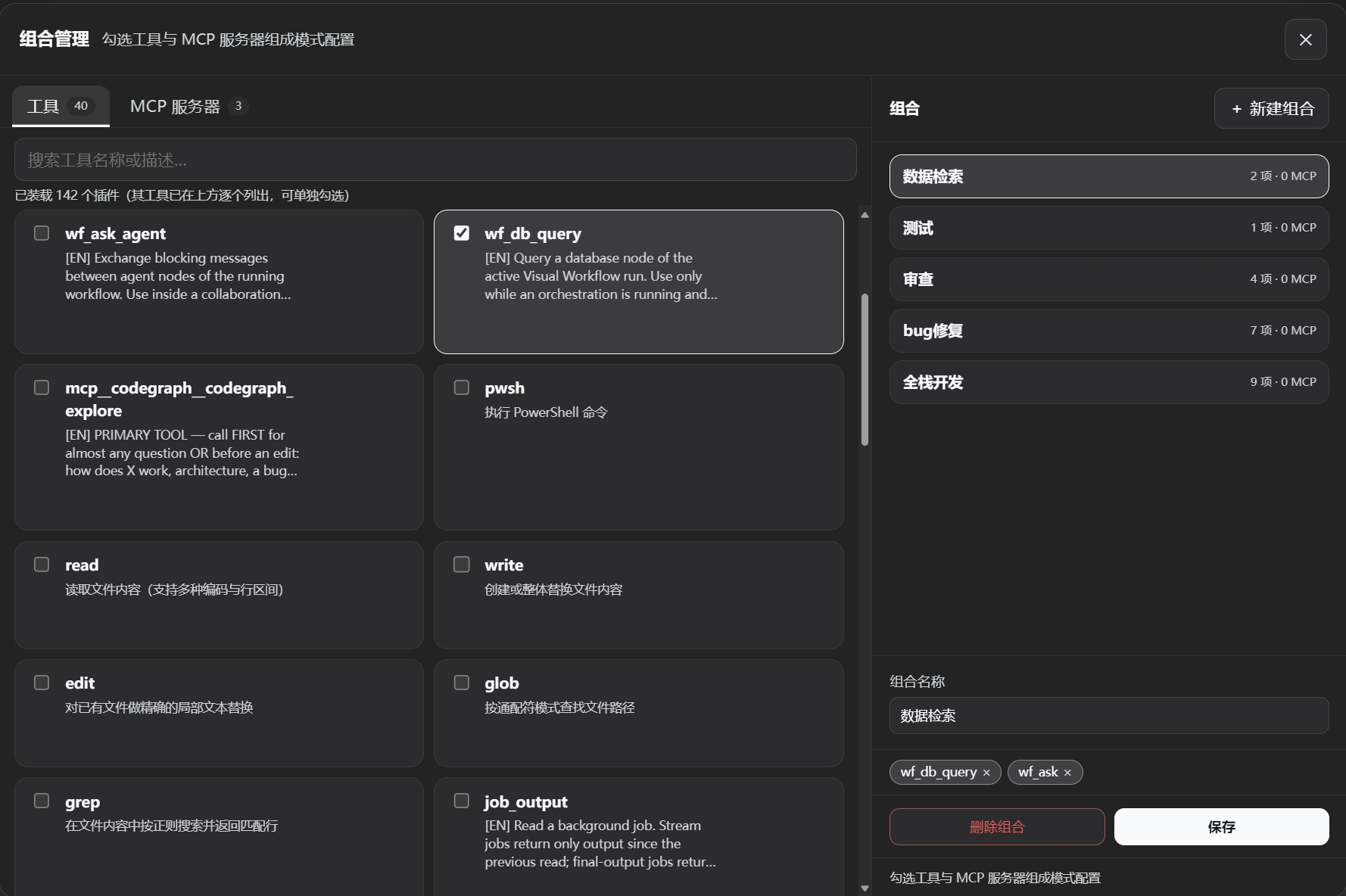
- Each sub-agent node independently configures system prompt, LLM model, reasoning effort, tool combinations (built-in presets / custom combinations), ReAct iteration cap, and retry cap; parent agents can also freely select models and scheduling templates, meeting fine-grained orchestration requirements.
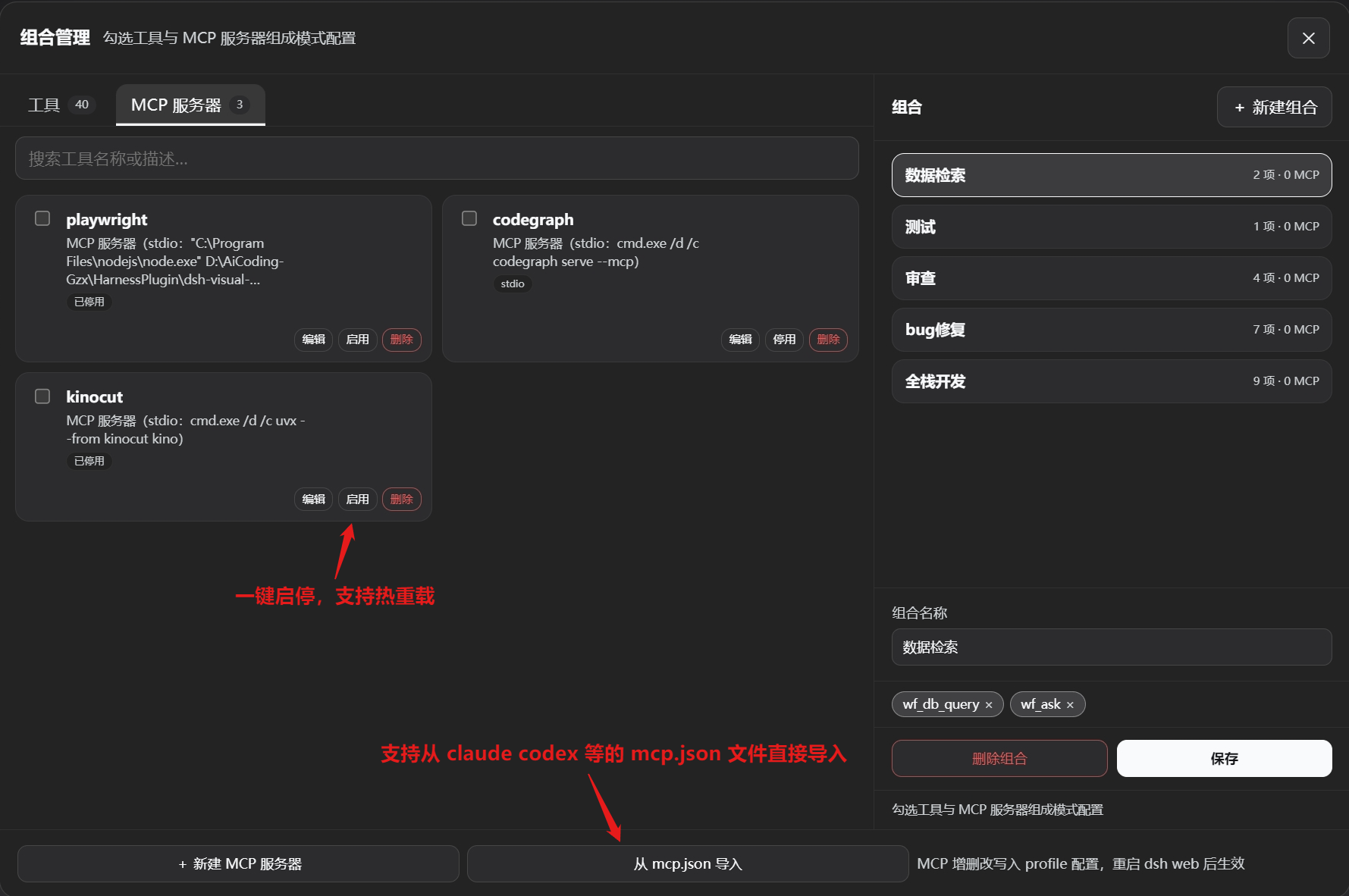
> Freely combine tools and assign them to individual agents to avoid cluttering the context with unused tools; MCP servers can be registered with a single line of configuration and support hot-reload for immediate effect.
✦ **Collaboration Groups & Virtual Nodes**
- Drag multiple role nodes into a collaboration group; agents within the group execute in parallel and communicate via `wf_ask_agent`; virtual nodes serve as aliased references to master nodes, sharing the same execution instance, enabling more flexible topology reuse.
✦ **Scheduled Triggers**
- Built-in scheduled tasks within the workspace: select a workflow template, configure execution windows and trigger policies, automatically create and run instances; missed windows auto-suspend/resume, support off-peak API calls to save costs and effort.
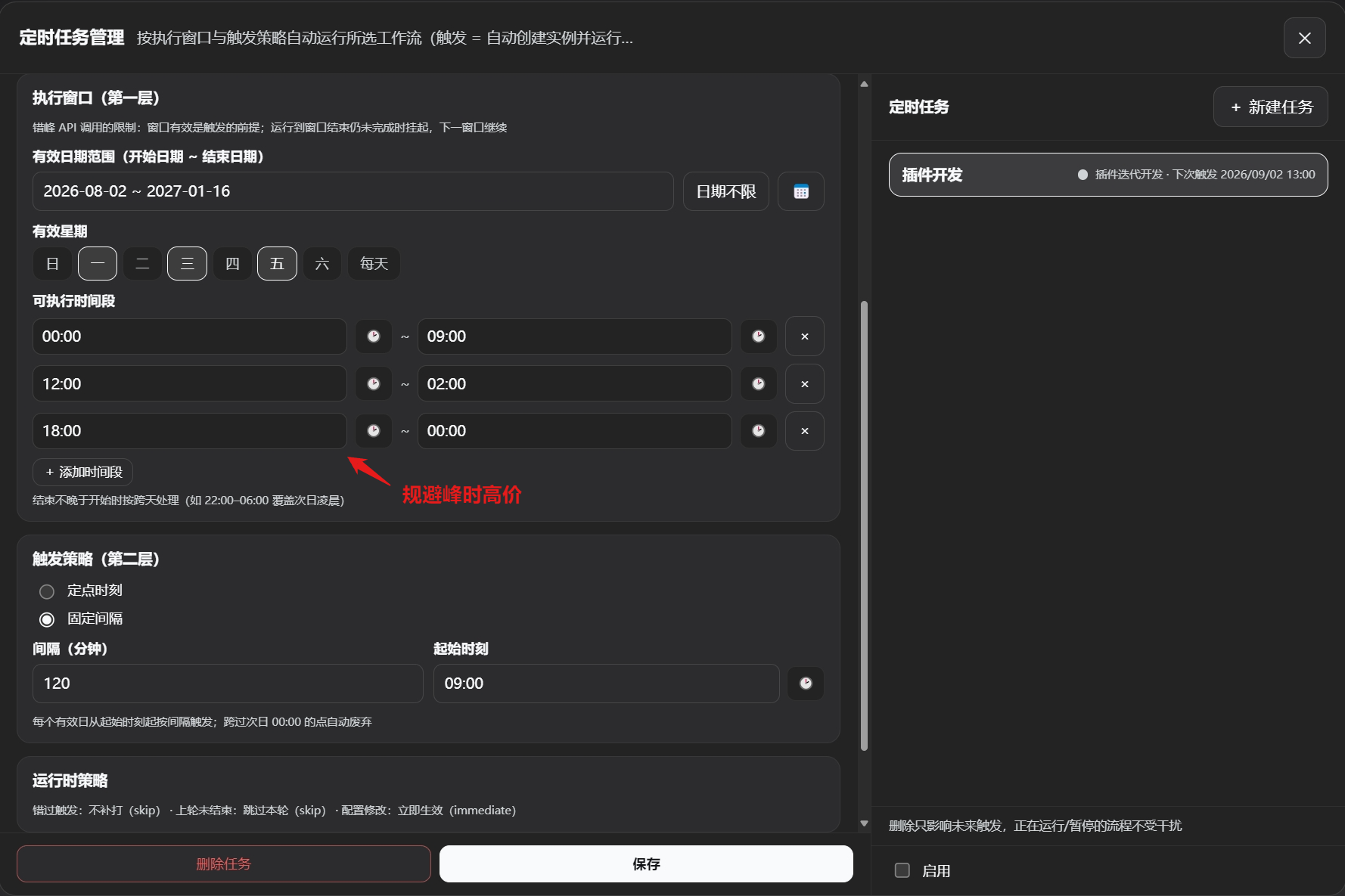
> Fully automated operation and maintenance: scheduled automatic workflow execution, supports off-peak invocation, auto-pause, workflow data persistence, and auto-resume during off-peak hours.
✦ **Zero Official Package Dependencies**
- All DSH ecosystem services (LLM, sub-agents, tools, user questions, etc.) are resolved at runtime via `ctx.get()`; Host tools are registered as plain object definitions; the plugin itself has no compile-time dependencies on any official packages, ensuring better upgrade compatibility.
---
## Core Concepts
| Concept | Description |
|---------|-------------|
| **Template** | The "blueprint" for roles/files/databases/workflows, stored under `~/.dsh/visual-workflow/`; templates are decoupled from instances via deep copy, so modifying a template does not affect already-instantiated nodes. |
| **Instance** | A concrete running instance of a workflow or service (under `workflows/` and `services/`); can only be created from a workflow template, and can be edited and saved on the canvas. |
| **Node** | A card on the canvas, including parent agent, sub-agent, file, database, stage (start/end/pause), collaboration group, and virtual node. |
| **Edge** | Conveys flow direction (flow edge), context content (context edge), or database identifier (database edge); flow edges can carry condition labels (pass/fail/content) determined semantically by the parent agent. |
| **Parent Agent** | The core scheduler of the orchestration; in Mode 1, responsible for supervision and scheduling (not executing specific tasks); in Mode 2, serves as the final responder; can be instructed by the user to adjust the orchestration flow. |
| **Sub-agent** | Task executor; independently configures persona, model, tools, etc., created and scheduled by the parent agent as needed. |
| **Orchestration** | The main agent autonomously drives the process using tools such as `wf_run_node`, `wf_ask`, `wf_finish`, controlling node states. |
| **Mode** | The plugin provides two operation modes: Flow Orchestration Mode (Mode 1) and API Service Mode (Mode 2), switched via the top bar; each stores data in separate directories. |
| **Checkpoint Resume** | After a workflow is paused or the host is unexpectedly interrupted, the states of executed nodes are persisted; upon resumption, no re-execution occurs—the process continues from the checkpoint. |
| **Collaboration Group** | Combines multiple role nodes into a parallel execution unit; agents within the group can communicate freely; the group as a whole triggers subsequent flow only after completion. |
| **Virtual Node** | An alias reference to a master node; does not store independent configuration, shares the master node's execution instance, used for topology reuse. |
> Distinction: Unlike the official subagent scheduling, which only passes the parent's tools and model, `wf_run_node` creates sub-agent nodes that can be freely equipped with any combination of tools, different models, and custom system prompts.
---
## Node Cards
### 1. Role Node (Task Execution Unit)
Card layout (**3 inputs on the left, 2 outputs on the right**):
```
┌─────────────────────────┐
left1 ●│ [Role Card] Title │● right1
(database) │ Type Badge / Model / │(context)
left2 ●│ Tool Combo Badge │● right2
(context) │ │(flow out)
left3 ●│ │
(flow in) │ │
└─────────────────────────┘
```
| Port | Name | Semantics |
|------|------|-----------|
| left1 | Database input | Connects to a database node, injecting retrieval/query tools |
| left2 | Context input | Receives upstream context (if not connected, no inheritance) |
| left3 | Flow input | Controls execution order |
| right1 | Context output | Passes this node's output downstream |
| right2 | Flow output | Sequential execution / conditional branching (pass/fail/content) |
**Property Configuration**:
| Property | Description |
|----------|-------------|
| **Name** | Node name |
| **System prompt** | Text input or reference to a .md file; sets the role system prompt |
| **LLM model** | Independently select provider + model |
| **Reasoning effort** | Consistent with the official dropdown |
| **Tool combination** | Built-in presets (Standard/Minimal/PTC/Creative) + custom combinations (created in Combo Management) |
| **ReAct iteration cap** | Soft cut-off: upon reaching the cap, forced finalization (no new tool calls, output existing conclusions); default 50 |
| **Retry cap** | Node-level attempt count guardrail; default 3 |
| **Input/Output data schema** | Text/JSON description (assists model understanding) |
| **System prompt toggles** | Controls official system prompt injection (enabled by default); two toggles separately control official persona and tool text injection |
**Virtual Node**: Click "Duplicate" to generate a virtual node (dashed border + "↻ Reference" badge), which shares configuration and execution instance with the master node; deleting the master node cascades cleanup.
### 2. File Node
- File content is stored directly in the template (text / PDF-extracted text / images and other non-text files stored under managed paths)
- The right property panel allows uploading/replacing files; upon saving, all referencing nodes sync automatically
- Purpose: inject prompts, requirements, compressed summaries, and other context into role nodes
- Text content injection cap defaults to 20,000 characters; truncation with notification occurs beyond that; non-text only injects the managed path, accessible by agents via the official read tool
### 3. Database Node
- **Local type**: Supports SQLite files, built-in vector retrieval (bge-small-zh-v1.5, CPU inference; automatic BM25 fallback if model assets are missing or fail to load)
- **Server type**: Supports MySQL / PostgreSQL, providing structured read-only queries and vector retrieval (local index construction)
- The right panel allows configuring connection details, testing connections, and adjusting advanced retrieval options (recall count, chunk window, similarity threshold, index capacity)
- **Database retrieval** is exposed as the `wf_db_query` tool (single tool with three modes: search/query/schema) for agents to call; agents must obtain this tool via a db-in edge
### 4. Stage Node
- **Start (Mode 1) / Input (Mode 2)**: Entry point; in Mode 2, automatically receives the external user question as initial context
- **End (Mode 1) / Output (Mode 2)**: Terminal point; in Mode 2, aggregates the parent agent's final output and streams it back
- **Pause (Mode 1 only)**: Flow gate; upon reaching this node, the process pauses and saves a checkpoint (manual review point); re-running continues from the right output
### 5. Collaboration Group Node
- Drag multiple role nodes into a collaboration group; roles within the group start in parallel (only context/database edges are retained for members)
- A collaboration prompt is appended to each member's first user message, automatically listing all member IDs and role names
- Agents within the group communicate via `wf_ask_agent` (blocking) and interact with the user via `wf_ask`
- The group card has a left flow input and a right flow output; member nodes support cross-group context/database edges
- The card is resizable (8-direction handles); internal member list is scrollable
---
## Edges
**Edge Types & Colors**:
| Edge Type | Semantics | Color |
|-----------|-----------|-------|
| Flow edge | Controls execution order | ⚪ Cool gray / silver |
| Context edge | Passes textual content, file indices | 🟡 Amber gold |
| Database edge | Passes database service identifier | 🔵 Sky blue |
| Condition: pass | Condition evaluates to true, execute this branch | 🟢 Emerald green |
| Condition: fail | Condition evaluates to false, execute this branch or retry | 🔴 Coral red |
| Condition: content | Custom semantic routing (route label) | 🟣 Violet |
> After editing a condition, the condition color overrides the initial color; condition judgments are performed semantically by the parent agent.
---
## Orchestration Tools
Agents autonomously schedule using the following tools (guardrails and persistence provided by the plugin):
| Tool | Parameters | Description |
| :--- | :--- | :--- |
| **`wf_run_node`** | `nodeId` – node ID
`thinking?` – reasoning effort
`iterationLimit?` – ReAct iteration cap
`retryLimit?` – retry cap | Asynchronously starts the node sub-agent, immediately returns `started`; if a pause node, returns `paused` and persists checkpoint. |
| **`wf_run_node_wait`** | `nodeId` – node ID
`thinking?` – reasoning effort
`iterationLimit?` – ReAct iteration cap
`retryLimit?` – retry cap | Blocks until the node completes; returns `ok/fail` along with the final output. |
| **`wf_ask`** | `questions[]` – list of questions (multiple allowed)
`options?` – optional configurations
`multi_select?` – allow multi-select | Asks the user a question, rendering the official question card; blocks until the user responds. |
| **`wf_ask_agent`** | `cmd: ask/reply/resolve` – command type
`targetChildId` – target agent ID
`message?` – message content
`askId?` – ask ID (for reply/resolution) | Blocking inter-agent communication: `ask` initiates a question and suspends; `reply` replies directly; `resolve` allows the parent agent to perform timeout resolution (continue/retry/terminate). |
| **`wf_db_query`** | `dataId` – data node ID
`mode: search/query/schema` – query mode
`query?/sql?` – query statement
`topK?` – number of results | Read-only database access: vector retrieval, structured queries (SELECT only), table schema inspection. |
| **`wf_finish`** | `status?` – completion status (completed/failed)
`summary?` – summary message | Finalizes the workflow, marking completion or failure, and releases the run lock (idempotent). |
---
## Installation (Windows)
```bash
dsh plugin --profile web add "github:GZX2211/dsh-Visual-Workflow#main"
```
Restart `dsh web`; the "Workflow" button above the bottom-left settings is the entry point (click to open the workspace).
Verify mount:
```bash
dsh --profile web --dump-config | findstr "visual-workflow"
```
Uninstall:
```bash
dsh plugin --profile web remove dsh-visual-workflow
```
### Installation Troubleshooting
**Encounter `Host key verification failed`**
In **PowerShell** or **CMD**, run:
```bash
git config --global url."https://github.com/".insteadOf "git@github.com:"
```
**pnpm build interception: declares `prepare`, requires `allowBuilds`** (common)
Navigate to `%USERPROFILE%\.dsh\profiles\web\pnpm-workspace.yaml` in File Explorer, add the package names from the error message to the `allowBuilds` list, save, and reinstall.
---
## Quick Start
1. **Create a workflow template** – In the left panel "Workflows" → click `+` below the template area to create a blank template
2. **Create a role template** – In the left panel "Roles" → `+` → configure prompt / model / tool combo → save
3. **Drag onto the canvas** – Drag roles/files/databases/stages/collaboration groups from the left panel to generate nodes
4. **Connect edges** – Drag from the right output ports to the left input ports (`flow` controls order, `ctx` passes context, `db` injects data tools)
5. **Create instance and run** – Click "Create Instance" above the canvas (or directly click "Run", which auto-creates an instance); Mode 1 starts the flow; Mode 2 click "Run" to start the API service
6. **Real-time editing** – Modify the canvas during execution and save; subsequent scheduling takes effect immediately; node status highlighting is reflected back; supports undo/redo
7. **Checkpoint resume** – After a pause node or window closure, re-running continues from the checkpoint; the history panel shows all run records and allows recovery of interrupted flows
> **Mode switching**: The top bar "Mode" dropdown lets you choose the running mode – Mode 1 for long-running scheduled orchestration, Mode 2 for persistent API services.
> **Combo management**: The top bar "Combos" button lets you create custom tool combinations (official tools/self-built tools + MCP servers), selectable in role templates.
> **Scheduled tasks**: The top bar "Scheduled Tasks" entry lets you select a workflow template, configure execution windows and trigger policies for automatic scheduling.
---
## Data Storage
All files are located under `~/.dsh/visual-workflow/`, with atomic writes (temp file + fsync + rename), human-readable JSON:
```
workflows/ # Mode 1 instances (per-session isolation)
services/ # Mode 2 instances (per-session isolation)
flow-templates/ # Workflow templates (globally shared)
roles/ # Role templates
files/ # File templates
databases/ # Database templates
combos.json # Custom tool combinations
runs/ # Run history (run snapshots, including checkpoint data)
orchestrations/ # Orchestration fact sources per run (for parent agent consumption)
data/files/ # Managed non-text file copies
data/vector/ # Vector index files (per dataId)
scheduler/ # Scheduled task definitions and trigger records
services/*.sessions.json # Mode 2 userId↔sessionId mappings
```
---
## Configuration
Override defaults in `cordis.patch.yml`:
```yaml
- insert:
- id: visual-workflow
name: dsh-visual-workflow
config:
dataDir: !!js dshHomePath('visual-workflow')
servicePortBase: 7860
apiKey: null
maxConcurrentPerService: 50
wfAskAgentTimeoutMs: 120000
runIdleTimeoutMs: 1800000
reactIterationLimitDefault: 50
retryLimitDefault: 3
outputFullLimit: 102400
documentTextLimit: 20000
embeddingModelDir: null
embeddingEndpoint: null
runPollMs: 2000
```
See [Architecture Documentation](docs/架构文档.md) §2.2 for detailed explanations of each configuration item.
---
## Local Development
```bash
git clone https://github.com/GZX2211/dsh-Visual-Workflow.git
cd dsh-visual-workflow
pnpm install
dsh plugin --profile web add "link:$PWD"
```
Common commands:
```bash
pnpm build # Build Host (tsc) + Client (tsdown)
pnpm test # Unit tests (vitest)
pnpm client-smoke # Client smoke test
pnpm check # Full check (types + tests + build + smoke)
pnpm verify # Same as above (gate)
```
> Modifying the Client requires a rebuild and hard refresh of the browser; modifying the Host requires restarting `dsh web`.
---
## Directory Structure (Core)
```
dsh-visual-workflow/
├── src/
│ ├── host/ # Host plugin
│ │ ├── shared/ # Pure type contracts shared between frontend and backend
│ │ ├── storage/ # Atomic storage (FlowStore)
│ │ ├── orchestrator/ # Run locks, checkpoint state machine, bidirectional sync
│ │ ├── agent/ # Sub-agent execution engine, guardrails, prompt injection
│ │ ├── tools/ # wf_* tool registration
│ │ ├── remote/ # GUI API endpoints
│ │ ├── service/ # Mode 2 service manager (fork/port pool/recovery)
│ │ ├── embedding/ # Local vector embedding and indexing
│ │ ├── scheduler/ # Scheduled task engine
│ │ └── prompts/ # Orchestration/node task prompt templates
│ └── client/ # WebUI source
│ ├── studio/ # Main state machine (useReducer)
│ ├── components/ # Canvas/panels/combos/history/scheduled tasks, etc.
│ ├── hooks/ # Single-responsibility hooks
│ └── lib/ # Pure logic (remote/graph-model/bundle)
├── tests/ # Unit + integration tests
├── scripts/ # Build and watch scripts
├── assets/models/ # Local embedding model assets
├── cordis.patch.yml # Web profile mount layer
├── serve.patch.yml # Mode 2 service process composition layer template
├── docs/ # Requirements / Architecture / MCP registration guide
└── package.json
```
---
## Future Roadmap
- Deep dependency handling for combos (conflict detection)
- More node types (HTTP request, conditional branching, loops, etc.)
- Third-party platform adapters (Feishu/WeCom) for Mode 2
- UI/UX improvements (sidebar dragging for layout changes)
- Workflow prompt optimization (command execution accuracy, exception handling)
- API service enhancements (runtime logs, error feedback)
- Tool optimization (merge tools to reduce context)
- Parent agent tool whitelist configuration (to reduce unnecessary context)
---
## License
[MIT](LICENSE) © GZX2211. Issues and PRs are welcome. This is a community project; UI design reference from [dsh-deepseek-flow](https://github.com/kanghelyu/dsh-deepseek-flow).