# MailySend
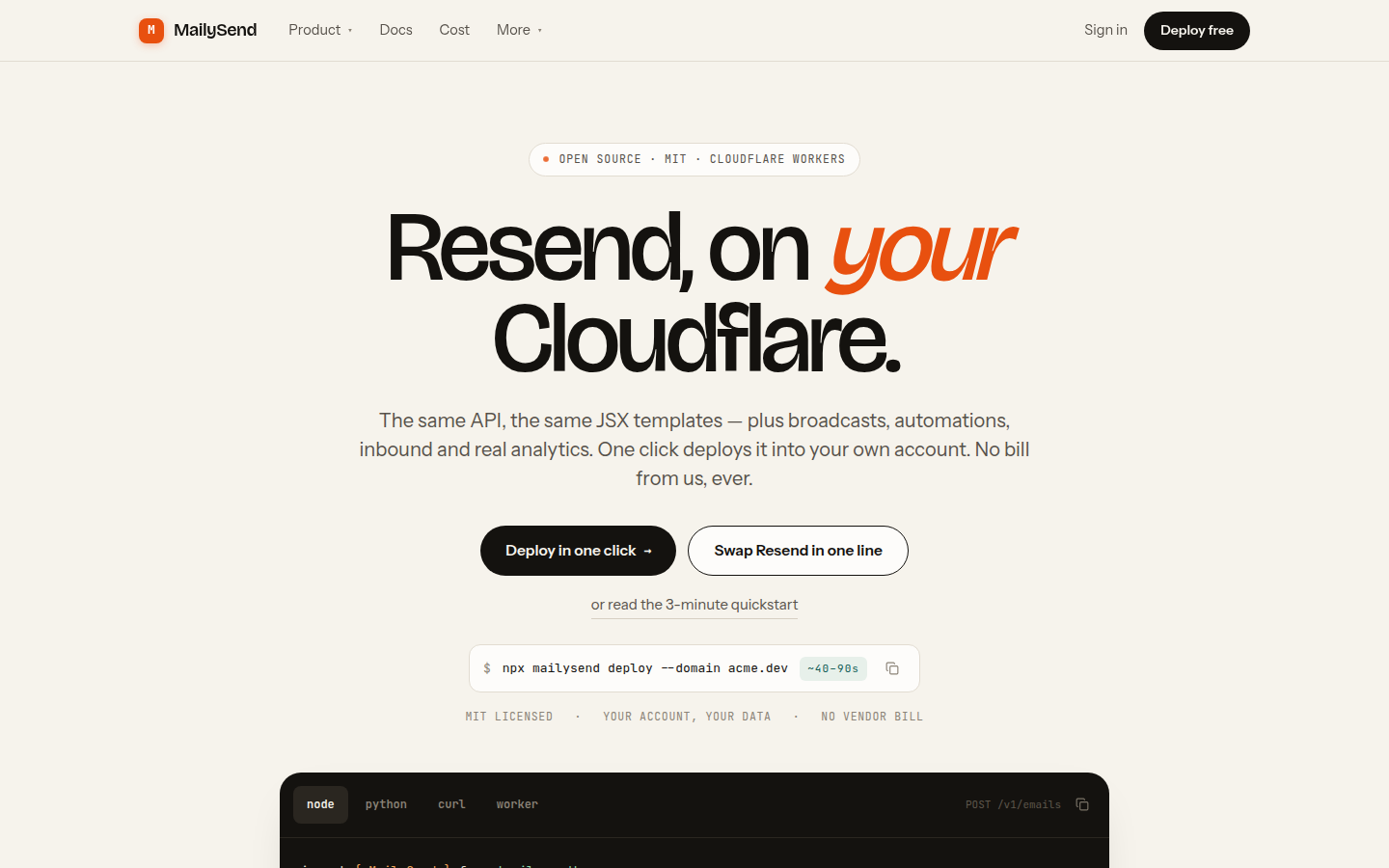
### **Resend, on _your_ Cloudflare.**
The complete email platform — transactional sending, marketing broadcasts, automations,
inbound mail with threading and deliverability analytics — running entirely on Cloudflare
Workers, **in your own account**. Drop-in compatible with the Resend API. MIT licensed.
Also runs on a plain Node server with no Cloudflare account at all.
[**Live demo → mailysend.com**](https://mailysend.com) ·
[Docs](https://mailysend.com/docs) ·
[Dashboard tour](https://mailysend.com/dashboard-tour) ·
[Honest comparisons](https://mailysend.com/compare) ·
[Cost](https://mailysend.com/pricing)
[](LICENSE)
[](https://workers.cloudflare.com/)
[](https://nodejs.org/)
[](https://deploy.workers.cloudflare.com/?url=https://github.com/GagnDeep/mailysend)
---
## Why this exists
You like Resend's API. You do not like that your sending history, your contact list and
your bounce data live in someone else's account, on their retention policy, at a per-email
markup over what the bytes actually cost.
MailySend is that API — reimplemented on Cloudflare's own primitives — plus everything a
platform can do only when it runs where your data already is.
```diff
import { Resend } from 'resend'
- const resend = new Resend(process.env.RESEND_API_KEY)
+ const resend = new Resend(process.env.MAILYSEND_API_KEY)
+ // RESEND_BASE_URL=https://your-deployment/v1
```
The `resend` npm package honours `RESEND_BASE_URL`, so that really is the whole migration —
no code changes, no rewrite, no lock-in either direction. There is also a first-party
`mailysend` SDK, and `mailysend/compat` exports a `Resend` class with the same method names
if you would rather be explicit.
---
## What you get
| | |
|---|---|
| 📤 **Transactional sending** | `POST /v1/emails`, batches of 100, scheduling 30 days out, idempotency keys, attachments, tags, typed errors |
| 🔀 **Four transports, one API** | Cloudflare Email Service (default), Amazon SES v2, Resend, generic SMTP — deterministic routing, automatic failover, no vendor lock-in |
| 📣 **Marketing** | Audiences, contacts, custom properties, CSV import, live segments, broadcasts with A/B testing and holdouts, a preference centre |
| 🔁 **Automations** | Visual step builder on Cloudflare Workflows — send, wait, branch, tag, webhook — in per-contact or cohort mode |
| 📥 **Inbound** | Real mailboxes, MIME parsing, reply threading, full-text search, attachments streamed straight to R2 |
| 📊 **Deliverability** | Delivery events, bounce classification, parsed DMARC aggregate reports, seed-list inbox placement with its source labelled |
| 👁️ **Analytics** | Opens and clicks with bot / MPP classification, per-domain and per-tag breakdowns, daily rollups, long-term NDJSON archive in R2 |
| 🤖 **Agents** | A nine-tool MCP server so an assistant can read and draft mail — with a confirmation you approve at `/app/approvals` before anything sends |
| 🎨 **Templates** | Handlebars, MJML, a restricted JSX AST compiler, versioning with diff and rollback |
| 🔗 **Webhooks** | HMAC-signed, retried on a queue then a durable tail, every attempt's response stored, replayable |
| 🔐 **Auth** | Passkeys and single-use recovery codes for the dashboard, Cloudflare Access when you have it, a CLI device flow, hashed API keys for the API, RBAC, invites, audit log — and no password store anywhere |
| 🚀 **SEO built in** | 42 prerendered pages (marketing, docs and 26 guides), JSON-LD, OG images, `sitemap.xml`, `robots.txt`, `llms.txt` |
---
## How it compares
### MailySend vs. the hosted services
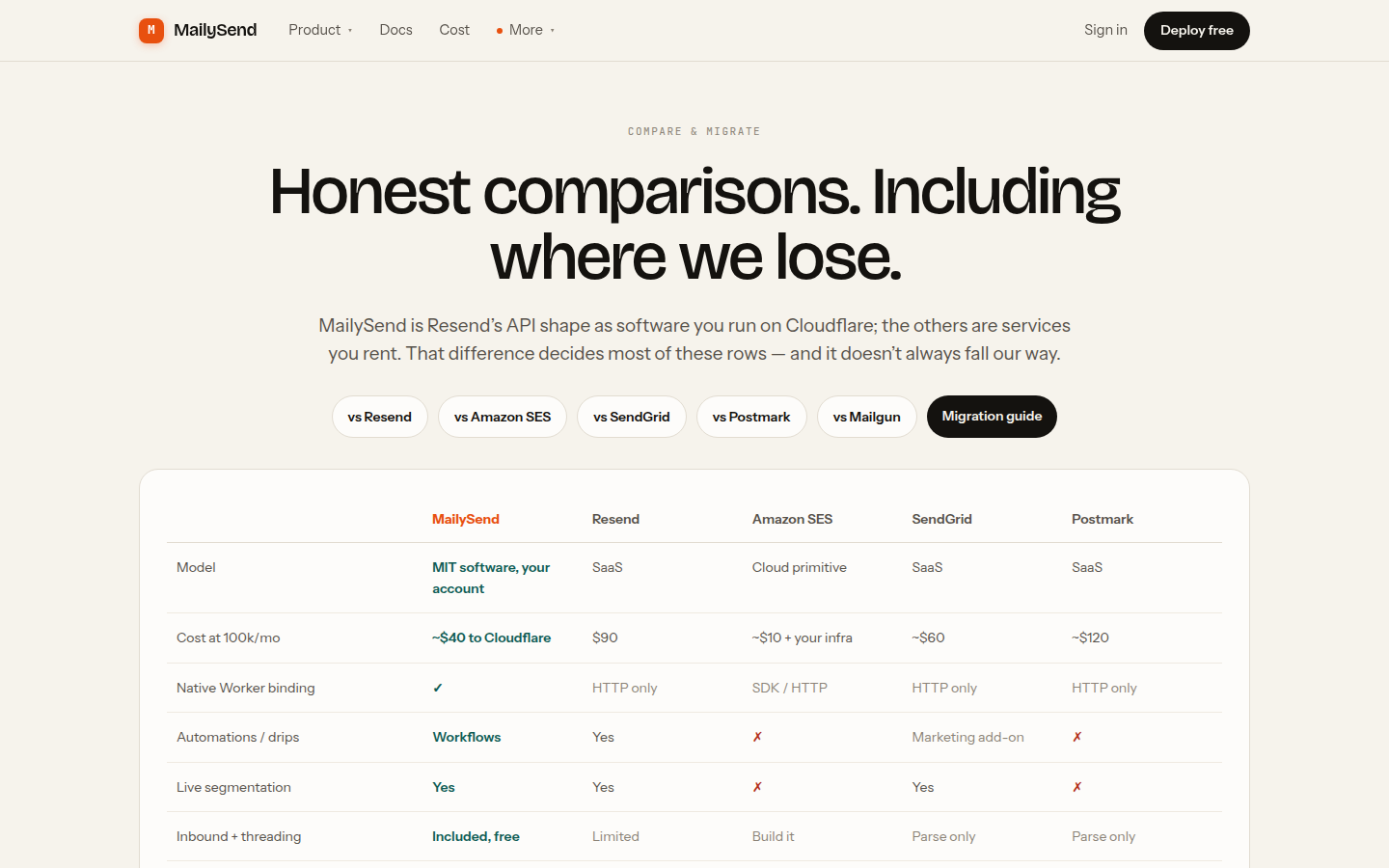
This is the same matrix the site publishes at [/compare](https://mailysend.com/compare),
including the last row.
| | **MailySend** | Resend | Amazon SES | SendGrid | Postmark |
|---|:--|:--|:--|:--|:--|
| Model | **MIT software, your account** | SaaS | Cloud primitive | SaaS | SaaS |
| Cost at 100k/mo | **~$40 to Cloudflare** | $90 | ~$10 + your infra | ~$60 | ~$120 |
| Native Worker binding | **✅** | HTTP only | SDK / HTTP | HTTP only | HTTP only |
| Automations / drips | **Workflows** | Yes | ❌ | Marketing add-on | ❌ |
| Live segmentation | **Yes** | Yes | ❌ | Yes | ❌ |
| Inbound + threading | **Included, free** | Limited | Build it | Parse only | Parse only |
| Inbox-placement analytics | **Per provider** | Delivery only | CloudWatch | Partial | Strong |
| Parsed DMARC aggregate reports | **✅** | ❌ | ❌ | ❌ | ❌ |
| Multi-provider sending + failover | **✅** | ❌ | ❌ | ❌ | ❌ |
| MCP server for agents | **✅** | ❌ | ❌ | ❌ | ❌ |
| Data location | **Your account** | Theirs | Your AWS | Theirs | Theirs |
| **Who is on call** | **You** | Them | AWS | Them | Them |
Resend has grown into a genuinely capable marketing product, and this table says so — the
rows the artboards originally marked "No" now read the way a prospect would actually find
them. The thing Resend still cannot be is **yours**. And Postmark measures placement better
than we do; that row says so too.
### What it costs to send 100,000 emails a month
| | Monthly | Basis |
|---|---|---|
| **MailySend + SES** | **$16.20** | $5 Workers Paid + $0.10/1k + ~$1.20 storage/queues/analytics — one config line |
| **MailySend + Cloudflare** | **$40.15** | $5 Workers Paid + $0.35/1k after the 3,000 included + ~$1.20 — no second account |
| Resend | $90 | published plan ladder (Pro 100k) |
| SendGrid | $60 | ≈$0.60 per 1,000 |
Same product either way: same API, same dashboard, same logs, same analytics, same inbound.
The transport is one line of configuration and you can change it later, so the row to read
is whichever backend you already have an account with.
Amazon SES on its own is about **$10** at this volume, and it is worth being clear about what
that buys: an SMTP wire. No dashboard, no event timeline, no segments, no broadcasts, no
inbound, and CloudWatch where the analytics would be. MailySend runs *on top of* SES for the
same $0.10 per thousand — that is the first row of this table, not a competitor to it.
Estimates for planning, not a quote — and the same formulas the site's own calculator runs,
so you can move the slider at [mailysend.com/pricing](https://mailysend.com/pricing) and check
them. The dashboard also shows your real month-to-date Cloudflare spend next to your send
volume, so the estimate is answerable to a number.
---
## See it running
Everything below is the live deployment at **[mailysend.com](https://mailysend.com)** — one Node
process behind nginx, or one Worker, from this exact repository. Real traffic, not empty states.
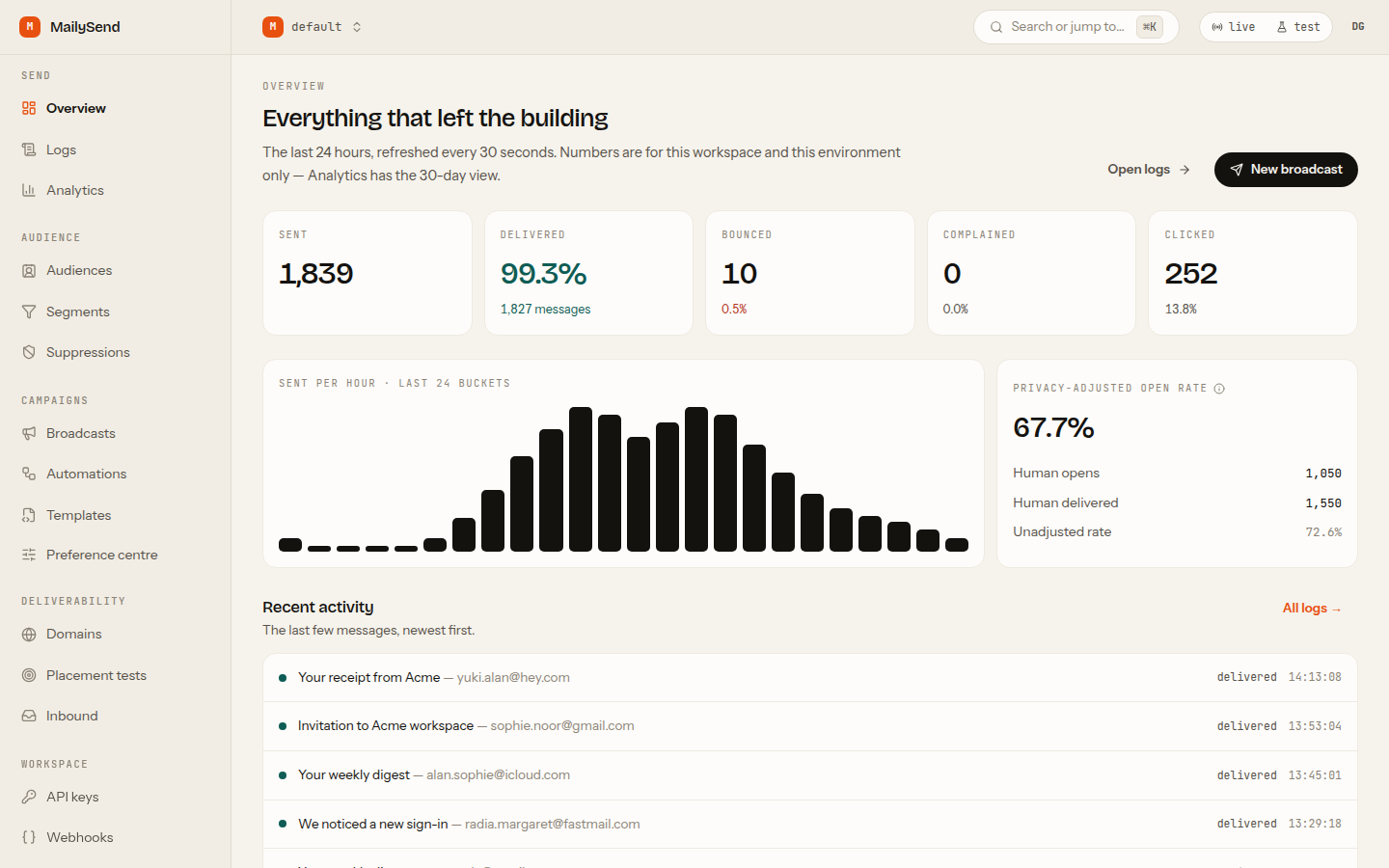
**The overview, on a month of sending**
Sent, delivered, bounced, complained and the hourly curve — with the counts of record coming from
SQL rollups, never from a sampled analytics store.
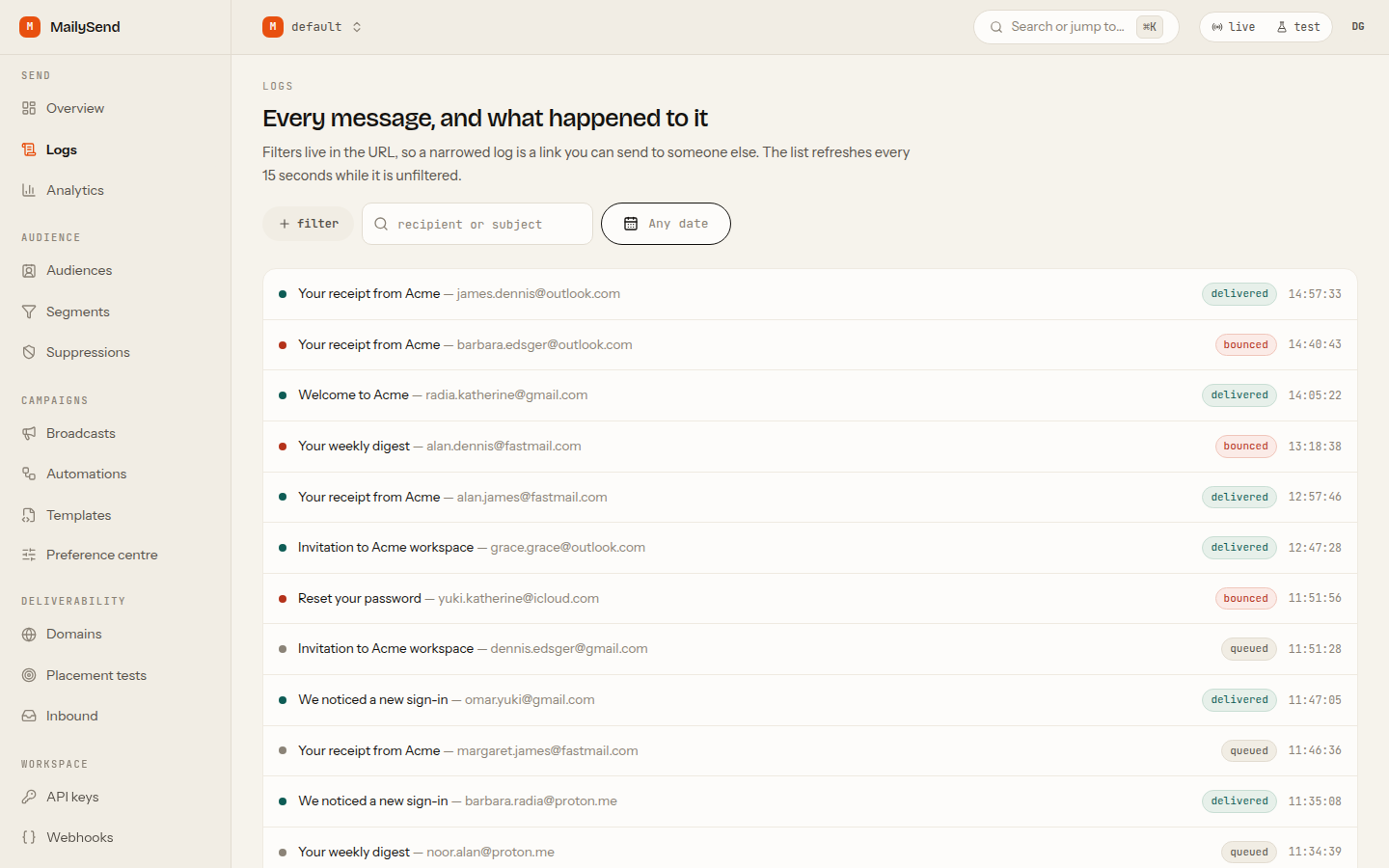
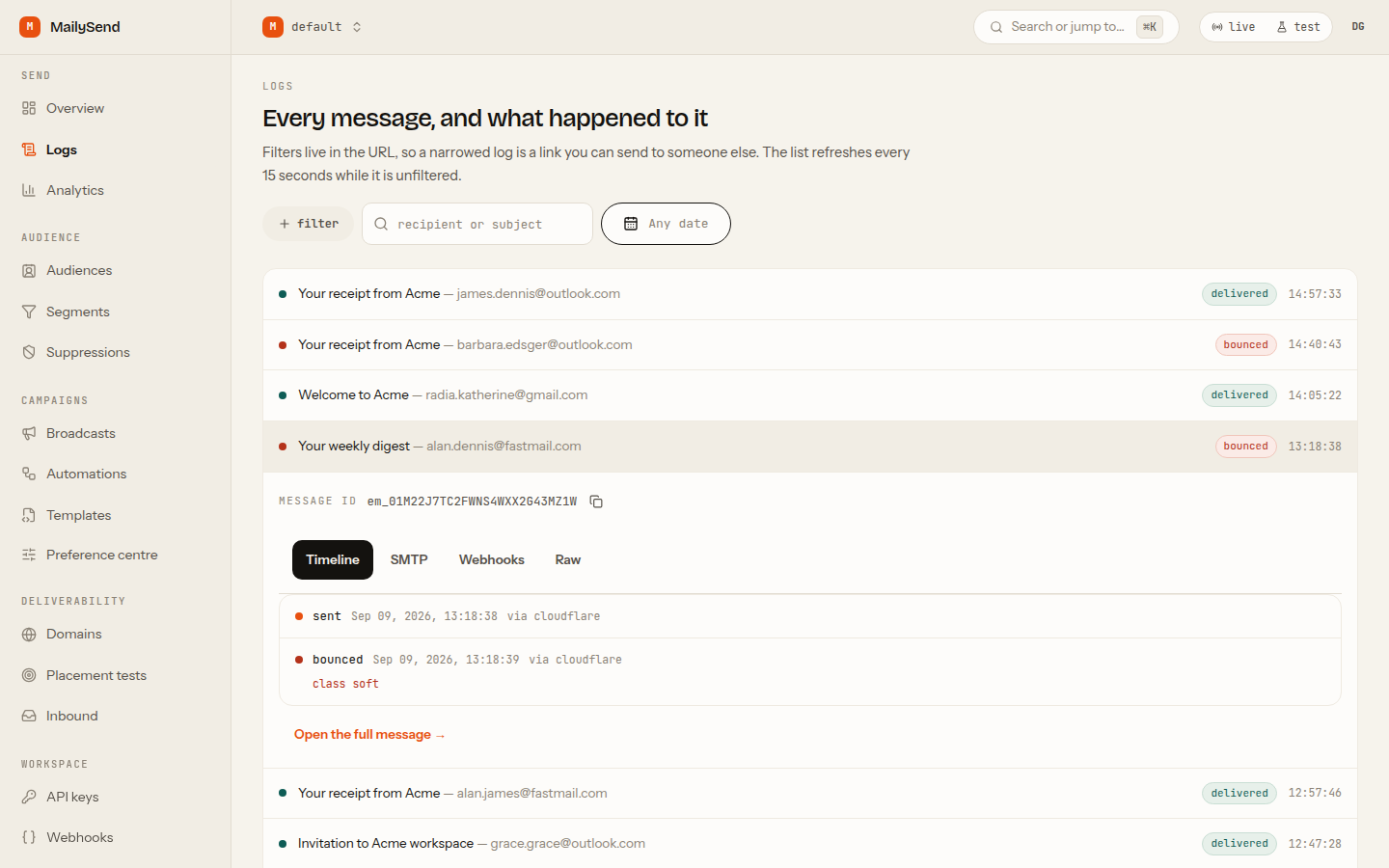
**Every message, and what happened to it**
The full log with filters that live in the URL, and a drawer per message: state timeline, the SMTP
conversation, every webhook attempt and its response, and the raw MIME.
|
**One message, all the way down**
|
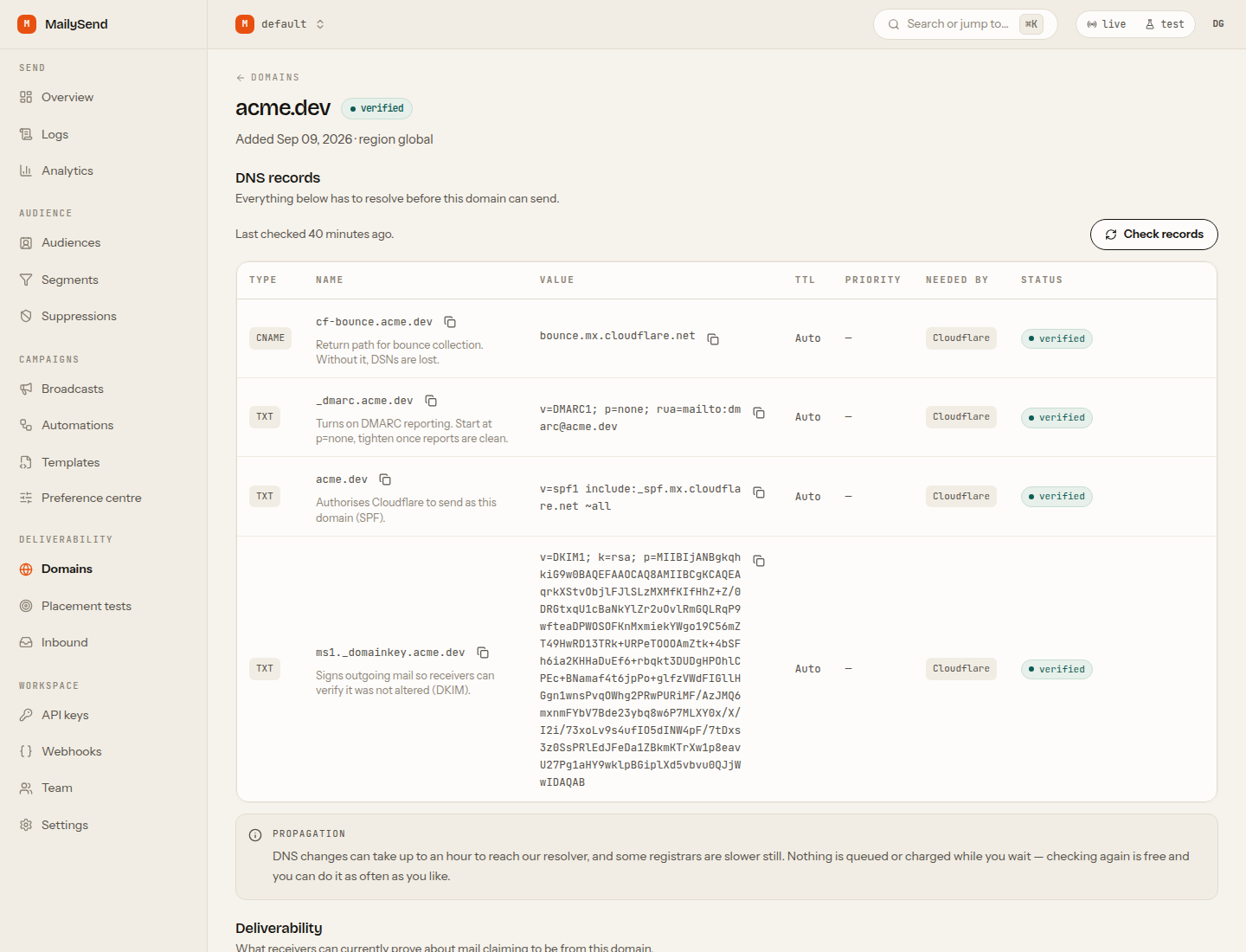
**Domain setup that finishes**
Every DNS record for the active transport, copy-buttoned, with SPF/DKIM/DMARC state and the
deliverability posture on one page.
|
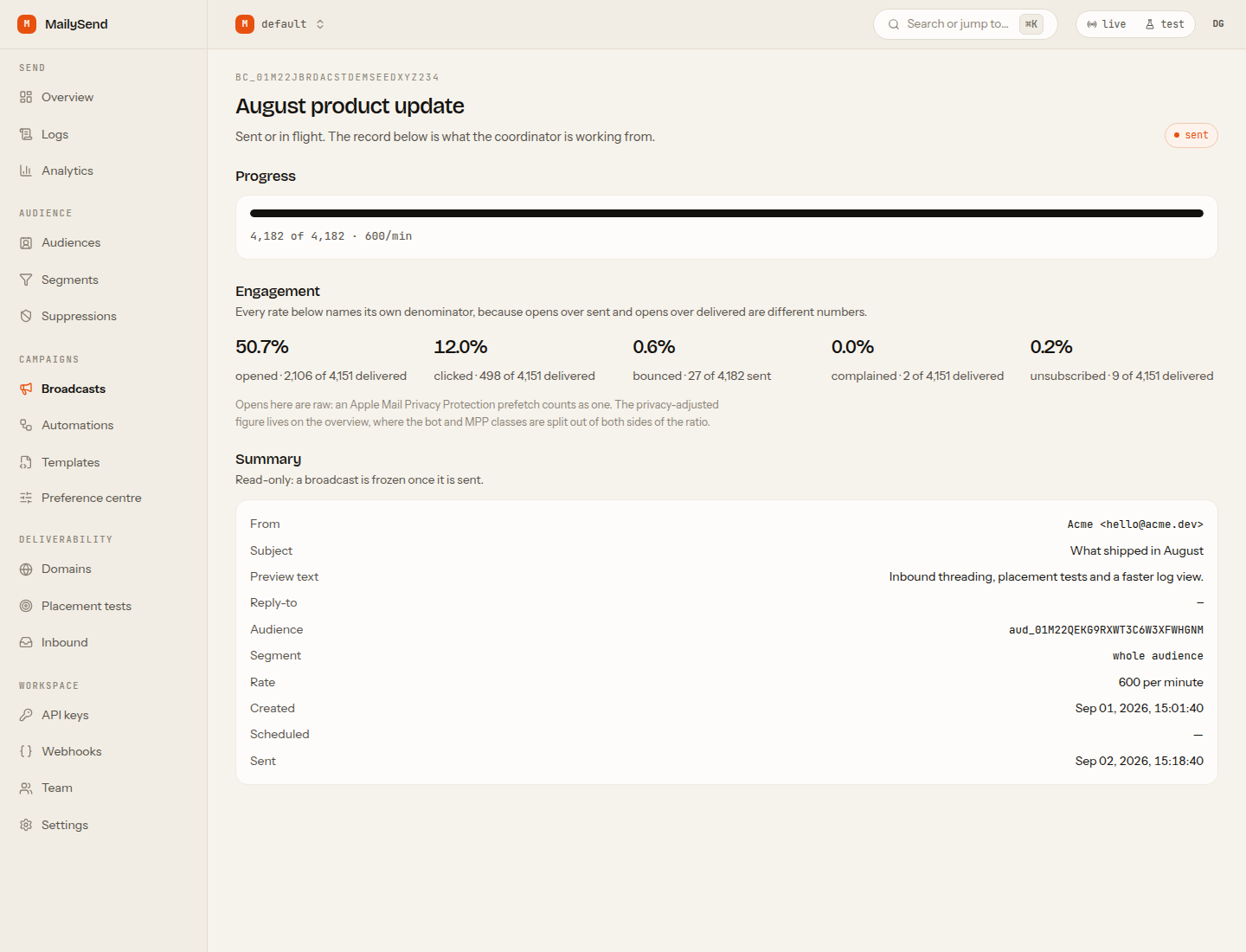
**Broadcasts with a real denominator**
Progress from the coordinator's own counters, and every engagement rate stated over the
denominator it was actually computed from.
|
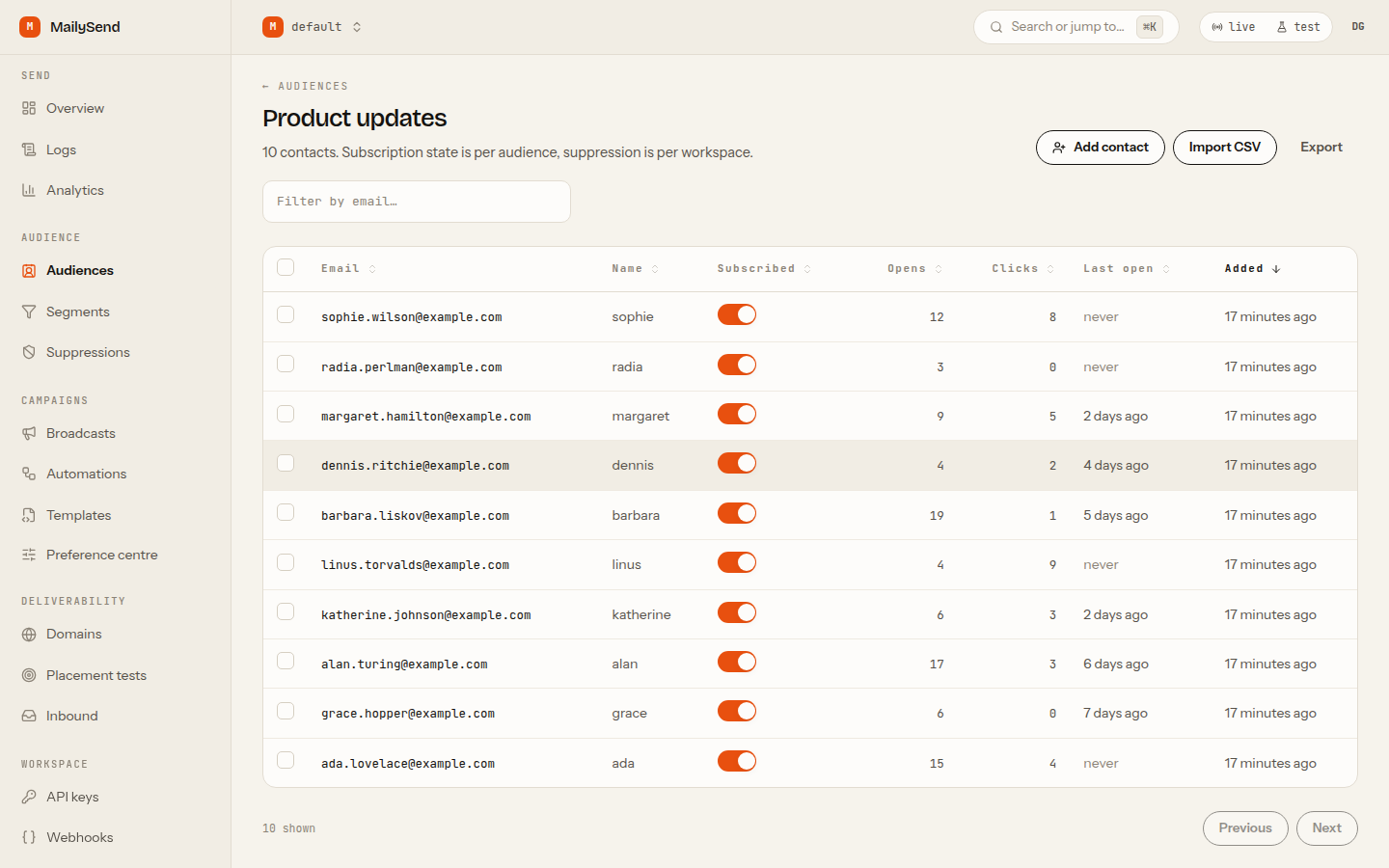
**Audiences and live segments**
Contacts, custom properties, CSV import, and segments written in a real query DSL that compiles to
parameterised SQL.
|
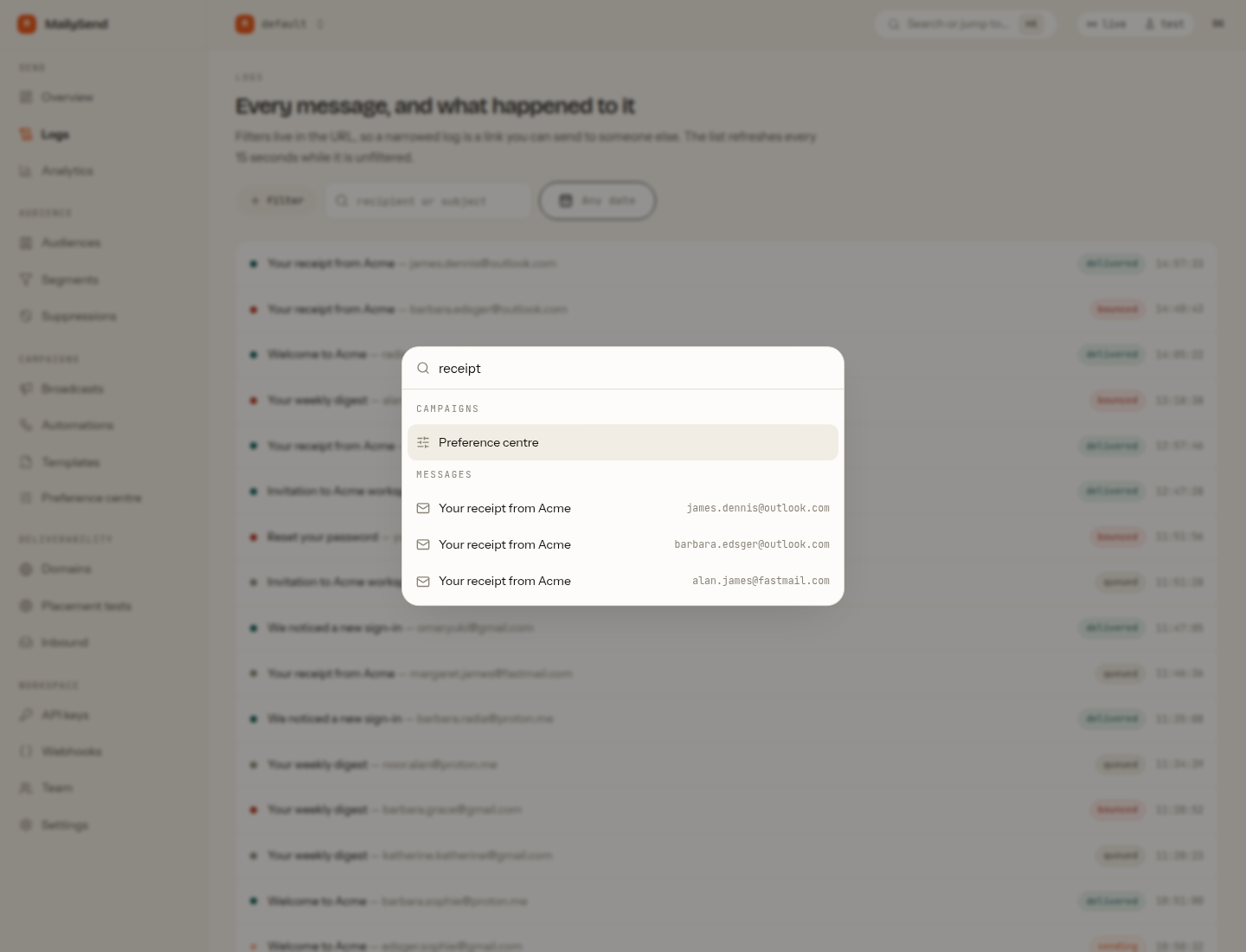
**⌘K to anywhere**
Jump to any message, domain, template or doc page. `G L` for logs, `G B` for broadcasts. No screen
in the product ends in "contact support".
|
It works.
"
}'
```
The `id` comes back **before any provider is contacted**. That is deliberate: the id is
ours, minted at accept time, so it survives a failover, a provider migration, and a
provider that loses its own id. `provider_message_id` is recorded later and is queryable,
but it is never the identity of a message.
### And then receive something
Sending and receiving are two independent setups on the same domain, and the second one is
configured in two different places — which is the whole reason the first test message
usually bounces.
1. **Cloudflare dashboard → Email → Email Routing.** Enable it (Cloudflare publishes the MX
records itself), then add a **catch-all** rule whose action is **Send to a Worker**,
pointed at this instance's script. That is what delivers the domain's mail to MailySend.
2. **In MailySend, under the domain's Receiving tab**, create a mailbox — and turn on
**Catch-all** on it if you want every address on the domain to land there rather than
only the one you named.
Step 1 alone is not enough. Mail for an address with no mailbox and no catch-all is refused
at the door with a legible `550 5.1.1 No such mailbox`, which is the honest answer to a
typo and tells a spammer nothing — but it is also exactly what "I bound the catch-all and
nothing arrived" looks like. **Check receiving** on the domain resolves its MX and says
which of the two halves is missing, and both outcomes are written to the event timeline
rather than only to `wrangler tail`.
### Getting into the dashboard
The API takes a key; the dashboard takes a session. A brand-new deployment has no verified
sending domain, no identity provider and nobody to email, so the first session cannot come
from any of those. It comes from **claiming the instance**.
**1 — Claim it at `/setup`.** The first person to open it registers a passkey and becomes
the owner. The claim is a single conditional insert, so two people opening `/setup` at the
same moment produce exactly one owner — the other is told the instance is already claimed.
Then it offers, both skippable, adding a sending domain and minting your first API key
with a live test send.
**2 — Save the recovery codes.** Ten of them, shown once, single-use. They are the way back
in if the passkey is gone, and the reason removing your last passkey is allowed at all.
**3 — Sign in afterwards with the passkey alone.** No email typed: the credential is
discoverable, so the browser offers it and `/sign-in` trades the assertion for a session.
Three other doors exist, and the sign-in page renders each one **only when it is actually
open** — an offered door that answers 501 is worse than no door:
| Door | When it appears | What it needs |
|---|---|---|
| **Recovery code** | always | one of the ten codes |
| **Cloudflare Access** | `MS_ACCESS_TEAM` and `MS_ACCESS_AUD` are set | the assertion is verified against your team's published keys — signature, `iss`, `aud`, `exp` — never merely decoded |
| **Emailed one-time code** | a sending domain is verified | it is sent through this deployment's own send path, from the domain you marked default |
Until a domain is verified, `POST /v1/auth/otp` answers `202 {"status":"unavailable"}` and
the page says so, instead of pointing you at an inbox that will never receive anything.
**Locked out?** `npx mailysend claim --url https://your-instance` is the break-glass path,
and it keeps working after the instance is claimed. It proves control of the deployment
rather than of an inbox: it writes a one-time nonce into the instance's own database —
through the Cloudflare D1 API when `CLOUDFLARE_ACCOUNT_ID` and `CLOUDFLARE_API_TOKEN` are
in your environment, otherwise by printing the exact `wrangler d1 execute` command for you
to run — and then proves it knows that nonce. Only somebody who can write that database
can produce it. You get a session and a fresh API key.
**On the CLI**, `npx mailysend login` uses a device code: it prints an eight-character code
and a URL, you approve it at **Settings → Access** in a browser that is already signed
in, and the CLI receives a full-access key named after the client — revocable from the same
screen as any other key.
**Moving to your own domain** is done from **Settings → Access**. This matters more
than it looks: a passkey is bound to a hostname, so changing the host invalidates every
passkey registered on the old one. The instance stores the hostname each credential was
registered for, shows you which are still usable, and tells you plainly that you need a
recovery code and a re-registration on the new host. `mailysend claim` remains the
guaranteed way in, which is what makes offering the move as a button safe at all.
There is no password store. A self-hosted email platform that invents one is adding the
single credential most likely to be reused and leaked.
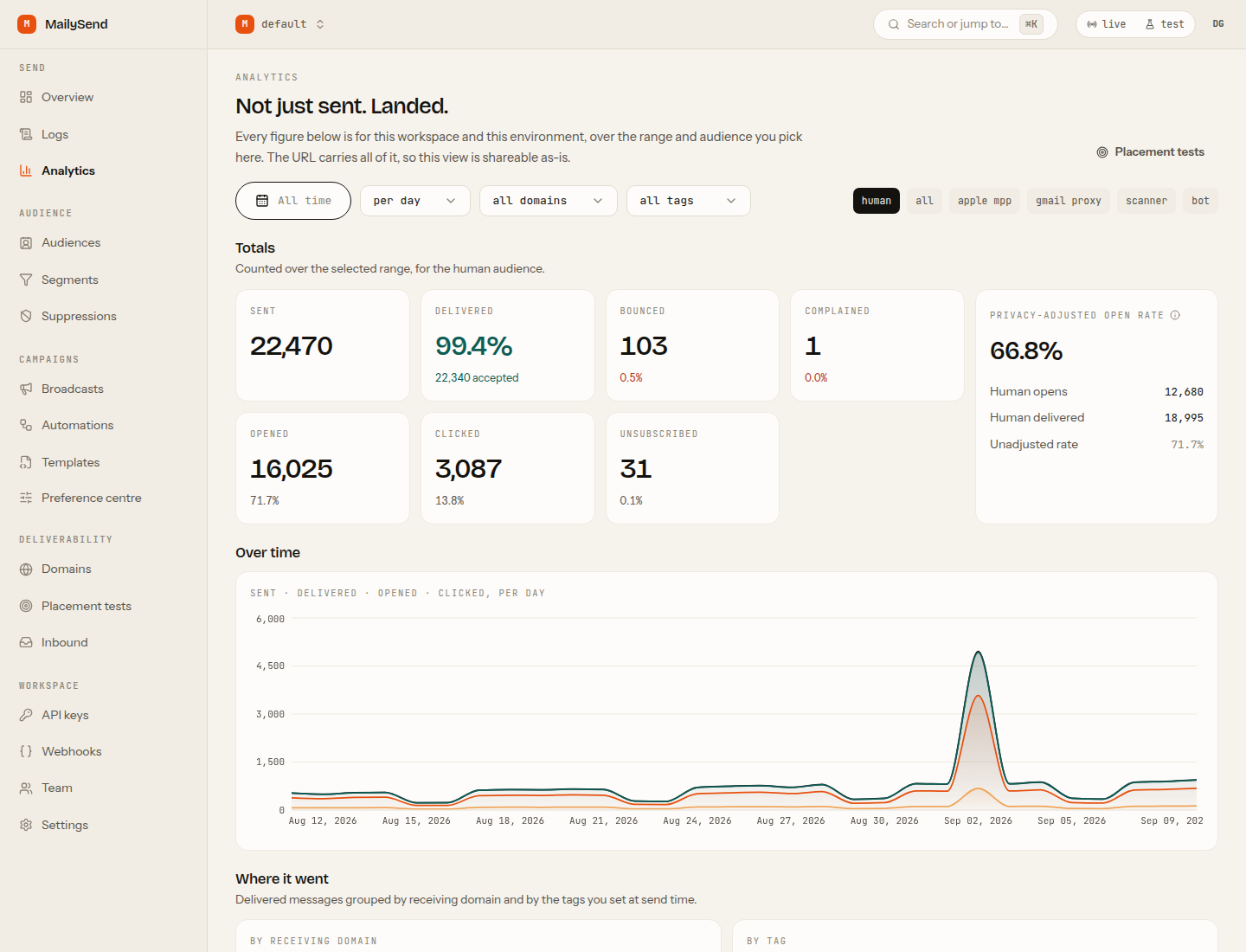
 **Analytics that names its own denominators**
A 30-day series, delivery grouped by receiving domain and by the tags you set at send time, opens
and clicks split by who actually generated them, and inbox placement per provider with the source
of every figure attached.
**Analytics that names its own denominators**
A 30-day series, delivery grouped by receiving domain and by the tags you set at send time, opens
and clicks split by who actually generated them, and inbox placement per provider with the source
of every figure attached.