GG Sheet Export

GG Sheet Export

Clean, printable character sheets for D&D 5e and Pathfinder 2e, straight from Foundry VTT
Reading view · vector-crisp PDF (native print) · interactive HTML · Markdown (Obsidian-ready)

Foundry v12 Foundry v13 Foundry v14 D&D 5e Pathfinder 2e License: MIT Latest Release

English · Español

bardica.ar · more free GM tools · más herramientas gratis

GG Sheet Export — GegesVTT

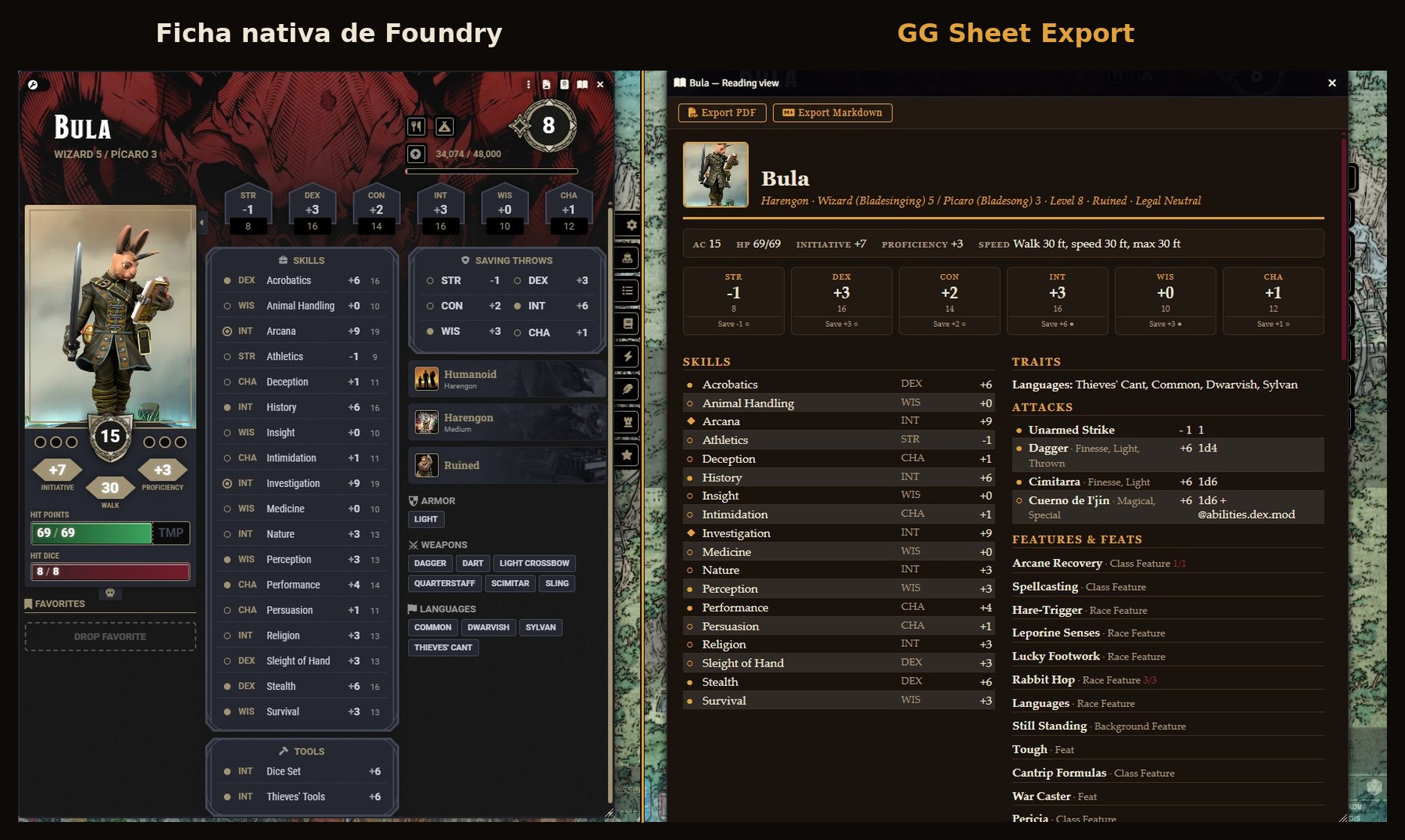
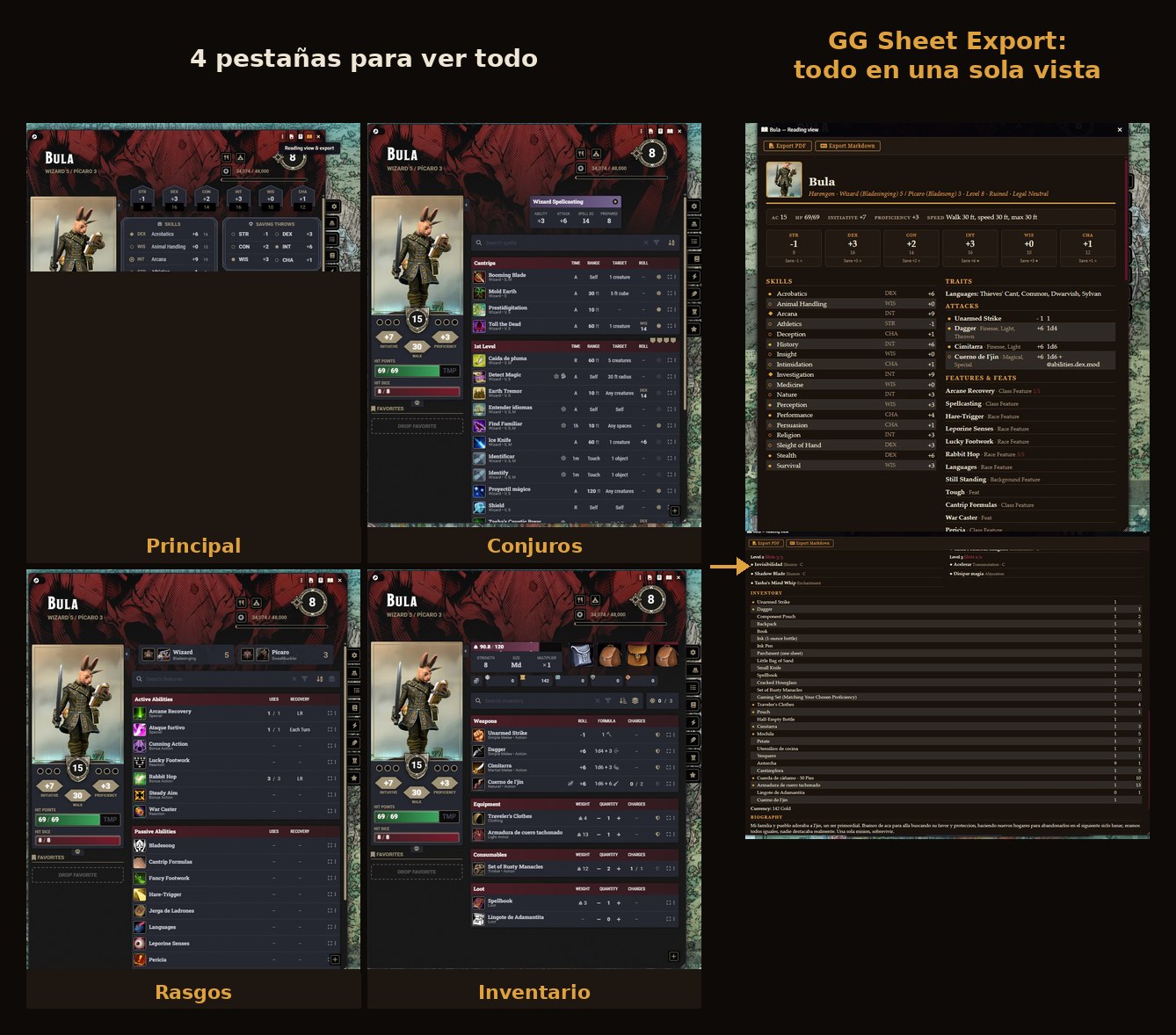
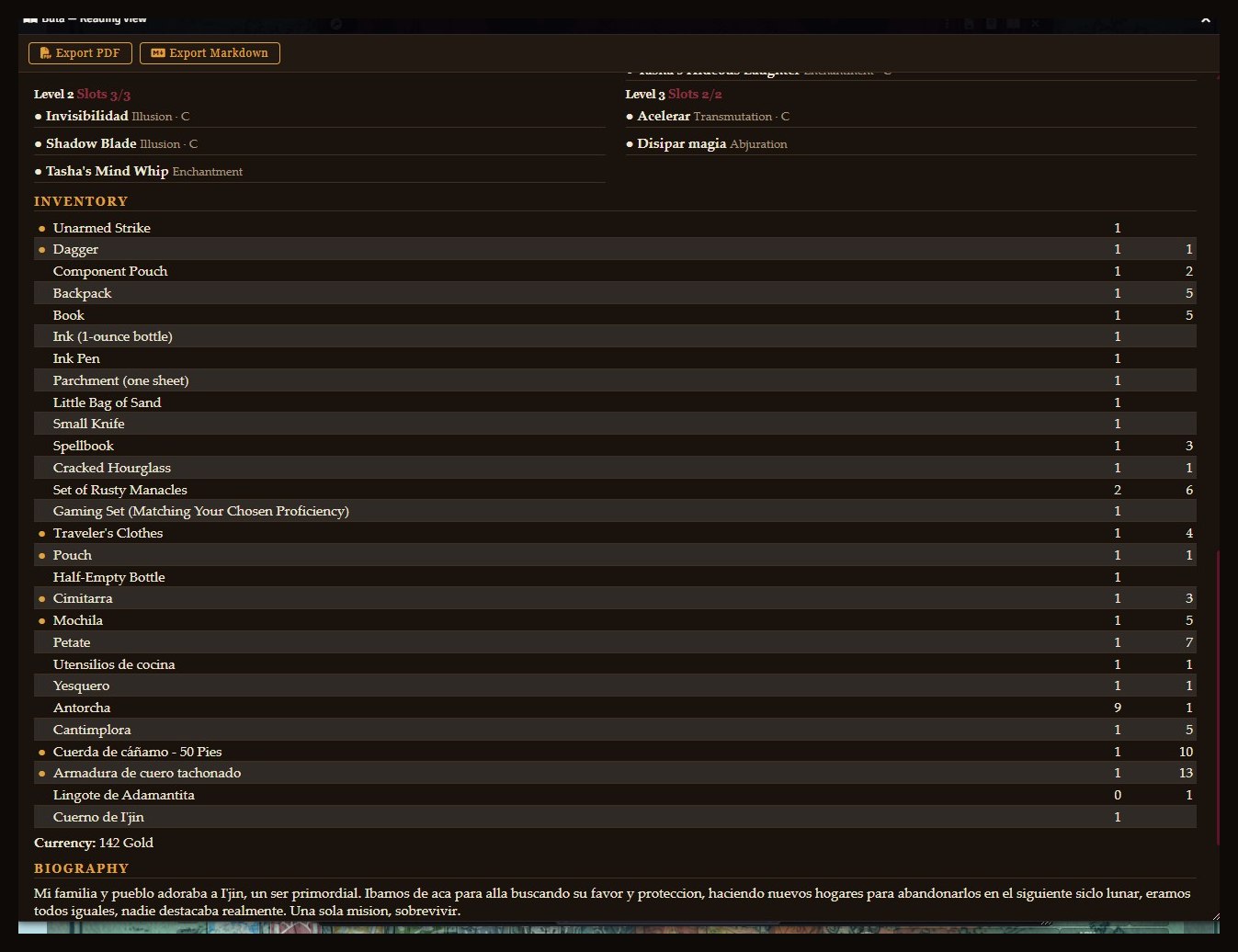
--- ## Screenshots **Before / after** — the same sheet, native Foundry vs. exported with the module: ![Before and after](https://raw.githubusercontent.com/GegesVTT/gg-sheet-export/main/docs/images/screenshot-antes-despues.jpg) **Everything in one view** — Foundry makes you hop between tabs for combat, spells, features and inventory. The reading view puts the whole character in a single scroll: ![Everything in one view](https://raw.githubusercontent.com/GegesVTT/gg-sheet-export/main/docs/images/screenshot-una-sola-vista.jpg) **A real table sheet** — spells, inventory and biography from an actual campaign character: ![Real table sheet](https://raw.githubusercontent.com/GegesVTT/gg-sheet-export/main/docs/images/screenshot-ficha-real.jpg) --- ## ✨ Features - **📖 Reading view** — the entire character on one scroll: combat, abilities, skills, attacks, spells, features, inventory, biography. No tab-hopping. - **Export to PDF** — a print-ready layout (warm parchment look, serif type, clean page breaks). Uses the browser's **native print**, so the PDF comes out vector-crisp — not a blurry screenshot. - **Export to HTML** *(new in v1.5)* — a **standalone interactive file**: tap the **?** circle next to any feature, spell or item to unfold its full description (tables and lists included). The portrait is embedded, so the file works with Foundry closed and can be shared with your players. **Print that same file and descriptions hide automatically** — you get the compact table sheet back. - **Export to Markdown** — tables and headers, drops straight into Obsidian or any notes vault. - **Built to be used at the table**: bubbles to pencil in spell slots as you burn them, death saves / hero points, hit dice, temp HP. Spells grouped by level, features grouped by source, inventory grouped by category. - **Real inventory** — items inside a bag show **under their container** (nested containers included), with capacity per container. A *Bag of Holding* is flagged as `contents weigh nothing`, and the **total weight comes from the system itself** — coins included, weightless contents excluded — along with your encumbrance thresholds. - Works for **characters and NPCs**, fully localized in **English and Spanish**. ### 🎲 Two systems, one look | | **D&D 5e** | **Pathfinder 2e** | |---|---|---| | Abilities | scores + modifiers + saves | modifiers (Remaster style) | | Saves | six, tied to abilities | three, each with its own proficiency rank | | Proficiency | ● / ◆ / ◐ markers | U · T · E · M · L ranks | | Attacks | to-hit + damage with ability modifier (finesse resolved by the system) | Strikes with MAP variants (+14 / +9 / +4) and resolved damage | | Actions | — | grouped by cost: ◆ · ◆◆ · ◆◆◆ · ◇ free · ↺ reaction | | Spells | by level, slot bubbles, concentration / ritual | one block **per spellcasting entry**, each with its own tradition, DC and attack (staves and focus spells included) | | Load | weight in lb + encumbrance thresholds | Bulk (L notation) | | Extras | death saves, inspiration | hero points, focus points, dying/wounded tracks | The PF2e sheet was validated stat-by-stat against the native system sheet (PCs and NPC stat blocks). ## 💡 Beyond the printed page Ideas straight from the community: - **Feed your character to an LLM** — the Markdown export is perfect context for NotebookLM, Claude or ChatGPT (and uses far fewer tokens than a PDF). - **Help new players learn their sheet** — the HTML export shows the whole character in plain, ordered form, and every rule text is one tap away. No Foundry UI in the way. - **Share sheets outside Foundry** — the HTML file is self-contained (portrait embedded): send it over WhatsApp or Discord and it just opens. ## 📦 Installation In Foundry: **Add-on Modules → Install Module** and paste the manifest URL: ``` https://github.com/GegesVTT/gg-sheet-export/releases/latest/download/module.json ``` Then enable **GG Sheet Export** in *Manage Modules* of your dnd5e or pf2e world. (Manual alternative: drop the `gg-sheet-export` folder into `Data/modules/`.) ## 🚀 Usage Open any character or NPC sheet — you'll see an open-book 📖 icon in the window header. - **Reading view**: a read-only window with the whole sheet, in the Crónicas Bárdicas look (black oak + amber). - **Export PDF**: the print dialog opens right over Foundry — pick **"Save as PDF"** as destination. No pop-up window needed, so it works in the Foundry desktop app too. - **Export HTML**: downloads a standalone `.html`. On screen it's interactive (**?** unfolds descriptions); printed from any browser, it becomes the compact sheet. - **Export Markdown**: downloads a `.md` with tables and headers. > If the print dialog ever fails to open, the module falls back to a pop-up window — allow pop-ups for your Foundry domain in that case. **Journals too.** The same 📖 icon appears on any Journal Entry (and on right-click in the Journals sidebar). Journals export in their own **tome layout** — cover, auto-generated contents, drop caps, themed tables — to PDF, standalone HTML and Obsidian-ready Markdown (with `@UUID` references turned into `[[wiki-links]]`). GM **secret blocks are left out by default**; a world setting lets you include them. **Printable spell cards (D&D 5e).** Casters get a 🪄 button in the reading view (and on right-click in the Actors sidebar). It builds poker-size cards (63×88mm, 9 per A4), **double-sided** — front with the stats (casting time, range, duration, components, plus the character's own save DC / attack) and back with the description. Fronts and backs print as mirrored sheets so they line up for duplex printing; cut along the edges and sleeve them. Long spells (Wish and friends) are abridged with a manual page reference, so each spell stays on a single card. A theme system is in place for future card packs. ## 🔌 Macro API ```js const actor = game.actors.getName("Rahegal"); const api = game.modules.get("gg-sheet-export").api; api.open(actor); // open the reading view await api.exportPdf(actor); // print/export to PDF await api.exportHtml(actor); // download the standalone .html await api.exportMarkdown(actor); // download the .md // Journals — same three formats, tome style const journal = game.journal.getName("Capítulo 18: El Valle de las Cenizas"); api.openJournal(journal); await api.exportJournalPdf(journal); await api.exportJournalHtml(journal); await api.exportJournalMarkdown(journal); // Spell cards (D&D 5e) — preview window or straight to PDF const pc = game.actors.getName("Rahegal"); api.openSpellCards(pc); await api.exportSpellCards(pc); ``` ## 🎨 Card themes Spell cards ship with a theme system. Pick a look under **Settings → Module Settings → GG Sheet Export → "Cards: visual theme"**. The base theme (**Crónicas Bárdicas**) is always available. **Installing more themes:** theme packs are small companion modules. Install a pack the same way as any module (paste its manifest URL in *Install Module*, or find it in the browser), enable it, and it appears automatically in the theme dropdown. Packs only change the look — the engine stays the same, so themes never gate features. Free packs: **Ink Saver** (black & white, printer-friendly). More coming. **Building a theme pack (devs):** a pack is a module that registers itself in the `setup` hook: ```js Hooks.once("setup", () => { const api = game.modules.get("gg-sheet-export")?.api; api?.registerCardTheme({ id: "my-theme", name: "My Theme", vars: { "--card-ink": "#1a1a1a", "--card-amber": "#8a2f3f" /* … inherits the rest */ }, watermark: null, // data-URL / path, or null fontImports: [], // Google Fonts URLs, or… fontCSS: "", // …embedded @font-face (base64) for offline use customCSS: ".ggse-cards .ggse-front { /* scoped tweaks */ }" }); }); ``` Only use fonts whose license allows embedding/redistribution (OFL, etc.). Declare `requires: gg-sheet-export` (min 1.8.0) in your pack's manifest. ## ✅ Compatibility - Foundry VTT **v12–v13**. - **dnd5e** — data paths cover 3.x, 4.x and 5.x (verified on 5.2.4). Weapon damage is read from the system's **activities**, so ability modifiers, finesse and extra magic-weapon dice come out exactly as the sheet rolls them. - **pf2e** — verified on 7.12.2 (Foundry 13). PC and NPC data models handled separately, as the system does. - Actor types: `character` and `npc`. - Description unfolding in the HTML export is currently a **dnd5e** feature; PF2e exports the same interactive file without descriptions (coming later). ## 🛠️ Technical notes - Data extraction is one module per system (`extract.mjs`, `extract-pf2e.mjs`), selected by `game.system.id` and **loaded on demand** — a dnd5e world never loads PF2e code. Every data-model path uses optional chaining: if a future system version changes a structure, the expected failure mode is a field showing `—`, not the module breaking. - **Numbers come from the system, not from re-computation.** Weapon damage is taken from dnd5e activities / PF2e resolved strikes; total weight comes from `attributes.encumbrance` (dnd5e) and `actor.inventory.bulk` (pf2e). If the system says +6, the sheet says +6. - PF2e action costs use Unicode glyphs (◆ ◆◆ ◆◆◆ ◇ ↺) instead of the system's private icon font, so they print identically anywhere. - The PDF uses `window.print()` on a dedicated HTML document with an A4 `@page` — vector typography and proper `break-inside` handling, far superior to html2canvas/jsPDF approaches. Printing runs in a hidden iframe, so no pop-ups are required. - The HTML export shares the same CSS base as the PDF. Descriptions are enriched (`@UUID` links and inline rolls flattened to plain text) and sanitized; portrait and logo are embedded as data URIs so the file has zero external dependencies besides fonts. - Cinzel and Cormorant Garamond load from Google Fonts; offline, they degrade to Georgia/serif without breaking the layout. ## 🧭 Roadmap & other systems The design separates extraction from presentation: supporting another system means writing one extractor that returns the same flat object. - ✅ **Pathfinder 2e** — shipped in v1.3. - **Description unfolding for PF2e** in the HTML export. - Daggerheart is on the radar. Playing something else? [Open an issue](https://github.com/GegesVTT/gg-sheet-export/issues). ## 🏷️ Keywords character sheet · print · printable · PDF export · HTML export · interactive sheet · Markdown · Obsidian · reading view · D&D 5e · dnd5e · Pathfinder 2e · pf2e · hybrid table · in-person · paper · NPC statblock · LLM context ## 📜 License MIT — © Geges Part of **Crónicas Bárdicas**, the Foundry VTT module suite by Geges (Gonzalo Gesualdo): [GG Nameforge](https://github.com/GegesVTT/gg-nameforge) · [GG Encounter Lens](https://github.com/GegesVTT/gg-encounter-lens) --- ## 🇪🇸 Español **Fichas de personaje de D&D 5e y Pathfinder 2e limpias e imprimibles, directo desde Foundry VTT.** Visor de lectura · **PDF** vectorial (impresión nativa) · **HTML** interactivo · **Markdown** (listo para Obsidian). ### ✨ Características - **📖 Vista de lectura** — todo el personaje en un solo scroll: combate, características, habilidades, ataques, conjuros, rasgos, inventario y biografía. Sin saltar entre pestañas. - **Exportar PDF** — versión de imprenta (fondo pergamino cálido, tipografía serif, cortes de página limpios). Usa la **impresión nativa** del navegador: el PDF sale vectorial y nítido, no una captura borrosa. - **Exportar HTML** *(nuevo en v1.5)* — un **archivo autónomo e interactivo**: tocá el círculo **?** junto a cualquier rasgo, conjuro u objeto y se despliega su descripción completa (con tablas y listas). El retrato va incrustado: el archivo funciona con Foundry cerrado y se puede compartir con tus jugadores. **Imprimí ese mismo archivo y las descripciones se ocultan solas** — volvés a tener la ficha compacta de mesa. - **Exportar Markdown** — tablas y encabezados, listo para Obsidian o cualquier vault de notas. - **Pensado para usarse en la mesa**: burbujas para marcar con lápiz los espacios de conjuro, salvaciones de muerte / puntos de héroe, dados de golpe y PG temporales. Conjuros agrupados por nivel, rasgos por origen, inventario por categoría. - **Inventario de verdad** — lo que está dentro de una bolsa aparece **bajo su contenedor** (contenedores anidados incluidos), con la capacidad de cada uno. Una *bolsa de contención* se marca como `el contenido no pesa`, y el **peso total lo calcula el propio sistema** — monedas incluidas, contenido ingrávido excluido — junto a tus umbrales de carga. - Funciona con **personajes y PNJs**, localizado en **español e inglés**. ### 🎲 Dos sistemas, una misma estética | | **D&D 5e** | **Pathfinder 2e** | |---|---|---| | Características | puntuaciones + modificadores + salvaciones | modificadores (estilo Remaster) | | Salvaciones | seis, ligadas a características | tres, cada una con su rango de competencia | | Competencia | marcadores ● / ◆ / ◐ | rangos U · T · E · M · L | | Ataques | ataque + daño con modificador (finesse la resuelve el sistema) | Golpes con variantes de MAP (+14 / +9 / +4) y daño resuelto | | Acciones | — | agrupadas por costo: ◆ · ◆◆ · ◆◆◆ · ◇ libre · ↺ reacción | | Conjuros | por nivel, burbujas de espacios, concentración / ritual | un bloque **por entrada de lanzamiento**, cada una con su tradición, CD y ataque (bastones y conjuros focales incluidos) | | Carga | peso en lb + umbrales | Volumen/Bulk (notación L) | | Extras | salvaciones de muerte, inspiración | puntos de héroe, de enfoque, agonizante/herido | La ficha de PF2e se validó número por número contra la ficha nativa del sistema (PJs y stat blocks de PNJ). ### 💡 Más allá del papel Ideas que trajo la comunidad: - **Dale tu personaje a una IA** — el Markdown es contexto perfecto para NotebookLM, Claude o ChatGPT (y gasta muchos menos tokens que un PDF). - **Ayudá a jugadores nuevos a entender su ficha** — el HTML muestra el personaje completo y ordenado, con el texto de cada regla a un toque de distancia. Sin la interfaz de Foundry en el medio. - **Compartí fichas fuera de Foundry** — el HTML es autónomo (retrato incrustado): lo mandás por WhatsApp o Discord y abre directo. ### 📦 Instalación En Foundry: **Módulos Complementarios → Instalar Módulo** y pegá la URL de manifiesto: ``` https://github.com/GegesVTT/gg-sheet-export/releases/latest/download/module.json ``` Después activá **GG Sheet Export** en *Gestionar Módulos* de tu mundo dnd5e o pf2e. (Alternativa manual: copiá la carpeta `gg-sheet-export` dentro de `Data/modules/`.) ### 🚀 Uso Abrí cualquier ficha de personaje o PNJ: vas a ver un ícono de libro abierto 📖 en el header de la ventana. - **Vista de lectura**: ventana de solo lectura con toda la ficha, con la estética Crónicas Bárdicas (roble negro + ámbar). - **Exportar PDF**: el diálogo de impresión se abre sobre la misma ventana de Foundry — elegí **"Guardar como PDF"** como destino. No hace falta ninguna ventana emergente, así que también funciona en la app de escritorio de Foundry. - **Exportar HTML**: descarga un `.html` autónomo. En pantalla es interactivo (el **?** despliega descripciones); impreso desde cualquier navegador, se convierte en la ficha compacta. - **Exportar Markdown**: descarga un `.md` con tablas y encabezados. > Si el diálogo de impresión no llegara a abrirse, el módulo recurre a una ventana emergente — en ese caso, permití ventanas emergentes para tu dominio de Foundry. **También journals.** El mismo ícono 📖 aparece en cualquier Journal Entry (y con clic derecho en la barra de Diarios). Los journals se exportan con su **propio estilo de tomo** — portada, índice automático, capitulares, tablas temáticas — a PDF, HTML autónomo y Markdown para Obsidian (con las referencias `@UUID` convertidas en `[[wiki-links]]`). Los **bloques secretos de GM quedan afuera por defecto**; un ajuste de mundo permite incluirlos. **Tarjetas de conjuros imprimibles (D&D 5e).** Los lanzadores tienen un botón 🪄 en el visor (y con clic derecho en la barra de Actores). Arma tarjetas tamaño póker (63×88mm, 9 por hoja A4), **a doble faz** — frente con los datos (tiempo de lanzamiento, alcance, duración, componentes, más la CD de salvación / ataque del propio personaje) y dorso con la descripción. Los frentes y dorsos se imprimen como hojas espejadas para que coincidan al imprimir doble cara; se cortan por el borde y se enfundan. Los hechizos largos (Wish y compañía) se resumen con la referencia de página del manual, así cada conjuro entra en una sola tarjeta. El sistema de temas queda listo para futuros packs. ### 🔌 API para macros ```js const actor = game.actors.getName("Rahegal"); const api = game.modules.get("gg-sheet-export").api; api.open(actor); // abre el visor await api.exportPdf(actor); // exporta a PDF await api.exportHtml(actor); // descarga el .html autónomo await api.exportMarkdown(actor); // descarga el .md // Journals — los mismos tres formatos, en estilo tomo const journal = game.journal.getName("Capítulo 18: El Valle de las Cenizas"); api.openJournal(journal); await api.exportJournalPdf(journal); await api.exportJournalHtml(journal); await api.exportJournalMarkdown(journal); // Tarjetas de conjuros (D&D 5e) — ventana de vista previa o PDF directo const pc = game.actors.getName("Rahegal"); api.openSpellCards(pc); await api.exportSpellCards(pc); ``` ### 🎨 Temas de tarjetas Las tarjetas tienen un sistema de temas. Elegí el look en **Configuración → Ajustes del módulo → GG Sheet Export → "Tarjetas: tema visual"**. El tema base (**Crónicas Bárdicas**) siempre está disponible. **Instalar más temas:** los packs son módulos complementarios chiquitos. Instalás un pack como cualquier módulo (pegás su manifest URL en *Instalar módulo*, o lo buscás en el navegador), lo activás, y aparece solo en el selector de temas. Los packs cambian solo la estética — el motor es el mismo, así que un tema nunca bloquea funciones. Packs gratis: **Ink Saver** (blanco y negro, ahorra tinta). Más en camino. **Crear un pack (devs):** un pack es un módulo que se registra en el hook `setup`: ```js Hooks.once("setup", () => { const api = game.modules.get("gg-sheet-export")?.api; api?.registerCardTheme({ id: "mi-theme", name: "Mi Theme", vars: { "--card-ink": "#1a1a1a", "--card-amber": "#8a2f3f" /* … hereda el resto */ }, watermark: null, // data-URL / ruta, o null fontImports: [], // URLs de Google Fonts, o… fontCSS: "", // …@font-face embebido (base64) para uso sin red customCSS: ".ggse-cards .ggse-front { /* retoques acotados */ }" }); }); ``` Usá solo fuentes cuya licencia permita embeber/redistribuir (OFL, etc.). Declará `requires: gg-sheet-export` (min 1.8.0) en el manifest del pack. ### ✅ Compatibilidad - Foundry VTT **v12–v13**. - **dnd5e** — las rutas de datos cubren 3.x, 4.x y 5.x (verificado en 5.2.4). El daño de armas se lee de las **activities** del sistema: los modificadores, finesse y los dados extra de armas mágicas salen exactamente como los tira la ficha. - **pf2e** — verificado en 7.12.2 (Foundry 13). Los modelos de PJ y PNJ se manejan por separado, como hace el sistema. - Tipos de actor: `character` y `npc`. - El desplegado de descripciones del HTML es por ahora una función de **dnd5e**; PF2e exporta el mismo archivo interactivo sin descripciones (llegarán más adelante). ### 🛠️ Notas técnicas - La extracción es un módulo por sistema (`extract.mjs`, `extract-pf2e.mjs`), elegido según `game.system.id` y **cargado bajo demanda** — un mundo dnd5e nunca carga código de PF2e. Todas las rutas usan optional chaining: si una versión futura cambia una estructura, el modo de falla esperado es un campo mostrando `—`, no el módulo roto. - **Los números salen del sistema, no se recalculan.** El daño viene de las activities de dnd5e / los strikes resueltos de PF2e; el peso total, de `attributes.encumbrance` (dnd5e) y `actor.inventory.bulk` (pf2e). Si el sistema dice +6, la ficha dice +6. - Los costos de acción de PF2e usan glifos Unicode (◆ ◆◆ ◆◆◆ ◇ ↺) en vez de la fuente privada del sistema: imprimen igual en cualquier lado. - El PDF usa `window.print()` sobre un documento HTML dedicado con `@page` A4 — tipografía vectorial y cortes de página correctos, muy superior a los enfoques html2canvas/jsPDF. La impresión corre en un iframe oculto: no requiere ventanas emergentes. - El HTML comparte la misma base CSS que el PDF. Las descripciones se enriquecen (los enlaces `@UUID` y tiradas embebidas se aplanan a texto) y se sanean; retrato y logo van incrustados como data URIs, así el archivo no depende de nada externo salvo las fuentes. - Cinzel y Cormorant Garamond cargan de Google Fonts; sin conexión, degradan a Georgia/serif sin romper el layout. ### 🧭 Hoja de ruta y otros sistemas El diseño separa extracción de presentación: soportar otro sistema es escribir un extractor que devuelva el mismo objeto plano. - ✅ **Pathfinder 2e** — publicado en la v1.3. - **Desplegado de descripciones para PF2e** en la exportación HTML. - Daggerheart está en el radar. ¿Jugás otra cosa? [Abrí un issue](https://github.com/GegesVTT/gg-sheet-export/issues). ### 🏷️ Palabras clave ficha de personaje · imprimir · imprimible · exportar PDF · exportar HTML · ficha interactiva · Markdown · Obsidian · vista de lectura · D&D 5e · dnd5e · Pathfinder 2e · pf2e · mesa híbrida · presencial · papel · PNJ · contexto para IA ### 📜 Licencia MIT — © Geges Parte de **Crónicas Bárdicas**, la línea de módulos para Foundry VTT de Bárdica: [GG Nameforge](https://github.com/GegesVTT/gg-nameforge) · [GG Encounter Lens](https://github.com/GegesVTT/gg-encounter-lens) · [GG Fog Scout](https://github.com/GegesVTT/gg-fog-scout) ---

GG Sheet Export · Crónicas Bárdicas · Bárdica

---

Made by Bárdica — free tools, printable cards and daily games for GMs, in Spanish and English.
Hecho por Bárdica — herramientas gratis, cartas imprimibles y juegos diarios para directores.
bardica.ar