Pumperly
Open-source fuel & EV route planner. Real-time prices across 36 countries. Self-hostable.






---
**Try it now at [pumperly.com](https://pumperly.com)** — or self-host it with Docker Compose.
## What is Pumperly?
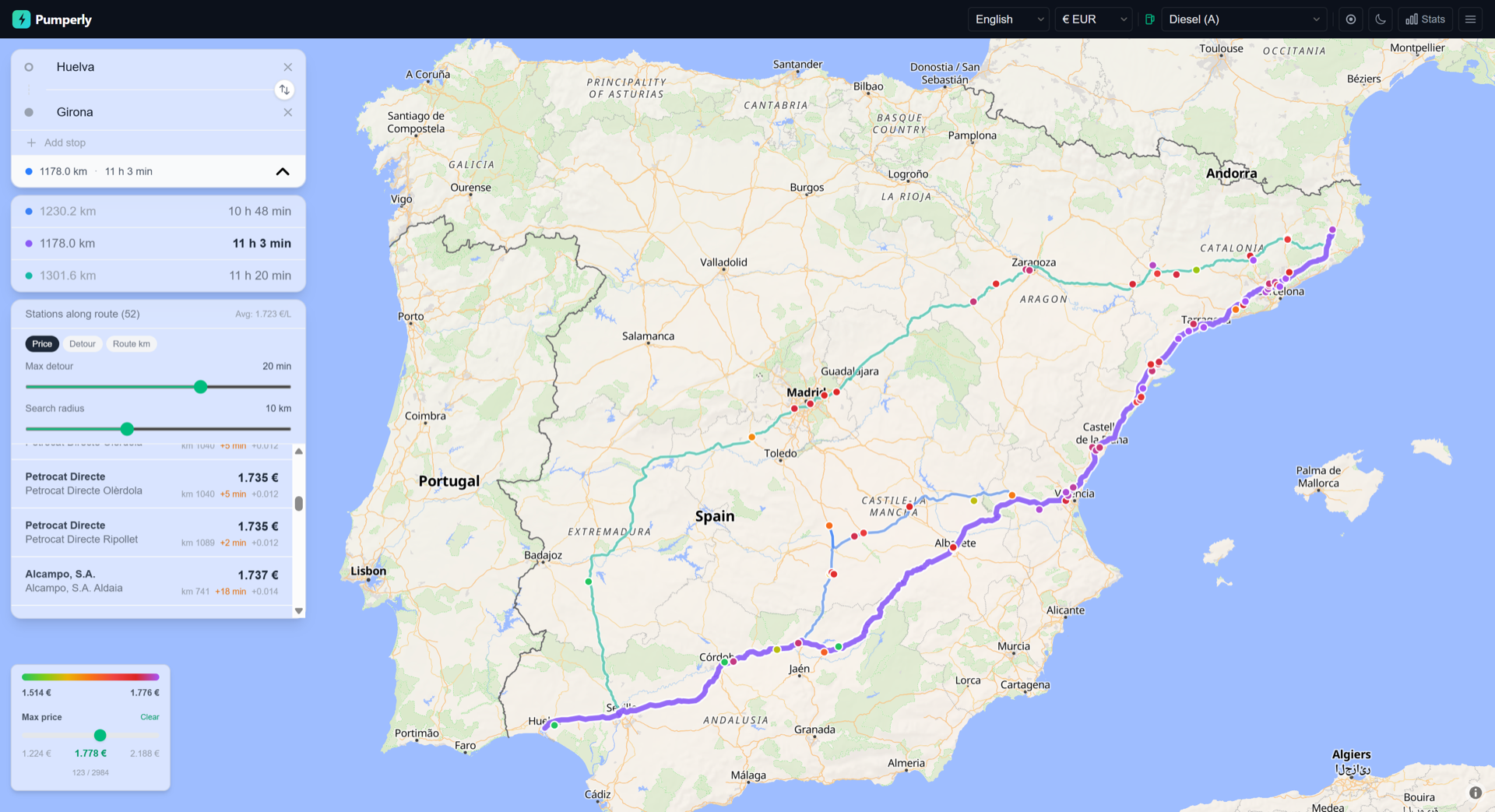
Pumperly combines route planning with real-time fuel prices and EV charging station data. No other open-source tool does this.
- Plan a route from A to B with autocomplete and alternative routes
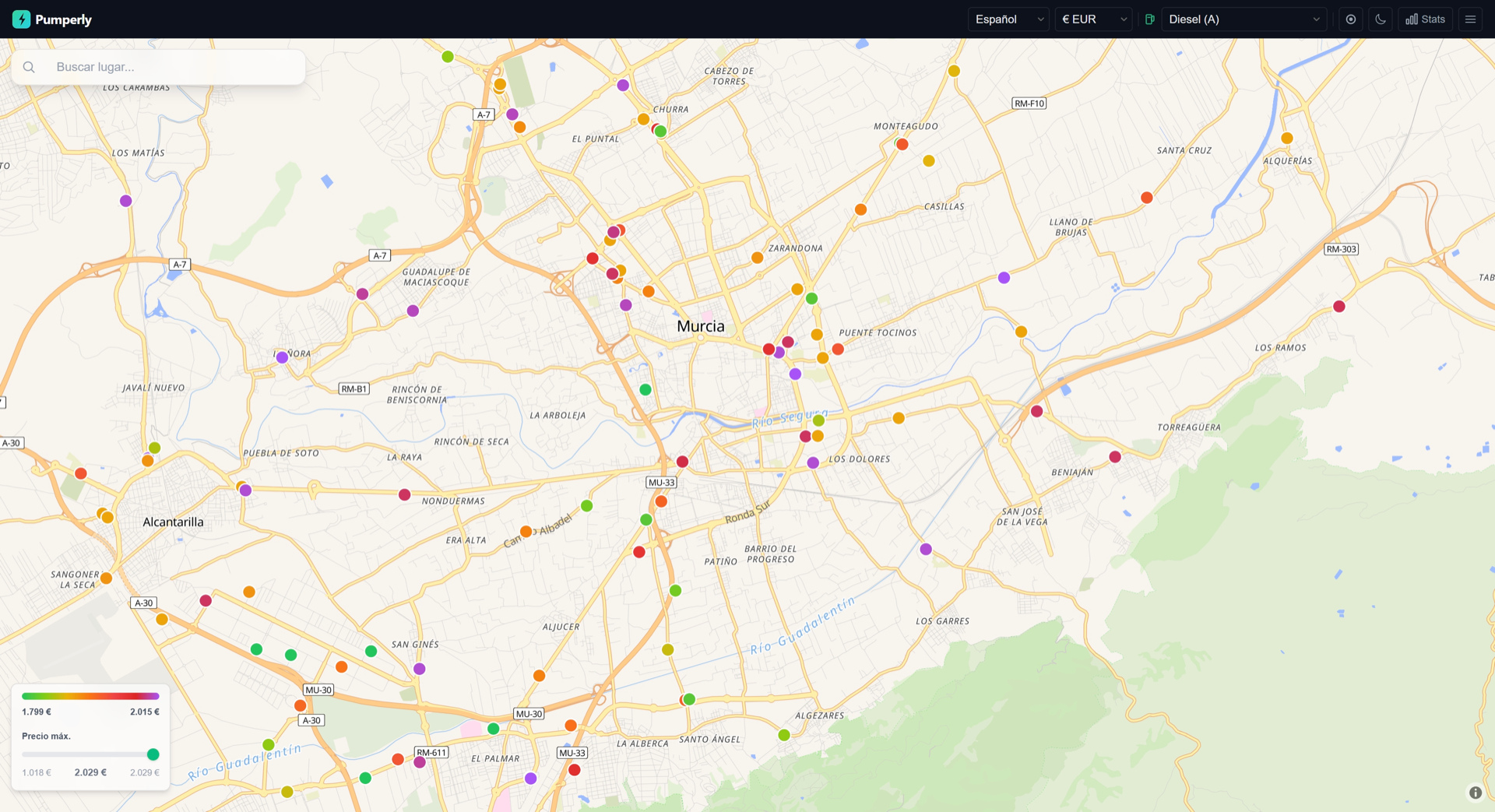
- See every fuel station and EV charger within a corridor along your route
- Filter by "cheapest within N minutes detour" — the feature no competitor has
- Covers 36 fuel-price countries across Europe, Latin America, and Oceania, plus US EV-charger coverage (stations only — no national fuel-price API exists)
- 16 languages, multi-currency, fully self-hostable
- 100% open source (GPL-3.0), no tracking, no cookies, no accounts
## Features
- **Route planning** — Geocoding via [Photon](https://github.com/komoot/photon), routing via [Valhalla](https://github.com/valhalla/valhalla), with alternative routes
- **Real-time fuel prices** — From government open data APIs and community sources
- **EV charging stations** — Via [Open Charge Map](https://openchargemap.org) across all supported countries
- **Detour calculation** — Each station shows estimated detour time from your route
- **"Cheapest within N min"** — Slider filters stations by maximum detour, highlights the best deal
- **Corridor station list** — Sorted by position along route, with price deltas vs average
- **Price color scale** — Green (cheap) to red (expensive) based on P5/P95 percentiles
- **Station clustering** — GPU-accelerated clustering at low zoom levels
- **16 languages** — ES, EN, FR, DE, IT, PT, PL, CS, HU, BG, SK, DA, SV, NO, SR, FI
- **Multi-currency** — EUR, GBP, CHF, RON, DKK, SEK, NOK, PLN, CZK, HUF, BGN, RSD, TRY, ARS, MXN, AUD
- **Geolocation** — Auto-centers on your location with one tap
- **Privacy-first** — No cookies, no analytics, no personal data collection
## Data Sources
### Fuel prices
| Country | Source | Type | Update |
|---|---|---|---|
| Spain | MITECO | Government API | Every 12h |
| France | prix-carburants.gouv.fr | Government API | Hourly |
| Germany | Tankerkoenig (MTS-K) | Government API | Hourly |
| Italy | MIMIT | Government CSV | Every 12h |
| Austria | E-Control | Government API | Every 2h |
| UK | CMA Open Data | Government feeds | Every 4h |
| Portugal | DGEG | Government API | Every 12h |
| Slovenia | goriva.si | Government API | Every 6h |
| Netherlands | ANWB | Commercial API | Every 6h |
| Belgium | ANWB | Commercial API | Every 6h |
| Luxembourg | ANWB | Commercial API | Every 12h |
| Romania | Peco Online | Community | Every 12h |
| Greece | FuelGR | Community API | Every 12h |
| Ireland | Pick A Pump | Community API | Every 12h |
| Croatia | MZOE | Government API | Every 12h |
| Denmark | FuelPrices.dk | Commercial API | Every 6h |
| Norway | DrivstoffAppen | Government-mandated | Every 6h |
| Sweden | Drivstoffappen | Community | Every 12h |
| Serbia | NIS / cenagoriva | Brand-level | Every 12h |
| Finland | polttoaine.net | Community | Every 12h |
| Switzerland, Poland, Czech Republic, Hungary, Bulgaria, Slovakia, Estonia, Latvia, Lithuania, Bosnia, North Macedonia | [Fuelo.net](https://fuelo.net) | Community | Every 12h |
| Turkey | [Fuelo.net](https://fuelo.net) | Community | Every 12h |
| Moldova | ANRE | Government | Every 12h |
| Australia (WA + NSW) | FuelWatch / FuelCheck | Government API | Every 12h |
| Argentina | Secretaria de Energia | Government API | Every 12h |
| Mexico | CRE | Government API | Every 12h |
### EV charging stations
| Source | Coverage | License |
|---|---|---|
| [Open Charge Map](https://openchargemap.org) | All supported countries + United States (EV-only) | ODbL |
### Map & routing
| Service | Purpose | License |
|---|---|---|
| [OpenStreetMap](https://www.openstreetmap.org) via [OpenFreeMap](https://openfreemap.org) | Map tiles | ODbL |
| [Valhalla](https://github.com/valhalla/valhalla) | Route calculation | MIT |
| [Photon](https://github.com/komoot/photon) (Komoot/OSM) | Geocoding / address search | Apache 2.0 |
## Self-Hosting
Pumperly is designed to be self-hosted. The full stack runs as four Docker containers.
### Architecture
```
┌─────────────────────────────────────────────────────────┐
│ docker compose up -d │
│ │
│ ┌──────────┐ ┌──────────┐ ┌──────────┐ ┌────────┐ │
│ │ App │ │ PostGIS │ │ Valhalla │ │ Photon │ │
│ │ Next.js │ │ 17-3.4 │ │ 3.5.1 │ │ 1.0.1 │ │
│ │ :3000 │ │ :5432 │ │ :8002 │ │ :2322 │ │
│ └──────────┘ └──────────┘ └──────────┘ └────────┘ │
│ ▲ ▲ ▲ ▲ │
│ └─────────────┴─────────────┴────────────┘ │
│ internal network │
└─────────────────────────────────────────────────────────┘
```
### Requirements
| Resource | First-time build | Steady state |
|---|---|---|
| **RAM** | ~24 GB (Valhalla tile build peaks at ~15 GB) | 6-8 GB |
| **Disk** | ~300 GB (Photon imports + Valhalla tiles) | ~100 GB |
| **CPU** | Multi-core recommended for tile building | Any |
### Quick Start
```bash
git clone https://github.com/GeiserX/pumperly.git
cd pumperly
cp .env.example .env
# Edit .env — see "Configuration" below
docker compose -f docker/docker-compose.yml up -d
```
Open `http://localhost:3000` once all services are healthy. Station data will begin populating automatically.
### Helm Chart (Kubernetes)
A Helm chart is also available for Kubernetes deployments. See the [chart documentation](charts/pumperly/README.md) for the full values reference.
```bash
helm repo add pumperly https://geiserx.github.io/Pumperly
helm install pumperly pumperly/pumperly
```
### What Happens on First Start
Each service has a one-time initialization step. Subsequent starts are fast.
| Service | First start | Time | Subsequent starts |
|---|---|---|---|
| **PostGIS** | Creates database + extensions | Instant | Ready immediately |
| **App** | Runs Prisma migrations, starts scraping stations | ~1 min | Ready immediately |
| **Valhalla** | Downloads OSM PBF extracts + builds routing tiles | 3-6 hours | Loads pre-built tiles (~2 GB RAM) |
| **Photon** | Downloads Photon JAR + country geocoding dumps, imports them | 20+ hours | Starts with existing index (~3 GB RAM) |
> **Tip**: Photon imports countries sequentially. The first country (Spain by default) is imported before the server starts, so geocoding works within ~30 minutes. Remaining countries are imported in the background while the server runs.
### Valhalla Setup (Routing)
Valhalla builds routing graph tiles from OpenStreetMap PBF extracts. The docker-compose uses [gis-ops/docker-valhalla](https://github.com/gis-ops/docker-valhalla) which handles everything automatically.
**How it works:**
1. On first start, Valhalla downloads the PBF file(s) specified in `tile_urls`
2. It merges multiple PBFs using osmium-tool (if more than one)
3. It builds routing tiles, admin data, and timezone data
4. Tiles are persisted in the volume — subsequent starts skip the build
**Customizing countries:**
- The `tile_urls` environment variable accepts a comma-separated list of PBF URLs from [Geofabrik](https://download.geofabrik.de/)
- Example for just Spain + France:
```
tile_urls=https://download.geofabrik.de/europe/spain-latest.osm.pbf,https://download.geofabrik.de/europe/france-latest.osm.pbf
```
- For all of Europe: `tile_urls=https://download.geofabrik.de/europe-latest.osm.pbf` (requires ~50 GB RAM for tile build)
- After changing `tile_urls`, delete the valhalla volume to trigger a rebuild
**Resource usage:**
- Tile build: ~15-24 GB RAM (proportional to PBF size), 3-6 hours for 15 countries
- Runtime: ~2 GB RAM, sub-second route calculations
### Photon Setup (Geocoding)
Photon provides address autocomplete and geocoding, built on OpenStreetMap data via [Komoot](https://github.com/komoot/photon).
**How it works:**
1. On first start, the entrypoint script downloads the Photon 1.0.1 JAR
2. It downloads per-country geocoding dumps from [Graphhopper](https://download1.graphhopper.com/public/europe/)
3. It imports the first country (configurable), then starts the server
4. Remaining countries are imported in the background while serving requests
5. Data is persisted in the volume — subsequent starts skip the import
**Customizing countries:**
- Edit the `COUNTRIES` variable in the Photon entrypoint to match your enabled countries
- Available dumps: see [download1.graphhopper.com/public/europe](https://download1.graphhopper.com/public/europe/)
- The `LANGS` variable controls which languages are indexed (affects search quality and disk usage)
**Resource usage:**
- Import: ~3-8 GB RAM per country import batch, 20+ hours for 30 countries
- Runtime: ~3 GB RAM, sub-100ms geocoding queries
- Disk: ~250 GB for 30 European countries (OpenSearch index)
### Docker Compose Services
The provided `docker/docker-compose.yml` includes a minimal setup (PostGIS only). For a full production deployment, use this complete configuration:
Full production docker-compose.yml
```yaml
services:
db:
image: postgis/postgis:17-3.4
container_name: pumperly-db
restart: unless-stopped
healthcheck:
test: ["CMD-SHELL", "pg_isready -U pumperly"]
interval: 10s
timeout: 5s
retries: 5
environment:
TZ: Europe/Madrid # Your timezone
POSTGRES_DB: pumperly
POSTGRES_USER: pumperly
POSTGRES_PASSWORD: changeme # CHANGE THIS
volumes:
- pumperly-pgdata:/var/lib/postgresql/data
deploy:
resources:
limits:
memory: 2G
valhalla:
image: ghcr.io/gis-ops/docker-valhalla/valhalla:3.5.1
container_name: pumperly-valhalla
restart: unless-stopped
environment:
TZ: Europe/Madrid
use_tiles_ignore_pbf: "False"
serve_tiles: "True"
build_elevation: "False"
build_admins: "True"
build_time_zones: "True"
build_transit: "False"
server_threads: "4" # Adjust to your CPU count
# Comma-separated PBF URLs from https://download.geofabrik.de/
# Add/remove countries as needed:
tile_urls: >-
https://download.geofabrik.de/europe/spain-latest.osm.pbf,
https://download.geofabrik.de/europe/france-latest.osm.pbf,
https://download.geofabrik.de/europe/portugal-latest.osm.pbf,
https://download.geofabrik.de/europe/italy-latest.osm.pbf,
https://download.geofabrik.de/europe/austria-latest.osm.pbf,
https://download.geofabrik.de/europe/germany-latest.osm.pbf,
https://download.geofabrik.de/europe/great-britain-latest.osm.pbf,
https://download.geofabrik.de/europe/slovenia-latest.osm.pbf,
https://download.geofabrik.de/europe/netherlands-latest.osm.pbf,
https://download.geofabrik.de/europe/belgium-latest.osm.pbf,
https://download.geofabrik.de/europe/luxembourg-latest.osm.pbf,
https://download.geofabrik.de/europe/romania-latest.osm.pbf,
https://download.geofabrik.de/europe/greece-latest.osm.pbf,
https://download.geofabrik.de/europe/ireland-and-northern-ireland-latest.osm.pbf,
https://download.geofabrik.de/europe/croatia-latest.osm.pbf,
https://download.geofabrik.de/europe/switzerland-latest.osm.pbf,
https://download.geofabrik.de/europe/poland-latest.osm.pbf,
https://download.geofabrik.de/europe/czech-republic-latest.osm.pbf,
https://download.geofabrik.de/europe/hungary-latest.osm.pbf,
https://download.geofabrik.de/europe/bulgaria-latest.osm.pbf,
https://download.geofabrik.de/europe/slovakia-latest.osm.pbf,
https://download.geofabrik.de/europe/denmark-latest.osm.pbf,
https://download.geofabrik.de/europe/sweden-latest.osm.pbf,
https://download.geofabrik.de/europe/norway-latest.osm.pbf,
https://download.geofabrik.de/europe/serbia-latest.osm.pbf,
https://download.geofabrik.de/europe/finland-latest.osm.pbf,
https://download.geofabrik.de/europe/estonia-latest.osm.pbf,
https://download.geofabrik.de/europe/latvia-latest.osm.pbf,
https://download.geofabrik.de/europe/lithuania-latest.osm.pbf,
https://download.geofabrik.de/europe/bosnia-herzegovina-latest.osm.pbf,
https://download.geofabrik.de/europe/macedonia-latest.osm.pbf
volumes:
- pumperly-valhalla:/custom_files
deploy:
resources:
limits:
memory: 24G # 24 GB for tile build, ~2 GB at runtime
reservations:
memory: 4G
photon:
image: eclipse-temurin:21-jre
container_name: pumperly-photon
restart: unless-stopped
working_dir: /photon
entrypoint: ["/bin/bash", "-c"]
command:
- |
set -e
LANGS="es,en,fr,de,it,pt,sl,nl,ro,el,ga,hr,pl,cs,hu,bg,sk,da,sv,no,sr,fi"
BASE="https://download1.graphhopper.com/public/europe"
if [ ! -f /photon/photon.jar ]; then
echo "Downloading Photon 1.0.1 JAR..."
apt-get update -qq && apt-get install -y -qq --no-install-recommends wget zstd >/dev/null 2>&1
wget -q "https://github.com/komoot/photon/releases/download/1.0.1/photon-1.0.1.jar" -O /photon/photon.jar
fi
# Phase 1: Import first country so search works quickly
if [ ! -f /photon/.imported_spain ]; then
apt-get update -qq 2>/dev/null; apt-get install -y -qq --no-install-recommends wget zstd >/dev/null 2>&1
echo "Downloading Spain dump..."
wget -q -O /photon/spain.jsonl.zst "$BASE/spain/photon-dump-spain-1.0-latest.jsonl.zst"
zstd -dc /photon/spain.jsonl.zst > /photon/spain.jsonl
rm -f /photon/spain.jsonl.zst
echo "Importing Spain..."
java -Xmx3g -jar /photon/photon.jar import -import-file /photon/spain.jsonl -languages $LANGS
rm -f /photon/spain.jsonl
touch /photon/.imported_spain
echo "Spain import done."
fi
# Phase 2: Import remaining countries in background after server starts
if [ ! -f /photon/.import_done ]; then
apt-get update -qq 2>/dev/null; apt-get install -y -qq --no-install-recommends wget zstd >/dev/null 2>&1
(
sleep 5
# Add/remove countries to match your PUMPERLY_ENABLED_COUNTRIES:
COUNTRIES="france-monacco portugal italy austria germany british-islands slovenia netherlands belgium luxemburg romania greece ireland croatia switzerland poland czech-republic hungary bulgaria slovakia denmark sweden norway serbia finland estonia latvia lithuania bosnia-herzegovina macedonia"
for country in $COUNTRIES; do
if [ -f /photon/.imported_$country ]; then continue; fi
echo "[bg] Downloading $country..."
wget -q -O "/photon/$country.jsonl.zst" "$BASE/$country/photon-dump-$country-1.0-latest.jsonl.zst"
zstd -dc "/photon/$country.jsonl.zst" > "/photon/$country.jsonl"
rm -f "/photon/$country.jsonl.zst"
echo "[bg] Importing $country..."
java -Xmx3g -jar /photon/photon.jar import -import-file "/photon/$country.jsonl" -languages $LANGS
rm -f "/photon/$country.jsonl"
touch "/photon/.imported_$country"
echo "[bg] $country done."
done
touch /photon/.import_done
echo "[bg] All countries imported."
) &
fi
exec java -jar /photon/photon.jar serve -languages $LANGS -listen-ip 0.0.0.0 -cors-any
volumes:
- pumperly-photon:/photon
deploy:
resources:
limits:
memory: 8G
reservations:
memory: 2G
app:
image: drumsergio/pumperly:latest
container_name: pumperly
restart: unless-stopped
depends_on:
db:
condition: service_healthy
environment:
TZ: Europe/Madrid
DATABASE_URL: postgresql://pumperly:changeme@pumperly-db:5432/pumperly
PUMPERLY_DEFAULT_COUNTRY: ES
PUMPERLY_ENABLED_COUNTRIES: ES,FR,PT,IT,AT,DE,GB,SI,NL,BE,LU,RO,GR,IE,HR,CH,PL,CZ,HU,BG,SK,DK,SE,NO,RS,FI,EE,LV,LT,BA,MK
VALHALLA_URL: http://pumperly-valhalla:8002
PHOTON_URL: http://pumperly-photon:2322
PUMPERLY_CLUSTER_STATIONS: "true"
PUMPERLY_PRICE_MIN: "0.30"
PUMPERLY_PRICE_MAX: "4.00"
# API keys — get your own:
# TANKERKOENIG_API_KEY: "" # https://creativecommons.tankerkoenig.de
# PUMPERLY_OCM_API_KEY: "" # https://openchargemap.org (free, for EV data)
# FUELPRICES_DK_API_KEY: "" # Denmark fuel prices
ports:
- "3000:3000"
deploy:
resources:
limits:
memory: 512M
volumes:
pumperly-pgdata:
pumperly-valhalla:
pumperly-photon:
```
### Configuration
| Variable | Description | Default |
|---|---|---|
| `DATABASE_URL` | PostGIS connection string | **Required** |
| `PUMPERLY_DEFAULT_COUNTRY` | ISO code for initial map view | `ES` |
| `PUMPERLY_ENABLED_COUNTRIES` | Comma-separated ISO codes to enable | All |
| `PUMPERLY_DEFAULT_FUEL` | Override default fuel type | Per-country |
| `PUMPERLY_CLUSTER_STATIONS` | Enable map marker clustering | `true` |
| `PUMPERLY_PRICE_MIN` / `PUMPERLY_PRICE_MAX` | Price bounds for scraper validation (EUR/L) | `0.30` / `4.00` |
| `PUMPERLY_SCRAPE_INTERVAL_HOURS` | Global scrape interval override (hours, 0=disable) | Per-country |
| `PUMPERLY_EV_ENABLED` | Enable EV charger scraping (`0` to disable) | `1` |
| `VALHALLA_URL` | Valhalla routing endpoint | — |
| `PHOTON_URL` | Photon geocoding endpoint | — |
### API Keys
Some data sources require API keys (all free):
| Key | Source | How to get it |
|---|---|---|
| `TANKERKOENIG_API_KEY` | Germany fuel prices | Register at [creativecommons.tankerkoenig.de](https://creativecommons.tankerkoenig.de) |
| `PUMPERLY_OCM_API_KEY` | EV charging stations | Register at [openchargemap.org](https://openchargemap.org), go to My Profile > My API Keys |
| `FUELPRICES_DK_API_KEY` | Denmark fuel prices | Contact [fuelprices.dk](https://fuelprices.dk) |
Most countries work without any API key — they use open government data.
### Supported Countries
All 36 supported countries
**Europe (31):** ES (Spain), FR (France), DE (Germany), IT (Italy), GB (United Kingdom), AT (Austria), PT (Portugal), SI (Slovenia), NL (Netherlands), BE (Belgium), LU (Luxembourg), RO (Romania), GR (Greece), IE (Ireland), HR (Croatia), CH (Switzerland), PL (Poland), CZ (Czech Republic), HU (Hungary), BG (Bulgaria), SK (Slovakia), DK (Denmark), SE (Sweden), NO (Norway), RS (Serbia), FI (Finland), EE (Estonia), LV (Latvia), LT (Lithuania), BA (Bosnia and Herzegovina), MK (North Macedonia)
**Other regions (5):** TR (Turkey), MD (Moldova), AU (Australia), AR (Argentina), MX (Mexico)
### Running Without Valhalla/Photon
Valhalla and Photon are optional. Without them:
- Route planning and geocoding are disabled
- The map still shows all stations with prices
- All scraping works normally
Just omit `VALHALLA_URL` and `PHOTON_URL` from your environment.
## Development
```bash
git clone https://github.com/GeiserX/pumperly.git
cd pumperly
npm install
cp .env.example .env
# Start PostGIS:
docker compose -f docker/docker-compose.yml up -d
# Generate Prisma client + push schema:
npx prisma generate && npx prisma db push
# Seed data for one country:
npm run scraper:run -- --country=ES
# Start dev server:
npm run dev
```
Open `http://localhost:3000`.
### Available Scripts
| Script | Description |
|---|---|
| `npm run dev` | Start Next.js dev server |
| `npm run build` | Production build |
| `npm run start` | Start production server |
| `npm run lint` | Run ESLint |
| `npm run scraper:run -- --country=XX` | Run scraper for a country (or `--country=all`) |
### Tech Stack
| Layer | Technology |
|---|---|
| Frontend | [Next.js](https://nextjs.org) 16, [React](https://react.dev) 19, [MapLibre GL JS](https://maplibre.org), [Tailwind CSS](https://tailwindcss.com) |
| Backend | Next.js API routes, [Prisma](https://prisma.io) ORM |
| Database | [PostGIS](https://postgis.net) 17 (PostgreSQL + spatial) |
| Routing | [Valhalla](https://github.com/valhalla/valhalla) 3.5.1 |
| Geocoding | [Photon](https://github.com/komoot/photon) 1.0.1 |
| Map tiles | [OpenFreeMap](https://openfreemap.org) (OpenStreetMap) |
| Deployment | Docker, GitHub Actions CI/CD |
## Roadmap
See [ROADMAP.md](ROADMAP.md) for the full development plan.
## Ecosystem
| Project | Type | Description |
|---------|------|-------------|
| [pumperly-mcp](https://github.com/GeiserX/pumperly-mcp) | MCP Server | Query fuel and EV prices from AI assistants via the Model Context Protocol |
| [pumperly-ha](https://github.com/GeiserX/pumperly-ha) | Home Assistant Integration | Fuel and EV charging price sensors for your smart home dashboard |
| [n8n-nodes-pumperly](https://github.com/GeiserX/n8n-nodes-pumperly) | n8n Community Node | Automate fuel price workflows in n8n |
## Contributing
Contributions are welcome. Please open an issue first to discuss what you'd like to change.
## License
[GPL-3.0](LICENSE) — free to use, modify, and distribute. If you distribute a modified version, you must also release the source code under GPL-3.0.
---
Made by Sergio Fernandez