# GenieACS for Home Assistant
[](https://github.com/GeiserX/genieacs-ha/actions/workflows/tests.yml)
[](https://github.com/GeiserX/genieacs-ha/blob/main/LICENSE)
[](https://codecov.io/gh/GeiserX/genieacs-ha)
[](https://github.com/hacs/integration)
[](https://github.com/GeiserX/genieacs-ha/stargazers)
A Home Assistant custom integration for managing TR-069 CPE devices (routers, ONTs, gateways) through a [GenieACS](https://genieacs.com/) instance. It reads the GenieACS Northbound Interface (NBI) REST API and brings every managed device into Home Assistant.
## Features
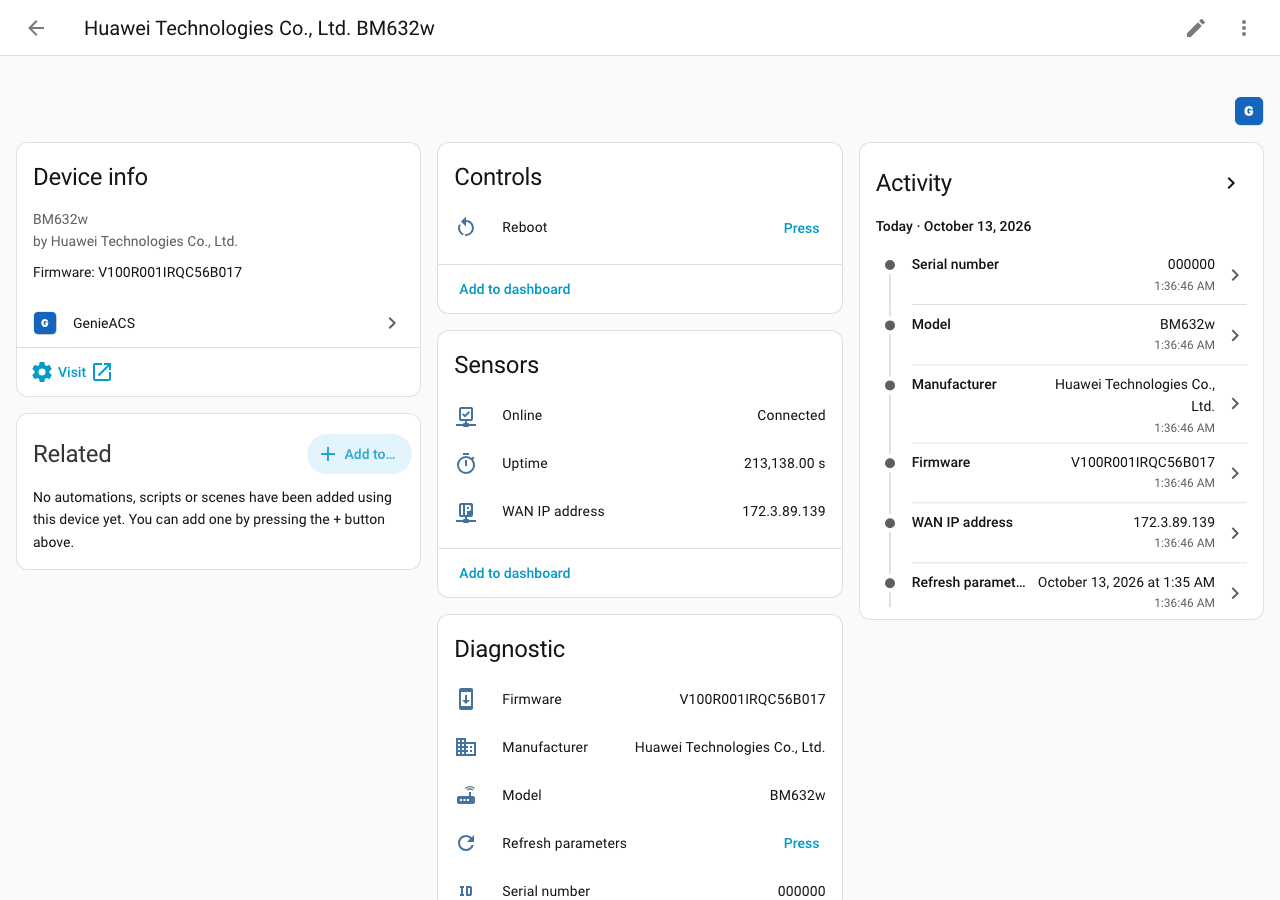
- Discovers every CPE your GenieACS manages through the NBI REST API and creates one Home Assistant device per CPE.
- Online binary sensor: on when the device reported within the last 5 minutes.
- Sensors for WAN IP, uptime, firmware, manufacturer, model and serial number.
- Reboot and Refresh parameters buttons that send TR-069 tasks.
- Reads both TR-181 (`Device.`) and TR-098 (`InternetGatewayDevice.`) parameter trees.
- Optional HTTP Basic auth for the NBI; polls every 60 seconds.
## Quick start
1. In HACS, search for **GenieACS**, download it and restart Home Assistant. Or open it in HACS directly:
[](https://my.home-assistant.io/redirect/hacs_repository/?owner=GeiserX&repository=genieacs-ha&category=integration)
2. Go to **Settings > Devices & services > Add integration** and search for **GenieACS**.
3. Enter your NBI URL, for example `http://genieacs:7557`. If your NBI needs Basic auth, put it behind HTTPS and use an `https://` URL, so the credentials are not sent in clear text.
Manual install and what a working setup looks like are in [Getting started](https://geiserx.github.io/genieacs-ha/getting-started/).
## Documentation
The full documentation is at [geiserx.github.io/genieacs-ha](https://geiserx.github.io/genieacs-ha/).
- [Getting started](https://geiserx.github.io/genieacs-ha/getting-started/): prerequisites, HACS and manual install, configuration, first run
- [Usage](https://geiserx.github.io/genieacs-ha/usage/): the entities, TR-181 and TR-098, an example automation
- [How it works](https://geiserx.github.io/genieacs-ha/how-it-works/): every request to GenieACS, the parameter behind each sensor, where the credentials are kept
- [Troubleshooting](https://geiserx.github.io/genieacs-ha/troubleshooting/): each setup error and odd sensor with its fix, and what to put in a bug report
- [Development](https://geiserx.github.io/genieacs-ha/development/): tests, CI checks, building the docs, releases
## Related projects
GenieACS family: [genieacs-container](https://github.com/GeiserX/genieacs-container), [genieacs-ansible](https://github.com/GeiserX/genieacs-ansible), [genieacs-mcp](https://github.com/GeiserX/genieacs-mcp), [genieacs-services](https://github.com/GeiserX/genieacs-services), [genieacs-sim-container](https://github.com/GeiserX/genieacs-sim-container); the full list is in [genieacs-container's related projects](https://github.com/GeiserX/genieacs-container/blob/main/docs/related.md). Other Home Assistant integrations: [cashpilot-ha](https://github.com/GeiserX/cashpilot-ha), [duplicacy-ha](https://github.com/GeiserX/duplicacy-ha), [pumperly-ha](https://github.com/GeiserX/pumperly-ha).
## License
[GPL-3.0-or-later](https://github.com/GeiserX/genieacs-ha/blob/main/LICENSE)