
Every book, comic and audiobook gets a cover.


---
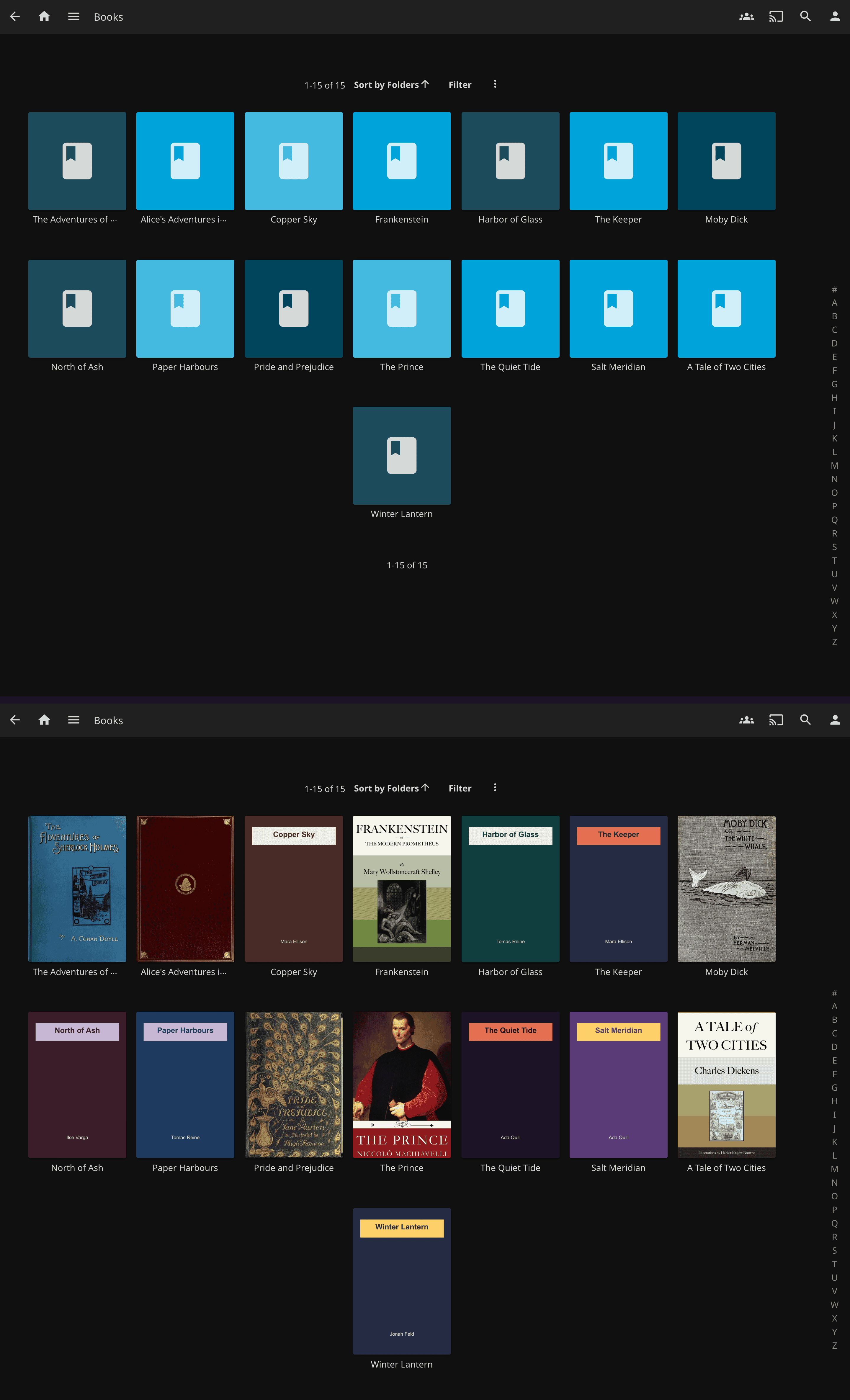
**smart-covers** is a Jellyfin plugin that gives a cover to the books, comics and audiobooks Jellyfin leaves blank. It takes the cover from the file itself (the first page of a PDF or comic, the cover image inside an EPUB or MOBI, the art embedded in an audio file), and when the file has none it asks Open Library and then Google Books. No API key is required; an optional Google Books key avoids its shared quota. It runs on Jellyfin 10.11 or newer and appears in the catalog and the dashboard as **SmartCovers**.
## Features
- PDFs get a cover from their first page, rendered by a bundled PDFium; nothing to install on the server.
- EPUBs whose cover Jellyfin or Bookshelf misses still get one: the archive is searched by file name, then by path, then by the largest image.
- MOBI and AZW books get the cover stored in the file.
- CBZ and CBR comics show the image named as the cover, else their first page in natural page order, RAR4, RAR5 and solid archives included; a RAR renamed to `.cbz` still works.
- Audiobooks and music (MP3, M4A/M4B, FLAC, OGG/Opus, WMA, AAC, WAV) show their embedded art, including art tagged with the wrong image format that Jellyfin's own extractor drops.
- A folder audiobook gets one cover for the book: a sidecar image if there is one, the folder's own Jellyfin poster, else the first track's art, multi-disc rips included.
- A file with no cover inside gets one from Open Library, then Google Books, looked up by ISBN first and by the book's own title and author where the file has them. Anna's Archive names and translated titles are found too.
- Books nobody has a cover for can get a plain drawn cover with the title and author (off by default), replaced as soon as a real one turns up.
- Anything missed at scan time is retried by a daily task that logs why each book is still blank, and the settings page turns the plugin on and refreshes images one library at a time.
## Quick start
1. In **Dashboard > Plugins > Repositories**, add this URL, then install **SmartCovers** from the catalog and restart Jellyfin (10.11 or newer):
```
https://geiserx.github.io/smart-covers/manifest.json
```
2. Open **Dashboard > SmartCovers**, click **Enable** on each library you want covered, then **Refresh Images**. The plugin is off on every library until you do this, including libraries you create later.
It worked when the SmartCovers page shows three green lines (PDF rendering, ffmpeg, online fetching) and covers appear on the tiles as the refresh runs. Books and audiobooks still blank afterwards are retried every night at 04:00 by the **Refresh items missing a cover** task. The release zip is in [Getting started](https://geiserx.github.io/smart-covers/getting-started/#from-releases); building from source is in [Development](https://geiserx.github.io/smart-covers/development/).
## Documentation
- [Getting started](https://geiserx.github.io/smart-covers/getting-started/): catalog install, the release zip, requirements, turning it on, checking that it works
- [Configuration](https://geiserx.github.io/smart-covers/configuration/): the settings page, every setting and its default, per-library enable and refresh
- [How it works](https://geiserx.github.io/smart-covers/how-it-works/): how each format is read, the online lookup, the daily task
- [Troubleshooting](https://geiserx.github.io/smart-covers/troubleshooting/): installed but nothing changed, covers missing for one format, reporting a bug
- [Development](https://geiserx.github.io/smart-covers/development/): building from source, tests, what ships in the zip, the release process
## Related projects
- [quality-gate](https://github.com/GeiserX/quality-gate): restrict users to specific media versions with path-based policies
- [quality-gate-encoder](https://github.com/GeiserX/quality-gate-encoder): automatic 720p HEVC, H.264 or AV1 versions of a library, with NVIDIA and Intel hardware acceleration
- [whisper-subs](https://github.com/GeiserX/whisper-subs): subtitles generated on your own server with local Whisper models
- [jellyfin-telegram-channel-sync](https://github.com/GeiserX/jellyfin-telegram-channel-sync): Jellyfin user access that follows Telegram channel membership
## License
[GPL-3.0-or-later](LICENSE). Bundled third-party components are listed in [THIRD-PARTY-NOTICES.md](THIRD-PARTY-NOTICES.md).