# Genesis World
[](https://pypi.org/project/genesis-world/)
[](https://pepy.tech/projects/genesis-world)
[](https://genesis-world.readthedocs.io/en/latest/)
[](https://github.com/Genesis-Embodied-AI/genesis-world/issues)
[](https://github.com/Genesis-Embodied-AI/genesis-world/discussions)
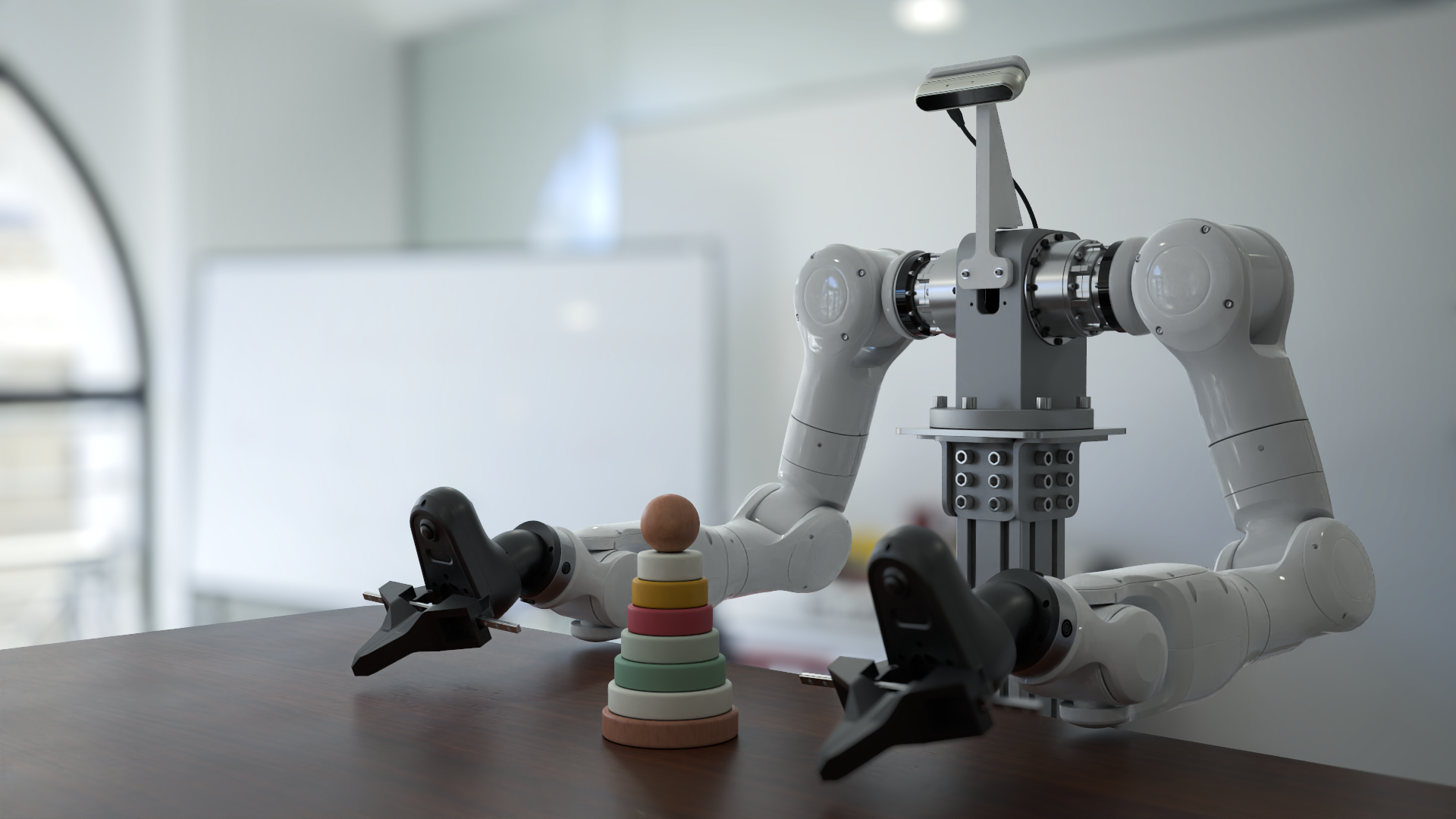
**Genesis World** is a simulation platform for physical AI developments. It combines a unified multi-physics engine, a photo-realistic renderer ([Nyx](https://github.com/Genesis-Embodied-AI/genesis-nyx)), and a cross-platform compiler ([Quadrants](https://github.com/Genesis-Embodied-AI/quadrants)) behind a Pythonic simulation interface. Genesis World is designed to scale from a single laptop kernel to datacenter-grade GPUs, while remaining easy to read, extend, and embed in research code.
It was previously named **Genesis** and started as an academic project since Dec 2024, and its development is now officially supported by [Genesis AI](https://www.genesis.ai/).
For more technical details, refer to our [blog post](https://genesis.ai/blog/the-role-of-simulation-in-scalable-robotics-genesis-world-10-and-the-path-forward).
## Table of Contents
1. [What is Genesis World?](#what-is-genesis-world)
2. [Catalogue](#catalogue)
3. [Quick Installation](#quick-installation)
4. [Docker](#docker)
5. [Contribution](#contributing-to-genesis)
6. [Support](#support)
7. [License and Acknowledgments](#license-and-acknowledgments)
8. [Citation](#citation)
## What is Genesis World?
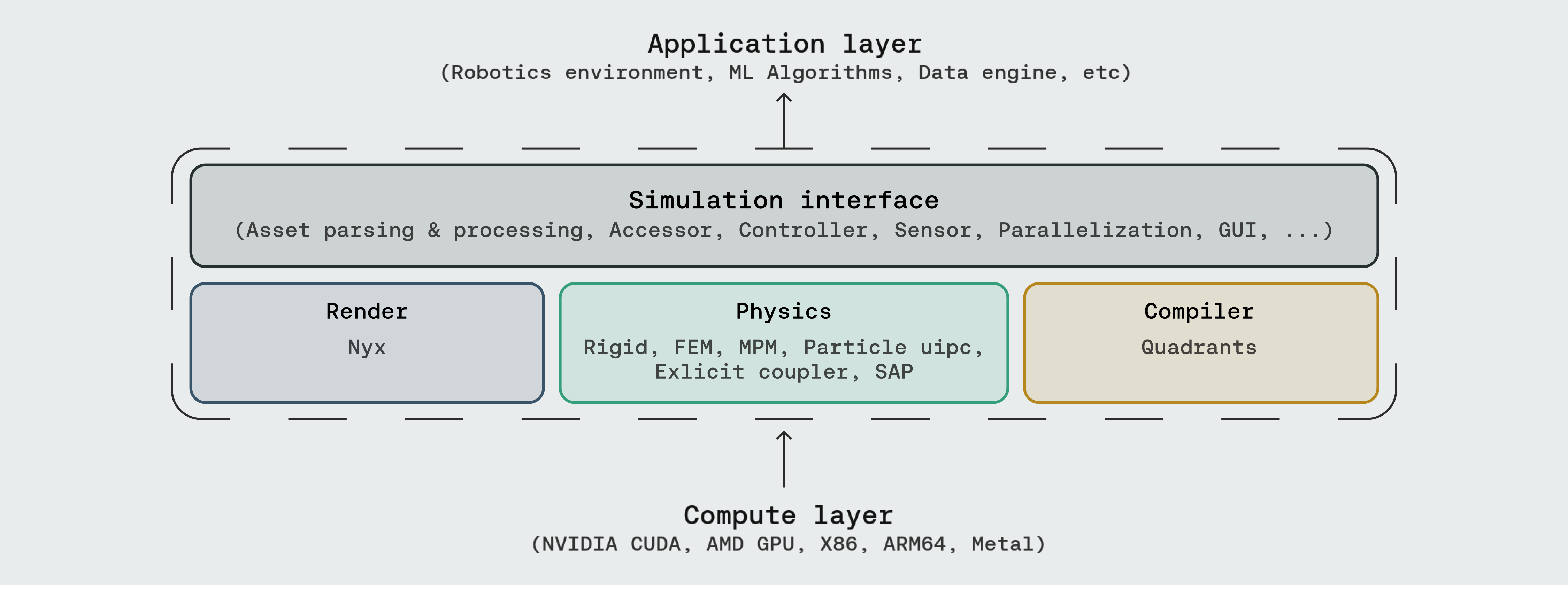
Genesis World occupies the four layers inside the dashed box. Above sits whatever you build (robotics environments, ML pipelines, data generation, agentic simulation); below sits whatever compute backend you have.
- **Simulation Interface** — the user-facing API: asset parsing (URDF, MJCF, OBJ, GLB, USD, …), entity accessors, controllers, sensors, parallel and heterogeneous environments, and a built-in GUI.
- **Physics** — a unified multi-physics engine integrating Rigid, FEM, MPM, Particle (PBD / SPH), [uipc](https://github.com/spiriMirror/libuipc), an explicit coupler, and SAP, all sharing one scene and one state.
- **Render** — three rendering paths plug in as camera sensors: **[Nyx](https://github.com/Genesis-Embodied-AI/genesis-nyx)** (our in-house renderer designed for robotics), Luisa (DSL ray tracer), and Pyrender (rasterizer).
- **Compiler** — **[Quadrants](https://github.com/Genesis-Embodied-AI/quadrants)** lowers Python kernel code to CUDA, AMD ROCm, Apple Metal, Vulkan, x86, and ARM64. It carries Genesis's autodiff, GPU graphs, and fastcache machinery.
### Documentation
- [Genesis World](https://genesis-world.readthedocs.io/en/latest/)
- [Quadrants](https://genesis-embodied-ai.github.io/quadrants/index.html)
- [Nyx](https://genesis-embodied-ai.github.io/genesis-nyx/latest/)
## Catalogue
Three sections, mirroring the Genesis layers that ship runnable demos: **Physics** (solvers and multi-solver coupling), **Rendering** (in-repo camera setups plus the Nyx walkthroughs hosted in [genesis-nyx](https://github.com/Genesis-Embodied-AI/genesis-nyx)), and **Simulation Interface** (sensors, GUI, controllers, parallel/heterogeneous envs, and tutorials). Most scripts run end-to-end after `pip install -e ".[dev]"`; demos that depend on optional backends (e.g. the IPC and Nyx examples) need the extras listed in [Optional extras](#optional-extras).
### Physics
| | | |
|---|---|---|


| [Rigid: franka cube](./examples/rigid/franka_cube.py) | [Rigid: collision tower](./examples/collision/tower.py) | [Rigid: contype](./examples/collision/contype.py) |
|  |
|  |
|  |
| [FEM: hard & soft constraint](./examples/fem_hard_and_soft_constraint.py) | [MPM: tutorial](./examples/tutorials/mpm.py) | [MPM: sand wheel](./examples/coupling/sand_wheel.py) |
|
|



| [FEM: hard & soft constraint](./examples/fem_hard_and_soft_constraint.py) | [MPM: tutorial](./examples/tutorials/mpm.py) | [MPM: sand wheel](./examples/coupling/sand_wheel.py) |
|  |
|  |
|  |



| [SPH: rigid](./examples/coupling/sph_rigid.py) | [SPH: + MPM](./examples/coupling/sph_mpm.py) | [PBD: liquid](./examples/pbd_liquid.py) |
|
|
| [SPH: rigid](./examples/coupling/sph_rigid.py) | [SPH: + MPM](./examples/coupling/sph_mpm.py) | [PBD: liquid](./examples/pbd_liquid.py) |
|  |
|  |
|  |



| [PBD: cloth](./examples/tutorials/pbd_cloth.py) | [Stable Fluid: smoke](./examples/smoke.py) | [IPC: robot cloth teleop](./examples/IPC_Solver/ipc_robot_cloth_teleop.py) |
|
|
| [PBD: cloth](./examples/tutorials/pbd_cloth.py) | [Stable Fluid: smoke](./examples/smoke.py) | [IPC: robot cloth teleop](./examples/IPC_Solver/ipc_robot_cloth_teleop.py) |
|  |
|  |
|  |



| [Coupler: cloth on rigid](./examples/coupling/cloth_on_rigid.py) | [Coupler: rigid + MPM](./examples/coupling/rigid_mpm_attachment.py) | [Coupler: cut dragon](./examples/coupling/cut_dragon.py) |
|
|
| [Coupler: cloth on rigid](./examples/coupling/cloth_on_rigid.py) | [Coupler: rigid + MPM](./examples/coupling/rigid_mpm_attachment.py) | [Coupler: cut dragon](./examples/coupling/cut_dragon.py) |
|  |
|  |
|  |



| [Coupler: water wheel](./examples/coupling/water_wheel.py) | [Coupler: flush cubes](./examples/coupling/flush_cubes.py) | [SAP: Franka grasp rigid cube](./examples/sap_coupling/franka_grasp_rigid_cube.py) |
|
|
| [Coupler: water wheel](./examples/coupling/water_wheel.py) | [Coupler: flush cubes](./examples/coupling/flush_cubes.py) | [SAP: Franka grasp rigid cube](./examples/sap_coupling/franka_grasp_rigid_cube.py) |
|  |
|  |
|  |
### Rendering
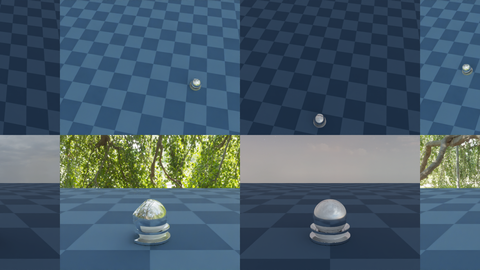
Genesis exposes three rendering paths as camera sensors: built-in (Nyx / Luisa / Pyrender) and detailed Nyx walkthroughs hosted in [genesis-nyx](https://github.com/Genesis-Embodied-AI/genesis-nyx/tree/main/examples).
| | | |
|---|---|---|
| [Follow entity](./examples/rendering/follow_entity.py) | [Animated camera](./examples/rendering/moving_camera.py) | [Nyx: hello](https://github.com/Genesis-Embodied-AI/genesis-nyx/blob/main/examples/01_hello_nyx.py) |
|
|
### Rendering
Genesis exposes three rendering paths as camera sensors: built-in (Nyx / Luisa / Pyrender) and detailed Nyx walkthroughs hosted in [genesis-nyx](https://github.com/Genesis-Embodied-AI/genesis-nyx/tree/main/examples).
| | | |
|---|---|---|


| [Follow entity](./examples/rendering/follow_entity.py) | [Animated camera](./examples/rendering/moving_camera.py) | [Nyx: hello](https://github.com/Genesis-Embodied-AI/genesis-nyx/blob/main/examples/01_hello_nyx.py) |
|  |
|  |
| 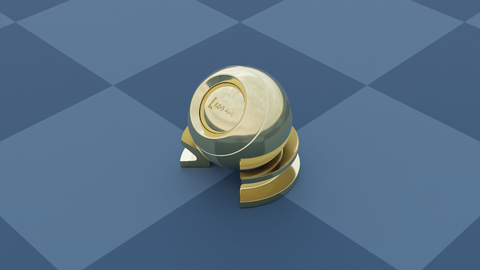 |

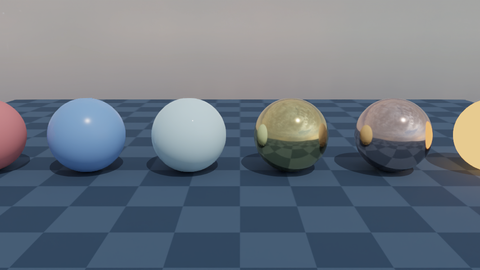
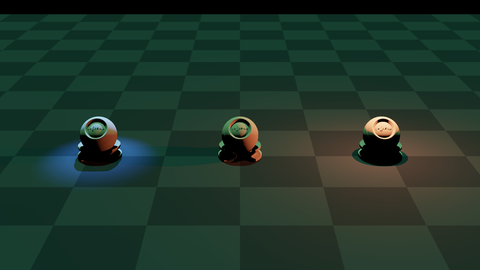
| [Nyx: attached camera](https://github.com/Genesis-Embodied-AI/genesis-nyx/blob/main/examples/02_attached_camera.py) | [Nyx: PBR materials](https://github.com/Genesis-Embodied-AI/genesis-nyx/blob/main/examples/03_materials.py) | [Nyx: light types](https://github.com/Genesis-Embodied-AI/genesis-nyx/blob/main/examples/04_light_types.py) |
|
|
| [Nyx: attached camera](https://github.com/Genesis-Embodied-AI/genesis-nyx/blob/main/examples/02_attached_camera.py) | [Nyx: PBR materials](https://github.com/Genesis-Embodied-AI/genesis-nyx/blob/main/examples/03_materials.py) | [Nyx: light types](https://github.com/Genesis-Embodied-AI/genesis-nyx/blob/main/examples/04_light_types.py) |
|  |
|  |
|  |
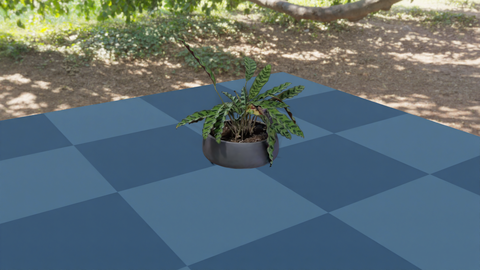
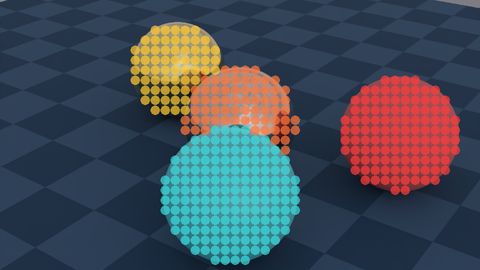
| [Nyx: 3D Gaussian splat](https://github.com/Genesis-Embodied-AI/genesis-nyx/blob/main/examples/05_gaussian_splat.py) | [Nyx: object picking](https://github.com/Genesis-Embodied-AI/genesis-nyx/blob/main/examples/06_object_picking.py) | [Nyx: multi-cam multi-env](https://github.com/Genesis-Embodied-AI/genesis-nyx/blob/main/examples/07_multi_camera_multi_env.py) |
|
|
| [Nyx: 3D Gaussian splat](https://github.com/Genesis-Embodied-AI/genesis-nyx/blob/main/examples/05_gaussian_splat.py) | [Nyx: object picking](https://github.com/Genesis-Embodied-AI/genesis-nyx/blob/main/examples/06_object_picking.py) | [Nyx: multi-cam multi-env](https://github.com/Genesis-Embodied-AI/genesis-nyx/blob/main/examples/07_multi_camera_multi_env.py) |
|  |
|  |
|  |
### Simulation Interface
| | | |
|---|---|---|



| [Controlling a robot](./examples/tutorials/control_your_robot.py) | [GUI: ImGui joint control](./examples/gui/imgui_joint_control.py) | [Heterogeneous envs](./examples/rigid/heterogeneous_simulation.py) |
|
|
### Simulation Interface
| | | |
|---|---|---|
| [Controlling a robot](./examples/tutorials/control_your_robot.py) | [GUI: ImGui joint control](./examples/gui/imgui_joint_control.py) | [Heterogeneous envs](./examples/rigid/heterogeneous_simulation.py) |
|  |
|  |
|  |
| [Domain randomization](./examples/rigid/domain_randomization.py) | [Sensor: depth camera](./examples/sensors/depth_camera_custom_vverts.py) | [Sensor: IMU](./examples/sensors/imu_franka.py) |
|
|
| [Domain randomization](./examples/rigid/domain_randomization.py) | [Sensor: depth camera](./examples/sensors/depth_camera_custom_vverts.py) | [Sensor: IMU](./examples/sensors/imu_franka.py) |
|  |
|  |
|  |
| [Sensor: lidar](./examples/sensors/lidar_teleop.py) | [Sensor: tactile sandbox](./examples/sensors/tactile_sandbox.py) | [Sensor: contact force](./examples/sensors/contact_force_go2.py) |
|
|
| [Sensor: lidar](./examples/sensors/lidar_teleop.py) | [Sensor: tactile sandbox](./examples/sensors/tactile_sandbox.py) | [Sensor: contact force](./examples/sensors/contact_force_go2.py) |
|  |
|  |
|  |

| [Sensor: surface distance](./examples/sensors/surface_distance_shadowhand.py) | [Sensor: temperature grid](./examples/sensors/temperature_grid.py) | [GUI: debug drawing](./examples/tutorials/draw_debug.py) |
|
|
| [Sensor: surface distance](./examples/sensors/surface_distance_shadowhand.py) | [Sensor: temperature grid](./examples/sensors/temperature_grid.py) | [GUI: debug drawing](./examples/tutorials/draw_debug.py) |
|  |
|  |
|  |



| [GUI: mesh point picker](./examples/viewer_plugin/mesh_point_selector.py) | [GUI: mouse interaction](./examples/viewer_plugin/mouse_interaction.py) | [Diff-IK controller](./examples/rigid/diffik_controller.py) |
|
|
| [GUI: mesh point picker](./examples/viewer_plugin/mesh_point_selector.py) | [GUI: mouse interaction](./examples/viewer_plugin/mouse_interaction.py) | [Diff-IK controller](./examples/rigid/diffik_controller.py) |
|  |
|  |
|  |



| [Batched IK](./examples/tutorials/batched_IK.py) | [Drone](./examples/drone/hover_train.py) | [Advanced: worm](./examples/tutorials/advanced_worm.py) |
|
|
| [Batched IK](./examples/tutorials/batched_IK.py) | [Drone](./examples/drone/hover_train.py) | [Advanced: worm](./examples/tutorials/advanced_worm.py) |
|  |
|  |
|  |
## Quick Installation
### Using pip
Install **PyTorch** first following the [official instructions](https://pytorch.org/get-started/locally/).
Then, install Genesis via PyPI:
```bash
pip install genesis-world # Requires Python>=3.10,<3.14;
```
For the latest version to date, make sure that `pip` is up-to-date via `pip install --upgrade pip`, then run command:
```bash
pip install git+https://github.com/Genesis-Embodied-AI/genesis-world.git
```
Note that the package must still be updated manually to sync with main branch.
Users seeking to contribute are encouraged to install Genesis in editable mode. First, make sure that `genesis-world` has been uninstalled, then clone the repository and install locally:
```bash
git clone https://github.com/Genesis-Embodied-AI/genesis-world.git
cd genesis-world
pip install -e ".[dev]"
```
It is recommended to systematically execute `pip install -e ".[dev]"` after moving HEAD to make sure that all dependencies and entrypoints are up-to-date.
### Optional extras
| | |
|---|---|
| IPC solver (uipc backend) | `pip install pyuipc` *(Linux / Windows x86, NVIDIA GPU)* |
| Nyx renderer | `pip install gs-nyx` — see [genesis-nyx](https://github.com/Genesis-Embodied-AI/genesis-nyx) |
Quadrants is bundled with Genesis automatically; no extra install. The standalone wheel (`pip install quadrants`) is documented at [Quadrants](https://github.com/Genesis-Embodied-AI/quadrants) for users who want the compiler outside Genesis.
### Using uv
[uv](https://docs.astral.sh/uv/) is a fast Python package and project manager.
**Install uv:**
```bash
# On macOS and Linux
curl -LsSf https://astral.sh/uv/install.sh | sh
# On Windows
powershell -ExecutionPolicy ByPass -c "irm https://astral.sh/uv/install.ps1 | iex"
```
**Quick start with uv:**
```bash
git clone https://github.com/Genesis-Embodied-AI/genesis-world.git
cd genesis-world
uv sync
```
Then install PyTorch for your platform:
```bash
# NVIDIA GPU (CUDA 12.6 as an example)
uv pip install torch --index-url https://download.pytorch.org/whl/cu126
# CPU only (Linux/Windows)
uv pip install torch --index-url https://download.pytorch.org/whl/cpu
# Apple Silicon (Metal/MPS)
uv pip install torch
```
Run an example:
```bash
uv run examples/rigid/single_franka.py
```
## Docker
If you want to use Genesis from Docker, you can first build the Docker image as:
```bash
docker build -t genesis -f docker/Dockerfile docker
```
Then you can run the examples inside the docker image (mounted to `/workspace/examples`):
```bash
xhost +local:root # Allow the container to access the display
docker run --gpus all --rm -it \
-e DISPLAY=$DISPLAY \
-e LOCAL_USER_ID="$(id -u)" \
-v /dev/dri:/dev/dri \
-v /tmp/.X11-unix/:/tmp/.X11-unix \
-v $(pwd):/workspace \
--name genesis genesis:latest
```
### AMD users
AMD users can use Genesis using the `docker/Dockerfile.amdgpu` file, which is built by running:
```
docker build -t genesis-amd -f docker/Dockerfile.amdgpu docker
```
and can then be used by running:
```xhost +local:docker \
docker run -it --network=host \
--device=/dev/kfd \
--device=/dev/dri \
--group-add=video \
--ipc=host \
--cap-add=SYS_PTRACE \
--security-opt seccomp=unconfined \
--shm-size 8G \
-v $PWD:/workspace \
-e DISPLAY=$DISPLAY \
genesis-amd
```
The examples will be accessible from `/workspace/examples`. Note: AMD users should use the ROCm (HIP) backend. This means you will need to call `gs.init(backend=gs.amdgpu)` to initialise Genesis.
## Contributing to Genesis
The Genesis project is an open and collaborative effort. We welcome all forms of contributions from the community, including:
- **Pull requests** for new features or bug fixes.
- **Bug reports** through GitHub Issues.
- **Suggestions** to improve Genesis's usability.
Refer to our [contribution guide](https://github.com/Genesis-Embodied-AI/genesis-world/blob/main/.github/contributing/PULL_REQUESTS.md) for more details.
## Support
- Report bugs or request features via GitHub [Issues](https://github.com/Genesis-Embodied-AI/genesis-world/issues).
- Join discussions or ask questions on GitHub [Discussions](https://github.com/Genesis-Embodied-AI/genesis-world/discussions).
## License and Acknowledgments
The Genesis source code is licensed under Apache 2.0.
Genesis's development has been made possible thanks to these open-source projects:
- [Taichi](https://github.com/taichi-dev/taichi): the original compiler that [Quadrants](https://github.com/Genesis-Embodied-AI/quadrants) forked from in June 2025. Kudos to the Taichi team for their technical support over the years.
- [libuipc](https://github.com/spiriMirror/libuipc): IPC solver backend.
- [FluidLab](https://github.com/zhouxian/FluidLab): Reference MPM solver implementation.
- [SPH_Taichi](https://github.com/erizmr/SPH_Taichi): Reference SPH solver implementation.
- [Ten Minute Physics](https://matthias-research.github.io/pages/tenMinutePhysics/index.html) and [PBF3D](https://github.com/WASD4959/PBF3D): Reference PBD solver implementations.
- [MuJoCo](https://github.com/google-deepmind/mujoco): Reference for rigid body dynamics.
- [libccd](https://github.com/danfis/libccd): Reference for collision detection.
- [PyRender](https://github.com/mmatl/pyrender): Rasterization-based renderer.
- [LuisaCompute](https://github.com/LuisaGroup/LuisaCompute) and [LuisaRender](https://github.com/LuisaGroup/LuisaRender): Ray-tracing DSL.
- [Madrona](https://github.com/shacklettbp/madrona) and [Madrona-mjx](https://github.com/shacklettbp/madrona_mjx): Batch renderer backend
## Citation
If you use Genesis in your research, please consider citing:
```bibtex
@article{
genesis2026genesisworld,
author = {Genesis AI Team},
title = {The Role of Simulation in Scalable Robotics, Genesis World 1.0, and the Path Forward},
journal = {Genesis AI Blog},
month = {May},
year = {2026},
url = {https://www.genesis.ai/blog/the-role-of-simulation-in-scalable-robotics-genesis-world-10-and-the-path-forward},
}
```
```bibtex
@misc{
Genesis,
author = {Genesis Authors},
title = {Genesis: A Generative and Universal Physics Engine for Robotics and Beyond},
month = {December},
year = {2024},
url = {https://github.com/Genesis-Embodied-AI/genesis-world}
}
```
|
## Quick Installation
### Using pip
Install **PyTorch** first following the [official instructions](https://pytorch.org/get-started/locally/).
Then, install Genesis via PyPI:
```bash
pip install genesis-world # Requires Python>=3.10,<3.14;
```
For the latest version to date, make sure that `pip` is up-to-date via `pip install --upgrade pip`, then run command:
```bash
pip install git+https://github.com/Genesis-Embodied-AI/genesis-world.git
```
Note that the package must still be updated manually to sync with main branch.
Users seeking to contribute are encouraged to install Genesis in editable mode. First, make sure that `genesis-world` has been uninstalled, then clone the repository and install locally:
```bash
git clone https://github.com/Genesis-Embodied-AI/genesis-world.git
cd genesis-world
pip install -e ".[dev]"
```
It is recommended to systematically execute `pip install -e ".[dev]"` after moving HEAD to make sure that all dependencies and entrypoints are up-to-date.
### Optional extras
| | |
|---|---|
| IPC solver (uipc backend) | `pip install pyuipc` *(Linux / Windows x86, NVIDIA GPU)* |
| Nyx renderer | `pip install gs-nyx` — see [genesis-nyx](https://github.com/Genesis-Embodied-AI/genesis-nyx) |
Quadrants is bundled with Genesis automatically; no extra install. The standalone wheel (`pip install quadrants`) is documented at [Quadrants](https://github.com/Genesis-Embodied-AI/quadrants) for users who want the compiler outside Genesis.
### Using uv
[uv](https://docs.astral.sh/uv/) is a fast Python package and project manager.
**Install uv:**
```bash
# On macOS and Linux
curl -LsSf https://astral.sh/uv/install.sh | sh
# On Windows
powershell -ExecutionPolicy ByPass -c "irm https://astral.sh/uv/install.ps1 | iex"
```
**Quick start with uv:**
```bash
git clone https://github.com/Genesis-Embodied-AI/genesis-world.git
cd genesis-world
uv sync
```
Then install PyTorch for your platform:
```bash
# NVIDIA GPU (CUDA 12.6 as an example)
uv pip install torch --index-url https://download.pytorch.org/whl/cu126
# CPU only (Linux/Windows)
uv pip install torch --index-url https://download.pytorch.org/whl/cpu
# Apple Silicon (Metal/MPS)
uv pip install torch
```
Run an example:
```bash
uv run examples/rigid/single_franka.py
```
## Docker
If you want to use Genesis from Docker, you can first build the Docker image as:
```bash
docker build -t genesis -f docker/Dockerfile docker
```
Then you can run the examples inside the docker image (mounted to `/workspace/examples`):
```bash
xhost +local:root # Allow the container to access the display
docker run --gpus all --rm -it \
-e DISPLAY=$DISPLAY \
-e LOCAL_USER_ID="$(id -u)" \
-v /dev/dri:/dev/dri \
-v /tmp/.X11-unix/:/tmp/.X11-unix \
-v $(pwd):/workspace \
--name genesis genesis:latest
```
### AMD users
AMD users can use Genesis using the `docker/Dockerfile.amdgpu` file, which is built by running:
```
docker build -t genesis-amd -f docker/Dockerfile.amdgpu docker
```
and can then be used by running:
```xhost +local:docker \
docker run -it --network=host \
--device=/dev/kfd \
--device=/dev/dri \
--group-add=video \
--ipc=host \
--cap-add=SYS_PTRACE \
--security-opt seccomp=unconfined \
--shm-size 8G \
-v $PWD:/workspace \
-e DISPLAY=$DISPLAY \
genesis-amd
```
The examples will be accessible from `/workspace/examples`. Note: AMD users should use the ROCm (HIP) backend. This means you will need to call `gs.init(backend=gs.amdgpu)` to initialise Genesis.
## Contributing to Genesis
The Genesis project is an open and collaborative effort. We welcome all forms of contributions from the community, including:
- **Pull requests** for new features or bug fixes.
- **Bug reports** through GitHub Issues.
- **Suggestions** to improve Genesis's usability.
Refer to our [contribution guide](https://github.com/Genesis-Embodied-AI/genesis-world/blob/main/.github/contributing/PULL_REQUESTS.md) for more details.
## Support
- Report bugs or request features via GitHub [Issues](https://github.com/Genesis-Embodied-AI/genesis-world/issues).
- Join discussions or ask questions on GitHub [Discussions](https://github.com/Genesis-Embodied-AI/genesis-world/discussions).
## License and Acknowledgments
The Genesis source code is licensed under Apache 2.0.
Genesis's development has been made possible thanks to these open-source projects:
- [Taichi](https://github.com/taichi-dev/taichi): the original compiler that [Quadrants](https://github.com/Genesis-Embodied-AI/quadrants) forked from in June 2025. Kudos to the Taichi team for their technical support over the years.
- [libuipc](https://github.com/spiriMirror/libuipc): IPC solver backend.
- [FluidLab](https://github.com/zhouxian/FluidLab): Reference MPM solver implementation.
- [SPH_Taichi](https://github.com/erizmr/SPH_Taichi): Reference SPH solver implementation.
- [Ten Minute Physics](https://matthias-research.github.io/pages/tenMinutePhysics/index.html) and [PBF3D](https://github.com/WASD4959/PBF3D): Reference PBD solver implementations.
- [MuJoCo](https://github.com/google-deepmind/mujoco): Reference for rigid body dynamics.
- [libccd](https://github.com/danfis/libccd): Reference for collision detection.
- [PyRender](https://github.com/mmatl/pyrender): Rasterization-based renderer.
- [LuisaCompute](https://github.com/LuisaGroup/LuisaCompute) and [LuisaRender](https://github.com/LuisaGroup/LuisaRender): Ray-tracing DSL.
- [Madrona](https://github.com/shacklettbp/madrona) and [Madrona-mjx](https://github.com/shacklettbp/madrona_mjx): Batch renderer backend
## Citation
If you use Genesis in your research, please consider citing:
```bibtex
@article{
genesis2026genesisworld,
author = {Genesis AI Team},
title = {The Role of Simulation in Scalable Robotics, Genesis World 1.0, and the Path Forward},
journal = {Genesis AI Blog},
month = {May},
year = {2026},
url = {https://www.genesis.ai/blog/the-role-of-simulation-in-scalable-robotics-genesis-world-10-and-the-path-forward},
}
```
```bibtex
@misc{
Genesis,
author = {Genesis Authors},
title = {Genesis: A Generative and Universal Physics Engine for Robotics and Beyond},
month = {December},
year = {2024},
url = {https://github.com/Genesis-Embodied-AI/genesis-world}
}
```