gentle-shell™
Your coding agent for controlled development in the workspace you lead.




Website
·
Quickstart
·
Docs
·
Wiki
Your terminal can run an agent. Your workspace should help you lead it.
gentle-shell is your coding agent, bringing your changes, tasks, and engineering workflow together—built for Pi.
🎬 See it in action
One prompt, from idea to reviewed commit: memory, workflow, and evidence in a real session.
https://github.com/user-attachments/assets/fa5c0cfe-06e7-4c0d-bd6e-8ac7cb934339
Watch Prefer Spanish subtitles? — the same demo with Spanish captions
https://github.com/user-attachments/assets/6d2bc422-a4dd-4ecf-a04b-fcd3bea7fea9
BUILT FOR PI · Shaped by Gentle-AI · Coding-agent workspace · Focused agents · ODD

## ✨ What's new in v4.1
The [v4.1.0 release](https://github.com/Gentleman-Programming/gentle-shell/releases/tag/v4.1.0) makes Gentle Shell installable on a clean machine and pins Gentle AI v4.1.1:
- **Clean-machine installers:** a browser wizard and double-click installers for macOS, Windows, and Linux install what is missing, update what you have, and ask once before changing anything. See [Get started](#get-started).
- **Bundled Gentle Shell:** a new installation keeps its exact Pi, pinned Gentle AI, Engram, and state in one prefix; existing global installs can migrate, the launcher offers updates, and `gentle-shell self-uninstall` removes it.
- **Background jobs and monitors:** `bash_background` wakes the agent once when a command exits, and `monitor` turns each output line of a long-running command into an event. Inspect them with `/gentle:jobs` ([Background jobs](#background-jobs)).
- **Contextual Auto permissions:** Auto decides with the conversation's context and image input, retries provider failures, and can be the saved default ([Permission modes](#permission-modes--normal-auto-or-yolo)).
- **Cross-session coordination:** sessions publish a recognizable subject, task aliases, repository scope, and a bounded work classification that other sessions can list, search, and consult with explicit cost permission.
- **Session-bound profiles:** the active profile binds to the parent session, and orchestrator and reviewer routing apply per session.
- **Delegate for a reason and review by risk:** see [Focused agents](#focused-agents--context-with-a-return-path), [ODD](#odd--the-everyday-workflow), and [Native review](#native-review--review-the-exact-change).
## 🧠 How it works
### el Gentleman — Think before you build
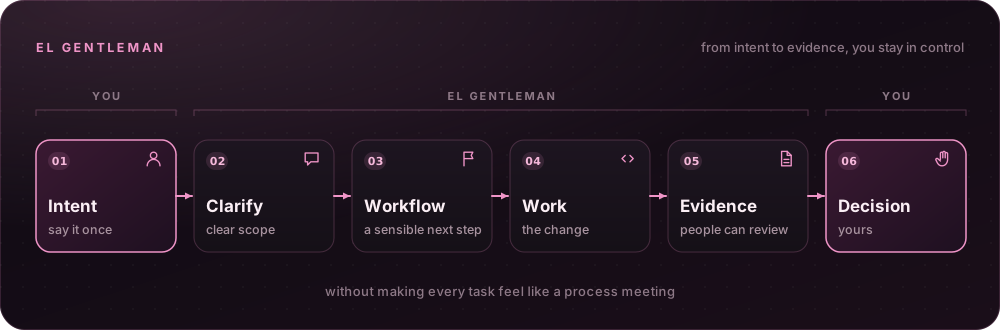 Say what you need once, then keep moving. el Gentleman helps turn intent into clear scope, a sensible next step, and evidence people can review — without making every task feel like a process meeting.
**[Docs →](docs/readme-reference.md#organic-driven-development)**
---
### ODD — The everyday workflow
Say what you need once, then keep moving. el Gentleman helps turn intent into clear scope, a sensible next step, and evidence people can review — without making every task feel like a process meeting.
**[Docs →](docs/readme-reference.md#organic-driven-development)**
---
### ODD — The everyday workflow
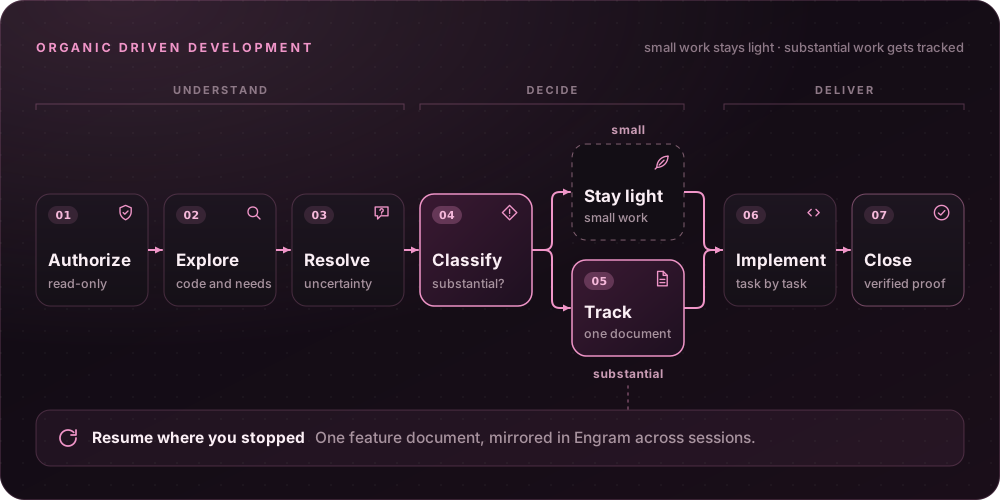 **Organic Driven Development (ODD)** is the everyday path: the agent explores before changing anything, clarifies only real decisions, and keeps small understood work small. Substantial, authorized work gets one recoverable feature document — mirrored in memory when available — so progress, evidence, and the next step survive an interruption; behavior changes are test-first by default when a runnable test applies.
Tasks are sized by understanding, risk, and resumability: work you could finish from the request and `git diff` alone runs inline, with no subagents and no task document. The feature document quotes your spec verbatim, and every handoff points at it instead of paraphrasing it, so exact strings, error messages, and examples reach the workers intact.
**[Docs →](docs/readme-reference.md#organic-driven-development)**
---
### Focused agents — Context with a return path
**Organic Driven Development (ODD)** is the everyday path: the agent explores before changing anything, clarifies only real decisions, and keeps small understood work small. Substantial, authorized work gets one recoverable feature document — mirrored in memory when available — so progress, evidence, and the next step survive an interruption; behavior changes are test-first by default when a runnable test applies.
Tasks are sized by understanding, risk, and resumability: work you could finish from the request and `git diff` alone runs inline, with no subagents and no task document. The feature document quotes your spec verbatim, and every handoff points at it instead of paraphrasing it, so exact strings, error messages, and examples reach the workers intact.
**[Docs →](docs/readme-reference.md#organic-driven-development)**
---
### Focused agents — Context with a return path
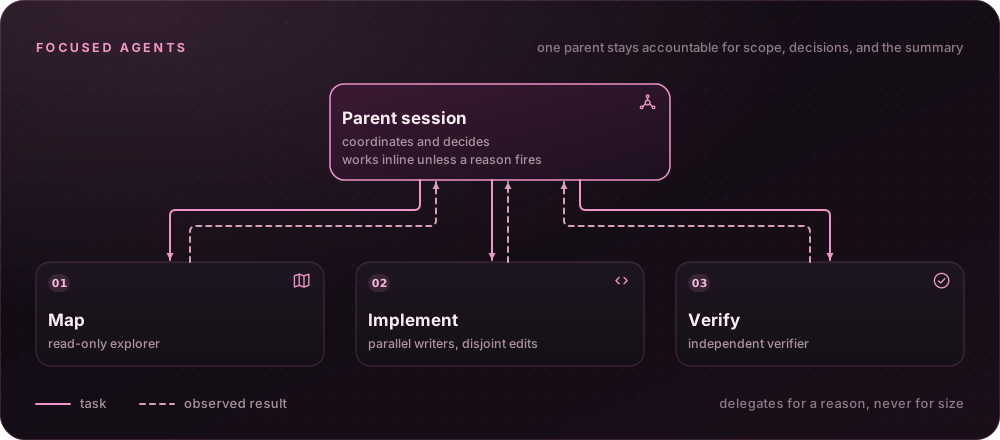 Bring in help without losing the thread. Focused package-owned Pi agents can map a codebase, implement a bounded change, or verify it, while one parent stays accountable for the scope, the decisions, and the final summary.
The parent delegates for a reason, not for size. Understanding that outgrows one inline batch (about 3 calls and 10k tokens) gets one read-only explorer; two or more independent units of behavior, each big enough to outweigh a subagent's start-up and with disjoint edit surfaces, get parallel writers; a change that touches a named high-risk item gets an independent verifier, whatever model wrote it; a long session hands its next unit to a fresh worker. Without a named reason the parent works inline — file count and task size never decide the route.
**[Docs →](docs/readme-reference.md#how-the-harness-decides-what-to-do)**
---
### Measured — What proportional routing changed
Bring in help without losing the thread. Focused package-owned Pi agents can map a codebase, implement a bounded change, or verify it, while one parent stays accountable for the scope, the decisions, and the final summary.
The parent delegates for a reason, not for size. Understanding that outgrows one inline batch (about 3 calls and 10k tokens) gets one read-only explorer; two or more independent units of behavior, each big enough to outweigh a subagent's start-up and with disjoint edit surfaces, get parallel writers; a change that touches a named high-risk item gets an independent verifier, whatever model wrote it; a long session hands its next unit to a fresh worker. Without a named reason the parent works inline — file count and task size never decide the route.
**[Docs →](docs/readme-reference.md#how-the-harness-decides-what-to-do)**
---
### Measured — What proportional routing changed
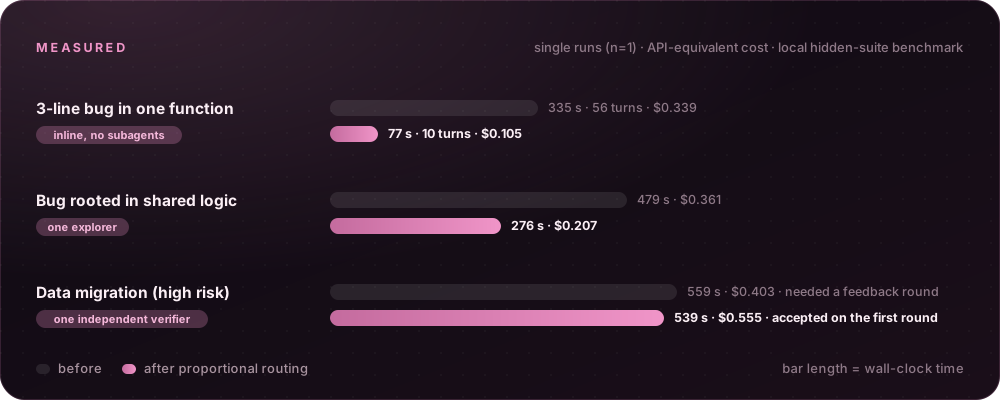 The routing rules came from benchmarks. These runs use a local benchmark with hidden acceptance suites; each cell is a single run (n=1), and cost is API-equivalent.
| Scenario | Before | After |
| :--- | :--- | :--- |
| 3-line bug in one function | 335 s · 56 turns · $0.339 | **77 s · 10 turns · $0.105** — inline, no subagents |
| Bug rooted in shared logic | 479 s · $0.361 | **276 s · $0.207** — one explorer |
| Data migration (high risk) | 559 s · $0.403 · needed a feedback round | 539 s · $0.555 · **accepted on the first round** — one independent verifier |
| 73-line spec, 26 hidden checks | Paraphrased handoffs: 13 failing, still 23/26 after two feedback rounds | Spec passed by reference ([#1718](https://github.com/Gentleman-Programming/gentle-shell/pull/1718)) |
Against the same model in Codex CLI, with blind review of every solution, Gentle Shell was accepted on the first round in every cell and ranked higher on the medium (3 of 3 runs) and large tasks; it was close on the small one. The large task still took about three times longer (17.5–17.9 min vs 6.1 min) — that gap is open work. Sources: [#1723](https://github.com/Gentleman-Programming/gentle-shell/pull/1723), [#1794](https://github.com/Gentleman-Programming/gentle-shell/pull/1794), [#1713](https://github.com/Gentleman-Programming/gentle-shell/issues/1713).
---
### Native review — Review the exact change
The routing rules came from benchmarks. These runs use a local benchmark with hidden acceptance suites; each cell is a single run (n=1), and cost is API-equivalent.
| Scenario | Before | After |
| :--- | :--- | :--- |
| 3-line bug in one function | 335 s · 56 turns · $0.339 | **77 s · 10 turns · $0.105** — inline, no subagents |
| Bug rooted in shared logic | 479 s · $0.361 | **276 s · $0.207** — one explorer |
| Data migration (high risk) | 559 s · $0.403 · needed a feedback round | 539 s · $0.555 · **accepted on the first round** — one independent verifier |
| 73-line spec, 26 hidden checks | Paraphrased handoffs: 13 failing, still 23/26 after two feedback rounds | Spec passed by reference ([#1718](https://github.com/Gentleman-Programming/gentle-shell/pull/1718)) |
Against the same model in Codex CLI, with blind review of every solution, Gentle Shell was accepted on the first round in every cell and ranked higher on the medium (3 of 3 runs) and large tasks; it was close on the small one. The large task still took about three times longer (17.5–17.9 min vs 6.1 min) — that gap is open work. Sources: [#1723](https://github.com/Gentleman-Programming/gentle-shell/pull/1723), [#1794](https://github.com/Gentleman-Programming/gentle-shell/pull/1794), [#1713](https://github.com/Gentleman-Programming/gentle-shell/issues/1713).
---
### Native review — Review the exact change
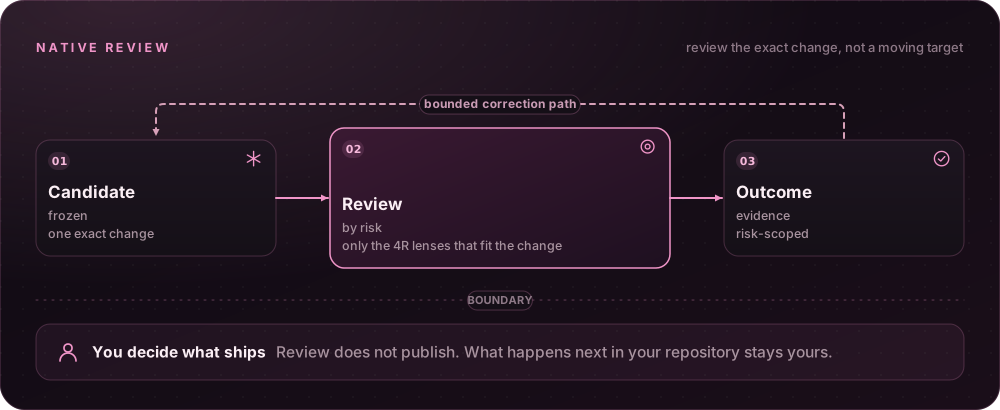 Review the exact change, not a moving target. Native review keeps one candidate in view, returns risk-scoped evidence, and can surface a bounded correction path. You still decide what happens next in your repository.
Review is proportionate: an independent verifier runs only for a named high-risk item in every RDD state, a review is only due for high-risk work, and the agent forwards the 4R lenses that fit what it touched — with its reason — instead of paying for all four.
> ℹ️ **RDD is opt-in:** enable native receipt-driven development only through an explicit `/gentle:review-mode enable` decision. The `.git/gentle-ai/candidate-views` parent must sit on a filesystem that honors private POSIX modes (or equivalent Windows ACLs); WSL DrvFS mounts without metadata can reject START before lineage creation.
Review the exact change, not a moving target. Native review keeps one candidate in view, returns risk-scoped evidence, and can surface a bounded correction path. You still decide what happens next in your repository.
Review is proportionate: an independent verifier runs only for a named high-risk item in every RDD state, a review is only due for high-risk work, and the agent forwards the 4R lenses that fit what it touched — with its reason — instead of paying for all four.
> ℹ️ **RDD is opt-in:** enable native receipt-driven development only through an explicit `/gentle:review-mode enable` decision. The `.git/gentle-ai/candidate-views` parent must sit on a filesystem that honors private POSIX modes (or equivalent Windows ACLs); WSL DrvFS mounts without metadata can reject START before lineage creation.
More Reviewer transport — how review completions follow Pi's transport setting
Reviewer completions inherit Pi's effective `transport` preference when an acknowledged individual or grouped capture executes. The host forwards a defined value unchanged, with one settings snapshot per group; it never forces SSE or changes model routing. An absent setting or an older Pi API without `getSettings()` preserves the provider default. This completion preference is separate from native `pi_host_relay` coordination, and providers that do not support it may ignore it.
**[Docs →](docs/review-integration.md)**
## 🖥️ Your workspace
### gentle-shell — Your coding agent, in the workspace you lead
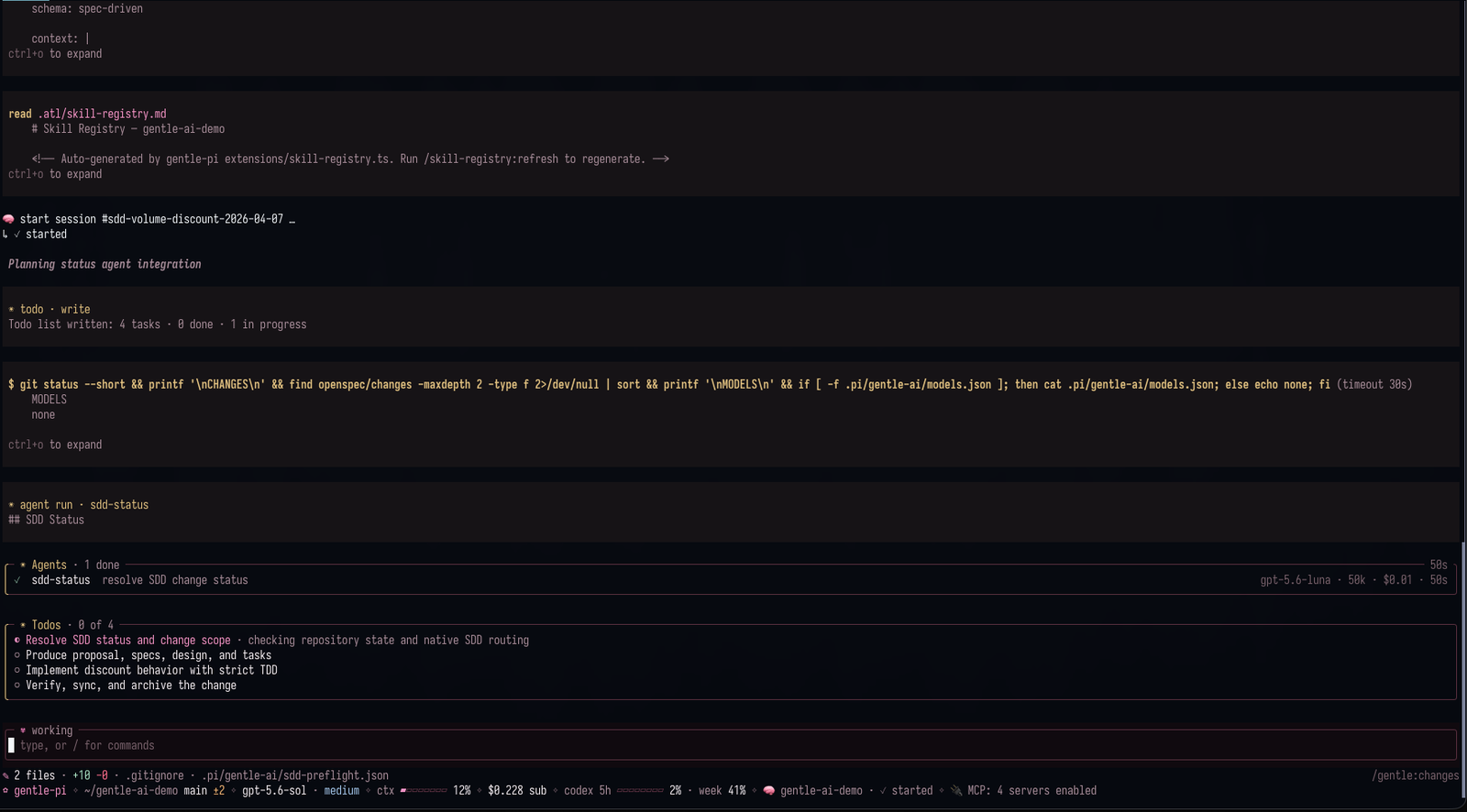
 A bare terminal answers "what is the agent doing?" only with scrollback. gentle-shell turns your Pi session into a workspace: agent orchestration, live changes and runtime status, usage monitoring for supported provider accounts, and built-in diff views — so you lead the work instead of chasing it.
gentle-shell in action. Screenshot from Gentle-AI.
**[Docs →](docs/gentle-shell.md)**
---
### Gentle Changes — What your session left uncommitted
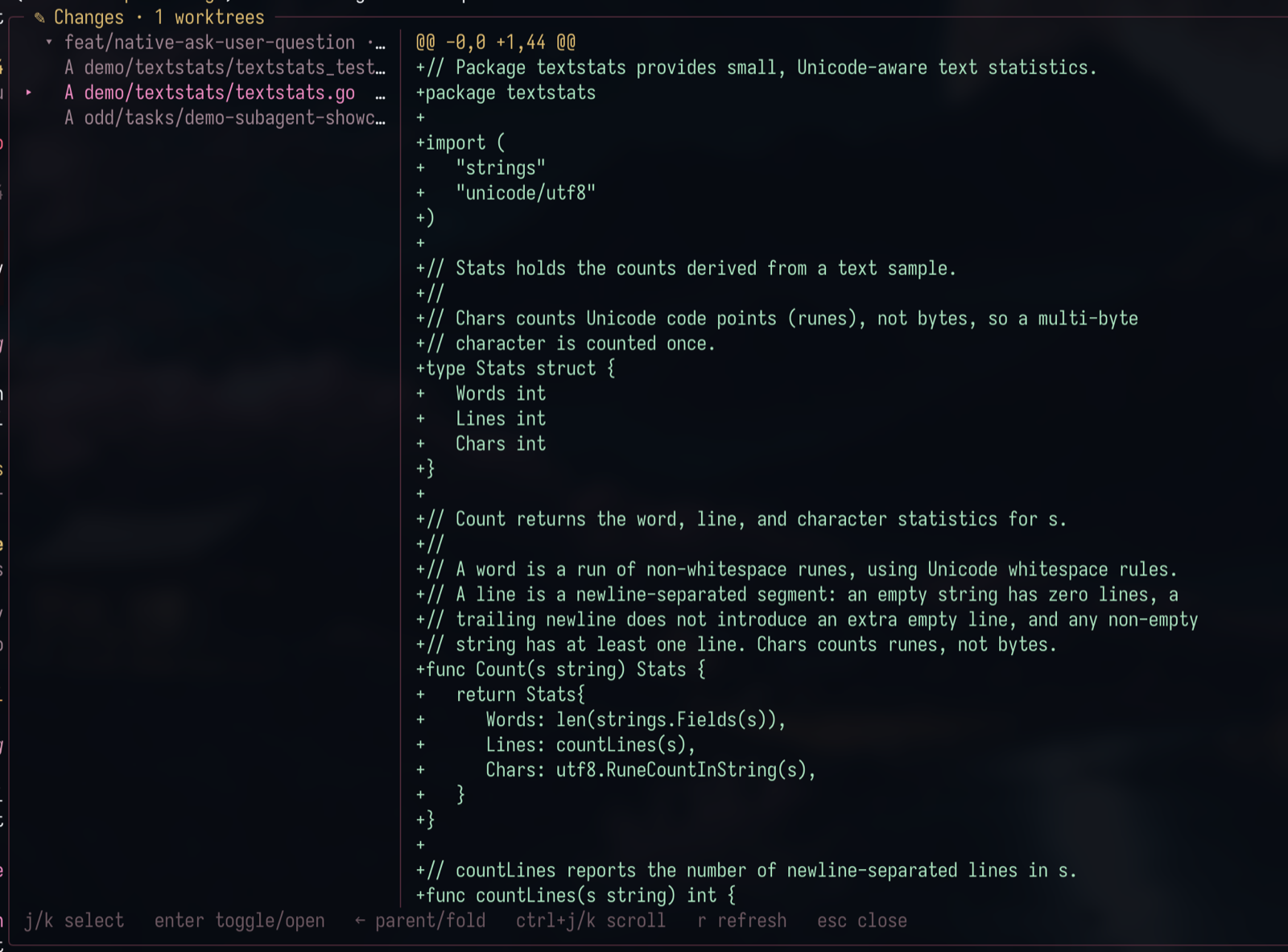 You should not have to run `git status` in every worktree to find out what your agents left behind. Gentle Changes shows the current Git state — working tree against HEAD, untracked files included — of your session's repository plus every worktree its subagents used, one group per root. Commit and it disappears; remove a worktree and its group goes with it. Nothing runs at startup; `alt+g` opens a full-screen two-pane viewer with per-file line counts and lazy diffs, `F` hides the file list to read the diff at full width, and `o` drops the real file into your editor.
**[Docs →](docs/gentle-shell.md#browse-changes)**
---
### Gentle Agents — Parallel work with a live view
You should not have to run `git status` in every worktree to find out what your agents left behind. Gentle Changes shows the current Git state — working tree against HEAD, untracked files included — of your session's repository plus every worktree its subagents used, one group per root. Commit and it disappears; remove a worktree and its group goes with it. Nothing runs at startup; `alt+g` opens a full-screen two-pane viewer with per-file line counts and lazy diffs, `F` hides the file list to read the diff at full width, and `o` drops the real file into your editor.
**[Docs →](docs/gentle-shell.md#browse-changes)**
---
### Gentle Agents — Parallel work with a live view
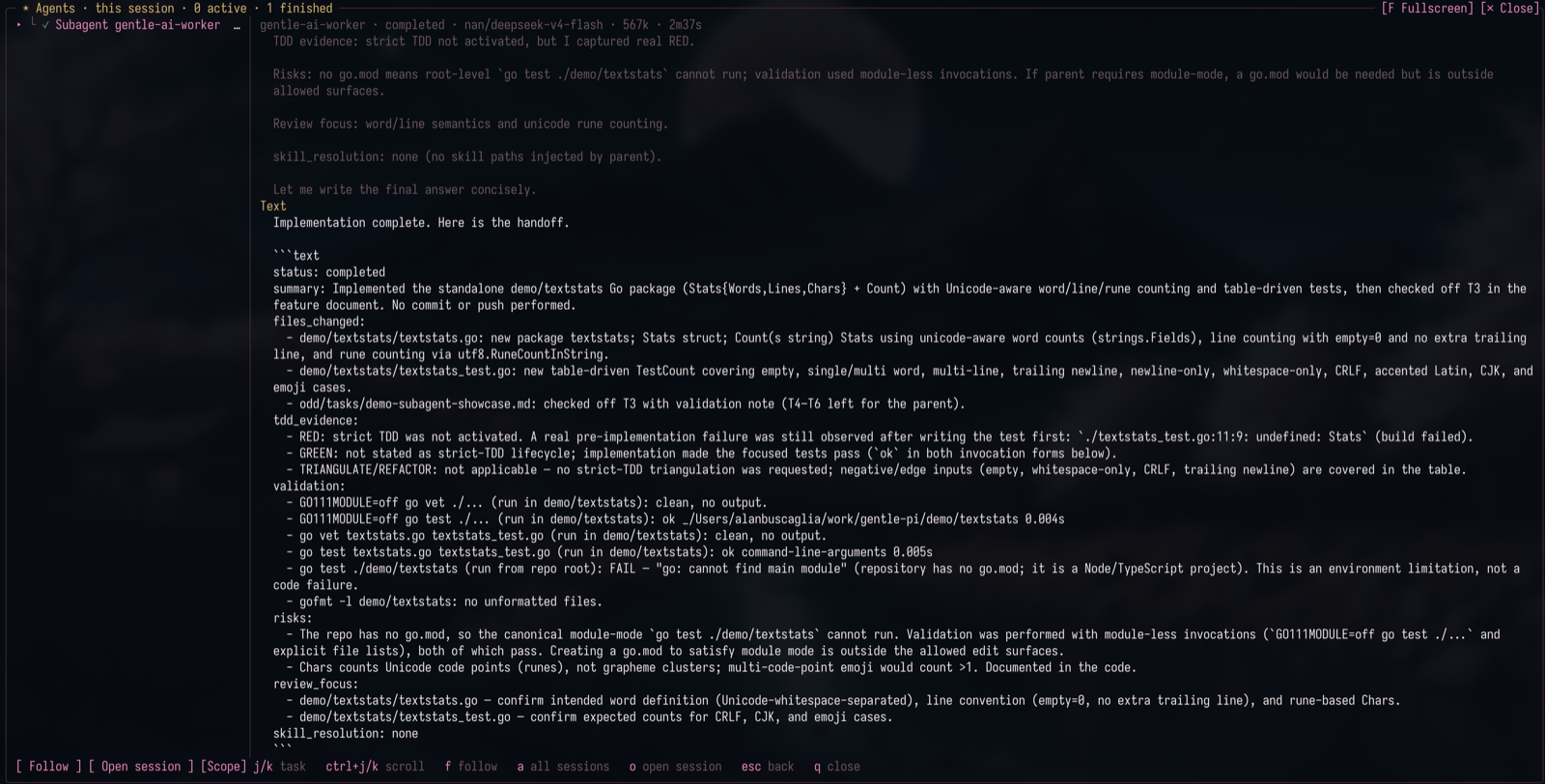 Delegating work should not mean losing it. Every subagent runs as its own process with a live card above the editor — model, tokens, cost, elapsed — and `alt+a` opens the full view with retained threads, stop controls, and history restored on resume. A child can ask you a question as an ordinary dialog, and background results come back as cards that start a new turn — nothing polls.
**[Docs →](docs/gentle-shell.md#gentle-agents)**
---
### Profiles and model routing — One deliberate decision per knob
Delegating work should not mean losing it. Every subagent runs as its own process with a live card above the editor — model, tokens, cost, elapsed — and `alt+a` opens the full view with retained threads, stop controls, and history restored on resume. A child can ask you a question as an ordinary dialog, and background results come back as cards that start a new turn — nothing polls.
**[Docs →](docs/gentle-shell.md#gentle-agents)**
---
### Profiles and model routing — One deliberate decision per knob
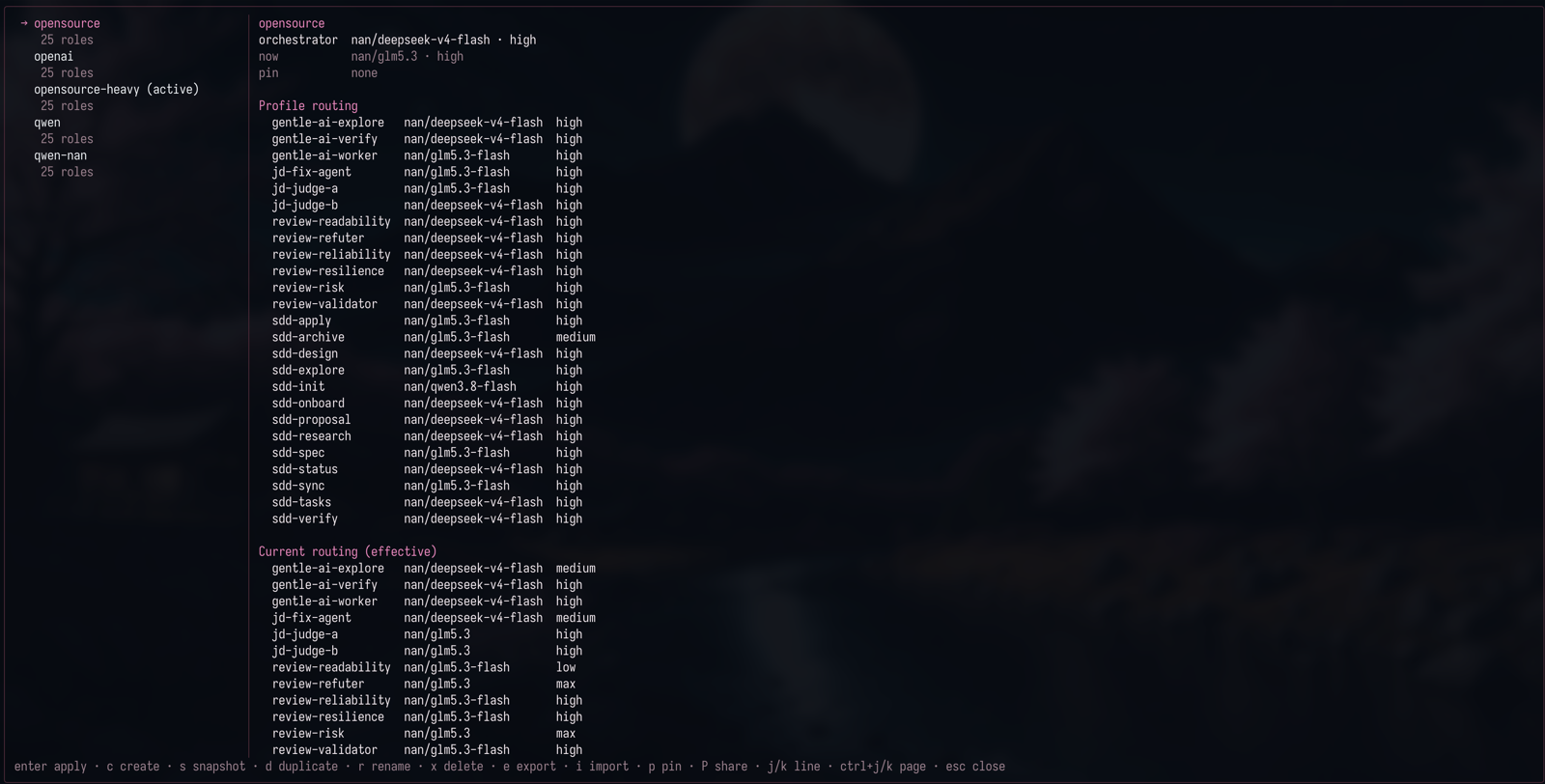 Model, effort, and who does what should be choices, not accidents. Named profiles route the orchestrator atomically and independently from packaged and review roles; a repository can pin its profile so its subagents stop following the globally active one, and the panel always shows the routing the runtime actually uses.
**[Docs →](docs/readme-reference.md#agent-model-profiles)**
---
### Command palette — Every command, one keystroke away
Model, effort, and who does what should be choices, not accidents. Named profiles route the orchestrator atomically and independently from packaged and review roles; a repository can pin its profile so its subagents stop following the globally active one, and the panel always shows the routing the runtime actually uses.
**[Docs →](docs/readme-reference.md#agent-model-profiles)**
---
### Command palette — Every command, one keystroke away
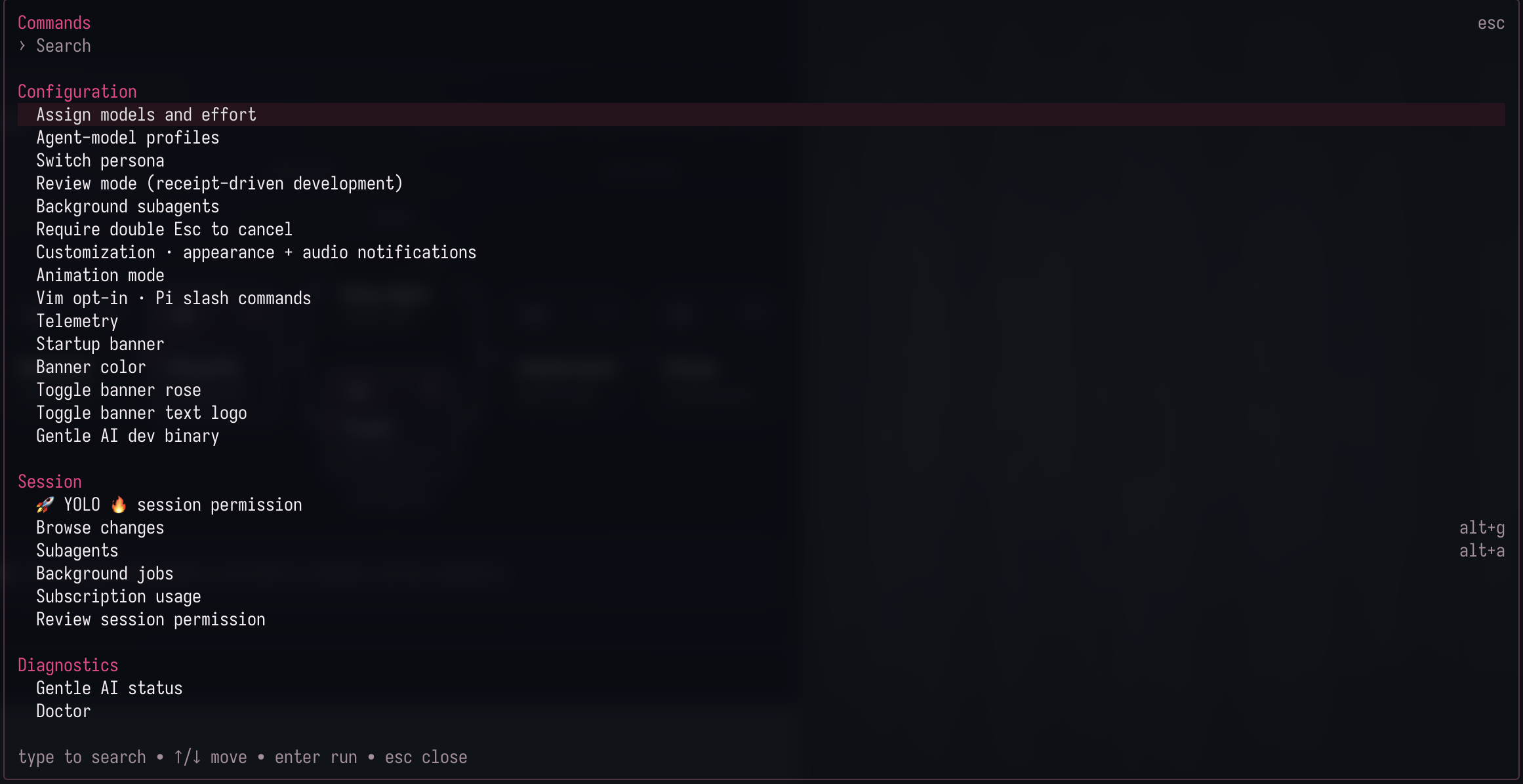 Extension commands are only useful if you can find them. `alt+k` opens a curated, grouped palette — Configuration, Session, Diagnostics, and Skills — searchable by label, command name, or description, showing entries only when they are actually registered.
**[Docs →](docs/gentle-shell.md#command-palette)**
---
### Customize — Look, layout, and editor in one panel
`/gentle:customize` opens an interactive panel to set animation quality, startup banner rose, text logo and color, or choose an installed Pi theme.
Extension commands are only useful if you can find them. `alt+k` opens a curated, grouped palette — Configuration, Session, Diagnostics, and Skills — searchable by label, command name, or description, showing entries only when they are actually registered.
**[Docs →](docs/gentle-shell.md#command-palette)**
---
### Customize — Look, layout, and editor in one panel
`/gentle:customize` opens an interactive panel to set animation quality, startup banner rose, text logo and color, or choose an installed Pi theme.
More Everything /gentle:customize controls — themes, status layout, Vim, history, and visual profiles
- **Themes:** Highlighting a theme previews its source palette without changing the active theme; press Enter or Space to apply it through Pi. If its source is unreadable, the preview is unavailable.
- **Status layout:** Status defaults to a right rail in fullscreen terminals at least 140 columns wide, and to a bottom bar otherwise. Choose right, bottom, or hidden (which removes both the rail and the bottom status bar at every width), move the fullscreen header below the input (below the 140-column breakpoint only one status row paints: a top header replaces the bottom bar, while with the header below the input the bottom bar alone carries the header's context, cost, and usage plus extension statuses), select comfortable/compact/minimal density, and toggle Changes, Agents, TODO, usage/cost, and model details independently. Layout changes and reset take effect immediately; banner changes appear on the next startup.
- **Vim:** The Editor category offers explicit Vim enable/disable controls for the global prompt preference; highlighting shows the persisted preference and effective prompt state without changing either. Enter or Space saves it and updates the live prompt; unsupported editors keep ordinary editing even when the saved preference is on. Vim is not included in visual profiles or visual reset.
- **History:** The History category turns prompt-history capture on or off; it is off by default, applies to the next prompt without a restart, and never deletes stored history. An explicit `GENTLE_PI_HISTORY_CAPTURE` value overrides the saved choice, and the panel marks that override (see [Prompt history](docs/prompt-history.md)).
- **Reset and profiles:** The panel can reset visual, banner, and animation settings to defaults. Press `p` for named visual profiles: `s` saves the current installed theme, banner, animation and layout; select a profile with ↑/↓, then use `r` to replace, `a` to apply, or `d` to delete. `z` clears only the profile catalog. Confirm destructive/apply actions with `y`, or cancel with any other key; Esc returns without applying a preview. Applying independent stores is not atomic: partial failures identify what changed.
**[Card style and content →](docs/gentle-shell.md#card-style)**
---
### Audio notifications — Opt-in sounds for success, errors, and attention
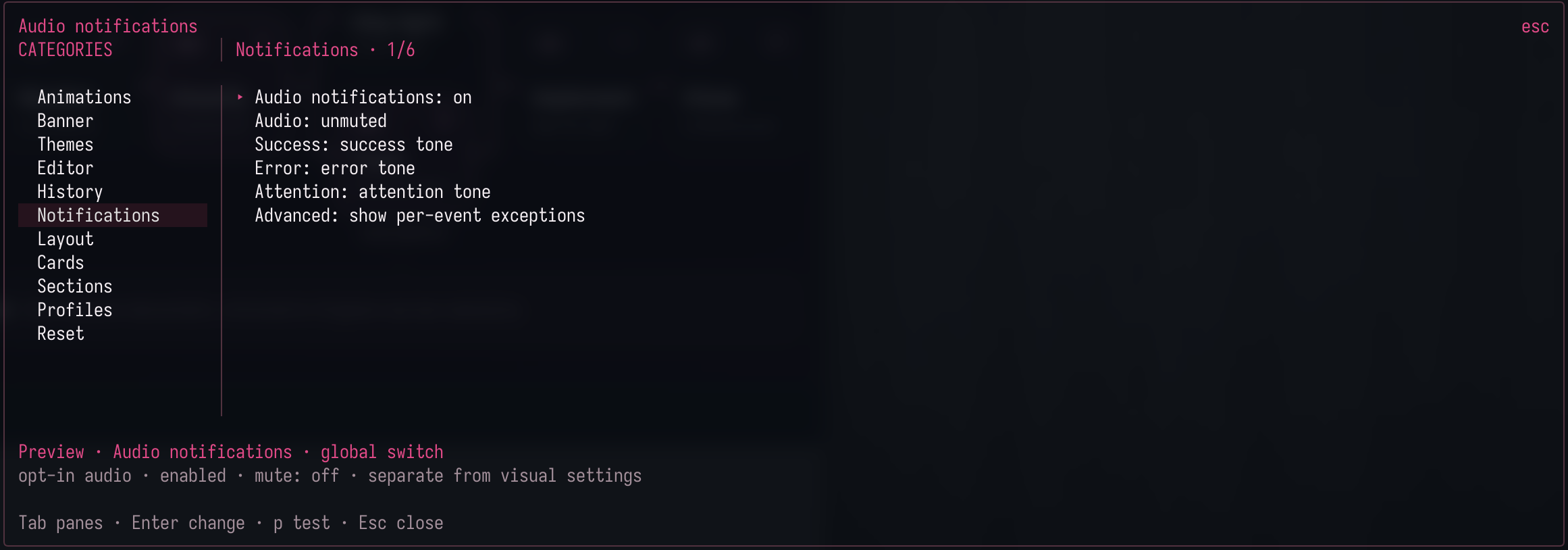 Open `/gentle:customize` → **Notifications** (the card header reads **Audio notifications**) and configure audio directly in the same two-column card, with no nested menu. Audio starts off; RPC and children stay silent.
More Controls and platform support — keys, custom sounds, and per-OS playback
- **Controls:** Enter toggles the master switch or cycles a type/event through silence/success/error/attention, `f` assigns a literal absolute local WAV/OGG/FLAC sound (≤2 MiB, ≤10 seconds) to the highlighted **Success**, **Error** or **Attention** type (each type keeps its own sound), and `p` previews its assigned sound. **Advanced** folds per-event exceptions; the type choices stay independent.
- **Quick answer (Linux/WSLg):** on plain Linux the installed package prefers the native WAV backend and needs no external player — it talks to a local PulseAudio/PipeWire-Pulse Unix socket and requires a running server with a default sink.
- Inside **WSL** the Windows system `SoundPlayer` is preferred instead: the validated WAV snapshot is mapped to a `\\wsl.localhost\\...` UNC path, so no Pulse server or RDP audio dependency is required; it does depend on the default `/mnt/c` automount and the standard `C:\Windows` root and otherwise falls back to the trusted Linux CLI before any playback.
- **Native Windows** WAV uses the same system `SoundPlayer` through the fixed `C:\Windows\...\powershell.exe` host. A read-only probe succeeded here, but that is not a claim of physically heard audio.
- OGG/FLAC keep the legacy CLI backend (`paplay`/`pw-play`/`aplay`) on Linux and WSL; native codecs are a future phase and Windows OGG/FLAC is unsupported. macOS keeps `afplay` for WAV and FLAC while an own CoreAudio phase is planned.
**[Usage, limits and verification →](docs/sound-notifications.md)**
---
### Background jobs — Inspect what runs in the background
Use `/gentle:jobs` to inspect this session's background commands and monitors. Running jobs appear first; each group is ordered newest first. Arrow keys select a job, `Tab` opens details on narrow terminals, `s` stops a running job, and `q` closes the modal.
The Status panel has a **Jobs** section with each running job's description. When the panel is hidden or unavailable in the compact/mobile layout, the top or bottom bar shows only the running count (`⧗ 1 job`). The count and descriptions disappear when no jobs remain active; `/gentle:jobs` retains completed jobs for inspection.
**[Docs →](docs/gentle-shell.md#background-jobs)**
## 🛡️ Control
### Permission modes — Normal, Auto, or YOLO
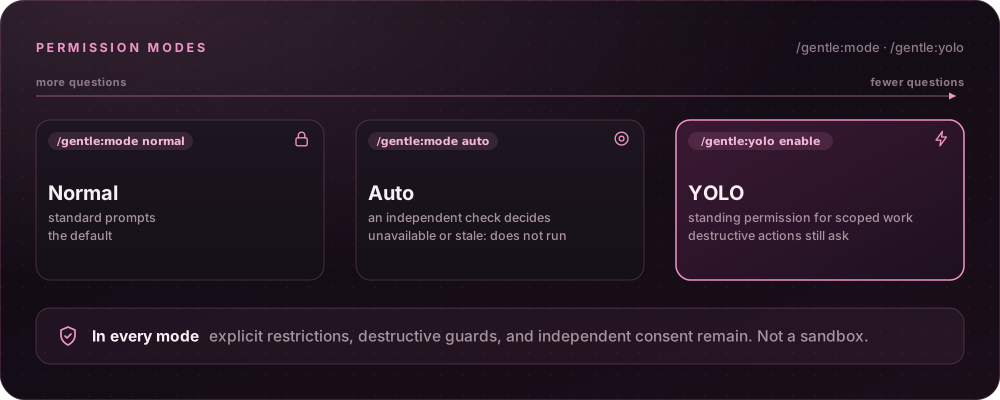 Choose `/gentle:mode auto` to check eligible actions with an independent inference using the current session model. Ordinary checks are tool-free; an eligible script check can inspect at most two complete files ([inspection limits](docs/auto-permission-evidence.md)).
More Coverage, defaults, and scope — what Auto checks, its cost, and how to make it the default
Auto covers primary file/shell/custom/MCP tools and nested calls through the SDK pipeline while retaining explicit restrictions, destructive guards and independent consent. It adds separately recorded inference cost and latency; unavailable or stale decisions do not run the action. This is not a sandbox or a claim of proprietary classifier parity.
Save `/gentle:mode default auto` or `/gentle:mode default yolo` to use either optional mode in new primary sessions. `/gentle:mode normal` changes only this session; `/gentle:mode default normal` changes future sessions. Children retain their existing delegation rules, not the parent's elevated mode.
**[Commands, scope, cost and limits →](docs/permission-modes.md)**
---
### 🚀 YOLO 🔥 — Scoped permission, destructive guards intact
> 🚀 **Full speed, destructive actions still ask.** YOLO removes repeated permission questions for ordinary already-scoped work, which suits long autonomous runs. Destructive operations still require fresh confirmation.
`/gentle:yolo enable` supplies standing permission for ordinary already-scoped implementation, checks, commits, non-force pushes and PR creation.
More How YOLO behaves — what still asks, how to turn it off, and the Customize toggle
- **Default:** **OFF** unless selected or saved as the global default, with interactive primary TUI controls and live session/workspace binding; `/gentle:yolo disable` revokes it and `/gentle:yolo status` checks it.
- **Menu:** With no argument, `/gentle:yolo` opens a menu (`enable`, `disable`, `status`) showing the current state; cancelling changes nothing, and without an interactive menu it reports status.
- **Lifetime:** Reload and session replacement revoke live grants; new primary instances may apply the saved global default.
- **Status:** Active status plus a separate widget show **🚀 YOLO ON 🔥 — destructive confirmations remain**.
- **Still mandatory:** Explicit restrictions, configured confirmations/blocks, consequential unresolved choices, destination/credential ambiguity and native consent/recovery decisions remain mandatory. Children get no independent delivery grant. This is not a sandbox.
- **From Customize:** Or open `/gentle:customize` → **Editor** and select **YOLO: OFF · session only**, immediately below Vim. Enter or Space toggles the same live-session permission as `/gentle:yolo`; browsing and previews never activate it. This live toggle does not save a preference. The separate **Session permissions** and **Default permissions** rows select a current mode or save a user-global default, respectively; repository settings and visual profiles cannot grant either mode.
**[Use and limits →](docs/yolo-mode.md)**
## 📦 Also in the box
| Component | What it does |
| :--- | :--- |
| Startup and runtime panel | A configurable gentle-shell entry point and visible runtime state for Pi. |
| Skills and delivery guidance | Package skills for documentation, issue work, PRs, reviews, and reviewable work units. |
| Model, effort, persona, and profile controls | Explicit knobs for how Pi routes and presents work. |
| Safety boundaries | Guards around destructive operations and sensitive-path handling. |
| Optional companion packages | Extra capabilities you may choose to add; persistent memory is **not** bundled with `gentle-pi`. |
| Fullscreen workspace layout | Header row plus a scrolling Status → Changes → TODO rail on wide terminals. |
| Live status bar and prompt petal | One-line gauge, cost, and statuses; the petal shows `working` and `queued`. |
| Parent ↔ subagent communication | Delegate, steer, reply, and cross-session notification within your local profile. |
| Native interactive tools | Built-in questions, choices, and review captures — no third-party dependency. |
| Gentle Todo | A plan card that turns amber when the model lets it go stale. |
| Subscription usage | Per-window meters and resets for supported provider accounts. |
| Gentle Stats | `/gentle:stats` shows local usage history: activity heatmap, tokens, cost, streaks, and per-model share. |
| Gentle notices | Gentle AI calls and review reminders as cards in the transcript. |
Cross-orchestrator messages appear as compact `🤖 Sender → 🤖 Recipient` cards with single-row headings. Expand a card to inspect available identifiers and reasons. **Message queued** means queued, not delivered or read; long names are clipped to fit narrow terminals.
**Every component, skill and preset: [Full breakdown →](docs/gentle-shell.md)**
---
### NaN model provider — First-party, no extra package
The first-party `nan` provider is included; no third-party provider package is required. Set `NAN_API_KEY` before starting Pi, or use native `/login` → NaN (also `/login nan`), then use `/model` to select a model.
More Login, model discovery, and thinking levels — API keys, available models, and per-model levels
- **Login:** Both login routes await explicit API-key input; blank or whitespace-only entries fail without saving a credential, and surrounding whitespace is trimmed. Cancellation leaves the stored key unchanged. Stored keys take precedence over `NAN_API_KEY`.
- **Streaming:** Pi streams chat completions through its OpenAI-compatible provider.
- **Model discovery:** Model discovery intersects NaN's authenticated `/v1/models` response with a maintained subset of known chat IDs from the [official model documentation](https://nan.builders/docs/models); unknown and non-chat IDs are omitted. A successful response with no known chat IDs stays empty. Documented context, reasoning, and text/image capabilities are preserved with conservative numeric bounds for abbreviated limits; audio input is not advertised by Pi.
- **Output caps:** The provider configures `maxTokens` caps rather than claiming undocumented model maxima: 32,768 for GLM 5.3, GLM 5.3 Flash, and MiMo; 16,384 for DeepSeek V4 Flash; 65,536 for Gemma 4 and Qwen 3.6; and 131,000 for Qwen 3.8 Flash (NaN documents 131K). Reasoning shares the output budget.
- **Offline fallback:** Before a successful refresh, all seven documented chat models are available as the offline fallback in `/gentle:models`: `glm5.3`, `deepseek-v4-flash`, `glm5.3-flash`, `qwen3.8-flash`, `mimo-v2.6-flash`, `gemma4`, and `qwen3.6`. This fallback declares documented support, not proof of access for your key. Once refreshed, the successful live key-scoped list remains authoritative (including an empty list), even offline or after a failed refresh. Changing credentials resets the catalog to the full documented fallback until discovery succeeds for the new key.
- **Not included:** NaN MCP search and media bridges are not included.
Thinking levels follow NaN's [reasoning contract](https://nan.builders/docs/models):
| Models | Pi thinking levels |
| --- | --- |
| GLM 5.3 / GLM 5.3 Flash | `low`, `medium`, `high`, and `max` are fully controllable. No `off`; Pi's `minimal` and `xhigh` clamp to `low` and `max`. |
| Qwen 3.6 / Gemma 4 | `off` sends `none` and `minimal` also skips reasoning; `low`, `medium`, `high`, and `max` set reasoning budgets. Pi's `xhigh` clamps to `max`. |
| DeepSeek V4 Flash / Qwen 3.8 Flash / MiMo | The same `off` (`none`), `minimal`, `low`, `medium`, `high`, and `max` levels are accepted, but NaN manages their reasoning depth, so no value changes it. Pi's `xhigh` clamps to `max`. The header reports `effort: auto` for these three and a one-time notice says the level does not change the depth. |
Back to top ↑
## ⚡ Get started
> ℹ️ **Naming transition:** The product is called `gentle-shell`; the current npm package and repository remain `gentle-pi` until migration.
**Which path is for me?**
| If you… | Use |
| :--- | :--- |
| Want the simplest setup, no terminal needed | [Download and double-click](#easiest-download-and-double-click-no-terminal-needed) |
| Work from a clone of this repository | [Path C: browser installer from a checkout](#path-c-browser-installer-from-a-checkout) |
| Are comfortable with npm and want Pi left untouched | [Path A: standalone `gentle-shell`](#path-a-standalone-gentle-shell-recommended-no-pi-changes) |
| Already use Pi and want the package inside it | [Path B: inside an existing pi](#path-b-inside-an-existing-pi) |
### Easiest: download and double-click (no terminal needed)
Download the installer for your computer, double-click it, and follow the steps in your browser. It installs everything Gentle Shell needs (Node.js, pnpm, Pi and Gentle Shell), or updates what you already have, and installs nothing until you confirm the plan it shows you. (To show that plan it may first download Node.js and pnpm into a temporary folder, which it removes afterwards.)
| Your computer | Download | Then |
| --- | --- | --- |
| **macOS** | [gentle-shell-installer-macos.zip](https://github.com/Gentleman-Programming/gentle-shell/releases/latest/download/gentle-shell-installer-macos.zip) | Open the zip, then double-click **Install Gentle Shell.command** inside the *Gentle Shell Installer* folder. |
| **Windows** | [gentle-shell-installer-windows.zip](https://github.com/Gentleman-Programming/gentle-shell/releases/latest/download/gentle-shell-installer-windows.zip) | Right-click the zip → **Extract All**. Open the extracted folder, then the *Gentle Shell Installer* folder inside it, and double-click **Install Gentle Shell.cmd**. It does not run from inside the zip. |
| **Linux** | [gentle-shell-installer-linux.tar.gz](https://github.com/Gentleman-Programming/gentle-shell/releases/latest/download/gentle-shell-installer-linux.tar.gz) | Extract it, then double-click **install-gentle-shell.sh**. If your file manager does not run scripts, run `sh install-gentle-shell.sh` in that folder. |
A small window opens, then the installer appears in your browser. Use the tab it opens, and keep the small window open until the installer says it is done.
> ⚠️ **Your computer will warn you the first time.** These installers are not signed with an Apple or Microsoft developer certificate yet, so the system cannot verify who made them. That warning is expected; here is how to continue:
>
> - **macOS:** you see *"Install Gentle Shell.command" Not Opened* (or *cannot be opened because Apple cannot check it*). Click **Done**, open **System Settings → Privacy & Security**, scroll down to the message about *Install Gentle Shell.command*, click **Open Anyway**, and confirm with your password. On older macOS versions you can instead right-click the file, choose **Open**, then **Open** again. You only do this once.
> - **Windows:** you see *Windows protected your PC*: click **More info**, then **Run anyway**. If you see *Open File – Security Warning* instead, click **Run**.
> - **Linux:** if double-click opens the file in an editor, run `sh install-gentle-shell.sh` in that folder instead.
>
> Only download from this repository's [Releases](https://github.com/Gentleman-Programming/gentle-shell/releases) page. To check a download, compare its SHA-256 with [gentle-shell-installers-SHA256SUMS.txt](https://github.com/Gentleman-Programming/gentle-shell/releases/latest/download/gentle-shell-installers-SHA256SUMS.txt).
A new installation gets Gentle Shell as one self-contained product. Its own Node.js, npm, pnpm and Pi live in `~/.gentle-shell`, and your own tools are not used or changed ([bundled installation](docs/install-wizard.md#bundled-installation)).
The installer is a preview: it is tested on Linux and in CI, while clean-machine runs on macOS and Windows are still being verified. How it works and what it changes: **[installation wizard](docs/install-wizard.md)**.
### Path C: browser installer from a checkout
The same installer as the [download above](#easiest-download-and-double-click-no-terminal-needed), started from a clone instead of a download:
```bash
git clone https://github.com/Gentleman-Programming/gentle-shell.git
cd gentle-shell
# macOS and Linux
sh scripts/bootstrap.sh
# Windows (cmd)
scripts\bootstrap.cmd
```
It installs what is missing (Node.js, pnpm, Pi, Gentle Shell) and updates an existing Gentle Shell or an older Pi; nothing changes until you confirm. The bootstrap gets Node.js and pnpm into a temporary folder if they are missing, then opens the wizard in your browser at a private `127.0.0.1` address. Use the tab it opens: the link works once and expires after 2 minutes. On the review screen, choose what to install:
- **Latest release** (recommended): the published Gentle Shell with its pinned Gentle AI binary.
- **Latest main**: development builds of Gentle Shell and Gentle AI from the latest commit of `main`, built on your computer with Go. If your Go is missing, older or its version cannot be checked, the installer downloads its own pinned, verified Go only for that build.
More How the installer treats the tools you already have — what it reuses, updates, or leaves alone
- **Node.js and pnpm:** An older Node.js or an incompatible pnpm (from mise, nvm, nvm-windows, fnm, Volta or Homebrew, for example) is left untouched: the installer uses its own pinned, verified copy and installs it under `$PNPM_HOME`, and the plan says so before you confirm; a version manager may still put your own version first in new terminals. This applies only to a new installation: with Gentle Shell already installed, an older Node.js or incompatible pnpm still blocks. On Windows, `bootstrap.cmd` also uses its own Node.js when it cannot verify where yours lives (an nvm-windows symlink or an fnm junction, for example), without running yours.
- **Your pnpm:** A pnpm in the pnpm global bin directory (`$PNPM_HOME/bin`) is never replaced or downgraded: pnpm 11.1.1 or newer, pnpm 12 included, is used as it is, an older one blocks with the `pnpm self-update` command that updates it, and one whose version could not be checked is left as it is while the installer uses its own verified pnpm, which the plan says before you confirm.
- **npm:** A working `npm` on your PATH (from Node.js, Homebrew, nvm, nvm-windows, fnm, mise, asdf or Volta, for example) is used as it is; the installer adds its own npm only when none works.
- **Windows:** On Windows it never runs `npm.cmd` or `pnpm.cmd` through a shell: it runs what a recognized shim runs, or the `.exe` itself, and treats any other shim as not usable. It also checks that no other account can change the pnpm home folder (`PNPM_HOME`), and never runs a pnpm from a folder another account can change (or one it cannot prove is pnpm, such as Corepack's `pnpm.cmd`): it uses its own verified pnpm instead and leaves yours as it is. When pnpm's default `%LOCALAPPDATA%\pnpm` fails that check and holds nothing yet, it uses `%USERPROFILE%\.pnpm` instead and `pnpm setup` saves it for new terminals; pnpm commands you run later still keep pnpm's configuration, cache and state under `%LOCALAPPDATA%`, an accepted risk the plan states. When that folder already holds files, or your own `PNPM_HOME` fails the check, it stops and names the folder, the account and its rights. The plan says so before you confirm.
- **Your existing tools:** Your Node.js, npm, Go, Pi or npm-installed Gentle Shell are used as you already use them; when one lives in a folder another account can change, the plan names that folder, the account and its rights as a notice, without blocking.
- **Go:** When a build needs Go (the main channel, or Windows) and yours is missing, older or its version cannot be checked, the installer downloads a pinned Go from go.dev, verifies its checksum and uses it only to build, from its own folder; your Go and PATH are left untouched, and the plan says so before you confirm. A release install on macOS or Linux never downloads Go.
- **Git:** Git is not needed to install; when it is missing the plan says so before you confirm, with the command to install it, because code review, worktrees and repository features need it.
- **Pi:** An existing Pi that meets the minimum is reused as it is. With pnpm 11, Gentle Shell may run a newer Pi than the installer's that pnpm puts next to it (always at least the minimum); the installer says which one when it finishes. An older Pi is updated to the version the installer installs, with the package manager that installed it (pnpm or npm); the plan shows the found and target versions before you confirm. An older Pi that neither manages (mise, Homebrew or a standalone binary, for example) is left untouched, and the installer adds its own Pi with pnpm, as when Pi is missing; Gentle Shell uses that one. Pi is never downgraded.
- **Gentle Shell:** An existing Gentle Shell is updated with the package manager that installed it (pnpm or npm); one it cannot attribute, such as an `npm link` of a source checkout, is left untouched and explained. No checkout dependencies are needed (`pnpm install` is not required).
Details: **[installation wizard](docs/install-wizard.md)**.
### Path A: standalone `gentle-shell` (recommended, no pi changes)
`gentle-shell` opens Pi with the Gentle Shell package loaded, without installing it into your pi agent or editing its `settings.json`. It requires Pi 1.2.0 or newer.
```bash
npm i -g gentle-pi
# Own home, never touches your pi install
gentle-shell
# Reuse your pi sign-ins, models and chats instead
gentle-shell --link
```
`gentle-shell` alone starts in its own home, `~/.gentle-shell/agent`, keeps its settings in `~/.gentle-shell/gentle-ai` (copied once from `~/.pi/gentle-ai` on the first launch that needs it), and sets that home up on first run — no separate step. Gentle Shell keeps its own home with the Gentle AI companion packages and no conflicting plugins; gentle-pi itself always stays this launcher's own copy, never one installed into the home; your pi install is untouched. That home also defaults to the Gentleman-Cute theme unless you set your own. `gentle-shell --link` reuses `~/.pi/agent` as-is, is never auto-provisioned, and never has its theme touched.
```bash
# Re-run provisioning by hand, e.g. to see the full install output
gentle-shell setup
```
`gentle-shell setup` installs the same companion packages gentle-ai provisions into a regular Pi, into this home only, then removes the one package that conflicts with gentle-pi's own `ask_user_question` tool (gentle-ai #4820). The first `gentle-shell` launch in a home already runs this automatically; `setup` is for re-running it by hand. See **[First run](docs/readme-reference.md#first-run-in-an-isolated-or-custom-home)** for the opt-out (`GENTLE_SHELL_NO_AUTO_SETUP=1`) and failure behavior.
```bash
# Make --link the default
gentle-shell home link
# Or keep the separate home and copy your pi sign-ins into it
gentle-shell home import-pi --dry-run
gentle-shell home import-pi
```
`gentle-shell home import-pi` copies `auth.json` (kept private, `0600`) and `mcp.json` from your pi home into the separate home, plus your default provider, model and thinking level when that home has none. It never overwrites a file or setting, never copies packages, extensions, caches or chats, and never changes your pi home. The tradeoff: `--link` shares one credential store with pi, while `import-pi` makes a second copy, so a provider that rotates refresh tokens may sign one of the two out; run `/login` again there.
Every other argument is forwarded to pi unchanged, for example `gentle-shell --mode rpc` or `gentle-shell -p "..."`. Full flags, env vars, and modes: **[launcher reference](docs/readme-reference.md#gentle-shell-launcher)**.
### Path B: inside an existing pi
Install the stable release into an existing pi agent, restart Pi, then synchronize the installed assets.
```bash
# Published stable release: v4.1.0
pi install npm:gentle-pi@4.1.0
# Restart Pi, then run:
gentle-ai sync
# Start Pi in your project
pi
```
See the [v4.1.0 release notes](https://github.com/Gentleman-Programming/gentle-shell/releases/tag/v4.1.0) for version-specific changes.
More Seeing a builtin codemode warning? — why it appears and how to silence it
gentle-pi replaces Pi's builtin `codemode` with its compact renderer, so Pi warns at startup that the builtin was not loaded. In your own Pi home (`pi` with this package, or `gentle-shell --link`), gentle-pi asks once in the interactive TUI whether to add `"-builtin:codemode"` to `extensions` in the agent `settings.json` (usually `~/.pi/agent/settings.json`); it writes only if you accept, and the warning disappears from the next launch. A declined prompt is not repeated. To silence it by hand, add the entry yourself, for example `"extensions": ["-builtin:codemode"]`. Isolated `gentle-shell` homes already carry it.
### Check your setup
```text
/gentle:status
/gentle:doctor
```
ℹ️ **Good to know**
- **STATUS diagnostics are opt-in:** `/gentle:status-timing enable` arms timing for the next separately authorized STATUS-bearing tool call; `show` consults the memory-only summary and `disable` clears it. It never invokes or retries STATUS. See the [diagnostic boundaries](docs/readme-reference.md#diagnose-status-timing-without-retrying-it).
- **Fullscreen installation note:** a recognized global installation persists Pi’s `"tuiMode": "fullscreen"` setting. Project-local and other install paths do not receive that change.
- **Interactive RPC hosts:** the desktop app sets `GENTLE_SHELL_INTERACTIVE_HOST=1` automatically, without touching your Pi config — see the [installation reference](docs/readme-reference.md#interactive-rpc-hosts).
### Keep it up to date
**Release compatibility:** `upgrade` is available from `gentle-pi` v4.1.0 (and in main builds containing commit `96ff045a8`). Releases through v4.0.0 do not support it: on those launchers, `gentle-shell upgrade` opens a session with `upgrade` as the prompt instead of updating.
For those installations, download the [latest installer](#easiest-download-and-double-click-no-terminal-needed) or use the [browser installer from a fresh main checkout](#path-c-browser-installer-from-a-checkout). It detects an existing installation and shows the update plan before you confirm. See the [older-installation procedure](docs/readme-reference.md#updating-an-installation-without-upgrade).
On a main build that supports `upgrade`:
```bash
# Update along your channel: the latest release, or the latest main
gentle-shell upgrade
# Switch channel
gentle-shell upgrade --channel main
gentle-shell upgrade --channel release
# Bundled install: back to the previous version
gentle-shell upgrade --rollback
```
`gentle-shell upgrade` uses the package manager that owns your installation.
More Channels, bundled installs, and rollback — what each channel builds and how rollback works
- **Main channel:** On the main channel it rebuilds Gentle AI and Gentle Shell from the latest `main` commits (only what changed) and needs pnpm and Go (a Go older than the minimum is replaced, for the build only, by the pinned Go the installer left in its own folder); switching back to release restores the pinned Gentle AI binary.
- **Your Pi:** With pnpm 11, the updated Gentle Shell may run a newer Pi that pnpm puts next to it (always at least the minimum); your own Pi is never changed.
- **Bundled install:** A bundled install (the web installer's own Node, pnpm and Pi) follows the release channel only: it installs the new version beside the current one, verifies it, then switches, keeping the previous version for `--rollback`. On release, once the latest release publishes the bundled distribution, `upgrade` moves a global pnpm or npm installation to the bundled one and asks once before removing the old global `gentle-pi`.
- **`update` vs `upgrade`:** `gentle-shell update` is a different command: it is Pi's own package update. In a bundled install Pi ships pinned with Gentle Shell, so updating Pi itself runs `gentle-shell upgrade` instead.
More: **[upgrade reference](docs/readme-reference.md#upgrade-subcommand-and-channels)**.
### Remove it
```bash
# Show what would be removed, then remove it after confirming
gentle-shell self-uninstall --dry-run
gentle-shell self-uninstall
```
`gentle-shell self-uninstall` removes Gentle Shell's own data, its isolated home with its settings in `~/.gentle-shell/gentle-ai`, and the `gentle-pi` package. It keeps the shared Gentle AI configuration in `~/.pi/gentle-ai` unless you accept or pass `--include-shared`, and never touches your Pi home or custom `--home` homes. In a bundled install it removes the bundled folder and the one PATH entry the installer recorded instead ([details](docs/bundled-install.md#self-uninstall)). `gentle-shell uninstall` is Pi's own alias for `remove`. More: **[Removing Gentle Shell](docs/gentle-shell-uninstall.md)**.
For prerequisites, source-checkout instructions, full install behavior, and release policy, use the **[installation reference](docs/readme-reference.md#install)**. For everyday work, describe the outcome and follow [ODD](#odd--the-everyday-workflow).
Back to top ↑
## 📚 Documentation
Start with the product-facing destination, then move into the operational reference only when you need the details.
| Destination | Purpose |
| --- | --- |
| [gentle-shell reference](docs/gentle-shell.md) | Workspace layout, changes, usage, agents, and todo interactions. |
| [ODD workflow](docs/readme-reference.md#organic-driven-development) · [Technical reference](docs/readme-reference.md) | Everyday work and recovery, installation, configuration, commands, and contributor detail. |
| [Installation wizard (preview)](docs/install-wizard.md) | How the browser installer checks your computer, what it installs on the release and main channels, its security model, and what is still being verified. |
| [Removing Gentle Shell](docs/gentle-shell-uninstall.md) | What `gentle-shell self-uninstall` removes, keeps and never touches. |
| [Review integration](docs/review-integration.md) | The provider/consumer boundary for native review. |
| [Native authority architecture](docs/native-authority-architecture.md) | Ownership boundaries and review architecture. |
| [Delegated verification](docs/delegated-verification.md) | Practical verification guidance. |
| [Telemetry](docs/telemetry.md) | Approved fields and source limitations. |
| [Skill style guide](docs/skill-style-guide.md) | The package skill contract. |
Back to top ↑
## 🤝 Community
This project is built in public. Bring a real workflow, a sharp question, a bug report, or a small improvement that makes the next person’s work clearer.



★ Star gentle-shell on GitHub
- Open an [issue](https://github.com/Gentleman-Programming/gentle-shell/issues) with the context needed to reproduce or understand the idea.
- See the people shaping the project in the [contributors graph](https://github.com/Gentleman-Programming/gentle-shell/graphs/contributors).
- Follow [Gentleman Programming](https://github.com/Gentleman-Programming) for the wider ecosystem.
Back to top ↑
## About the author
`gentle-shell` is built by [Alan Buscaglia](https://github.com/Gentleman-Programming), the maker behind Gentleman Programming. It grew from a practical belief: capable agents are more useful when the human’s intent, review load, and delivery judgment stay visible all the way through the work.
Startup intro collaboration: thanks to [@aporcelli](https://github.com/aporcelli) and [`pi-gentle-startup`](https://github.com/aporcelli/pi-gentle-startup), which inspired the clean-screen startup animation, compact runtime panel, and pink visual treatment.



Back to top ↑
Built with the workflow it brings to Pi.

> **Trademark notice:** The gentle-shell™ and gentle-pi™ names and associated logos are trademarks of Alan Buscaglia. The MIT License applies to the code; it does not permit implying endorsement or official affiliation. See [TRADEMARKS.md](TRADEMARKS.md).