---
description: Customize and edit settings across your published site
icon: gear
---
# Site settings
{% include "../.gitbook/includes/customization-premium-and-ultimate-hint.md" %}
Update the settings for your published documentation.
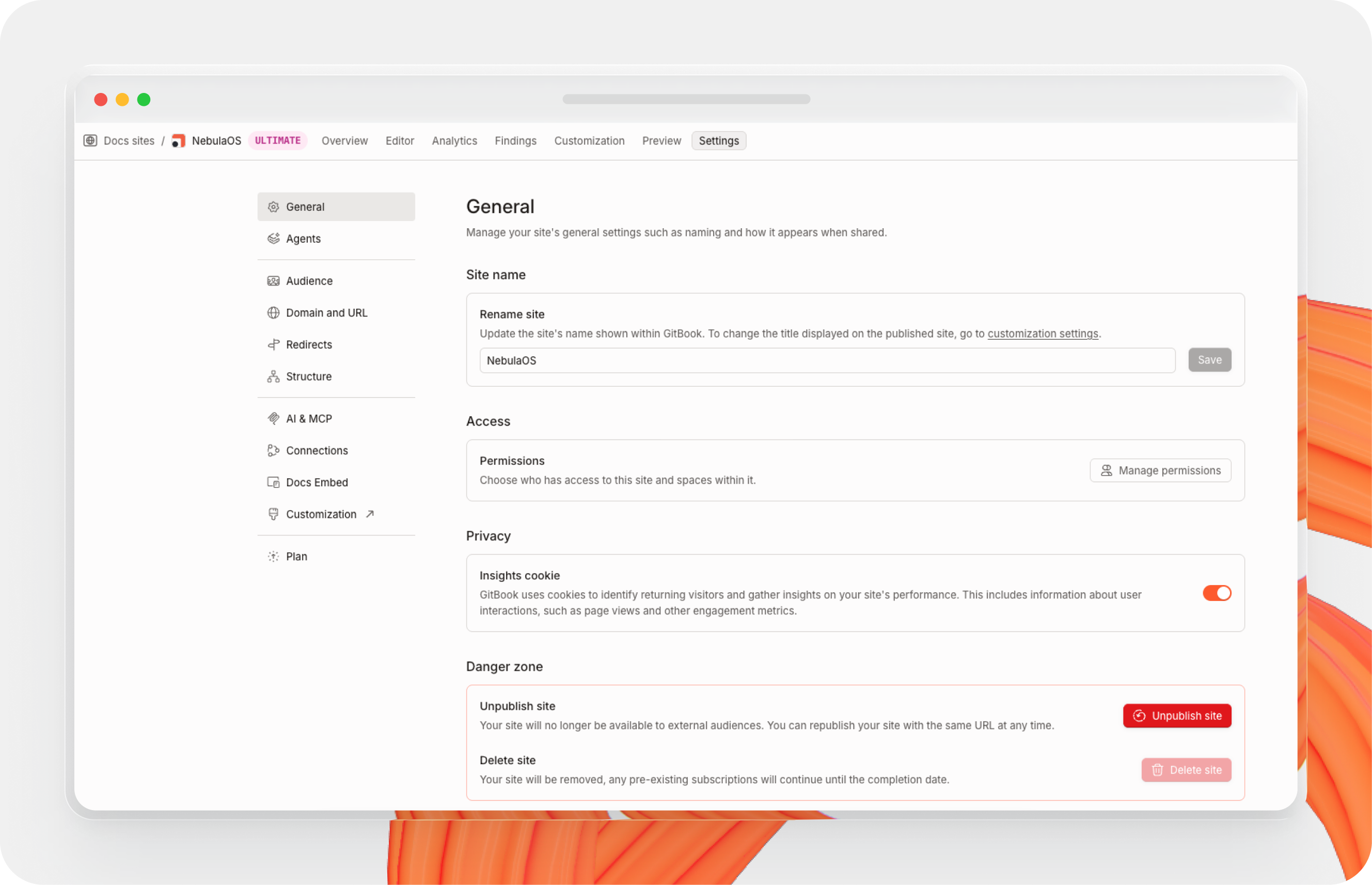
### General
Site title
Change the name of your site, if you don't have a custom logo this is the name that your site visitors will see.
Analytics cookie
If you want to use GitBook’s [site analytics](insights.md), your site will use cookies to identify returning visitors and gather the data needed to view your analytics.
You can choose to disable these cookies, but it will prevent you from using site analytics.
Unpublish site
Unpublish your site, but keep its settings and customizations. You can publish your site again at any time.
Delete site
Unpublish and remove your site from the **Docs site** section in the GitBook app.
**Note:** Deleting a site is a permanent action and cannot be undone. Any settings and customizations will be lost, but your content will remain in its [space](../creating-content/content-structure/space.md).
Access
Manage who can access and administer your docs site.
Open **Access** and click **Manage permissions**. You can also use **Share** from the site’s **Overview** page.
Site permissions are available on all plans.
By default, new sites derive permissions from their linked [spaces](../creating-content/content-structure/space.md), until you update permissions from the site permissions modal.
Site permissions can also affect the permissions of linked spaces that use **Inherited** mode. In this case, each inherited space receives the highest permission level granted by the organization, any parent collection, and any site that includes it.
### Agents
{% content-ref url="../gitbook-agent/what-is-gitbook-agent.md" %}
[what-is-gitbook-agent.md](../gitbook-agent/what-is-gitbook-agent.md)
{% endcontent-ref %}
### Audience
Audience
Choose who sees your published content. See [publish-a-docs-site](publish-a-docs-site/ "mention") for more info.
Adaptive content Ultimate
Turn on adaptive content for your site pages, variants, and sections. [Adaptive content](../site-access/adaptive-content/) lets you hide or show content for different visitors, depending on their permissions.
Your visitor token signing key will also be displayed here.
### Domain and URL
Custom domain
Configure a custom domain to unify your site with your own branding. See [custom-domain](custom-domain/ "mention") for more info.
GitBook Subdirectory
Publish your content on a subdirectory (e.g. `yourcompany.com/docs`). See [#gitbook-subdirectory](site-settings.md#gitbook-subdirectory "mention") for more info
### Redirects
{% content-ref url="../publishing-documentation/site-redirects.md" %}
[site-redirects.md](../publishing-documentation/site-redirects.md)
{% endcontent-ref %}
### Features
PDF export Premium & Ultimate
Let your visitors to export your GitBook as PDF. See [pdf-export.md](pdf-export.md "mention") for more info.
Page ratings Premium & Ultimate
Choose whether or not visitors to your published content can leave a rating on each page to let you know how they feel about it. They’ll be able to choose a sad, neutral, or happy face.
You can review the results of these ratings by opening [site analytics](insights.md) from your docs site dashboard and selecting **Pages & feedback**.
### AI & MCP
Choose the AI experience Ultimate
Let your site visitors ask GitBook anything with AI search or the GitBook assistant. See [ai-search.md](ai-search.md "mention") for more info.
Extend it with MCP connectors Ultimate
Configure MCP servers that the AI assistant can use when answering user questions inside your docs. See [#how-do-i-use-gitbook-ai](ai-search.md#how-do-i-use-gitbook-ai "mention") for more info.
### Connections
{% content-ref url="../ai-and-search/connections.md" %}
[connections.md](../ai-and-search/connections.md)
{% endcontent-ref %}
### Structure
{% content-ref url="site-structure/" %}
[site-structure](site-structure/)
{% endcontent-ref %}
### Plan
{% content-ref url="../account-management/plans/" %}
[plans](../account-management/plans/)
{% endcontent-ref %}