# psi [](https://travis-ci.org/GoogleChromeLabs/psi) [](https://npmjs.org/package/psi)
> PageSpeed Insights with reporting
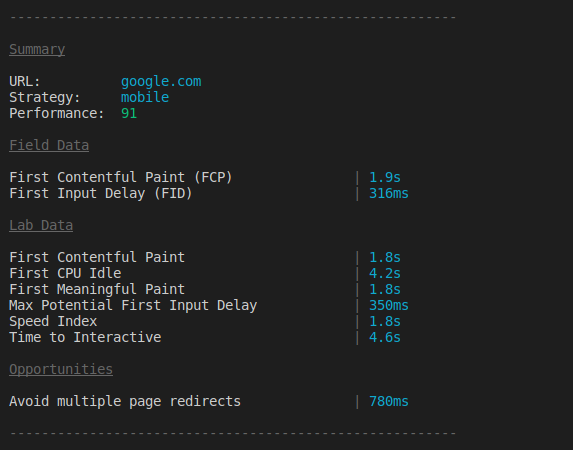
Run mobile and desktop performance tests for your deployed site using [Google PageSpeed Insights v5](https://developers.google.com/speed/docs/insights/v5/about) with tidy reporting for your build process.
## Install
```
$ npm install psi
```
## Usage
```js
const psi = require('psi');
(async () => {
// Get the PageSpeed Insights report
const { data } = await psi('https://theverge.com');
console.log('Speed score:', data.lighthouseResult.categories.performance.score);
// Output a formatted report to the terminal
await psi.output('https://theverge.com');
console.log('Done');
// Supply options to PSI and get back speed
const data2 = await psi('https://theverge.com', {
nokey: 'true',
strategy: 'desktop'
});
console.log('Speed score:', data2.data.lighthouseResult.categories.performance.score);
})();
```
As of PSI 2.x, we expose both the PageSpeed Insights speed and usability scores. The latter is based on [usability rules](https://developers.google.com/speed/docs/insights/rules) that score a page based on factors like the presence of a sensible mobile [viewport](https://developers.google.com/speed/docs/insights/ConfigureViewport).
## API
### psi(url, [options])
Returns a promise for the response data from Google PageSpeed Insights.
#### url
Type: `string`
URL of the page for which the PageSpeed Insights API should generate results.
#### options
Type: `Object`
##### key
Type: `string`
Default: Free tier
When using this module for a production-level build process, registering for an API key from the [Google Developer Console](https://developers.google.com/speed/docs/insights/v1/getting_started#auth) is recommended.
##### strategy
Type: `string`
Default: `mobile`
Values: `mobile` `desktop`
Strategy to use when analyzing the page.
##### locale
Type: `string`
Default: `en_US`
Locale results should be generated in.
##### threshold
Type: `number`
Default: `70`
Threshold score to pass the PageSpeed test. Useful for setting a performance budget.
##### links
Type: `boolean`
Default: `false`
If passed adds links with more info about opportunities. Useful for checking documentation about opportunities.
### psi.output(url, [options])
Output the formatted report to the terminal.
Returns a promise for the response data from Google PageSpeed Insights.
`url` and `options` are the same as `psi()`.
## CLI
```
$ npm install --global psi
```
```
$ psi --help
Usage
$ psi
Options
--key Google API Key. By default the free tier is used
--strategy Strategy to use when analyzing the page: mobile|desktop
--format Output format: cli|json|tap
--locale Locale results should be generated in
--threshold Threshold score to pass the PageSpeed test
Example
$ psi https://addyosmani.com --strategy=mobile
```
## Common Use cases
Getting PSI into your build process.
A sample [Gulp](https://github.com/addyosmani/psi-gulp-sample) project using PSI is available.
If you use Grunt, [`grunt-pagespeed`](https://github.com/jrcryer/grunt-pagespeed) is a task by James Cryer that uses PSI under the hood.
For testing local projects, we recommend using [`psi-ngrok`](https://github.com/denar90/psi-ngrok) or [`ngrok`](http://www.jamescryer.com/2014/06/12/grunt-pagespeed-and-ngrok-locally-testing/).
Getting filmstrips
**Filmstrips** are returned by the v5 API as data uri's but the psi tool does not expose them on the cli. If you want to get **filmstrips** (or any audit details) you can require `psi` and get them from the `audits` object:
```javascript
const psi = require('psi');
(async () => {
// Get the PageSpeed Insights report
const {data} = await psi('https://theverge.com');
console.log(data.lighthouseResult.audits['screenshot-thumbnails'].details.items);
})();
```
## License
Apache-2.0 - Copyright 2015 Google Inc