
Claw-Kanban
AI Agent Orchestration Kanban Board
Route tasks to Claude Code, Codex CLI, Gemini CLI, OpenCode, GitHub Copilot, and Google Antigravity with role-based auto-assignment and real-time monitoring.





Install with AI ·
Features ·
Architecture ·
API ·
Changelog ·
한국어
---
## Install with AI
> **Just paste this to your AI coding agent (Claude Code, Codex, Gemini CLI, Cursor, etc.):**
>
> ```
> Install Claw-Kanban following the guide at:
> https://github.com/GreenSheep01201/Claw-Kanban
> ```
>
> The AI will read this README and handle everything automatically.
---
## AI Installation Guide
> **This section is written for AI coding agents.**
> If you are an AI assistant and the user has asked you to install Claw-Kanban, follow the steps below exactly. Each step includes a verification command — run it and confirm success before proceeding to the next step.
### Step 0: Check Prerequisites
```bash
# 1. Check Node.js version (must be 22 or higher)
node -v
# Expected: v22.x.x or higher. If missing or below v22, stop and tell the user:
# "Node.js 22+ is required. Install from https://nodejs.org/ or use nvm: nvm install 22"
# 2. Check for pnpm (recommended) or npm
pnpm -v || npm -v
# If pnpm is missing, install it:
# npm install -g pnpm
# 3. Check for at least one AI CLI tool
which claude || which codex || which gemini
# If none found, tell the user to install at least one:
# Claude Code: npm i -g @anthropic-ai/claude-code && claude login
# Codex CLI: npm i -g @openai/codex && codex auth login
# Gemini CLI: npm i -g @google/gemini-cli && gemini auth login
```
### Step 1: Clone and Build
```bash
git clone https://github.com/GreenSheep01201/Claw-Kanban.git
cd Claw-Kanban
pnpm install # or: npm install
pnpm build # or: npm run build
```
**Verify:** `ls dist/index.html` should exist.
### Step 2: Start the Server
```bash
pnpm start
# Server starts at http://127.0.0.1:8787
```
**Verify:** `curl -s http://127.0.0.1:8787/api/health` should return `{"ok":true, ...}`.
### Step 3: Open the Dashboard
Tell the user:
```
Claw-Kanban is installed and running!
Dashboard: http://127.0.0.1:8787
```
### Step 3.5: AGENTS.md Setup (Required)
This step is **required** for AI agent orchestration. It teaches your AI coding agent how to interact with the kanban board — without it, the agent cannot register tasks, route work, or manage cards.
```bash
pnpm setup
# This prepends orchestration rules to the workspace AGENTS.md
```
**Verify:** Your workspace `AGENTS.md` should now contain `` at the top.
### Optional: Development Mode
For development with hot reload:
```bash
pnpm dev # LAN accessible (0.0.0.0)
pnpm dev:local # localhost only (127.0.0.1)
# UI: http://127.0.0.1:5173 | API: http://127.0.0.1:8787
```
### Troubleshooting
| Symptom | Cause | Fix |
|---------|-------|-----|
| `pnpm build` fails with "node:sqlite" error | Node.js < 22 | Upgrade to Node.js 22+: `nvm install 22 && nvm use 22` |
| Port 8787 already in use | Another process on port | `lsof -i :8787` to find it, or set `PORT=9999 pnpm start` |
| `curl /api/health` connection refused | Server not running | Run `pnpm start` from the Claw-Kanban directory |
| No AI providers shown in Settings | CLI tools not installed | Install at least one: `npm i -g @anthropic-ai/claude-code` |
| Provider shows "Not Authenticated" | CLI tool not logged in | Run the auth command: `claude login`, `codex auth login`, or `gemini auth login` |
---
## Why?
Using multiple AI coding agents (Claude Code, Codex CLI, Gemini CLI, OpenCode, Copilot, Antigravity) means juggling multiple terminal windows, manually deciding which agent to use for each task, and waiting blindly until they finish. Claw-Kanban solves this by providing a single dashboard where you can:
- **Auto-assign agents by role** — no more manual switching between terminals
- **Watch agents work in real-time** — no more blind waiting; see exactly what your agent is doing
- **Dispatch tasks from your phone** — send `# fix the login bug` via Telegram and the agent handles the rest
- **Use your existing CLI environment** — CLI agents inherit your skills, MCP servers, custom instructions, and all settings with zero additional configuration
## Dual Execution Model
Claw-Kanban supports **6 AI agents** through two execution modes:
### CLI Agents — Your Environment, Your Rules
| Agent | Execution | Setup |
|-------|-----------|-------|
| **Claude Code** | CLI spawn | `npm i -g @anthropic-ai/claude-code && claude login` |
| **Codex CLI** | CLI spawn | `npm i -g @openai/codex && codex auth login` |
| **Gemini CLI** | CLI spawn | `npm i -g @google/gemini-cli && gemini auth login` |
| **OpenCode** | CLI spawn | `npm i -g opencode && opencode auth` |
CLI agents spawn the actual CLI binary installed on your machine. This means **your entire personalized environment carries over automatically**:
- Custom skills and agents you've configured
- MCP server connections
- Project-specific instructions (CLAUDE.md, etc.)
- Authentication and API keys
- All CLI settings and preferences
**No additional setup needed** — if `claude`, `codex`, or `gemini` works in your terminal, it works in Claw-Kanban. This is the key advantage of CLI agents: they use your existing workflow as-is.
### HTTP Agents — Zero Install, OAuth Only
| Agent | Execution | Setup |
|-------|-----------|-------|
| **GitHub Copilot** | Direct API call | OAuth Connect in Settings |
| **Google Antigravity** | Direct API call | OAuth Connect in Settings |
HTTP agents call provider APIs directly from the server. No CLI installation required — just connect your GitHub or Google account via OAuth in the Settings panel. Tokens are encrypted at rest (AES-256-GCM).
## Features
- **6-Column Kanban Board** — Inbox, Planned, In Progress, Review/Test, Done, Stopped
- **Multi-Agent Orchestration** — Manage 6 AI agents: Claude Code, Codex CLI, Gemini CLI, OpenCode, GitHub Copilot, Google Antigravity
- **Dual Execution Model** — CLI agents (spawn local processes, inherit your environment) + HTTP agents (direct API calls, OAuth only)
- **Role-Based Auto-Assignment** — Automatically route tasks by role (DevOps / Backend / Frontend) and task type (New / Modify / Bugfix)
- **AI Provider Detection** — Settings panel shows install and auth status for each CLI tool; unauthenticated providers are disabled in dropdowns
- **OAuth Connect (optional)** — For environments where CLI auth isn't possible, or to use Copilot/Antigravity; connect via browser and store credentials server-side (encrypted)
- **Automatic Review** — After implementation completes, auto-trigger a review/test cycle via Claude
- **Real-time Terminal Viewer** — Live agent output in the browser; no more waiting blindly for completion
- **Chat-to-Card** — Send `# task description` via Telegram, Slack, or any webhook source to instantly create a kanban card
- **OpenClaw Gateway Integration** — Optional wake notifications on card status changes
- **Project Path Safety** — Dedicated `project_path` field per card; server blocks agent runs when path is unset to prevent working in the wrong directory
- **Multi-Language Orchestration** — AGENTS.md rules auto-detect user language (Korean, English, etc.) and respond accordingly
- **Modern Dark UI** — React 19, responsive, glassmorphism design
- **SQLite Storage** — Zero-config, file-based database via Node.js built-in `node:sqlite`
- **Cross-Platform** — macOS, Linux, and Windows (PowerShell)
## Screenshots
### Kanban Dashboard
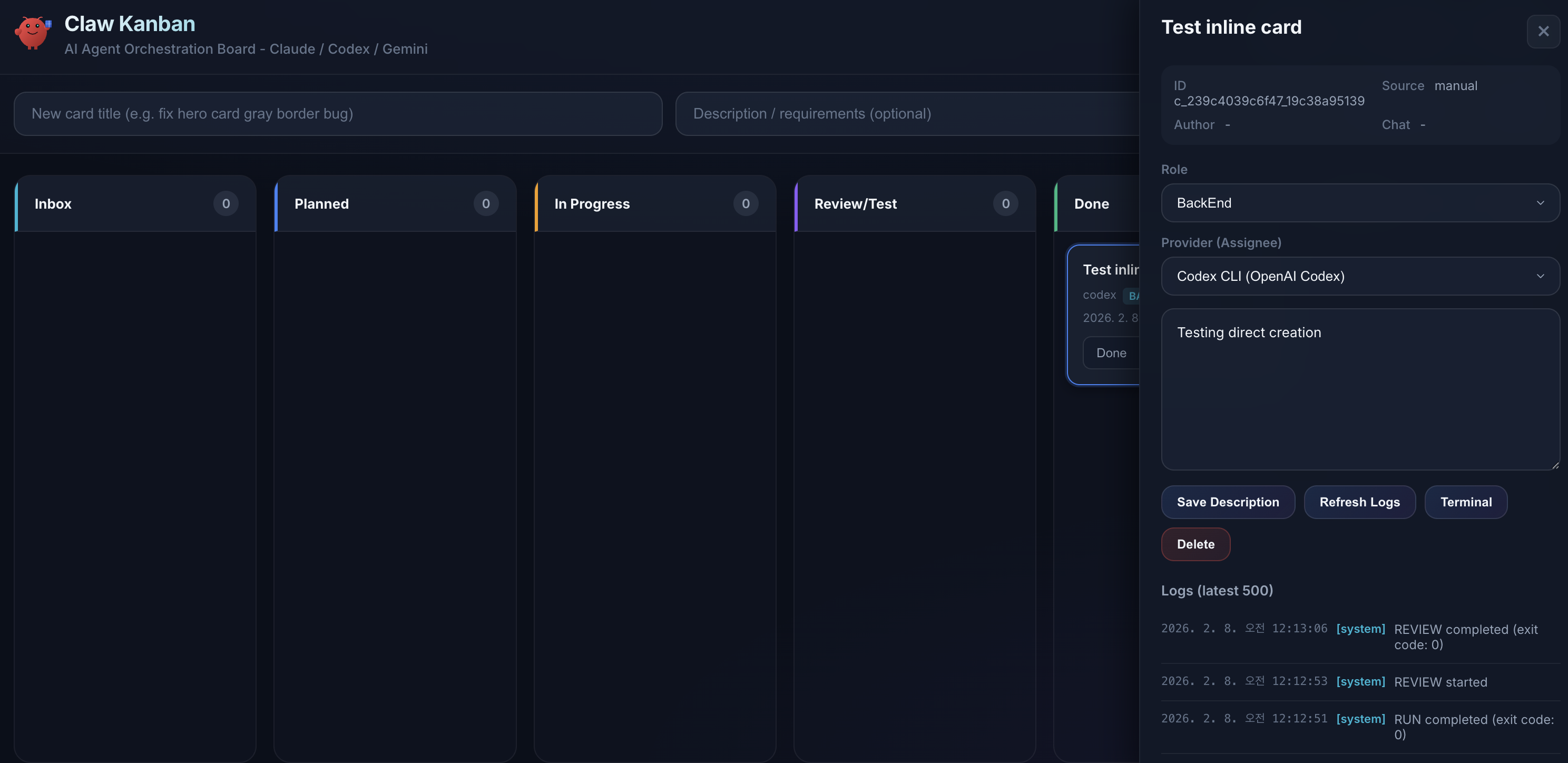
> 6-column kanban board with card detail panel. Create tasks, assign AI agents, and monitor progress in real-time.
### Provider Settings
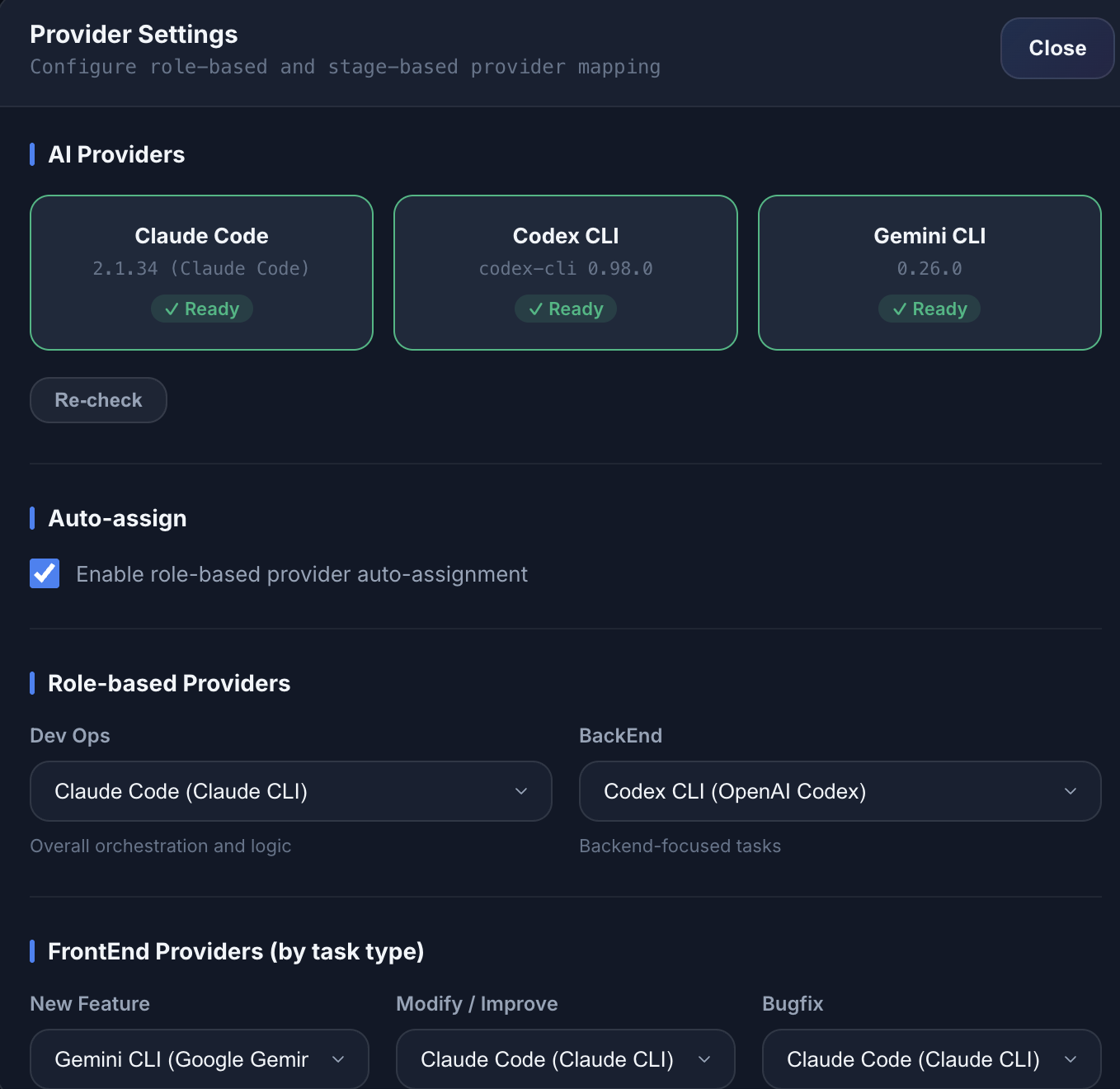
> Auto-detect installed AI CLI tools (Claude Code, Codex CLI, Gemini CLI) and configure role-based provider mapping.
### Real-time Terminal Viewer
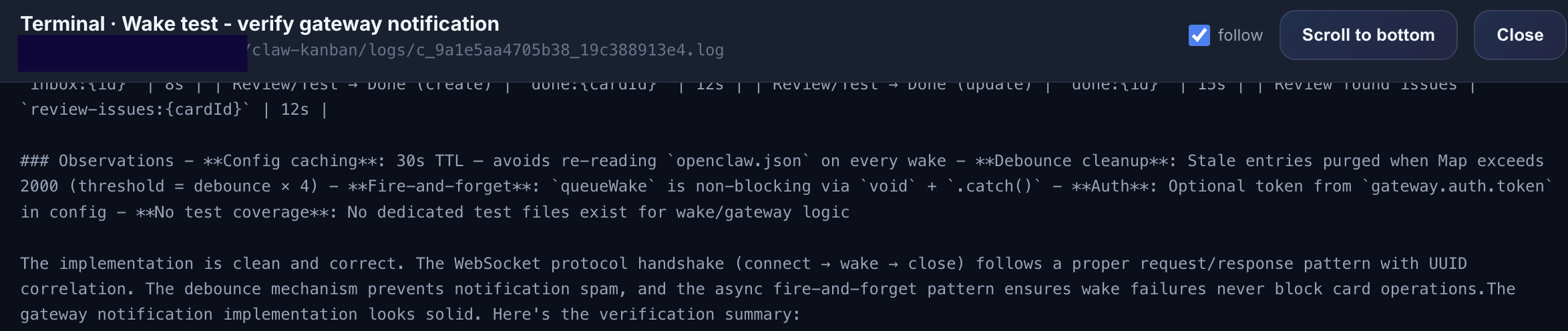
> See exactly what your AI agent is doing in real-time. No more waiting blindly for completion — open the terminal viewer and watch the agent work.
### Telegram Integration
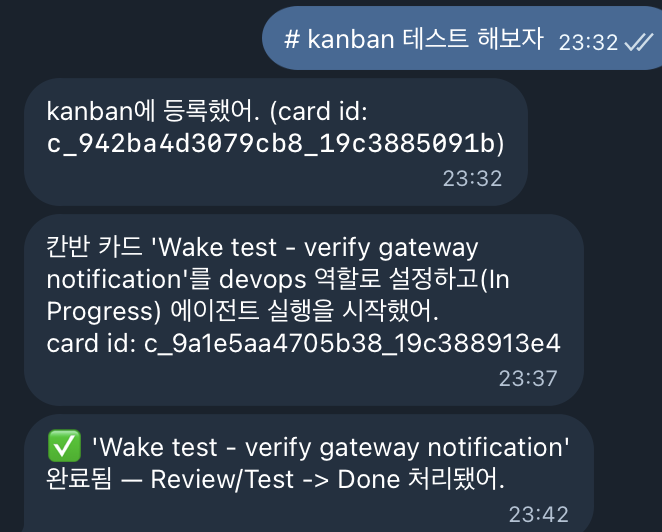
> Send `# fix the login bug` from Telegram and a kanban card is created automatically. The agent runs, completes the work, and reports back — dispatch tasks from your phone on the go.
## Prerequisites
- **Node.js 22+** (required for `node:sqlite`)
- **pnpm** (recommended) or npm
- At least one AI agent available:
**CLI Agents** — Install and authenticate the CLI tool. Your existing configuration (skills, agents, MCP servers, custom instructions) carries over automatically.
| Tool | Install | Authenticate |
|------|---------|-------------|
| [Claude Code](https://docs.anthropic.com/en/docs/claude-code) | `npm i -g @anthropic-ai/claude-code` | `claude login` |
| [OpenAI Codex CLI](https://github.com/openai/codex) | `npm i -g @openai/codex` | `codex auth login` |
| [Google Gemini CLI](https://github.com/google-gemini/gemini-cli) | `npm i -g @google/gemini-cli` | `gemini auth login` |
| [OpenCode](https://github.com/opencode-ai/opencode) | `npm i -g opencode` | `opencode auth` |
**HTTP Agents** — No CLI needed. Connect via OAuth in the Settings panel after starting the server.
| Tool | Setup |
|------|-------|
| GitHub Copilot | Settings > OAuth Connect > GitHub |
| Google Antigravity | Settings > OAuth Connect > Google |
## Quick Start
### One-Line Install
**macOS / Linux:**
```bash
curl -fsSL https://raw.githubusercontent.com/GreenSheep01201/Claw-Kanban/main/install.sh | bash
```
**Windows (PowerShell):**
```powershell
irm https://raw.githubusercontent.com/GreenSheep01201/Claw-Kanban/main/install.ps1 | iex
```
The installer clones the repo, installs dependencies, builds the UI, configures `.env` and `AGENTS.md`, and registers an auto-start service (launchd on macOS, systemd on Linux).
### Manual Install
```bash
git clone https://github.com/GreenSheep01201/Claw-Kanban.git
cd Claw-Kanban
pnpm install
pnpm build
```
### Running
```bash
# Production (serves built UI)
pnpm start
# Development (Vite HMR + API with hot reload, LAN accessible)
pnpm dev
# Development (localhost only)
pnpm dev:local
```
| | URL |
|---|---|
| **UI** | http://127.0.0.1:5173 (dev) or http://127.0.0.1:8787 (prod) |
| **API** | http://127.0.0.1:8787 |
## How It Works
```
1. Task arrives (UI / API / webhook) ──> Card created in Inbox
2. Click "Start" or auto-assign ──> Agent launched:
• CLI agents (Claude/Codex/Gemini) ──> CLI process spawned (inherits your environment)
• HTTP agents (Copilot/Antigravity)──> Direct API call (OAuth tokens)
3. Card moves to "In Progress" ──> Real-time terminal logs available
4. Agent completes (exit 0) ──> Card auto-moves to "Review/Test"
5. Auto-review triggers ──> Claude reviews the work
6. Review passes ──> Card moves to "Done" + wake notification
7. Review fails ──> Stays in "Review/Test", issues reported
```
### Project Path
The agent needs to know **which project directory** to work in. There are three ways to set it:
**1. Dedicated `project_path` field (recommended):**
Set it in the UI card detail panel, or via API:
```bash
# When creating a card
curl -X POST http://127.0.0.1:8787/api/cards \
-H 'content-type: application/json' \
-d '{"title":"fix bug","description":"...","project_path":"/Users/me/projects/my-app"}'
# When updating an existing card
curl -X PATCH http://127.0.0.1:8787/api/cards/ \
-H 'content-type: application/json' \
-d '{"project_path":"/Users/me/projects/my-app"}'
```
**2. Description section (legacy, still supported):**
```
Fix the login button style
## Project Path
/Users/me/projects/my-app
```
**3. Webhook with project_path:**
```bash
curl -X POST http://127.0.0.1:8787/api/inbox \
-H 'content-type: application/json' \
-d '{"text":"fix the build","source":"telegram","project_path":"/Users/me/projects/my-app"}'
```
**Fallback chain:** `card.project_path` field > description `## Project Path` section > blocked (server returns error)
> **Note:** The server blocks `/run` and `/review` if no project path can be resolved. This prevents agents from running in the wrong directory.
### Task Flow Diagram
```
┌─────────┐
UI / API ──> │ Inbox │
Webhook ──> │ │
└────┬────┘
│ Start (manual or auto)
┌────▼────┐
│ Planned │ (optional staging)
└────┬────┘
│
┌────▼─────────┐
│ In Progress │ <── CLI agent running
│ (terminal log)│
└────┬─────────┘
│ exit 0
┌────▼─────────┐
│ Review/Test │ <── Claude auto-review
└──┬────────┬──┘
pass │ │ issues found
┌───────▼┐ ┌───▼────┐
│ Done │ │Stopped │
└────────┘ └────────┘
```
## Configuration
### Environment Variables
Copy `.env.example` to `.env`:
```bash
cp .env.example .env
```
| Variable | Default | Description |
|----------|---------|-------------|
| `PORT` | `8787` | API server port |
| `HOST` | `127.0.0.1` | Bind address (`0.0.0.0` for LAN/Tailscale) |
| `DB_PATH` | `./kanban.sqlite` | SQLite database file path |
| `LOGS_DIR` | `./logs` | Agent terminal log directory |
| `OPENCLAW_CONFIG` | *(empty)* | Path to `openclaw.json` for gateway wake integration |
| `OAUTH_ENCRYPTION_SECRET` | *(empty)* | **Required for OAuth Connect**. Secret used to encrypt OAuth tokens at rest (AES-256-GCM). Can reuse `SESSION_SECRET`. |
| `OAUTH_BASE_URL` | `http://HOST:PORT` | Public base URL used to build OAuth redirect URIs (set if HOST/PORT differ from browser access) |
| `ANTIGRAVITY_GITHUB_CLIENT_ID` | *(empty)* | GitHub OAuth App client id for `antigravity` provider |
| `ANTIGRAVITY_GITHUB_CLIENT_SECRET` | *(empty)* | GitHub OAuth App client secret for `antigravity` provider |
| `ANTIGRAVITY_GITHUB_SCOPE` | `read:user user:email` | GitHub OAuth scopes requested by `antigravity` provider |
### OAuth Connect (optional)
If a machine cannot authenticate CLI tools (e.g. locked-down environments), you can use **OAuth Connect** from the Settings modal.
**Copilot decision (v1):** this repo uses **GitHub OAuth web login** (Authorization Code + PKCE) rather than asking for a GitHub PAT. This is the lowest-friction approach to avoid users creating long-lived PATs.
- Scopes requested are controlled via `ANTIGRAVITY_GITHUB_SCOPE` (default: `read:user user:email`).
- Tokens are stored **server-side** in SQLite and encrypted at rest using `OAUTH_ENCRYPTION_SECRET`.
### Provider Settings (UI)
Open **Settings** in the UI to configure:
| Section | Description |
|---------|-------------|
| **AI Providers** | Shows install/auth status for Claude, Codex, Gemini. Re-check button refreshes detection. |
| **Auto-assign** | Toggle role-based provider auto-assignment on/off |
| **Role-based Providers** | Map DevOps / Backend roles to a default provider |
| **FrontEnd Providers** | Map New / Modify / Bugfix task types to providers |
| **Stage-based Providers** | Optional overrides for In Progress and Review/Test stages |
Default mapping:
| Role | Task Type | Default Provider |
|------|-----------|-----------------|
| DevOps | — | Claude Code |
| Backend | — | Codex CLI |
| Frontend | New | Gemini CLI |
| Frontend | Modify | Claude Code |
| Frontend | Bugfix | Claude Code |
### AGENTS.md Integration
The setup script prepends kanban orchestration rules to your workspace `AGENTS.md`:
```bash
pnpm setup # auto-detect location
pnpm setup -- --agents-path /path/to/AGENTS.md # custom path
```
This teaches your AI agent to recognize `#`-prefixed messages as task requests and register them on the board.
### OpenClaw Gateway
Set `OPENCLAW_CONFIG` in `.env` to enable wake notifications:
```bash
OPENCLAW_CONFIG=~/.openclaw/openclaw.json
```
Wake notifications fire on:
- New Inbox card creation
- Card moving from Review/Test to Done
## Architecture
```
Claw-Kanban/
├── server/
│ └── index.ts # Express 5 API server
│ # - SQLite storage (node:sqlite)
│ # - Agent process spawn/kill
│ # - CLI detection (GET /api/cli-status)
│ # - Gateway wake integration
├── src/
│ ├── App.tsx # Kanban board + Settings modal
│ ├── App.css # Dark theme (CSS variables)
│ ├── api.ts # Frontend API client + TypeScript types
│ ├── main.tsx # React 19 entry point
│ └── index.css # Base/reset styles
├── public/
│ └── kanban-claw.svg # App icon (OpenClaw lobster + kanban box)
├── templates/
│ └── AGENTS-kanban.md # AGENTS.md orchestration rules template
├── scripts/
│ ├── setup.mjs # AGENTS.md setup (prepend, not overwrite)
│ └── kanban.mjs # Process management (start/stop/status)
├── install.sh # One-line installer (macOS/Linux)
├── install.ps1 # One-line installer (Windows)
├── .env.example # Environment variable template
├── vite.config.ts # Vite config (dev proxy to API)
└── package.json
```
### Tech Stack
| Layer | Technology |
|-------|-----------|
| Frontend | React 19 + TypeScript + Vite |
| Backend | Express 5 + Node.js 22+ |
| Database | SQLite (via `node:sqlite`, zero dependencies) |
| CLI Agents | Claude Code, Codex CLI, Gemini CLI, OpenCode (local process spawn) |
| HTTP Agents | GitHub Copilot, Google Antigravity (direct API + OAuth) |
| Process Mgmt | Node `child_process` (CLI) + `fetch` streaming (HTTP) |
## API Reference
### Cards
| Method | Endpoint | Description |
|--------|----------|-------------|
| `GET` | `/api/cards` | List all cards (optional `?status=Inbox`) |
| `GET` | `/api/cards/search?q=keyword` | Search cards across all fields |
| `POST` | `/api/cards` | Create a card |
| `PATCH` | `/api/cards/:id` | Update card fields |
| `DELETE` | `/api/cards/:id` | Delete card and all artifacts |
| `POST` | `/api/cards/purge?status=Done` | Bulk delete by status |
### Agent Control
| Method | Endpoint | Description |
|--------|----------|-------------|
| `POST` | `/api/cards/:id/run` | Start agent (spawns CLI process) |
| `POST` | `/api/cards/:id/stop` | Stop running agent (kill process tree) |
| `POST` | `/api/cards/:id/review` | Manually trigger review |
| `GET` | `/api/cards/:id/terminal` | Stream terminal output (`?lines=200&pretty=1`) |
| `GET` | `/api/cards/:id/logs` | Get card event logs |
### Settings & Status
| Method | Endpoint | Description |
|--------|----------|-------------|
| `GET` | `/api/settings` | Get provider settings |
| `PUT` | `/api/settings` | Save provider settings |
| `GET` | `/api/cli-status` | Detect CLI install/auth status (30s cache, `?refresh=1` to bypass) |
| `GET` | `/api/oauth/antigravity/start` | Start OAuth (redirects to GitHub) |
| `GET` | `/api/oauth/antigravity/callback` | OAuth callback (stores token server-side) |
| `GET` | `/api/oauth/status` | OAuth connection status |
| `POST` | `/api/oauth/disconnect` | Disconnect OAuth (body: `{ provider?: string }`) |
### Webhook
```bash
POST /api/inbox
Content-Type: application/json
{ "text": "# Fix the login bug", "source": "telegram", "author": "user123", "project_path": "/path/to/project" }
```
> `project_path` is optional in webhook payloads. If omitted, the orchestrator will ask the user before running the agent.
### Health
```bash
GET /api/health # { ok, version, dbPath, gateway }
```
## CLI Detection
The `/api/cli-status` endpoint checks each tool:
| Check | Method |
|-------|--------|
| **Installed** | `which` (Unix) / `where` (Windows) + `--version` |
| **Claude auth** | `~/.claude.json` contains `oauthAccount` key |
| **Codex auth** | `~/.codex/auth.json` contains `OPENAI_API_KEY` or `tokens`; fallback to `OPENAI_API_KEY` env var |
| **Gemini auth** | `~/.gemini/oauth_creds.json` contains `access_token`; on Windows also checks `%APPDATA%\gcloud\application_default_credentials.json` |
Results are cached for 30 seconds. Use `?refresh=1` to force re-check.
## Security
Claw-Kanban is a **local development tool**. Important notes:
- **No Authentication** — Bind to `127.0.0.1` (default). Only use `0.0.0.0` on trusted networks (VPN/Tailscale).
- **Agent Permission Flags** — `--dangerously-skip-permissions` (Claude), `--yolo` (Codex/Gemini) are used for autonomous operation.
- **Environment Inheritance** — Child processes inherit the server's environment.
- **CORS** — Open CORS enabled for Vite dev proxy. Do not expose to the public internet.
- **OAuth token storage** — OAuth tokens are stored **server-side only** in SQLite and encrypted at rest using `OAUTH_ENCRYPTION_SECRET` (AES-256-GCM). The browser never receives refresh tokens.
- **Built-in OAuth Client IDs** — The GitHub and Google OAuth client IDs/secrets embedded in the source code are **public OAuth app credentials**, not user secrets. Per [Google's documentation](https://developers.google.com/identity/protocols/oauth2/native-app), client secrets for installed/desktop apps are "not treated as a secret." This is standard practice for open-source apps (VS Code, Thunderbird, GitHub CLI, etc.). These credentials only identify the app itself — your personal tokens are always encrypted separately.
- **No personal credentials in source** — All user-specific tokens (GitHub, Google OAuth) are stored encrypted in the local SQLite database, never in source code. The encryption key is derived from your `OAUTH_ENCRYPTION_SECRET` environment variable.
- **Copilot token caching** — Exchanged Copilot session tokens are cached in-memory only (never written to disk) and auto-expire. Cache is invalidated on re-authentication.
## Platform Support
| Platform | Status | Notes |
|----------|--------|-------|
| macOS | Fully tested | Primary dev platform. 100% working. launchd auto-start. |
| Linux | Fully supported | systemd user service auto-start. |
| Windows | Supported | PowerShell installer available. Process management uses `taskkill` for reliable cleanup. |
## Management
```bash
# Using the management script
node scripts/kanban.mjs status # Check if server is running
node scripts/kanban.mjs start # Start in background
node scripts/kanban.mjs stop # Stop server
node scripts/kanban.mjs restart # Restart server
# macOS (launchd)
launchctl kickstart -k gui/$(id -u)/ai.openclaw.kanban # restart
launchctl bootout gui/$(id -u)/ai.openclaw.kanban # stop
# Linux (systemd)
systemctl --user restart claw-kanban
systemctl --user stop claw-kanban
systemctl --user status claw-kanban
```
## Changelog
### v1.0.3
- **`POST /api/wake` endpoint** — Agents can now send wake notifications via HTTP (`curl`) instead of requiring the external `openclaw` CLI
- **AGENTS.md template updated** — All `openclaw gateway wake` references replaced with `curl` commands to the new `/api/wake` endpoint
### v1.0.2
- **GitHub Copilot direct API** — OAuth token exchange + OpenAI-compatible chat completions streaming, no opencode CLI needed
- **Google Antigravity direct API** — Uses `cloudcode-pa` endpoint with automatic GCP project discovery (`loadCodeAssist`), transparent token refresh
- **Dual execution model** — CLI agents (Claude/Codex/Gemini) spawn local processes inheriting your environment; HTTP agents (Copilot/Antigravity) call APIs directly via OAuth
- **Race condition fix** — DB writes now happen synchronously before async HTTP agent launch
- **Copilot token cache fix** — Added sourceHash validation to prevent stale credentials after re-authentication
- **SSE stream fixes** — Final buffer flush, proper log stream await, negative PID handling for stop/delete
### v1.0.1
- **`project_path` first-class field** — Cards now have a dedicated `project_path` column. Set it via UI, API (`POST /api/cards`, `PATCH /api/cards/:id`, `POST /api/inbox`), or AGENTS.md orchestration
- **Run/review guard** — Server blocks `/run` and `/review` when `project_path` is unset, preventing agents from running in the wrong directory
- **3-step fallback chain** — `card.project_path` > description `## Project Path` section > ask user (blocked)
- **AGENTS.md orchestration updates** — Orchestrator asks user for project path on card creation; checks for existing work before re-running; language-adaptive responses (Korean/English/auto-detect)
- **Windows process management fix** — `killPidTree` now uses `execFile("taskkill")` with timeout; `kanban.mjs stop` uses `execSync("taskkill /T /F")` for reliable process tree cleanup
- **UI improvements** — Project path input in card creation form and detail panel; "Save Description" renamed to "Save Details"; Working Dir shown in card metadata
- **SQLite parameter binding fix** — Explicit `null` conversion for all optional fields prevents `undefined` binding errors on `node:sqlite`
### v1.0.0
- Initial release
## License
Apache License 2.0 — see [LICENSE](LICENSE) for details.
Copyright 2025 GreenSheep01201