*Professional terminal interface for advanced users and CI/CD integration*
The legacy browser UI has been removed. The Tauri 2 workbench can be run from
source today; packaged Desktop releases are still under active development.
See the
[`P1 architecture`](../P1_APP_SERVER_ARCHITECTURE.md).
---
### 🎬 **Introduction Video**
*🎯 **Watch our complete introduction** - See how DeepCode transforms research papers and natural language into production-ready code*
---
> *"Where AI Agents Transform Ideas into Production-Ready Code"*
---
## 📑 Table of Contents
- [📰 News](#-news)
- [🚀 Key Features](#-key-features)
- [🏗️ Architecture](#️-architecture)
- [📊 Experimental Results](#-experimental-results)
- [🚀 Quick Start](#-quick-start)
- [💡 Examples](#-examples)
- [🎬 Live Demonstrations](#-live-demonstrations)
- [⭐ Star History](#-star-history)
- [📄 License](#-license)
---
## 📰 News
**[2026-07-20] Shared LLM connections and per-Session model switching**
- **Configure once, use everywhere.** CLI and Desktop now share named
connections, provider routing, model discovery, and the same Agent runtime.
- **Credentials stay private.** Saved API keys live in a user-only credential
store and are never returned to Desktop or written into Session history.
- **Switch models without losing context.** A Session can change
connection/model for future Turns while preserving its complete history;
every accepted Turn keeps its own immutable execution snapshot.
---
**[2026-07-10] Team mode: split a big feature across parallel workers**
- **A team, not just one agent.** Hand DeepCode a larger feature and it breaks the work into pieces, builds them at the same time, and combines the results — each piece checked against your tests as it goes.
- **Parallel work that never collides.** Every worker builds on its own isolated copy of your project, so simultaneous changes can't corrupt each other; when two pieces touch the same code, the overlap is flagged instead of silently overwritten.
- **Only ships when the tests pass.** Once everything is combined, the whole feature runs against your test command — the team reports success only when the tests are actually green.
---
**[2026-07-10] Loop engineering: give it a goal, it works until the tests pass**
- **Autonomous coding loops.** Hand DeepCode a goal and a test command — it works, runs your tests, and keeps fixing until they pass, on its own.
- **Self-tidying memory.** The agent periodically cleans up its own notes, so its memory stays sharp across sessions.
- **Run it on a schedule.** Kick off a loop or a memory tidy-up on an interval, with sensible stop conditions so it never runs away.
---
**[2026-07-08] Persistent agent sessions and memory**
- **The agent remembers across sessions.** Drop an `AGENTS.md` (or `DEEPCODE.md`) at your project root for standing instructions, and the agent keeps persistent notes under `.deepcode/memory/`.
- **Sessions survive restarts.** Workspaces, messages, titles, and task references are persisted under `~/.deepcode/sessions/` and can be resumed from the TUI.
---
**[2026-07-08] General coding agent: interactive CLI and native tools**
- **Talk to DeepCode in your terminal.** `deepcode` opens a free-form, multi-turn coding conversation — describe any task in natural language and watch the agent stream its reply, edit files, and run commands with live progress cards. Steer with `/new`, `/resume`, `/model`, `/clear`, `/help`, and attach files with `@path`. (Replaces the previous menu-driven CLI.)
- **Edits that land on the first try.** First-class `read` / `write` / `edit` / `apply_patch` / `bash` / `grep` / `glob` tools: whitespace-tolerant fuzzy edits, multi-file atomic patches, and automatic post-edit diagnostics the agent fixes on the spot.
- **Script any task.** `deepcode exec "task" --json` runs one task end-to-end and emits a machine-readable event stream — drop it straight into CI or your own pipelines.
- **Long conversations stay fast and stable.** Context windows resolve per model with automatic history compaction, and sessions are SQLite-indexed so listing and resume are instant.
---
**[2026-07-04] V2 foundation: unified agent kernel, security sandbox & event protocol**
- **Every coding phase behaves the same.** All phases now run on one shared agent runtime, with tool definitions sourced straight from the MCP servers as the single source of truth — Paper2Code results unchanged.
- **Your credentials stay yours.** Every tool call passes a three-valued permission engine (allow / ask / deny) with a non-overridable credential denylist (`.ssh`, `.aws/credentials`, `.env`, `*.pem`, ...), and shell/Python execution runs inside a platform sandbox (macOS seatbelt / Linux bubblewrap) fenced to the workspace. Tune it via `DEEPCODE_SANDBOX` / `DEEPCODE_PERMISSION_MODE` or the `security` block in `deepcode_config.json`.
- **Build every client on one contract.** Declarative per-model provider settings, a normalized model-event stream, a structured message model, and an `AgentSession` event protocol back the CLI and headless runs. The desktop application is being rebuilt on the same core.
---
Earlier news
🧭 **[2026-05-01] OpenRouter model selector, session cleanup & workflow UX hardening**
- 🧠 **OpenRouter model catalog support.** DeepCode can fetch and cache OpenRouter model metadata and use exact model ids such as `z-ai/glm-5.1`.
- 🔄 **Runtime model switching.** Model choices in `deepcode_config.json` apply to newly started workflows.
- 🛡️ **Workflow robustness fixes.** Uploads now reject Git LFS pointer files, cancelled tasks stop backend work promptly, stale browser session ids recover cleanly, planner retries fall back to a minimal valid plan when a model defers/tool-calls incorrectly, and document segmentation skips an extra validation LLM call that could stall progress.
---
🗂️ **[2026-04-28] Persistent sessions & dual-layer logging**
- 🆕 **Sessions are now persistent.** Every CLI run can attach to a session under `~/.deepcode/sessions//` (override with `DEEPCODE_SESSIONS_DIR`). Sessions are JSONL and indexed with SQLite.
- 🔄 **Resume a previous run** from the TUI with `/resume` or start it with `--resume `.
- 💻 **CLI session UX.** The interactive CLI now supports Cursor-style slash commands: `/resume` opens a numbered session picker, `/new [title]` creates and switches sessions, `/session` shows the active session, and `/help` lists commands. You can also paste inline inputs directly at the menu prompt with `@/path/to/paper.pdf`, `@"C:\path with spaces\paper.pdf"`, or `@https://...`.
- 📜 **Two-layer structured logging.** A global rotating JSONL lives at `logs/server-YYYYMMDD.jsonl`; per-task logs at `deepcode_lab/tasks//logs/{system,llm,mcp}.jsonl`. Every `loguru.logger` call automatically picks up the active `task_id` via a contextvar — business code did not have to change. Configure via the new `logger.{globalFile,taskFile,llm}` block in `deepcode_config.json`.
- 🧹 **Dead code removed.** Legacy in-memory session code was replaced by `core.sessions.SessionStore`.
---
🛠️ **[2026-04-17] Stability, Windows compatibility & secrets hygiene update**
- 🐛 **Code Implementation no longer crashes** with `name 'LoopDetector' is not defined` — added the missing `LoopDetector`/`ProgressTracker` imports in both `workflows/code_implementation_workflow.py` and `workflows/code_implementation_workflow_index.py`.
- 🪟 **Windows: `mkdir -p` / `touch` / `rm -rf` / `cp -r` / `mv` now work natively.** `tools/command_executor.py` translates these common Unix file-tree commands via `pathlib`/`shutil` on every platform, eliminating the bug where `cmd.exe` would create a literal `-p` directory and stall the workflow.
- 🚀 **Removed Brave Search end-to-end.** All Python code, MCP server config, and docs are scrubbed of `brave`/`BRAVE_API_KEY`/`WebSearchTool`. Web fetching now relies entirely on the built-in `fetch` MCP server.
- 🔌 **OpenAI-compatible providers documented.** New `Quick Start → Configuration` snippet shows how to point the `openai`/`openrouter` blocks at Poe (`https://api.poe.com/v1`), OpenRouter, or Alibaba DashScope, plus how to set `agents.defaults.model` / `agents.planning.model` / `agents.implementation.model` (e.g. `openai/gpt-5.4`).
- 🔐 **Secrets hygiene.** All YAML config has been collapsed into a single `deepcode_config.json`, and `.gitignore` now ignores it alongside `secrets.json`, `*credentials*.json`, `.env`, `.env.*` (with `*.env.example` whitelisted).
- 🧹 **Misc:** auto-create `logs/` directory so JSONL logging never fails on a fresh checkout, replace bare `except:` with `except Exception:` in `agent_orchestration_engine.py` (Ruff E722), `command_executor` MCP tool descriptions now embed the host OS so the LLM picks compatible commands.
---
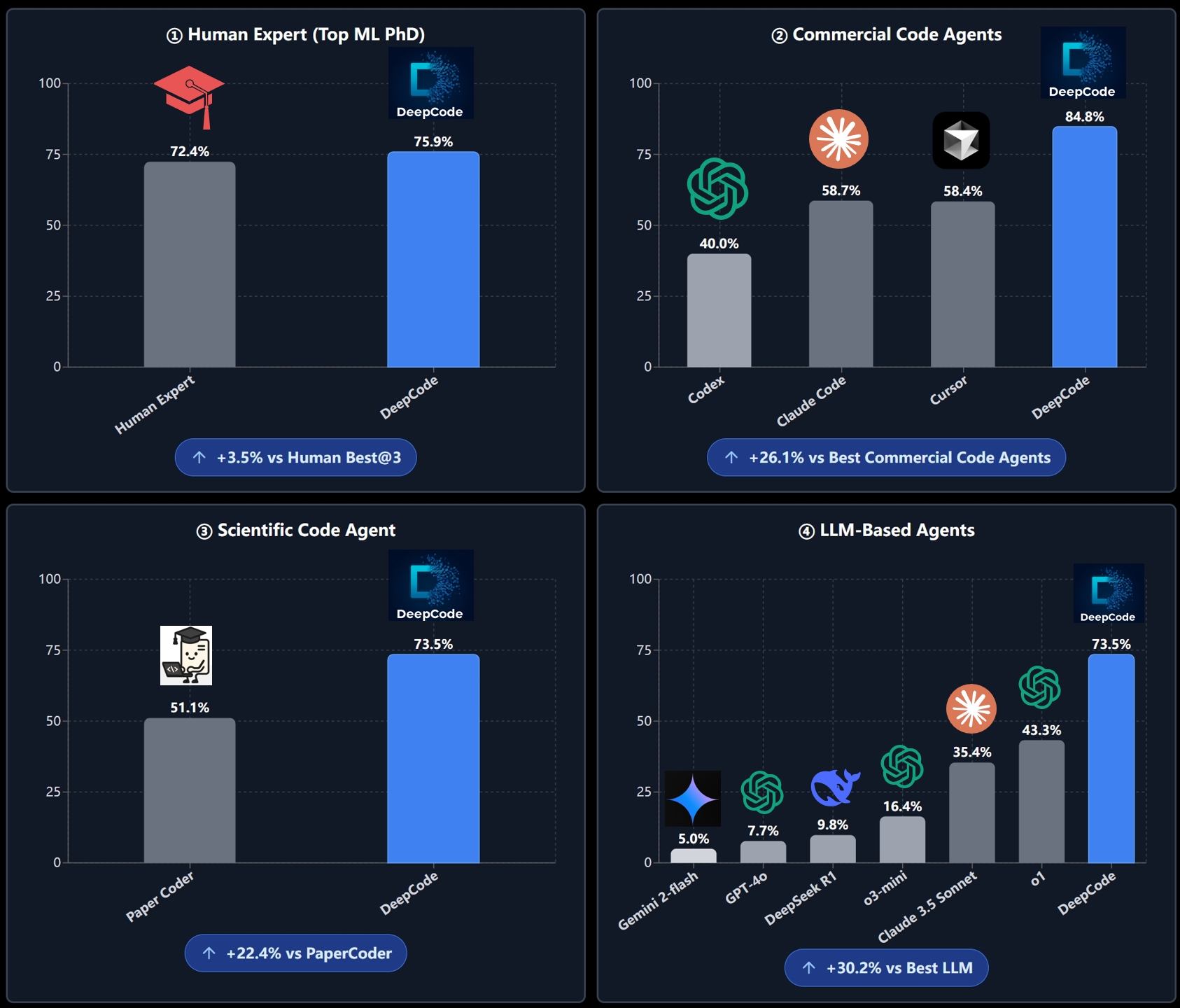
🎉 **[2025-10-28] DeepCode Achieves SOTA on PaperBench!**
DeepCode sets new benchmarks on OpenAI's PaperBench Code-Dev across all categories:
- 🏆 **Surpasses Human Experts**: **75.9%** (DeepCode) vs Top Machine Learning PhDs 72.4% (+3.5%).
- 🥇 **Outperforms SOTA Commercial Code Agents**: **84.8%** (DeepCode) vs Leading Commercial Code Agents (+26.1%) (Cursor, Claude Code, and Codex).
- 🔬 **Advances Scientific Coding**: **73.5%** (DeepCode) vs PaperCoder 51.1% (+22.4%).
- 🚀 **Beats LLM Agents**: **73.5%** (DeepCode) vs best LLM frameworks 43.3% (+30.2%).
---
## 🚀 Key Features
🚀 Paper2Code
Automated Implementation of Complex Algorithms
Effortlessly converts complex algorithms from research papers into high-quality, production-ready code, accelerating algorithm reproduction.
🎨 Text2Web
Automated Front-End Web Development
Translates plain textual descriptions into fully functional, visually appealing front-end web code for rapid interface creation.
⚙️ Text2Backend
Automated Back-End Development
Generates efficient, scalable, and feature-rich back-end code from simple text inputs, streamlining server-side development.
---
## 📊 Experimental Results
We evaluate **DeepCode** on the [*PaperBench*](https://openai.com/index/paperbench/) benchmark (released by OpenAI), a rigorous testbed requiring AI agents to independently reproduce 20 ICML 2024 papers from scratch. The benchmark comprises 8,316 gradable components assessed using SimpleJudge with hierarchical weighting.
Our experiments compare DeepCode against four baseline categories: **(1) Human Experts**, **(2) State-of-the-Art Commercial Code Agents**, **(3) Scientific Code Agents**, and **(4) LLM-Based Agents**.
### ① 🧠 Human Expert Performance (Top Machine Learning PhD)
**DeepCode: 75.9% vs. Top Machine Learning PhD: 72.4% (+3.5%)**
DeepCode achieves **75.9%** on the 3-paper human evaluation subset, **surpassing the best-of-3 human expert baseline (72.4%) by +3.5 percentage points**. This demonstrates that our framework not only matches but exceeds expert-level code reproduction capabilities, representing a significant milestone in autonomous scientific software engineering.
### ② 💼 State-of-the-Art Commercial Code Agents
**DeepCode: 84.8% vs. Best Commercial Agent: 58.7% (+26.1%)**
On the 5-paper subset, DeepCode substantially outperforms leading commercial coding tools:
- Cursor: 58.4%
- Claude Code: 58.7%
- Codex: 40.0%
- **DeepCode: 84.8%**
This represents a **+26.1% improvement** over the leading commercial code agent. All commercial agents utilize Claude Sonnet 4.5 or GPT-5 Codex-high, highlighting that **DeepCode's superior architecture**—rather than base model capability—drives this performance gap.
### ③ 🔬 Scientific Code Agents
**DeepCode: 73.5% vs. PaperCoder: 51.1% (+22.4%)**
Compared to PaperCoder (**51.1%**), the state-of-the-art scientific code reproduction framework, DeepCode achieves **73.5%**, demonstrating a **+22.4% relative improvement**. This substantial margin validates our multi-module architecture combining planning, hierarchical task decomposition, code generation, and iterative debugging over simpler pipeline-based approaches.
### ④ 🤖 LLM-Based Agents
**DeepCode: 73.5% vs. Best LLM Agent: 43.3% (+30.2%)**
DeepCode significantly outperforms all tested LLM agents:
- Claude 3.5 Sonnet + IterativeAgent: 27.5%
- o1 + IterativeAgent (36 hours): 42.4%
- o1 BasicAgent: 43.3%
- **DeepCode: 73.5%**
The **+30.2% improvement** over the best-performing LLM agent demonstrates that sophisticated agent scaffolding, rather than extended inference time or larger models, is critical for complex code reproduction tasks.
---
### 🎯 **Autonomous Self-Orchestrating Multi-Agent Architecture**
**The Challenges**:
- 📄 **Implementation Complexity**: Converting academic papers and complex algorithms into working code requires significant technical effort and domain expertise
- 🔬 **Research Bottleneck**: Researchers spend valuable time implementing algorithms instead of focusing on their core research and discovery work
- ⏱️ **Development Delays**: Product teams experience long wait times between concept and testable prototypes, slowing down innovation cycles
- 🔄 **Repetitive Coding**: Developers repeatedly implement similar patterns and functionality instead of building on existing solutions
**DeepCode** addresses these workflow inefficiencies by providing reliable automation for common development tasks, streamlining your development workflow from concept to code.
```mermaid
flowchart LR
A["📄 Research Papers 💬 Text Prompts 🌐 URLs & Document 📎 Files: PDF, DOC, PPTX, TXT, HTML"] --> B["🧠 DeepCode Multi-Agent Engine"]
B --> C["🚀 Algorithm Implementation 🎨 Frontend Development ⚙️ Backend Development"]
style A fill:#ff6b6b,stroke:#c0392b,stroke-width:2px,color:#000
style B fill:#00d4ff,stroke:#0984e3,stroke-width:3px,color:#000
style C fill:#00b894,stroke:#00a085,stroke-width:2px,color:#000
```
---
## 🏗️ Architecture
### 📊 **System Overview**
**DeepCode** is an AI-powered development platform that automates code generation and implementation tasks. Our multi-agent system handles the complexity of translating requirements into functional, well-structured code, allowing you to focus on innovation rather than implementation details.
🎯 **Technical Capabilities**:
🧬 **Research-to-Production Pipeline**
Multi-modal document analysis engine that extracts algorithmic logic and mathematical models from academic papers. Generates optimized implementations with proper data structures while preserving computational complexity characteristics.
🪄 **Natural Language Code Synthesis**
Context-aware code generation using fine-tuned language models trained on curated code repositories. Maintains architectural consistency across modules while supporting multiple programming languages and frameworks.
⚡ **Automated Prototyping Engine**
Intelligent scaffolding system generating complete application structures including database schemas, API endpoints, and frontend components. Uses dependency analysis to ensure scalable architecture from initial generation.
💎 **Quality Assurance Automation**
Integrated static analysis with automated unit test generation and documentation synthesis. Employs AST analysis for code correctness and property-based testing for comprehensive coverage.
🔮 **CodeRAG Integration System**
Advanced retrieval-augmented generation combining semantic vector embeddings with graph-based dependency analysis. Automatically discovers optimal libraries and implementation patterns from large-scale code corpus.
---
### 🔧 **Core Techniques**
- 🧠 **Intelligent Orchestration Agent**: Central decision-making system that coordinates workflow phases and analyzes requirements. Employs dynamic planning algorithms to adapt execution strategies in real-time based on evolving project complexity. Dynamically selects optimal processing strategies for each implementation step.
- 💾 **Efficient Memory Mechanism**: Advanced context engineering system that manages large-scale code contexts efficiently. Implements hierarchical memory structures with intelligent compression for handling complex codebases. This component enables instant retrieval of implementation patterns and maintains semantic coherence across extended development sessions.
- 🔍 **Advanced CodeRAG System**: Global code comprehension engine that analyzes complex inter-dependencies across repositories. Performs cross-codebase relationship mapping to understand architectural patterns from a holistic perspective. This module leverages dependency graphs and semantic analysis to provide globally-aware code recommendations during implementation.
---
### 🤖 **Multi-Agent Architecture of DeepCode**:
- **🎯 Central Orchestrating Agent**: Orchestrates entire workflow execution and makes strategic decisions. Coordinates specialized agents based on input complexity analysis. Implements dynamic task planning and resource allocation algorithms.
- **📝 Intent Understanding Agent**: Performs deep semantic analysis of user requirements to decode complex intentions. Extracts functional specifications and technical constraints through advanced NLP processing. Transforms ambiguous human descriptions into precise, actionable development specifications with structured task decomposition.
- **📄 Document Parsing Agent**: Processes complex technical documents and research papers with advanced parsing capabilities. Extracts algorithms and methodologies using document understanding models. Converts academic concepts into practical implementation specifications through intelligent content analysis.
- **🏗️ Code Planning Agent**: Performs architectural design and technology stack optimization. Dynamic planning for adaptive development roadmaps. Enforces coding standards and generates modular structures through automated design pattern selection.
- **🔍 Code Reference Mining Agent**: Discovers relevant repositories and frameworks through intelligent search algorithms. Analyzes codebases for compatibility and integration potential. Provides recommendations based on similarity metrics and automated dependency analysis.
- **📚 Code Indexing Agent**: Builds comprehensive knowledge graphs of discovered codebases. Maintains semantic relationships between code components. Enables intelligent retrieval and cross-reference capabilities.
- **🧬 Code Generation Agent**: Synthesizes gathered information into executable code implementations. Creates functional interfaces and integrates discovered components. Generates comprehensive test suites and documentation for reproducibility.
---
#### 🛠️ **Implementation Tools Matrix**
**🔧 Powered by MCP (Model Context Protocol)**
DeepCode leverages the **Model Context Protocol (MCP)** standard to seamlessly integrate with various tools and services. This standardized approach ensures reliable communication between AI agents and external systems, enabling powerful automation capabilities.
##### 📡 **MCP Servers & Tools**
| 🛠️ **MCP Server** | 🔧 **Primary Function** | 💡 **Purpose & Capabilities** |
|-------------------|-------------------------|-------------------------------|
| **📂 filesystem** | File System Operations | Local file and directory management, read/write operations |
| **🌐 fetch** | Web Content Retrieval | Fetch and extract content from URLs and web resources |
| **📥 github-downloader** | Repository Management | Clone and download GitHub repositories for analysis |
| **📋 file-downloader** | Document Processing | Download and convert files (PDF, DOCX, etc.) to Markdown |
| **⚡ command-executor** | System Commands | Execute bash/shell commands for environment management |
| **🧬 code-implementation** | Code Generation Hub | Comprehensive code reproduction with execution and testing |
| **📚 code-reference-indexer** | Smart Code Search | Intelligent indexing and search of code repositories |
| **📄 document-segmentation** | Smart Document Analysis | Intelligent document segmentation for large papers and technical documents |
##### 🔧 **Legacy Tool Functions** *(for reference)*
| 🛠️ **Function** | 🎯 **Usage Context** |
|-----------------|---------------------|
| **📄 read_code_mem** | Efficient code context retrieval from memory |
| **✍️ write_file** | Direct file content generation and modification |
| **🐍 execute_python** | Python code testing and validation |
| **📁 get_file_structure** | Project structure analysis and organization |
| **⚙️ set_workspace** | Dynamic workspace and environment configuration |
| **📊 get_operation_history** | Process monitoring and operation tracking |
---
🎛️ **Shared Agent Runtime**
CLI and headless execution share one event-driven Agent runtime. The Tauri desktop client is being rebuilt on the same application layer.
**🚀 Multi-Agent Intelligent Pipeline:**
### 🌟 **Intelligence Processing Flow**
💡 INPUT LAYER
📄 Research Papers • 💬 Natural Language • 🌐 URLs • 📋 Requirements
🎯 CENTRAL ORCHESTRATION
Strategic Decision Making • Workflow Coordination • Agent Management
📝 TEXT ANALYSIS
Requirement Processing
📄 DOCUMENT ANALYSIS
Paper & Spec Processing
📋 REPRODUCTION PLANNING
Deep Paper Analysis • Code Requirements Parsing • Reproduction Strategy Development
⚡ OUTPUT DELIVERY
📦 Complete Codebase • 🧪 Test Suite • 📚 Documentation • 🚀 Deployment Ready
### 🔄 **Process Intelligence Features**
🎯 Adaptive Flow
Dynamic agent selection based on input complexity
🧠 Smart Coordination
Intelligent task distribution and parallel processing
🔍 Context Awareness
Deep understanding through CodeRAG integration
⚡ Quality Assurance
Automated testing and validation throughout
---
## 🚀 Quick Start
### ⚡ **Recommended First Run**
The shortest path from installation to a working coding Session is:
```bash
# 1. Install the CLI and create the user-level DeepCode home.
pip install deepcode-hku
deepcode init
# 2. Create one connection shared by CLI and Desktop.
# --api-key prompts securely and does not echo the key.
deepcode provider set personal-openrouter \
--template openrouter \
--label "OpenRouter · Personal" \
--api-key
# 3. Verify the connection and inspect exact model IDs.
deepcode provider test personal-openrouter
deepcode provider models personal-openrouter --refresh
# 4. Start a Session in the current project.
deepcode -c personal-openrouter -m moonshotai/kimi-k3
```
You can run the last command from any project directory. DeepCode keeps the
Session under `~/.deepcode/sessions/`, while the selected connection and its
credential remain user-scoped under `~/.deepcode/`.
| Surface | Start command | Best for |
|---------|---------------|----------|
| **Interactive CLI** | `deepcode` | Multi-turn coding and Session resume |
| **Headless CLI** | `deepcode exec "" --json` | Scripts, CI, and automation |
| **Desktop from source** | `cd desktop && npm run tauri -- dev` | Visual Sessions, settings, review, and terminal |
### 📋 **Prerequisites**
Before installing DeepCode, ensure you have the following:
| Requirement | Version | Purpose |
|-------------|---------|---------|
| **Python** | 3.12+ | Core runtime and CLI |
| **Node.js** | 22+ | Desktop UI development only |
| **Rust** | stable | Tauri desktop development only |
```bash
# Check your versions
python --version # Should be 3.12+
```
📥 Desktop development prerequisites
```bash
node --version
npm --version
rustc --version
cargo --version
```
Node and Rust are not required for the Python CLI. Follow the official Tauri
prerequisites when working on `desktop/`.
### 📦 **Step 1: Installation**
Choose one of the following installation methods:
#### ⚡ **Direct Installation (Recommended)**
```bash
# 🚀 Install DeepCode package directly
pip install deepcode-hku
# 🔑 One-time setup: create ~/.deepcode/deepcode_config.json (then add a key)
deepcode init
```
#### 🔧 **Development Installation (From Source)**
📂 Click to expand development installation options
##### 🔥 **Using UV (Recommended for Development)**
```bash
git clone https://github.com/HKUDS/DeepCode.git
cd DeepCode/
curl -LsSf https://astral.sh/uv/install.sh | sh
uv venv --python=3.13
source .venv/bin/activate # On Windows: .venv\Scripts\activate
uv pip install -r requirements.txt
```
##### 🐍 **Using Traditional pip**
```bash
git clone https://github.com/HKUDS/DeepCode.git
cd DeepCode/
pip install -r requirements.txt
```
##### 🧪 **Editable install (lets `deepcode` always run THIS checkout)**
If you want the global `deepcode` command to launch the source tree you are
hacking on, install the project in editable mode after the steps above:
```bash
pip install -e .
```
This registers a `deepcode-hku` package (current version 1.2.0) and exposes
the `deepcode` CLI entry point. Any local code change is picked up
immediately on next launch — no reinstall needed.
> If you maintain multiple DeepCode checkouts, only one of them can own the
> `deepcode` command at a time (the most recent `pip install -e .` wins).
> Reinstall in the checkout you currently want to be active.
##### 🖥️ **Desktop and App Server**
The legacy browser UI has been removed. To run the Tauri desktop workbench from
source:
```bash
cd desktop
npm ci
npm run tauri -- dev
```
Open **Settings → Connections** to configure a provider, then select a
connection/model from the Session composer. See
[`desktop/README.md`](../../desktop/README.md) for the complete source-run,
verification, and packaging guide.
The P1 App Server can be exercised independently of the desktop shell:
```bash
python -m app_server
```
### 🔧 **Step 2: Configure an LLM Connection**
> The following configuration applies to pip, UV, and source installations.
> Connection definitions live in `deepcode_config.json`; saved API keys live
> separately in the user-only credential store.
#### 🌍 Run `deepcode` from any directory
DeepCode resolves its config in two layers, the same way Codex and Claude Code do:
| Layer | Location | Role |
|-------|----------|------|
| **User base** | `~/.deepcode/deepcode_config.json` (or `$DEEPCODE_HOME`) | Read from **any** working directory. Owns LLM connections and defaults. |
| **Project override** | `deepcode_config.json` in the current directory (or any parent) | Optional project agent/safety overrides. Provider endpoints and named connections remain user-owned. |
Run the one-time setup and you can launch `deepcode` anywhere:
```bash
deepcode init # creates ~/.deepcode/deepcode_config.json
```
`deepcode init` is a single cross-platform command (Windows, macOS, Linux). Run
from a checkout that already has a `deepcode_config.json`, it lifts that config —
keys and all — into the user base; run elsewhere, it drops the template there for
you to fill in. It never overwrites an existing base (use `--force` to reseed,
which keeps a `.bak`), and on Unix it locks the file to `600`. To relocate the
base, set `DEEPCODE_HOME` (`export DEEPCODE_HOME=...` on macOS/Linux,
`setx DEEPCODE_HOME ...` on Windows).
Project files may select a user-owned connection, but cannot replace its
endpoint, adapter, headers, or credential. This prevents a repository from
redirecting a key inherited from the user config or environment.
#### 🔑 Recommended: Named Connection
The recommended path is a named connection shared by CLI and Desktop:
```bash
deepcode provider set personal-openrouter \
--template openrouter \
--label "OpenRouter · Personal" \
--api-key
deepcode provider test personal-openrouter
deepcode provider models personal-openrouter --refresh
```
`--api-key` opens a non-echoing prompt. The key is stored separately in
`~/.deepcode/credentials.json` with user-only permissions and is never returned
through the App Server protocol. In Desktop, the same flow is available under
**Settings → Connections**; use the model picker below a Session composer to
change the connection/model for future Turns.
Common connection commands:
| Command | Purpose |
|---------|---------|
| `deepcode provider list` | Show built-in and named connections without exposing keys |
| `deepcode provider set ...` | Create a connection or update only the supplied fields |
| `deepcode provider test ` | Verify authentication and model discovery |
| `deepcode provider models --refresh` | Refresh and list exact model IDs |
| `deepcode provider remove ` | Remove a named connection and its saved key |
Use an environment variable instead of the credential store when preferred:
```bash
deepcode provider set work-openrouter \
--template openrouter \
--api-key-env OPENROUTER_API_KEY
```
Available templates include `openrouter`, `openai`, `anthropic`, `deepseek`,
`gemini`, `dashscope`, `ollama`, `vllm`, and `custom`. For an arbitrary
OpenAI-compatible endpoint:
```bash
deepcode provider set company-proxy \
--template custom \
--adapter openai_compat \
--api-base https://llm.example.com/v1 \
--catalog openai \
--api-key
```
Passing `--connection` and `--model` selects a model for one launch. To make the
same selection the default for CLI and Desktop, update the user-level
`~/.deepcode/deepcode_config.json`:
```json
{
"agents": {
"defaults": {
"connection": "personal-openrouter",
"model": "moonshotai/kimi-k3"
}
}
}
```
Legacy inline provider keys remain readable for compatibility. Environment
references are also supported:
```json
{
"providers": {
"openai": { "apiKey": "your_openai_api_key" },
"anthropic": { "apiKey": "${ANTHROPIC_API_KEY}" },
"gemini": { "apiKey": "" }
}
}
```
🔌 Using OpenAI-compatible providers (OpenRouter / Poe / DashScope / etc.)
Any OpenAI-compatible endpoint is supported by overriding `apiBase` on the matching provider entry. Then set the model name on the `agents` block (using `provider/model` slugs):
```json
{
"agents": {
"defaults": {
"provider": "openrouter",
"model": "z-ai/glm-5.1"
},
"planning": { "provider": "openrouter", "model": "z-ai/glm-5.1" },
"implementation": { "provider": "openrouter", "model": "z-ai/glm-5.1" }
},
"providers": {
"openai": { "apiKey": "your_openai_api_key" },
"openrouter": { "apiKey": "your_openrouter_key", "apiBase": "https://openrouter.ai/api/v1" }
}
}
```
OpenRouter model ids must use the exact `id` returned by its model catalog. Use
`deepcode provider models --refresh` or the Desktop Session model
picker to search the live catalog. The last successful catalog is cached for
offline use.
> **🔐 Never commit `deepcode_config.json`.** It is already in `.gitignore`.
#### 🤖 LLM Provider *(optional)*
The provider is inferred from the `model` slug (`openai/...`, `anthropic/...`, `gemini/...`, etc.). To force a specific backend, set `agents.defaults.provider`:
```json
{
"agents": {
"defaults": { "provider": "openai" }
}
}
```
#### 📄 Document Segmentation *(optional)*
```json
{
"documentSegmentation": {
"enabled": true,
"sizeThresholdChars": 50000
}
}
```
🪟 Windows Users: Additional MCP Server Configuration
On Windows you may need to configure MCP servers manually in `deepcode_config.json` (`tools.mcpServers`):
```bash
# 1. Install MCP servers globally
npm i -g @modelcontextprotocol/server-filesystem
# 2. Find your global node_modules path
npm -g root
```
```json
{
"tools": {
"mcpServers": {
"filesystem": {
"type": "stdio",
"command": "node",
"args": ["C:/Program Files/nodejs/node_modules/@modelcontextprotocol/server-filesystem/dist/index.js", "."]
}
}
}
}
```
> Replace the path with the actual global `node_modules` path from step 2.
🔍 Web Search Configuration
DeepCode performs web content retrieval through the built-in `fetch` MCP server (no API key required) and reads local files via `filesystem`. The auxiliary search server defaults to `filesystem`:
```json
{
"tools": { "defaultSearchServer": "filesystem" }
}
```
> **💡 Tip**: To plug in another search backend, add it under `tools.mcpServers` in `deepcode_config.json` and set `tools.defaultSearchServer` to its name.
### ⚡ **Step 3: Launch DeepCode**
CLI and Desktop use the same Agent kernel, connection profiles, model resolver,
Skills, and canonical Session store.
**🖥️ Interactive agent.** Start a multi-turn coding Session:
```bash
deepcode
deepcode -w ./my-project -c personal-openrouter -m moonshotai/kimi-k3
```
**🤖 Headless agent.** Run one task with machine-readable output:
```bash
deepcode exec "fix the failing test in mathlib.py" \
--connection personal-openrouter \
--model moonshotai/kimi-k3 \
--json
```
**🪟 Desktop from source.** Start the Tauri application:
```bash
cd desktop
npm ci
npm run tauri -- dev
```
#### 💻 **Interactive CLI (multi-turn coding agent)**
`deepcode` opens a Claude Code-style conversation in your terminal:
describe any coding task in natural language, watch the agent stream its
reply and tool progress live, and keep the conversation going across turns.
```bash
deepcode # current directory
deepcode -w ./my-project # explicit workspace
deepcode -c personal-openrouter \
-m moonshotai/kimi-k3 # explicit connection/model
deepcode --resume # resume a stored Session
```
Inside the conversation:
```text
/help # list all commands
/new [title] # start a fresh conversation
/resume # list THIS directory's sessions; /resume restores one
/resume all # list sessions from every directory (origins shown)
/model [connection] [id] # show or switch connection/model (history preserved)
/skills # list discovered Skills
/skill # select a Skill for the next Turn
/clear # clear the conversation context
@src/main.py # attach a file's content to your message
```
Conversations persist under `~/.deepcode/sessions//` (JSONL, with a SQLite
index for instant listing) and are titled automatically from your first
message. Switching models never forks or erases the Session: it rebuilds the
runtime with the same visible history and applies only to future Turns. Every
accepted Turn stores its own secret-free execution snapshot, so queued work and
retries do not silently drift when defaults change.
For scripting and CI there is a headless one-shot entry:
```bash
deepcode exec "fix the failing test in mathlib.py" \
--connection personal-openrouter \
--model moonshotai/kimi-k3 \
--skill \
--json
```
which streams machine-readable events (NDJSON) and exits 0 on completion.
Manage the same Skill catalog outside a Session:
```bash
deepcode skill list
deepcode skill import ./my-skill --scope project
deepcode skill show
```
### 🎯 **Step 4: Generate Code**
1. **📄 Input** — Upload a research paper, type requirements, or paste a URL
2. **🤖 Processing** — The multi-agent system analyzes, plans, and generates
3. **⚡ Output** — Receive production-ready code with tests and documentation
---
### 🔧 **Troubleshooting**
❓ Common Issues & Solutions
| Problem | Cause | Fix |
|---|---|---|
| `credential needed` in `deepcode provider list` | The connection has no API key or environment variable | Run `deepcode provider set --api-key`, or configure it in **Desktop → Settings → Connections** |
| Model not listed | The provider catalog is stale or the endpoint has no catalog API | Run `deepcode provider models --refresh`; exact model IDs can still be entered manually |
| Model switch is rejected | A Turn is running or queued in the Session | Wait for it to finish or interrupt it, then switch again |
| Windows: MCP servers not working | Need absolute paths | See [Windows MCP Configuration](#-step-2-configure-an-llm-connection) above |
| Windows: `UnicodeEncodeError: 'gbk' codec can't encode...` on launch | Default GBK console can't render emoji in startup banner | Set UTF-8 first: `set PYTHONIOENCODING=utf-8 && set PYTHONUTF8=1` (cmd) or `$env:PYTHONIOENCODING="utf-8"; $env:PYTHONUTF8="1"` (PowerShell) |
| Windows: code-implementation stage hangs / produces a `-p` directory | LLM emitted `mkdir -p ...` and `cmd.exe` treated `-p` as a folder name | Already fixed in `tools/command_executor.py` — common Unix commands (`mkdir -p`, `touch`, `rm -rf`, `cp -r`, `mv`) are now executed natively via `pathlib`/`shutil`, no shell needed |
| `name 'LoopDetector' is not defined` during code implementation | Missing import in workflow modules | Already fixed — `LoopDetector` and `ProgressTracker` are now imported from `utils.loop_detector` in both `workflows/code_implementation_workflow.py` and `workflows/code_implementation_workflow_index.py` |
---
## 💡 Examples
### 🎬 **Live Demonstrations**
#### 📄 **Paper2Code Demo**
**Research to Implementation**
**[▶️ Watch Demo](https://www.youtube.com/watch?v=MQZYpLkzsbw)**
*Transform academic papers into production-ready code automatically*
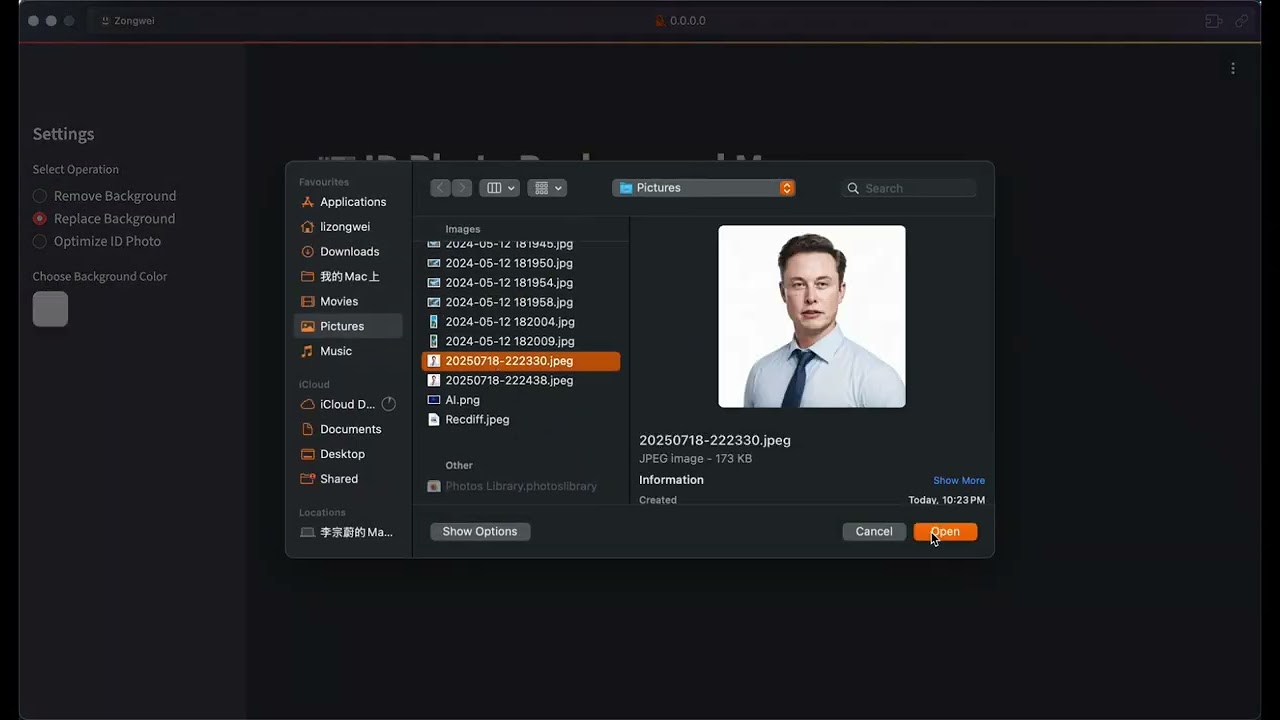
**[▶️ Watch Demo](https://www.youtube.com/watch?v=nFt5mLaMEac)**
*Intelligent image processing with background removal and enhancement*
#### 🌐 **Frontend Implementation**
**Complete Web Application**
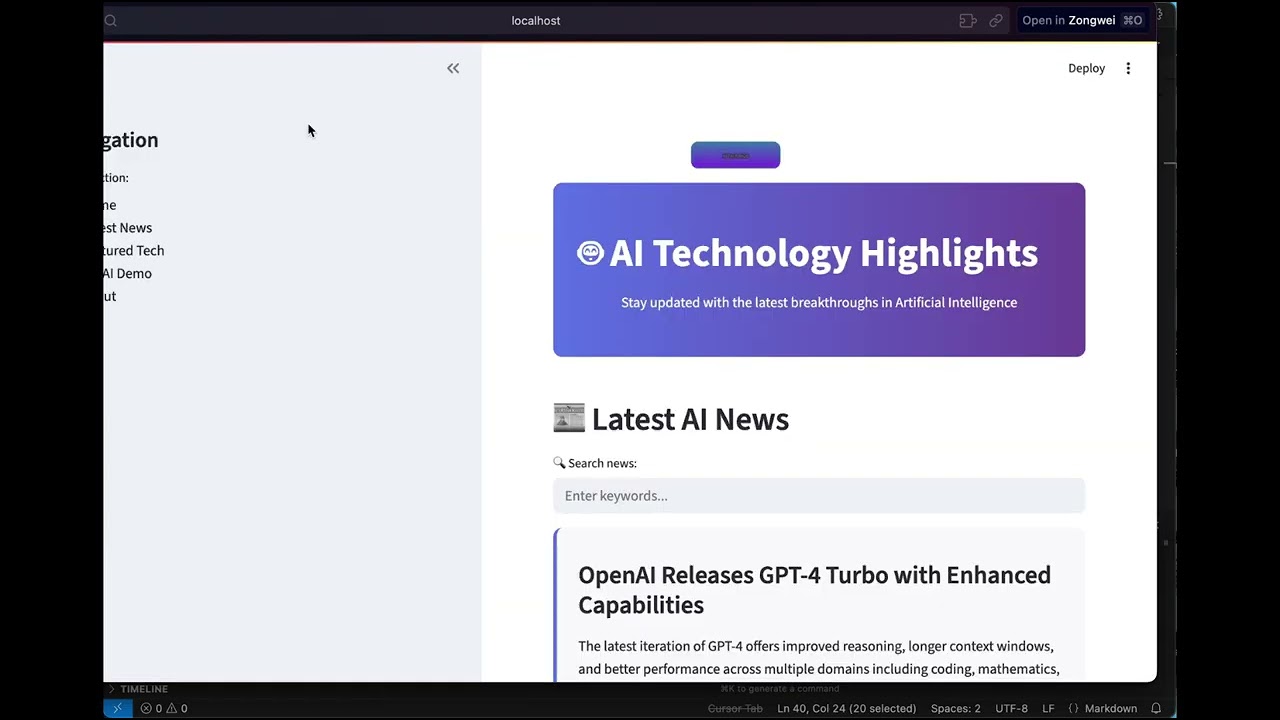
**[▶️ Watch Demo](https://www.youtube.com/watch?v=78wx3dkTaAU)**
*Full-stack web development from concept to deployment*
### 🆕 **Recent Updates**
#### 📄 **Smart Document Segmentation (v1.2.0)**
- **Intelligent Processing**: Automatically handles large research papers and technical documents that exceed LLM token limits
- **Configurable Control**: Toggle segmentation via configuration with size-based thresholds
- **Semantic Analysis**: Advanced content understanding with algorithm, concept, and formula preservation
- **Backward Compatibility**: Seamlessly falls back to traditional processing for smaller documents
### 🚀 **Coming Soon**
We're continuously enhancing DeepCode with exciting new features:
#### 🔧 **Enhanced Code Reliability & Validation**
- **Automated Testing**: Comprehensive functionality testing with execution verification and error detection.
- **Code Quality Assurance**: Multi-level validation through static analysis, dynamic testing, and performance benchmarking.
- **Smart Debugging**: AI-powered error detection with automatic correction suggestions
#### 📊 **PaperBench Performance Showcase**
- **Benchmark Dashboard**: Comprehensive performance metrics on the PaperBench evaluation suite.
- **Accuracy Metrics**: Detailed comparison with state-of-the-art paper reproduction systems.
- **Success Analytics**: Statistical analysis across paper categories and complexity levels.
#### ⚡ **System-wide Optimizations**
- **Performance Boost**: Multi-threaded processing and optimized agent coordination for faster generation.
- **Enhanced Reasoning**: Advanced reasoning capabilities with improved context understanding.
- **Expanded Support**: Extended compatibility with additional programming languages and frameworks.
---
## ⭐ Star History
*Community Growth Trajectory*
---
### 🚀 **Ready to Transform Development?**
---
### 📖 **Citation**
If you find DeepCode useful in your research or applications, please kindly cite:
```
@misc{li2025deepcodeopenagenticcoding,
title={DeepCode: Open Agentic Coding},
author={Zongwei Li and Zhonghang Li and Zirui Guo and Xubin Ren and Chao Huang},
year={2025},
eprint={2512.07921},
archivePrefix={arXiv},
primaryClass={cs.SE},
url={https://arxiv.org/abs/2512.07921},
}
```
---
### 📄 **License**
**MIT License** - Copyright (c) 2025 Data Intelligence Lab, The University of Hong Kong
---
 DeepCode: Open Agentic Coding
### *Advancing Code Generation with Multi-Agent Systems*






 *🎯 **Watch our complete introduction** - See how DeepCode transforms research papers and natural language into production-ready code*







 **MIT License** - Copyright (c) 2025 Data Intelligence Lab, The University of Hong Kong
---