MATLAB MCP Server
Give any AI agent the power of MATLAB — via the Model Context Protocol
Quick Start •
Examples •
Tools Reference •
Configuration •
Wiki





---
A Python MCP server that connects **any AI agent** (Claude, Cursor, Copilot, custom agents) to a shared MATLAB installation. Execute code, discover toolboxes, check code quality, get interactive Plotly plots, and run long simulations — all through [MCP](https://modelcontextprotocol.io/).
## Why?
- Your AI agent can now **write and run MATLAB code** directly
- **Long-running jobs** (hours!) run async — the agent keeps working while MATLAB computes
- **Multiple users** share one MATLAB server via an elastic engine pool
- **Interactive plots** come back as Plotly JSON — renderable in any web UI
- **Custom MATLAB libraries** become first-class AI tools with zero code changes
## Features
| Feature | Description |
|---------|-------------|
| Execute MATLAB code | Sync for fast commands, auto-async for long jobs |
| Elastic engine pool | Scales 2-10+ engines based on demand |
| Toolbox discovery | Browse installed toolboxes, functions, help text |
| Code checker | Run `checkcode`/`mlint` before execution |
| Interactive plots | Figures auto-converted to Plotly JSON |
| Multi-user (SSE) | Session isolation with per-user workspaces |
| Custom tools | Expose your `.m` functions as MCP tools via YAML |
| Progress reporting | Long jobs report percentage back to the agent |
| Cross-platform | Windows + macOS, MATLAB R2022b+ |
| One-click Windows install | Offline `install.bat` — no admin rights needed |
## MATLAB Plot Conversion to Interactive Plotly
Every MATLAB figure is automatically converted into an interactive [Plotly](https://plotly.com/javascript/) chart — no extra code needed. When your MATLAB code creates a plot, the server:
1. **Extracts figure properties** via `mcp_extract_props.m` — axes, line data, labels, colors, markers, legends, subplots
2. **Maps MATLAB styles to Plotly** — line styles (`--` → `dash`), markers (`o` → `circle`), legend positions, axis scales, colormaps
3. **Returns interactive JSON** — renderable in any web UI with `Plotly.newPlot()`
4. **Generates a static PNG + thumbnail** as fallback for non-interactive clients
**Supported plot types:** line, scatter, bar, area, subplots (`subplot`/`tiledlayout`), multiple axes, log/linear scales
**Style fidelity:** Line styles, marker shapes, colors (RGB), line widths, font sizes, axis labels, titles, legends, grid lines, axis limits, and background colors are all preserved.
```matlab
% This MATLAB code...
x = linspace(0, 2*pi, 200);
plot(x, sin(x), 'r-', 'LineWidth', 2); hold on;
plot(x, cos(x), 'b--', 'LineWidth', 2);
plot(x, sin(x) .* cos(x), 'g-.', 'LineWidth', 2);
legend('sin(x)', 'cos(x)', 'sin(x)*cos(x)');
xlabel('x'); ylabel('y');
title('Trigonometric Functions');
```
...automatically becomes this interactive Plotly chart:
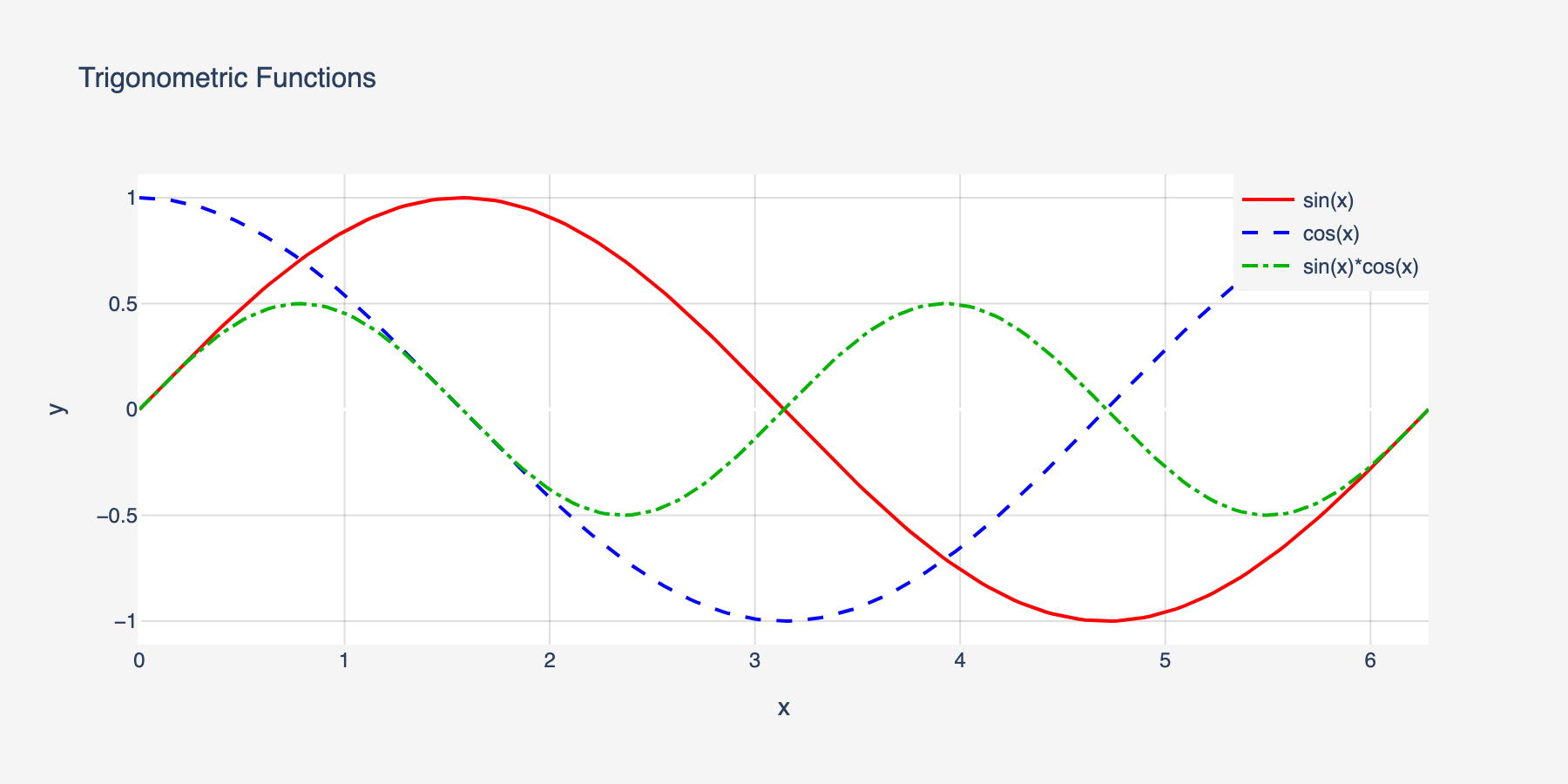
Line styles, colors, markers, legends, and axis labels are all preserved in the conversion.
## Quick Start
### Prerequisites
- **Python 3.10+**
- **MATLAB R2022b+** with the [MATLAB Engine API for Python](https://www.mathworks.com/help/matlab/matlab-engine-for-python.html) installed
```bash
# Install MATLAB Engine API (from your MATLAB installation)
cd /Applications/MATLAB_R2024a.app/extern/engines/python # macOS
# cd "C:\Program Files\MATLAB\R2024a\extern\engines\python" # Windows
pip install .
```
### Install the server
**Pixi (recommended, no admin needed):**
[Pixi](https://pixi.sh) installs Python + all dependencies into an isolated, per-project
environment — no venv wrangling, no admin rights, works the same on Windows/macOS/Linux.
```powershell
# Install pixi (Windows PowerShell)
irm -useb https://pixi.sh/install.ps1 | iex
# ...or via winget:
winget install prefix-dev.pixi
```
```bash
git clone https://github.com/HanSur94/matlab-mcp-server-python.git
cd matlab-mcp-server-python
# 1. Engine-free start — verifies the server comes up (no MATLAB required yet)
pixi run start
# 2. Detect your local MATLAB install and pip-install the matching matlabengine
pixi run install-engine
# 3. Start again — MATLAB code now actually executes
pixi run start
```
`pixi.lock` is committed, so `pixi run ...` always reproduces the exact resolved
environment (Python 3.10–3.12, `fastmcp==3.4.4`) on any machine — no separate `pip install`
step needed. `matlabengine` is deliberately never a static dependency (its sdist build reads
the local MATLAB installation and fails on machines without a matching release); the
`install-engine` task installs it on demand, matched to your detected MATLAB release.
**Windows (one-click, no admin needed):**
```cmd
git clone https://github.com/HanSur94/matlab-mcp-server-python.git
cd matlab-mcp-server-python
install.bat
```
The installer auto-detects MATLAB, creates a virtual environment, and installs everything from bundled wheels — fully offline, no internet required. Works on Windows 10/11 with Python 3.10, 3.11, or 3.12.
**macOS / Linux:**
```bash
# Option 1: Install from PyPI
pip install matlab-mcp-python
# Option 2: Install from source
git clone https://github.com/HanSur94/matlab-mcp-server-python.git
cd matlab-mcp-server-python
pip install -e ".[dev]"
```
### Run it
```bash
# Single user (stdio) — simplest setup
matlab-mcp
# Multi-user, HTTP — preferred transport (FastMCP 3.4.4 streamable-http)
matlab-mcp --transport streamablehttp
# Multi-user, SSE — legacy alias, kept for existing SSE clients
matlab-mcp --transport sse
```
With Pixi, the equivalent tasks are `pixi run start` (stdio), `pixi run http`
(`streamablehttp`, preferred), and `pixi run sse` (legacy alias). `streamablehttp` is the
transport to reach for on new setups; `sse` continues to work unchanged so existing
integrations are never broken.
### Connect to Claude Desktop
Add to your Claude Desktop config (`~/Library/Application Support/Claude/claude_desktop_config.json` on macOS):
```json
{
"mcpServers": {
"matlab": {
"command": "matlab-mcp"
}
}
}
```
### Connect to Claude Code
```bash
claude mcp add matlab -- matlab-mcp
```
### Connect to Cursor
Add to `.cursor/mcp.json` in your project:
```json
{
"mcpServers": {
"matlab": {
"command": "matlab-mcp"
}
}
}
```
### Run with Docker
```bash
# Build the image
docker build -t matlab-mcp .
# Run with your MATLAB mounted
docker run -p 8765:8765 -p 8766:8766 \
-v /path/to/MATLAB:/opt/matlab:ro \
-e MATLAB_MCP_POOL_MATLAB_ROOT=/opt/matlab \
matlab-mcp
# Or use docker-compose (edit docker-compose.yml to set your MATLAB path)
docker compose up
```
> **Note:** The Docker image does not include MATLAB. You must mount your own MATLAB installation.
> **Upgrading?** If you previously installed as `matlab-mcp-server`, uninstall first: `pip uninstall matlab-mcp-server && pip install matlab-mcp-python`
## Examples
### Basic: Run MATLAB Code
Ask your AI agent:
> "Calculate the eigenvalues of a 3x3 magic square in MATLAB"
The agent calls `execute_code`:
```matlab
A = magic(3);
eigenvalues = eig(A);
disp(eigenvalues)
```
Result returned inline:
```
15.0000
4.8990
-4.8990
```
### Signal Processing
> "Generate a 1kHz sine wave, add noise, then filter it with a low-pass Butterworth filter and plot both"
```matlab
fs = 8000;
t = 0:1/fs:0.1;
clean = sin(2*pi*1000*t);
noisy = clean + 0.5*randn(size(t));
[b, a] = butter(6, 1500/(fs/2));
filtered = filter(b, a, noisy);
subplot(2,1,1); plot(t, noisy); title('Noisy Signal');
subplot(2,1,2); plot(t, filtered); title('Filtered Signal');
```
Returns: Interactive Plotly chart + static PNG + thumbnail.
### Long-Running Simulation (Async)
> "Run a Monte Carlo simulation with 1 million trials"
```matlab
n = 1e6;
results = zeros(n, 1);
for i = 1:n
results(i) = simulate_trial(); % your custom function
if mod(i, 1e5) == 0
mcp_progress(__mcp_job_id__, i/n*100, sprintf('Trial %d/%d', i, n));
end
end
disp(mean(results));
```
The agent gets a job ID immediately, polls progress ("Trial 500000/1000000 — 50%"), and retrieves results when done.
### Custom Tools
Expose your proprietary MATLAB functions as first-class AI tools. Create `custom_tools.yaml`:
```yaml
tools:
- name: analyze_signal
matlab_function: mylib.analyze_signal
description: "Analyze a signal and return frequency components, SNR, and peak detection"
parameters:
- name: signal_path
type: string
required: true
- name: sample_rate
type: float
required: true
- name: window_size
type: int
default: 1024
returns: "Struct with fields: frequencies, magnitudes, snr, peaks"
- name: train_model
matlab_function: ml.train_classifier
description: "Train a classification model on the given dataset"
parameters:
- name: dataset_path
type: string
required: true
- name: model_type
type: string
default: "svm"
returns: "Trained model object saved to workspace"
```
Now the agent can call `analyze_signal` or `train_model` directly — with full parameter validation and help text.
## MCP Tools Reference
### Code Execution
| Tool | Parameters | Description |
|------|-----------|-------------|
| `execute_code` | `code: str` | Run MATLAB code. Returns inline if fast (<30s), or a job ID if promoted to async |
| `check_code` | `code: str` | Run `checkcode`/`mlint`. Returns structured warnings/errors |
| `get_workspace` | — | Show variables in the current MATLAB workspace |
### Async Job Management
| Tool | Parameters | Description |
|------|-----------|-------------|
| `get_job_status` | `job_id: str` | Status + progress percentage for running jobs |
| `get_job_result` | `job_id: str` | Full result of a completed job |
| `cancel_job` | `job_id: str` | Cancel a pending or running job |
| `list_jobs` | — | List all jobs in this session |
### Discovery
| Tool | Parameters | Description |
|------|-----------|-------------|
| `list_toolboxes` | — | List installed MATLAB toolboxes |
| `list_functions` | `toolbox_name: str` | List functions in a toolbox |
| `get_help` | `function_name: str` | Get MATLAB help text for any function |
### File Management
| Tool | Parameters | Description |
|------|-----------|-------------|
| `upload_data` | `filename: str, content_base64: str` | Upload data files to the session |
| `delete_file` | `filename: str` | Delete a session file |
| `list_files` | — | List files in the session directory |
### File Reading
| Tool | Parameters | Description |
|------|-----------|-------------|
| `read_script` | `filename: str` | Read a MATLAB `.m` script file as text |
| `read_data` | `filename: str, format: str` | Read data files (`.mat`, `.csv`, `.json`, `.txt`, `.xlsx`). `format`: `summary` or `raw` |
| `read_image` | `filename: str` | Read image files (`.png`, `.jpg`, `.gif`) — renders inline in agent UIs |
### Admin
| Tool | Parameters | Description |
|------|-----------|-------------|
| `get_pool_status` | — | Engine pool stats (available/busy/max) |
### Monitoring
| Tool | Parameters | Description |
|------|-----------|-------------|
| `get_server_metrics` | — | Comprehensive server metrics (pool, jobs, sessions, system) |
| `get_server_health` | — | Health status with issue detection (healthy/degraded/unhealthy) |
| `get_error_log` | `limit: int` | Recent errors and notable events |
## Configuration
All settings live in `config.yaml` with sensible defaults. Override any setting via environment variables:
```bash
# Override pool size
export MATLAB_MCP_POOL_MIN_ENGINES=4
export MATLAB_MCP_POOL_MAX_ENGINES=16
# Override sync timeout (promote to async after 60s instead of 30s)
export MATLAB_MCP_EXECUTION_SYNC_TIMEOUT=60
# Override transport
export MATLAB_MCP_SERVER_TRANSPORT=sse
```
### Key Configuration Sections
Server — transport, host, port, logging
```yaml
server:
name: "matlab-mcp-server"
transport: "stdio" # stdio | sse
host: "0.0.0.0" # SSE only
port: 8765 # SSE only
log_level: "info" # debug | info | warning | error
log_file: "./logs/server.log"
result_dir: "./results"
drain_timeout_seconds: 300
```
Pool — engine count, scaling, health checks
```yaml
pool:
min_engines: 2 # always warm
max_engines: 10 # hard ceiling
scale_down_idle_timeout: 900 # 15 min
engine_start_timeout: 120
health_check_interval: 60
proactive_warmup_threshold: 0.8
queue_max_size: 50
matlab_root: null # auto-detect
```
Execution — timeouts, workspace isolation
```yaml
execution:
sync_timeout: 30 # seconds before async promotion
max_execution_time: 86400 # 24h hard limit
workspace_isolation: true
engine_affinity: false # pin session to engine
temp_dir: "./temp"
temp_cleanup_on_disconnect: true
```
Security — function blocklist, upload limits
```yaml
security:
blocked_functions_enabled: true
blocked_functions:
- "system"
- "unix"
- "dos"
- "!"
- "eval"
- "feval"
- "evalc"
- "evalin"
- "assignin"
- "perl"
- "python"
max_upload_size_mb: 100
require_proxy_auth: false
```
Toolboxes — whitelist/blacklist exposure
```yaml
toolboxes:
mode: "whitelist" # whitelist | blacklist | all
list:
- "Signal Processing Toolbox"
- "Optimization Toolbox"
- "Statistics and Machine Learning Toolbox"
- "Image Processing Toolbox"
```
Output — Plotly, images, thumbnails
```yaml
output:
plotly_conversion: true
static_image_format: "png"
static_image_dpi: 150
thumbnail_enabled: true
thumbnail_max_width: 400
large_result_threshold: 10000
max_inline_text_length: 50000
```
## Monitoring
Built-in observability with a web dashboard, JSON health/metrics endpoints, and MCP tools for AI agent self-monitoring.
### Dashboard
Access at `http://localhost:8766/dashboard` (stdio) or `http://localhost:8765/dashboard` (SSE).
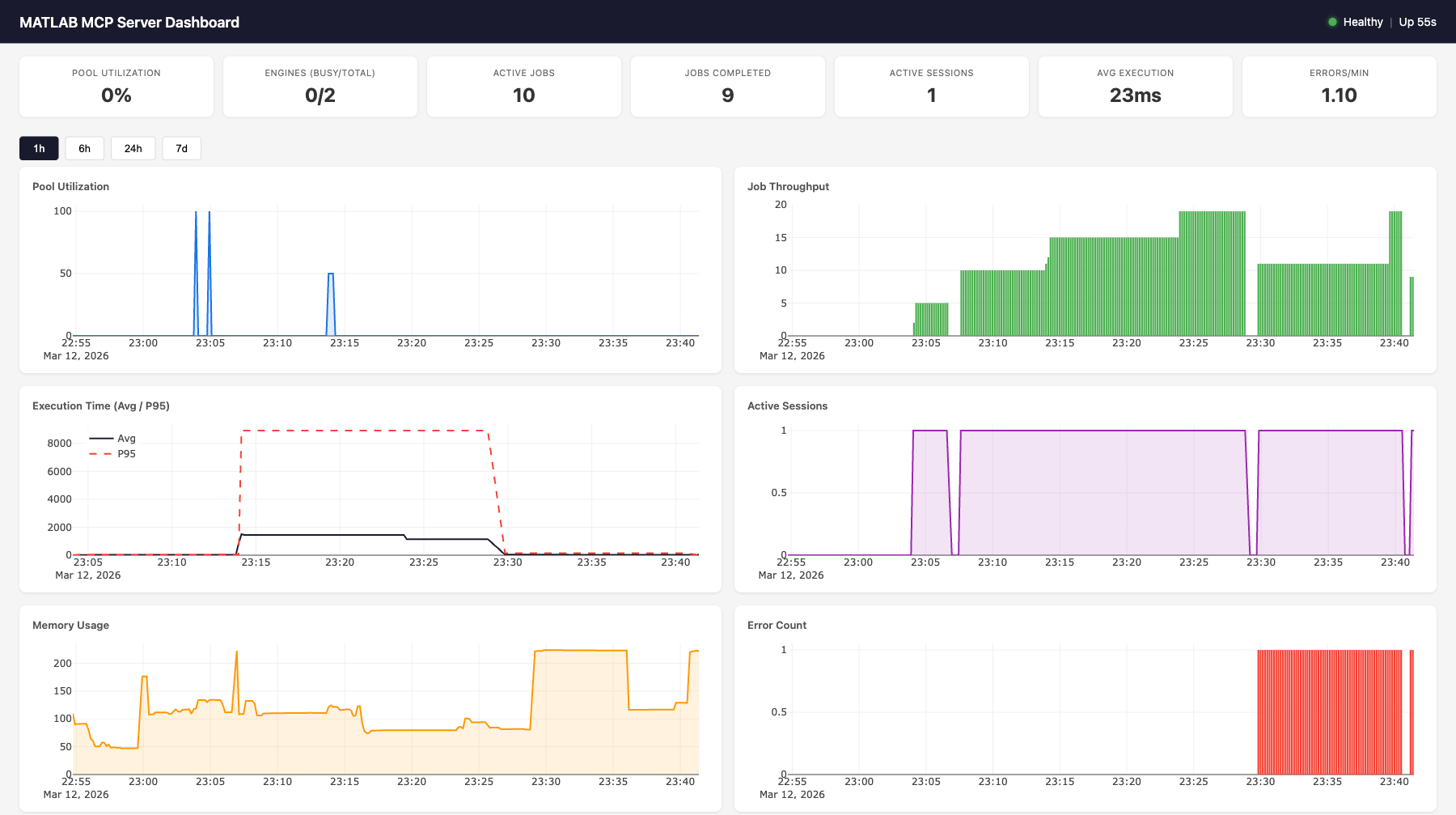
Features:
- **7 live gauges**: pool utilization, engines (busy/total), active jobs, completed jobs, active sessions, avg execution time, errors/min
- **6 time-series charts** (Plotly.js): pool utilization, job throughput, execution time (avg + p95), active sessions, memory usage, error count
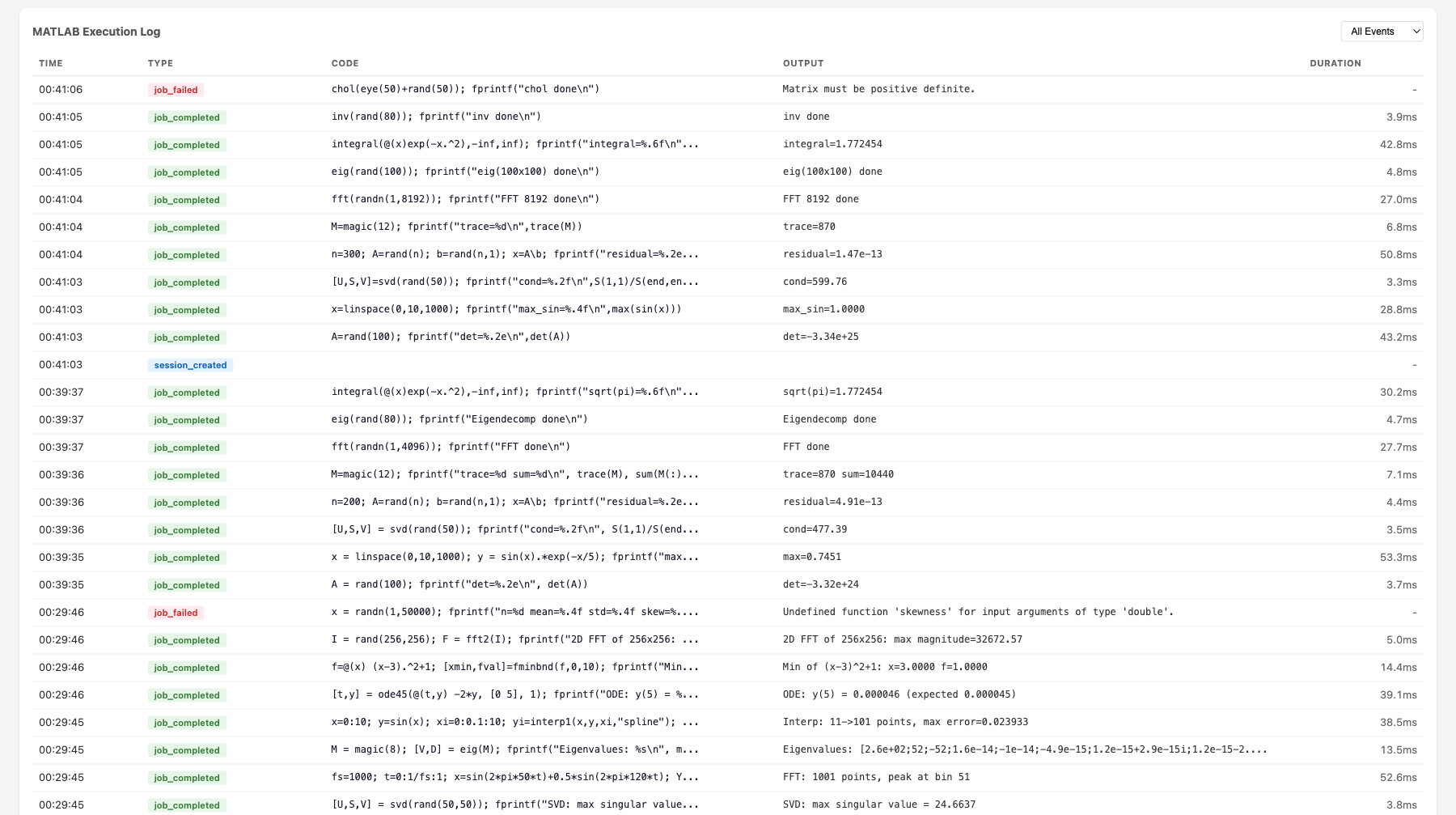
- **MATLAB execution log**: filterable table showing time, event type, MATLAB code, output, and duration for every job
- **Time range selector**: 1h, 6h, 24h, 7d views
- Auto-refreshes every 10 seconds
### Health Endpoint
```bash
curl http://localhost:8766/health
```
```json
{
"status": "healthy",
"uptime_seconds": 3600.1,
"issues": [],
"engines": {"total": 2, "available": 1, "busy": 1},
"active_jobs": 1,
"active_sessions": 3
}
```
**Status codes**: 200 for healthy/degraded, 503 for unhealthy.
**Health evaluation rules**:
| Status | Condition |
|--------|-----------|
| `unhealthy` | No engines running (`total == 0`) |
| `unhealthy` | All engines busy at max capacity (`available == 0 && total >= max_engines`) |
| `degraded` | Pool utilization > 90% |
| `degraded` | Health check failures detected |
| `degraded` | Error rate > 5/min |
| `healthy` | None of the above |
### Metrics Endpoint
```bash
curl http://localhost:8766/metrics
```
```json
{
"timestamp": "2026-03-12T23:01:56.799Z",
"pool": {"total": 2, "available": 1, "busy": 1, "max": 10, "utilization_pct": 50.0},
"jobs": {"active": 1, "completed_total": 47, "failed_total": 2, "cancelled_total": 0, "avg_execution_ms": 28.5},
"sessions": {"total_created": 5, "active": 3},
"errors": {"total": 2, "blocked_attempts": 0, "health_check_failures": 0},
"system": {"uptime_seconds": 3600.1, "memory_mb": 108.8, "cpu_percent": 12.3}
}
```
### Dashboard API
| Endpoint | Parameters | Description |
|----------|-----------|-------------|
| `GET /health` | — | Health status + issues |
| `GET /metrics` | — | Live metrics snapshot (no DB hit) |
| `GET /dashboard` | — | Web dashboard HTML |
| `GET /dashboard/api/current` | — | Same as `/metrics` |
| `GET /dashboard/api/history` | `metric`, `hours` | Time-series data from SQLite |
| `GET /dashboard/api/events` | `limit`, `type` | Event log with MATLAB output |
**Available history metrics**: `pool.utilization_pct`, `pool.total_engines`, `pool.busy_engines`, `jobs.completed_total`, `jobs.failed_total`, `jobs.avg_execution_ms`, `jobs.p95_execution_ms`, `sessions.active_count`, `system.memory_mb`, `system.cpu_percent`, `errors.total`
### Backend Architecture
```
┌─────────────────────────────────────────────┐
│ MetricsCollector │
│ │
│ In-memory: │
record_event() ──│─▶ _counters (7 counters) │
(sync, from any │ _execution_times (ring buffer, maxlen=100)│
component) │ │
│ Background task (every 10s): │
│ sample_once() ─▶ MetricsStore.insert() │
│ │
│ Live snapshot (no DB): │
│ get_current_snapshot() ─▶ /metrics │
└───────────┬─────────────────────────────────┘
│
┌───────────▼─────────────────────────────────┐
│ MetricsStore (aiosqlite) │
│ │
│ metrics table: │
│ id | timestamp | category | metric | value│
│ (4 indexes for fast queries) │
│ │
│ events table: │
│ id | timestamp | event_type | details │
│ (details = JSON with code, output, etc.) │
│ │
│ Methods: │
│ insert_metrics(), insert_event() │
│ get_latest(), get_history(), get_events() │
│ get_aggregates(), prune() │
│ │
│ SQLite WAL mode, log-and-swallow errors │
└───────────┬─────────────────────────────────┘
│
┌───────────▼─────────────────────────────────┐
│ Starlette Dashboard App │
│ │
│ /health ─▶ evaluate_health(collector) │
│ /metrics ─▶ collector.get_current_snapshot()│
│ /dashboard ─▶ cached index.html │
│ /dashboard/api/* ─▶ store queries │
│ /dashboard/static/* ─▶ JS, CSS, Plotly.js │
└─────────────────────────────────────────────┘
```
### Event Types
Events are recorded synchronously via `collector.record_event()` from any server component. Each event includes a JSON `details` field.
| Event Type | Source | Details Fields |
|------------|--------|---------------|
| `job_completed` | Executor | `job_id`, `execution_ms`, `code`, `output` |
| `job_failed` | Executor | `job_id`, `code`, `error` |
| `session_created` | SessionManager | `session_id_short` |
| `engine_scale_up` | PoolManager | `engine_id`, `total_after` |
| `engine_scale_down` | PoolManager | `engine_id`, `total_after` |
| `engine_replaced` | PoolManager | `old_id`, `new_id` |
| `health_check_fail` | PoolManager | `engine_id`, `error` |
| `blocked_function` | SecurityValidator | `function`, `code_snippet` |
### In-Memory Counters
The collector maintains 7 counters updated on every event (no DB hit):
| Counter | Incremented By |
|---------|---------------|
| `completed_total` | `job_completed` |
| `failed_total` | `job_failed` |
| `cancelled_total` | `job_cancelled` |
| `total_created_sessions` | `session_created` |
| `error_total` | Any error event (`job_failed`, `blocked_function`, `engine_crash`, `health_check_fail`) |
| `blocked_attempts` | `blocked_function` |
| `health_check_failures` | `health_check_fail` |
### Execution Time Tracking
Job execution times are stored in a ring buffer (`deque(maxlen=100)`) for O(1) avg/p95 calculation without DB queries. The p95 is computed as `sorted_times[int((len-1) * 0.95)]`.
### Transport Integration
| Transport | Monitoring Port | How |
|-----------|----------------|-----|
| **SSE** | Same as SSE port (8765) | Dashboard mounted as Starlette sub-app via `mcp._additional_http_routes` |
| **stdio** | Separate port (8766) | Uvicorn started as background `asyncio.Task` |
### Data Retention
The cleanup loop runs every 60 seconds and calls `store.prune(retention_days=7)` to delete metrics and events older than the configured retention period. SQLite WAL mode ensures reads aren't blocked during writes.
### Configuration
```yaml
monitoring:
enabled: true
sample_interval: 10 # seconds between metric samples
retention_days: 7 # days to keep historical data
db_path: "./monitoring/metrics.db"
dashboard_enabled: true
http_port: 8766 # dashboard/health port (stdio only)
```
Environment overrides: `MATLAB_MCP_MONITORING_ENABLED`, `MATLAB_MCP_MONITORING_SAMPLE_INTERVAL`, etc.
## Architecture
```
AI Agent (Claude, Cursor, etc.)
│
│ MCP Protocol (stdio or SSE)
▼
┌──────────────────────────────────────────────────────────┐
│ MCP Server (FastMCP 2.x) │
│ 20 tools + custom tools │
│ Session manager │ Security validator │ Formatter │
└──────────┬───────────────────────────────┬───────────────┘
│ │
┌──────────▼──────────────────┐ ┌─────────▼──────────────┐
│ Job Executor │ │ MetricsCollector │
│ Sync/async execution │ │ In-memory counters │
│ Timeout auto-promotion │ │ Ring buffer (p95) │
│ stdout/stderr capture │ │ Background sampling │
│ Event recording ──────────────▶ Event recording │
└──────────┬──────────────────┘ └─────────┬──────────────┘
│ │
┌──────────▼──────────────────┐ ┌─────────▼──────────────┐
│ MATLAB Pool Manager │ │ MetricsStore (SQLite) │
│ Elastic engine pool │ │ Time-series metrics │
│ Scale up/down on demand │ │ Event log with output │
│ Health checks & replace │ │ Aggregates & history │
└──────────┬──────────────────┘ └─────────┬──────────────┘
│ │
┌──────────▼──────────────────┐ ┌─────────▼──────────────┐
│ MATLAB Engines (R2022b+) │ │ Dashboard (Starlette) │
│ Engine 1 │ Engine 2 │ ... │ │ /health /metrics │
│ Workspace isolation │ │ /dashboard (Plotly.js) │
└──────────────────────────────┘ └─────────────────────────┘
```
### Request Flow
1. AI agent sends `execute_code` via MCP protocol
2. `SecurityValidator` checks code against function blocklist
3. `JobExecutor` creates a job, acquires an engine from the pool
4. Code runs in MATLAB with stdout/stderr captured via `StringIO`
5. If completes within `sync_timeout` (30s): result returned inline
6. If exceeds timeout: promoted to async, agent gets `job_id` to poll
7. `MetricsCollector.record_event()` logs code + output + duration
8. Engine released back to pool, workspace reset
### Component Wiring
All components receive a `collector` reference at construction time. The collector is wired to live pool/tracker/sessions in the lifespan handler after startup. This allows synchronous `record_event()` calls from any component without async overhead.
```python
# Construction (before event loop)
collector = MetricsCollector(config)
pool = EnginePoolManager(config, collector=collector)
executor = JobExecutor(pool, tracker, config, collector=collector)
sessions = SessionManager(config, collector=collector)
security = SecurityValidator(config.security, collector=collector)
# Lifespan (after event loop starts)
collector.pool = pool
collector.tracker = tracker
collector.sessions = sessions
collector.store = MetricsStore(config.monitoring.db_path)
```
## Development
```bash
# Install dev dependencies
pip install -e ".[dev]"
# Run tests (no MATLAB needed — uses mock engine)
pytest tests/ -v
# Run with coverage
pytest tests/ --cov=matlab_mcp --cov-report=term-missing
# Lint
ruff check src/ tests/
```
### Project Structure
```
src/matlab_mcp/
├── server.py # MCP server entry point, tool registration
├── config.py # YAML config, pydantic validation, env overrides
├── pool/
│ ├── engine.py # Single MATLAB engine wrapper
│ └── manager.py # Elastic pool manager
├── jobs/
│ ├── models.py # Job data model, lifecycle
│ ├── tracker.py # Job store, pruning
│ └── executor.py # Sync/async execution, timeout promotion
├── tools/
│ ├── core.py # execute_code, check_code, get_workspace
│ ├── discovery.py # list_toolboxes, list_functions, get_help
│ ├── jobs.py # job status, result, cancel, list
│ ├── files.py # upload, delete, list files
│ ├── admin.py # pool status
│ ├── monitoring.py # get_server_metrics, get_server_health, get_error_log
│ └── custom.py # Custom tool loader from YAML
├── monitoring/
│ ├── collector.py # Background metrics sampling, event recording
│ ├── store.py # Async SQLite storage for time-series data
│ ├── health.py # Health evaluation (healthy/degraded/unhealthy)
│ ├── routes.py # HTTP route handlers (/health, /metrics)
│ ├── dashboard.py # Starlette sub-app with dashboard API
│ └── static/ # Dashboard HTML, CSS, JS (Plotly.js)
├── output/
│ ├── formatter.py # Result formatting
│ ├── plotly_convert.py # Load Plotly JSON from MATLAB extraction
│ ├── plotly_style_mapper.py # MATLAB→Plotly style/property conversion
│ └── thumbnail.py
├── session/
│ └── manager.py # Session lifecycle, temp dirs
├── security/
│ └── validator.py # Function blocklist, filename sanitization
└── matlab_helpers/
├── mcp_extract_props.m
├── mcp_checkcode.m
└── mcp_progress.m
```
## Security
| Protection | Description |
|-----------|-------------|
| Function blocklist | Blocks `system()`, `unix()`, `dos()`, `!`, `eval()`, `feval()`, `evalc()`, `evalin()`, `assignin()`, `perl()`, `python()` by default |
| Filename sanitization | Rejects filenames with path traversal or invalid characters |
| Workspace isolation | `clear all; clear global; clear functions; fclose all; restoredefaultpath;` between sessions |
| SSE proxy auth | Requires reverse proxy with auth for production |
| Upload size limits | Configurable max upload size (default 100MB) |
## License
[MIT](LICENSE)
## Contributing
Contributions welcome! Please open an issue or PR on [GitHub](https://github.com/HanSur94/matlab-mcp-server-python).