> Updated: 2026-11-09. Platforms ship independently. Check the relevant release for its version, system requirements, and installation notes.
ScrapeFun brings metadata scraping, resource browsing, playback, reading, and user management into a self-hosted service. Deploy Server on Linux / NAS, macOS, or Windows, then connect through a browser or a dedicated Client.
This repository contains public product documentation, deployment templates, and extension examples. It does not publish the complete product source code. Platform repositories provide release assets and installation instructions.
## Downloads and deployment
Deploy a Server first, then install a Client if needed. Server stores libraries, users, configuration, and progress. Client connects to an existing Server. You can also access Server directly in a browser.
| Type | Platform | Published installation format | Links |
| --- | --- | --- | --- |
| Server | Linux / NAS | Docker, supports only `linux/amd64` | [Docker deployment](./DOCKER_GUIDE.en.md) |
| Server | Linux | Native systemd / amd64 0.5.10 | [Installation](./DOCKER_GUIDE.en.md#native-systemd-installation) · [v0.5.10](https://github.com/HaoweiLi97/scrapefun-server-linux/releases/tag/v0.5.10) |
| Server | Android | arm64-v8a APK 0.5.10 | [Installation](https://github.com/HaoweiLi97/scrapefun-server-android) · [Stable release](https://github.com/HaoweiLi97/scrapefun-server-android/releases/tag/v0.5.10) |
| Server | macOS | Apple Silicon / arm64 DMG 0.5.4 | [0.5.4 manual download](https://github.com/HaoweiLi97/scrapefun-server-macos/releases/tag/v0.5.4) |
| Server | Windows | x64 EXE / Microsoft Store MSIX | [GitHub release](https://github.com/HaoweiLi97/scrapefun-server-windows/releases/tag/v0.5.10) · [Microsoft Store](https://apps.microsoft.com/detail/9N83B6RSWG01) |
| Client | Linux | x64 DEB / AppImage 0.5.10 | [Installation](https://github.com/HaoweiLi97/scrapefun-client-linux) · [v0.5.10](https://github.com/HaoweiLi97/scrapefun-client-linux/releases/tag/v0.5.10) |
| Client | macOS | Apple Silicon / arm64 DMG 0.5.4 | [0.5.4 manual download](https://github.com/HaoweiLi97/scrapefun-client-macos/releases/tag/v0.5.4) |
| Client | Windows | x64 EXE / Microsoft Store APPX | [GitHub release](https://github.com/HaoweiLi97/scrapefun-client-windows/releases/tag/v0.5.10) · [Microsoft Store](https://apps.microsoft.com/detail/9NM3HPS675QH) |
| Client | Android | arm64-v8a / armeabi-v7a APK 0.5.10 | [Installation](https://github.com/HaoweiLi97/scrapefun-client-android/blob/main/README.en.md) · [Stable release](https://github.com/HaoweiLi97/scrapefun-client-android/releases/tag/v0.5.10) |
Available architectures and formats follow the actual Release Assets and Docker tag manifests.
Server 0.5.10 is available for Docker, Linux, Windows, and Android. Client 0.5.10 is available for Linux, Windows, and Android. This release improves library scanning, detail loading, and playback resume. The Windows and Linux clients restore the browsing window when you leave the player. On Linux, the picture and controls resize together, and maximizing covers the window edges. Windows GitHub EXEs are unsigned and may trigger Microsoft Defender SmartScreen. Check the Microsoft Store listings for their available versions.
## Quick start
On an x86-64 Linux host, install Docker, the Docker Compose plugin, and `flock` (usually provided by `util-linux`), then run:
```bash
curl -fsSL https://raw.githubusercontent.com/HaoweiLi97/ScrapeFun/main/scripts/one-click-compose-deploy.sh | bash -s -- stable
```
The installer automatically detects GPU access and validates it inside the container; set `SCRAPEFUN_GPU_MODE` to choose a mode explicitly. By default, the script stores deployment configuration in `~/scrapefun`, persistent data in `~/scrapefun-data`, and starts app plus a separate updater.
Open the following address after deployment:
```text
http://SERVER_IP:8096
```
Complete the setup wizard, configure administrator credentials, and add storage and libraries. NAS management-panel users should follow the [Compose guide](./DOCKER_COMPOSE_DEPLOYMENT.en.md). [Back up your data](./DOCKER_DATA_AND_BACKUP.en.md) before upgrading an existing instance.
## Capabilities
| Area | Capabilities |
| --- | --- |
| Media organization | Movie and TV metadata scraping, artwork and cast information, cleaning rules, custom and combined scrapers |
| Comic reading | Comic scanning, browser and client reading, saved reading progress |
| Remote resources | WebDAV / AList browsing and file management, remote-library scanning, resource connections |
| Playback and subtitles | Browser and client playback, synchronized playback progress, subtitle search and import |
| User management | Administrator and standard users, library access permissions, multiple devices |
| Extensions | Emby / Jellyfin-style compatibility interfaces, picture enhancement, and other Pro features |
Some advanced features require a valid ScrapeFun Pro entitlement. Feature scope and duration follow the [product entitlement information](https://scrapefun.com/?lang=en#/pro), purchase information, and the instance's license page. Player compatibility also depends on the client version, media codec, and Server configuration.
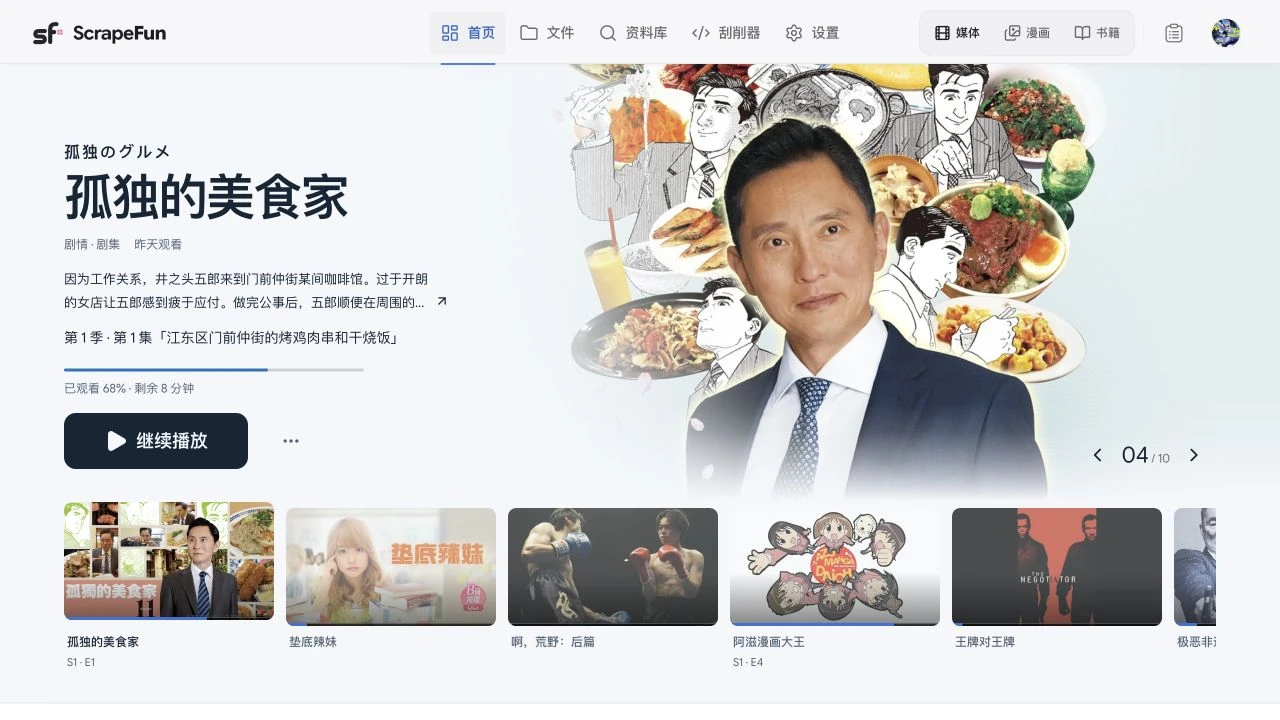
## Interface previews
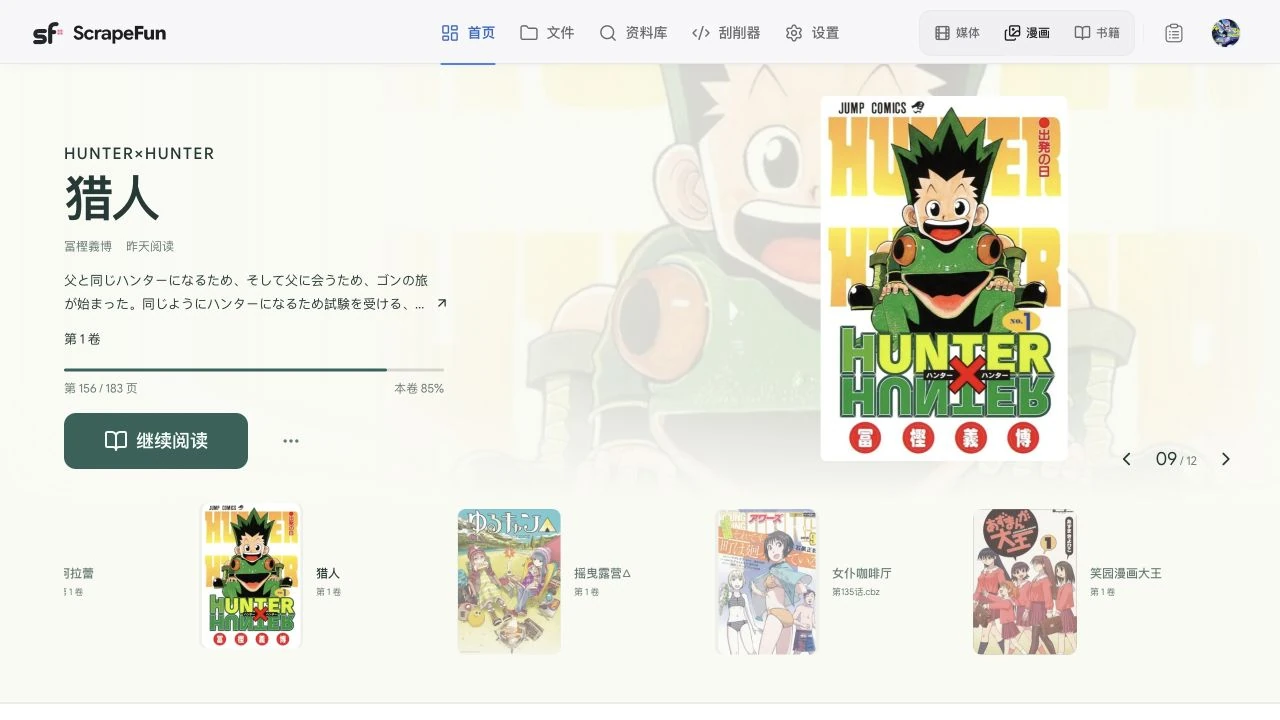
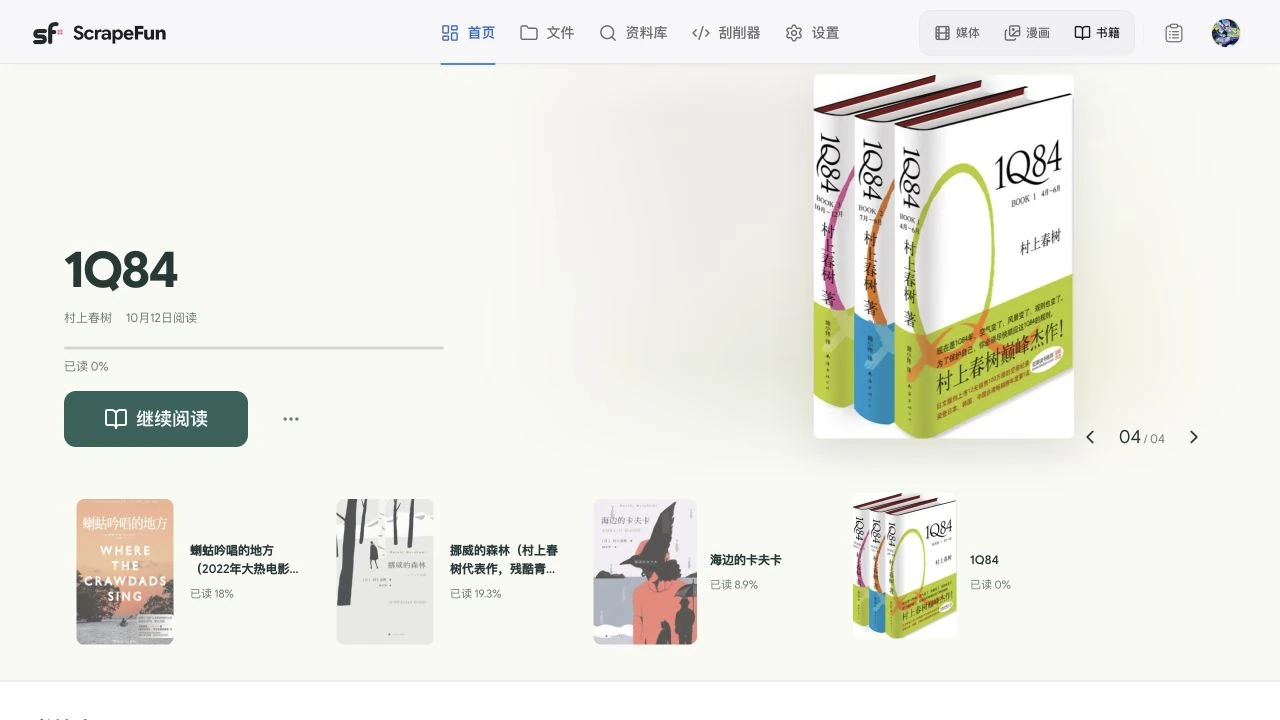
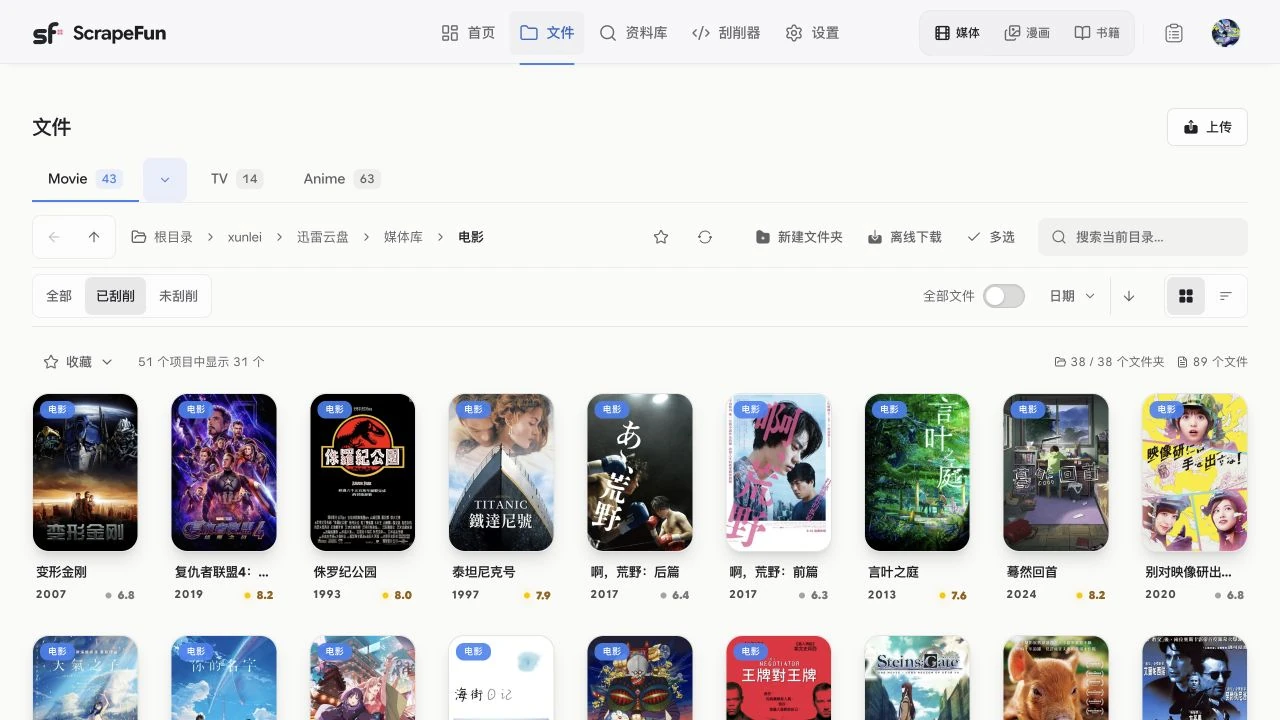
These screenshots were captured from the running ScrapeFun application on November 3, 2026. They show the Chinese interface; appearance can vary with platform, version, and personal settings.
Comic library and reading progress
View comic covers, volumes, and reading progress, then continue where you left off.
Book library
Browse books by cover and view titles in progress.
Remote resource browsing
Browse remote directories and switch between posters and file lists.
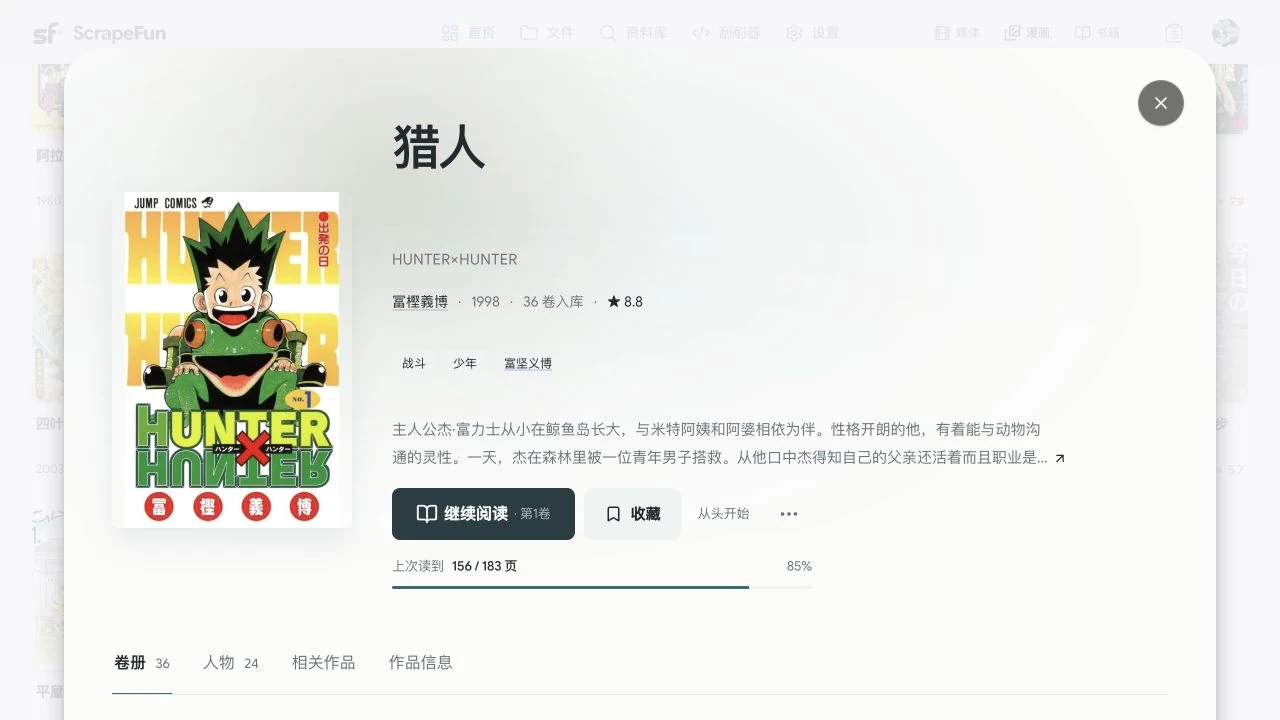
Title details
View artwork, metadata, descriptions, reading progress, and volume controls together.
## Documentation
| Task | Guide |
| --- | --- |
| API integration and automation | [Authentication, media, and tasks](./docs/developers/api.en.md) · [OpenAPI](./docs/developers/openapi.json) |
| Settings and AI connections | [Common settings](./docs/developers/settings.en.md) · [Text, voice, and image AI](./docs/developers/ai-settings.en.md) |
| Author and manage scrapers | [Methods and data formats](./docs/developers/scrapers.en.md) · [Testing and management API](./docs/developers/scraper-api.en.md) |
| Linux installation, updates, and channel changes | [Docker deployment and operations](./DOCKER_GUIDE.en.md) |
| Manual NAS configuration | [Docker Compose deployment](./DOCKER_COMPOSE_DEPLOYMENT.en.md) |
| Backup, migration, and recovery | [Persistent data, backup, and recovery](./DOCKER_DATA_AND_BACKUP.en.md) |
| Configuration fields | [Environment example](./.env.example) · [Configuration schema](./server-env.schema.json) |
| Custom scrapers | [English developer guide](./server/SCRAPER_GUIDE.md) · [Chinese guide](./server/SCRAPER_GUIDE.zh-CN.md) |
| Versions and update behavior | [Releases and compatibility](./RELEASE_POLICY.en.md) |
| Product issues and vulnerabilities | [Support](./SUPPORT.en.md) · [Security](./SECURITY.en.md) |
| Software licensing | [Licensing and agreements](./legal/README.en.md) |
More usage information is available in the [online documentation](https://scrapefun.com/?lang=en#/docs).
## Data and updates
Persist the complete Docker data root:
```yaml
volumes:
- ./scrapefun-data:/app/data
```
Updating restarts Server and interrupts playback and background tasks. Back up first, update, then check login, libraries, images, and playback and reading progress. `latest` follows stable releases and `beta` follows prereleases; use an explicit version tag when you need a fixed version.
macOS Server [0.5.4](https://github.com/HaoweiLi97/scrapefun-server-macos/releases/tag/v0.5.4) requires Apple Silicon and macOS 27.0 or later; macOS Client [0.5.4](https://github.com/HaoweiLi97/scrapefun-client-macos/releases/tag/v0.5.4) requires Apple Silicon and macOS 26.0 or later. Both use ad-hoc integrity signatures without Developer ID signing or Apple notarization. Install this version manually and follow its Release instructions to remove quarantine if needed.
## Contact and licensing
Report public product issues through [GitHub Issues](https://github.com/HaoweiLi97/ScrapeFun/issues) or the [product feedback page](https://scrapefun.com/?lang=en#/contact). For accounts, payments, or private logs, contact `scrapefun@outlook.com`. Commercial inquiries: `lihaowei977@gmail.com`.
See [licensing and agreements](./legal/README.en.md) for the scope of software, documentation, and third-party component licenses.