
Terminal-first streaming engine with smart autoplay radio.
--- [](https://www.python.org/downloads/) [](https://github.com/astral-sh/uv) [](https://opensource.org/licenses/MIT) ## Overview **Tuitify** is a terminal-first music streaming application built for users who want a fast, keyboard-driven listening experience without leaving the command line. It combines YouTube-powered music discovery, seamless playback, and radio-style autoplay recommendations into a lightweight TUI (Text User Interface) that feels like a minimal Spotify for the terminal. Users can search for music or podcasts, instantly stream audio using VLC-backed playback, and continue listening through an automatically generated recommendation queue based on the currently playing track. Album artwork, progress tracking, next-up previews, playback controls, and keyboard shortcuts make the experience smooth, responsive, and practical for daily use. 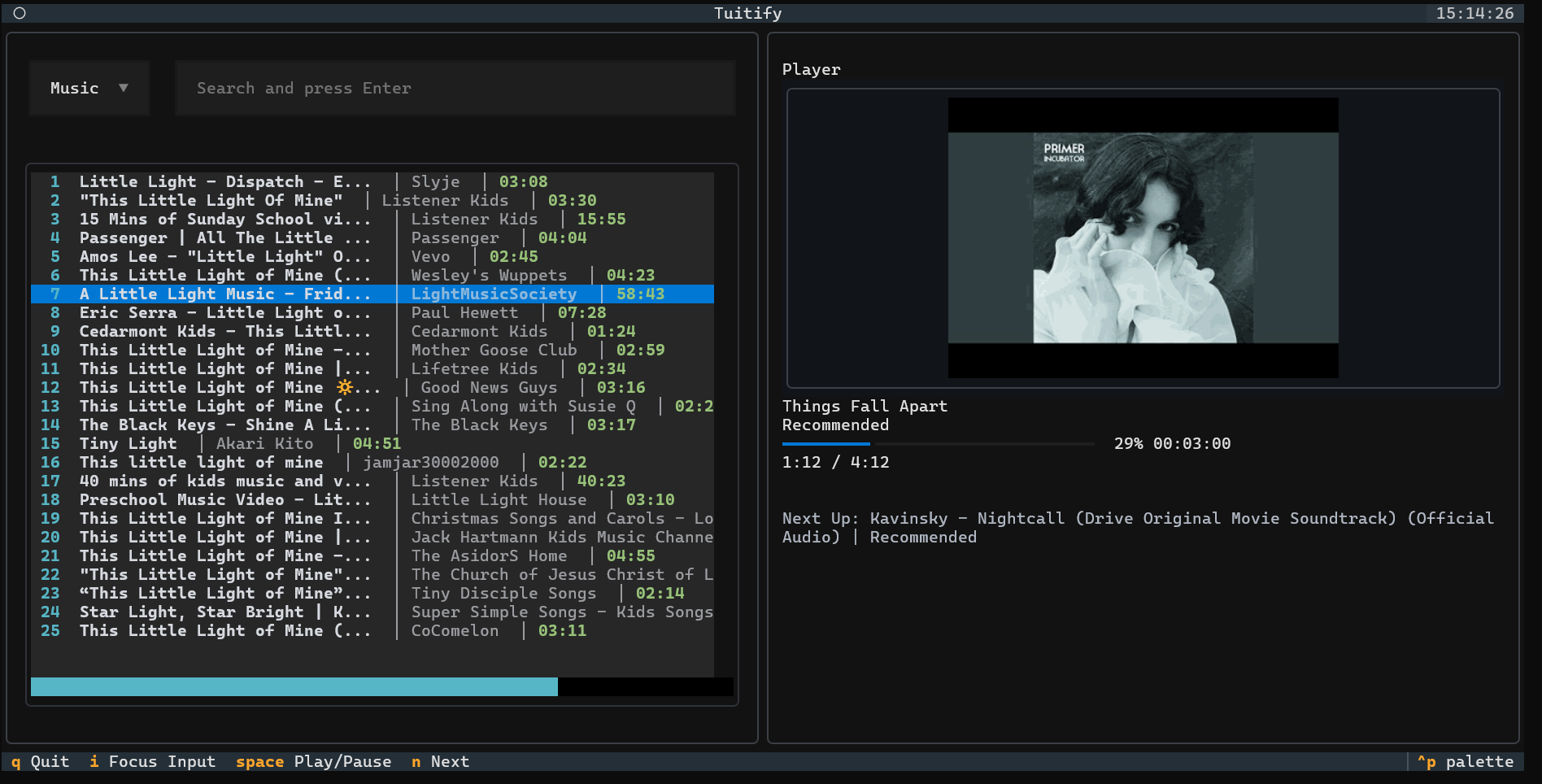 ## Why Tuitify? Most terminal music players focus only on local files. Tuitify is built for streaming-first listening. Listen your favourite music and podcasts without leaving the terminal. The goal is simple: minimal friction, continuous listening, and a terminal-native music experience, no more ads, no more interruptions, just the freedom to enjoy your music seamlessly from your command line. As a contributor to [SimpMusic](https://github.com/maxrave-dev/SimpMusic), I’ve seen how a simple and seamless streaming experience can completely change the way people listen to music. Tuitify brings that same idea to the terminal-a lightweight, keyboard-first music player that keeps playback smooth, fast, and uninterrupted. ## Features - **Global Search**: Instantly find songs, albums, or podcasts. - **Smart Radio Engine**: Automatically seeds recommendations based on your current track for non-stop playback. - **High-Quality Audio**: Uses `yt-dlp` and `vlc` for reliable and high-quality streaming. - **Keyboard Centric**: Optimized for efficiency with customizable keybindings. - **Album Art**: Real-time display of track artwork in your terminal. ### Support Matrix | Terminal | TGP support | Sixel support | Works with textual-image | |---------------------|:-----------:|:-------------:|:------------------------:| | Black Box | ❌ | ✅ | ✅ | | foot | ❌ | ✅ | ✅ | | GNOME Terminal | ❌ | ❌ | | | iTerm2 | ❌ | ✅ | ✅ | | kitty | ✅ | ❌ | ✅ | | konsole | ✅ | ✅ | ✅ | | tmux | ❌ | ✅ | ✅ | | Visual Studio Code | ❌ | ✅ | ✅ | | Warp | ❌ | ❌ | ❌ | | wezterm | ✅ | ✅ | ✅ | | Windows Console | ❌ | ❌ | | | Windows Terminal | ❌ | ✅ | ✅ | | xterm | ❌ | ✅ | ✅ | ✅ = Supported; ❌ = Not Supported ## Getting Started ### Prerequisites - **Python 3.12+** - **VLC Media Player**: Ensure VLC is installed on your system as it's the core playback engine. ### Installation 1. Clone the repository: ```bash git clone https://github.com/Hemanth2332/tuitify.git cd tuitify ``` 2. Install dependencies (using `uv` or `pip`): ```bash uv sync # or pip install . ``` ### Running the App Simply run the `main.py` file: ```bash uv run ./main.py ``` ## Controls - `i`: Focus search input - `Enter`: Search / Play selected track - `Space`: Play / Pause - `n`: Skip to next track - `tab`: switch between panels - `←` / `→`: Seek backward/forward (10s) - `q`: Quit Tuitify Feel Free to change the keybindings to your own preference in `src/tui/keybindings.py`. ## Project Structure - `src/tui/`: Main TUI application logic and layout. - `src/youtube/`: YouTube service, streaming player, and recommendation engine. - `src/search/`: Search-specific wrappers. ## Contribution Tuitify is built to grow, and contributions are always welcome. If you'd like to contribute: 1. Fork the repository 2. Create a new branch (`feature/your-feature-name`) 3. Commit your changes 4. Open a Pull Request Ideas, discussions, and improvements are always appreciated. ## License This project is licensed under the MIT License - see the [LICENSE](LICENSE) file for details.