# Git Scanner Framework
[](https://github.com/HightechSec/git-scanner/blob/master/LICENSE.md)









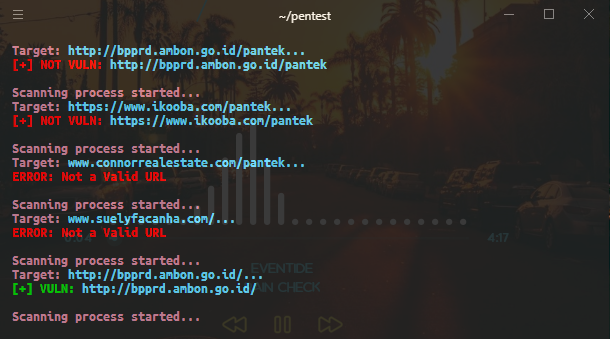
This tool can scan websites with open ```.git``` repositories for `Bug Hunting`/ `Pentesting Purposes` and can dump the content of the ```.git``` repositories from webservers that found from the scanning method. This tool works with the provided Single target or Mass Target from a file list.
 ## Installation
```
- git clone https://github.com/HightechSec/git-scanner
- cd git-scanner
- bash gitscanner.sh
```
or you can install in your system like this
```
- git clone https://github.com/HightechSec/git-scanner
- cd git-scanner
- sudo cp gitscanner.sh /usr/bin/gitscanner && sudo chmod +x /usr/bin/gitscanner
- $ gitscanner
```
## Usage
- Menu's
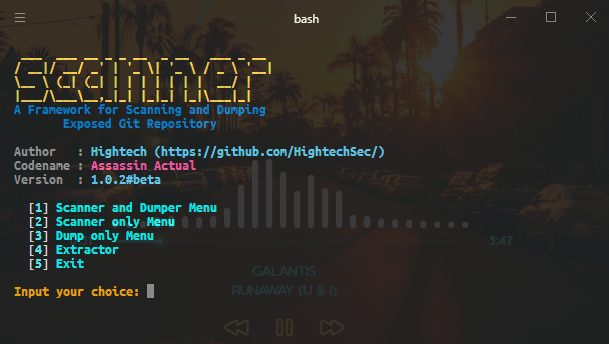
- Menu `1` is for scanning and dumping git repositories from a provided file that contains the `list of the target url` or a provided `single target url`.
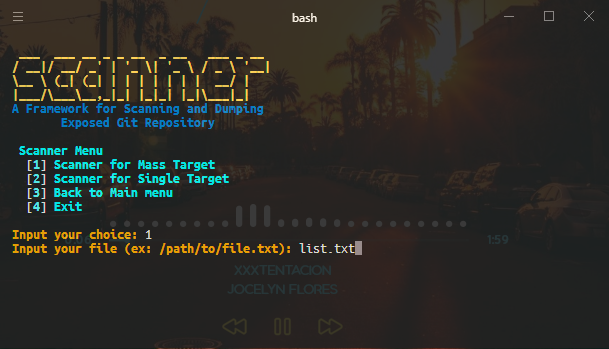
- Menu `2` is for scanning only a git repositories from a provided file that contains the `list of the target url` or a provided `single target url`.
- Menu `3` is for Dumping only the git repositories from a provided file that contains `list of the target url` or a provided `single target url`. This will work for the `Maybe Vuln` Results or sometimes with a repository that had directory listing disabled or maybe had a `403 Error Response`.
- Menu `4` is for Extracting files only from a Folder that had .git Repositories to a destination folder
- URL Format
- Use ```http://``` like ```http://example.com``` or ```https://``` like ```https://example.com``` for the url formatting
- Make sure use this format in the files that contains the list of possible target that you have, Example:
- https://target.com
- http://hackerone.com
- https://bugcrowd.com
- Extractor
- When using Extractor, make sure the location of the git repositories that you select are correct. Remember, The first option is for inputing the `Selected git repository` and the second option is for inputing the `Destination folder`
## Requirements
* curl
* bash
* git
* sed
## Todos
- Creating a `Docker Images` if it's possible
- ~~Adding Extractor on the next Version~~ Added in version 1.0.2#beta but still experimental.
- Adding ~~Thread Processing~~ Multi Processing (`Bash doesn't Support Threading`)
## Changelog
All notable changes to this project listed in this [file](https://github.com/HightechSec/git-scanner/blob/master/CHANGELOG.md)
# Credits
Thanks to:
- [GitTools](https://github.com/internetwache/GitTools) by [internetwache](https://github.com/internetwache/)
- [Mass Git Scanner](https://github.com/Adelittle/Mass_Git_Scanner/) by [Ade Little](https://github.com/Adelittle/)
## Installation
```
- git clone https://github.com/HightechSec/git-scanner
- cd git-scanner
- bash gitscanner.sh
```
or you can install in your system like this
```
- git clone https://github.com/HightechSec/git-scanner
- cd git-scanner
- sudo cp gitscanner.sh /usr/bin/gitscanner && sudo chmod +x /usr/bin/gitscanner
- $ gitscanner
```
## Usage
- Menu's
- Menu `1` is for scanning and dumping git repositories from a provided file that contains the `list of the target url` or a provided `single target url`.
- Menu `2` is for scanning only a git repositories from a provided file that contains the `list of the target url` or a provided `single target url`.
- Menu `3` is for Dumping only the git repositories from a provided file that contains `list of the target url` or a provided `single target url`. This will work for the `Maybe Vuln` Results or sometimes with a repository that had directory listing disabled or maybe had a `403 Error Response`.
- Menu `4` is for Extracting files only from a Folder that had .git Repositories to a destination folder
- URL Format
- Use ```http://``` like ```http://example.com``` or ```https://``` like ```https://example.com``` for the url formatting
- Make sure use this format in the files that contains the list of possible target that you have, Example:
- https://target.com
- http://hackerone.com
- https://bugcrowd.com
- Extractor
- When using Extractor, make sure the location of the git repositories that you select are correct. Remember, The first option is for inputing the `Selected git repository` and the second option is for inputing the `Destination folder`
## Requirements
* curl
* bash
* git
* sed
## Todos
- Creating a `Docker Images` if it's possible
- ~~Adding Extractor on the next Version~~ Added in version 1.0.2#beta but still experimental.
- Adding ~~Thread Processing~~ Multi Processing (`Bash doesn't Support Threading`)
## Changelog
All notable changes to this project listed in this [file](https://github.com/HightechSec/git-scanner/blob/master/CHANGELOG.md)
# Credits
Thanks to:
- [GitTools](https://github.com/internetwache/GitTools) by [internetwache](https://github.com/internetwache/)
- [Mass Git Scanner](https://github.com/Adelittle/Mass_Git_Scanner/) by [Ade Little](https://github.com/Adelittle/)