中文 | English
Native map & routing tools for DeepSeek Harness: driving / transit / walking / bicycling routes, geocoding, reverse geocoding and POI search. The model calls them directly — no MCP server — and every route it plans is drawn on a real map card below the final answer.





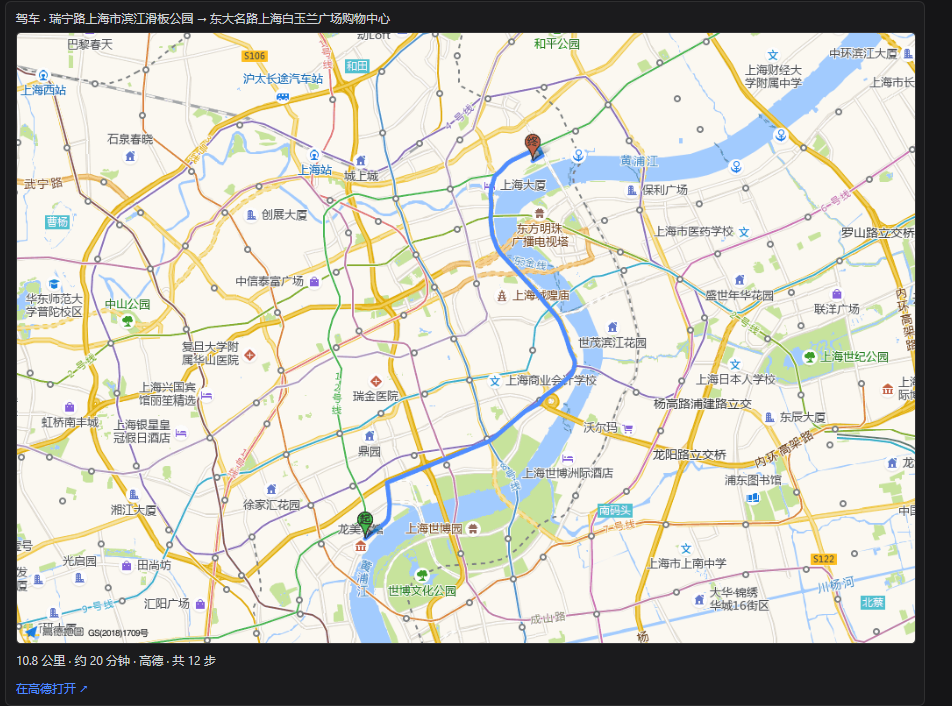
Real screenshot: the route map card below the closing prose (driving, 10.8 km / ~20 min / 12 steps; the blue polyline is the real route drawn by Amap).
A route question produces three things: | Where | What | Notes | |---|---|---| | Process area (the "thinking" block) | Compact summary + collapsible step list | **No map here** — the process area re-renders while the model thinks, so the map appears exactly once, at the final result (this also saves a static-map request) | | Closing prose | Distance, duration, step-by-step directions, "Open in Amap ↗" | Model-visible text; this is what the model reasons over | | **After** the closing prose (turn tail) | **Route map card**: real map + endpoints + distance/duration/steps + deep link | One card per route planned in the turn, labelled "k of N"; more than 3 routes shows the first 3 plus the total | Four card states — none of them blank: - **Running**: shows 「规划中…」 (planning). - **Success with geometry**: the real map (Amap static map). - **Success without a real map** (no key / quota exceeded / host route absent): **falls back to a self-drawn SVG sketch** — no external request, no frontend key, and the route shape, endpoints, distance and duration still show. - **Failure**: the error text is displayed rather than swallowed. > The turn tail is a **single-winner** seat in the DSH client: when the turn has routes, the map card takes that row and the official "files produced this turn" row does not render — the card notes "N other files produced this turn (the map card occupies this row; see the process area)". The card's **credit** sits on the **same line, right after** the "Open in Amap ↗" link (`本卡片由 DeepSeek Harness 插件 dsh-map-tools 生成 · GitHub ↗`; once per card, attached to the last route): these cards get screenshotted and forwarded, and a screenshot carries no README and no package page — that line is the only thing in it that says who drew the map. It is rendered by the browser half only: it never enters the model context and costs no tokens. ## Install ### Option 1 — DeepSeek Harness Desktop plugin page (recommended) Desktop's **plugin manager** installs by package name; no CLI needed: 1. Open the **Plugins** page in the sidebar → **Add plugin** (top right). 2. Put `dsh-map-tools` in **Package name or address**; leave **Registry** on its default (or pick the **Mainland China mirror** on a slow network). 3. The page looks the package up on that npm registry and shows its name and version — confirm, then press **Install**. You may press **Enable now**; otherwise the notice says the change applies at the next start. 4. Restart DeepSeek Harness Desktop and the `map_*` tools are available in a session. > **Which profile it lands in**: the desktop app installs into the **`desktop`** profile (`~/.dsh/profiles/desktop`) and records a caret range such as `dsh-map-tools ^0.7.1` — on 0.x a caret **cannot** reach 0.8.x, so upgrade by entering the target version (shaped `dsh-map-tools@^0.8.0`, with `0.8` replaced by the minor you are moving to) in the same field. > That field also accepts a **GitHub address** (`https://github.com/HorusJiang/dsh-map-tools`) and the **absolute path of a local plugin directory**, so source and local-development installs go through the same dialog. ### Option 2 — npm (CLI, prebuilt) ```sh dsh plugin --profile web add dsh-map-tools # web / CLI dsh plugin --profile desktop add dsh-map-tools # desktop app (profile name: desktop) ``` ### Option 3 — from GitHub (source build) ```sh dsh plugin --profile web add github:HorusJiang/dsh-map-tools ``` > The published package ships **no** `prepare` / `postinstall` build scripts, so pnpm ≥10 installs it without prompting to allow build scripts or configuring `allowBuilds`. **Requirements** - **DeepSeek Harness ≥ 0.1.2-rc.1** (peer deps: `@deepseek-ai/dsh-settings`, `@deepseek-ai/dsh-tools`, `@deepseek-ai/cordis` ^4.0.2). Earlier release lines are unsupported because `@deepseek-ai/dsh-settings` removed its legacy API. - Verified end to end on **DSH 0.1.6-alpha.2 / 0.1.6-alpha.1 + Node v24**; the compatible releases are recorded in `package.json` under `dsh.compatibility.dshReleases`. - **The desktop app works too**: on **DeepSeek Harness Desktop (DSH 0.1.7-rc.2)** the plugin-page install (`desktop` profile) and the turn-tail map card both work — that release still declares `conversation.chat.turnTail` as `list`, which is the shape this plugin registers. - **Node ≥ 20**. - The route map card and the config page need a **web client** (`dsh.client.platform: web`: both `dsh web` and DeepSeek Harness Desktop qualify). On TUI / headless the 7 tools still work — there are simply no graphical cards. Restart the client after installing: `dsh web` for the CLI (press `R` in the launcher), or DeepSeek Harness Desktop for the desktop app. ### Upgrade / uninstall / inspect ```sh dsh plugin --profile web list # installed version dsh plugin --profile web add dsh-map-tools@^0.7.0 # upgrade dsh plugin --profile web remove dsh-map-tools # uninstall ``` On the desktop app the whole thing is in the UI: **Plugins** page → dsh-map-tools gives you the switch and **Uninstall**; **upgrading means re-installing with a named target version** (e.g. `dsh-map-tools@^0.8.0`), because the `^0.7.1` the page writes cannot reach 0.8.x on 0.x. > **The 0.x caret trap**: on 0.x, a caret like `^0.6.1` only allows the same minor, so it **cannot** resolve 0.7.x. Name the target version when upgrading (e.g. `dsh-map-tools@^0.7.0`) — the plugin-page install (Option 1) obeys the same rule. ### Local development install ```sh dsh plugin --profile web add /absolute/path/to/dsh-map-tools ``` This mounts the checkout via `link:`. Note that **source edits need `pnpm run build`**, and hot-replacing the plugin inside the host (no restart) additionally requires the hmr row and a junction — the full recipe is in [`docs/开发-热插拔-HMR.md`](docs/开发-热插拔-HMR.md). ## Quick start Configure an Amap key (~2 minutes): 1. Open the [Amap console](https://console.amap.com/dev/key/app) → create an app → request a **"Web Service"** key (free for individuals). 2. On DSH's sidebar **Plugins page → dsh-map-tools**, paste the key, set the data source to `amap`, save (applies instantly). 3. Ask in a session: ``` Plan a driving route from Beijing South Station to Capital Airport T3 Geocode "西湖区文三路478号" to coordinates Any gas stations within 1km of 116.397428,39.90923? ``` 4. Expected result: the model answers with distance, duration and step-by-step directions, and a **map card appears below the closing prose**. Click "Open in Amap ↗" on the card to continue navigating in the Amap app or website. ## Tool reference | Tool | What it does | Parameters | Free OSM | Amap | |---|---|---|---|---| | `map_driving_route` | Driving route planning | `origin`, `destination` (required; address or `"lng,lat"`); `waypoints` (`"lng,lat;lng,lat"`, **Amap only**); `alternatives` (default `false`) | ✅ | ✅ | | `map_walking_route` | Walking route planning | `origin`, `destination` | ✅ | ✅ | | `map_bicycling_route` | Bicycling route planning | `origin`, `destination` | ✅ | ✅ | | `map_transit_route` | Transit (bus / metro) planning | `origin`, `destination` | — | ✅ | | `map_geocode` | Address → coordinates | `address` | CJK unreliable | ✅ | | `map_reverse_geocode` | Coordinates → structured address | `location` (`"lng,lat"`) | CJK unreliable | ✅ | | `map_poi_search` | POI search | `keywords`; `location` (nearby-search centre), `radiusM` (default 1000, max 50000), `region` (city filter), `types` (POI type code, e.g. `060000` for dining) | — | ✅ | Origins and destinations accept either **address text** or **`"lng,lat"` coordinates**; the plugin normalizes automatically. **What the model sees** - Distance, duration, step count, data source. - Step-by-step directions: **all steps up to 24**; longer routes give the first 16 + "N steps omitted, M in total" + the **last 6** (the arrival segment is always present, so the model has no reason to re-compute a partial route). - Coordinate inputs **echo the reverse-geocoded place name**, marked "(reverse geocoded)", so a wrong origin is visible at a glance: `endpoints: Beijing South Station → Beijing Capital International Airport (reverse geocoded)`. **Card-only data never enters the model context**: route geometry (decimated to ≤ 200 points) and the endpoint names travel through `output.presentationMeta` into the session log, used solely to render the card — which is why the card costs no tokens. ## Configuration ### Bundle config page (recommended) DSH's sidebar **Plugins page → dsh-map-tools** opens the bundle's detail page, and the configuration sits **between its description and its rows**: a status line (data source · key state), a data-source selector, the masked Amap key input (leave blank to keep the current one), the request timeout, plus a built-in "How to get an Amap key?" link and an "Open config file" action. Saving **rebuilds the tool instances**, so it takes effect immediately. The section renders into the host's `plugins.bundle.config` seat (keyed by the package name `dsh-map-tools`): the host draws the page chrome — title, package name, description, switch, uninstall — and the plugin draws only the content. **Older hosts** (DSH ≤ 0.1.5 declare no such seat) fall back to `Settings → Plugins → dsh-map-tools` with exactly the same card. Its behaviour matches the official configuration pages: edits are **staged and written only by Save** (what is on screen is what a save stores), **leaving the page discards them** (hence no Cancel control), an **invalid timeout blocks the save** instead of being silently rewritten, and after a save the form **re-seeds from what the host accepted**, which leaves the key input blank again. ### Config file Config lives in **`~/.dsh-map-tools/config.json`** (mode 0600), decoupled from the DSH settings document and **shared across profiles**. The path can be overridden with the `DSH_MAP_TOOLS_CONFIG` environment variable. ```jsonc // ~/.dsh-map-tools/config.json { "provider": "amap", // "amap" | "osm" "amapKey": "…", // Amap "Web Service" key (secret, never echoed) "timeoutMs": 15000, "maxQps": 2, // max Amap requests per second "defaultMode": "driving", "language": "zh" } ``` | Key | Default | In config page | Notes | |---|---|---|---| | `provider` | `amap` | ✅ | `amap` = Amap (recommended, best China coverage); `osm` = free OSM fallback (no key, limited) | | `amapKey` | — | ✅ | Amap **"Web Service"** key, [free to request](https://console.amap.com/dev/key/app) | | `timeoutMs` | `15000` | ✅ | Per-request timeout (ms) | | `maxQps` | `2` | edit JSON | Max Amap requests per second (2 sits below the usual limit of 3, avoiding `10021` quota errors) | | `defaultMode` | `driving` | edit JSON | Default route mode (`driving` / `transit` / `walking` / `bicycling`) | | `language` | `zh` | edit JSON | Response language (`zh` / `en`) | > The key is surfaced to the frontend only as a boolean (`hasAmapKey`); the literal is **never echoed to the page or the logs**. ### cordis.yml defaults Defaults can also be supplied in the profile's `cordis.yml`: ```yaml - id: map-tools name: dsh-map-tools config: provider: amap ``` **Priority: config file (written by the config page) > `cordis.yml` defaults.** ### Loopback routes (advanced) The config page talks to the plugin over same-origin loopback routes instead of writing DSH settings: | Route | Purpose | |---|---| | `GET /dsh-map-tools/config` | Non-secret summary (`provider`, `hasAmapKey`, `timeoutMs`, …) | | `GET /dsh-map-tools/config?open=true` | Open the config file in the editor | | `POST /dsh-map-tools/config` | Apply a `provider` / `amapKey` / `timeoutMs` patch and rebuild the tools | | `GET /dsh-map-tools/staticmap?w=&h=&line=` | Fetch a static map PNG (same-origin check, cached per parameter set, upstream request cancelled when the connection closes) | The static map is fetched **by the host** and the browser only receives a local image — which is also why the image is not returned inside the tool result: it neither enters the model context nor has to be written into the attachment store. ## Data sources and degradation | Source | Covers | Key | Notes | |---|---|---|---| | **Amap (高德)** | All 7 tools | [free to request](https://console.amap.com/dev/key/app) | Best China coverage: transit, POI, reliable Chinese geocoding | | OSRM | driving / walking / bicycling | none | Free public instance, rate-limited | | Photon / Nominatim | geocoding | none | Free public instances; **CJK parsing unreliable**, unreachable on some CN networks | Degradation is always **stated**, never silent and never faked: - **No key**: driving / walking / bicycling work (OSRM); transit and POI search return Chinese guidance saying a key is required, with the application link; unstable Chinese geocoding suggests passing `"lng,lat"` coordinates or configuring a key. - **Key present but failing**: errors stay actionable (wrong key type, quota exceeded, unreachable network are all named). - The free sources' CJK weakness is a **deliberate design choice**: instead of trying to "fix" it, the plugin points at a clear remedy. ## Known limitations 1. **The card mirrors only the current turn's route calls.** If the model computes only a detail-checking leg in this turn (the main route came from an earlier turn), the card shows that leg. The tool descriptions carry the contract: to reference an earlier turn's route, call the tool again in this turn with the same endpoints. 2. **At most 3 routes are drawn per turn**; beyond that the first 3 show plus the turn's total. 3. **The map card occupies the turn tail's single seat**: when the turn has routes, the official "files produced this turn" row does not render (the card reports the count). That is the chained slot's single-winner semantics, not a bug. 4. **Transit has no real polyline**: Amap v5 returns an empty transit polyline, so the card draws a schematic chain of walk segments and boarding/alighting stops. 5. **The map card and the config page are web-only**; TUI / headless get the tool text only. 6. The **"Open in Amap" deep link** uses the official `uri.amap.com` scheme and has not been verified case by case; please [open an issue](https://github.com/HorusJiang/dsh-map-tools/issues) if it misbehaves. 7. Rate limits and reachability of the free public sources are outside this plugin's control. ## Architecture ``` ┌───────────────────────────────────────────────────────────────┐ │ Model (any model / provider DSH supports) │ │ map_driving_route / map_transit_route / ... 7 native tools │ └─────────────────┬─────────────────────────────────────────────┘ │ ctx.tools (defineTool: validation + output.render) ┌─────────────────▼─────────────────────────────────────────────┐ │ Host half (TypeScript -> lib/) │ │ src/tools/ tool defs + model-visible text │ │ src/clients/ provider clients │ │ amap.ts Amap Web Service (recommended) │ │ osrm.ts OSRM free routing (fallback) │ │ photon.ts / nominatim.ts free geocoding (fallback) │ │ src/geo.ts geometry decode / decimate / encode │ │ src/config-file.ts ~/.dsh-map-tools/config.json 0600 │ │ src/config-route.ts GET/POST /dsh-map-tools/config │ │ src/staticmap-route.ts GET /dsh-map-tools/staticmap │ │ src/settings-ns.ts settings namespace registration │ └─────────────────┬─────────────────────────────────────────────┘ │ presentationMeta (never enters the model context) ┌─────────────────▼─────────────────────────────────────────────┐ │ Browser half client/client.js (hand-written lazy-CJS) │ │ - Bundle config (plugins.bundle.config, key = package) │ │ older hosts fall back to Settings -> Plugins │ │ - Turn-tail route card (conversation.chat.turnTail) │ │ real map (host static image) -> self-drawn SVG sketch │ └───────────────────────────────────────────────────────────────┘ ``` - **Config priority**: config file (written by the config page) → `cordis.yml` defaults. - **Instant apply**: tool instances rebuild on config change; no restart. - **No MCP**: every capability is a native DSH tool; no external MCP server process. - **Route geometry never enters the model context**: it exists only to draw the card, which is why the card costs no tokens. ## FAQ **Q: I configured an Amap key but routes still use OSM.** A: Check the config file's `provider` is `amap` (not `osm`) and `amapKey` is non-empty. The config card's status row shows the active source and key state. **Q: Why do transit / POI search ask for a key?** A: The free OSM sources provide neither transit nor POI data; those two need the Amap key. **Q: My Amap key is rejected or errors out.** A: Make sure it is a **"Web Service"** key (not JS API / Web), and that the services are enabled in the Amap console. `10021` means the QPS quota was hit — lower `maxQps` (default 2) or reduce request frequency. **Q: Chinese geocoding reports "free source unavailable".** A: Free sources (Photon / Nominatim) handle Chinese poorly and may be unreachable on some CN networks. By design — pass `"lng,lat"` coordinates, or configure an Amap key. **Q: The route card shows no map.** A: The card tries, in order: real map → self-drawn sketch → text row. No map usually means (1) no key, (2) Amap quota exceeded, or (3) not a web client. You still get a sketch or a text result — it is not a failure. **Q: The card draws a different route than the prose.** A: See [Known limitations](#known-limitations) #1 — the card mirrors **this turn's** route calls only. Ask the model to call the tool again with the same endpoints in the current turn; the tool descriptions already carry that contract. **Q: Why is there no map in the process area (the "thinking" block)?** A: By design. The process area re-renders as the model thinks; the map appears once at the turn tail (the final result) to avoid flicker and duplicate fetches. **Q: The map card displaced the "files produced this turn" row.** A: The turn tail is a single-winner seat. The card reports "N other files produced this turn"; the files themselves are in the process area. **Q: Does the card cost tokens?** A: No. Card data travels through `presentationMeta` and never enters the model context. **Q: Do I need an MCP server?** A: No. All 7 tools are native DSH tools. **Q: Which DSH versions are supported?** A: DSH ≥ 0.1.2-rc.1, verified on 0.1.6-alpha.2 and 0.1.6-alpha.1 (the turn-tail seat changed shape between those two releases; the plugin adapts to the declared slot), and it also works on **DeepSeek Harness Desktop 0.1.7-rc.2**. See [Install](#install). **Q: How do I install or upgrade it on DeepSeek Harness Desktop?** A: No CLI needed: **Plugins** page → **Add plugin**, enter `dsh-map-tools`. To upgrade, enter `dsh-map-tools@^0.8.0` in the same field — the `^0.7.1` the page wrote cannot reach 0.8.x on 0.x. It installs into the `desktop` profile; see [Install](#install) Option 1. ## Development ```sh pnpm install pnpm run build # tsc → lib/ pnpm test # vitest unit tests (mocked network, 135 cases) node scripts/smoke.mjs # smoke: the host registers all 7 tools node scripts/config-e2e.mjs # config round-trip: the card's data path end to end node scripts/integration.mjs # real network: free sources (OSRM / Nominatim) node scripts/amap-e2e.mjs # real network: Amap (needs AMAP_API_KEY) node scripts/call-driving-route.mjs # single-call example node scripts/check-secrets.mjs # secret guard pnpm hooks # install the pre-commit secret guard ``` Conventions worth knowing: - Unit tests **always mock the network** (nothing under `tests/` makes real requests); scripts needing a real key read it from `process.env.AMAP_API_KEY` only — **never** write a key into any file. - After editing `client/client.js`, run `node --check client/client.js`; the client tests load the very same shipped bytes. - Any tool-facing change must come with unit tests. - **Development hot-reload** (source edits without restarting or refreshing): recipe and upstream limits in [`docs/开发-热插拔-HMR.md`](docs/开发-热插拔-HMR.md). Full conventions: [CONTRIBUTING.md](CONTRIBUTING.md) and [AGENTS.md](AGENTS.md). ## Publishing Releases are run by CI ([`.github/workflows/release.yml`](.github/workflows/release.yml)), and they are **two steps — the second one is a human**: ```sh # 1. The tag triggers it: CI runs the same gates CI runs, then `npm stage publish` # only stages the package (nothing is installable yet) git tag -a vX.Y.Z -m "dsh-map-tools X.Y.Z" && git push origin vX.Y.Z # 2. A maintainer approves with 2FA, then publishes the draft Release CI left behind # (all three commands are printed in the run summary) npm stage list dsh-map-tools npm stage approve