**Languages:** English | [中文](README_zh.md)
A smooth photo display and management application, supporting multiple image formats and large-size image rendering.
[Live Demo: TimoYin's Mems](https://lens.bh8.ga)
## ✨ Features
### 🖼️ Powerful Photo Management
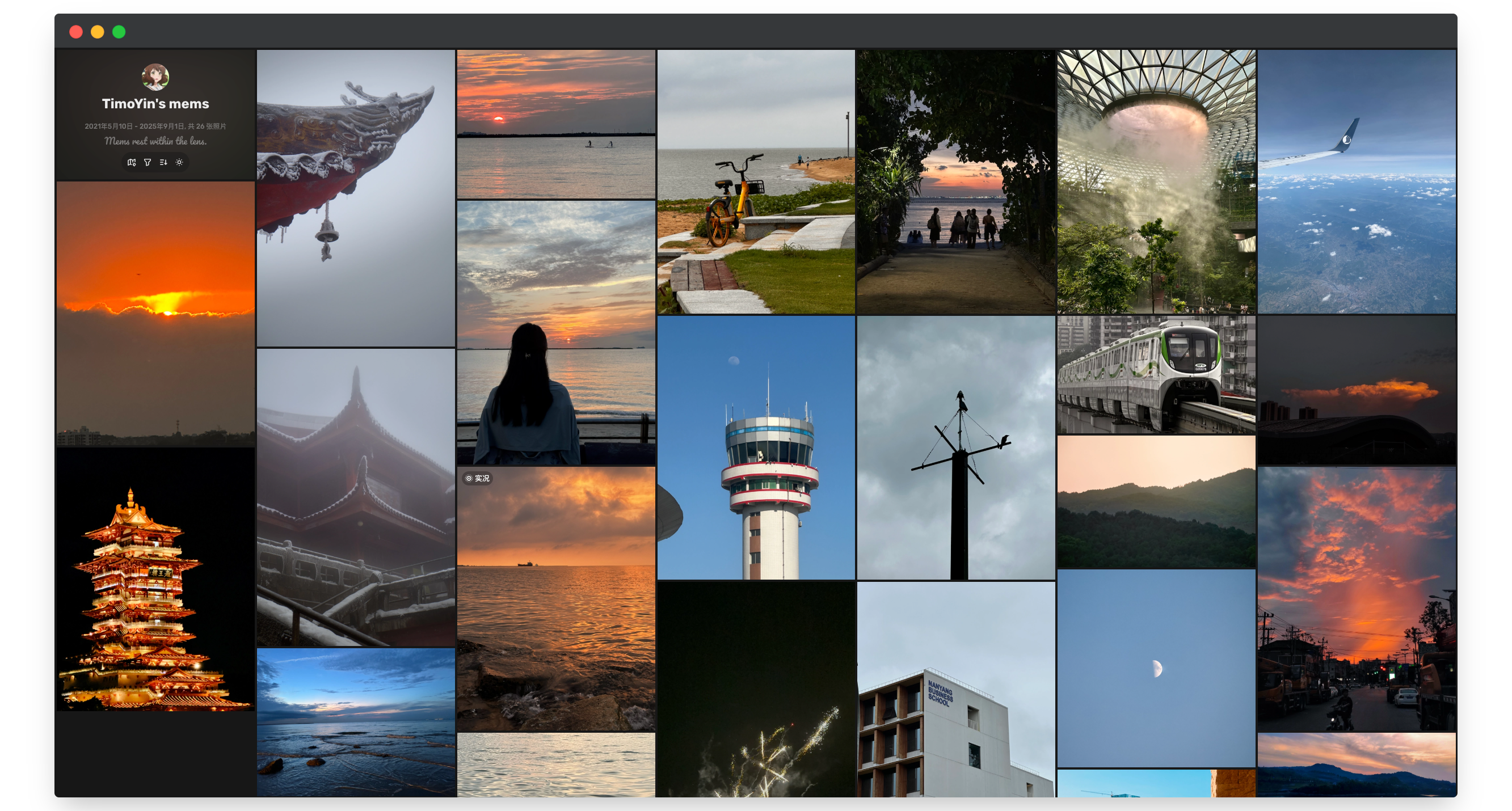
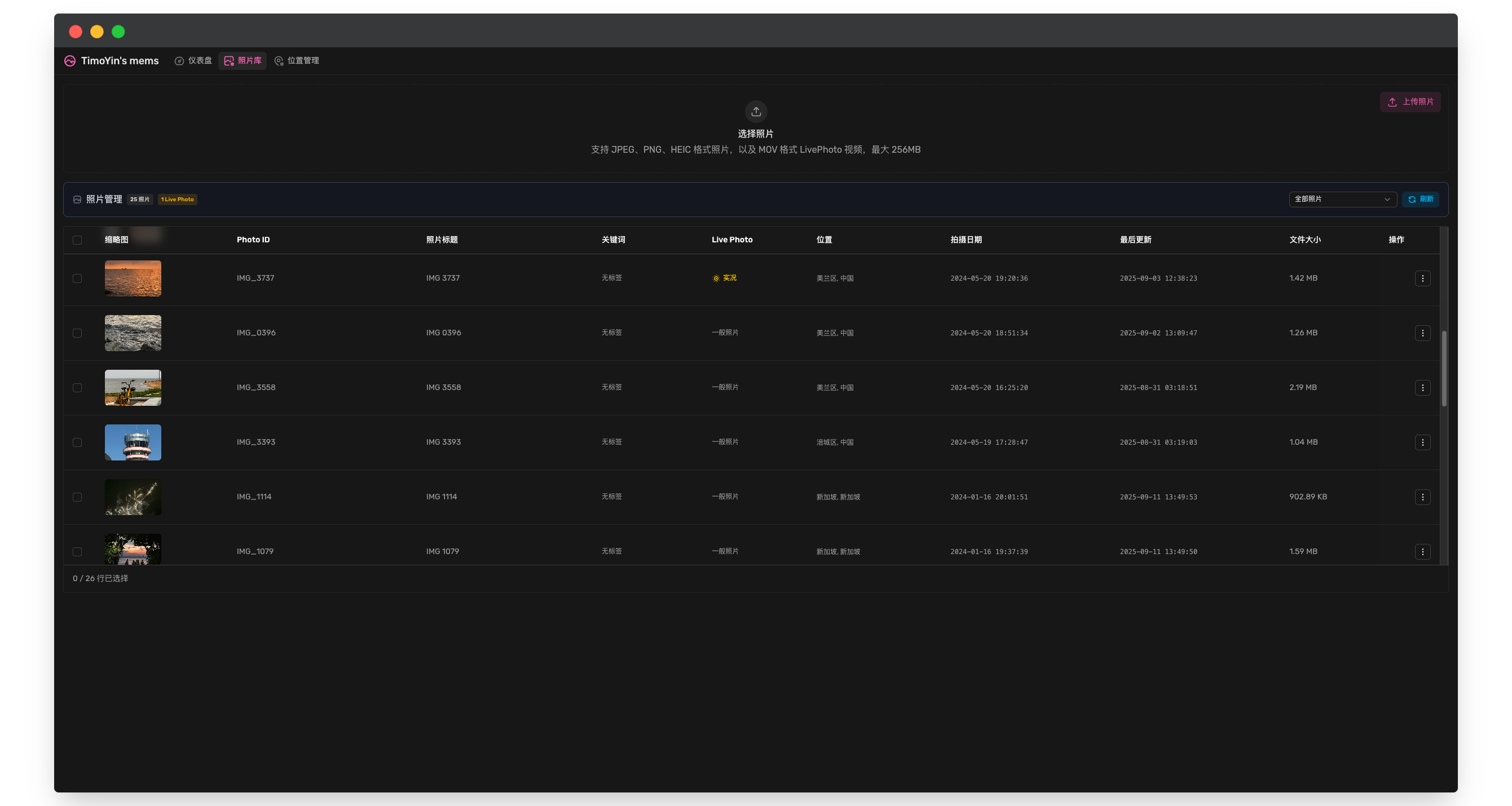
- **Manage photos online** - Easily manage and browse photos via the web interface
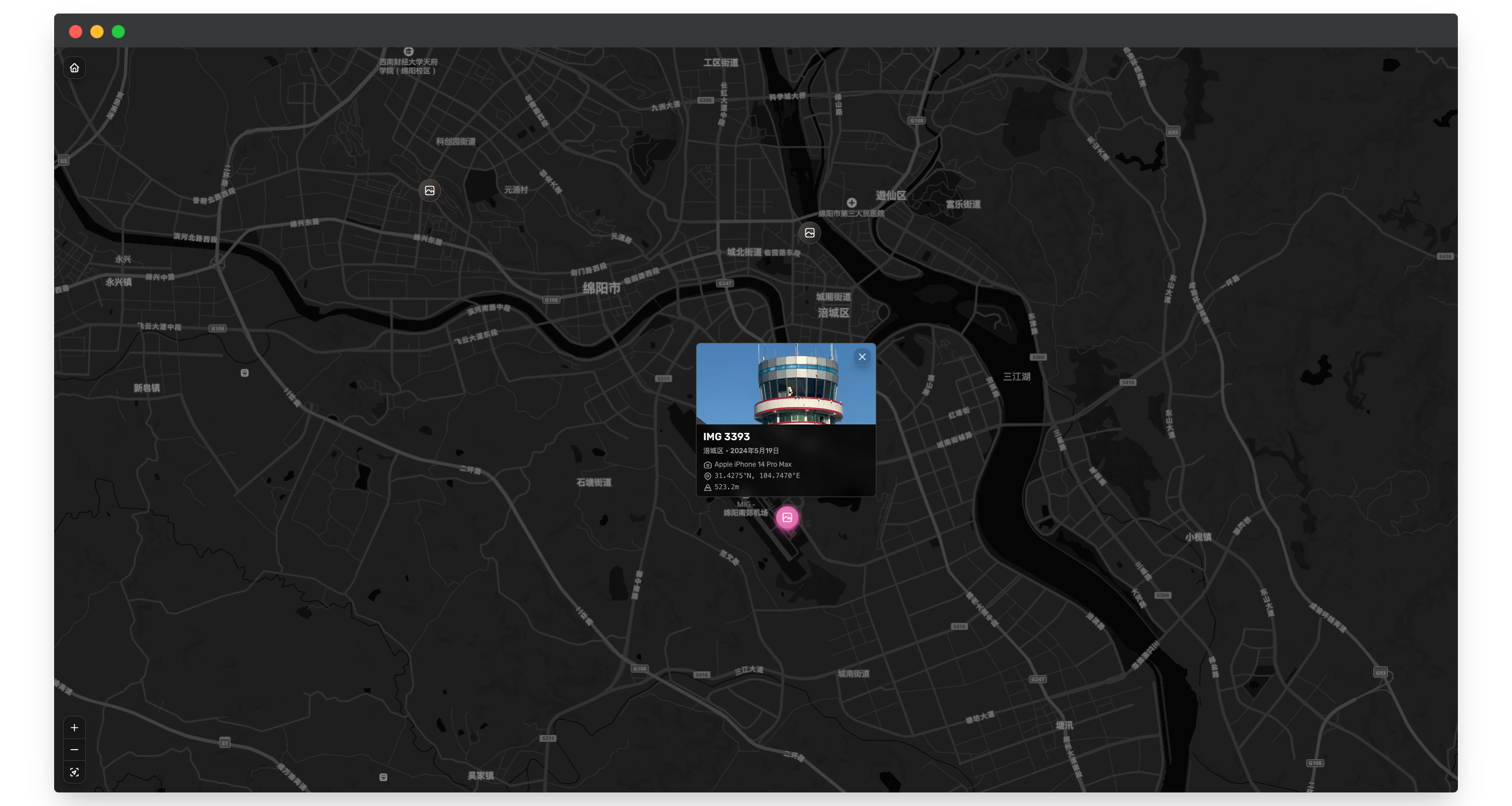
- **Explore map** - Browse photo locations on a map
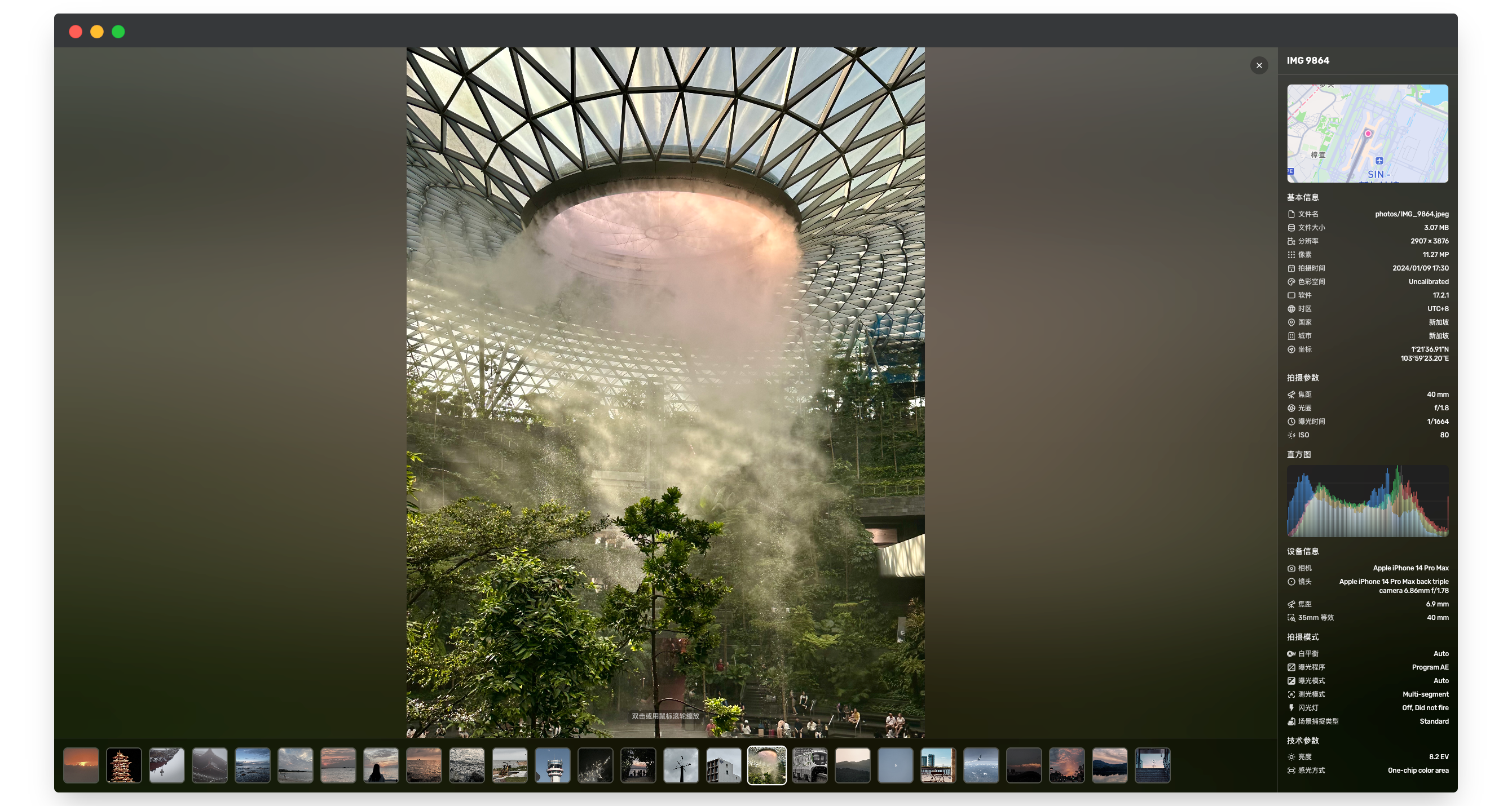
- **Smart EXIF parsing** - Automatically extracts metadata such as capture time, geolocation, and camera parameters
- **Reverse geocoding** - Automatically identifies photo shooting locations
- **Multi-format support** - Supports mainstream formats including JPEG, PNG, HEIC/HEIF
- **Smart thumbnails** - Efficient thumbnail generation using ThumbHash
### 🔧 Modern Tech Stack
- **Nuxt 4** - Built on the latest Nuxt framework with SSR/SSG support
- **TypeScript** - Full type safety
- **TailwindCSS** - Modern CSS framework
- **Drizzle ORM** - Type-safe database ORM
### ☁️ Flexible Storage Solutions
- **Multiple storage backends** - Supports S3-compatible storage, local filesystem
- **CDN acceleration** - Configurable CDN URL for faster photo delivery
## 🐳 Deployment
We recommend deploying with the prebuilt Docker image. [View the image on ghcr](https://github.com/HoshinoSuzumi/chronoframe/pkgs/container/chronoframe)
Create a `.env` file and configure environment variables.
Below is a **minimal configuration** example. For complete configuration options, see [Configuration Guide](https://chronoframe.bh8.ga/guide/configuration.html):
```bash
# Admin email (required)
CFRAME_ADMIN_EMAIL=
# Admin username (optional, default Chronoframe)
CFRAME_ADMIN_NAME=
# Admin password (optional, default CF1234@!)
CFRAME_ADMIN_PASSWORD=
# Site metadata (all optional)
NUXT_PUBLIC_APP_TITLE=
NUXT_PUBLIC_APP_SLOGAN=
NUXT_PUBLIC_APP_AUTHOR=
NUXT_PUBLIC_APP_AVATAR_URL=
# Map provider (maplibre/mapbox)
NUXT_PUBLIC_MAP_PROVIDER=maplibre
# MapTiler access token for MapLibre
NUXT_PUBLIC_MAP_MAPLIBRE_TOKEN=
# Mapbox access token for Mapbox
NUXT_PUBLIC_MAPBOX_ACCESS_TOKEN=
# Mapbox unrestricted token (optional, reverse geocoding)
NUXT_MAPBOX_ACCESS_TOKEN=
# Storage provider (local, s3 or openlist)
NUXT_STORAGE_PROVIDER=local
NUXT_PROVIDER_LOCAL_PATH=/app/data/storage
# Session password (32‑char random string, required)
NUXT_SESSION_PASSWORD=
```
### Pull Image
Use the published image on GitHub Container Registry and Docker Hub. Choose the source that works best for your network:
#### [GitHub Container Registry (GHCR)](https://github.com/HoshinoSuzumi/chronoframe/pkgs/container/chronoframe)
```bash
docker pull ghcr.io/hoshinosuzumi/chronoframe:latest
```
#### [Docker Hub](https://hub.docker.com/r/hoshinosuzumi/chronoframe)
```bash
docker pull hoshinosuzumi/chronoframe:latest
```
### Docker
Run with customized environment variables:
```bash
docker run -d --name chronoframe -p 3000:3000 -v $(pwd)/data:/app/data --env-file .env ghcr.io/hoshinosuzumi/chronoframe:latest
```
### Docker Compose
Create docker-compose.yml:
```yaml
services:
chronoframe:
image: ghcr.io/hoshinosuzumi/chronoframe:latest
container_name: chronoframe
restart: unless-stopped
ports:
- '3000:3000'
volumes:
- ./data:/app/data
env_file:
- .env
```
Start:
```bash
docker compose up -d
```
## 📖 User Guide
> If `CFRAME_ADMIN_EMAIL` and `CFRAME_ADMIN_PASSWORD` are not set, the default admin account is:
>
> - Email: `admin@chronoframe.com`
> - Password: `CF1234@!`
### Logging into the Dashboard
1. Click avatar to sign in with GitHub OAuth or use email/password login
### Uploading Photos
1. Go to the dashboard at /dashboard
2. On the Photos page, select and upload images (supports batch & drag-and-drop)
3. System will automatically parse EXIF data, generate thumbnails, and perform reverse geocoding
## 📸 Screenshots
## 🛠️ Development
### Requirements
- Node.js 18+
- pnpm 9.0+
### Install dependencies
```bash
# With pnpm (recommended)
pnpm install
# Or with other package managers
npm install
yarn install
```
### Configure environment variables
```bash
cp .env.example .env
```
### Initialize database
```bash
# 2. Generate migration files (optional)
pnpm db:generate
# 3. Run database migrations
pnpm db:migrate
```
### Start development server
```bash
pnpm dev
```
App will start at http://localhost:3000.
### Project Structure
```
chronoframe/
├── app/ # Nuxt app
│ ├── components/ # Components
│ ├── pages/ # Page routes
│ ├── composables/ # Composables
│ └── stores/ # Pinia stores
├── packages/
│ └── webgl-image/ # WebGL image viewer
├── server/
│ ├── api/ # API routes
│ ├── database/ # DB schema & migrations
│ └── services/ # Business logic services
└── shared/ # Shared types & utils
```
### Build commands
```bash
# Development (with dependencies build)
pnpm dev
# Build only dependencies
pnpm build:deps
# Production build
pnpm build
# Database operations
pnpm db:generate # Generate migration files
pnpm db:migrate # Run migrations
# Preview production build
pnpm preview
```
## 🤝 Contributing
Contributions are welcome! Please:
1. Fork the repo
2. Create a feature branch (git checkout -b feature/amazing-feature)
3. Commit changes (git commit -m 'Add some amazing feature')
4. Push to branch (git push origin feature/amazing-feature)
5. Open a Pull Request
### Coding Guidelines
- Use TypeScript for type safety
- Follow ESLint and Prettier conventions
- Update documentation accordingly
## 📄 License
This project is licensed under the MIT License.
## 👤 Author
**Timothy Yin**
- Email: master@uniiem.com
- GitHub: @HoshinoSuzumi
- Website: bh8.ga
- Gallery: lens.bh8.ga
## ❓ FAQ
How is the admin user created?
On first startup, an admin user is created based on CFRAME_ADMIN_EMAIL, CFRAME_ADMIN_NAME, and CFRAME_ADMIN_PASSWORD. The email must match your GitHub account email used for login.
Which image formats are supported?
Supported formats: JPEG, PNG, HEIC/HEIF, MOV (for Live Photos).
Why can’t I use GitHub/Local storage?
Currently only S3-compatible storage is supported. GitHub and local storage support is planned.
Why is a map service required and how to configure it?
The map is used to browse photo locations and render mini-maps in photo details. Currently Mapbox is used. After registering, get an access token and set it to the MAPBOX_TOKEN variable.
Why wasn’t my MOV file recognized as a Live Photo?
Ensure the image (.heic) and video (.mov) share the same filename (e.g., IMG_1234.heic and IMG_1234.mov). Upload order does not matter. If not recognized, you can trigger pairing manually from the dashboard.
How do I import existing photos from storage?
Direct import of existing photos is not yet supported. A directory scanning import feature is planned.
## 🙏 Acknowledgements
This project was inspired by Afilmory, another excellent personal gallery project.
Thanks to the following open-source projects and libraries:
- [Nuxt](https://nuxt.com/)
- [TailwindCSS](https://tailwindcss.com/)
- [Drizzle ORM](https://orm.drizzle.team/)
## ⭐️ Star History