```bash
npm i -g clitrigger && clitrigger
```
**Or download the desktop app** — no Node.js needed: **[Windows `.exe` · macOS `.dmg` · Linux `.AppImage`](https://github.com/HyperAITeam/CLITrigger/releases/latest)**
**Up and running in 60 seconds** — open `http://localhost:3000`, set a password, add a project, write TODOs, hit Start.
---
> ### Docs → Plan → Terminal → Autonomous Tasks → Version Control. One pipeline.
>
> The five stages of a development cycle scattered across five tools is today's real bottleneck. CLITrigger connects them in a single app — build project knowledge in **Docs**, shape it into a plan with the **planner & calendar**, refine it live in **terminal sessions**, then let multiple AI CLIs (**Claude Code · Antigravity · Codex**) **execute autonomously in parallel**, each in its own isolated git worktree — and land the results through the **review queue and built-in Git client**.
>
> While you sleep (or focus elsewhere), they burn through your token quota. Next morning you sit down, review the stack of diffs, and **accept / reject / merge**.
>
> **No context leaks between stages — the intent you captured in docs flows all the way to the merge.**
```mermaid
flowchart LR
docs["📚 Docs Project knowledge"] --> plan["🗓 Plan Planner · Calendar"]
plan --> term["⌨️ Terminal Interactive Sessions"]
term --> auto["🤖 Autonomous Tasks Parallel Worktrees"]
auto --> vcs["🔀 Version Control Review Queue · Git"]
vcs -. lessons feed back into docs .-> docs
```
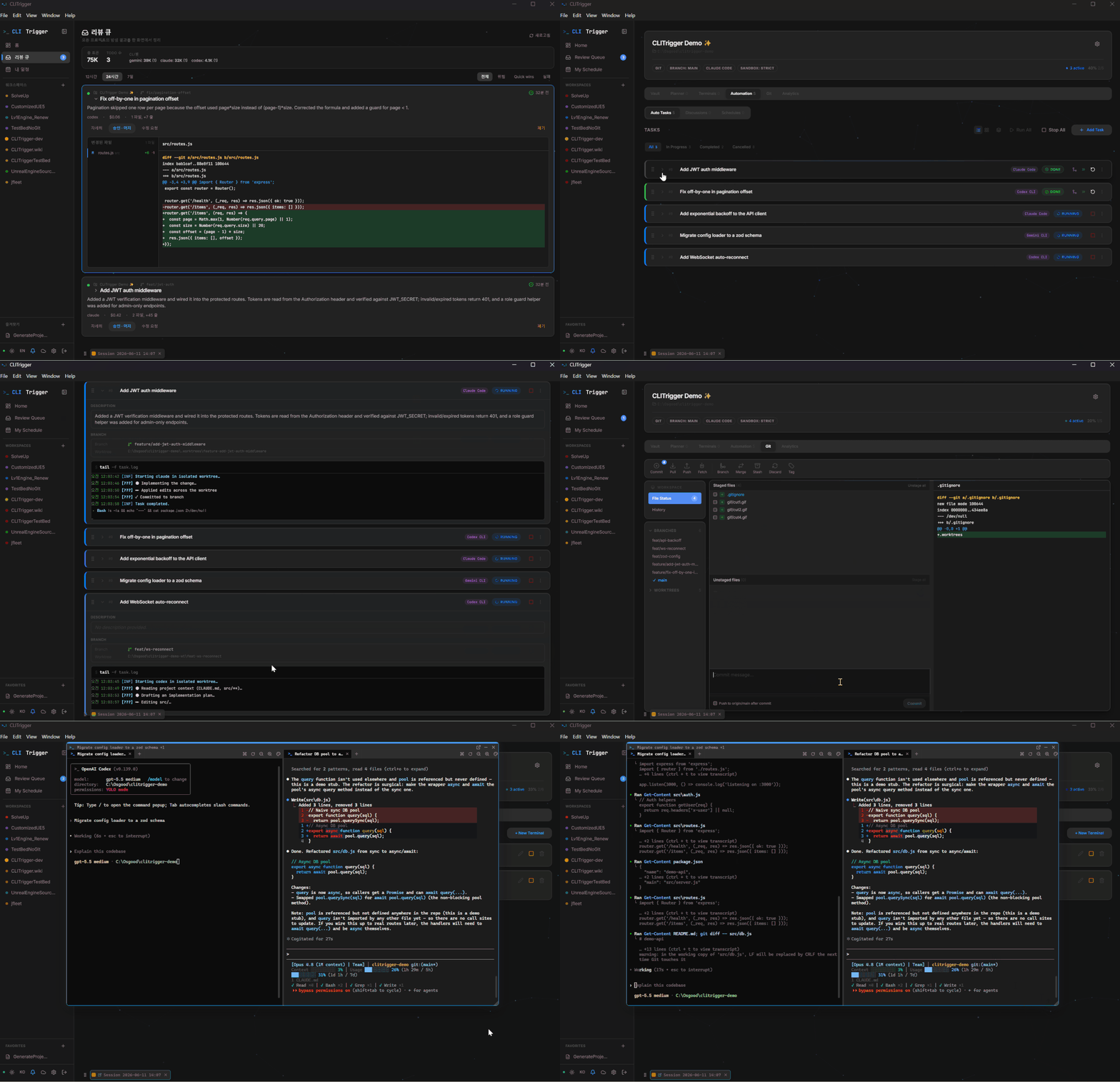
AI CLIs working simultaneously across isolated git worktrees
---
## Why CLITrigger?
**Running Claude Code in your terminal, you drive one agent at a time and babysit it.** CLITrigger fans that out: many agents, each in its own isolated worktree, running while you're away — and a single place to plan the work and review every diff when they're done.
Boris Cherny, creator of Claude Code, emphasizes **parallelism** as the key to AI-assisted development. Waiting for one task to finish before starting the next is the new bottleneck.
At the same time, most AI services have **rate limits** — you can burn through your daily quota by noon and be stuck waiting until midnight.
And as AI writes more of the code, the developer's real job becomes **capturing intent and reviewing output** — which falls apart the moment your context is scattered across sticky notes, terminals, and a dozen browser tabs.
CLITrigger solves all three:
- **Right now** — Multiple tasks run in isolated git worktrees, with Claude / Antigravity / Codex executing in parallel
- **Without hitting limits** — Schedule tasks for off-peak hours to make the most of your token quota
- **Without losing the thread** — The intent captured in your docs flows through plan → terminal → autonomous tasks → merge as one pipeline. No sticky notes, no twelve browser tabs
- **Better output** — Multiple AI agents debate and review before implementation, producing higher-quality results than a single AI working alone
---
## Features
The features follow the five pipeline stages — **📚 Docs → 🗓 Plan → ⌨️ Terminal → 🤖 Autonomous Tasks → 🔀 Version Control** — plus the supporting features underneath. Each feature below has a full guide in the **[Wiki](https://github.com/HyperAITeam/CLITrigger/wiki)** (↗).
### 📚 1. Docs — build the knowledge
#### Docs (File-based Knowledge)
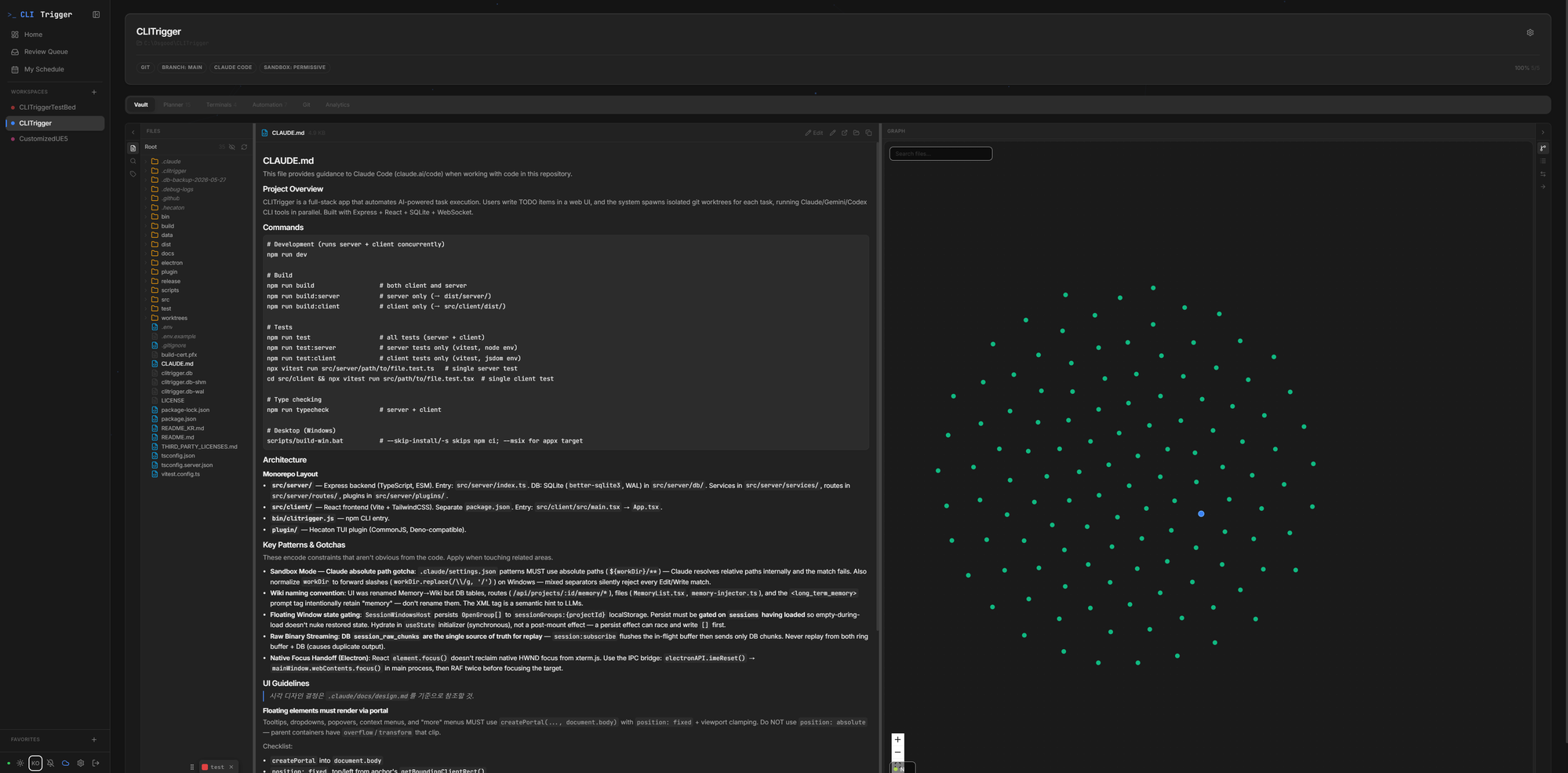
A per-project Obsidian-style knowledge base with a `[[wikilink]]` graph — inject any file into a prompt, CLI-agnostically. What accumulates here is the input to the whole pipeline. [↗](https://github.com/HyperAITeam/CLITrigger/wiki/Plan-&-Organize#vault)
The Docs tab — browse project markdown with inline preview and a force-directed wikilink graph, then selectively inject files into prompts
### 🗓 2. Plan — capture the intent
#### My Schedule
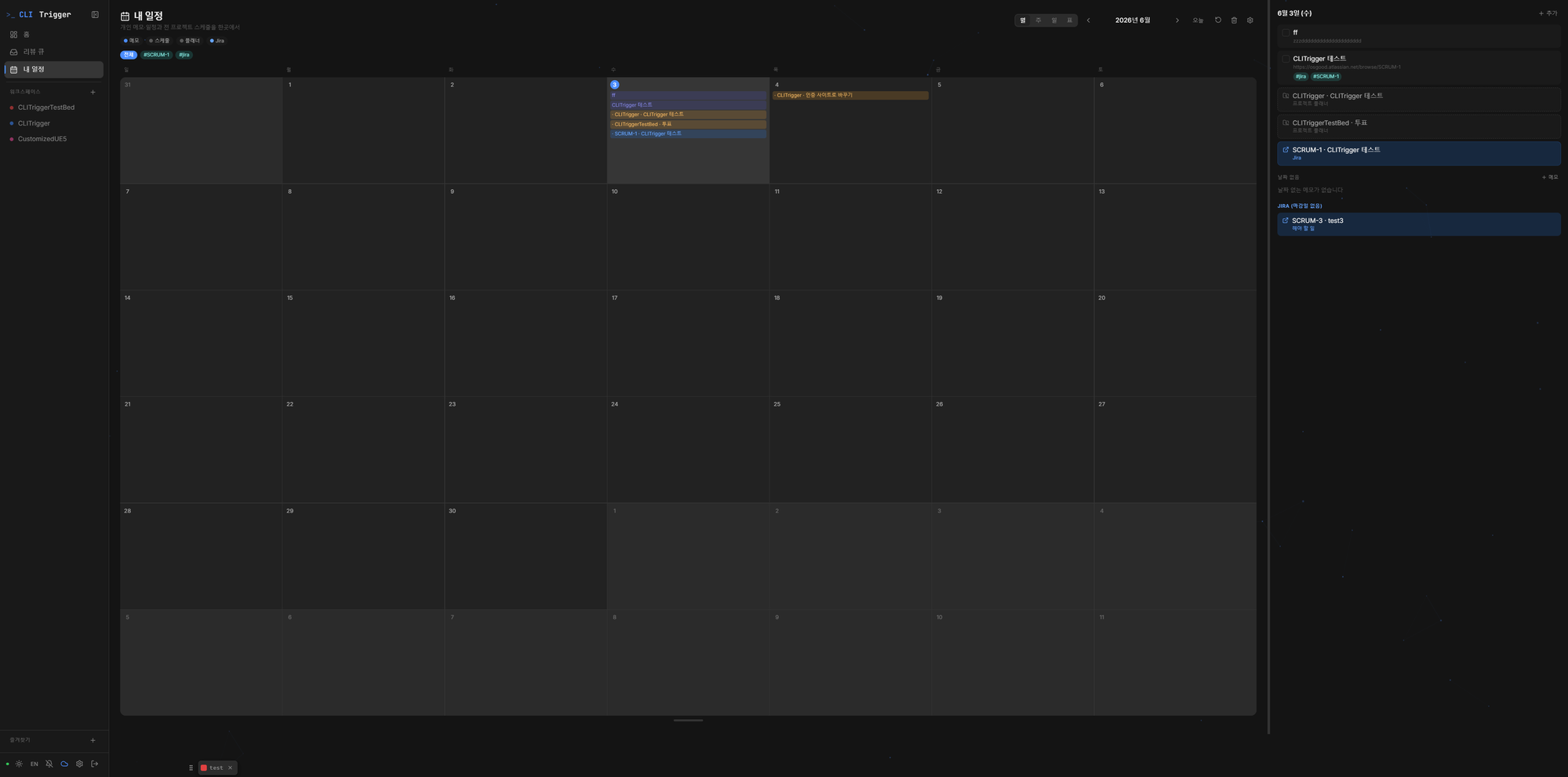
One personal calendar overlaying your memos, every project's schedules, planner due dates, and assigned Jira issues. [↗](https://github.com/HyperAITeam/CLITrigger/wiki/Plan-&-Organize#my-schedule)
One calendar overlaying personal memos, cross-project schedules, planner due dates, and assigned Jira issues
#### Planner
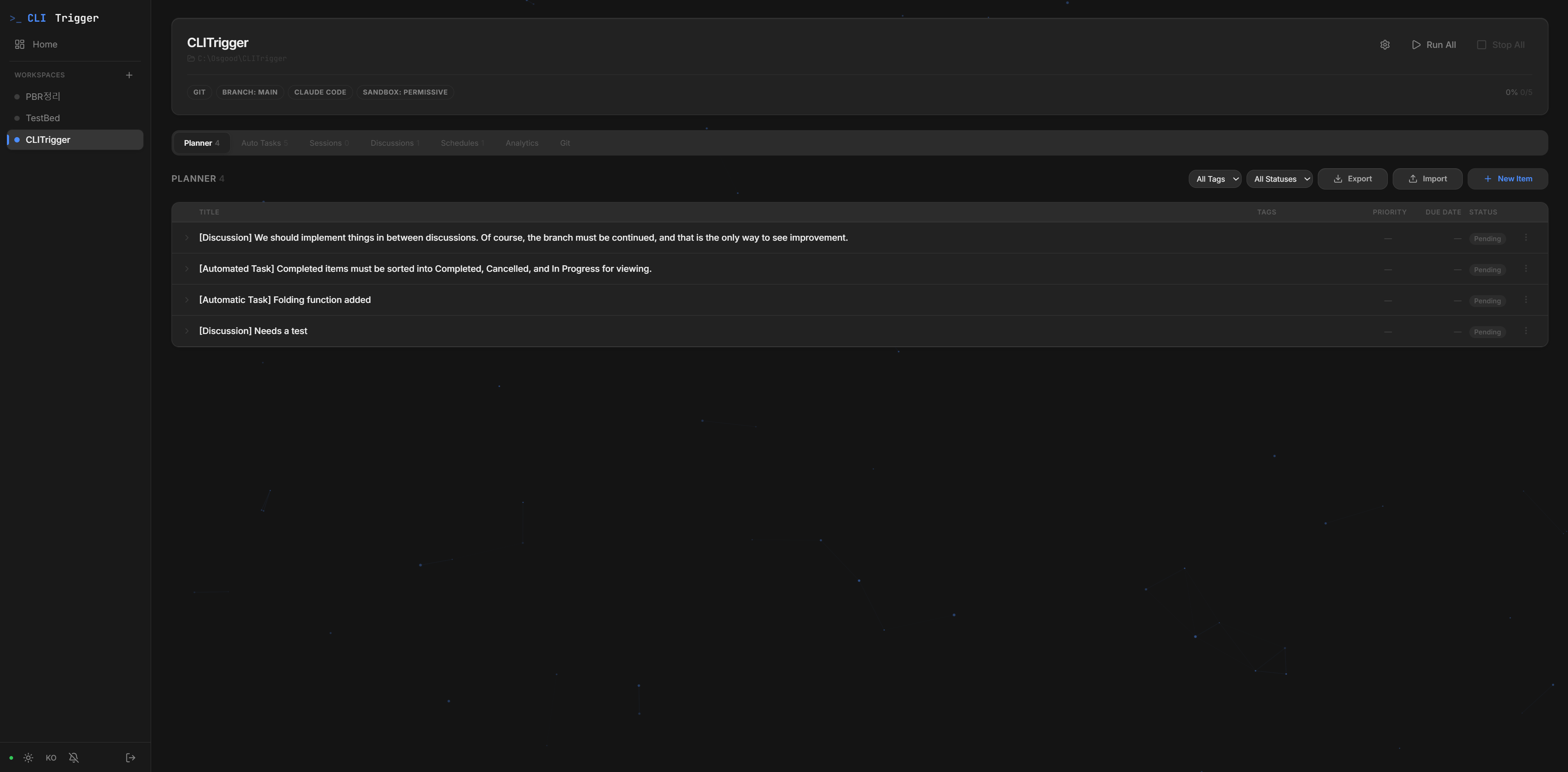
A lightweight task planner — capture ideas, then convert any item into a TODO, schedule, or session; Markdown import/export. What you plan here becomes the execution unit of the next stage. [↗](https://github.com/HyperAITeam/CLITrigger/wiki/Plan-&-Organize#planner)
Inline editing, color-coded tags, image attachments, and one-click conversion to TODOs or schedules
### ⌨️ 3. Terminal — refine it with AI
#### Interactive Sessions
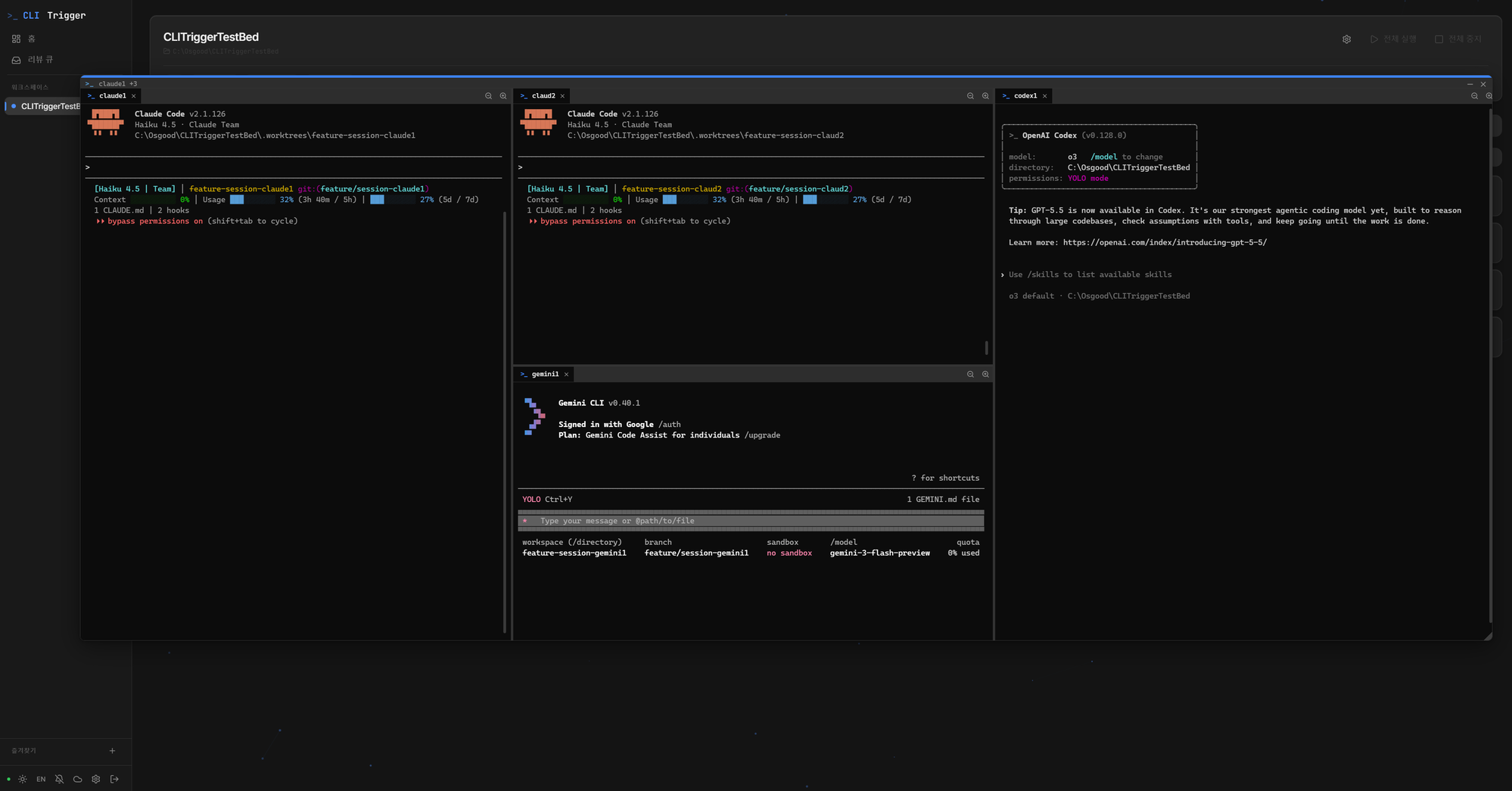
Long-lived CLI sessions in floating windows with VS Code-style docking, pop-out, and real xterm.js terminals — the human-in-the-loop stage before handing work off to automation. [↗](https://github.com/HyperAITeam/CLITrigger/wiki/Delegate-to-AI#interactive-sessions)
Claude, Antigravity, and Codex sessions docked side-by-side via VS Code-style window grouping — each running in its own worktree branch
### 🤖 4. Autonomous Tasks — AI executes in parallel
#### Parallel Worktree Execution (Tasks)
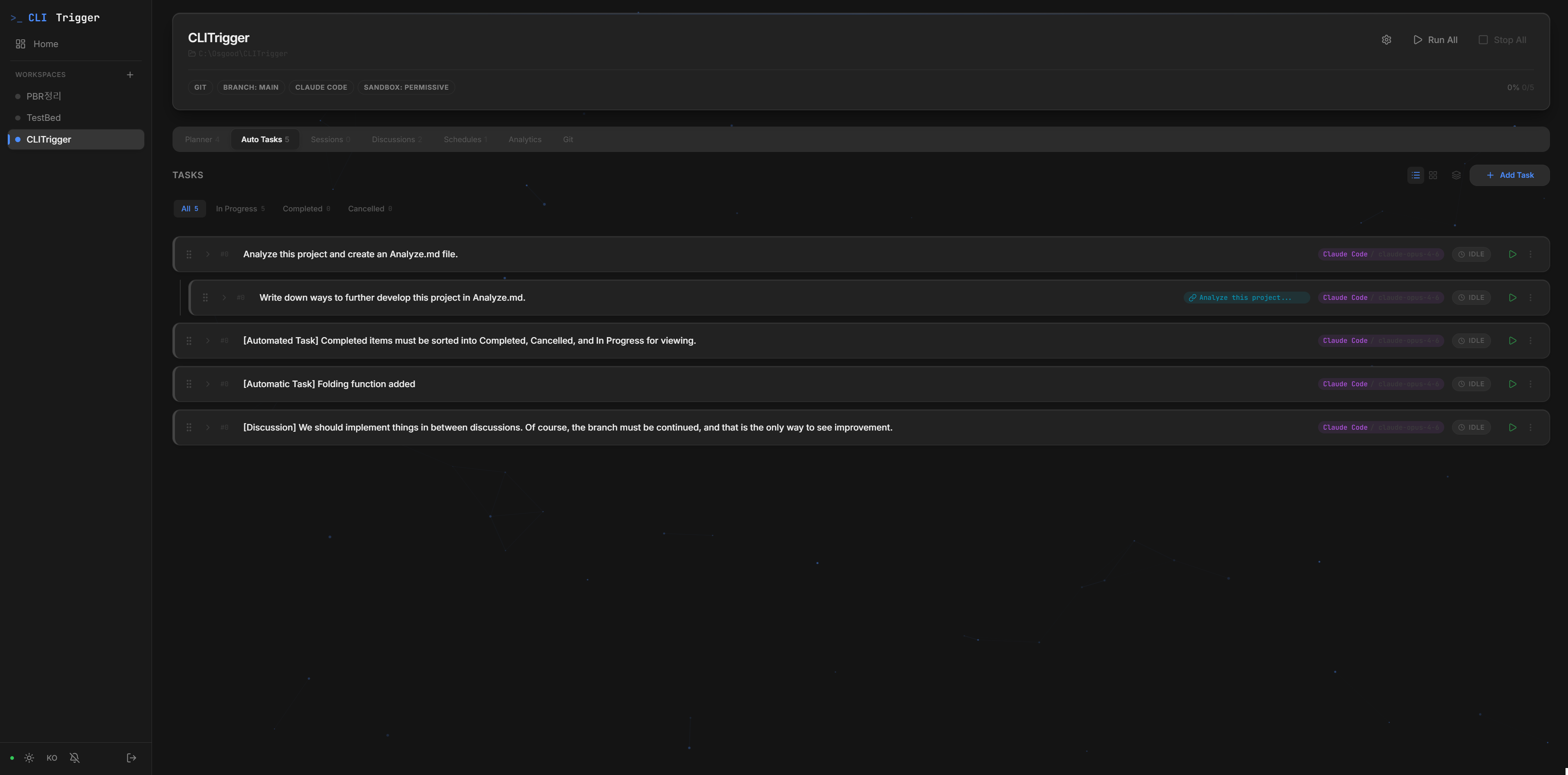
Every TODO runs in its own git worktree with Claude / Antigravity / Codex in parallel, plus dependency chains and merge control. [↗](https://github.com/HyperAITeam/CLITrigger/wiki/Delegate-to-AI#parallel-worktree-execution)
#### Multi-Agent Discussion
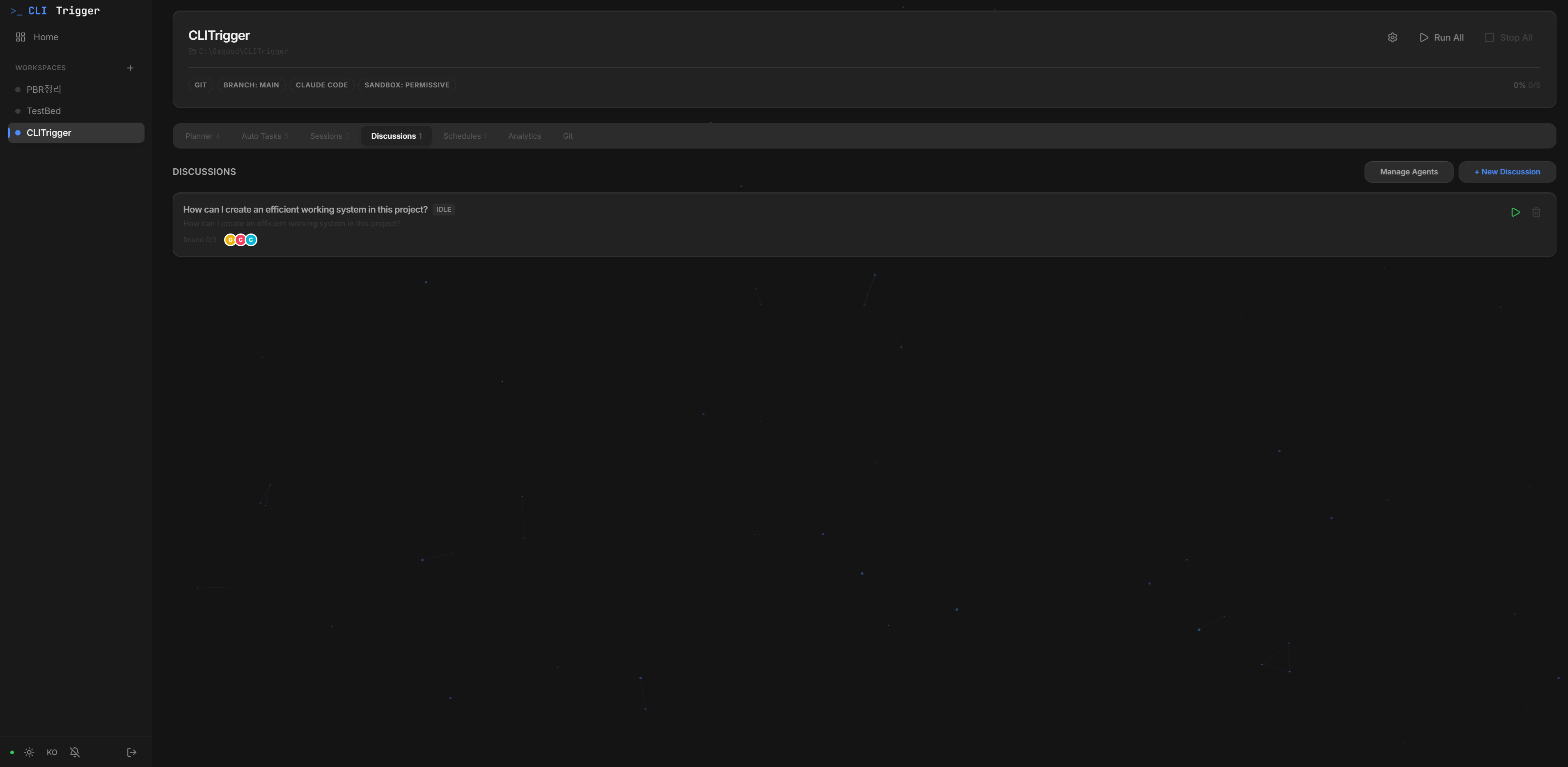
Architect / developer / reviewer agents debate before implementing, then commit code or send action items to the planner. [↗](https://github.com/HyperAITeam/CLITrigger/wiki/Delegate-to-AI#multi-agent-discussion)
Multiple AI agents with different roles debating in the Discussion view
#### Scheduled Execution
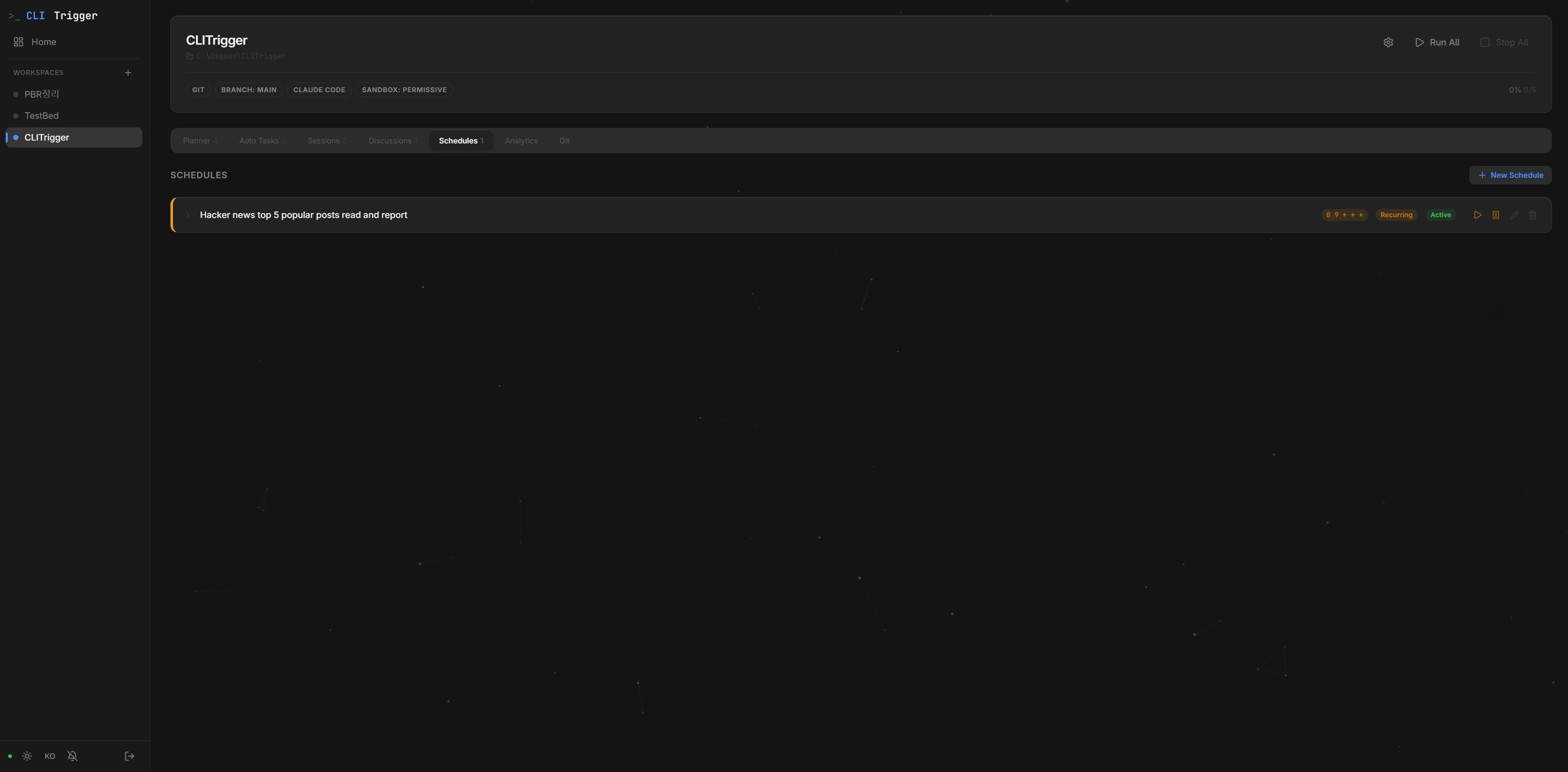
Run tasks on cron or one-off schedules, with auto-retry at the exact rate-limit reset time. [↗](https://github.com/HyperAITeam/CLITrigger/wiki/Delegate-to-AI#scheduled-execution)
Cron-based recurring and one-time scheduled task execution
#### Multi-CLI & Sandbox Mode
Pick Claude / Antigravity / Codex per project, TODO, or agent; strict sandbox confines file access to the worktree. [↗](https://github.com/HyperAITeam/CLITrigger/wiki/Delegate-to-AI#multi-cli--sandbox-mode)
### 🔀 5. Version Control — review and land it
#### Morning Review Queue
Triage every overnight TODO across projects in one keyboard-driven card stack — navigate, merge, or discard in a keypress. [↗](https://github.com/HyperAITeam/CLITrigger/wiki/Review-&-Ship#morning-review-queue)
#### Built-in Git Client
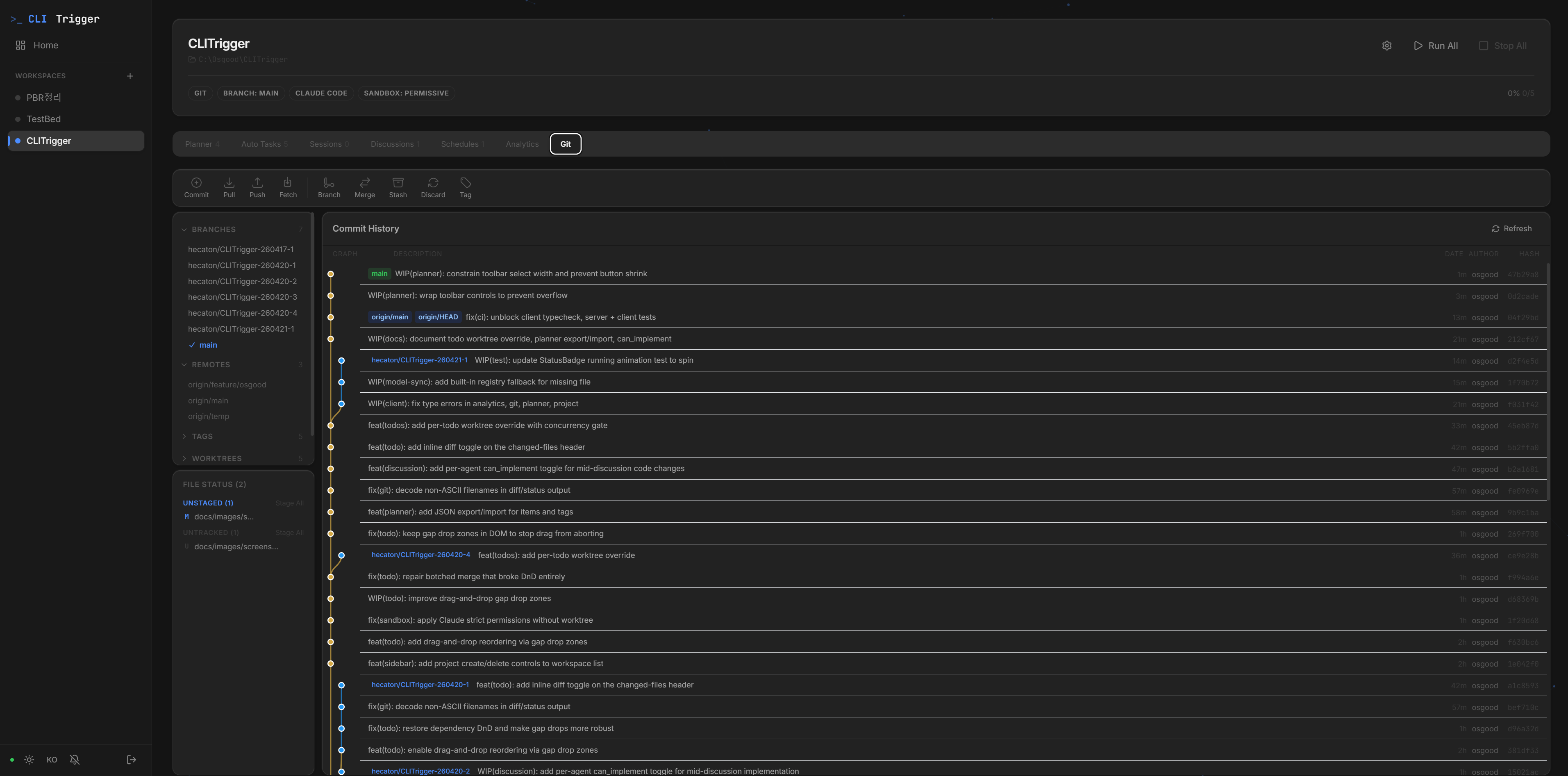
A Fork / SourceTree-style Git client in the browser — stage, commit, push, and manage branches and diffs. This is where AI output lands in your history, closing the pipeline. [↗](https://github.com/HyperAITeam/CLITrigger/wiki/Review-&-Ship#built-in-git-client)
Commit graph, branch actions, file diffs — all in the browser
### 🧰 Supporting the pipeline
#### Analytics
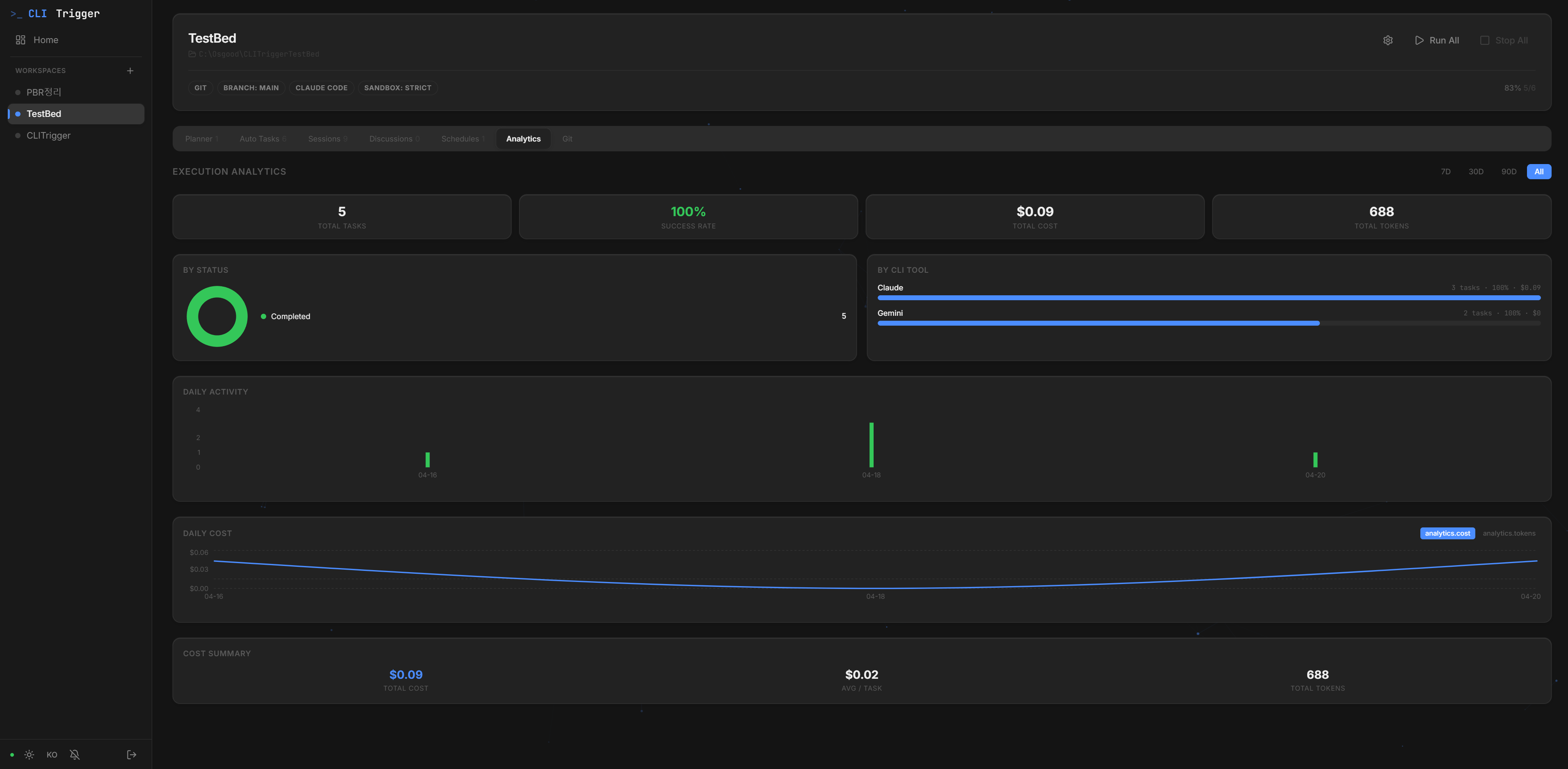
Per-project cost and execution stats — by CLI, by status, and over time. [↗](https://github.com/HyperAITeam/CLITrigger/wiki/Review-&-Ship#analytics)
Cost and token usage broken down by CLI, status, and over time
#### Live Logs (Chat & Raw)
Real-time WebSocket log streaming in Chat (markdown) or Raw (terminal) mode. [↗](https://github.com/HyperAITeam/CLITrigger/wiki/Review-&-Ship#live-logs)
#### Favorites Launcher
One-click launcher for your frequent external tools (executables, commands, URLs) from the sidebar. [↗](https://github.com/HyperAITeam/CLITrigger/wiki/Plan-&-Organize#favorites-launcher)
#### Remote Access
Reach CLITrigger from anywhere via Cloudflare Tunnel, with completion notifications and custom-domain routing. [↗](https://github.com/HyperAITeam/CLITrigger/wiki/Remote-Access)
---
## Tech Stack
| Layer | Tech |
|-------|------|
| Backend | Node.js · Express · TypeScript · SQLite · WebSocket |
| Frontend | React 18 · Vite · Tailwind CSS · Recharts |
| AI CLIs | Claude · Antigravity · Codex (Adapter Pattern) |
| Git | simple-git (worktree management) |
| Scheduling | node-cron |
| Terminal | node-pty (TTY support) · xterm.js (pixel-perfect rendering) |
| Remote Access | Cloudflare Tunnel (optional) |
---
## Quick Start
### Option A — Desktop App (recommended for end users)
Download the installer for your platform from the [latest GitHub release](https://github.com/HyperAITeam/CLITrigger/releases/latest):
- **Windows** — `CLITrigger-Setup-.exe` (NSIS installer) or the portable `.exe`
- **macOS** — `CLITrigger-.dmg` (Apple Silicon & Intel)
- **Linux** — `CLITrigger-.AppImage`
The desktop app bundles Node.js and the native modules (`better-sqlite3`, `node-pty`, `cloudflared`), so no separate runtime install is needed. On first launch a setup screen appears in the embedded browser — pick a password there and you're in. External sharing (Cloudflare tunnel) stays paused until setup completes, so the first user is guaranteed to be you.
### Option B — npm (recommended for developers)
```bash
# Install
npm i -g clitrigger
clitrigger
# Upgrade to the latest version
npm i -g clitrigger@latest
# Check current version: clitrigger --version
```
On first run the server starts immediately. Open `http://localhost:3000` → set a password on the welcome screen → register a project → write TODOs → click Start. Change the password later via Settings → Account in the web UI.
CLITrigger also prints a one-line `Update available: -> npm i -g clitrigger@latest` hint at startup whenever a newer version is on npm — no auto-update, you decide when to upgrade.
```bash
# Change settings
clitrigger config port 8080 # Change port
clitrigger config tunnel on # Enable Cloudflare tunnel for external sharing
```
> **Prerequisites**: Node.js 22+ (use an **LTS** release), Git, at least one AI CLI (Claude / Antigravity / Codex)
>
> **Supported Platforms**: Windows · macOS · Linux — all core code is cross-platform compatible.
> Prefer an LTS (even-numbered) Node.js. A brand-new major (e.g. an odd/just-released version) may not have prebuilt native binaries yet, which forces a source build requiring a C++ toolchain (Visual Studio Build Tools on Windows, `xcode-select --install` on macOS).
### Run from Source (for development)
Click to expand
```bash
# 1. Clone & install
git clone https://github.com/HyperAITeam/CLITrigger.git
cd CLITrigger
npm install
cd src/client && npm install && cd ../..
# 2. Configure environment
cp .env.example .env
# AUTH_PASSWORD is optional — leave it blank and the dev server will show the
# setup screen on first browser load. Set it only if you want to skip setup.
# 3. Run
npm run dev
```
Open `http://localhost:5173`.
#### Windows One-Click Scripts
Double-click any bat file in `scripts/` — no terminal needed.
| File | Action |
|------|--------|
| `install.bat` | Install dependencies (first time) |
| `dev.bat` | Start development mode |
| `build.bat` | Build project |
| `start.bat` | Start production server |
| `start-tunnel.bat` | Start with Cloudflare Tunnel |
| `test.bat` | Run all tests |
#### macOS / Linux
`npm run` commands work identically on all platforms. Use the terminal instead of `.bat` scripts.
```bash
npm run dev # Development mode
npm run build # Build
npm run start # Production server
npm test # Run tests
```
### Remote Access (Cloudflare Tunnel)
```bash
# Install cloudflared
winget install cloudflare.cloudflared # Windows
brew install cloudflared # macOS
# Set TUNNEL_ENABLED=true in .env, then:
npm run start:tunnel
# → Outputs https://xxxx.trycloudflare.com in the console
```
#### Route a named tunnel through your own domain (optional)
To avoid the "dangerous site" browser warnings on `*.trycloudflare.com` / `*.cfargotunnel.com`, point a named tunnel at your own domain. Either use the sidebar ⚙ → Tunnel settings modal (Tunnel Name + Custom Hostname), or the CLI:
```bash
clitrigger config tunnel hostname app.your-domain.com
cloudflared tunnel route dns app.your-domain.com # one-time
```
The displayed URL becomes `https://app.your-domain.com` and reputation tracks your domain.
---
## Documentation
📖 **The full manual lives in the [Wiki](https://github.com/HyperAITeam/CLITrigger/wiki)** — installation, every feature guide, and remote access.
| Doc | Content |
|-----|---------|
| [Wiki](https://github.com/HyperAITeam/CLITrigger/wiki) | Detailed feature guides and usage |
| [SETUP.md](docs/SETUP.md) | Detailed installation and usage guide (한국어) |
| [changelog/](docs/changelog/README.md) | Version history (per-date entries by month) |
| [CICD.md](docs/CICD.md) | GitHub Actions CI/CD setup |
| [TESTING.md](docs/TESTING.md) | Testing guide |
---
## Star & Join Us
If CLITrigger saves you time, please [**give us a star**](https://github.com/HyperAITeam/CLITrigger) — it genuinely helps the project reach more developers.
Want to help shape what comes next? We're actively looking for contributors:
- **File an issue** — bug reports, feature requests, and rough ideas all welcome at [Issues](https://github.com/HyperAITeam/CLITrigger/issues)
- **Open a PR** — start with [`good first issue`](https://github.com/HyperAITeam/CLITrigger/issues?q=is%3Aissue+is%3Aopen+label%3A%22good+first+issue%22) labels, or pick anything that itches you
- **Share what you built** — drop your worktree workflows, custom plugins, or productivity tips in [Discussions](https://github.com/HyperAITeam/CLITrigger/discussions)
Every star, issue, and PR moves this faster. Thank you 🙏
---
## Contributors
Thanks to everyone who has contributed to CLITrigger!
---
## Star History
---
## ☕ Buy Me a Coffee
If CLITrigger saves you time, consider buying me a coffee!
[](https://buymeacoffee.com/osgoodyz)
---
## License
[MIT](LICENSE) — Free to use, modify, and distribute.