👀 Inspect Git state → 🖱️ Run a quick action or ask the Agent → ✅ Review → 🚀 Execute
## Preview 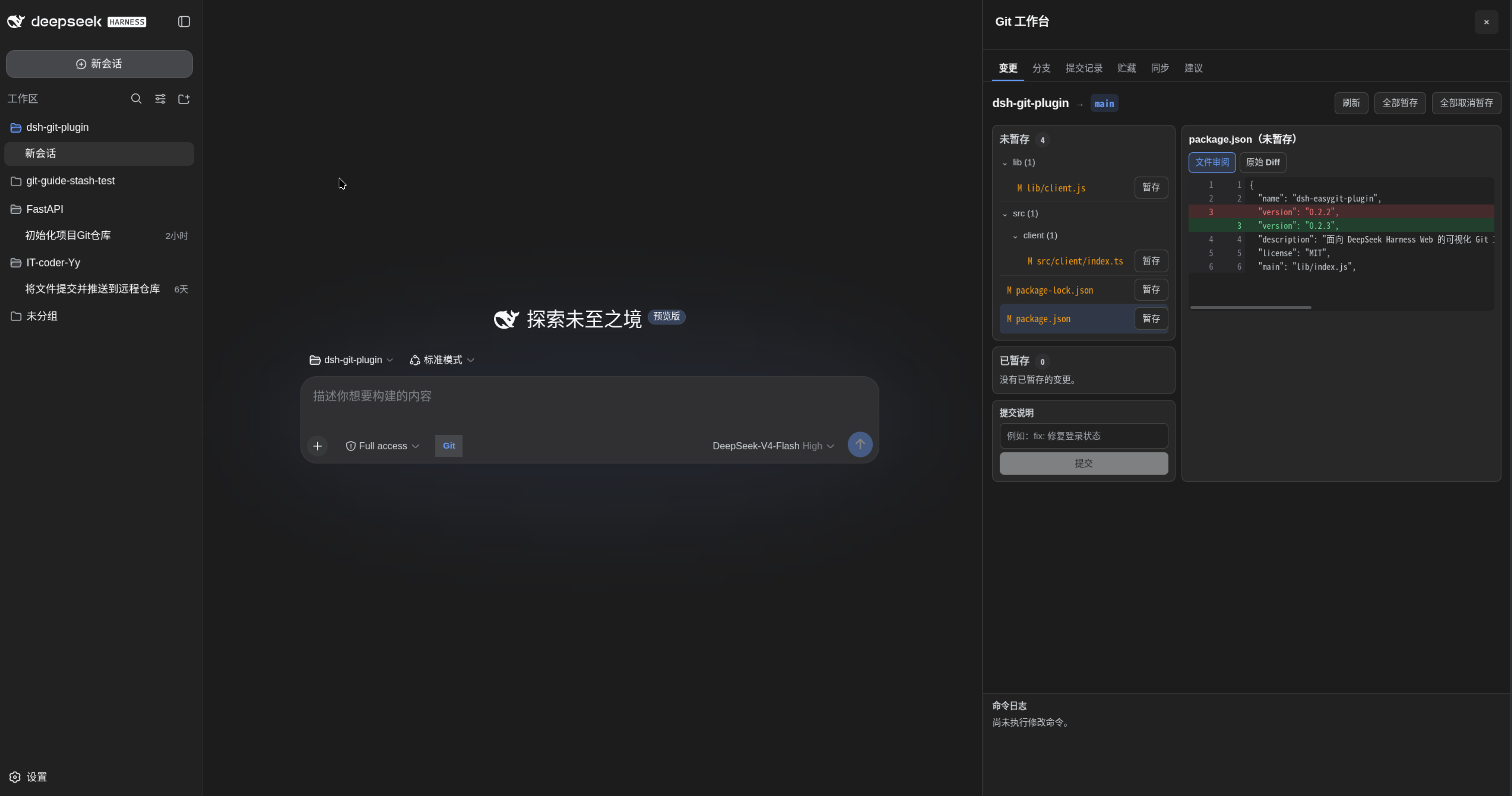 ## Features 1. **Visual repository state**: See the current branch, staged and unstaged files, and each file's formatted review view or raw diff. 2. **Commit history and details**: Browse the current branch as a commit graph, then click a commit to inspect its message, author, timestamps, parents, changed files, statistics, and full diff. 3. **One-click Git actions**: Stage or unstage one file or all files, create commits, and create, search, switch, or safely delete local branches directly from the workbench. 4. **Remote sync and Rebase**: Inspect upstream, ahead/behind counts, and working-tree state; fetch, fast-forward pull, push, set an upstream for a new branch, or safely start, continue, and abort a Rebase. 5. **References at a glance**: Inspect local branches, remote branches, and tags without leaving DeepSeek Harness Web. 6. **Natural-language workflows**: Turn a request into a clear, step-by-step Git command proposal, then execute it directly or copy it for manual execution. 7. **Actionable failure handling**: Keep the failed command, output, and post-failure repository diagnostics together; offer a safe recovery proposal for recognized failures or let the Agent analyze a complex failure. 8. **Safety by default**: Validate commands against a conservative allowlist, require confirmation for high-risk operations and history rewrites, prevent proposal replay, and redact common credentials from diagnostics. ## Quick start ### 0. Allow immediate installation of the new package Newer versions of `pnpm` may delay recently published packages. To install the latest release immediately, add `dsh-easygit-plugin` to `~/.dsh/profiles/web/pnpm-workspace.yaml`: ```yaml minimumReleaseAgeExclude: - dsh-easygit-plugin ``` ### 1. Install the plugin ```sh dsh plugin --profile web add dsh-easygit-plugin ``` ### 2. Start DSH Web ```sh dsh web ``` ### 3. Open the Git workbench Use the Git button beside the composer to inspect changes, review commit history, stage files, commit changes, manage branches, or synchronize with a remote. Rebase and forceful branch deletion require an explicit risk confirmation. For a more involved workflow, ask the Agent for a Git operation. For example: ```text Commit the documentation update to the current branch with the message "docs: update guide" ``` Review the generated steps in the Git workbench, then choose direct execution or manual execution. ## Install from source ```sh git clone https://github.com/IT-coder-Yy/dsh-git-plugin.git cd dsh-git-plugin npm install npm run build dsh plugin --profile web add ${PWD} ``` ## Install from GitHub repository ```sh dsh plugin --profile web add github:IT-coder-Yy/dsh-git-plugin ``` ## Update the plugin ```sh dsh plugin --profile web update dsh-easygit-plugin ``` ## Uninstall the plugin ```sh dsh plugin --profile web remove dsh-easygit-plugin ``` ## How it works The plugin registers two model tools: | Tool | Description | | --- | --- | | `git_repo_state` | Reads the current repository state without modifying it. | | `git_propose` | Validates and registers one or more Git steps. | The Web profile adds a Git action beside the composer and opens the workbench in the native details area. Its tabs provide visual access to working-tree changes and diffs, branches and references, commit history and details, stashes, remote synchronization, and Agent-generated proposals. Commands are validated both when a proposal is created and immediately before execution. When an action fails, the workbench preserves structured error context and repository diagnostics; recognized failures can create a new recovery proposal, while complex failures can be handed back to the Agent for analysis. ## Security - Each step must contain exactly one allowed `git