# WorkBuddy Local API Bridge
Expose the model capabilities of your locally-logged-in **WorkBuddy desktop app**
(DeepSeek / GLM / Kimi / MiniMax …) through a local bridge as **OpenAI-compatible**,
**Anthropic-compatible** and **OpenAI Responses** APIs — so **Claude Code**, **Codex**,
**opencode**, **Cursor**, **Trae**, **Cherry Studio**, **NextChat**, **LobeChat**,
**Open WebUI** or any client with a custom Base URL can use them directly.
Also included: a web console (status / start-stop / diagnostics / model registration /
usage / health check / chat test) — **bilingual (Chinese / English, switchable in the
top-right corner, remembered locally)** — and an optional **DeepSeek Harness (dsh)
native plugin**.
> **In one line**: WorkBuddy quota → local API → any AI client you like.
> 🌏 **English summary only.** The full documentation is in Chinese
> ([README.md](README.md), [docs/](docs/)); both cover the same system.
> The console itself has a complete English UI — the `EN` toggle sits next to the
> theme switch.
## For DSH users: one install, everything included
Use WorkBuddy models in **DeepSeek Harness (dsh)** and this repo gives you the complete
set: a **native dsh plugin + local API bridge + web console**. One command installs the
plugin; after restarting dsh, WorkBuddy models appear in the model picker — and everything
else lives in the same plugin: model management (enable / disable, health checks with cost
multipliers), account switching, credit & usage tracking with trends and CSV export,
per-request details (failures highlighted with upstream error codes), 8-point environment
diagnostics, multi-turn chat test, and automatic daily check-in. The bridge also speaks
OpenAI / Anthropic / Responses, so Claude Code, Codex, opencode, Cherry Studio and other
clients can connect directly.
```sh
dsh plugin --profile desktop add github:Ianzhyh/workbuddy-to-dsh
```
## ⚠️ Read this first (disclaimer & boundaries)
- **Unofficial path.** This relies on the undocumented credential storage of the
WorkBuddy desktop app. The upstream may change protocols or tighten risk control
at any time (it already happened) — **no availability or compatibility guarantee**.
- **Only drives YOUR account.** It reads the credentials of the account logged in on
**your own machine** and consumes its quota. **Do not** use it for multi-account
pooling, proxying for others, or any resale/hosting service.
- **Check WorkBuddy's Terms of Service** before use; if they disallow this, don't use it.
- **No warranty.** Provided "as is" under MIT. Use a real API contract for anything
long-term or commercial.
- Sharing the repo link, writing tutorials and sending PRs are welcome. **Do not**
repackage it for sale, bundle it with payment, or collect anyone's credentials in
its name.
## How it differs from similar tools
- **Opposite direction to claude-code-router (CCR)**: CCR injects other providers'
APIs *into* Claude Code; this project exports *from* WorkBuddy to standard APIs.
Complementary, not competing.
- **vs the WorkBuddy2API cluster (20+ projects)**: this one deliberately stays
**single-account · credentials never hit disk · zero runtime dependencies ·
single-file bridge**; no multi-account pooling, no task automation.
## Quick start (Windows)
1. `git clone https://github.com/Ianzhyh/workbuddy-to-dsh && cd workbuddy-to-dsh`
2. Double-click `启动.cmd` — it locates Node.js, starts the bridge + console and
opens `http://127.0.0.1:8792` in your browser.
3. Open the **Client Access** tab for Base URL & token:
- OpenAI-compatible: `http://127.0.0.1:8790/v1`
- Anthropic: `http://127.0.0.1:8790` (no `/v1`)
- API key: `wb-local-bridge` (or your `WORKBUDDY_LOCAL_TOKEN`)
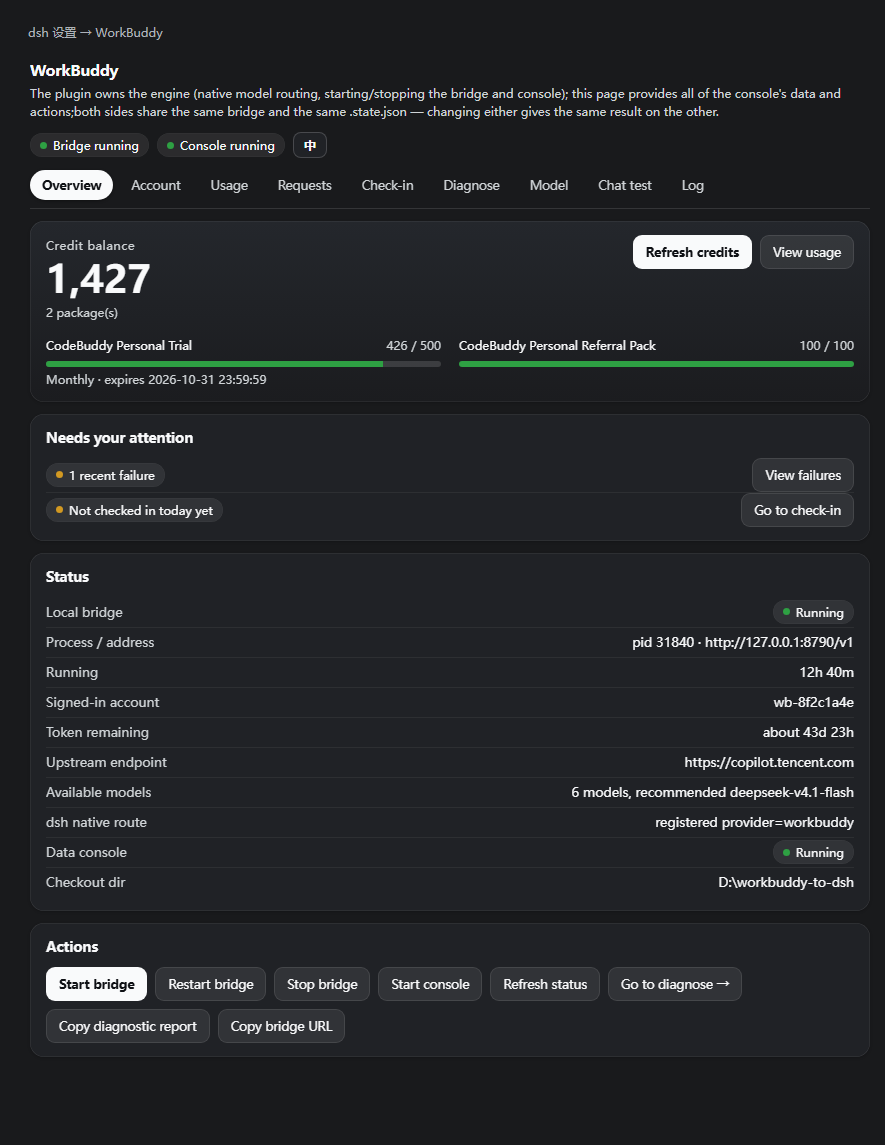
DeepSeek Harness users: `dsh plugin add github:Ianzhyh/workbuddy-to-dsh`, then
register models in the plugin's settings page. That page is **bilingual** —
the `EN` / `中` toggle in its top-right corner switches all nine tabs
(upstream data such as model descriptions and chat content is left as-is):
## Highlights
- **Zero runtime dependencies** — the bridge is a single self-contained file
(`bridge/workbuddy-bridge.mjs`).
- **Credentials never hit disk** — AtRest keys are fetched from the desktop app via
`ELECTRON_RUN_AS_NODE` on demand; plaintext tokens stay in memory only.
- **Three protocols**, streaming, tool calls, multi-turn tool results.
Codex speaks the OpenAI **Responses** protocol, which is *not* chat/completions —
the bridge contains a real conversion layer (`/v1/responses`), so there is no
extra routing process to install. Note that `wire_api = "chat"` was **removed
upstream**; `"responses"` is the only value Codex still accepts.
- **One-click setup** — the console detects installed clients (Codex / Claude Code /
opencode) and writes the Base URL and token straight into their config files:
only its own keys are touched, the original file is backed up first, undo is
one click, and it then verifies end-to-end with the token it just wrote.
Same thing from the terminal: `npm run connect status | apply | verify | undo `.
- **Ops features**: local rate limiting (opt-in), per-request overhead header,
in-flight request visibility, `count_tokens`, client credential layering
(per-key accounting / revocation / rate-limit buckets), local usage ledger.
- **Honest console** — 9 tabs of diagnostics that distinguish "model thinking"
from "actually stuck", and never fake capabilities (embeddings return 501).
- **Bilingual console** — complete Chinese / English UI, switchable in-page
(no reload, no build step); your choice is remembered.
## Configuration
Everything is optional; see [.env.example](.env.example) (Chinese comments).
Key knobs: `WORKBUDDY_PORT` / `WORKBUDDY_LOCAL_TOKEN` / `WORKBUDDY_ANTHROPIC_MODEL`
/ `WORKBUDDY_RATE_LIMIT_*` / `WORKBUDDY_CLIENT_KEYS` / `WORKBUDDY_CLIENT_*` etc.
## Documentation (Chinese)
- [Architecture](docs/ARCHITECTURE.md) · [Configuration](docs/CONFIGURATION.md)
- [Troubleshooting](docs/TROUBLESHOOTING.md) · [Security](docs/SECURITY.md)
- [OpenAPI](docs/openapi.yaml) · [Changelog](CHANGELOG.md) · [Contributing](CONTRIBUTING.md)
## License
MIT — see [LICENSE](LICENSE).

 ## Highlights
- **Zero runtime dependencies** — the bridge is a single self-contained file
(`bridge/workbuddy-bridge.mjs`).
- **Credentials never hit disk** — AtRest keys are fetched from the desktop app via
`ELECTRON_RUN_AS_NODE` on demand; plaintext tokens stay in memory only.
- **Three protocols**, streaming, tool calls, multi-turn tool results.
Codex speaks the OpenAI **Responses** protocol, which is *not* chat/completions —
the bridge contains a real conversion layer (`/v1/responses`), so there is no
extra routing process to install. Note that `wire_api = "chat"` was **removed
upstream**; `"responses"` is the only value Codex still accepts.
- **One-click setup** — the console detects installed clients (Codex / Claude Code /
opencode) and writes the Base URL and token straight into their config files:
only its own keys are touched, the original file is backed up first, undo is
one click, and it then verifies end-to-end with the token it just wrote.
Same thing from the terminal: `npm run connect status | apply
## Highlights
- **Zero runtime dependencies** — the bridge is a single self-contained file
(`bridge/workbuddy-bridge.mjs`).
- **Credentials never hit disk** — AtRest keys are fetched from the desktop app via
`ELECTRON_RUN_AS_NODE` on demand; plaintext tokens stay in memory only.
- **Three protocols**, streaming, tool calls, multi-turn tool results.
Codex speaks the OpenAI **Responses** protocol, which is *not* chat/completions —
the bridge contains a real conversion layer (`/v1/responses`), so there is no
extra routing process to install. Note that `wire_api = "chat"` was **removed
upstream**; `"responses"` is the only value Codex still accepts.
- **One-click setup** — the console detects installed clients (Codex / Claude Code /
opencode) and writes the Base URL and token straight into their config files:
only its own keys are touched, the original file is backed up first, undo is
one click, and it then verifies end-to-end with the token it just wrote.
Same thing from the terminal: `npm run connect status | apply