
SupaConductor
Turn your coding agent into a full engineering team.
One command builds features, fixes bugs, and ships code — with automated planning, execution, and quality checks.


 \n
 \n
 \n
 \n


What Is This? •
Install •\n Platforms •
Get Started •
How It Works •
Commands •
FAQ •
Roadmap •
Community
---
## Latest Release
See the [latest GitHub Release](https://github.com/Ibrahim-3d/orchestrator-supaconductor/releases/latest) for current changes, fixes, upgrade notes, and known limitations. The [changelog](CHANGELOG.md) keeps the full version history.
---
## What Does This Do?
You tell your coding agent what you want. SupaConductor figures out how to build it — step by step, with quality checks at every stage.
**Without SupaConductor**, you prompt your coding agent and hope for the best. You manually review, re-prompt, and fix what it misses.
**With SupaConductor**, you type one command:
```
/orchestrator-supaconductor:go Add user authentication with Google OAuth
```
And it automatically:
1. Writes a detailed specification
2. Creates an implementation plan with task dependencies
3. Executes each task (in parallel when possible)
4. Checks the work with specialized evaluators
5. Fixes any issues it finds
6. Marks the work complete when everything passes
No babysitting. No re-prompting. Just describe what you want and walk away.
---
## What's Inside
| Component | Count | What It Does |
|-----------|------:|-------------|
| **Commands** | 36 | Slash commands you type to control everything |
| **Skills** | 39 | Specialized knowledge modules that activate when needed |
| **Agents** | 15 | Autonomous workers that handle planning, coding, and evaluation |
| **Evaluators** | 4 | Quality checkers for UI/UX, code quality, integrations, and business logic |
| **Board of Directors** | 5 | Virtual executives who deliberate on major decisions |
| **Lead Engineers** | 4 | Architecture, Product, Tech, and QA specialists |
Bundles [Superpowers](https://github.com/obra/superpowers) v4.3.0 (MIT) — everything works out of the box with zero setup.
---
## Installation
SupaConductor now targets multiple coding-agent hosts from one canonical source. See [Platform Support](docs/platform-support.md) for exact capability differences and package layouts.
### Claude Code — native plugin
```
/plugin marketplace add Ibrahim-3d/orchestrator-supaconductor
/plugin install orchestrator-supaconductor@ibrahim-plugins
```
Update later:
```bash
claude plugin marketplace update ibrahim-plugins
claude plugin update orchestrator-supaconductor@ibrahim-plugins
```
### Codex, Cursor, Antigravity, Windsurf, and GitHub Copilot
```bash
git clone https://github.com/Ibrahim-3d/orchestrator-supaconductor.git
cd orchestrator-supaconductor
python3 scripts/build-platform-adapters.py
```
Packages are generated under `dist/platforms/`; published releases also attach ready-to-use ZIP packages.
| Host | Package |
|---|---|
| OpenAI Codex / ChatGPT desktop | `dist/platforms/codex/orchestrator-supaconductor` |
| Cursor | `dist/platforms/cursor/orchestrator-supaconductor` |
| Google Antigravity | `dist/platforms/antigravity/orchestrator-supaconductor` |
| Windsurf / Cascade | `dist/platforms/windsurf/orchestrator-supaconductor` |
| GitHub Copilot | `dist/platforms/copilot/orchestrator-supaconductor` |
See [docs/platform-support.md](docs/platform-support.md) for installation paths and command/agent mapping.
---
## Getting Started
### Step 1: Set up your project
Open Claude Code in your project folder and run:
```
/orchestrator-supaconductor:setup
```
This walks you through an interactive setup that:
- Analyzes your existing codebase (or starts fresh for new projects)
- Helps define your product vision and tech stack
- Creates a `conductor/` folder in your project to track all work
- Generates an initial development sprint with ready-to-execute tracks
You only need to do this once per project.
### Step 2: Build something
Tell it what you want in plain English:
```
/orchestrator-supaconductor:go Add Stripe payment integration with webhooks
```
```
/orchestrator-supaconductor:go Fix the login bug where users get logged out after refresh
```
```
/orchestrator-supaconductor:go Build a dashboard with real-time analytics charts
```
```
/orchestrator-supaconductor:go Refactor the database layer to use connection pooling
```
That's it. SupaConductor takes over from here — planning, coding, testing, and evaluating the work automatically.
### Step 3: Check on progress
```
/orchestrator-supaconductor:status
```
Shows all your active tracks, what step each one is on, and what's completed.
### Step 4: Resume interrupted work
If a session ends before a track completes, just run:
```
/orchestrator-supaconductor:go
```
It picks up exactly where it left off.
---
## How It Works
Every piece of work follows a structured cycle called the **Evaluate-Loop**:
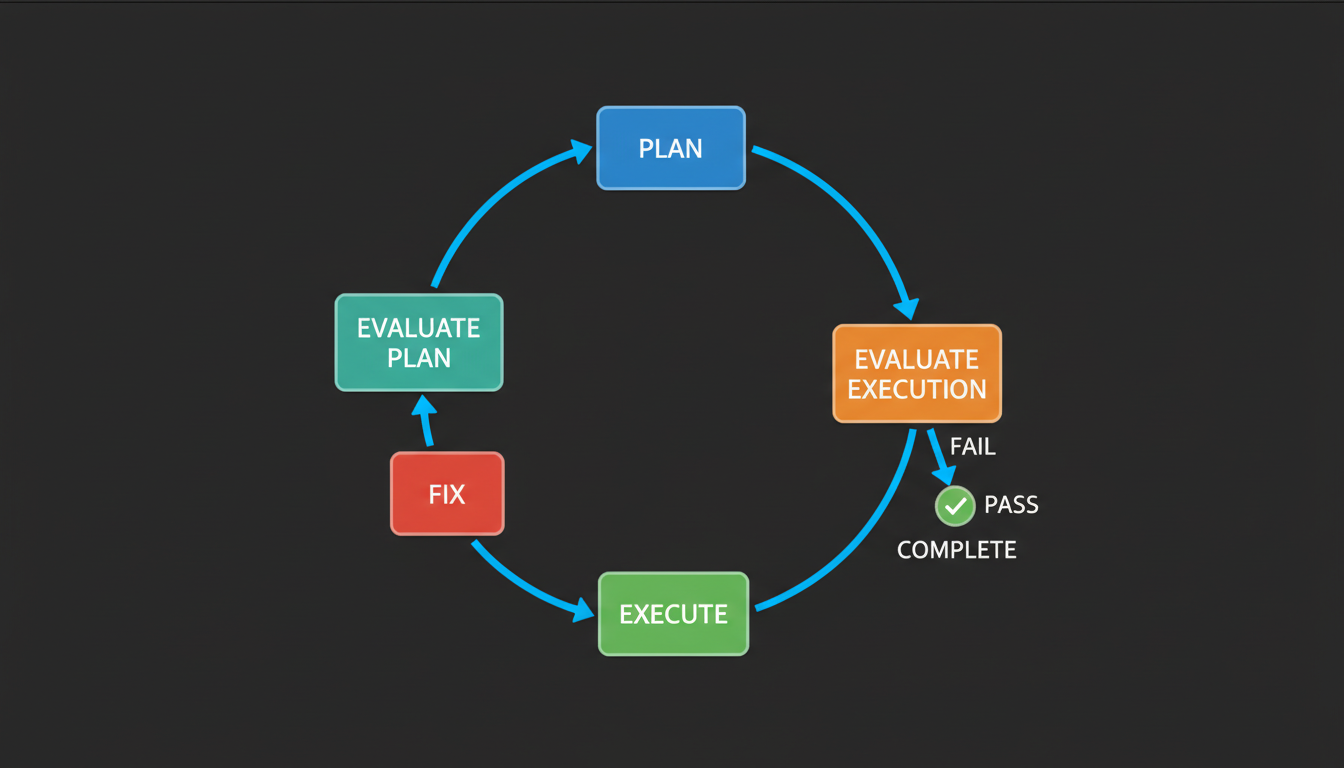
| Step | What Happens |
|------|-------------|
| **Plan** | Breaks your goal into tasks with a dependency graph |
| **Evaluate Plan** | Checks for scope issues, overlap with other work, and feasibility |
| **Execute** | Writes code, runs tests, tracks progress — parallel when possible |
| **Evaluate Execution** | Specialized checkers review UI/UX, code quality, integrations, and business logic |
| **Fix** | Addresses any failures, then loops back to evaluation (up to 5 fix cycles; up to 3 plan revisions) |
| **Complete** | All checks pass — track is marked done |
The loop runs fully automated. It stops when the work passes all quality checks or when it needs your input.
### Parallel Execution
When tasks don't depend on each other, they run simultaneously:
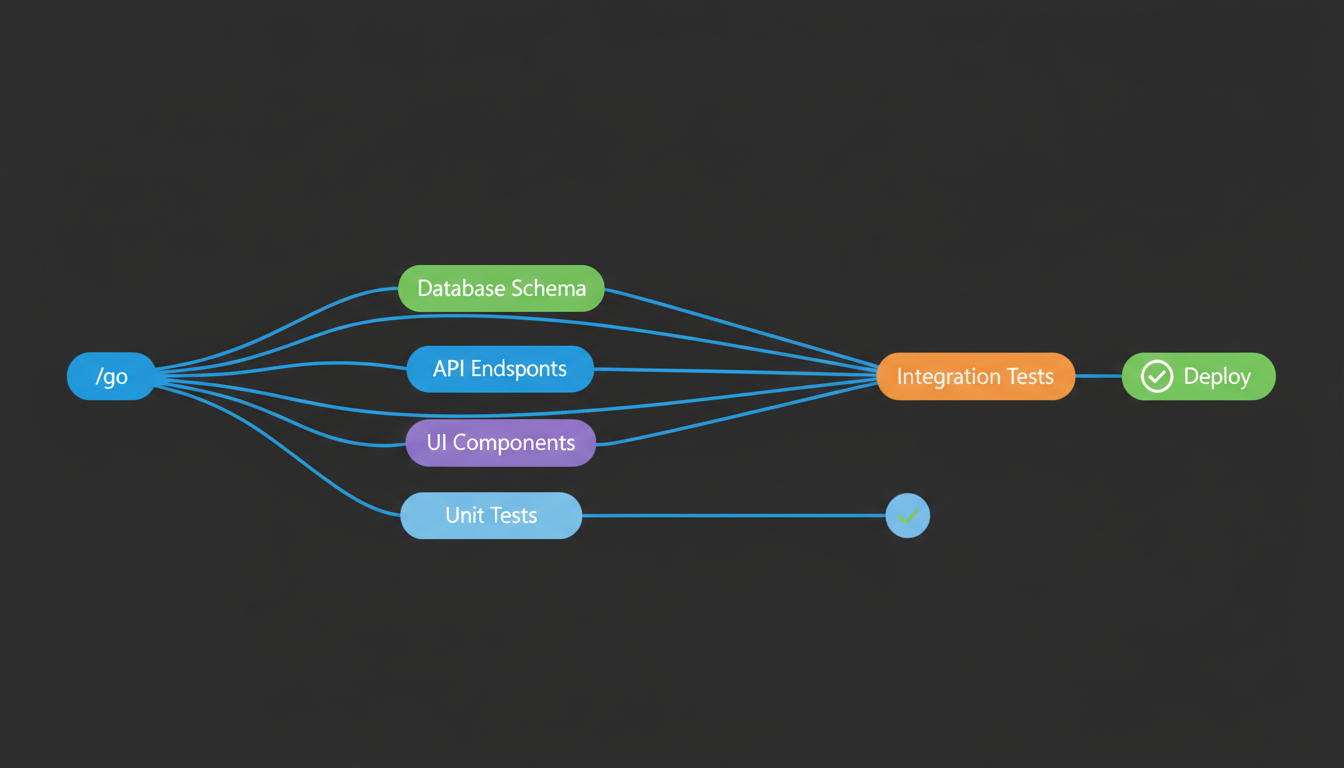
This means a feature with 6 tasks might only take as long as 3, because independent tasks run in parallel.
### Two Modes
SupaConductor can work in two ways:
| Mode | Behavior | Best For |
|------|----------|----------|
| **Agentic** (default) | Fully autonomous — makes all decisions itself | Experienced users who trust the system |
| **Human-in-the-loop** | Pauses at key decision points to ask you | Learning the system, critical work, or when you want more control |
Switch modes by editing `conductor/config.json` in your project:
```json
{ "mode": "agentic" }
```
```json
{ "mode": "human-in-the-loop" }
```
---
## Board of Directors
For major decisions — and automatically for high-stakes tracks like production deploys, security architecture changes, breaking API migrations, or data-loss operations — a virtual board deliberates with written rationale:
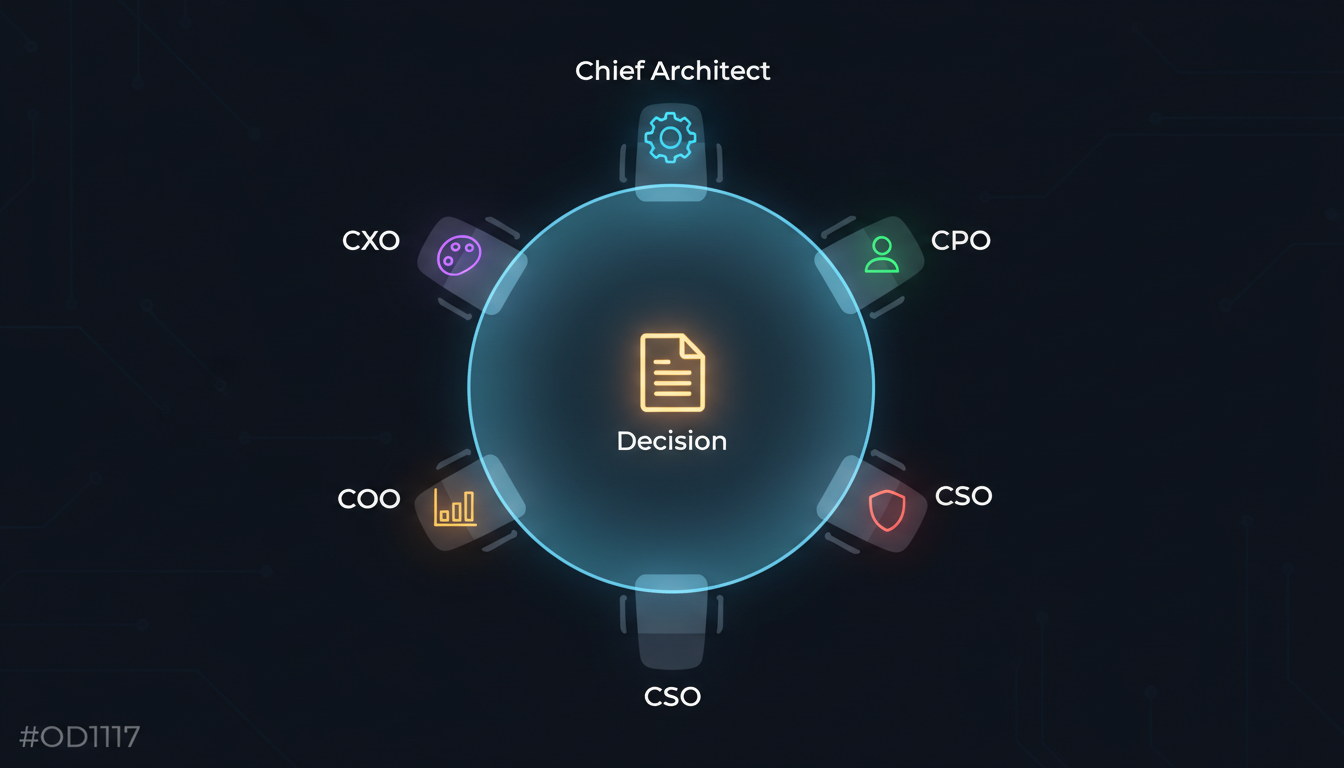
| Director | Focus |
|----------|-------|
| **Chief Architect** | System design, scalability, technical debt |
| **Chief Product Officer** | User value, market fit, feature scope |
| **Chief Security Officer** | Vulnerabilities, compliance, data protection |
| **Chief Operations Officer** | Feasibility, timelines, deployment risks |
| **Chief Experience Officer** | UX/UI, accessibility, user journeys |
Each director independently assesses your question, then they discuss and vote with written rationale.
```
/orchestrator-supaconductor:board-meeting Should we migrate from REST to GraphQL?
```
```
/orchestrator-supaconductor:board-review Add real-time notifications via WebSocket
```
Use `board-meeting` for full deliberation (detailed, takes longer) or `board-review` for quick assessments.
---
## All Commands
### The Main Ones
| Command | What It Does |
|---------|-------------|
| `/orchestrator-supaconductor:go ` | Describe what you want — everything else is automatic |
| `/orchestrator-supaconductor:setup` | Set up SupaConductor in your project (run once) |
| `/orchestrator-supaconductor:status` | See all your tracks and their progress |
| `/orchestrator-supaconductor:implement` | Continue the Evaluate-Loop on the current track |
| `/orchestrator-supaconductor:new-track` | Create a new track with more manual control |
### Quality and Review
| Command | What It Does |
|---------|-------------|
| `/orchestrator-supaconductor:phase-review` | Run a quality gate on completed work |
| `/orchestrator-supaconductor:cto-advisor` | Get a CTO-level architecture review |
| `/orchestrator-supaconductor:board-meeting ` | Full board deliberation with voting |
| `/orchestrator-supaconductor:board-review ` | Quick board assessment |
| `/orchestrator-supaconductor:ui-audit` | Accessibility and UI/UX review |
### Expert Advisors
Ask for advice from virtual executives — they analyze your project and give guidance:
| Command | Advisor |
|---------|---------|
| `/orchestrator-supaconductor:ceo` | Business strategy and product direction |
| `/orchestrator-supaconductor:cmo` | Marketing strategy and positioning |
| `/orchestrator-supaconductor:cto` | Technical architecture and engineering |
| `/orchestrator-supaconductor:ux-designer` | User experience and design |
### Planning and Execution
| Command | What It Does |
|---------|-------------|
| `/orchestrator-supaconductor:writing-plans` | Create a structured implementation plan |
| `/orchestrator-supaconductor:executing-plans` | Execute an existing plan step by step |
| `/orchestrator-supaconductor:brainstorming` | Creative exploration before building |
| `/orchestrator-supaconductor:systematic-debugging` | Structured approach to finding and fixing bugs |
| `/orchestrator-supaconductor:using-git-worktrees` | Isolate feature work in separate git worktrees |
| `/orchestrator-supaconductor:finishing-a-development-branch` | Wrap up a branch — merge, PR, or cleanup |
### Loop Control (Advanced)
These give you fine-grained control over individual loop steps:
| Command | Step |
|---------|------|
| `/orchestrator-supaconductor:loop-planner` | Run just the planning step |
| `/orchestrator-supaconductor:loop-plan-evaluator` | Evaluate just the plan |
| `/orchestrator-supaconductor:loop-executor` | Run just the execution step |
| `/orchestrator-supaconductor:loop-execution-evaluator` | Evaluate just the execution |
| `/orchestrator-supaconductor:loop-fixer` | Run just the fix step |
| `/orchestrator-supaconductor:parallel-dispatcher` | Dispatch parallel workers manually |
| `/orchestrator-supaconductor:task-worker` | Run a single task from the plan |
---
## Architecture
### How the system fits together
```
/go
|
+----------v-----------+
| Orchestrator |
| (controls the loop) |
+----------+-----------+
|
+-------------------+-------------------+
v v v
+--------+ +---------+ +----------+
| Plan | ------> | Execute | ------> | Evaluate |
+--------+ +---------+ +----------+
| | |
v v v
writing-plans parallel-dispatcher 4 evaluators
plan-evaluator |-- task-worker |-- eval-ui-ux
cto-reviewer |-- task-worker |-- eval-code-quality
+-- task-worker |-- eval-integration
+-- eval-business-logic
+----------------------+ +----------------------------+
| Board of Directors | | Knowledge / Retrospective |
| 5 directors + vote | | patterns.md + errors.json |
+----------------------+ +----------------------------+
```
### What gets created in your project
When you run `/orchestrator-supaconductor:setup`, it creates a `conductor/` folder:
```
your-project/
+-- conductor/
|-- tracks.md # Registry of all your work tracks
|-- config.json # Mode setting (agentic or human-in-the-loop)
|-- workflow.md # How the development process works
|-- authority-matrix.md # Who can make which decisions
|-- decision-log.md # Record of architectural decisions
|-- product.md # Product vision and requirements
|-- tech-stack.md # Technology choices and constraints
|-- knowledge/
| |-- patterns.md # Patterns learned from completed work
| +-- errors.json # Fixes for recurring errors
+-- tracks/
+-- feature-name/
|-- spec.md # What needs to be built
|-- plan.md # How to build it (tasks + dependencies)
+-- metadata.json # Current state and configuration
```
All of these are plain Markdown and JSON files. You can read, edit, or delete them anytime.
---
## FAQ
### Do I need to know how to code?
You need one supported coding-agent host installed and basic terminal knowledge. Claude Code has the reference native integration; Codex, Cursor, Antigravity, Windsurf, and GitHub Copilot use generated platform adapters.
### How much does this cost in API credits?
SupaConductor uses the same Claude API as normal Claude Code — it just structures the work more carefully. Because it runs multiple agents (planning, execution, evaluation), it uses roughly **3-5x** the API calls compared to doing everything manually in one conversation.
SupaConductor optimizes costs automatically: it uses **Opus** (the most capable model) for planning and evaluation, and **Sonnet** (faster, cheaper) for execution tasks.
Ways to reduce cost:
- Use `/orchestrator-supaconductor:implement` if you write specs yourself
- Skip board meetings for small features (they're opt-in)
- Use human-in-the-loop mode to stay in control of scope
### How much of my context window does this use?
Skills use **progressive disclosure** — only ~100 tokens each for metadata. Full instructions load only when activated (typically under 5,000 tokens each). The 39 skills are not loaded all at once.
Agents run as **separate conversations** with their own context windows, so they don't fill up your main conversation.
| Component | Context Used | When |
|-----------|-------------|------|
| Orchestrator | ~4,000 tokens | Active during `/go` |
| Planner | ~3,000 tokens | During planning only |
| Evaluator | ~2,500 tokens each | Only the active evaluator loads |
| Board meeting | ~5,000 tokens | On-demand only |
| Idle | ~500 tokens | Between steps |
### Does this work with Codex, Cursor, Windsurf, Antigravity, or Copilot?
Yes. SupaConductor now ships generated adapters for **OpenAI Codex, Cursor, Google Antigravity, Windsurf/Cascade, and GitHub Copilot**, while preserving Claude Code as the reference integration.
The hosts do not expose identical plugin APIs, so the adapter maps SupaConductor to each platform's strongest native primitives: Agent Skills, commands/workflows/prompts, and custom agents/subagents where supported. See [Platform Support](docs/platform-support.md) for the exact matrix.
### Is this overkill for small tasks?
For a quick one-file fix — yes, just use Claude Code directly. Use SupaConductor when:
- The work touches 3 or more files
- You'd normally plan before coding
- You want automated quality checks
- You want the work done right the first time
You can also use individual commands without the full loop:
```
/orchestrator-supaconductor:board-review Should we use Redis or PostgreSQL for sessions?
/orchestrator-supaconductor:cto-advisor
/orchestrator-supaconductor:writing-plans
```
### Can I use this alongside other Claude Code plugins?
Yes. SupaConductor uses the `/orchestrator-supaconductor:` namespace and doesn't conflict with any other plugins, built-in commands, or MCP servers.
### How do I update to a newer version?
If you installed via the Claude Code marketplace:
```bash
claude plugin marketplace update ibrahim-plugins
claude plugin update orchestrator-supaconductor@ibrahim-plugins
```
If you cloned via git:
```bash
cd ~/.claude/plugins/orchestrator-supaconductor && git pull
```
### How do I uninstall?
For a marketplace install:
```bash
claude plugin uninstall orchestrator-supaconductor@ibrahim-plugins
```
For a manual git clone:
```bash
rm -rf ~/.claude/plugins/orchestrator-supaconductor
```
The `conductor/` directory in your project stays — it's just documentation files.
---
## Migration from the Old Name
If you previously installed `conductor-orchestrator-superpowers` (the old name):
1. Disable the old plugin: run `/plugin` in Claude Code and toggle it off
2. Delete the old folder: `rm -rf ~/.claude/plugins/conductor-orchestrator-superpowers`
3. Install SupaConductor using the [instructions above](#installation)
4. Run `/orchestrator-supaconductor:setup` in your existing projects to update references
Your existing tracks and data are safe — only the command prefix changed from `/conductor:` to `/orchestrator-supaconductor:`.
---
## Community
- [Discussions](https://github.com/Ibrahim-3d/orchestrator-supaconductor/discussions) — Questions, ideas, feedback, and what you've built
- [Issues](https://github.com/Ibrahim-3d/orchestrator-supaconductor/issues) — Reproducible bugs and scoped actionable work
- [Roadmap](ROADMAP.md) — Current direction, near-term priorities, and items under consideration
- [Changelog](CHANGELOG.md) — Full version history
- [Contributing](CONTRIBUTING.md) — Development and pull-request workflow
- [Support](SUPPORT.md) — Where to ask for help
---
## Requirements
- [Claude Code](https://docs.anthropic.com/en/docs/claude-code) CLI
- Git
## Third-Party
Bundles [Superpowers](https://github.com/obra/superpowers) v4.3.0 by [Jesse Vincent](https://github.com/obra), licensed under MIT. See [LICENSES/superpowers-MIT](LICENSES/superpowers-MIT).
## License
SupaConductor is licensed under the **GNU Affero General Public License v3.0 (AGPL-3.0)** — see [LICENSE](LICENSE).
Bundled third-party components retain their original licenses. Superpowers is MIT-licensed; see [LICENSES/superpowers-MIT](LICENSES/superpowers-MIT).