# Monocraft
[](https://GitHub.com/IdreesInc/Monocraft/releases/)

[](https://GitHub.com/IdreesInc/Monocraft/releases/)
 ## [`Download it here!`](https://github.com/IdreesInc/Monocraft/releases)
### [`For updates and support, visit our Discord!`](https://discord.gg/6yxE9prcNc)
## [`Download it here!`](https://github.com/IdreesInc/Monocraft/releases)
### [`For updates and support, visit our Discord!`](https://discord.gg/6yxE9prcNc)

The monospaced font for developers who like Minecraft a bit _too_ much.
If you'd like to see a vectorized version of this font, try [Miracode](https://github.com/IdreesInc/Miracode)!
*Notice: This project is not affiliated with Minecraft or Mojang in any way and is exclusively a fan project. This font emulates the typeface of the font used in the Minecraft UI, but it does not include any assets or font files from the original game.*
## Features
- Minecraft!
- The characters in this font were based around the [typeface](https://github.com/IdreesInc/Minecraft-Font) used in the Minecraft UI, with each glyph updated for better readability and spacing
- Monospaced!
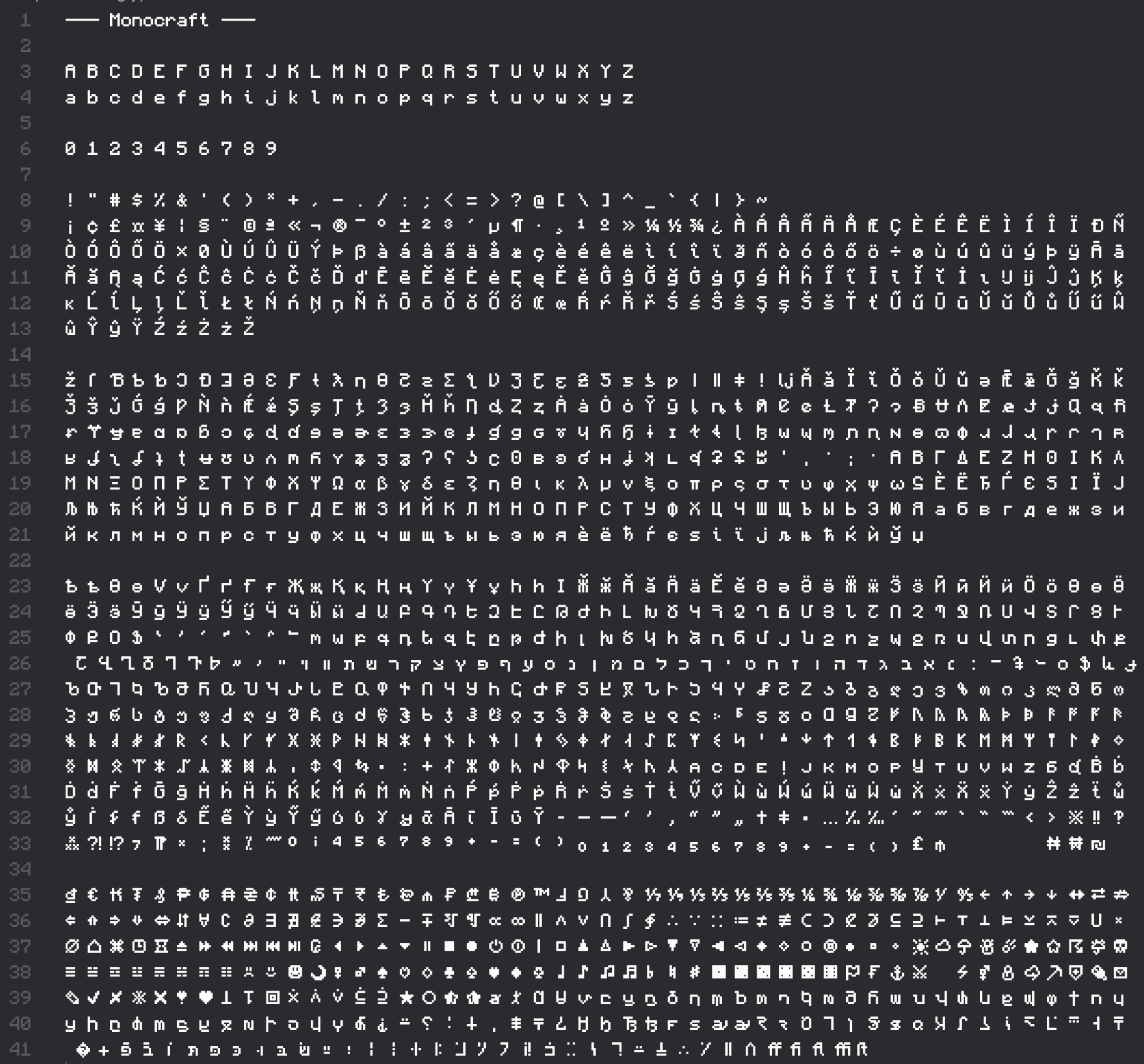
- Each of the 1500+ glyphs included in this font have been carefully redesigned to work in a monospaced font
- Thin characters like "i" and "l" have been reworked with tasteful tails and serifs to look better in a monospaced environment
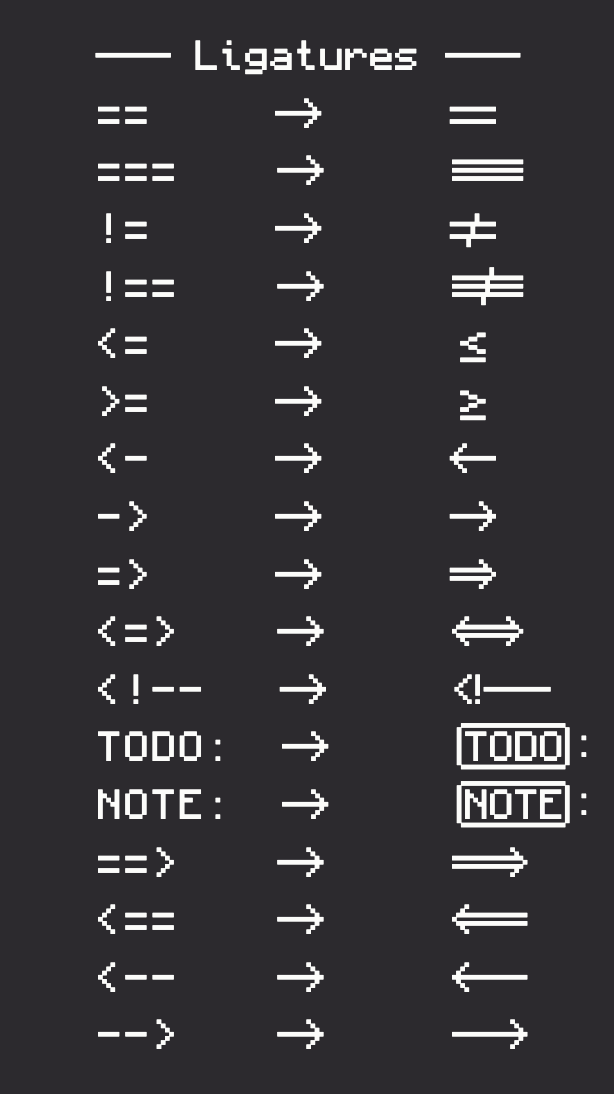
- Programming ligatures!
- Add some spice to your programming life with all new ligature characters
- Arrows now look like arrows and comparison operators are easier to see at a glance
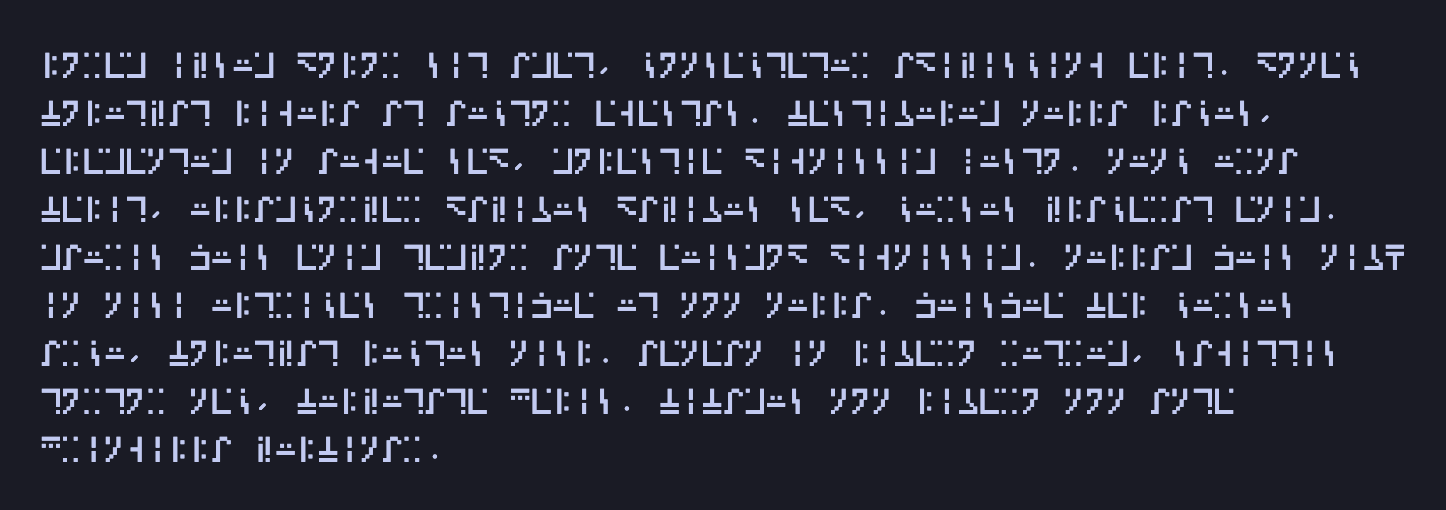
- Enchantment language support!
- Type in the "standard galactic alphabet" used by Minecraft for enchantment table text
- Perfect for enchanting your code with Bane of Arthropods!
## Glyphs
## How to install
### Windows
Download the most recent `Monocraft.ttc` file from the [Releases](https://github.com/IdreesInc/Monocraft/releases) page. Right click on the downloaded font and select **Install**. You might need administrative access to install fonts, depending on your machine.
### Mac
#### Using Homebrew
```shell
brew install --cask font-monocraft
```
#### Manually
Download the most recent `Monocraft.ttc` file from the [Releases](https://github.com/IdreesInc/Monocraft/releases) page. Double click on the downloaded font file and select **Install Font** in the window that appears. More help available [here](https://support.apple.com/en-us/HT201749).
### Linux
Download the most recent `Monocraft.ttc` file from the [Releases](https://github.com/IdreesInc/Monocraft/releases) page. Move the file to ~/.local/share/fonts (create the folder if it doesn't already exist). In a terminal, run `fc-cache -fv`. Alternatively, log out and log in again.
### On Your Website
To use Monocraft on your website, add the following code to your CSS:
```css
@font-face {
font-family: 'Monocraft';
src: url('https://cdn.jsdelivr.net/gh/IdreesInc/Monocraft@main/dist/Monocraft-ttf/Monocraft.ttf') format('truetype');
font-weight: normal;
font-style: normal;
}
```
Note that you will have to add each weight as an individual import as most browsers don't support the bundled `.ttc` font file.
## How to use
After following the installation instructions up above, simply select the "Monocraft" font (note the space) in any application that supports custom fonts. You might need to restart the application or your computer for the font to appear.
## FAQ
### What ligatures are available?
So far, the following ligatures have been added to the font:
 And with the contributions of [@Ciubix8513](https://github.com/Ciubix8513), Monocraft now includes continuous ligatures that enable you to type arrows and lines that _just keep going_.
If there is another character combination that you feel could be a ligature, feel free to create an issue!
### How do I write in the enchantment table language?
Monocraft supports the "standard galactic alphabet" used by Minecraft to represent enchantment table text in a special codepoint range! To type like a sorcerer, follow these steps:
1. Install Monocraft following the instructions above
2. Go to this site: https://cryptii.com/pipes/alphabetical-substitution
3. Replace the "ciphertext alphabet" with this (don't worry that it looks like boxes): ``
4. Type whatever you want in the leftmost text box, and it will be converted to galactic text in the right box (but it will still look like boxes for now)
5. Copy the output text to your editor with Monocraft and watch the magic!
Here's some Lorem Ipsum text so you can see it in action!
### How are these characters generated?
Using [FontForge's](https://fontforge.org/en-US/) excellent Python extension, the glyphs are created from configuration files representing each character's pixels. Diacritics are created separately and are combined with the original characters to create over 500 unique glyphs. To learn more, check out the source code in the [src](https://github.com/IdreesInc/Monocraft/tree/main/src) folder.
### Do you have a version with the original Minecraft font (not monospaced)?
I've got you covered, check out my rendition of the Minecraft typeface [here](https://github.com/IdreesInc/Minecraft-Font).
### What if I want to use a font that's actually good?
Understandable, check out [Fira Code](https://github.com/tonsky/FiraCode) for a font with amazing attention to detail, or [Scientifica](https://github.com/nerdypepper/scientifica) for a bitmap font similar to this. Feel free to also check out my font [Miracode](https://github.com/IdreesInc/Miracode) for a font based on Monocraft that's a little more usable!
And with the contributions of [@Ciubix8513](https://github.com/Ciubix8513), Monocraft now includes continuous ligatures that enable you to type arrows and lines that _just keep going_.
If there is another character combination that you feel could be a ligature, feel free to create an issue!
### How do I write in the enchantment table language?
Monocraft supports the "standard galactic alphabet" used by Minecraft to represent enchantment table text in a special codepoint range! To type like a sorcerer, follow these steps:
1. Install Monocraft following the instructions above
2. Go to this site: https://cryptii.com/pipes/alphabetical-substitution
3. Replace the "ciphertext alphabet" with this (don't worry that it looks like boxes): ``
4. Type whatever you want in the leftmost text box, and it will be converted to galactic text in the right box (but it will still look like boxes for now)
5. Copy the output text to your editor with Monocraft and watch the magic!
Here's some Lorem Ipsum text so you can see it in action!

### How are these characters generated?
Using [FontForge's](https://fontforge.org/en-US/) excellent Python extension, the glyphs are created from configuration files representing each character's pixels. Diacritics are created separately and are combined with the original characters to create over 500 unique glyphs. To learn more, check out the source code in the [src](https://github.com/IdreesInc/Monocraft/tree/main/src) folder.
### Do you have a version with the original Minecraft font (not monospaced)?
I've got you covered, check out my rendition of the Minecraft typeface [here](https://github.com/IdreesInc/Minecraft-Font).
### What if I want to use a font that's actually good?
Understandable, check out [Fira Code](https://github.com/tonsky/FiraCode) for a font with amazing attention to detail, or [Scientifica](https://github.com/nerdypepper/scientifica) for a bitmap font similar to this. Feel free to also check out my font [Miracode](https://github.com/IdreesInc/Miracode) for a font based on Monocraft that's a little more usable!