# dsh-mcp-manager-ui
[中文](README.md) | English






An **MCP management panel** for DeepSeek Harness Web: click the floating button (bottom-right) or the sidebar **MCP** entry to inspect connection status, add servers, and edit configuration. The panel floats above the session — **it never interrupts an ongoing conversation**.
> **This line has been merged into [`dsh-toolbox-ui`](https://www.npmjs.com/package/dsh-toolbox-ui) (MCP + skills).**
> It combines this project's MCP panel with a skills face (including a skill market) in one panel, and is a
> superset of it. Since **1.5.4**, `dsh-mcp-manager-ui` does exactly one thing — move existing installs over:
>
> ```bash
> dsh plugin update # pulls 1.5.5
> # after restarting the host, the panel shows a "迁移" (migrate) button:
> # one click installs dsh-toolbox-ui and removes this package
> ```
>
> New users should install the successor directly:
> `dsh plugin --profile web add dsh-toolbox-ui@^1.6.1`.
> In-depth design notes (shared-connection model, connection-state semantics, known limits) are currently Chinese-only: [docs/design.md](docs/design.md).
## Screenshots
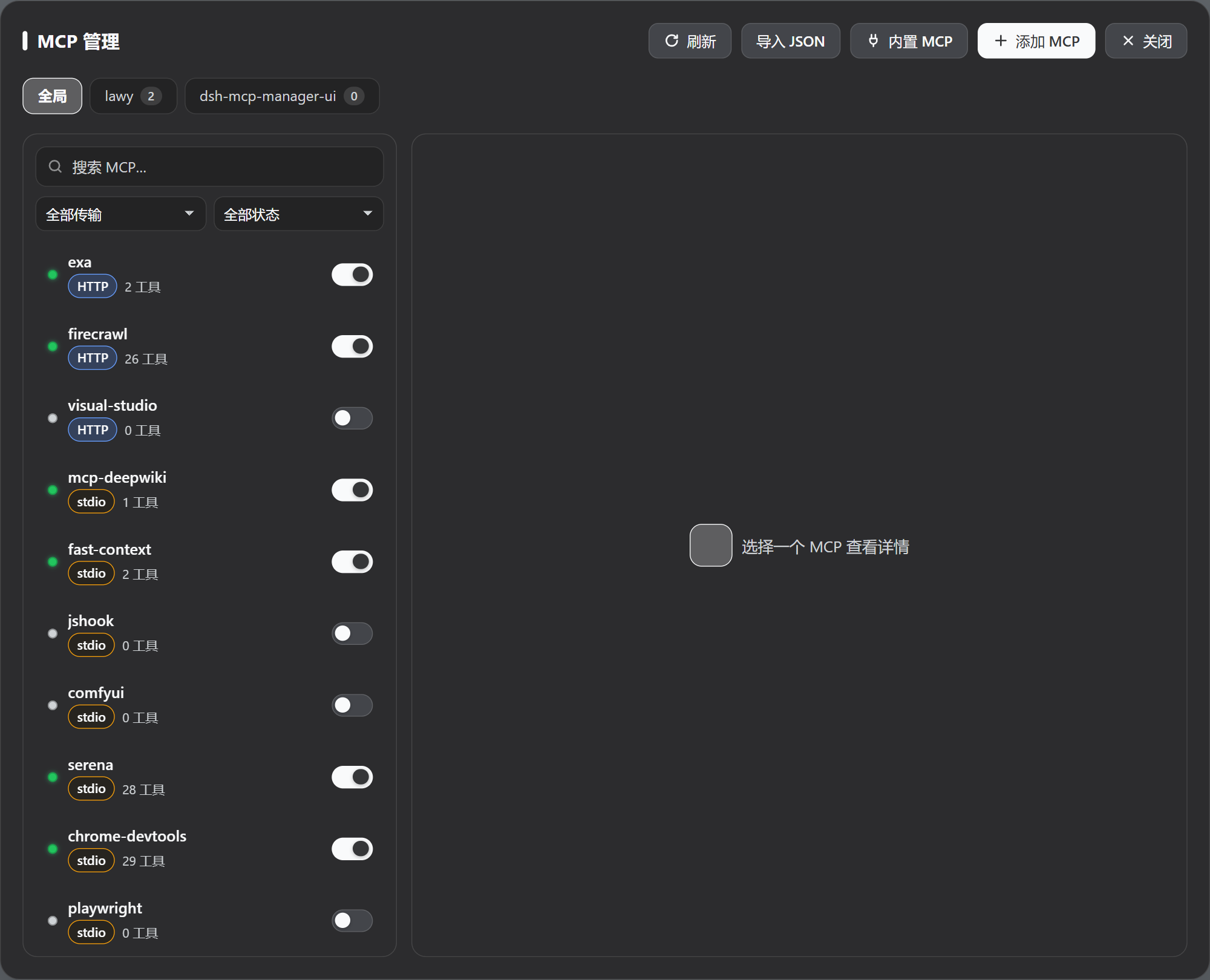
### Global panel
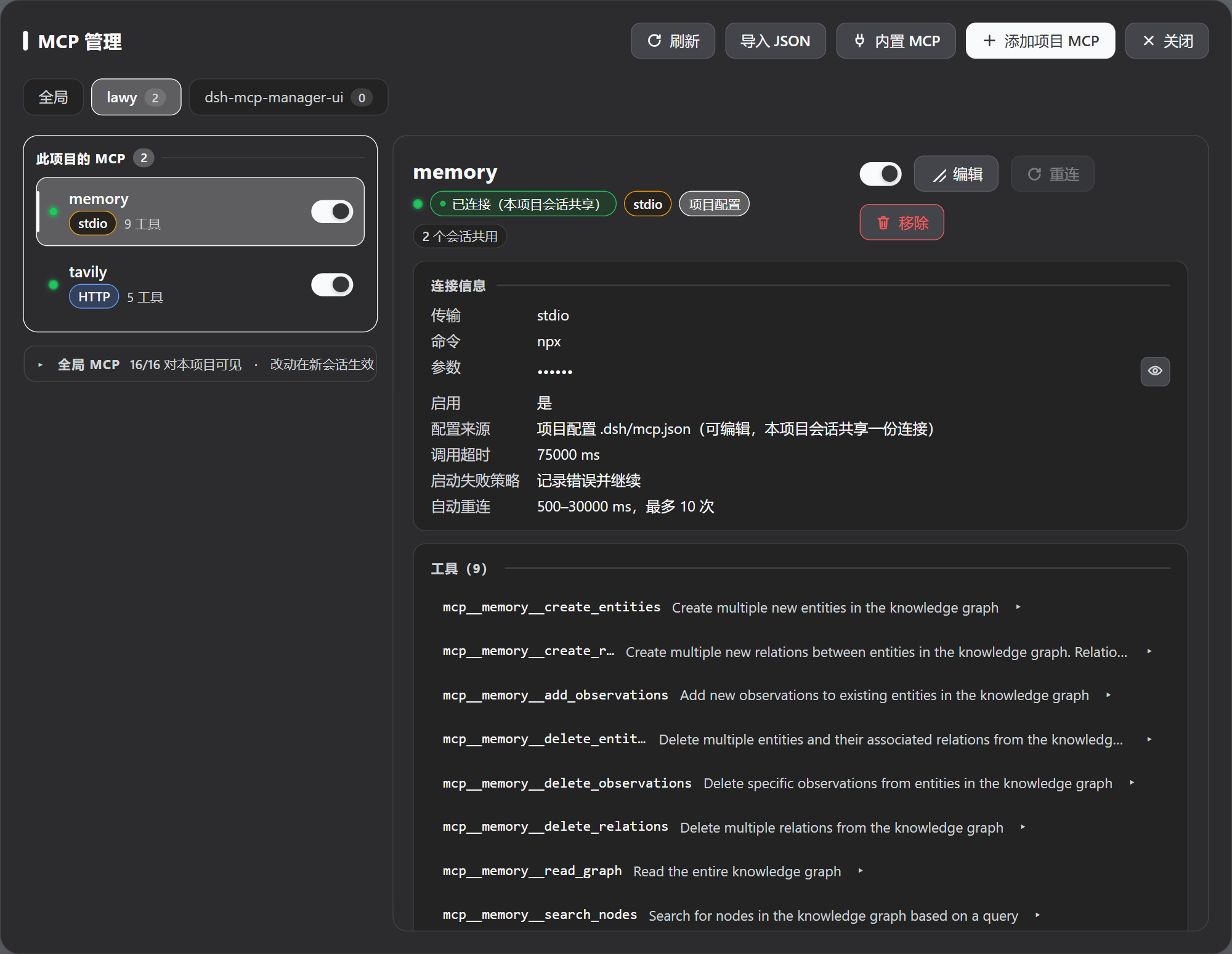
### Project scope (`.dsh/mcp.json`)
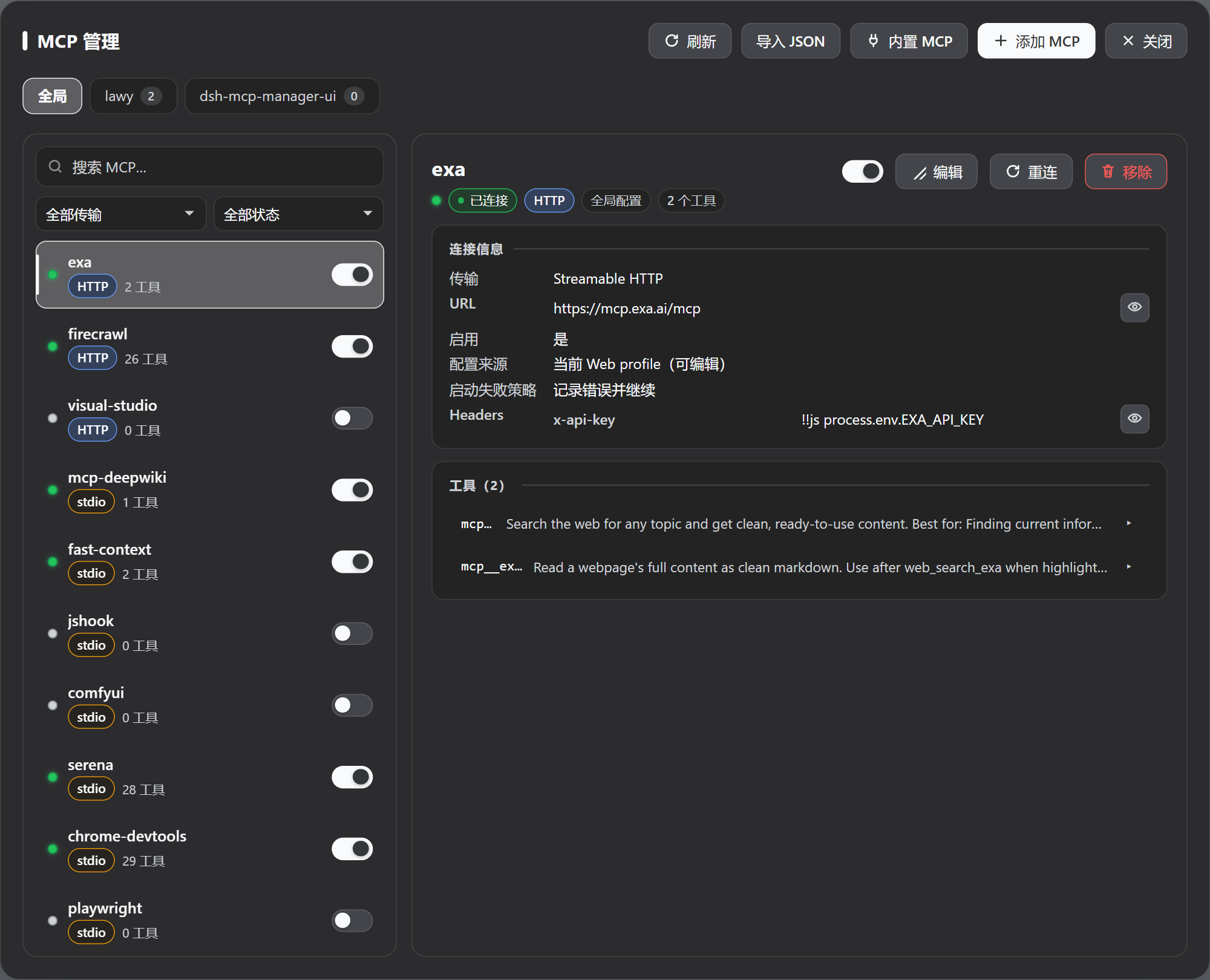
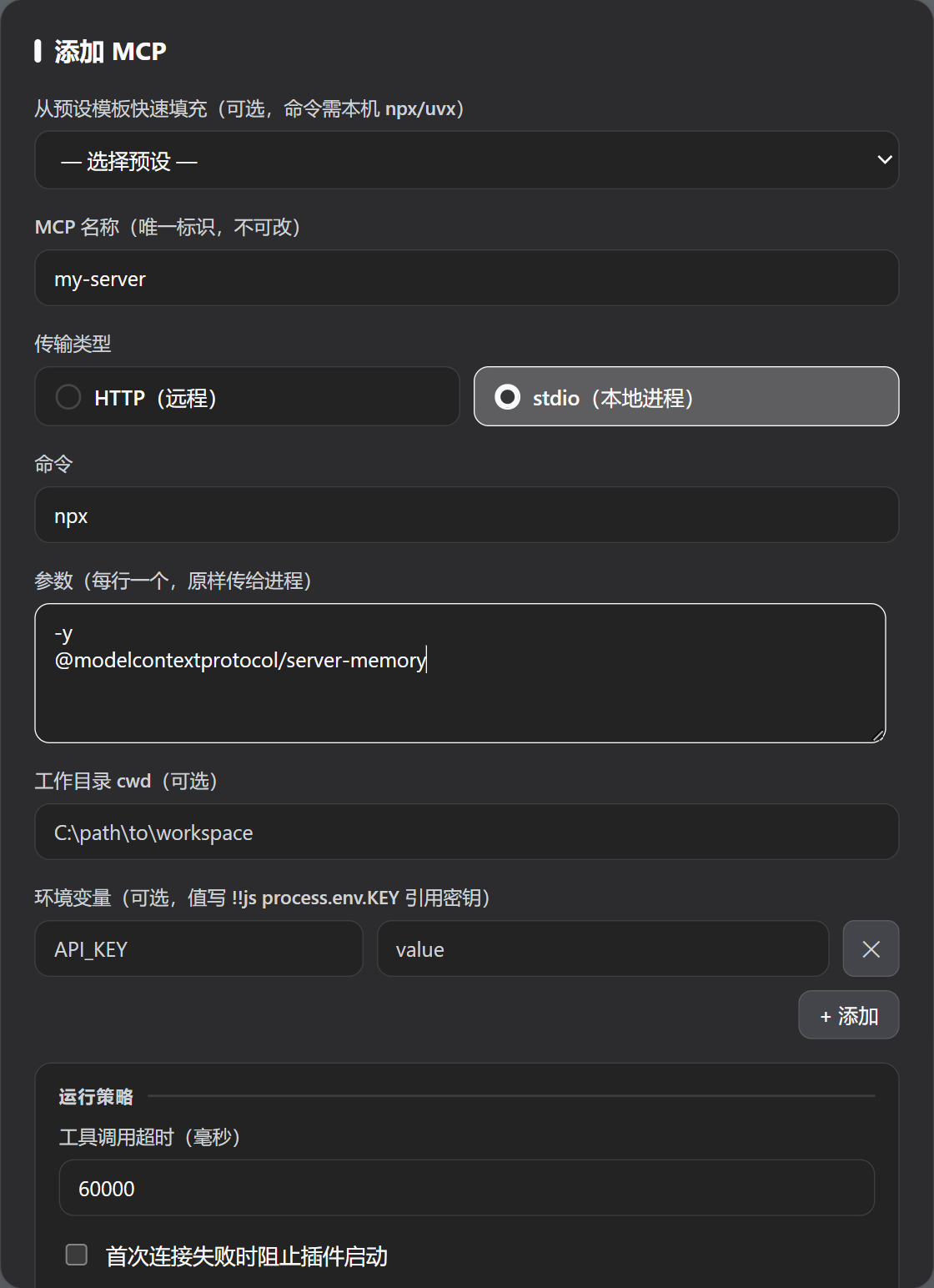
### Connection details and adding a server
## Features
- Inspect every MCP server's status, transport, connection parameters, and tool list; expand a tool to see its full input JSON Schema (required/optional, types, enums, defaults, raw JSON)
- Filter by transport (HTTP/stdio) and status, search by name/command/URL
- Enable, disable, reconnect, add, edit, remove; reveal masked credentials temporarily with the eye button and copy with one click
- **Global + project scopes**: global servers live in the Web profile and are available to every project; project servers live in that project's `.dsh/mcp.json` and are visible only to its sessions. A project can also hide any global MCP
- **Two entry points, one panel**: the draggable floating button (position remembered) and the official sidebar entry share the same state; the "Entry" control in the panel header can keep just one of them (never neither)
- **MCP market**: 47 services across 10 categories (search, dev, security & reverse engineering, data, AI & knowledge, browser automation, cloud & infra, productivity, files, comms), each verified against first-party sources. Search-first, with category and "keyless only" filters, sorting, and one-click install from the card; every entry states its free tier honestly and what you must supply (key / connection details / arguments to edit after install). Already-configured entries are detected and skipped, never overwritten
- Import MCP configuration from other clients installed on this machine: Claude Code, Codex (`config.toml`), OpenCode (including `.jsonc`), pi, Claude Desktop, Cursor, Windsurf, VS Code, Gemini CLI, Roo Code, and the cross-tool shared config are detected and listed, and one click imports from any of them; you can also paste `mcpServers` JSON from Claude, Cursor, Cline, or Roo, or `servers` JSON from VS Code. Everything is previewed before writing, with "merge" and "replace" modes
- **Moving servers between workspaces**: copy this project's MCP servers into another registered workspace in one go (done inside the Host, so credentials never pass through the browser), or export the whole project configuration as JSON to download / copy (same shape as `.dsh/mcp.json`, ready to drop into another workspace). See [Moving servers between workspaces](#moving-servers-between-workspaces)
- Follows the DSH dark/light theme and adapts to narrow/mobile widths
- Update notice and **one-click upgrade**: a dismissible banner when a newer release exists (at most one check per day; disable with `DSH_MCP_MANAGER_DISABLE_UPDATE_CHECK`). Nothing happens until you press Upgrade — it **never auto-updates**. The upgrade runs through DSH's official pluginManager and tells you to restart the host when done. A local dev copy installed via `link:` / `file:` / `github:` gets no button (upgrading it would replace your link with an npm package)
- **What changed, said once**: after the version changes, the first time you open the panel a small card lists what's new and where to find it (e.g. that the "Entry" control sits in the panel header); confirming it never shows it again, and it uses no network and sends nothing
## Install
```sh
# Recommended: install from npm — `dsh plugin update` then upgrades within ^1.x automatically
dsh plugin --profile web add dsh-mcp-manager-ui@^1.5.5
# Or pin a GitHub release tag (no automatic upgrades; re-add with a new tag to upgrade)
dsh plugin --profile web add github:Imzl-zl/dsh-mcp-manager-ui#v1.5.5
```
Then **restart `dsh web`**. To upgrade:
```sh
dsh plugin --profile web update dsh-mcp-manager-ui
```
To uninstall (your configured MCP entries stay in place):
```sh
dsh plugin --profile web remove dsh-mcp-manager-ui
```
Details, local development installs, and troubleshooting: [docs/installation.md](docs/installation.md) (Chinese).
> Do not add `mcp-manager-ui` to the profile's `cordis.patch.yml`, an agent preset, or an extra `--patch` file by hand — the plugin command already does that, and duplicating it fails loudly on purpose.
## Usage
### Opening the panel
Two entry points, one panel:
- **Floating button (bottom-right)**: draggable, position remembered;
- **Sidebar "MCP"**: above "Settings" when expanded, icon-only in the 56px rail.
The panel floats above the session; closing it ("Close" or Esc) does not affect the conversation.
Both entries can be turned off independently: the panel header's "Entry" control offers `Floating button + sidebar` (default), `Floating button only`, or `Sidebar only`. They **cannot both be hidden** — the panel is only reachable through these two entries, so this is a three-way choice, not two independent switches. The choice is stored in the browser (localStorage), so a different browser or a cleared cache starts from the default again.
### Global vs project
Tabs switch between "Global" and each project:
| Tab | Stored in | Visible to | When changes take effect |
|---|---|---|---|
| Global | The Web profile's `cordis.patch.yml` | every project | DSH hot-reloads, usually immediately |
| A project | That project's `.dsh/mcp.json` | only that project's sessions | the next newly created connection (see below) |
`serverName` is scoped: different projects, and global vs project, **may reuse the same name** with independent connections; duplicates inside one scope are rejected.
### Common actions
From a row or the detail pane:
- **Toggle**: enable / disable (global writes the profile patch's `disabled`, project writes `.dsh/mcp.json`);
- **Reconnect**: global only (project connections are held by sessions and `mcp-client` reconnects them on its own);
- **Edit / Remove**: removal only affects the current scope;
- **Hide** (a global MCP, from a project tab): writes `exclude` so that project's new sessions no longer see it — the global instance keeps running, so other projects are unaffected.
### Adding a server
Three ways, all from the panel toolbar:
1. **Add MCP**: fill in `command`/`args`/`env`/`cwd` (stdio) or `url`/`headers` (HTTP), optionally set the call timeout, startup-failure policy, and reconnect policy; presets are available for common servers.
2. **Import JSON**: paste another client's configuration, preview, then write. "Merge (update by name)" and "replace" modes; field mapping and limits in [docs/json-import.md](docs/json-import.md) (Chinese).
3. **Built-in MCP**: tick the servers you want (Exa, Tavily, Firecrawl, Chrome DevTools, Playwright). The first three work without a key and need no local dependencies; the last two are local tools requiring Node.js and a browser.
### Moving servers between workspaces
Two entries sit next to the "This project's MCP" heading in a project tab (both apply to the current project only):
- **Copy to…**: tick the servers to move (all selected by default), pick a target workspace, and write them in one go. The copy happens inside the Host, so configuration and credentials never pass through the browser. When the target already has the same name the entry is **skipped by default** (the target's own configuration wins); you can explicitly choose "overwrite same names". The result names exactly what was added, overwritten, or skipped. The target's `exclude` list is not carried over — that is the target project's own visibility decision, not configuration data.
- **Export**: turn this project's configuration into JSON (same shape as `.dsh/mcp.json`) that you can copy or download — for backups, moving to another machine, or sharing. **The export is the full configuration**: literal credentials (tokens in URLs, literal header / env values) appear in it verbatim, so treat it as a secret. Locations written as `${VAR}` keep the reference form and are never resolved to plaintext. The file can be dropped into another workspace's `.dsh/mcp.json`, or pasted back through "Import MCP" (pasting reads `mcpServers` only; `exclude` has to be set by hand).
The target workspace must be registered with DSH (i.e. it appears as a tab in the panel) — "Copy to…" does not accept an arbitrary directory, and that limit is enforced by the Host, not just hidden in the UI.
### Tools and credentials
The detail pane lists the tools a server currently registers; expand one for its full input schema. Credential fields are masked by default — the eye button asks the Host for the **effective runtime value** (environment references already resolved) and shows it temporarily, with one-click copy. If you do not actually edit a field, saving keeps the original reference instead of writing secrets back into the configuration file.
## When configuration changes take effect (important)
| Scope | When a change takes effect |
|---|---|
| Global | DSH hot-reloads it, usually immediately (including running sessions) |
| Project | **As soon as it is written**: an added server mounts into live sessions, a removed one retracts its tools, and a changed one reloads in place (tool names stay the same) |
Project MCPs are shared by every session of that project and configured in `.dsh/mcp.json`. Saving in the panel aligns the running sessions immediately — **no need to reopen a session and no Host restart**; editing the file by hand is picked up at the **next session mount**.
> **The connection follows the configuration, not the sessions**: when the last session ends the connection is not torn down — it goes idle and the next session reuses it, so it is already up when you need it (this is also the host's own contract: tools must appear before the first turn). Idle recycling defaults to 5 minutes; `idleTimeoutMs` tunes it and `0` means never recycle automatically.
>
> **How to read the state**: a project row states two independent facts instead of merging them.
> - **Is the connection there**: `已连接 · 当前无会话使用(连接保留,下次直接用)` / `已连接 · N 个会话在用` / `连接中…` / `连接失败` / `尚未建立连接(新会话自动挂载)`.
> - **How many sessions use it**: the `N 个会话在用` part above. The old "待会话挂载" wording merged both into one phrase and read like "not connected yet".
>
> **Reconnect is a required exit**: mcp-client has a bounded reconnect budget and, once exhausted, it unregisters the tools and stops until the configuration is reloaded or the harness restarts (its README says so). A project MCP is not a resident service, so the panel's "reconnect" button tears the old connection down, rebuilds it from the current configuration, and re-projects it into live sessions.
## FAQ
**The panel says a server is "disabled", but the model reports `unknown tool "mcp__xxx__..."`.**
That server is disabled, so it registers no tools. Enable it in the panel (global writes the profile patch and hot-reloads; project writes `.dsh/mcp.json` and applies to new sessions).
**A row shows "mount failed", "connection failed", or "scope isolation failed" — what is the difference?**
Three different things, and the detail pane gives the specific reason: **mount failed** = the plugin could not mount it during session setup (a `${VAR}` resolved to empty, startup failed under `failOnStartupError`, tool registration was rejected); **connection failed** = `mcp-client` could not connect or exhausted its reconnect budget (the reason comes from its logs); **scope isolation failed** = the connection is fine but the tools are not in the shared scope layer (two copies of `@deepseek-ai/dsh-scope` ended up loaded in the Host). See [docs/design.md](docs/design.md) (Chinese) for the diagnosis.
**What do "waiting for a session", "pending configuration", and "N sessions sharing" on a project row mean?**
Respectively: no session of that project holds the shared connection yet / the configuration changed but the old connection is still being reused (see above) / how many sessions currently share it.
**How do I upgrade? Why did the panel not notify me?**
If you installed from npm, `dsh plugin --profile web update dsh-mcp-manager-ui` upgrades within `^1.x` — or just press Upgrade on the panel banner, which does the same thing without the command. The banner only queries GitHub Releases, at most once a day, is dismissible, and never acts on its own. Tag-pinned installs never cross versions — re-add with the new tag.
**Will editing touch my other configuration?**
No. Global edits only rewrite the entries declared by `@deepseek-ai/dsh-mcp-client` that this plugin manages, preserving other plugin rows, comments, and `!!js` expressions; "replace" imports only replace that part and never delete MCPs owned by another bundle or agent preset.
**Does uninstalling remove my configured MCPs?**
No. Uninstalling the plugin leaves existing `@deepseek-ai/dsh-mcp-client` rows in the profile untouched, and a project's `.dsh/mcp.json` stays where it is (it is an ordinary JSON file).
## Compatibility
| Item | Verified |
|---|---|
| DeepSeek Harness | `0.1.5-rc.1` and above (verified through `0.2.0-rc.2`) |
| Node.js | whatever runtime DSH ships/supports |
| Platform | Windows; Linux/macOS share the same DSH Web contracts |
Only 0.1.5 and above are supported (earlier versions lack "`serverName` uniqueness per registration scope" and "`setup` receives the agent"); there are no fallback branches for older versions. Rationale and dependency details: [docs/design.md](docs/design.md) (Chinese).
## Development
```sh
npm test # full suite (includes real-host integration tests)
dsh --profile web --dump-config # inspect the effective profile configuration
dsh web # run the Web UI for real verification
```
Besides fixture-based tests (which check internal consistency), `npm test` includes **real-host integration tests** that run genuine `cordis` + `dsh-tools` + `dsh-scope` + `dsh-mcp-client` plus a real stdio MCP child process, covering "two sessions of one project share a single connection, tools are projected into each session, nothing leaks into the global view, and the child process exits with the last session". CI (push to `main` / pull requests, and tag pushes for releases) runs the same gate; see [docs/installation.md](docs/installation.md#发布流程维护者) (Chinese) for the release flow.
## Documentation
- [Installation and upgrades](docs/installation.md) (Chinese)
- [JSON import](docs/json-import.md) (Chinese)
- [Design and limits](docs/design.md) (Chinese)
- [Official DeepSeek Harness plugin publishing guide](https://github.com/deepseek-ai/deepseek-harness/blob/master/docs/user/develop/basic/publish.md)
## Links
- [LINUX DO](https://linux.do/)
- [DeepSeek Harness](https://github.com/deepseek-ai/deepseek-harness)
- [GitHub `dsh-plugin` topic](https://github.com/topics/dsh-plugin)
## License
MIT