HTTP credential proxy and vault
An open-source credential broker by Infisical that sits between your agents and the APIs they call.
Agents should not possess credentials. Agent Vault eliminates credential exfiltration risk with brokered access.
New here? The launch blog post has the full story behind Agent Vault.
Documentation | Installation | Tutorial | Video Demo | Slack
## Why Agent Vault
Traditional secrets management involves returning credentials back to you applications and services. This breaks down with AI agents which can be tricked via [prompt injection](https://en.wikipedia.org/wiki/Prompt_injection) into leaking secrets. This is the problem of **credential exfiltration**.
Agent Vault was created to solve credential exfiltration for all AI agents. Instead of giving AI agents credentals directly, you store them in Agent Vault (e.g. `ANTHROPIC_API_KEY`, `GITHUB_PAT`, etc.) and force your agents to route HTTP requests through it. Agent Vault intercepts every request and attaches credentials onto it before forwarding the request to the target outbound API.
Features:
- **Credential Brokering**: Broker AI agents access target services like LLM providers and GitHub without them holding any real credentials. Agent Vault is able to broker that access by substituting dummy values in headers like `__anthropic_api_key__` with real credentials or replacing auth headers entirely on outbound requests through it.
- **[Pluggable Credential Stores](docs/learn/credential-stores.mdx)**: Back a vault with an external secrets store like [Infisical](https://infisical.com) instead of the local encrypted store. This extends the capabilities of Agent Vault to include features like [dynamic secrets](https://infisical.com/docs/documentation/platform/dynamic-secrets/overview) from Infisical.
- **Transparent Integration**: Let AI agents use existing tools like MCP, CLI, SDK, API with all underlying requests automatically routed through Agent Vault. Agent Vault takes an interface-agnostic, non-invasive approach to credential brokering by bootstrapping your agents' environment to use `HTTPS_PROXY` and be compatible with Agent Vault's MITM architecture.
- **Purpose-Built Design**: Existing forward proxies like `mitmproxy` or `squid` require modification to perform credential brokering and integrate well with agents. Agent Vault is purpose-built to work with the ergonomics of all types of agent use-cases with a dedicated CLI, multi-tenancy, and agent-specific roadmap backed by [Infisical](https://github.com/Infisical/infisical).
- **Egress Filtering**: Control which agents should have access to which services and API endpoints on them since authenticated requests flow through Agent Vault.
- **Request Logging**: Inspect authenticated traffic to monitor and diagnose agent behavior.
By default, requests not matching any service forward as plain proxy traffic; flip a vault into strict deny mode (`unmatched_host_policy=deny`) to reject them with 403 instead.
Read the full backstory behind Agent Vault [here](https://infisical.com/blog/agent-vault-the-open-source-credential-proxy-and-vault-for-agents).
## Use Cases
Agent Vault works with all kinds of AI Agent use-cases including secure remote coding agents, all-purpose agents, custom agents + harnesses, secure ephemeral sandboxes and more.
- Secure remote coding agents: You can run a remote Claude Code session and configure it to proxy requests through Agent Vault. As part of this setup, you can set an `ANTHROPIC_API_KEY` and `GITHUB_PAT` in Agent Vault, allowing Claude Code to interact with the Anthropic and GitHub API to code, raise PRs, and more. The same principle applies to other coding agents.
- Secure all-purpose agents: You can set up OpenClaw, Hermes, and other all-purpose agents to proxy outbound requests through Agent Vault.
- Secure custom agents: You can build your own AI agents with custom harnesses and configure them to proxy outbound requests through Agent Vault.
- Secure ephemeral sandboxes: You can configure an orchestrator (e.g. backend) to mint a temporary token to be passed into an agent sandbox to use to proxy requests through agent vault. You can even have the sandboxed agent loop back a request to the same backend that spun it up.
## Basic Usage
Agent Vault is both a vault and proxy service and ships as a single binary that acts as both a server and CLI client. It stores credentials and brokers them to your AI agents using a MITM proxy architecture. By design, Agent Vault is meant to be deployed on a separate machine from your AI agents to provide the security guarantee needed so your AI agents cannot directly access the credentials within Agent Vault.
```
┌─────────────────────────────────────────────────────────────────┐
│ Public internet │
│ │
│ api.anthropic.com api.github.com api.stripe.com ... │
│ ▲ ▲ ▲ │
└──────────┼───────────────────┼──────────────────┼───────────────┘
│ │ │
└───────────────────┼──────────────────┘
│ outbound HTTPS, Agent Vault
│ injects credentials on the way out
┌──────────────────────────────┼──────────────────────────────────┐
│ Private network │ │
│ │ │
│ ┌───────────────────────────┴────┐ ┌────────────────────┐ │
│ │ Agent Vault │ │ AI agent │ │
│ │ :14321 management UI / API │◀────│ HTTPS_PROXY= │ │
│ │ :14322 MITM proxy │ │ agent-vault:14322 │ │
│ └────────────────▲───────────────┘ └────────────────────┘ │
│ │ │
└───────────────────┼─────────────────────────────────────────────┘
│ operator access: keep private, or front
│ with TLS + auth (SSO reverse proxy, IP
│ allowlist, or VPN) if you need remote admin
│
Operator
```
You can configure Agent Vault to broker credentials for an AI agents in just a few steps:
1. [Install](https://docs.agent-vault.dev/installation) and start an Agent Vault server. You can run the script below to Install Agent Vault, supporting macOS (Intel + Apple Silicon) and Linux (x86_64 + ARM64):
```bash
curl --proto '=https' --proto-redir '=https' --tlsv1.2 -fsSL https://get.agent-vault.dev | sh
```
Start the Agent Vault server and set a master password for it (store it somewhere safe); the password is used as part of its [data encryption mechanism](https://docs.agent-vault.dev/learn/security) and is unset from the process after the initial read.
```bash
export AGENT_VAULT_MASTER_PASSWORD=your-password
agent-vault server -d
```
You can also deploy Agent Vault with Docker:
```bash
docker run -it -p 14321:14321 -p 14322:14322 \
-e AGENT_VAULT_MASTER_PASSWORD=your-password \
-v agent-vault-data:/data infisical/agent-vault
```
The server starts the HTTP API on port `14321` and a transparent HTTP/HTTPS proxy on port `14322`; the same listener handles `CONNECT` for `https://` upstreams and absolute-form forward-proxy requests for `http://` upstreams.
The web UI becomes available at `http://:14321` and you'll be prompted to create the first user known as the instance **owner**.
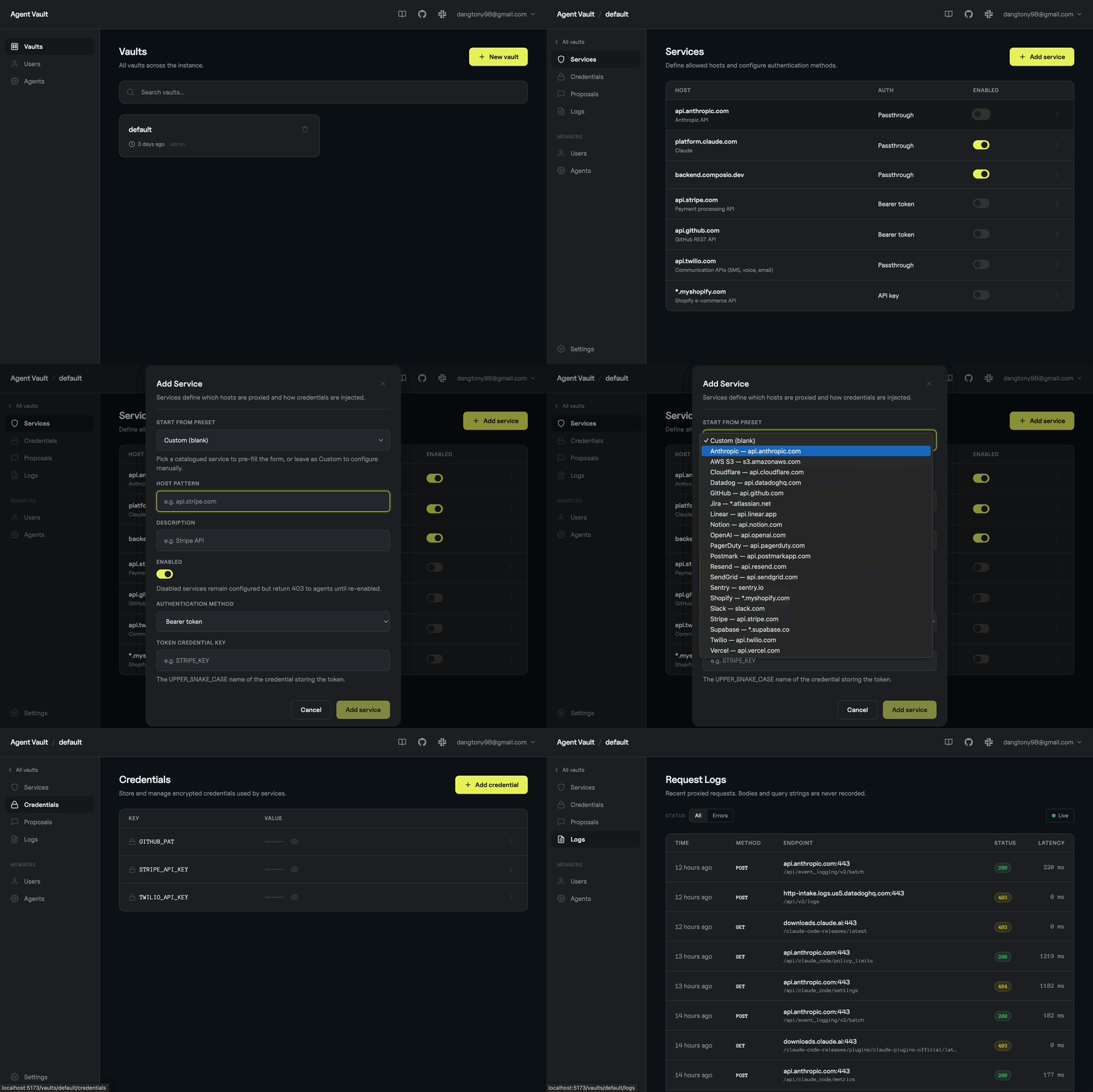
2. Create a [vault](https://docs.agent-vault.dev/learn/vaults), input your [credentials](https://docs.agent-vault.dev/learn/credentials), and configure [service rules](https://docs.agent-vault.dev/learn/services) in Agent Vault either through the management UI or via CLI on the Agent Vault machine. For example, you can create a credential for `ANTHROPIC_API_KEY` and create a service rule for Agent Vault to substitute a dummy value `__anthropic_api_key__` for the real key.
3. Create an [agent](https://docs.agent-vault.dev/agents/overview) to represent a long-running agent and obtain a **token** for it. Alternatively, if you're spinning up ephemeral sandboxed agents, you can use [agent](https://docs.agent-vault.dev/agents/overview) to represent an orchestrator backend and use it to mint a short-lived **token** to be passed into the sandbox for the agent to use and proxy requests through Agent Vault.
4. Set the following environment variables in your AI agent's environment:
```bash
AGENT_VAULT_ADDR=http://:14321
AGENT_VAULT_TOKEN=
AGENT_VAULT_VAULT=
...
ANTHROPIC_API_KEY=__anthropic_api_key__ // dummy key that will be substituted by Agent Vault
```
5. [Install](https://docs.agent-vault.dev/installation) the Agent Vault CLI into your agent's environment and run the Agent Vault CLI with your agent to start proxying requests through Agent Vault.
```bash
curl --proto '=https' --proto-redir '=https' --tlsv1.2 -fsSL https://get.agent-vault.dev | sh
```
### Verifying downloaded release binaries
Release archives published from this workflow ship with a build provenance attestation tied to the GitHub Actions run that produced them. Verify with the `gh` CLI (no extra tools, no key management):
```bash
gh attestation verify agent-vault_*.tar.gz --repo Infisical/agent-vault
```
`checksums.txt` is also covered by the same attestation, and its cosign signature continues to verify with `cosign verify-blob` for users who prefer that path.
```bash
agent-vault run -- claude
agent-vault vault run -- agent
agent-vault vault run -- codex
agent-vault vault run -- opencode
```
Alternatively, if your agent is running with Docker, you can install the Agent Vault CLI via a Dockerfile by copying the binary into your own image and using it to start up your agent process:
```dockerfile
# Add this line to your existing Dockerfile alongside your agent or app setup.
COPY --from=infisical/agent-vault:latest /usr/local/bin/agent-vault /usr/local/bin/agent-vault
...
ENTRYPOINT ["agent-vault", "run", "--", "claude"]
```
There are many ways to deploy Agent Vault and integrate your AI agents with it. We recommend consulting the fuller [documentation](https://docs.agent-vault.dev/installation).
## See it in Action
Watch how Agent Vault brokers credentials for AI agents: store your keys once, route every outbound request through the proxy, and let agents call real APIs without ever seeing a secret.

Want a full deployment walkthrough? See [Run Hermes on a VPS](https://docs.agent-vault.dev/guides/hermes-on-vps) for an end-to-end example with a brokered agent on a separate box.
## Best Practices
1. Security:
- You should deploy Agent Vault as a separate service on a different host machine from your AI agents to prevent agents from exploiting a shared host to gain access to Agent Vault.
- You should keep the proxy port (14322 by default), where credentials get injected into outbound requests, private to your agents' network. The management interface on 14321 is safer to expose if you need remote admin, but still harden it like any production web service (TLS, IP allowlist). Refer to [examples/nginx-public-ui-proxy/](examples/nginx-public-ui-proxy/) for a working example.
2. Latency: You should co-locate Agent Vault alongside your AI agents within the same network to reduce request latency.
3. Tokens: You should create an [agent](https://docs.agent-vault.dev/agents/overview) in Agent Vault to represent a long-lived agent. For ephemeral sandboxes, you may prefer to mint short-lived, vault-scoped tokens for sandboxed agents to use to proxy requests through Agent Vault.
## PostgreSQL (Production)
By default Agent Vault stores all state in a local SQLite database, which requires no setup. For production deployments, or when running multiple instances, set the `DATABASE_URL` environment variable (or `--database-url` flag) to a PostgreSQL connection string and Agent Vault switches to Postgres as its backend. All instances share the same database, so state is consistent across replicas.
Migrate existing data with `agent-vault migrate-db --to postgres://...` before switching. See the [PostgreSQL guide](https://docs.agent-vault.dev/self-hosting/postgres) for deployment examples (Kubernetes, Docker Compose), architecture notes, and operational details.
## SDK
Agent Vault offers a TypeScript SDK in the event you'd like an orchestrator to mint a short-lived token and pass proxy config into a sandboxed agent to have it proxy requests through Agent Vault that way.
```bash
npm install @infisical/agent-vault-sdk
```
```typescript
import { AgentVault, buildProxyEnv } from "@infisical/agent-vault-sdk";
const av = new AgentVault({
token: "YOUR_TOKEN", // agent token
address: "http://localhost:14321",
});
const session = await av
.vault("my-vault")
.sessions.create({ vaultRole: "proxy" });
// certPath is where you'll mount the CA certificate inside the sandbox.
const certPath = "/etc/ssl/agent-vault-ca.pem";
// env: { HTTPS_PROXY, HTTP_PROXY, NO_PROXY, NODE_USE_ENV_PROXY,
// SSL_CERT_FILE, NODE_EXTRA_CA_CERTS, REQUESTS_CA_BUNDLE,
// CURL_CA_BUNDLE, GIT_SSL_CAINFO, DENO_CERT }
const env = buildProxyEnv(session.containerConfig!, certPath);
const caCert = session.containerConfig!.caCertificate;
// Pass `env` as environment variables and mount `caCert` at `certPath`
// in your sandbox — Docker, Daytona, E2B, Firecracker, or any other runtime.
// Once configured, the agent inside just calls APIs normally:
// fetch("https://api.github.com/...") — no SDK, no credentials needed.
```
See the [TypeScript SDK README](sdks/sdk-typescript/README.md) for full documentation.
## Development
```bash
make build # Build frontend + Go binary
make test # Run tests
make web-dev # Vite dev server with hot reload (port 5173)
make dev # Go + Vite dev servers with hot reload
make docker # Build Docker image
```
## Open-source vs. paid
This repo available under the [MIT expat license](https://github.com/Infisical/infisical/blob/main/LICENSE), with the exception of the `ee` directory which will contain premium enterprise features requiring a Infisical license.
If you are interested in Infisical or exploring a more commercial path for Agent Vault, take a look at [our website](https://infisical.com/) or [book a meeting with us](https://infisical.cal.com/vlad/infisical-demo).
## Contributing
Whether it's big or small, we love contributions. Agent Vault follows the same contribution guidelines as Infisical.
Check out our guide to see how to [get started](https://infisical.com/docs/contributing/getting-started).
Not sure where to get started? You can:
- Join our Slack, and ask us any questions there.
## We are hiring!
If you're reading this, there is a strong chance you like the products we created.
You might also make a great addition to our team. We're growing fast and would love for you to [join us](https://infisical.com/careers).
---
> **Preview.** Agent Vault is in active development and the API is subject to change. Please review the [security documentation](https://docs.agent-vault.dev/learn/security) before deploying.