 | | |
|---|---|
| Players | 2 (split screen, netplay) |
| Region | PAL (Europe) |
| Publisher | Ubi Soft / NewKidCo |
| Year | 2000 |
## What this adds
All enhancements live in the bundled **Tom & Jerry Widescreen** mod package
(launcher → Mods) and can be switched off.
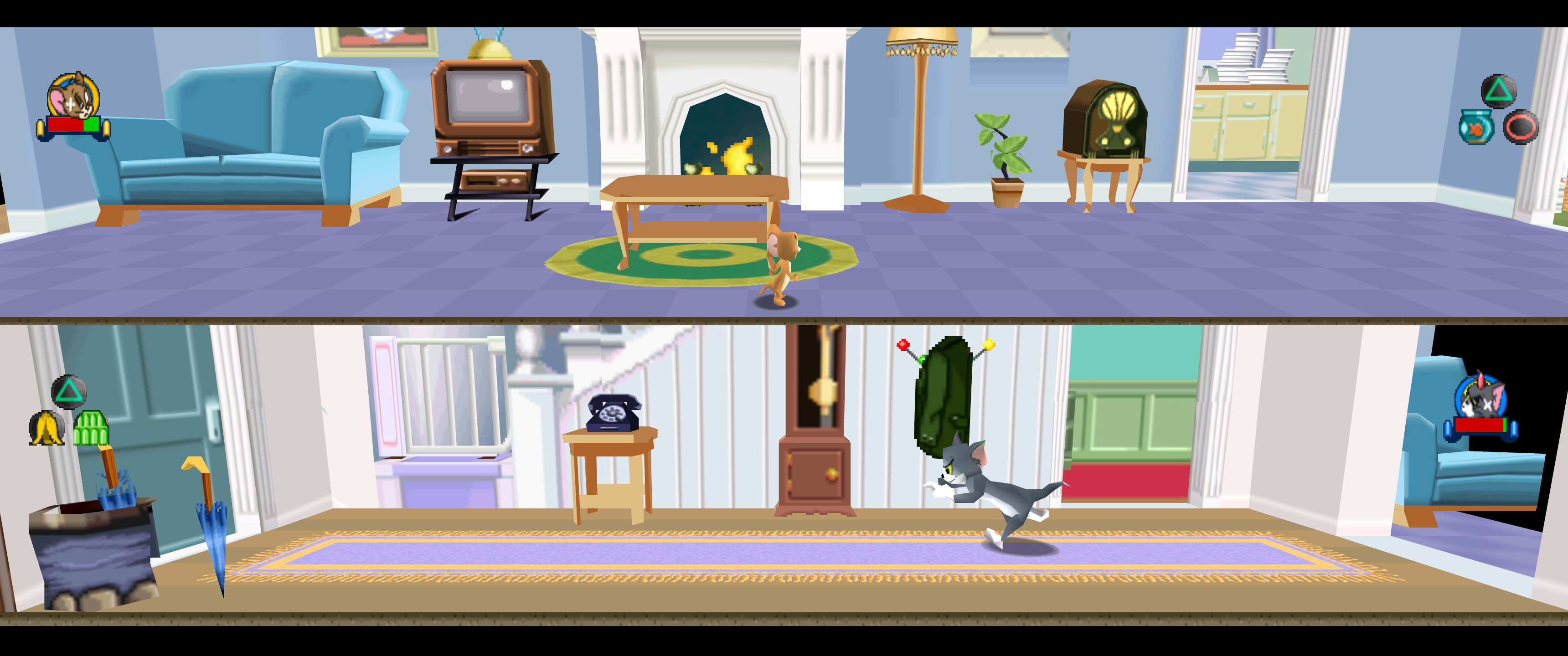
**Widescreen** (16:9, 21:9, 32:9 or fit to window) — a real wider field of
view, not a stretched picture:
- the whole room is drawn at the screen edges: props, walls and the full
floor, which the original only built for a 4:3 window around the camera;
- the HUD (portraits, health bars, button prompts) is anchored to the corners
of the wide screen, in both split-screen views;
- the split-screen separator, the pause menu, LOADING screens and menus are
handled cleanly: no leftover images at the sides, menus stay 4:3.
**HUD size** — 100 / 85 / 75 / 65 % (default 75 %): the low-resolution HUD art
is drawn smaller so it looks sharper next to the high-resolution game.
**Frame rate** — 30 fps on NTSC timing (default), the speed the game was
designed for; the PAL release runs at 25 fps and never compensated. Music is
unchanged. 25 fps PAL remains available.
**VSync on high-refresh monitors** — no tearing on 120/144/165 Hz screens
without G-SYNC or driver tweaks, game speed unchanged.
**Fixes**
- LOADING screens are centred (no black band, no cut-off bottom).
- Italian text fix: "SI" in the pause and options menus was an orange block
(the font has no accented I); it now reads correctly.
- Netplay disc check fixed for the standard Redump dump.
Plus everything psxrecomp provides: high internal resolution, texture
filtering, save states, netplay with rollback, controller rumble.
## How to play
1. Download the latest zip from
[Releases](https://github.com/IraFunesto/TomJerryRecomp/releases/latest)
and extract it into a new folder.
2. Run `TomJerry_Recompiled.exe` (Python 3 required).
3. Select your own disc (.cue/.bin) and follow the **Generate & rebuild**
wizard: the game is compiled on your PC.
4. Enable **Widescreen** in the launcher's Mods page.
The download contains no game data and no Sony BIOS; OpenBIOS (MIT-licensed)
is used when you do not provide your own.
## Legal
You must own the original game. Disc images under `disc/` are gitignored and
must never be committed. Retail BIOS dumps are not redistributed; OpenBIOS is
used for Generate unless you supply your own SCPH locally.
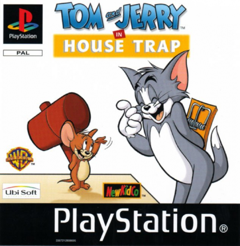
App icon: Tom, cropped from the PAL cover (`assets/psxrecomp.ico` / `.png`). Windows builds embed it via `APP_ICON`.
Optional box art under `launcher_assets/img/` may come from
[libretro-thumbnails](https://github.com/libretro-thumbnails/libretro-thumbnails)
(`Named_Boxarts`); see `BOXART_SOURCE.txt` when present.
## Quick start (dev)
```bash
git submodule update --init --recursive
./psxrecomp/tools/ci/build_emitters.sh
python3 psxrecomp/psxrecomp_cli.py generate \
--config game.toml --project-root . --disc disc/
| | |
|---|---|
| Players | 2 (split screen, netplay) |
| Region | PAL (Europe) |
| Publisher | Ubi Soft / NewKidCo |
| Year | 2000 |
## What this adds
All enhancements live in the bundled **Tom & Jerry Widescreen** mod package
(launcher → Mods) and can be switched off.
**Widescreen** (16:9, 21:9, 32:9 or fit to window) — a real wider field of
view, not a stretched picture:
- the whole room is drawn at the screen edges: props, walls and the full
floor, which the original only built for a 4:3 window around the camera;
- the HUD (portraits, health bars, button prompts) is anchored to the corners
of the wide screen, in both split-screen views;
- the split-screen separator, the pause menu, LOADING screens and menus are
handled cleanly: no leftover images at the sides, menus stay 4:3.
**HUD size** — 100 / 85 / 75 / 65 % (default 75 %): the low-resolution HUD art
is drawn smaller so it looks sharper next to the high-resolution game.
**Frame rate** — 30 fps on NTSC timing (default), the speed the game was
designed for; the PAL release runs at 25 fps and never compensated. Music is
unchanged. 25 fps PAL remains available.
**VSync on high-refresh monitors** — no tearing on 120/144/165 Hz screens
without G-SYNC or driver tweaks, game speed unchanged.
**Fixes**
- LOADING screens are centred (no black band, no cut-off bottom).
- Italian text fix: "SI" in the pause and options menus was an orange block
(the font has no accented I); it now reads correctly.
- Netplay disc check fixed for the standard Redump dump.
Plus everything psxrecomp provides: high internal resolution, texture
filtering, save states, netplay with rollback, controller rumble.
## How to play
1. Download the latest zip from
[Releases](https://github.com/IraFunesto/TomJerryRecomp/releases/latest)
and extract it into a new folder.
2. Run `TomJerry_Recompiled.exe` (Python 3 required).
3. Select your own disc (.cue/.bin) and follow the **Generate & rebuild**
wizard: the game is compiled on your PC.
4. Enable **Widescreen** in the launcher's Mods page.
The download contains no game data and no Sony BIOS; OpenBIOS (MIT-licensed)
is used when you do not provide your own.
## Legal
You must own the original game. Disc images under `disc/` are gitignored and
must never be committed. Retail BIOS dumps are not redistributed; OpenBIOS is
used for Generate unless you supply your own SCPH locally.
App icon: Tom, cropped from the PAL cover (`assets/psxrecomp.ico` / `.png`). Windows builds embed it via `APP_ICON`.
Optional box art under `launcher_assets/img/` may come from
[libretro-thumbnails](https://github.com/libretro-thumbnails/libretro-thumbnails)
(`Named_Boxarts`); see `BOXART_SOURCE.txt` when present.
## Quick start (dev)
```bash
git submodule update --init --recursive
./psxrecomp/tools/ci/build_emitters.sh
python3 psxrecomp/psxrecomp_cli.py generate \
--config game.toml --project-root . --disc disc/R.A.I.D. — Retro AI Development · a Discord for AI-assisted retro reverse-engineering, decomp & recomp